The best USB-C hub for 2024

To squeeze the most productivity possible out of a laptop, or even a high-end tablet, you might need to plug in more stuff than your machine natively allows. A USB-C hub connects to a single port on your device, and through that you can attach a monitor, keyboard, mouse and even external storage. Plus, when you’ve got all your bells and whistles plugged into a hub, freeing up your device to be more mobile is as simple as unplugging one thing. Then, when you return to your desk, one step fully connects you again. We checked out hundreds of hubs before testing out 15 highly rated options to find the best USB-C hubs you can get today.

The first thing to decide is whether you need a USB-C hub or a docking station. There’s no set standard for what differentiates the two, but docking stations tend to have more ports, offer a separate DC power supply and cost more, with some reaching upwards of $400. We have a separate guide to the best docking stations to check out if you’re looking for something bigger than what we’re discussing here. USB-C hubs, in contrast, have between four and 10 ports, can support pass-through charging and typically cost between $30 and $150.

Hubs make more sense for smaller setups with just a few peripherals, such as a monitor, a wired keyboard and mouse, and the occasional external drive. They’re also more portable, since they’re small and require no dedicated power. That could be useful if you change work locations but want to bring your accessories with you, or if you want to replace your laptop with a more powerful tablet. A docking station makes more sense for someone who needs a robust setup for their laptop, including multiple external monitors, webcams, stream decks, microphones and so on.

Both docks and hubs make it easy to grab your laptop off your desk for a meeting or other brief relocation and when you get back, plugging in one cable gets all your accessories reconnected.

The first port to consider is the one on your laptop or tablet. For a USB-C hub to work, it needs to connect to a port that supports video, data and power — all of which is covered by anything listed as USB 3.0 or better. The port, of course, needs to be Type-C as well. The sea of laptops out there is vast, so it’s hard to make generalizations, but modern laptops should have at least one USB-C port that will suffice, and indeed, every one of our top picks for the best laptops do.

Next, it’s a matter of finding a hub that has the right connections for your needs. Most hubs offer some combo of HDMI, USB, memory card, Ethernet and 3.5 mm ports. If you have a 4K monitor and would like at least a 60Hz refresh rate, you’ll need a hub with an HDMI 2.0 port — HDMI 1.4 only goes up to 30Hz. HDMI 2.1 will handle 4K at up to 120Hz, but hubs that have adopted that standard aren’t as common just yet. Keep in mind that a low refresh rate can cause your screen to feel laggy, making your mouse appear glitchy and your webcam movements to look delayed.

Additional USB ports on these accessories are usually Type-A or Type-C. They can support data with different transfer rates, typically 5Gbps or 10Gbps. Some ports only handle passthrough power and no data, and some can do data, power and video, so it’s best to check the spec list to make sure you’re getting the support you need. Keep in mind that a hub may bill itself as a 7-in-1, but one of those ports may not be usable for anything other than charging.

Standard SD and microSD slots are useful for transferring data from cameras and the like. Ethernet ports may deliver faster internet speeds than your Wi-Fi and a hub with a 3.5mm jack can bring back the wired headphone connection that some laptops have ditched.

Closeup of usb-c hub
Photo by Amy Skorheim / Engadget

Nearly all of the USB-C hubs I tested support passthrough charging. That means if your laptop or tablet only charges via USB, you don’t have to take up another port on your laptop to keep everything topped up. Unlike a docking station, powering a hub is optional. The one exception is if you want to close the lid on your laptop while you work on an external monitor. Most computers will go into sleep mode if the lid is closed without power, so either the laptop or the hub will need to be plugged into the wall to prevent that from happening.

Many of the newer hubs include a 100W power delivery (PD) port, with a healthy 80 to 85 watts going to your computer (the hubs take a little of the juice for themselves, hence the 15-watt or so difference). In my tests, sending power through the hub made them run even hotter than they do already, so I prefer to charge the computer directly. But for tablets or other devices with no extra ports, that PD option is important.

Some PD ports are also data ports — which is both good and bad. On one hand, it feels wasteful to use a perfectly good data port just for boring old electricity. But on the other hand, USB-C connections that only carry a charge are less versatile, and it makes it seem like it has more accessory hookups than it actually does.

There’s surprisingly little design variation among hubs. Most look like a flat slab, a little smaller than a smartphone, and have an attached Type-C host cable. The hues range from a silvery black to a silvery gray. Some are thinner than others, some have all ports on one edge and some have ports on both sides. All of this is just to say that aesthetics probably won’t make or break your buying decision.

One variation that could tip the scales is the length of the cable. A longer one will give you more freedom as you arrange the hub on your desk, potentially even letting you hide it behind your laptop. Or you may prefer a shorter one to keep the hub neatly set beside your laptop.

Before we test anything, we take a look at what’s available and how they’ve been received by shoppers, forum-goers and other publications. I became familiar with a few reputable brands when I was testing docking stations, so I looked into hubs from those companies as well. I focused on items that would help with an average day of productivity — not high-end setups or demanding gaming situations. Once I settled on a dozen or so that would make good candidates, I had them shipped to my humble office in the desert and started testing them out over the course of a few weeks.

I used an M1 MacBook Pro as the host computer and plugged in accessories that include a 4K Dell monitor, a ZSA USB-C ergo keyboard, a Logitech USB-A gaming mouse, an Elgato USB-C 4K webcam, a Logitech streaming light, a USB-A 3.0 Sandisk thumb drive, a USB-C Samsung T7 Shield external drive and a pair of wired headphones I got for free on an airplane (I should probably invest in some wired headphones, but the cord dangling on my chest drives me nutty so all my earbuds are wireless). I used high-end HDMI and USB-C cables to ensure that any data or connectivity issues weren’t related to my equipment.

Then I put each USB-C hub through a gamut of basic tests. I looked at what could be plugged in at once, the resolution on the monitor, data transfer speeds, the overall build quality of the hub and general usability factors, like the placement of the ports and the length of the cords. And, finally, the price to value ratio helped determine the best ones for a few different use cases.

There’s a lot to like about HyperDrive’s Next 10 Port USB-C Hub. The tethered cable is a lavish 13 inches long, the HDMI 2.0 port outputs clear and crisp 4K visuals at 60Hz and the data transfers are screaming fast. It has the coveted two USB-C data ports plus a PD port, and there’s even a headphone jack. The only thing that holds back a full-throated endorsement is the way our unit handled a streaming light. Having it on at full brightness made the webcam flicker every time. The issue went away at 75 percent brightness, but the same problem didn’t happen on any other hub I tested.

There’s nothing wrong with the Anker 341 USB-C hub. In fact it’s a current recommendation in our iPad accessories guide and it comes at a great $35 price. It gives you two USB-A ports as well as SD slots. But at this point, a 1.4 HDMI connection, which only supports 4K resolution at 30Hz feels a little retro. There’s also just a single USB-C downstream port and the data transfer tests proved to be a touch slower than the other hubs. But if you’ve got a lower resolution monitor and don’t need more than one USB-C, you won’t be disappointed with it.

I only became aware of Startech when I started researching for this guide. The quality is decent and the yellow accents are a welcome bit of color in the otherwise very gray world of hubs. The performance is solid, with no hiccups that I encountered. The brand’s 4-Port USB-C Hub has a long cord that wraps around the hub itself, which is unique. It doesn’t bother with power delivery, which isn’t an issue if you can power your computer directly. But the four USB ports (three Type-A and one Type-C) max out at 5Gbps and there’s no HDMI connector. It goes for $46, and unfortunately for it, there are cheaper ways to get a few more USB ports for your setup.

This article originally appeared on Engadget at https://www.engadget.com/computing/accessories/best-usb-c-hub-120051833.html?src=rss
Google announced a 45W USB-C charger that’s faster than its new Pixel 9 phones can handle

To support its latest Pixel 9 phones with faster charging speeds, Google has quietly unveiled a new 45 watt charger. That speed is well beyond what its latest devices can handle, so it may allow for future device support.  

Charging rates are a mixed bag with the new Pixel 9 phones. The Pixel 9 charges at 27W, the same as before, and the Pixel 9 Pro also charges at 27W, less than the Pixel 8 Pro's 30W. The new Pixel 9 Pro XL, however charges at 37W, up considerably from any previous model (the PIxel 9 Pro Fold's 21W max charging speed is unchanged).

The previous charger topped out at 30W, matching the Pixel 8 Pro's maximum rate, but the new 45W model has an extra 8W of capacity over the Pixel 9 Pro XL. That could allow Google to use the same charger for the Pixel 10, much as it used the 30W charger for both the Pixel 7 and Pixel 8.

It's nice to have the extra charging speeds on the Pixel Pro XL (and no other model) and it does keep pace with its primary competitor, Samsung's Galaxy S24 Ultra (45W). However, some Chinese phones like the Redmi Note 12 Explorer (210W) and Realme GT5 (240W) leave them both in the dust. The latter, for instance, can go from empty to a 100 percent charge in less than 10 minutes. The fastest-charging phone currently sold in the US is the OnePlus 12 (80W).

Google's new charger sells for $30, which is a decent price if you want to stick with the brand. However, you can find a fully compatible Anker or third-party 45W USB-C PD charger for $20 any day of the week. 

This article originally appeared on Engadget at https://www.engadget.com/mobile/smartphones/google-announced-a-45w-usb-c-charger-thats-faster-than-its-new-pixel-9-phones-can-handle-120035213.html?src=rss

10 Best Minimal Accessories To Lighten Your Baggage & Streamline Your Camping Gear

Camping isn’t everyone’s cup of tea, but once you get the taste of it, you do feel like dipping your toes into it time and again. I love dedicating my weekends to camping! Just a few days away from my hectic life, and this hectic world, in a bubble of my own, where all my worries are nowhere to be seen. Although camping does have a few downsides too – I mean, you have to get down and dirty, live life on the road, and tackle the moodiness of the elements. In such a scenario, having a set of trustworthy and handy camping products can make a world of difference! Having the right products by your side can make your life much easier during those crucial moments. We’ve curated some minimal and functional camping designs for you, that promise to make your outdoor adventures smoother and easier.

1. 8-in-1 EDC Scissor

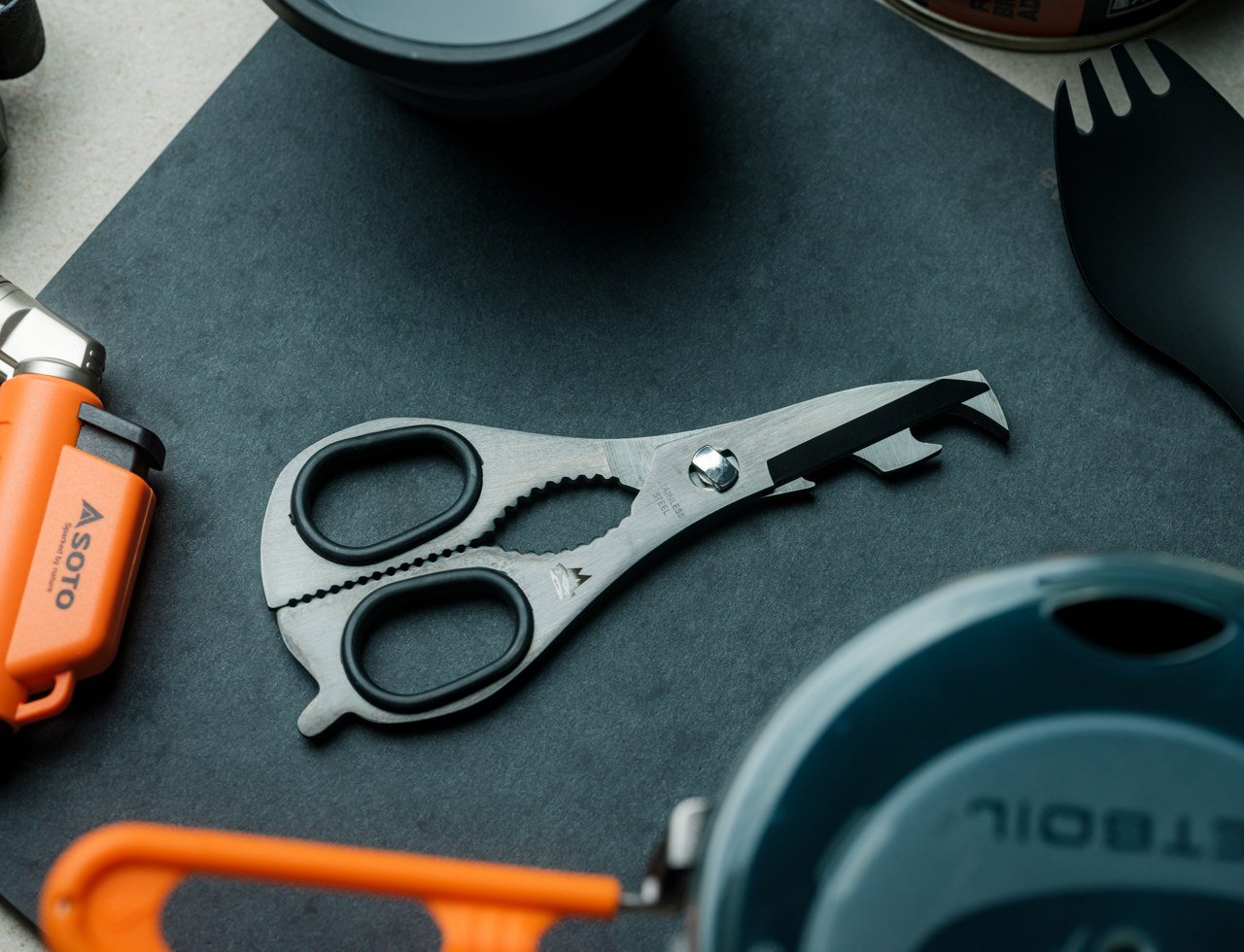
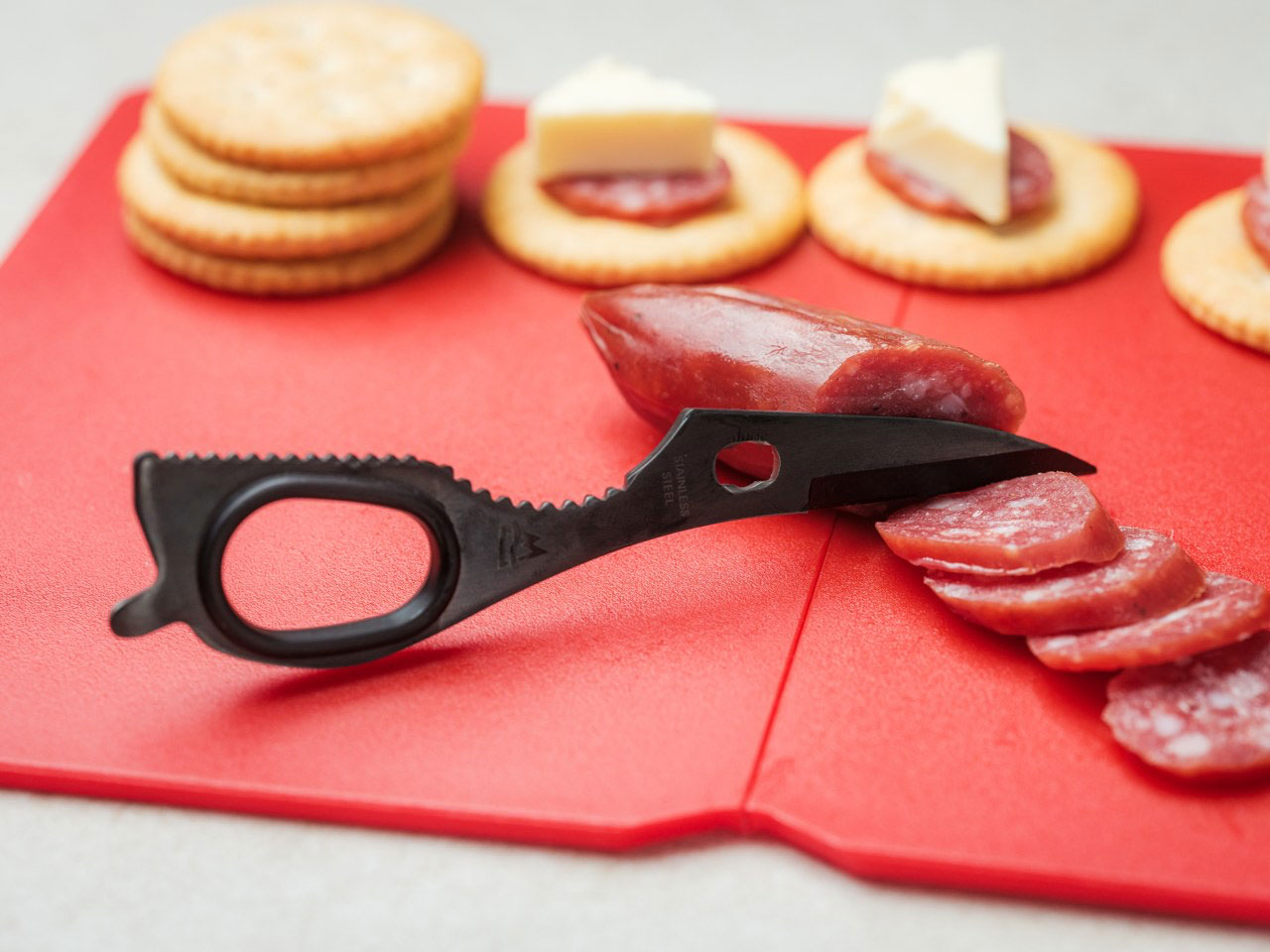
Named the 8-in-1 EDC Scissor, this handy product is an excellent tool for your outdoor and indoor culinary adventures. The scissors can be pulled apart, creating a set of knives. The tool serves as knives and scissors, while also functioning as a nutcracker, can opener, built-in opener, and fire starter. The tool is versatile and efficient, helping you handle difficult situations.

Click Here to Buy Now: $59

Why is it noteworthy?

The scissors can be pulled apart to form two individual halves, each half functions as a knife, or a major collection of multitools. When the two halves are connected, they serve as scissors, while the mid-section can be serrated and used to crack nuts.

What we like

  • Can be used for indoor and outdoor cooking
  • Packs a bunch of cool features in one convenient and compact form

What we dislike

  • It is not the kind of multitool you can carry easily and efficiently in your pocket, needs to be well-packed

2. Jinwook’s Camping Tools

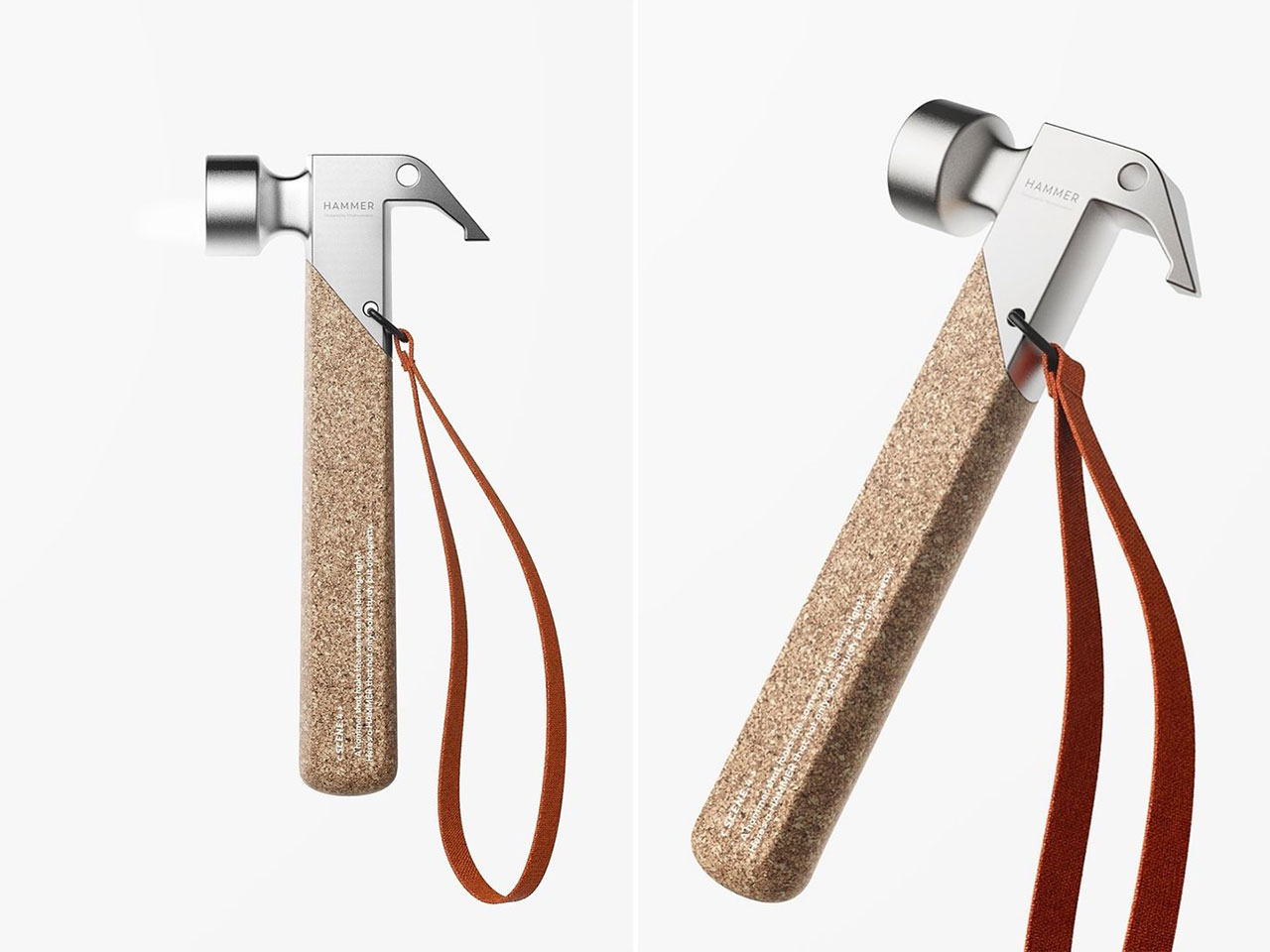
Designed by Lee Jinwook, this collection of camping gear is truly stylish and unique. It features a lovely premium cork finish, allowing you to glamp in complete style and ease. The collection includes a bunch of detailed products – a hammer, a lighter, a table, a light, as well as many other essential camping accessories.

Why is it noteworthy?

The premium camping tools were built using aluminum and cork to create a feeling of sophistication and class while ensuring their functionality and practicality aren’t hampered in the least. The collection of minimal and lightweight camping accessories would make a wonderful addition to your camping kit.

What we like

  • Classy and premium feel, without hampering the functionality

What we dislike

  • The camping tools are a concept, so we are unsure how functional they will be as tangible products

3. Slim Fold Dish Rack

Called the Slim Fold Dish Rack – this easy-to-carry and minimal dish rack is the perfect companion on your camping trips. It showcases a patent-pending spring mechanism that can be adjusted. When needed, you can deploy the dish rack and set it up as and when needed. It features an easy-to-assemble and disassemble form.

Click Here to Buy Now: $75.00

Why is it noteworthy?

It is minimal and sturdy and offers plenty of ventilation, which is more than enough space to hold utensils and plates, as well as different kinds of cookware. This product is efficient and functional, and well-suited for outdoor use on long trips.

What we like

  • The dish rack can be easily set up, maintained, and utilized
  • Features a convenient flexible collapsible form that makes it quite portable

What we dislike

  • Since the wires are quite slim, you can only use the rack to hold lightweight and compact utensils

4. Tentsla Tent

Dubbed the Tentsla, this innovative and one-of-a-kind tent can be packed away perfectly into the boot of your Tesla. When you remove the tent and open it, it converts into a full-fledged tent which can be used with the Tesla’s Camp Mode. The unique tent converts your car into a comfortable sleeping and chilling area.

Why is it noteworthy?

The Tentsla is designed to transform your EV into the ultimate camping experience. It is equipped with all the bells and whistles, including a multi-use weather-resistant canopy, mosquito netting, and a pump to help you set up your Tentsla in minutes.

What we like

  • Equipped with a multi-canopy design that blocks out the sun and keeps it cool
  • The tent can withstand up to 6000mm of water pressure

What we dislike

  • It is only restricted to the Tesla Model Y

5. Iron Frying Plate

Called the Iron Frying Plate, this one-of-a-kind kitchen appliance is an excellent choice for your outdoor cooking adventures. It helps you prepare healthy and delicious meals quickly and efficiently. The plate not only cooks your meals for you but also serves them. It is equipped with a removable handle.

Click Here to Buy Now: $69

Why is it noteworthy?

The Iron Frying Plate serves as a frying pan and a serving plate, functioning as a dual-functional kitchen tool which is pretty unique. With the Iron Frying Plate, you can practice direct-from-the-pan serving. The plate is made from durable materials and is quite long-lasting.

What we like

  • You can remove the handle, and use the plate as a serving platter too

What we dislike

  • The plate is made from iron and is quite heavy to use and store

6. Harmony Flame Fireplace

Named the Harmony Flame Fireplace, this lovely brass lamp lets you build a safe fire inside your home, or in the outdoors. You can experience the comfort and joy of an outdoor fire no matter where you are. The lamp uses bioethanol to create a light, spreading warm wherever you place it. The fireplace was made using the same process used to build musical instruments.

Click Here to Buy Now: $239

Why is it noteworthy?

The fireplace was designed to elevate and uplift the mood and ambiance of indoor space. It features reflective surfaces that work with the vivid flames to create a play of shadows and lights, forming a decorative piece that is quite aesthetically appealing as well.

What we like

  • You can enjoy a comforting fire safely in your home, or outdoors

What we dislike

  • You need to purchase bioethanol frequently, which is expensive and creates fuel dependency

7. Go Camping Hammock 2.0

The Go Camping Hammock 2.0 is designed to be a super comfy hammock, that is perfect for a cozy afternoon nap. You can use the hammock in your backyard, parks, picnics, concerts, or wherever you travel. You can keep the nifty hammock in your car or backpack, ensuring you never miss the chance to have a lovely little hang.

Why is it noteworthy?

The hammock’s new and improved design has been tested by experts, and it has proven to be very comfortable. It features a length of 11′, which allows your body to be completely flattened, cutting down on the uncomfy pressure points, in comparison to shorter hammocks. It also features a 64″ width, which lets you lay at a strong diagonal angle.

What we like

  • Allows you to rest in the most comfortable position

What we dislike

  • It is made from nylon which isn’t the best material for your skin

8. GoSun’s Portable Brewer

Say hello to GoSun’s portable brewer! This is the perfect brewer to prepare a delicious cup of coffee of tea for you – from start to finish, no matter where you are. The brewer is an all-in-one cup which can be used anywhere. Equipped with a 130W Heater and an integrated French press, both the components have been fused to build one double insulated mug.

Why is it noteworthy?

The mug is double-insulated, and it brews your drinks for you and also keeps them hot. If you’re craving an instant coffee fix while you’re out camping, then you need not worry, because the GoSun brewer will prepare a hot cup of coffee for you in minutes.

What we like

  • It has a portable and easy-to-carry design
  • Features an innovative all-in-one design

What we dislike

  • Doesnt seem to have different options in size and color

9. Alien

Meet the Alien – a titanium digging tool designed for outdoor camping. The Alien has been defined as a unique and functional men’s jewelry, built from Grade 5 titanium, and designed to be a practical digging tool for when you’re in the outdoors. The tool is built using exceptional craftsmanship and features a distinctive and eye-catching style which is really hard to miss.

Why is it noteworthy?

Alien features a lifelike claw shape which has been created using advanced 3D CNC machining. It is equipped with eight CNC machined surfaces on the front section of the claw, and each surface is highly detailed. It has also been integrated with a fuller, which elevates its three-dimensional and unique appearance.

What we like

  • Can be worn as a necklace or attached to your keys

What we dislike

  • It has a unique aesthetic, which may not be preferred by all users

10. Retro Camping Lantern Concept

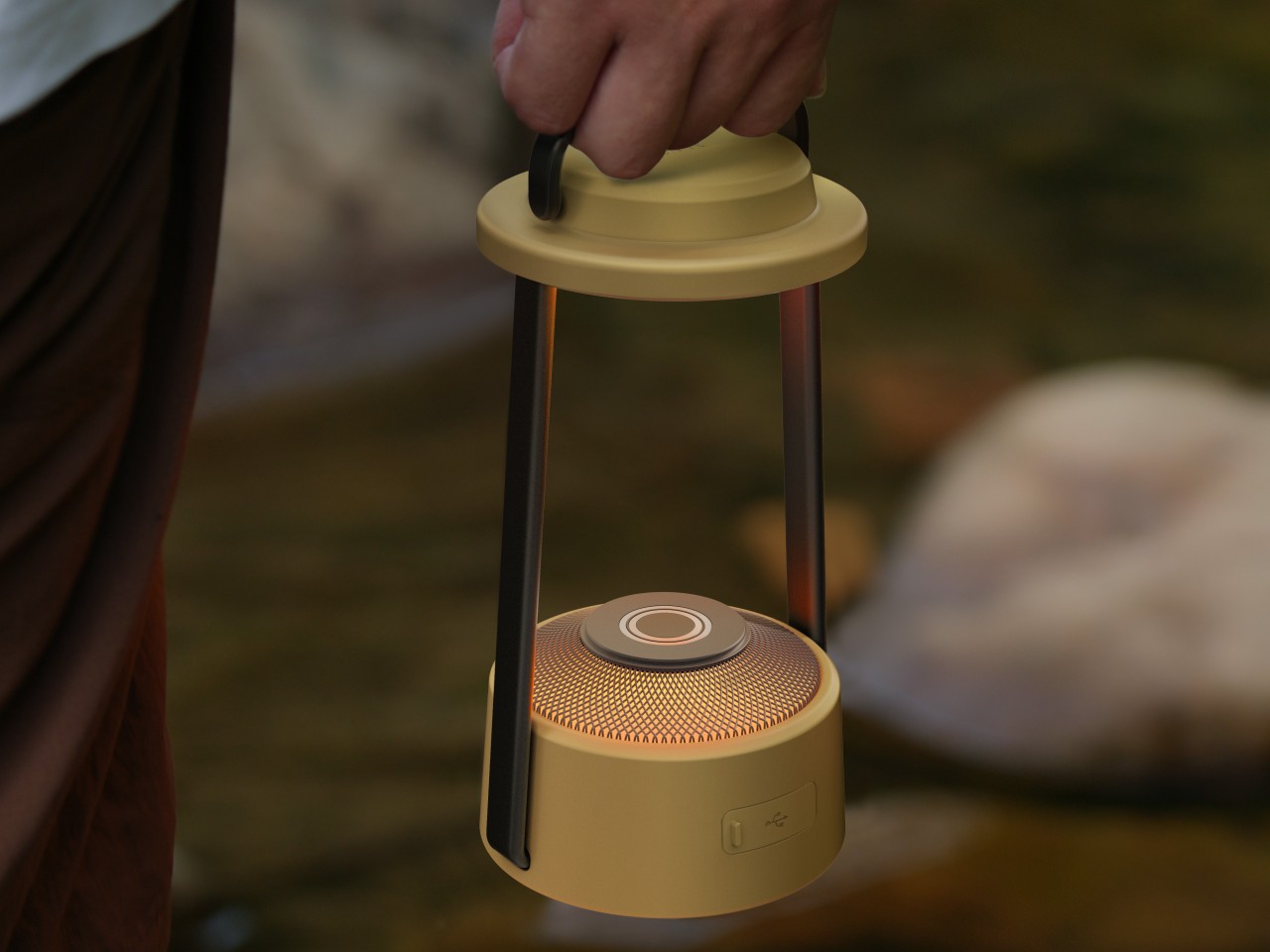
This conceptual lamp design is retro, and it is designed to make your outdoor camping experience more fun and whimsical. The lamp draws inspiration from ordinary objects. It is created to be a modern and contemporary variant of antiquated lantern designs – like the ones that use kerosene, and those that use candles.

Why is it noteworthy?

The LEDs are hidden in a circular tube at the upper and lower sections of the lamp. The lamp features a cover which is inspired by wide-brimmed hats utilized by ancient swordsmen from East Asian countries. The lighting design is modular in nature, and functions as a ‘candle’, or ‘multiple candles’ placed on top of each other.

What we like

  • The lantern’s battery can be used to charge other devices

What we dislike

  • It is a concept, so we are unsure how well it will translate into a tangible product

The post 10 Best Minimal Accessories To Lighten Your Baggage & Streamline Your Camping Gear first appeared on Yanko Design.

The Morning After: The biggest reveals from Google’s Pixel 2024 event

Google’s big Pixel event was packed with phones, and the company has redesigned them all. No more Cyclops camera band, now it’s an Among Us camera oval. That’s across all the Pixels (barring the new Pixel 9 Pro Fold). There are new flattened sides and softer corners, making these phones look more like iPhones than ever before.

First up, the entry-level Pixel 9 has a 6.3-inch screen, slightly larger than its predecessor, and a substantial camera bump up to a 48-megapixel ultrawide lens. New AI-powered photo editing tricks, like Add Me and Reimagine, join features I use daily on my Pixel 8, like Magic Editor and Night Sight.

It’s joined by the same-sized Pixel 9 Pro and the 6.8-inch Pixel 9 Pro XL. Technically, the Pixel 9 Pro is the new proposition: the best Pixel camera in a more convenient size. Besides screen size and battery, specs are the same across both Pro phones. The base Pixel 9 has a matte satin finish, while the Pro devices have a shiny, polished treatment. (I wish it was the other way around, personally.) Alongside that 50- and 48-megapixel camera duo, there’s a third 48MP cam with a 5x telephoto zoom. That’s the ‘pro’ part.

One surprise was that Google’s brand-new $1,000 Pixel 9 Phones won’t launch with Android 15.

This may be because the new Pixels are out earlier than usual. Android 14 arrived in October last year, so we can expect to hear more about Android 15 in the fall. Don’t worry, though. There’ll still be plenty of new AI features — which we’ll play with once our review devices land. Trust and believe.

— Mat Smith

All the AI features coming to the Pixel 9 phones

Google Pixel 9 and 9 Pro hands-on

Pixel Watch 3 hands-on: A bigger screen

Google’s Pixel Buds Pro 2 are its first earbuds that work with Gemini AI

Waiting for a new Fitbit smartwatch? Google says that’s the Pixel Watch 3

How to pre-order the new Google Pixel 9, Pixel 9 Pro and Pixel 9 Pro Fold

​​You can get these reports delivered daily direct to your inbox. Subscribe right here!

TMA
Engadget

Google’s first attempt at a foldable was different. The company went for different screen ratios, an insane price and capable cameras. This year, don’t call it the Pixel Fold 2, because this is Pixel 9 Pro Fold. As well as a revamped design, it has what Google says is the largest display of any phone on the market. Farewell, passport shape. The new foldable has a 6.3-inch outside display almost identical in size to the standard Pixel 9. But inside… boom. An eight-inch screen that beats Samsung, OnePlus and other rival foldables.

With cameras, a new module houses a 48MP main camera, a 10.5MP ultrawide camera and a 10.8MP telephoto cam with a 5x optical zoom. It’s not quite the Pixel 9 Pro, but on paper, it sounds capable. Still, no support for a stylus.

Continue reading.

The default assistant on all these new Pixels will be Gemini — Google’s AI-powered chatbot — not Google Assistant. “Gemini is an evolution of the Assistant,” said Sissie Hsiao, Google’s vice president and general manager of Gemini Experiences. Gemini, powered by Google’s own family of large language models, can apparently do everything the classic Google Assistant could do. To be clear, you can still use Gemini as your assistant on most current Android phones, Pixels or otherwise — but only if you opt in.

Continue reading.

Several months after a hacking group claimed to be selling nearly three billion records stolen from a prominent data broker, much of the information appears to have been leaked on a forum. According to Bleeping Computer, the data dump includes 2.7 billion records of people in the US, including names, social security numbers, potential aliases and all physical addresses they are known to have lived at. Worse still, it’s all unencrypted. It may be worth taking some steps to protect yourself against fraud and identity theft.

Continue reading.

This article originally appeared on Engadget at https://www.engadget.com/general/the-morning-after-the-biggest-reveals-from-googles-pixel-2024-event-111519925.html?src=rss
Hidden Apple Intelligence Features Revealed

Apple Intelligence

Apple’s latest iOS 18.1 beta 2 update brings a suite of advanced AI-driven features for Apple Intelligence designed to transform your user experience. These hidden gems leverage Apple’s innovative AI technology to automate tasks, enhance communication, and create personalized content, ultimately streamlining your daily interactions with your device. Let’s dive into the details of these […]

The post Hidden Apple Intelligence Features Revealed appeared first on Geeky Gadgets.

Instagram is failing to act on abuse targeting women lawmakers on both sides of the aisle

Instagram is failing to enforce its own rules and allowing some of its most high-profile accounts to be targeted with abusive comments “with impunity,” according to a new report from the Center for Countering Digital Hate. The anti-hate group claims that Meta failed to remove 93 percent of comments it reported to the company, including ones that contain racial slurs, violent threats and other disturbing language that would seem to clearly violate the social network’s rules.

CCDH’s researchers zeroed in on five Republican and five Democratic lawmakers who are up for election this year. The group included Vice President Kamala Harris, Representative Nancy Pelosi, Senator Elizabeth Warren, Representative Marjorie Taylor-Greene, Senator Marsha Blackburn and Representative Lauren Boebert.

The researchers reported 1,000 comments that appeared on the lawmakers’ Instagram posts between January and June of this year and found that Meta took “no action” against the vast majority of those comments, with 926 of them still visible in the app one week after being reported. The reported content included comments with racial slurs and other racist language, calls for violence and other abuse.

“We're simulating the moment at which someone reaches out their hand asking for help, and actually, Instagram's failure to act on that compounds the harm done,” CCDH CEO Imran Ahmed said in a briefing about the report.

The CCDH also found that many of the abusive comments came from “repeat offenders” which, according to Ahmed, has “created a culture of impunity” on the platform. The report comes less than three months before the US presidential election, and it notes that attacks targeting Harris, who is now campaigning for president seem to have “intensified” since she took over the ticket. “Instagram failed to remove 97 out of 105 abusive comments targeting Vice President Kamala Harris, equivalent to a failure to act on 92% of abusive comments targeting her,” the report says. It notes that Instagram failed to remove comments targeting Harris that used the n-word, as well as gender-based slurs.

In a statement, Meta said it would review the report. “We provide tools so that anyone can control who can comment on their posts, automatically filter out offensive comments, phrases or emojis, and automatically hide comments from people who don't follow them," Meta's Head of Women's Safety, said in a statement. "We work with hundreds of safety partners around the world to continually improve our policies, tools, detection and enforcement, and we will review the CCDH report and take action on any content that violates our policies.” 

This article originally appeared on Engadget at https://www.engadget.com/big-tech/instagram-is-failing-to-act-on-abuse-targeting-women-lawmakers-on-both-sides-of-the-aisle-103025621.html?src=rss
How to Create Ultra Realistic AI Images With Flux

AI Images

The field of AI image generation has witnessed remarkable progress in recent years, with models like Flux pushing the boundaries of what is possible. Flux has emerged as a frontrunner in producing images that are often indistinguishable from real photographs. This article explores the capabilities of Flux, along with complementary tools that enhance realism, providing […]

The post How to Create Ultra Realistic AI Images With Flux appeared first on Geeky Gadgets.

Ergonomic controller suggests a more comfortable way to use XR glasses

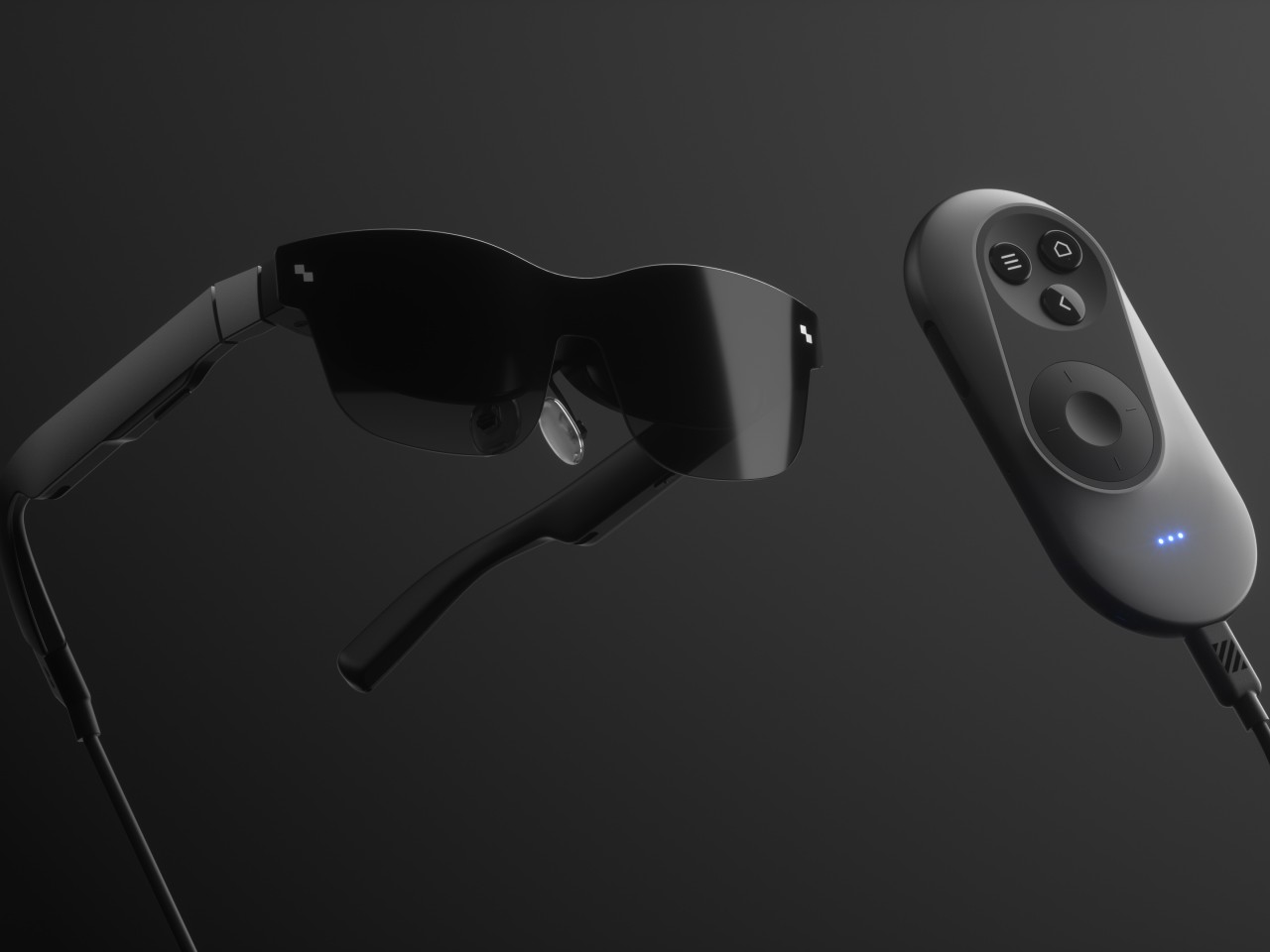
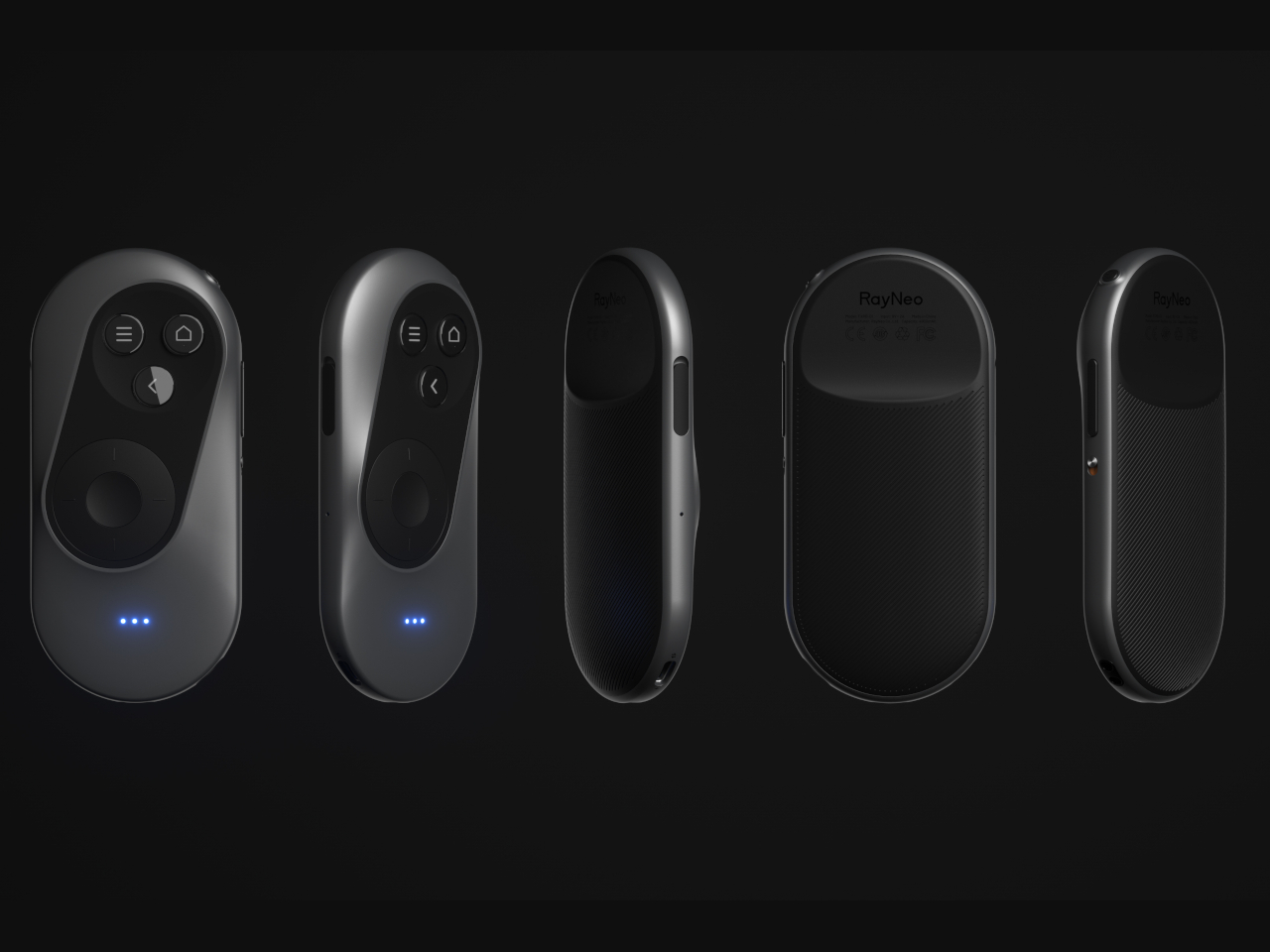
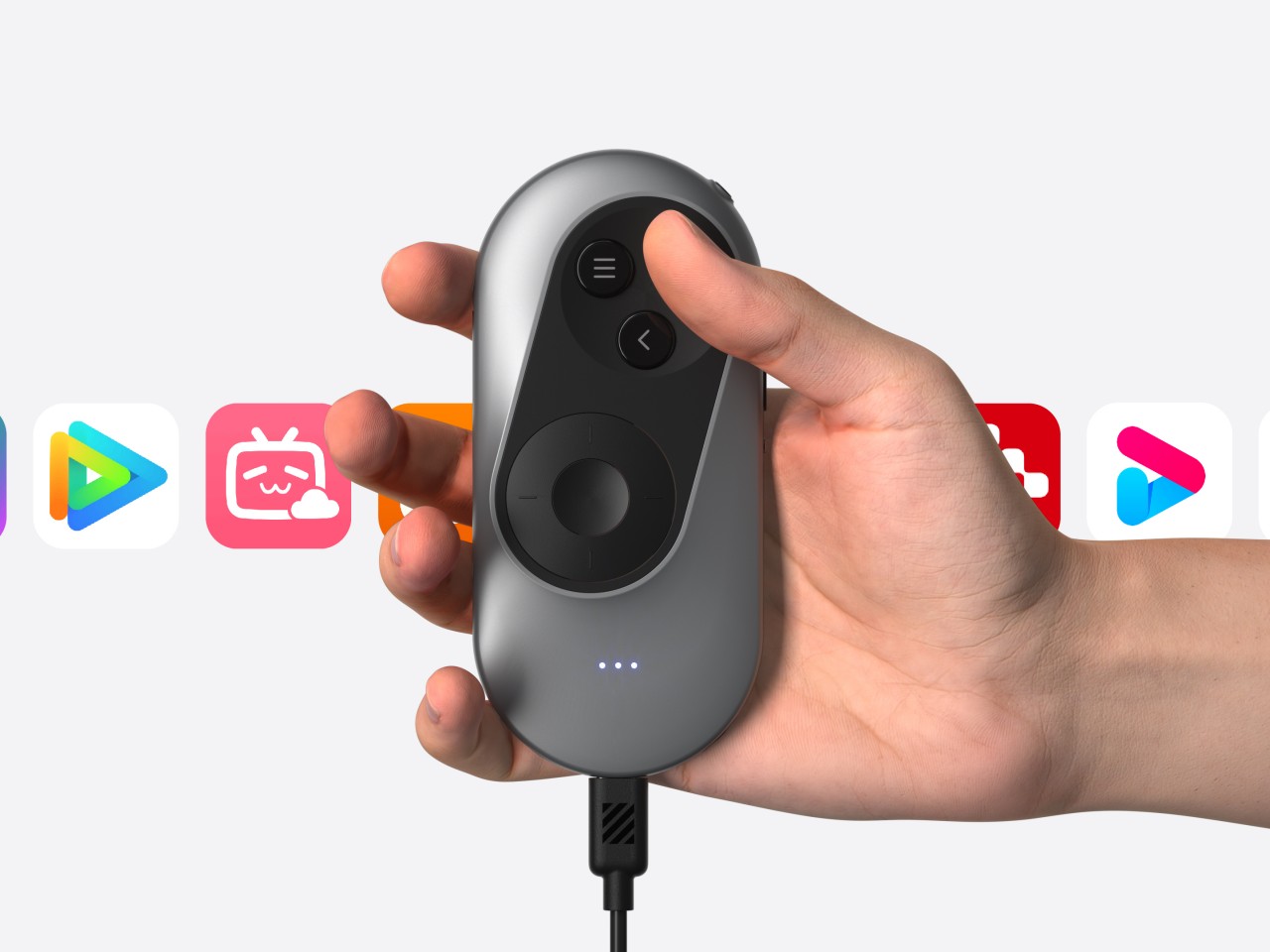
The launch of the Apple Vision Pro sparked renewed interest in extended reality experiences, both those offered by full-blown and heavy headsets as well as those pushed by more straightforward glasses. The latter often rely on your smartphone or a dedicated remote control to navigate through apps projected in front of you, an indirect interaction method made more awkward by the standard design of these devices. Remote controls might be fine for TVs and appliances, but not when you can barely see your own hand. This concept design tries to challenge convention by redesigning the face of a remote, offering a more ergonomic and simpler way to move around mixed reality while wearing those XR glasses.

Designer: Yiqiao Liu

XR or eXtended Reality glasses like the Xreal Air and TCL RayNeo can probably be called the poor man’s Vision Pro. They practically display a virtual monitor in front of you, which may or may not be pinned in an arbitrary location or follow your head around. This allows the glasses to be lighter, cheaper, and less conspicuous, though they do look like overgrown sunglasses. This also makes using the XR platform feel a bit more familiar because they more or less correspond to familiar operating systems like Windows or Android.

Moving around and interacting with objects in this XR space is then a simpler matter as well, and some even use the phone itself as a pointer and remote control, which is difficult to use when your vision is partially obscured by the glasses and all your fingers can feel is a flat and featureless surface. On the other hand, conventional remotes with their numerous buttons and straightforward layout can also be cumbersome to use as well.

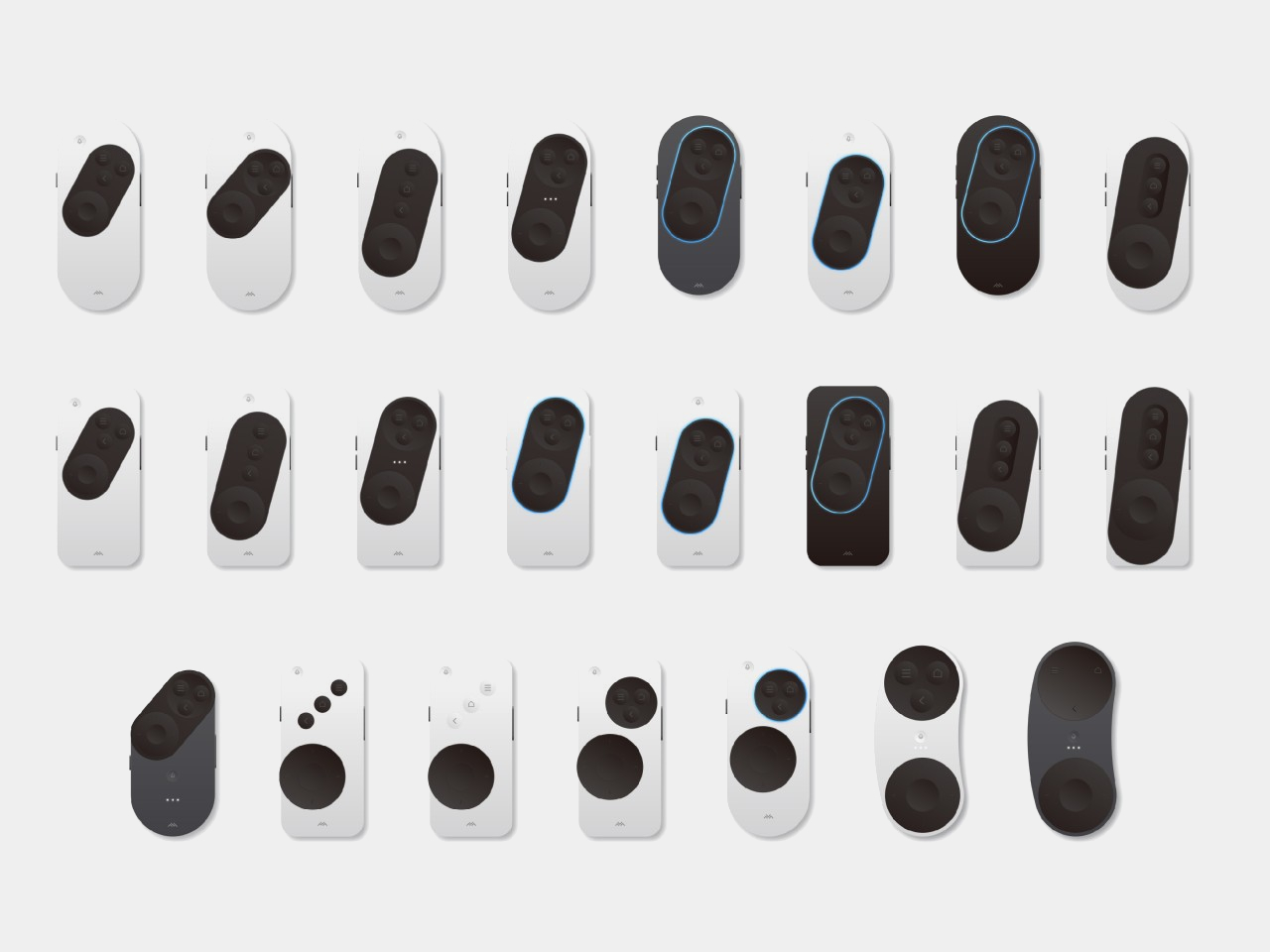
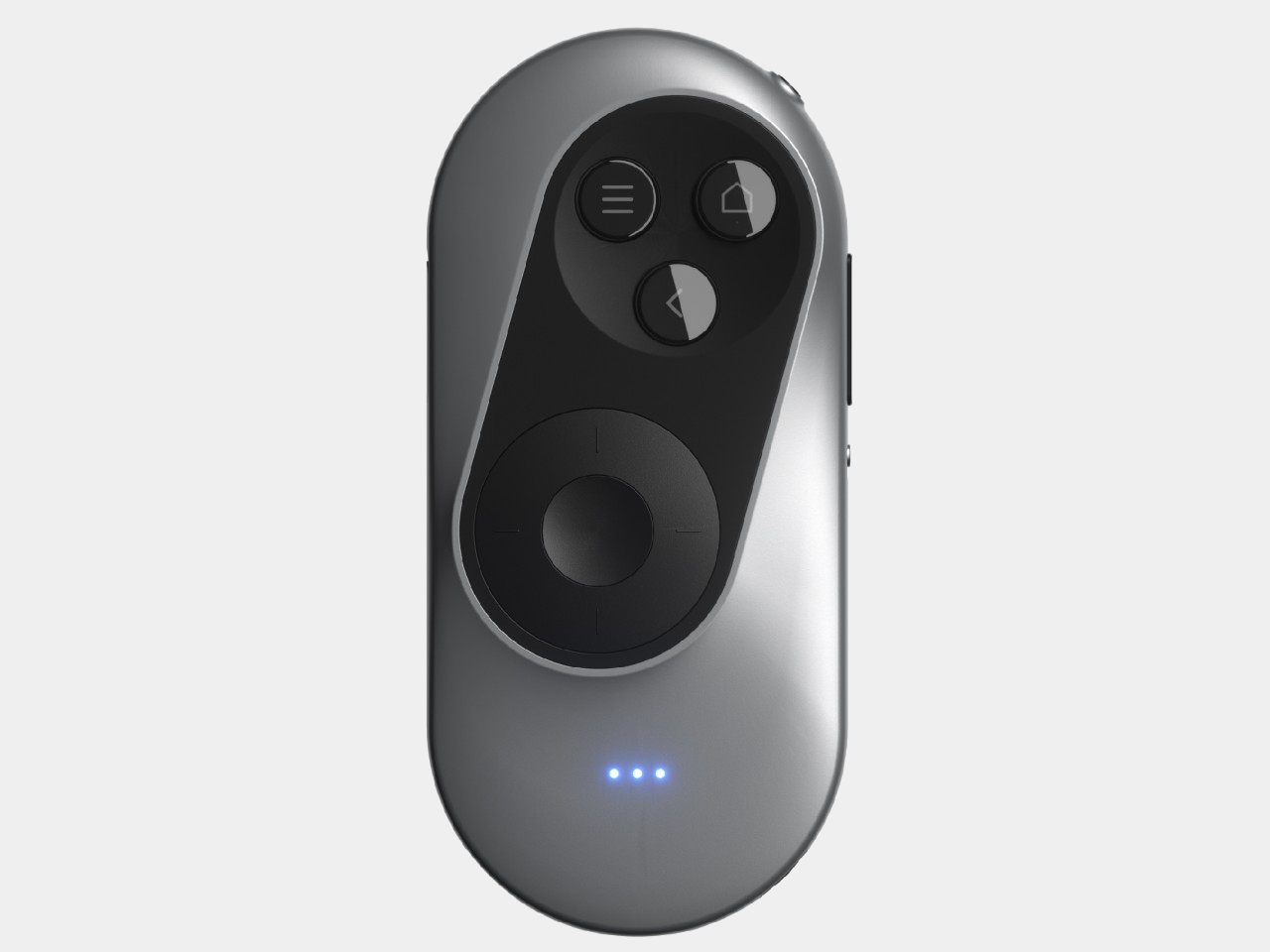
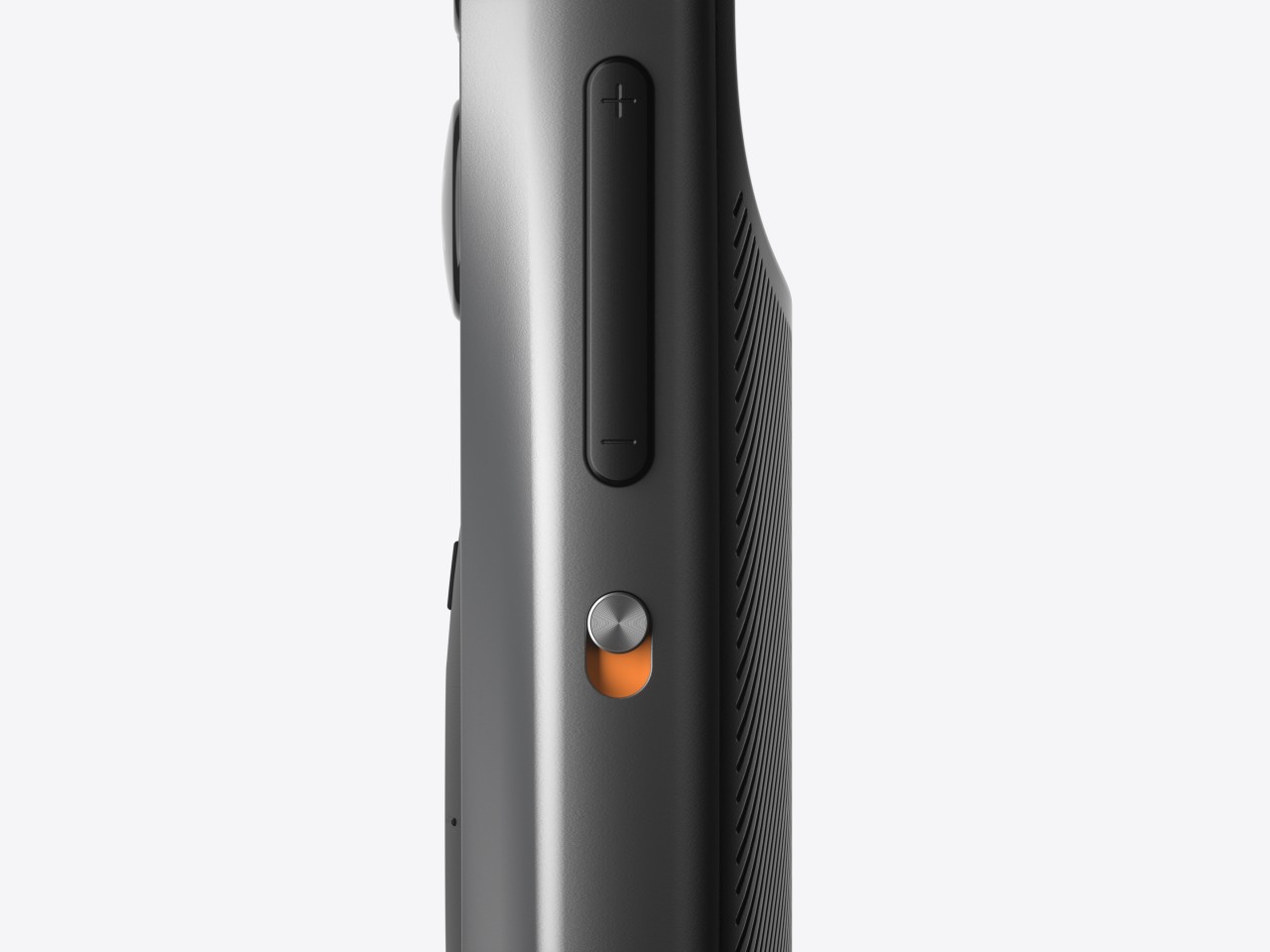
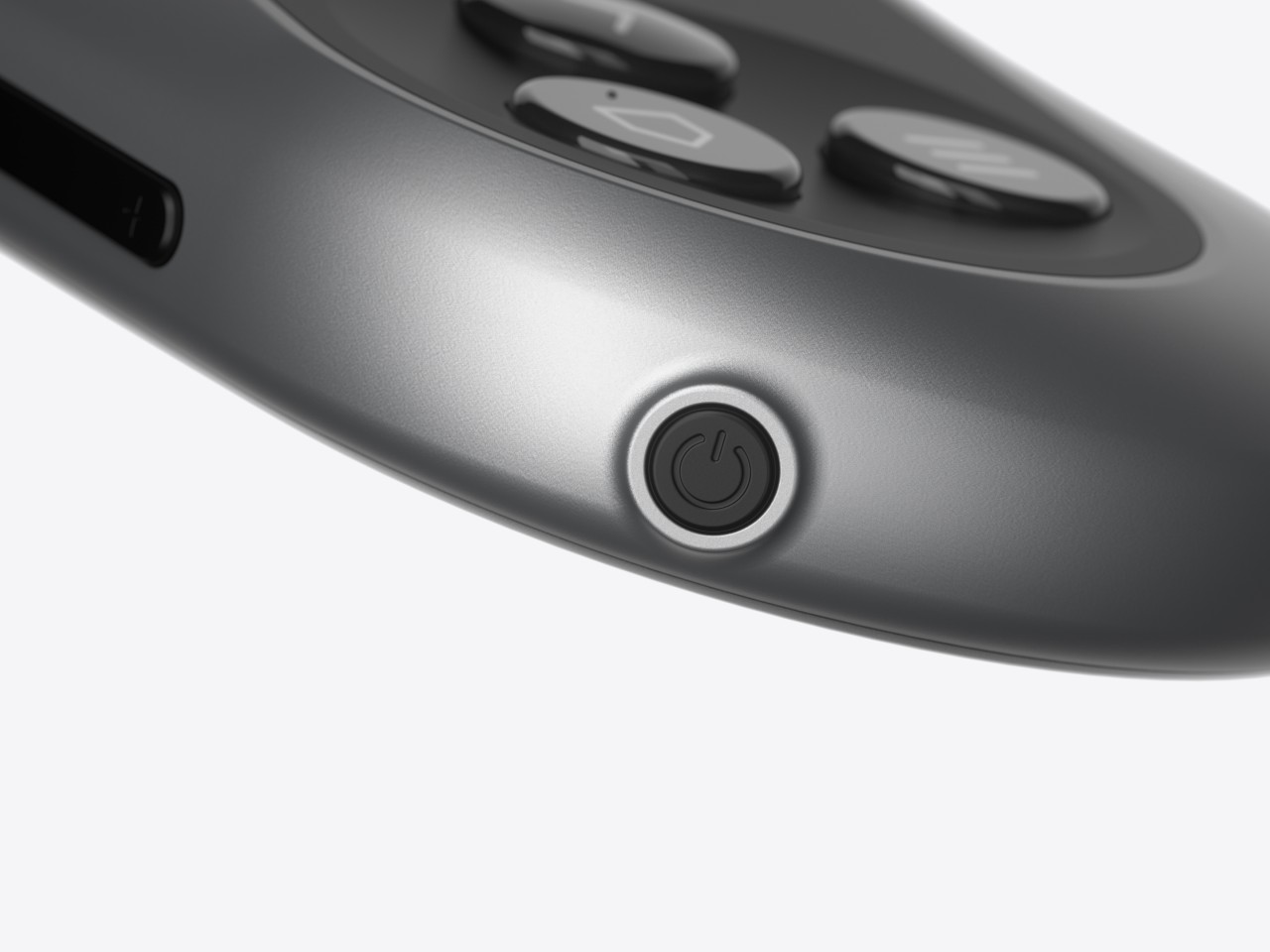
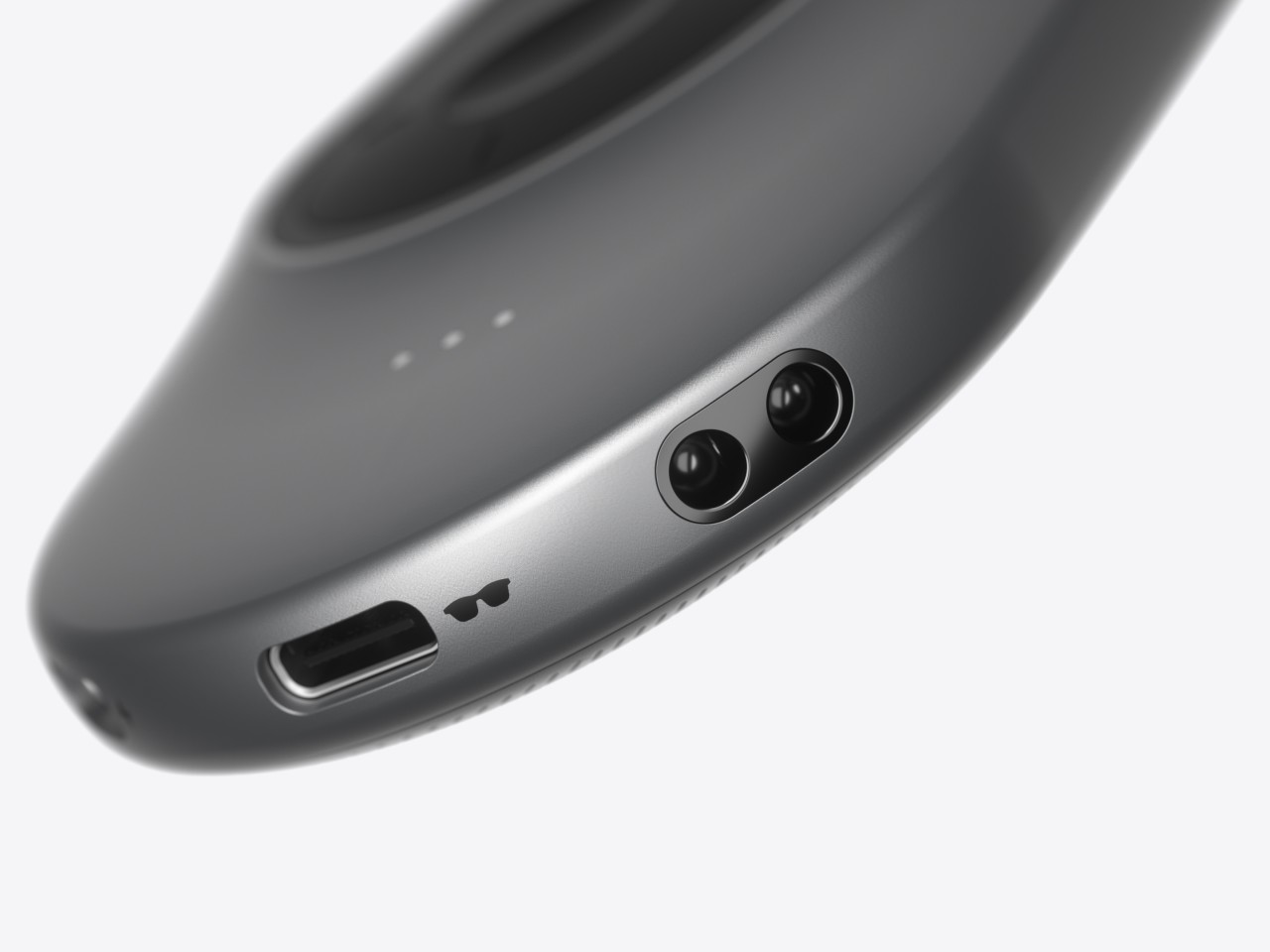
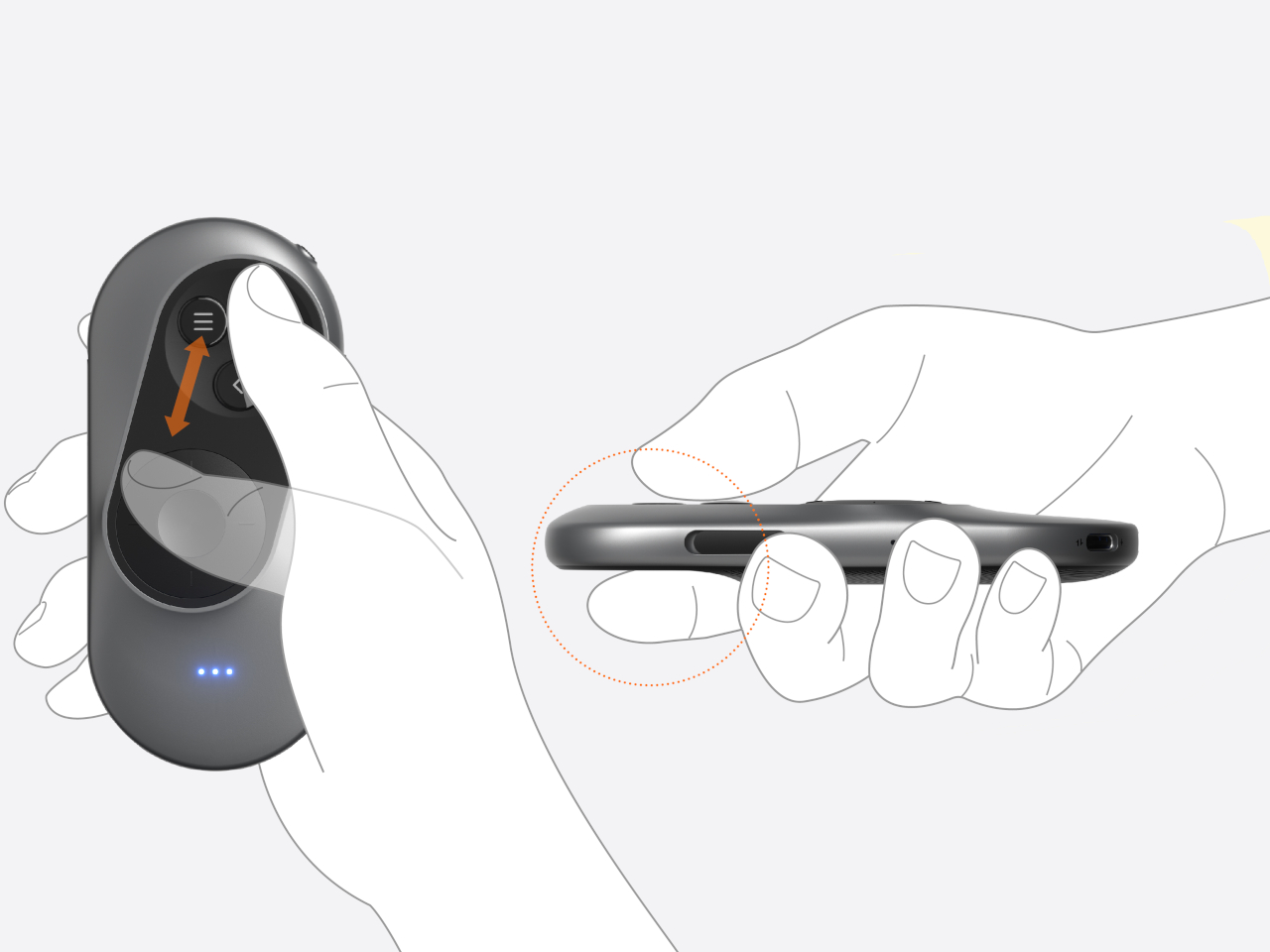
The XR Glasses Controller concept takes the minimalist design of something like an Apple TV remote and tilts it at an angle. Visually, this soap-shaped device looks like an unbalanced remote, with the top buttons leaning to the right and the bottom touch dial sliding to the left. It’s not a design that was made just to look different, though it definitely gives it a distinctive appearance.

The theory behind this design is the mobility and limited range of our thumbs when holding a remote. As many smartphone designers already know by now, the thumb holding the remote moves naturally in an arc, and that up-and-down movement can cause more strain. The controls are thus aligned with this arc, making it easy for the user to switch between buttons and touchpad without having to overextend or bend their thumb. Along with the significantly reduced number of buttons, the remote is easier to use as well, though it does limit itself to Android-based XR platforms since those buttons perfectly match Android’s navigation scheme.

The post Ergonomic controller suggests a more comfortable way to use XR glasses first appeared on Yanko Design.

Proton VPN’s browser extension is now free for all users

You can now get and use Proton VPN's browser extension even if you're not a paying user. The extension used to only be accessible if you're on one of the service's paid plans, but now you can install it as long as you're on a Firefox- or a Chromium-based browser. Proton VPN was our top choice for VPNs last year, because it was fast and doesn't collect data that passes through its network. 

Its apps for Windows, Mac, iOS, Android and Linux have always been free to use, but the unpaid service does come with limitations. The service's paid plans are faster, has over 100 countries to choose from and lets you connect up to 10 devices at once. Meanwhile, the free version struggled to stay connected at times when we tested it out. Still, it does its job and now it comes with access to the service's browser extension, which lets you keep your Proton VPN connection within your browser only. 

Yes, the extension will let you use your standard internet connection outside of your browser. If you're using an app that doesn't work properly when you're on a device-wide VPN, but you want to protect your connection or circumvent region-based website blocks, the extension can solve your problem. Proton unfortunately has no plans to release a Safari browser for now, but we'll let you know if that changes. You can get the Chrome and Firefox extensions from Proton VPN's official website.

The company has also recently launched a new plan called Proton Duo, if you're considering paying for its products. It was specifically designed for two users who'll then get to share 1 TB of storage space (with additional 15 GB of bonus storage every year), as well as full access to Proton Mail, Drive, Calendar, Pass and VPN. 

This article originally appeared on Engadget at https://www.engadget.com/computing/proton-vpns-browser-extension-is-now-free-for-all-users-100049528.html?src=rss

Supercharge Your Google Sheets with ChatGPT, DALL·E, & Perplexity

Google Sheets

Integrating powerful AI tools like ChatGPT, DALL·E, and Perplexity with Google Sheets can transform your workflow, allowing you to automate tasks, boost efficiency, and unlock new possibilities. The video below will walk you through the process of setting up app scripts and API keys to seamlessly integrate these innovative technologies into your Google Sheets environment. Unlocking the […]

The post Supercharge Your Google Sheets with ChatGPT, DALL·E, & Perplexity appeared first on Geeky Gadgets.