Motorola Razr Fold hands-on at MWC 2026: Bright screens, inside and out

After briefly announcing its new foldable at CES, Motorola is now ready to debut its first book-style foldable in full at MWC 2026. There are several features we already knew, including support for Motorola’s new Pen Ultra stylus and no fewer than five cameras. However, many specs were still unknown. There are some pleasant surprises.

Motorola decided to make both screens brighter than any of its rivals by quite a margin. The main 8.1-inch foldable display of the Razr Fold has a peak brightness of 6200 nits, while the external screen almost matches it with 6000 nits. For comparison, both screens on the Pixel 10 Fold Pro have a peak brightness of 3000 nits and other foldables’ internal screens typically have substantially lower brightness levels. Inside Motorola's demo room, filled with windows and Barcelona sun, I had no trouble reading either screen.

The main display is a 2K (2,484 x 2,232) LTPO display that can reach a peak refresh rate of 120Hz, while the external display has a 2,520 x 1,080 resolution and peaks at 165Hz. Both screens also support Dolby Vision.

Motorola Razr Fold at MWC 2026
Image by Mat Smith for Engadget

With those high-brightness levels, Motorola has opted for a silicon-carbon 6,000mAh battery, another leading specification among foldables at the time of writing. It’ll be interesting to see how battery life fares, powering those big, bright screens. The Razr Fold also supports fast charging at up to 80W with the company’s own (sold separately) TurboPower charger and up to 50W wireless charging.

With a silicon-carbon battery that offers higher energy density, Motorola’s biggest foldable yet remains surprisingly svelte, despite its huge battery. The Razr Fold is 4.6mm (0.181 inches) thin when open and 9.9mm (0.39 inches) when closed. Yes, Samsung’s latest Z Fold is thinner (4.2 mm; 8.9 mm), but it has a substantially smaller 4,400mAh battery.

Motorola Razr Fold at MWC 2026
Image by Mat Smith for Engadget

The Razr Fold’s hardware continues with many of the design touches found on recent Razr phones. I spent most of my time with the Blackened Blue iteration of the Razr Fold, with a woven piqué design that felt both easy to hold and didn’t seem to hold onto fingerprints. There will also be a Lily White color that doesn’t have the piqué design, but a more satin finish.

The Razr Fold has a Snapdragon 8 Gen 5 processor, the de facto flagship Android processor at this point. The foldable also has its own liquid-cooling system to maintain consistent performance during tougher tasks and gaming sessions.

The Razr Fold’s cameras will have to do more than what we’re used to seeing on the flip-style Razr smartphones, which have underwhelmed in the past. Fortunately, it looks like it could be a very capable smartphone camera. The main 50-megapixel sensor has a f/1.6 lens and 3.5 degrees of optical image stabilization. It’ll also work alongside a multi-spectral 3-in-1 light sensor to improve color accuracy. The Razr Fold’s ultrawide camera has a 50MP sensor, a 122-degree field of view, and support for macro photography. The 50MP periscope telephoto camera can reach up to 3x optical zoom and 100x SuperZoom, through image cropping and AI-boosted image processing. And finally, there are two selfie cameras: a 32MP internal camera that can record up to 4K video and a 20MP external selfie cam, both with a f/2.4 lens.

Motorola Razr Fold at MWC 2026
Image by Mat Smith for Engadget

Motorola is already claiming this is the best camera on a foldable smartphone, with the highest DXOMARK score among foldables. If you haven’t heard of DXOMARK before, it’s a benchmarking website and lab in France that offers professional image quality testing for smartphones, camera lenses and cameras. It also offers a consultancy service to help manufacturers improve their devices’ camera performance.

It’s too early to tell whether this is objectively a better cameraphone than Samsung’s Z Fold 7, but I was particularly impressed by the Razr Fold’s telephoto camera results. Similarly, I’m intrigued by Motorola’s decision to support its newest stylus, the Moto Pen Ultra. It warrants further testing when the foldable lands for review.

Motorola hasn’t announced pricing and availability for the Razr Fold. It’ll be coming to North America “in the coming months.”

This article originally appeared on Engadget at https://www.engadget.com/mobile/smartphones/motorola-razr-fold-hands-on-mwc-2026-050027092.html?src=rss

This AI Desk Terminal Has a Screen, Knob, and Voice Control

AI has become a permanent fixture in how we work, but accessing it still feels strangely clumsy. Most of the time, it means opening yet another browser tab, typing a prompt into a chat window, waiting for a response, then copying it somewhere else. The irony is thick: tools designed to save time end up buried under the same pile of windows and notifications they were supposed to help manage.

The DECOKEE Quake approaches this problem sideways, and the solution is physical. It is a desktop terminal built around an 8.88-inch ultra-wide IPS touchscreen and a single rotary control knob, designed to sit alongside a keyboard rather than compete with the monitor above it. Everything about the form factor suggests a device that wants to be glanced at, tapped, and spoken to, not stared at for hours.

Designer: DECOKEE

Click Here to Buy Now: $279 $359 (22% off). Hurry, only 66/500 left! Raised over $231,000.

Pick it up and the construction registers immediately. The body is CNC-machined aluminum alloy with an anodized matte finish, a material choice that gives the Quake a density and coolness that plastic peripherals simply cannot replicate. A transparent backplate on the rear adds a subtle design signature, while the adjustable stand lets the screen tilt anywhere from flat to 60 degrees. At roughly 800g, it has enough heft to stay planted on a desk without feeling like an anchor.

1

That ultra-wide screen has a 1920×480 resolution at 450 nits or brighter, and its unusual aspect ratio turns out to be a deliberate design decision. Rather than mimicking a small monitor, the panel is shaped for control surfaces: rows of customizable touch shortcuts, status dashboards, system stats, and meeting interfaces laid out horizontally. The rotary knob beside it offers infinite rotation with a push-button click and an RGB light ring that changes color based on what mode the Quake is operating in, turning a simple input device into a status indicator.

1

Where the Quake earns its “AI copilot” label is in meetings. Tap a button, and it begins recording through a built-in far-field microphone with noise reduction, then auto-generates a structured transcript and summary when the call ends. Ten summary templates let the output match the context, whether it is a standup, a client call, or a brainstorm. Real-time translation covers 17 languages, and a system-level mic mute button works across every app on the computer, not just Zoom or Teams.

1

Beyond meetings, holding the knob and speaking activates a conversational AI layer with over 100 configurable assistant roles. Ask it to generate a shortcut layout for Photoshop, and it builds one on screen, ready to use. Ask for a translation, a compliance check, or a math solution, and the response appears on the Quake’s display without ever pulling focus from the main monitor. The same voice input can produce custom wallpapers and emojis, though the novelty of AI-generated desktop art will vary by taste.

1

1

The feature list stretches further than expected for a device this compact. A system monitoring mode displays real-time CPU, memory, and network stats. A Discord overlay gives gamers channel and mute controls without alt-tabbing. Home Assistant integration (through API setup) allows single-tap smart home control from the touchscreen. There is even a music player with a vinyl-inspired interface that connects to Spotify or plays local files, which is a charming if unexpected addition to a productivity device.

1

What makes the Quake interesting as a design object is the underlying argument it makes about where AI belongs on a desk. Not trapped inside a browser tab, not buried in a notification, but sitting in a physical surface with tactile controls and a screen that stays visible. Whether that argument holds up after months of daily use is something only shipped units will answer.

Click Here to Buy Now: $279 $359 (22% off). Hurry, only 66/500 left! Raised over $231,000.

The post This AI Desk Terminal Has a Screen, Knob, and Voice Control first appeared on Yanko Design.

Nintendo’s Game Boy Jukebox Plays Pokémon Music on 45 Swappable Cartridges


Thirty years after Pokémon Red and Blue launched in Japan, Nintendo is celebrating the anniversary with something that looks almost exactly like a Game Boy — except it will never, ever play a game. The Pokémon Red & Pokémon Blue Game Music Collection: Game Boy Jukebox is a miniature sound toy that slots mini cartridges to play the original games’ iconic 8-bit soundtrack, and it’s already selling out across regions.

The device is a faithful shrunken replica of the original Game Boy, complete with the grey shell, D-pad, A/B buttons, and a screen. None of those controls do anything. All the action happens through the cartridges: pop one in, and the player outputs the corresponding track, whether that’s the hauntingly spare Lavender Town Theme, the adrenaline-spiked Gym Leader Battle music, or the quietly triumphant Pallet Town Theme. All 45 tracks from the original games are represented, covering everything from the Title Screen to the Ending Theme, with Jigglypuff’s Song and the Pokémon Center jingle tucked in between.

Designer: Nintendo

Junichi Masuda, composer of the original soundtrack, was involved in tuning the product. “We took particular care to make the audio sound just like Game Boy,” he said, which goes a long way toward explaining why the format (one cartridge, one song) makes a certain kind of sense. It’s tactile, deliberate, and forces you to actually choose what you want to hear rather than shuffling through a playlist.

That said, the jukebox comes with some genuine limitations. There’s no headphone jack, meaning the music plays out loud only, which caps its utility as background listening. The three required LR44 button cell batteries are included for demonstration but not for ongoing use. And at $69.99 (£59.99 in the UK, 489 yuan in China), it’s priced squarely as a collectible rather than an everyday gadget.

Nintendo is selling the jukebox exclusively through PokémonCenter.com in North America with a one-per-customer limit. The UK has already sold out. Fans in mainland China can enter a lottery-based purchase system starting March 6. Gotta catch ’em all, right?!

The post Nintendo’s Game Boy Jukebox Plays Pokémon Music on 45 Swappable Cartridges first appeared on Yanko Design.
Lenovo’s robot concept can help you digitally sign documents (and maybe annoy coworkers)

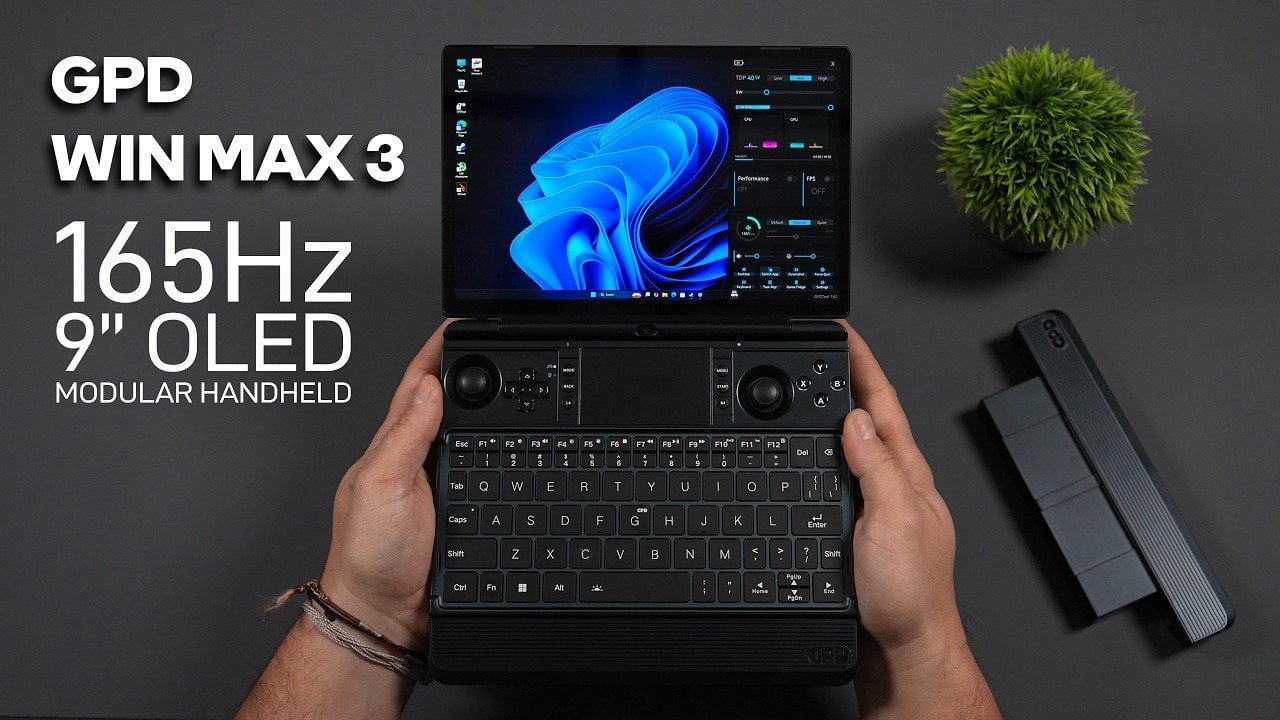
Lenovo can make a robot, too. Alongside proof-of-concept foldable gaming PCs and modular laptops, it introduced the AI Workmate Concept at MWC 2026. With its own Intel Core Ultra processor, 64GB of memory and its own Pico projector, it’s an AI-laced “workmate” meant to streamline office tasks and collaboration. And it has an LCD face.

For now, it’s a proof of concept, musing on how to integrate voice commands and LLMs (large language models) into workplace settings. It's meant to sit on your desk, but preferably also near a wall – more on that later.

Voice commands aside, the concept bot supports writing, voice and gestures with on-device AI processing. While it can answer the usual voice assistant questions, it can also scan and summarize documents (both digitally and physically) and even assist with creating a PowerPoint presentation – though you might want to check its work.

Lenovo AI Workmate Concept at MWC 2026
Mat Smith for Engadget

The 3.4-inch 480 x 480 screen doesn’t seem to offer any data visualization or numbers. During my demo, it only seemed to show the bot's eyes and facial expressions: it’ll sip coffee as it listens (with a moustache), cup a floating hand to the side of its face when it needs you to repeat a command, or twinkle when it’s processing more complicated tasks, like that fictional PowerPoint presentation.

With its articulated head, which houses the projector, cameras and LCD face, you can ask it to project images or documents on either the desk in front of it or a wall nearby. No need to flip around your monitor or laptop to share with colleagues. In one example, a spokesperson asked for a postcard. The Workmate then projected a (Lenovo-branded) image of Barcelona onto the desk. The rep laid paper down, then signed the ‘postcard’ and got the robot to scan it (with two downward-facing 5-megapixel cameras), and then send the file to a nearby printer.

Lenovo AI Workmate Concept at MWC 2026
Image by Mat Smith for Engadget

In theory, this sort of flow could transition to document signing or adding notation to images and files. However, one caveat here is whether those of us who work in offices want the extra workplace noise of a chatty robo and the person barking orders at it.

Lenovo says this concept (and it has a few at MWC) is meant to demonstrate the company’s “exploration of spatial and physical AI experiences” that integrate “seamlessly into professional environments.” Hopefully, further evolutions offer a text-based way to make using it a little less noisy.

Lenovo was also showing a simpler AI work device, the AI Work Companion Concept. It’s a completely different premise, despite the name being a little too close to the AI Workmate Concept.

Lenovo AI Workmate Concept at MWC 2026
Image by Mat Smith for Engadget

The AI Work Companion is not a robot, but a handsome chunky desk clock, with a solid, satisfying dial on the top and programmable buttons. The front is almost entirely display, able to show calendars, task lists and other work-centric dashes. It runs independently, plugging into a USB-C port for power and pulling data down wirelessly, while also acting as a port hub for charging other accessories and devices.

It’s certainly not as high-concept as the robot, but there are some AI smarts inside.

The Work Companion’s “Thought Bubble” uses AI to sync a user’s tasks and daily schedule across devices, synthesizing a daily action plan. It will even suggest times to break up bursts of work and attempt to monitor screen time to better manage burnout.

According to the press release, Lenovo says it also has “playful interactions with the user” and will, kind of bleakly, offer an end-of-week celebration report of tasks completed. It’s lucky it’s a good-looking desk clock.

This article originally appeared on Engadget at https://www.engadget.com/ai/lenovo-concept-robot-ai-workmate-mwc-2026-230159746.html?src=rss

Lenovo Built a Laptop Whose Keyboard, Screen, and Ports Come Apart

Business laptops have spent years getting thinner without getting more useful. The result is a category of machines that travel well and perform adequately, but ask them to flex beyond their fixed configuration, and they politely refuse. A second screen means a separate bag. Different ports mean a separate adapter. Lenovo’s ThinkBook Modular AI PC Concept, announced at MWC 2026, starts from the premise that the laptop’s form factor itself is the problem worth solving.

The concept is built around a 14-inch base unit in dark navy aluminum, conventional enough in isolation. The keyboard detaches completely over Bluetooth, and a secondary display module connects via pogo pins, the same spring-contact system that keeps the pieces in reliable communication without cables between them. That secondary display is the part that does the most work.

Designer: Lenovo

Positioned alongside the base on its own kickstand, it functions as a portable travel monitor in portrait or landscape orientation. Swapped with the keyboard instead, it turns the system into a dual horizontal screen setup with a combined viewing area of roughly 19 inches. Mounted on the top cover, it faces outward, which makes sharing content across a table a matter of flipping a panel rather than rotating an entire laptop.

The IO port modules are a smaller but equally considered detail. Each is a compact cube carrying a single connector, USB-A, USB-C, or HDMI, that slots into a shared housing on the base. Rather than committing to a fixed port arrangement, the base accepts whichever combination a given situation calls for, swapped out as needed, and stored in a small clamshell case that travels with the system.

The honest tension in all of this is that modularity trades one kind of inconvenience for another. A fixed laptop is limiting but uncomplicated. A modular one is flexible but requires keeping track of several small components that each have their own way of going missing. The pogo-pin connection is a good answer to the cable problem, and the accessories shown are compact enough to fit in a jacket pocket, but the system only works as promised if all its pieces arrive together.

What the concept gets right is identifying that most professionals don’t use their laptops the same way twice in a single day. The morning commute, the desk setup, the client meeting, and the hotel room at the end of it all make different demands, and a device that can reconfigure itself for each of them without requiring a separate piece of hardware for every scenario is a reasonable thing to want.

Whether the modularity holds up to daily handling, with real wear on the pogo pins and real risk of leaving the keyboard module in a conference room, is a question that only a shipping product could answer. For now, the ThinkBook Modular AI PC Concept is an argument that the laptop doesn’t have to be a fixed object, but one that can adapt to your needs and lifestyle.

The post Lenovo Built a Laptop Whose Keyboard, Screen, and Ports Come Apart first appeared on Yanko Design.

Lenovo Just Turned the Ugly Desk Hub Into an AI Assistant

Most desks already have too much on them. A laptop, an external monitor, a charging cable snaking toward a phone, maybe a cold cup of coffee that started the morning with good intentions. And somewhere behind all of it is a hub that ties all of it together, which is usually a graceless plastic brick shoved behind something else, forgotten until a port stops working. It’s the least glamorous object in the room, and it knows it.

Lenovo’s AI Work Companion Concept, announced at MWC 2026, makes a case that the hub doesn’t have to apologize for existing. It sits at the front of the desk as a matte black wedge, display angled toward the person working, looking more like a clock than a piece of connectivity hardware. It takes a different position on that problem, literally and figuratively.

Designer: Lenovo

The front display cycles through six clockface styles, from a clean flip-clock layout to an abstract trio of pie-shaped circles, each one designed to read comfortably at a glance without demanding attention. Alongside the time, it surfaces calendar events, port charging status, and a grid of quick-action shortcuts from a single compact footprint.

The hardware underneath that display is a full docking station. One USB-C port delivers 100W to a laptop, another handles 20W phone charging, and two HDMI outputs drive a pair of 4K displays at 60Hz simultaneously. For anyone running a multi-monitor setup, that covers the entire back of the desk without a separate hub involved.

The more unusual part is a cartoon mascot Lenovo calls the Thought Bubble, a bespectacled cloud that lives on the display and manages the AI layer. Tap the large red knob on top, and it pulls tasks and calendar events from across connected devices, then proposes a structured daily plan. It also schedules breaks and monitors screen time, with a weekly “celebration report” summarizing what got done.

The obvious tension is that a device designed to reduce screen fatigue adds another screen to the desk. Whether offloading schedule decisions to a cartoon cloud actually clears mental space, or just relocates the same decisions to a different surface, is a question the concept doesn’t fully answer yet. That’s not a criticism so much as an observation that the idea is still at the stage where it sounds better than it can be proven to work.

What’s harder to argue with is the physical logic. A docking station that also tells the time, tracks the day, and has a programmable knob for whatever shortcut matters most is a more considered object than the plastic brick it replaces. Whether the AI earns its place on the desk is something only daily use can settle.

The post Lenovo Just Turned the Ugly Desk Hub Into an AI Assistant first appeared on Yanko Design.

Lenovo’s AI Desk Robot Has Eyes, Moves, and Watches You Work

There’s a specific kind of loneliness that comes with working alone all day. Not the dramatic kind, just the low-grade awareness that every question you have goes into a chat window, every instruction gets typed into a box, and the thing supposedly helping you has no idea where you’re sitting or what’s on your desk.

Lenovo’s AI Workmate Concept, shown at MWC 2026, takes that gap seriously enough to build a physical object around it. The device is a desk companion in the most literal sense, a spherical head on an articulated arm, rising from a circular base, with animated eyes on its front display that shift and orient as it responds.

Designer: Lenovo

The arm is the most telling design decision, though it isn’t just decorative. Because it moves, the Workmate can orient itself toward whatever is in front of it, a document laid flat, a person leaning back, a wall nearby. That range of motion is what separates it from a smart speaker with a face. It has spatial awareness built into its posture, not just its software.

On the practical side, it handles the kind of work that accumulates quietly throughout a day. Place a document in front of it, and it can scan and summarize the contents. Talk through a rough set of notes, and it can help organize them into something usable. Working on a presentation means the Workmate can assist in structuring the content, pulling from what it already knows about the task at hand through on-device AI processing rather than a cloud connection.

The projection feature is the most speculative part of the concept. Rather than keeping information on a screen, the Workmate can cast content onto a desk surface or wall, which, on paper, turns any flat surface nearby into a secondary display. Whether that’s genuinely more useful than glancing at a monitor, or just a more theatrical way to display the same information, is a fair question that a proof of concept can’t fully answer.

What’s harder to dismiss is the physical language the design uses. The animated eyes aren’t a gimmick in the way that most product “personalities” are. They borrow from the same visual shorthand that makes robots in film immediately readable as attentive or distracted, curious or idle. A status light ring on the base shifts color depending on what the device is doing, adding a peripheral layer of feedback that doesn’t require looking directly at the display. Together, those two elements mean the Workmate communicates state without demanding attention, which is actually a more considered interaction model than most desktop AI tools currently offer.

The deeper question isn’t whether the Workmate works. It’s whether having a robot with eyes watching from the corner of the desk makes the day feel more manageable, or just more observed. That’s not a problem Lenovo can solve with a better arm joint. It’s the kind of thing that only becomes clear once the novelty of the eyes wears off.

The post Lenovo’s AI Desk Robot Has Eyes, Moves, and Watches You Work first appeared on Yanko Design.

Lenovo Unveils a Foldable Gaming Handheld That Replaces Your Laptop

Gaming handhelds have quietly become the most interesting category in consumer electronics, and also the most awkward one to travel with. They’re too big to ignore in a bag and too small to replace a laptop, which means plenty of people end up carrying both anyway, one for the flight, one for the hotel desk, each doing half a job. The Legion Go Fold Concept, unveiled by Lenovo at MWC 2026, is a direct argument against that arrangement.

The device is a foldable handheld with a POLED display that opens from 7.7 inches to 11.6 inches, with detachable controllers that clip onto either side via a rail system. Folded with the controllers on, it functions as a conventional handheld for tighter spaces. Open it flat, reattach the controllers in landscape orientation, and the full screen takes over for a more immersive session.

Designer: Lenovo

For longer stints that call for a keyboard, the included wireless accessory with an integrated touchpad turns the whole system into something closer to a compact laptop. The right controller doubles as a vertical mouse for FPS games, carrying over a feature from the Legion Go Gen 2. That same controller has a small circular secondary display on its face, handling performance metrics, touchpad input, and customizable hotkeys without requiring a trip into any menu.

An Intel Core Ultra 7 258V processor and 32GB of RAM handle the performance side, paired with a 48Whr battery. For a device expected to run demanding titles across multiple screen configurations, that battery figure is the one that will matter most in practice, and it’s also the one hardest to evaluate from a spec sheet alone.

The fold crease is the honest question the concept doesn’t answer. Running horizontally through the center of the display, it’s a non-issue in split configurations where the fold becomes a natural border. In full 11.6-inch mode, with a single uninterrupted game filling both panels, its visibility depends entirely on how well Lenovo has managed the panel gap and hinge tension, two things that vary considerably between announcement renders and finished hardware.

What the Legion Go Fold Concept gets right is identifying that the handheld’s biggest limitation isn’t processing power or battery: it’s the fixed screen. A device that can be a pocket-sized handheld on a commute and a proper gaming surface at a desk is genuinely more useful than two separate devices doing those jobs independently. Whether the folding display holds up to the kind of use that makes it worthwhile is the part that a concept can only promise, not prove.

The post Lenovo Unveils a Foldable Gaming Handheld That Replaces Your Laptop first appeared on Yanko Design.

Lenovo’s Yoga Book Concept Makes 3D Models Float Above the Screen

Working in 3D on a flat screen requires a specific kind of mental gymnastics. The model on the monitor is technically three-dimensional, but the screen keeps insisting it’s not, and somewhere between rotating the viewport and second-guessing the depth, the actual creative work slows to a halt. Lenovo’s Yoga Book Pro 3D Concept, revealed at MWC 2026, takes a direct position on that friction.

The upper display renders 3D content without glasses, using Lenovo’s PureSight Pro Tandem OLED technology to show depth and spatial volume directly on screen. A spacecraft that’s been modeled in three dimensions appears to float, with genuine perceived distance between its front and rear planes, rather than sitting flat behind glass.

Designer: Lenovo

The lower half of the device is a full touch display running the editing environment, with the traditional keyboard removed entirely. Snap-on physical accessories sit on that lower surface: a circular dial and a slider for adjusting lighting, tone, and viewing angle without diving into menus. The idea is that the physical controls stay contextual, appearing wherever they’re placed on the touch surface rather than in a fixed location.

An RGB camera above the upper display handles gesture recognition. Pinching, rotating, and zooming a 3D object happens in the air in front of the screen, which removes at least some of the back-and-forth between input device and viewport that slows down spatial editing. An Intel Core Ultra 7 paired with an NVIDIA GeForce RTX 5070 handles the rendering load underneath all of this.

The AI layer converts 2D reference images into editable 3D assets and can generate a surrounding environment for the converted object on prompt. For a creator pulling reference photography into a modeling workflow, that shortens a step that currently involves a separate pipeline or a lot of manual reconstruction.

What the Yoga Book Pro 3D does differently from other glasses-free 3D solutions is how it treats the display as the primary tool rather than the output. Most 3D workstation design stops at raw performance and screen size. This one asks whether the screen itself can close the gap between what the creator imagines and what the software shows them.

The post Lenovo’s Yoga Book Concept Makes 3D Models Float Above the Screen first appeared on Yanko Design.

Lenovo and AngryMiao Built a Keyboard With a Studio-Grade Knob

Most keyboards disappear into the desk. That’s by design, usually, since the keyboard’s job is to get out of the way and let the work happen. The trouble is that creative workflows don’t always work that way. Editing a podcast or cutting a video involves a lot of scrubbing, a lot of precise back-and-forth through a timeline that a mouse handles clumsily and a keyboard typically doesn’t handle at all.

The Lenovo Yoga Creative Keyboard AngryMiao Edition, announced at MWC 2026, takes a position on that gap. Developed with peripheral maker AngryMiao, it’s a full 98-key mechanical keyboard with a numpad, built around a 2.6kg aluminum base under a frosted polycarbonate top plate. The weight isn’t incidental. It keeps the board planted during longer sessions and damps the vibration that makes cheaper keyboards sound hollow, which matters more than it sounds when you’re spending hours at a stretch on a project.

Designer: Lenovo x AngryMiao

The knob is the detail that does the most explaining. Sitting at the top right of the chassis, it’s an oversized machined cylinder with concentric ridging and a recessed lens cap on top, sized and weighted to feel like something from a piece of studio equipment rather than a computer peripheral. For video editors, it controls the playhead directly, letting a thumb roll through footage frame by frame with tactile feedback that a mouse scroll wheel doesn’t come close to matching. It’s a simple addition that addresses a specific friction point, which is usually the best kind.

For users running the full Yoga setup with a Yoga Pro 9i Aura Edition laptop and a Yoga Pro 27UD-10 Monitor, there’s a dedicated YOGA key that cycles audio between the laptop’s speakers, the monitor’s speakers, or all twelve across both devices combined. That last option, spreading audio across the full speaker array, is a genuinely useful thing for anyone mixing or reviewing audio without headphones and wanting to hear how it sounds in a room rather than a pair of earbuds.

Per-key RGB lights diffuse through the translucent top plate rather than projecting harshly upward, giving the board a softer ambient glow that doesn’t compete with the screen. Two USB-C ports on the rear spine expand connectivity without requiring a separate hub on the desk. The pricing sits at $299 when it goes on sale in May 2026.

The AngryMiao collaboration brings credibility that the keyboard market takes seriously. AngryMiao’s builds are known in enthusiast circles for their material quality and acoustic tuning, and the ATM 98 platform this borrows from has a track record that Lenovo’s branding alone wouldn’t have provided. With the right setup, it ties everything together, pairing a well-built mechanical keyboard with a very good knob.

The post Lenovo and AngryMiao Built a Keyboard With a Studio-Grade Knob first appeared on Yanko Design.