Picture this: you’re standing on the Giza Plateau, the Great Pyramids towering behind you as they have for 4,500 years, and suddenly there’s something new in this ancient landscape. A massive aluminum ring that looks like it fell from the future, catching sunlight and throwing it back at history itself. That’s exactly what Turkish artist Mert Ege Köse just dropped on us with “The Shen,” and honestly, it’s the kind of art installation that makes you stop scrolling and actually want to book a flight to Egypt.
“The Shen” is currently on display as part of Art D’Égypte’s “Forever Is Now” exhibition, now in its fifth edition, and it’s doing something really special with how we think about contemporary art in historical spaces. The sculpture isn’t trying to compete with the pyramids or overshadow them. Instead, it creates this incredible dialogue between ancient Egyptian symbolism and modern design sensibility.
The name itself is a clue to what Köse is up to. In ancient Egyptian hieroglyphics, the Shen symbol represented eternity and protection, depicted as a circle of rope with no beginning or end. It’s basically the OG infinity symbol, showing up in royal cartouches and religious texts throughout pharaonic history. Köse took that concept and supersized it into a monumental aluminum structure that frames the pyramids like the world’s most epic viewfinder.
What makes this work so compelling is how it plays with reflection and perception. The polished aluminum surface doesn’t just sit there looking pretty. It actively engages with its surroundings, capturing the shifting desert light, the blue Egyptian sky, and the ancient stones in a constantly changing display. Depending on where you stand and what time of day you visit, you’re basically looking at a different artwork. It’s responsive design taken to a literal, sculptural extreme.
Köse has built his practice around creating these kinds of sculptural works that bridge tradition and innovation. His pieces typically feature smooth surfaces and malleable aluminum alloys, materials that feel distinctly contemporary while still carrying a sense of timelessness. There’s a poetic quality to his work that doesn’t hit you over the head with meaning but instead invites you to find your own connections.
The location matters enormously here. Art D’Égypte has been pushing boundaries with “Forever Is Now” since 2021, transforming the Giza Plateau into an open-air gallery where contemporary artists from around the world respond to one of humanity’s most iconic historical sites. It’s not just about plunking modern art next to ancient wonders for the shock value. The exhibition carefully considers how contemporary creative practice can illuminate and honor historical context rather than clash with it.
“The Shen” succeeds because it understands this balance. The circular form echoes not just the ancient Egyptian symbol but also the eternal cycle that the pyramids themselves represent: life, death, and the continuity of human creative expression across millennia. When you look through the ring toward the pyramids, you’re literally framing history through a contemporary lens. It’s a visual metaphor that works on multiple levels without feeling forced or pretentious.
There’s also something to be said about accessibility here. Unlike a lot of monumental sculpture that feels designed for art world insiders, “The Shen” is immediately photographable and shareable. It gives visitors a way to interact with both the artwork and the pyramids in a fresh way. In our current moment where experience and documentation are so intertwined, that matters. The sculpture becomes a portal, not just literally but also digitally, connecting people worldwide to this ancient site through contemporary art.
As an emerging voice in Turkish contemporary art, Köse is making moves that position him well beyond regional recognition. Bringing “The Shen” to Egypt, working at this scale, and creating something that genuinely enhances one of the world’s most significant historical sites is the kind of project that defines careers. What “The Shen” ultimately offers is something increasingly rare: art that makes you feel something without requiring an art history degree to understand it. It’s beautiful, it’s thoughtful, and it reminds us that the conversation between past and present doesn’t have to be complicated to be profound. Sometimes all you need is a perfect circle of light.
The M5 MacBook Pro represents a significant evolution in Apple’s laptop lineup, offering a blend of enhanced performance, refined features, and forward-looking capabilities. If you are contemplating an upgrade—especially from earlier models like the M1 or M2—the M5 introduces a range of improvements that could make it a worthwhile investment. Below is an in-depth comparison […]
What if the next big leap in AI technology wasn’t announced with fanfare, but quietly slipped into the hands of users, leaving them to uncover its new potential? That’s exactly what seems to have happened with Google’s stealth release of Gemini 3.0—a model so advanced that it’s already reshaping creative and technical landscapes without an […]
The Samsung Galaxy S26 Plus, once speculated to be replaced by an S26 Edge model, has returned to the spotlight. Recent leaks and announcements confirm a design that closely mirrors its predecessor, the Galaxy S25 Plus, while incorporating refined enhancements aimed at improving performance and user experience. This approach highlights Samsung’s dedication to elevating its […]
Have you ever downloaded a productivity app, expecting it to transform your workflow, only to find yourself questioning its limitations after a few weeks? That’s the story of Apple Reminders for many users. On the surface, this app seems like the perfect companion for managing your to-dos: it’s free, seamlessly integrates with the Apple ecosystem, […]
Gaming laptops have gone from being ugly bricks to sleek machines that can match the power of desktops. If you’re looking to get crazy high framerates, or if you just want to revel in the glory of real-time ray tracing, you’ll definitely be able to find a gaming laptop that suits your needs. And it’s also easier than ever to connect them to TVs and monitors for big-screen gaming.
One of the biggest advantages of a gaming laptop is its flexibility. You don’t need to worry about bulky setups or being tethered to one spot. Plus, with features like high refresh rate displays, powerful GPUs and cutting-edge processors, these machines are more than capable of handling AAA titles, eSports and even VR gaming. Many gaming laptops now come equipped with RGB-lit keyboards, advanced cooling systems and next-gen SSD storage to keep up with your gaming needs, too. We’ve tested a number of the latest gaming laptops to see which are worth your money.
We were eager to test the Framework Laptop 16 since it promised both modular customizability and a decent amount of gaming power. But while we appreciated just how repairable and upgradeable it is, its actual gaming performance was middling for its high price. You could always buy it without the additional GPU, but that makes it more of a daily workhorse than a gaming system.
MSI Stealth Studio 14
On a brighter note, we were pleased to see MSI return to form with the Stealth Studio 14, which is far faster and more attractive than the previous model.
Razer Blade 16 and 18
We were amazed to see a genuine 4K/1080p native screen in the Razer Blade 16, but it’s far too expensive and impractical, even for such a pricey brand. Similarly, we found the Razer Blade 18 to be both oversized and overpriced.
What to look for in a gaming laptop
Price
Your laptop buying journey starts and ends with the amount of money you're willing to spend. No surprise there. The good news: There are plenty of options for gamers at every budget. In particular, we're seeing some great entry-level PC gaming choices under $1,000, like the Acer Nitro V. Some cheap gaming laptops may feel a bit flimsier than pricier models, and they'll likely skimp on RAM, storage and overall power. But most cheaper laptops should be able to handle the majority of video games running at 1080p at 60 frames per second, which is the bare minimum you'd want from any system.
Things get interesting when you start looking at the best gaming laptops in the mid-range space, with prices around $1,500. At that point, you'll start finding PCs like the ASUS Zephyrus ROG G14, one of our favorite gaming notebooks. In general, you can look forward to far better build quality than budget gaming laptops (metal cases!), improved graphics power and enough RAM and storage space to handle the most demanding games. These are the gaming machines we'd recommend for most people, as they'll keep you gaming and working for years before you need to worry about an upgrade.
If you're willing to spend around $2,000 or more, you can consider more premium options like the Razer Blade, which is on-par with some of the best gaming PCs. Expect impeccably polished cases, the fastest hardware on the market and ridiculously thin designs. The sky's the limit here: Alienware's uber customizable Area 51m is an enormous beast that can cost up to $4,700. Few people need a machine that high-end, but if you're a gamer with extra cash to burn, it may be worth taking a close look at some of these pricier systems.
CPU and GPU
The answer to this question used to be relatively simple: Just get an Intel chip with an NVIDIA GPU. But over the last few years AMD has stepped up its game with its Ryzen notebook processors, which are better suited for juggling multiple tasks at once (like streaming to Twitch while blasting fools in Fortnite). Intel responded with its recent lineup of 13th-gen and Core Ultra chips, but it’s nice to have decent AMD Ryzen alternatives available, especially since they’re often cheaper than comparable Intel models.
When it comes to video cards, though, AMD is still catching up. Its Radeon RX 7000M GPU has been a fantastic performer, but it lags behind NVIDIA when it comes to newer features like ray tracing. At the very least, a Radeon-powered notebook can approach the general gaming performance of the NVIDIA RTX 4070 GPUs.
If you want to future-proof your purchase, or you’re just eager to see how much better ray tracing can make your games look, you’re probably better off with an NVIDIA graphics card. They’re in far more systems, and it’s clear that they have better optimized ray tracing technology. NVIDIA GeForce RTX GPUs also feature the company’s DLSS technology, which uses AI to upscale games to higher resolutions. That’ll let you play a game like Cyberpunk 2077 in 4K with faster frame rates. That’s useful if you’re trying to take advantage of a high refresh rate monitor.
You’ll still find plenty of laptops with NVIDIA’s older RTX 40-series GPUs these days, and they’ll still give you tremendous performance. But to be safe, it’s probably worth opting for the newer RTX 50-series systems, since they support the newer DLSS 4 technology and offer a wealth of performance upgrades. The entry-level RTX 5060 is a solid start, but we’d suggest going for a 5070 if you’re aiming to maximize your framerates on faster screens. The RTX 5080 and RTX 5090 are both incredibly powerful, but they typically make systems far too expensive for most users.
It’s worth noting that NVIDIA’s mobile graphics cards aren’t directly comparable to its more powerful desktop hardware. PC makers can also tweak voltages to make gaming performance better in a thinner case. Basically, these laptops may not be desktop replacements — don’t be surprised if you see notebooks that perform very differently, even if they’re all equipped with the same GPU.
Screen and refresh rate
Screen size is a good place to start when judging gaming notebooks. In general, 14-inch laptops offer the best portability, while 16-inch models are a bit more immersive. And of course, you can go all the way up to an 18-inch screen to maximize your real estate.
There’s also plenty to consider beyond screen size — like refresh rates. Most monitors refresh their screens vertically 60 times per second, or at 60Hz. That's a standard in use since black and white NTSC TVs. But over the past few years, displays have evolved considerably. Now, 120Hz 1080p screens are the bare minimum you'd want in any gaming notebook — and there are faster 144Hz, 240Hz and even 360Hz panels. All of this is in the service of one thing: making everything on your display look as smooth as possible.
For games, higher refresh rates also help eliminate screen tearing and other artifacts that could get in the way of your frag fest. And for everything else, it just leads to a better viewing experience. Even scrolling a web page on a 120Hz or faster monitor is starkly different from a 60Hz screen. Instead of seeing a jittery wall of text and pictures, everything moves seamlessly, as if you're unwinding a glossy paper magazine. Going beyond 120Hz makes gameplay look even more responsive, which to some players gives them a slight advantage.
Not to make things more complicated, but you should also keep an eye out for NVIDIA's G-SYNC and AMD's FreeSync. They're both adaptive sync technologies that can match your screen's refresh rate with the framerate of your game. That also helps to reduce screen tearing and make gameplay smoother. Consider them nice bonuses on top of one of the best gaming monitors with a high refresh rate; they're not necessary, but they can still offer a slight visual improvement.
It’s also worth paying attention to a gaming laptop’s display technology. The cheapest models will have basic LCD screens, but as you step up in price you’ll find brighter and bolder Mini LED and OLED displays. OLED will cost the most, but it offers the best contrast and extremely dark black levels. Mini LED laptops can get brighter and they’re typically cheaper than OLED.
Other things to remember when buying a gaming laptop:
Get at least 16GB of RAM. If you want to future-proof your system a bit, go for 32GB of RAM (memory is a lot cheaper than it used to be).
Storage is still a huge concern. These days, I'd recommend aiming for at least a 1TB M.2 SSD, and ideally a 2TB model if you can swing it. (4TB SSD are also a lot more attainable these days.) Some laptops also have room for standard SATA hard drives, which are far cheaper than M.2s and can hold more data.
Try out a system before you buy it. I'd recommend snagging the best gaming laptop for you from a retailer with a simple return policy, like Amazon or Best Buy. If you don't like it, you can always return it.
Don't forget about accessories! For the best performance, you'll need a good mouse, keyboard and a headset — these are some of the best gaming accessories for gaming PCs and laptops.
How we test gaming laptops
We review gaming laptops with the same amount of rigor as traditional notebooks. We test build quality by checking cases for any undesirable flexible spots, as well as the strength of screen hinges during furious typing and Call of Duty sessions. We benchmark every gaming notebook with PCMark 10, a variety of 3DMark tests, Cinebench and Geekbench. We also use NVIDIA’s Frameview app to measure the average framerates in Cyberpunk 2077, Overwatch 2 and other titles. For media creation, we transcode a 4K movie clip into 1080p using Handbrake’s CPU and GPU encoding options.
Displays are tested under indoor and outdoor lighting with productivity apps, video playback and gameplay. We also try to stress the full refresh rate of every gaming notebook’s screen by benchmarking Halo Infinite, Overwatch 2 and other titles. Laptop speakers are judged by how well they can play back music, movies and the occasional game session with detail and clarity, and without any obvious distortion.
When it comes to battery life, we see how long gaming systems last with a mixture of real-world productivity apps and gameplay, and we also test with PCMark 10’s “Modern office” battery test. In addition, we’re judging the quality of a machine’s keyboard with typing tests as well as relative accuracy and comfort during extended gaming sessions.
This article originally appeared on Engadget at https://www.engadget.com/computing/laptops/best-gaming-laptops-172033838.html?src=rss
The iPhone Air 2 is poised to be a pivotal release for Apple, with early leaks suggesting a host of significant upgrades aimed at addressing the shortcomings of its predecessor. While the device is not expected to debut until spring 2027, the rumored enhancements indicate Apple’s intention to reclaim its competitive edge in an increasingly […]
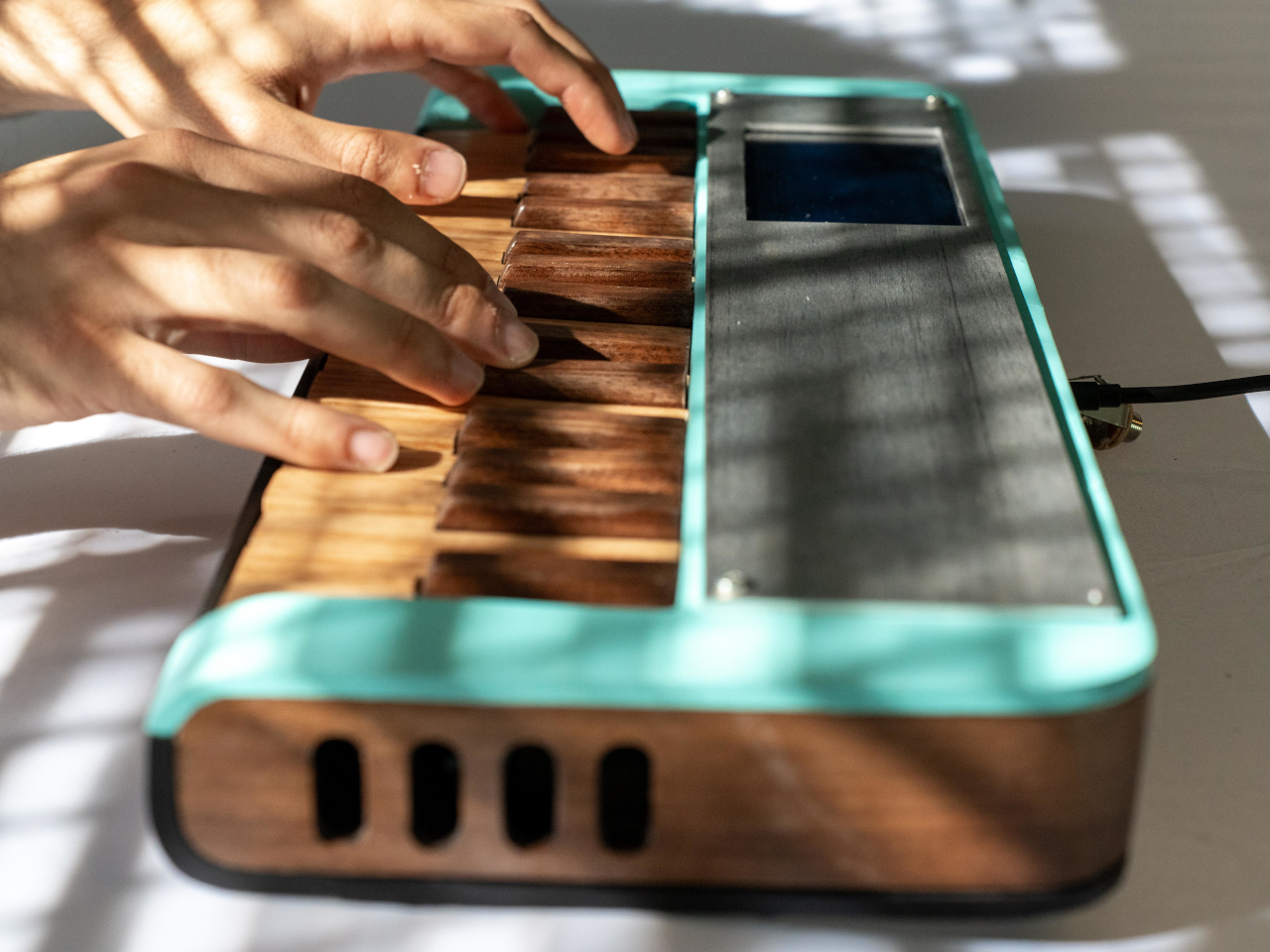
Most synthesizers look and feel like appliances. They’re plastic boxes mass-produced in factories, efficient and functional but utterly lacking in personality or warmth. Pianos and guitars get to be handcrafted instruments with wood grain and visible joints, while synths are treated like glorified toasters with circuit boards inside. That disconnect between electronic music and tactile craft has always felt like a missed opportunity, especially when you consider how satisfying it is to play a real wooden keyboard.
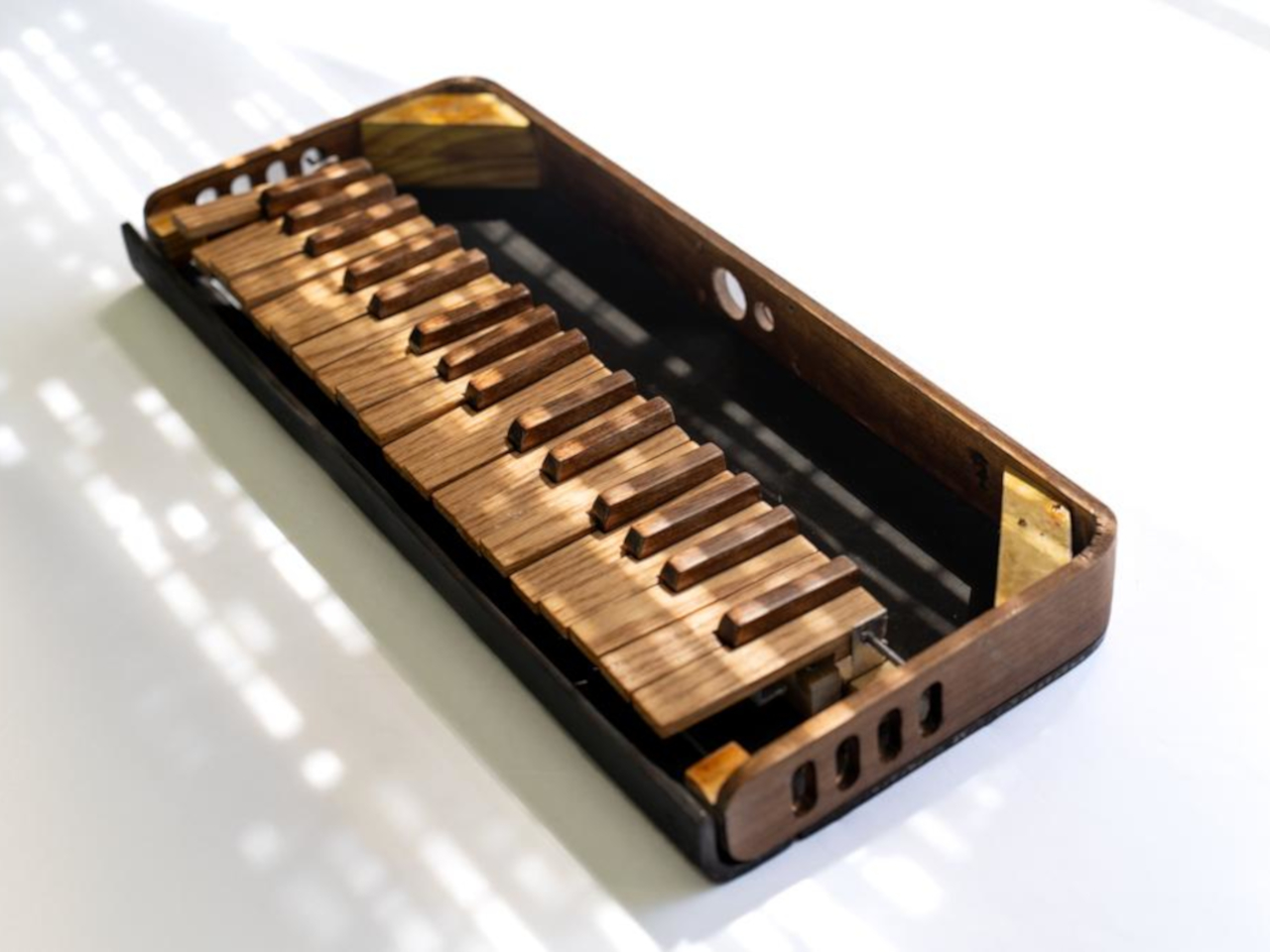
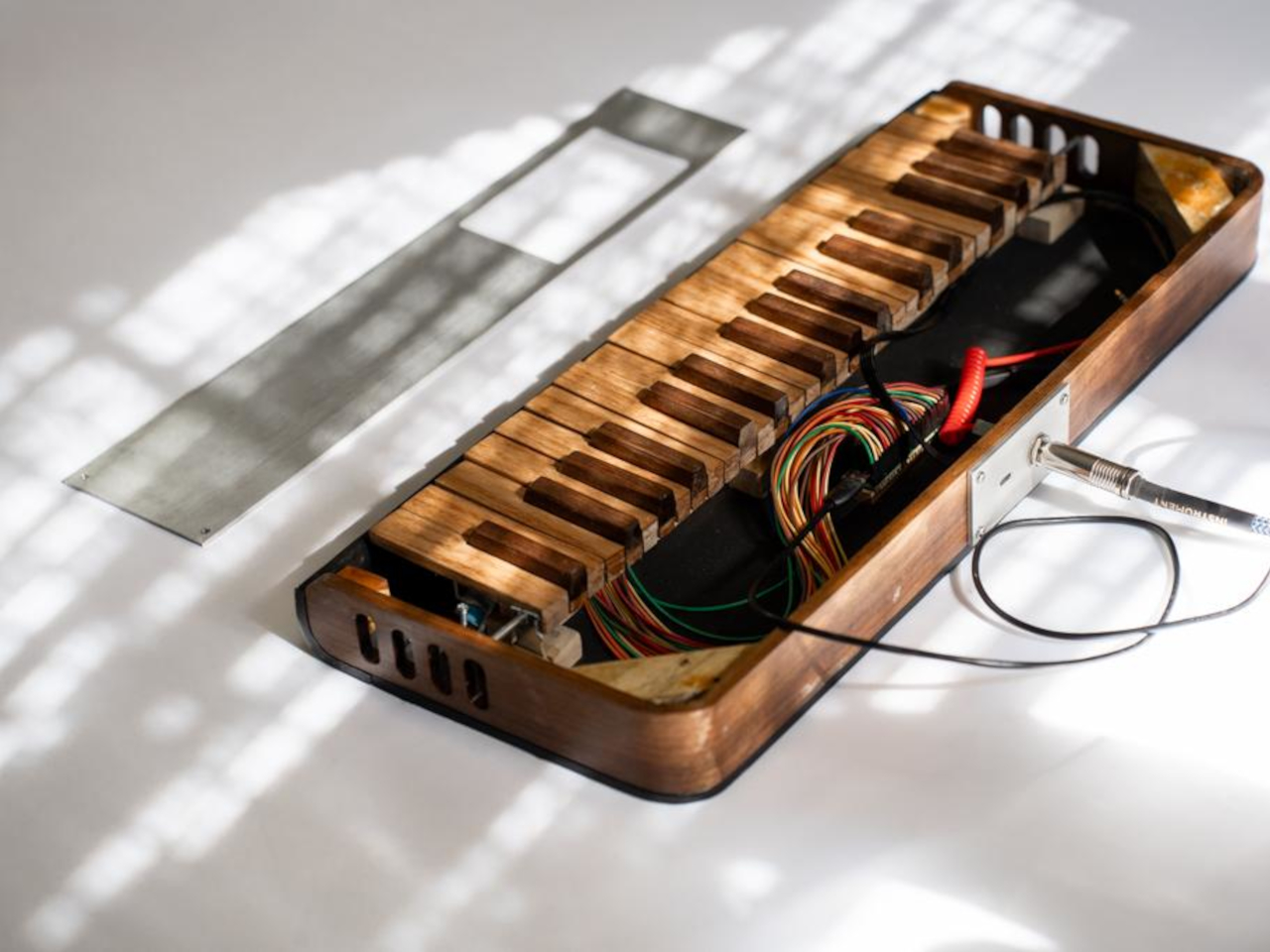
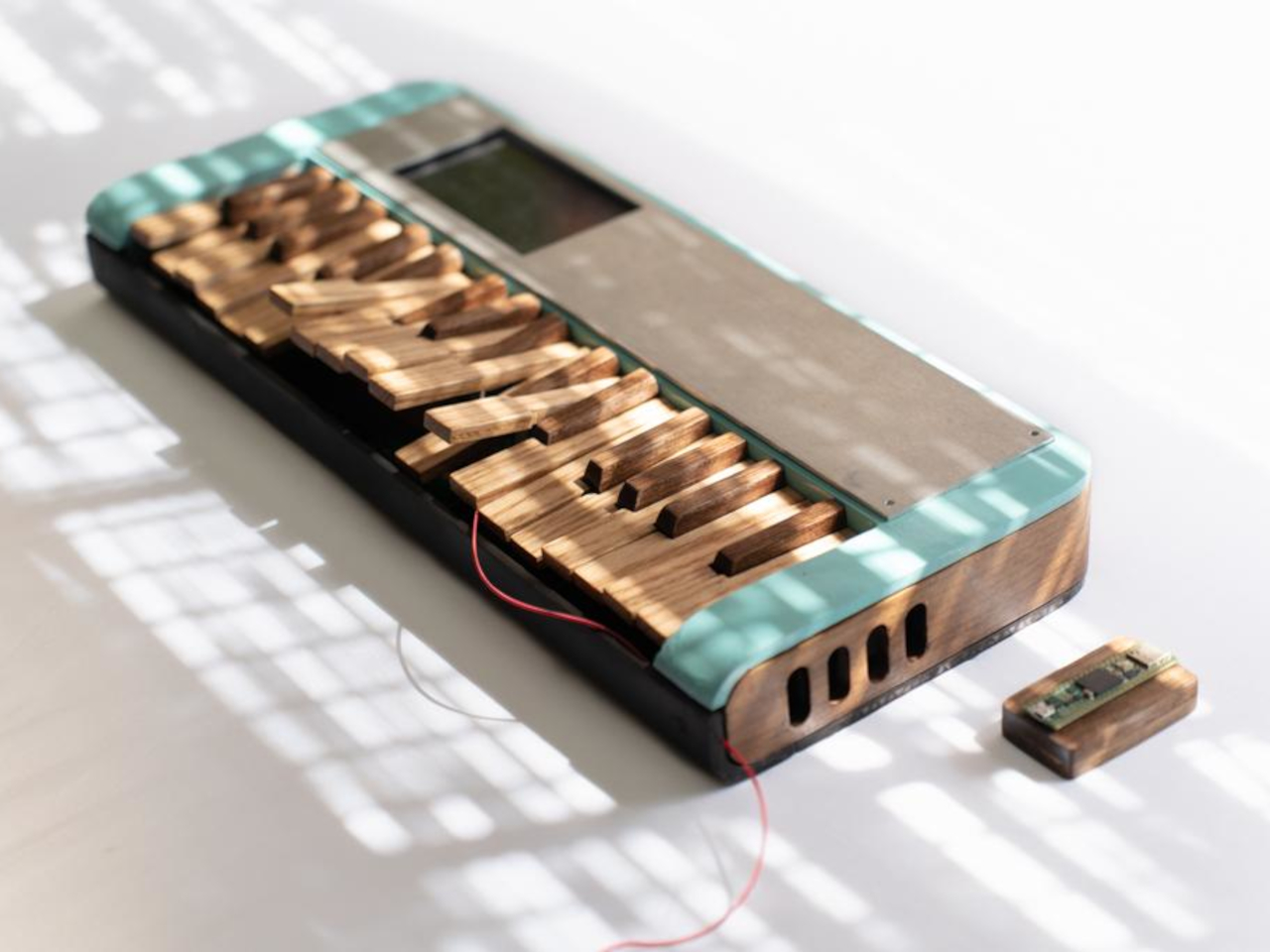
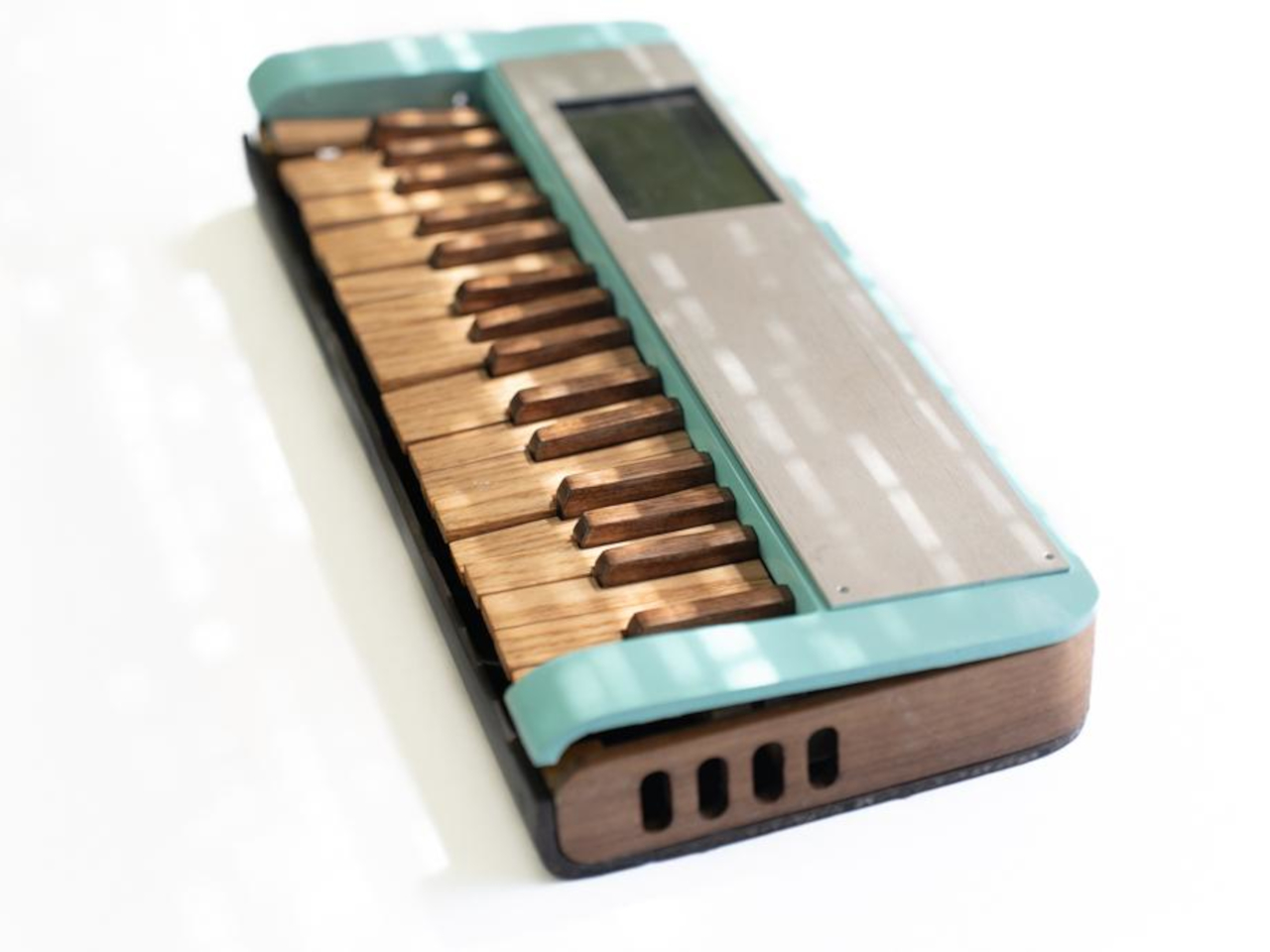
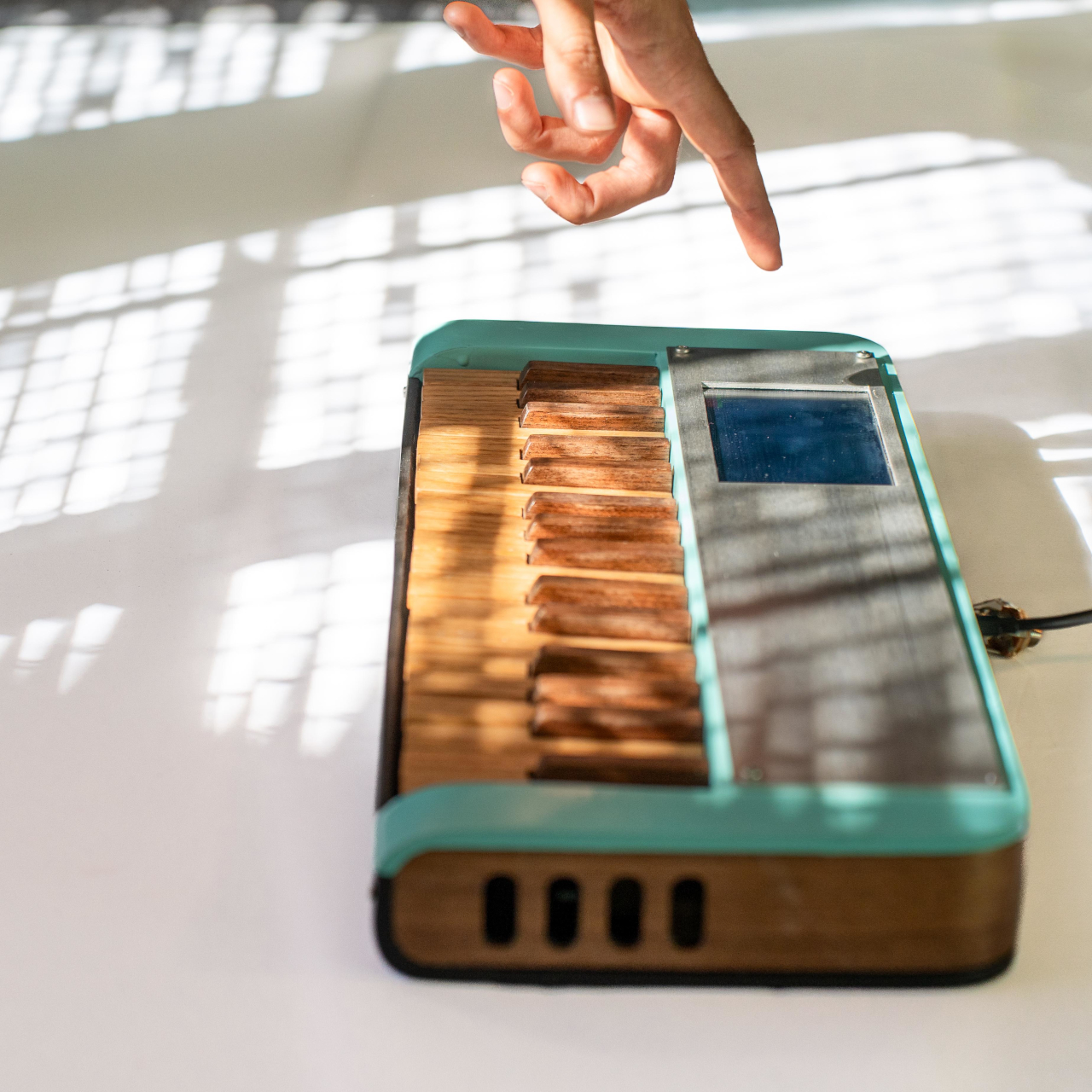
One maker decided to fix this by building a fully functional synthesizer from scratch, using materials that sound completely impractical. The result is a compact, 34-key synth with a fiberglass-reinforced cardboard body, a steam-bent walnut frame, and individual keys handmade from oak and walnut. It looks like something between a vintage record player and a mid-century hi-fi component, with a turquoise fiberglass shell and warm wooden accents that feel more like furniture than electronics.
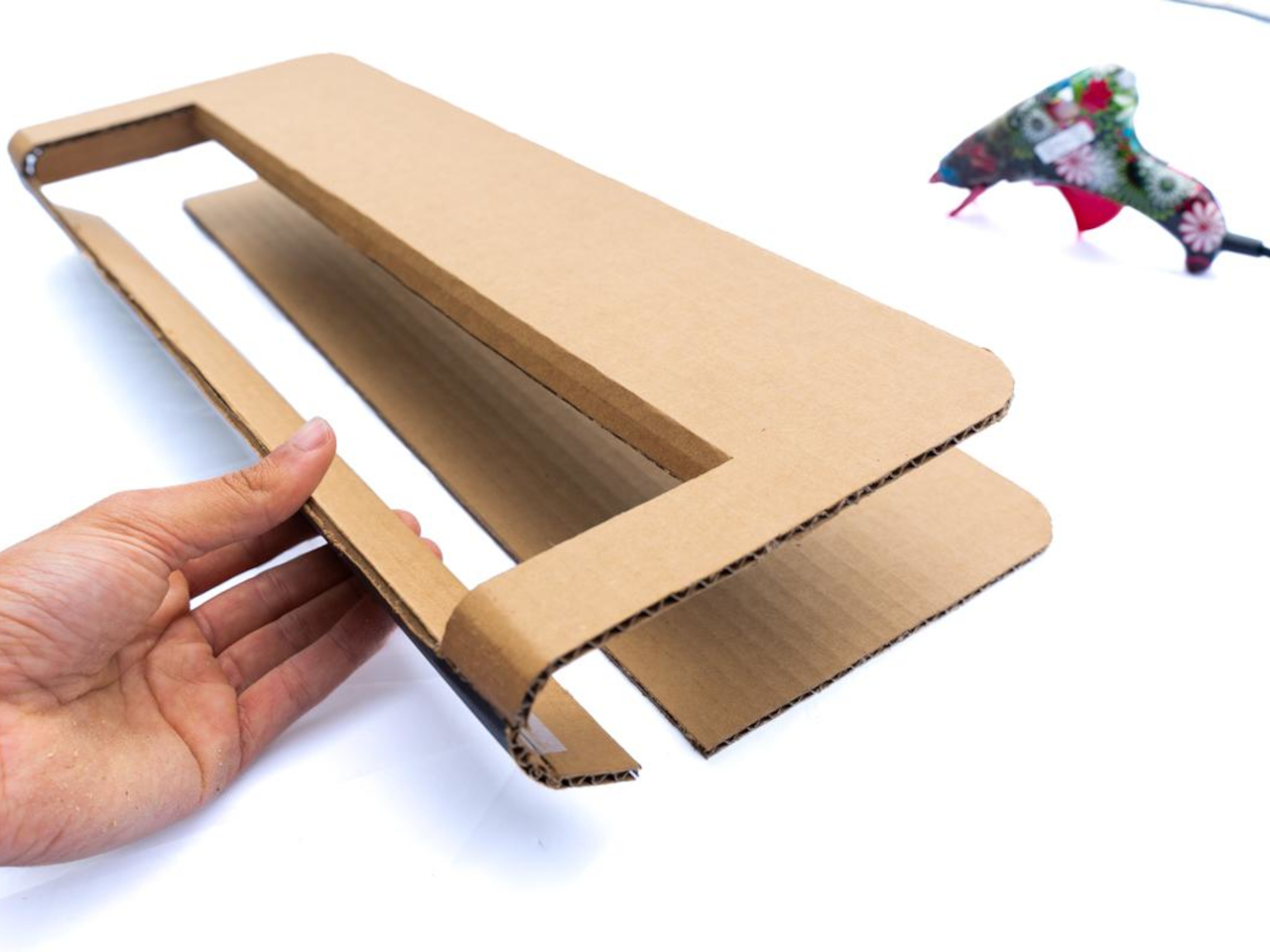
The body starts as folded cardboard panels cut from a template, then gets layered with fiberglass cloth and epoxy until it transforms into a rigid, glossy shell. The process borrows from old automotive techniques where fiberglass shaped custom car bodies in the 1950s, giving the synth a retro-futuristic sheen. Around the perimeter sits a continuous steam-bent walnut strip with oval cutouts that mimic speaker grilles on vintage radios, adding visual warmth and a furniture-like presence.
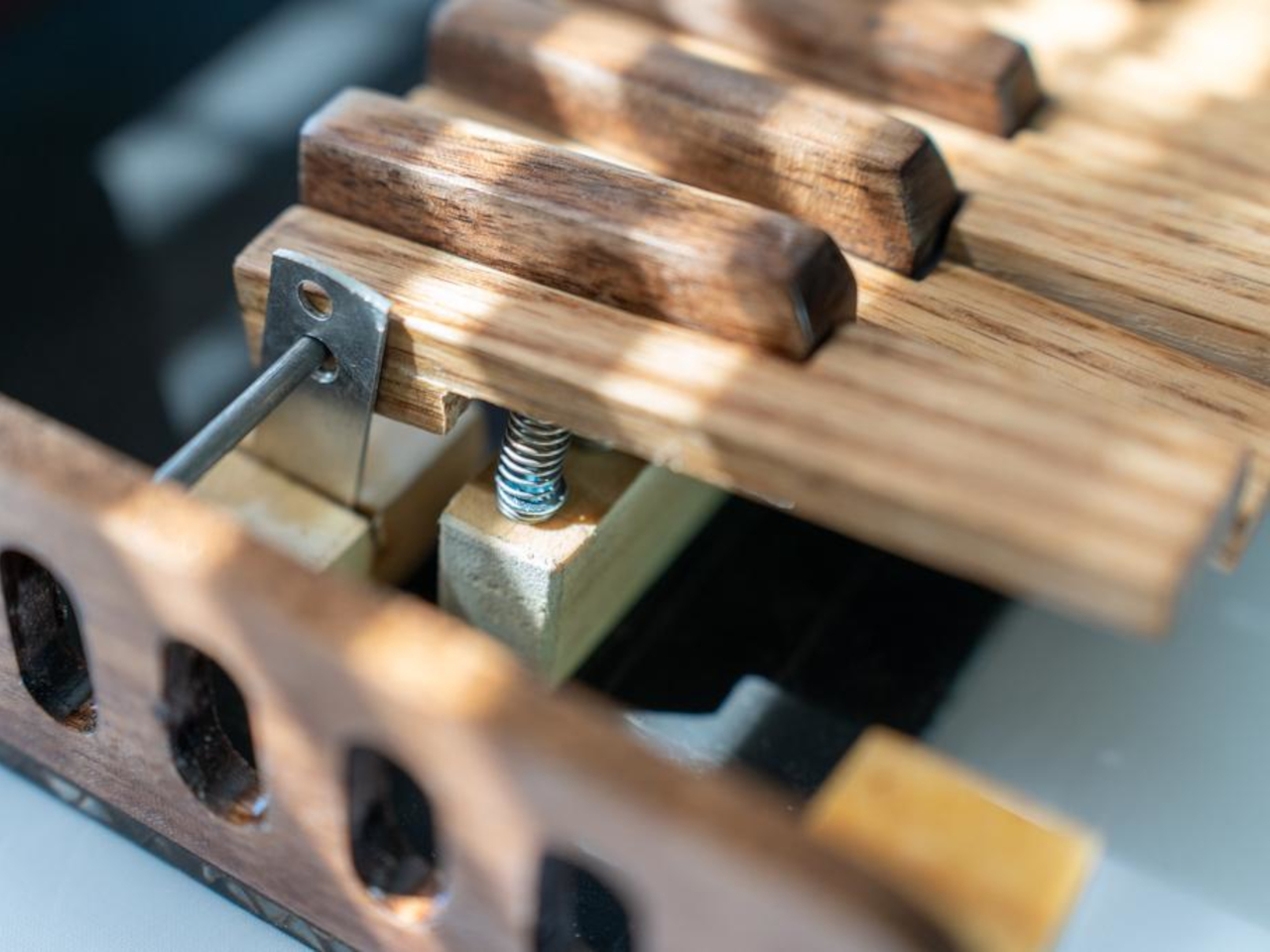
The keys are where the craft really shows. Black keys are made from laminated walnut offcuts, while white keys are cut from oak for contrast and durability. Each key is individually shaped, drilled for a shared steel rod pivot, beveled to prevent jamming, then coated with fiberglass and sanded up to 3000 grit for a smooth finish. The result looks and feels closer to a piano than a typical plastic keyboard.
Underneath sits a custom flexible printed circuit with interdigitated copper pads and rubber dome switches. When you press a key, the dome collapses and bridges the pads, closing a circuit that a Teensy microcontroller scans continuously. The Teensy sends MIDI messages to a Raspberry Pi running Zynthian, an open-source synth platform packed with engines and presets, all displayed on a small touchscreen.
Of course, using cardboard and steam-bent walnut creates challenges the designer readily admits. Cardboard turned out to be impractical, requiring multiple fiberglass layers and tedious filling. Walnut is notoriously stubborn to bend, needing kerf cuts and boiling water to soften the fibers. The designer suggests foam board or 3D printing as easier alternatives and notes that more precise tools would have made the keys cleaner.
What makes this synth significant is how it challenges the assumption that electronic instruments have to be cold and industrial. By using wood, fiberglass, and visible handwork, it reintroduces warmth and personality into something usually purely functional. It’s less a finished product and more proof that synthesizers can be beautiful, tactile objects worth admiring even when silent.
What if I told you that the future of AI image generation is already here, and it’s more new than we ever imagined? The Gemini 3 Pro Image, also known as the Nano Banana Pro, isn’t just an incremental upgrade, it’s a paradigm shift. Imagine an AI so advanced it can render photorealistic visuals with […]
What if we told you that the secret to making your data unforgettable lies not in the numbers themselves, but in how you present them? Imagine transforming a dull spreadsheet into a vibrant, engaging visual story that captivates your audience at first glance. Too often, Excel is dismissed as a dry, utilitarian tool for crunching […]