The deejay console is a thing of marvel – it’s designed to be highly intuitive and accessible at any given moment. Think about it, you’re at the console, you’ve got a crowd of thousands in front of you. One mistake and the entire atmosphere of the room changes. Heavy stakes require heavy design intervention – which is why the deejay console is made the way it is. Controls and knobs are located precisely within grasp based on how important they are or how often you need them. If you’re working with a 4-deck set, the four discs are located in a 2×2 layout, so you don’t have to move around to change songs, load up tracks, or scratch beats. The deejay console encourages creativity and is built for impulsive mixing, scratching, and production where milliseconds matter.
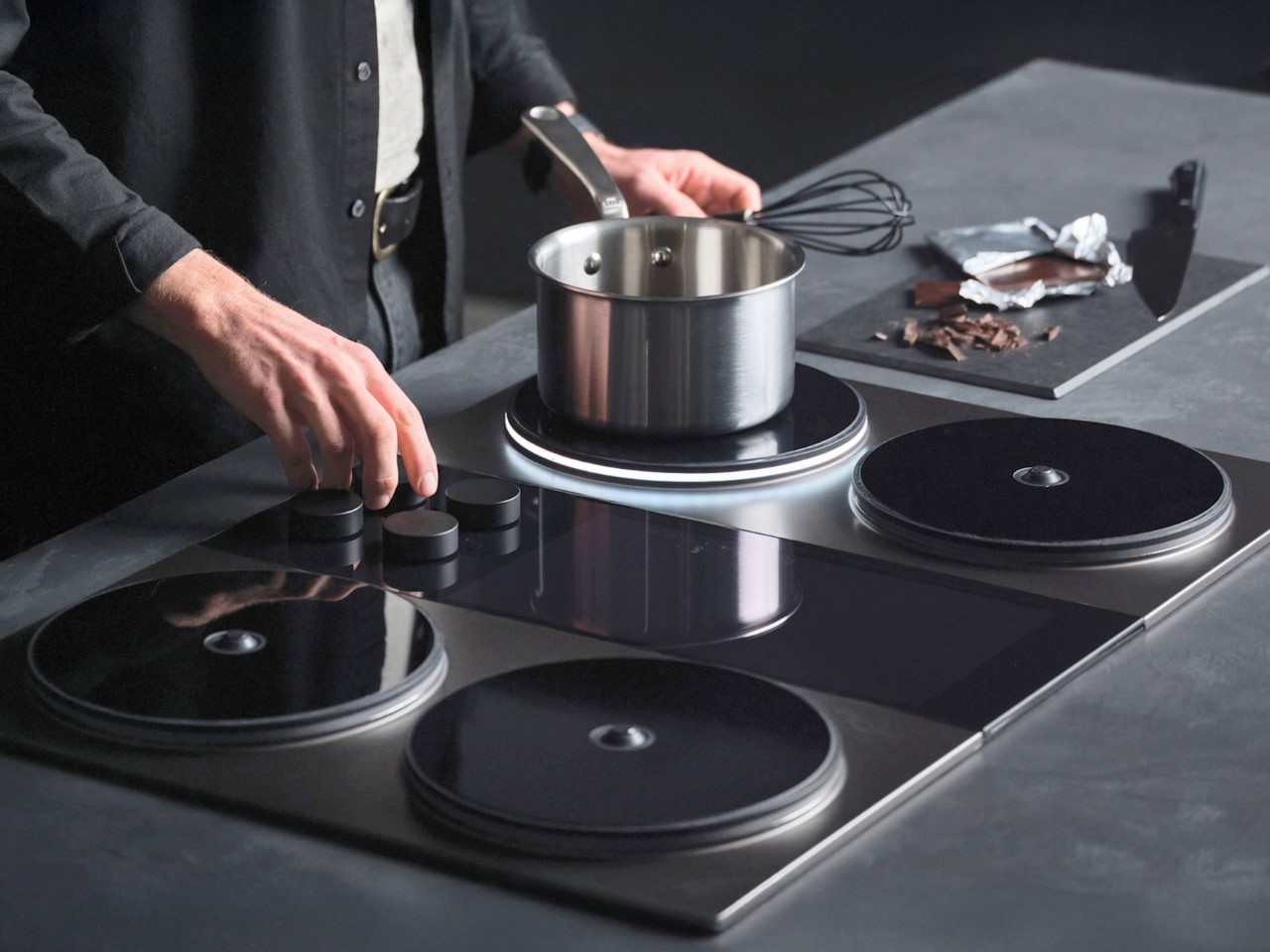
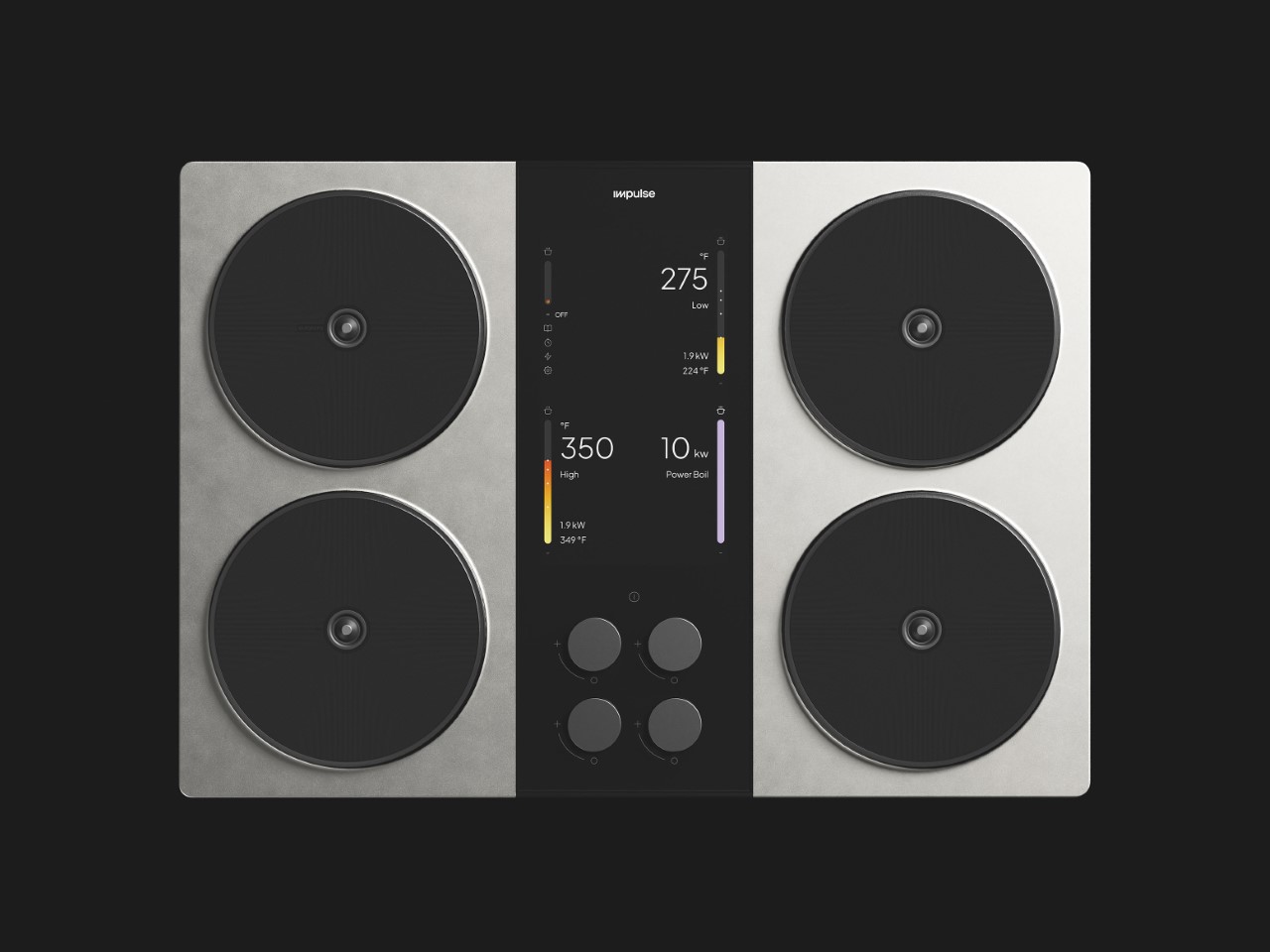
The Impulse Cooktop, as its name suggests, is designed around this very concept too, with a format that emulates the 4-deck console. The four cooktops are laid out like spin discs on a console, with the control panel being right in the center, within reach, and with controls that are both intuitive and easy to operate. Here’s where things get even more interesting – the entire cooktop is designed to be electric, and run on a combination of a power outlet as well as batteries, working even during a power cut. Individual elements are modular and repairable, so cooking meals should be just about as easy and creativity-driven as cooking fire beats.
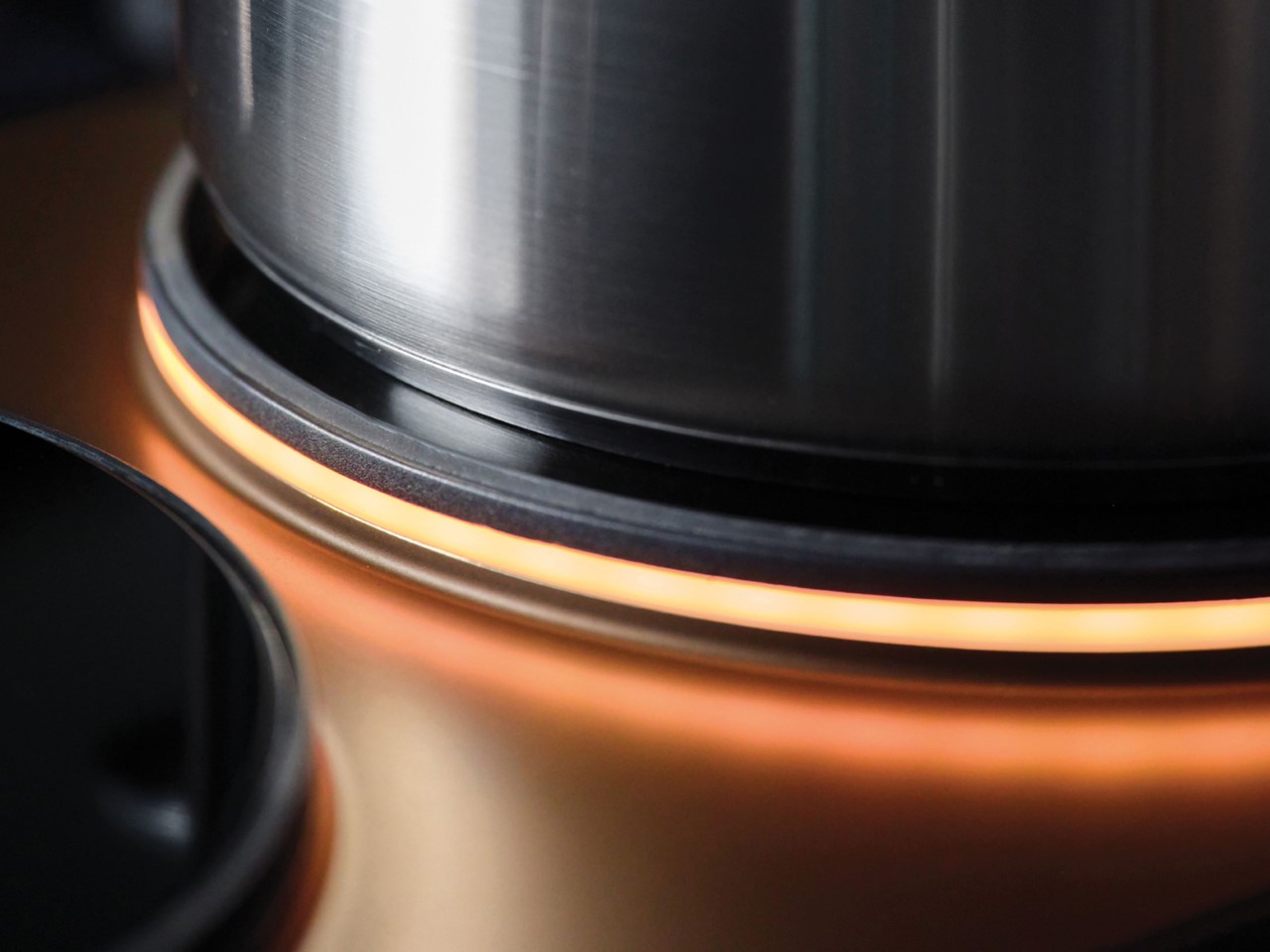
Designed by Studio Blond for Impulse Labs, the cooktop is made to plug and play right out of the box. Drop it into your worktop, plug it into a socket, and you’re ready to cook. Four knobs at the center control the four electric ‘burners’, while a display helps you understand how hot or cold your burner is. The text is big, has a high contrast, and is accompanied by visuals that help anyone grasp the temperature they’re cooking at. Unlike conventional burners or induction stove that just show flames or power levels, this display gives you actual temperature readings so you’re more well-informed while cooking. Meanwhile, an LED strip around each burner glows to let you know which burners are active and how hot they are. A white strip indicates low or sim, while a bright orange or red means your burner is on full power.
Touchscreens are fiddly, and deejay consoles don’t have them for that reason – everything should be so intuitive that you can work it with your eyes closed. Similarly, the Impulse ditches touch-sensitive screens for an all knob-based interface that feels much more grasp-worthy. You don’t need to worry about heat affecting the touch-sensitivity, or water/oil/gravy spilling on the screen and messing up your stove’s settings. The raised cooktop surfaces (which really look like spinning discs) prevent the heat from reaching the screen, and four minimalist knobs let you do all the controlling you need to. The knobs are removable too, leaving you with a flat plate that’s easy to wipe down between uses. The only thing really missing is a child lock and we’re absolutely perfect.
A winner of this year’s Red Dot Award: Design Concept in the Best of the Best category, the Impulse Cooktop combines visual appeal with true user-friendliness. It helps homes transition to 100% electrical energy, without a fuss. A power socket is all you need to run the cooktop, and if you’re in a place with frequent power cuts (like I am), an internal battery allows you to continue cooking even during a blackout – something that induction cooktops struggle to do. The modular design simplifies repair, upgrade, and disassembly, paving the way for future accessories too.
Nightdive Studios has reimagined another cult classic game for modern audiences. Killing Time: Resurrectedis a refresh of the 1996 3DO and PC original. For the uninitiated, the game was notable at the time for attempting to blend full-motion video (FMV) with a first-person shooter. It truly looked like nothing else when it was released during the heyday of Bill Clinton’s first term as president.
Like most Nightdive remakes, Killing Time: Resurrected isn’t just a simple remaster. This title boasts 4K visuals, a 144Hz frame cap and other modern graphical goodies like anti-aliasing. The menu art and 2D screens have also been redone.
As for gameplay, fans will now have access to all of the weapons from both the 3DO and PC versions of the game. Back in the 1990s, several weapons were exclusive to each platform. There’s also plenty of newly-unearthed content that was cut from the original, including a pool house stage and a shipwreck.
The 50 live-action FMV sequences have been fully remastered, and they really pop in this remake. Players can toggle between the original sprites and the updated visuals, which is always a nice touch. Nightdive promises “upscaled environmental texturing, smoother gameplay, more responsive controls.”
The load times between areas have also been completely eliminated. Those load times were pretty brutal back in the 1990s, if memory serves. Killing Time: Resurrected is available right now for PC via Steam. There’s a launch sale going on, dropping the title down to $20 from $25.
This article originally appeared on Engadget at https://www.engadget.com/gaming/pc/nightdive-studios-revives-a-cult-classic-3do-game-from-1996-185413750.html?src=rss
Google’s NotebookLM software just got some cool new features that primarily impact audio overviews. For the uninitiated, the platform’s Audio Overview tool uses AI to whip up an audio summary of a piece of content. It started with written content, but has since expanded to YouTube videos.
So what’s new? Users can now input specific instructions before generating a “Deep Dive” overview. Google gives examples of tasking the software to focus on a single topic or adjusting the expertise level to suit a particular audience. The company says it’s like “slipping the AI hosts a quick note right before they go on the air.”
There’s also a new background listening feature, which is just what it sounds like. People can listen to audio overviews as they do other stuff within NotebookLM. Google says users can query sources, get citations and explore relevant quotes “without interrupting the audio.”
It’s also worth noting that the company has removed NotebookLM’s “experimental” label, so I guess the experiment has been a resounding success. In any event, the software became available to the general public back in December.
The company even announced a forthcoming expansion that’s primarily intended for commercial use, called NotebookLM Business. This will include “enhanced features for businesses, universities and organizations.” Businesses can apply today to get early access to the pilot program.
This article originally appeared on Engadget at https://www.engadget.com/ai/google-notebooklm-adds-improved-audio-overviews-and-background-listening-feature-174804128.html?src=rss
The 2024 Good Design Awards celebrate products that push the boundaries of design, blending innovation, sustainability, and functionality. This year’s winners illustrate a new era of thoughtful creativity, where traditional craftsmanship meets cutting-edge technology. From groundbreaking laptops to kitchen essentials reimagined, each of these products demonstrates a commitment to enhancing everyday experiences through intelligent and beautiful design. The ASUS Zenbook Duo, the KAMADO Rice Pot, the PureAura Air Purifier, the Bricks Coffee Grinder, and the Raptor Mobility Platform all reflect a dedication to practical solutions that address the evolving needs of modern consumers, with an emphasis on sustainability and user-centric innovation.
ASUS Zenbook Duo (2024): A Multi-Tasker’s Dream with Dual-Screen Innovation
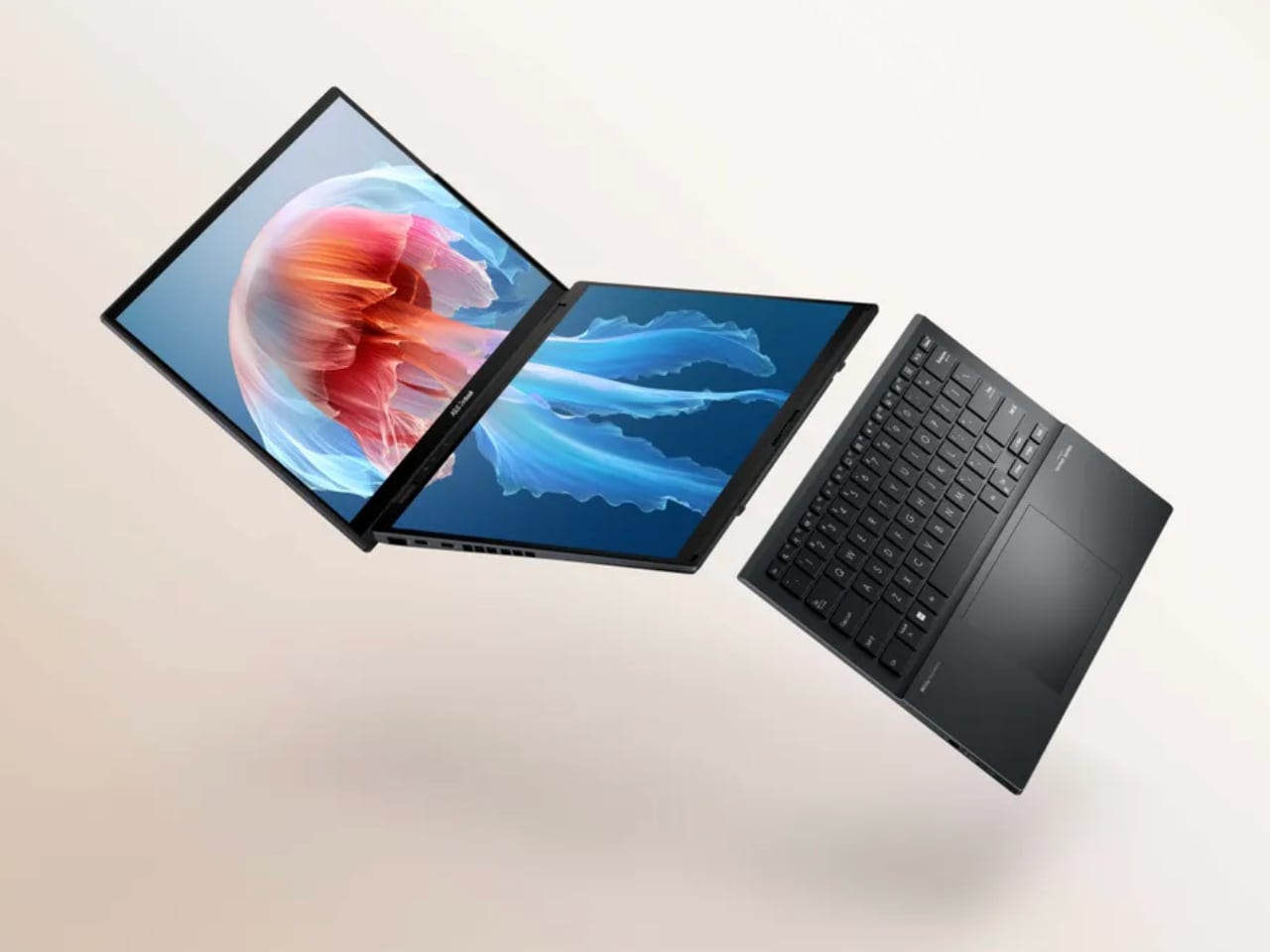
The ASUS Zenbook Duo (2024), a 2024 Good Design Award winner, represents the next generation of laptop innovation, where function meets form. The Zenbook Duo breaks new ground in productivity, creativity, and usability with its distinctive dual-screen setup. Designed for professionals, content creators, and multitaskers, this laptop has features that redefine how users interact with technology. By optimizing screen real estate and incorporating advanced performance components, the Zenbook Duo offers an exceptional computing experience.
Background
ASUS has long been at the forefront of laptop innovation, consistently pushing the boundaries of design and functionality. The Zenbook Duo series has evolved from ASUS’s desire to offer users a beyond-traditional laptop experience. The core idea behind the Zenbook Duo is multitasking, a critical need in today’s fast-paced, work-from-anywhere environment. The dual-screen design, first introduced in earlier models, has been refined for 2024 to deliver better ergonomics, efficiency, and seamless usability.
For creative professionals and digital nomads, the Zenbook Duo is a true productivity tool that enhances productivity. Its second display, known as the ScreenPad Plus, provides extra workspace for applications, toolbars, and shortcuts, making multitasking smoother and more intuitive.
Specifications
Display: Features a 14.5-inch main OLED display with 4K resolution and a secondary 12.7-inch ScreenPad Plus with touchscreen capability.
Processor: Powered by the latest Intel Core i9, offering high-speed performance suitable for demanding applications.
Graphics: Includes NVIDIA GeForce RTX graphics, ideal for content creators working with heavy software like video editors or 3D rendering tools.
Storage: Up to 1TB SSD, ensuring fast data access and ample space for large projects
Battery Life: Long-lasting battery designed to support extended work sessions with dual displays.
Connectivity: Multiple ports, including Thunderbolt 4, HDMI, and USB-C, allow seamless integration with external devices.
Why the Design is Notable
The ASUS Zenbook Duo (2024) is remarkable due to its innovative dual-screen layout. The integration of the ScreenPad Plus creates a distinct advantage for users who need extra screen space without sacrificing portability. This second screen can be used for various tasks, such as displaying tool palettes in creative software, handling messaging apps while working on the main screen, or even acting as a secondary display for multitasking across multiple programs.
The ergonomics of the dual-screen design have also been improved in this 2024 model. The ScreenPad Plus is slightly angled, offering a more comfortable viewing experience than previous models. This makes interacting easier and reduces neck strain for users who spend long hours on their laptops. The laptop’s slim profile and lightweight design are additional features that make it easy to carry, ensuring that users don’t have to compromise on portability.
The OLED main display delivers stunning visuals with rich colors and deep contrast, making it ideal for creative professionals who require accurate color reproduction. Furthermore, the NVIDIA GeForce RTX graphics card ensures that even graphics-heavy tasks like video editing or gaming run smoothly, making the Zenbook Duo as powerful as it is innovative.
Evaluation Comments
The Good Design Award judges were particularly impressed by the seamless integration of dual screens, a feature that elevates the user experience beyond typical laptops. They praised the ScreenPad Plus’s functionality, highlighting how it increases productivity without adding unnecessary bulk to the laptop’s design. The judges also commended the laptop’s sleek and modern aesthetic, combining advanced technology with a stylish form factor.
Another point of appreciation was the Zenbook Duo’s sustainability efforts. ASUS has been incorporating more environmentally friendly practices into its manufacturing process, and the use of recycled materials in this model reflects a commitment to sustainability. The judges also noted how the Zenbook Duo’s long battery life and energy-efficient components contribute to its eco-friendly design.
Yanko Design’s Take
From Yanko Design’s perspective, the ASUS Zenbook Duo (2024) is an innovative solution for professionals needing a traditional laptop. The dual-screen layout is a thoughtfully designed feature that dramatically improves multitasking capabilities. The ScreenPad Plus is particularly useful for content creators who need quick access to toolbars and controls without cluttering the main screen. The laptop’s sleek design and lightweight build make it an excellent choice for users who are always on the go, while the OLED display ensures that visual tasks are performed with the utmost clarity and accuracy.
Including high-performance components such as the Intel Core i9 processor and NVIDIA GeForce RTX graphics card means that the Zenbook Duo can handle even the most demanding applications, from 4K video editing to gaming. ASUS has created a laptop that looks impressive and delivers top-tier performance.
3 Things We Love About the Design
Dual-Screen Productivity with ScreenPad Plus
The ScreenPad Plus is a transformative feature that makes multitasking easier than ever. Whether you’re a content creator managing multiple applications or a professional juggling between emails and documents, the secondary screen adds a new dimension of efficiency. It’s a versatile tool that adapts to various workflows.
OLED Display and Graphics Performance
The OLED main display provides stunning visuals with true-to-life colors and deep contrasts, making it perfect for designers, photographers, and videographers. Coupled with the NVIDIA GeForce RTX graphics, this laptop can handle intensive visual tasks such as 3D rendering, video editing, and gaming, ensuring smooth performance across the board.
Ergonomic and Portable Design
Despite the dual-screen setup, the Zenbook Duo maintains a slim, lightweight profile, making it highly portable. The slight tilt of the ScreenPad Plus enhances ergonomics, making it comfortable to use even during long work sessions. ASUS’s commitment to user comfort is evident in the design, making this a laptop built for productivity without compromising on usability or aesthetics.
The ASUS Zenbook Duo (2024) raises the bar for what laptops can offer, blending innovation with practicality to enhance productivity, creativity, and the overall user experience. It’s easy to see why it was honored with a 2024 Good Design Award, and it will undoubtedly be a go-to device for professionals who need more from their technology.
KAMADO Rice Pot: The 2024 Good Design Award Winner Blends Tradition with Innovation
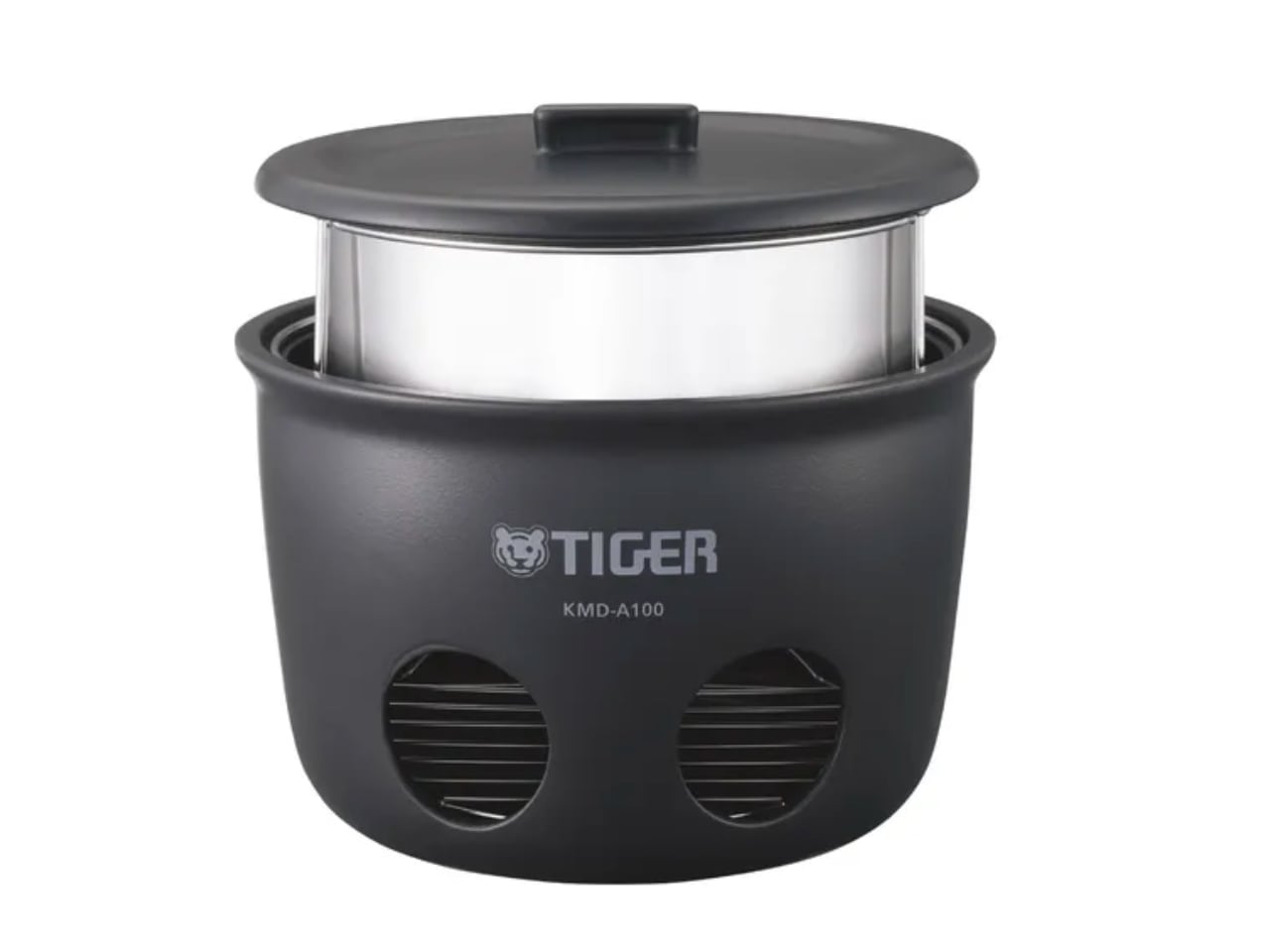
Cooking rice may seem simple, but achieving the perfect texture requires precision. The KAMADO rice pot, a 2024 Good Design Award winner, elevates this process by blending tradition with modern technology. Drawing on ancient Japanese cooking techniques, the KAMADO pot offers both cultural significance and contemporary convenience. This award-winning pot balances functionality and artistic design, making it a must-have for those who value precision in their kitchen.
Background
The KAMADO pot takes inspiration from traditional Japanese earthenware pots, known for their excellent heat retention and distribution. Historically, these pots were placed over open flames, requiring careful temperature control to perfect the rice’s texture. The KAMADO pot honors this heritage while incorporating smart technology to simplify the process.
The 2024 version focused on sustainability and ease of use, making it a modern kitchen essential. The pot ensures perfect rice and connects users to a deep-rooted culinary tradition.
Specifications
Material: High-quality ceramic replicating traditional earthenware for superior heat retention.
Capacity: Suitable for family-sized meals, cooking up to 5 cups of rice.
Technology: Smart temperature regulation ensures consistent cooking results for different types of rice.
Design: Neutral-toned, minimalist design that fits seamlessly into any kitchen aesthetic.
Functionality: A precisely fitting lid ensures optimal moisture retention for perfectly cooked rice.
Why the Design is Notable
The KAMADO rice pot is remarkable for its blend of traditional craftsmanship and modern technology. It reimagines a centuries-old method, fitting perfectly into today’s eco-conscious households. Using a material that mirrors the properties of traditional earthenware, the KAMADO pot enhances the cooking process while maintaining a connection to its cultural origins.
One distinctive feature is its ability to cook rice using only a single sheet of newspaper as fuel. This makes it a practical disaster preparedness solution and a sustainable outdoor cooking option. The pot shows how an ancient practice can adapt to modern conveniences and environmental considerations.
Evaluation Comments
The Good Design Award judges praised the KAMADO pot for its thoughtful combination of tradition and innovation. They highlighted the product’s environmental benefits, noting how it minimizes waste by reusing inner pans. Its ability to function without electricity or gas makes it versatile, especially in disaster situations or for outdoor enthusiasts. The ease of cleaning, requiring only water without detergent, further impressed judges with its eco-friendly design.
Yanko Design’s Take
We see the KAMADO rice pot as a perfect example of thoughtful, sustainable product design. More than a kitchen tool, it offers an experience—deeply rooted in tradition yet forward-thinking in application. Its ability to cook with just a sheet of newspaper makes it revolutionary in both functionality and sustainability.
The KAMADO pot shows how ancient techniques can be adapted for modern needs, reducing environmental impact without sacrificing performance. It proves that practical design can be simple, sustainable, and culturally meaningful.
3 Things We Love About the Design
Outdoor and Disaster Readiness
Cooking five cups of rice using just one newspaper is remarkable. This pot becomes essential in emergencies where electricity or gas might be unavailable. It also appeals to outdoor enthusiasts seeking sustainable cooking methods during their adventures.
Sustainability and Waste Reduction
Reusing inner pans that would otherwise be discarded reduces waste and extends the life of key components. This thoughtful reuse aligns with modern environmental standards, making the KAMADO pot an eco-friendly choice for conscious consumers.
Effortless and Eco-Friendly Cleaning
After cooking, the pot requires no heavy scrubbing or detergents—just a simple wipe with a water-soaked sponge. This approach to cleaning saves time and eliminates the need for harsh chemicals, contributing to a more environmentally friendly kitchen.
The KAMADO rice pot demonstrates the importance of maintaining cultural traditions while advancing technological and environmental standards. Its thoughtful design and practical innovation have earned it well-deserved recognition as a 2024 Good Design Award winner.
PureAura: The Portable Mini Energy-saving Air Purifier Redefining Air Quality Control
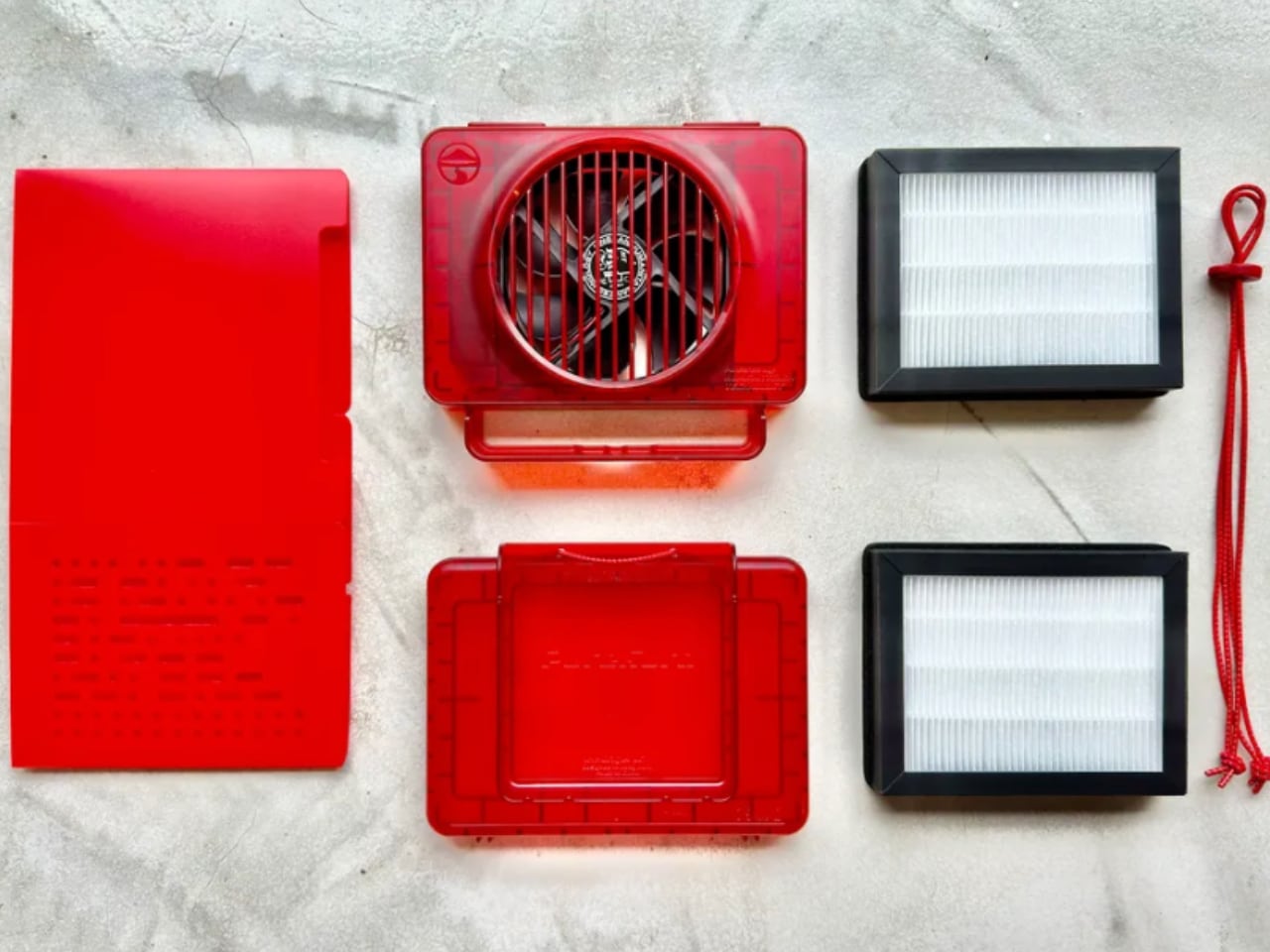
Clean air is a necessity in today’s world. The PureAura Portable Mini Energy-saving Air Purifier, recognized as a 2024 Good Design Award winner, meets the increasing demand for portable air quality solutions. Compact and energy-efficient, this air purifier combines advanced technology with user convenience, offering a reliable solution for those looking to breathe cleaner air wherever they go. With its sleek design and powerful performance, the PureAura air purifier is a significant step forward in personal air purification devices.
Background
Air purifiers have gained popularity, especially in urban areas with rising pollution levels. PureAura was developed to address the need for portable, energy-saving air purifiers for small spaces like offices, cars, and personal living areas. The focus was on creating a device that balances efficiency with portability, allowing users to maintain air quality without large, bulky equipment or high energy consumption.
The design reflects the growing awareness of environmental impact and energy efficiency. By reducing the device’s size and optimizing power usage, the creators ensured it could operate effectively in various spaces while consuming minimal electricity. It offers a solution to indoor and outdoor air quality concerns, ideal for individuals constantly moving or with limited space.
Specifications
Size: Compact and lightweight, designed for easy portability.
Energy Efficiency: Engineered to consume minimal energy while maintaining high purification performance.
Technology: Advanced filtration system that captures dust, pollen, bacteria, and other pollutants.
Noise Level: Operates quietly, ensuring it doesn’t disrupt daily activities.
Design: Minimalist, with a sleek aesthetic that complements modern environments.
Usage: Ideal for small enclosed spaces such as cars, personal workspaces, and bedrooms.
Why the Design is Notable
The PureAura Portable Air Purifier is remarkable for packing high functionality into a small device. Portability is often associated with reduced power, but PureAura delivers high-performance air purification while remaining energy-efficient. Its minimalist design allows it to blend seamlessly into any environment, whether on an office desk, bedside table, or in a car.
Another distinctive feature is its eco-conscious approach. The purifier’s energy-saving technology makes it a sustainable choice for those looking to reduce their carbon footprint. This focus on environmental impact without sacrificing performance sets PureAura apart in the market.
Evaluation Comments
The Good Design Award judges praised PureAura for its balance between form and function. Its ability to deliver powerful air purification in such a compact form was a distinctive feature, particularly given the rising demand for portable air solutions. The judges were also impressed with the energy efficiency, allowing users to maintain air quality without high energy costs or environmental waste.
Another key point was the simplicity of operation. PureAura is designed to be user-friendly, requiring little maintenance while still offering high performance. This focus on ease of use makes it accessible to a wide range of consumers, from office workers to frequent travelers who need a portable air solution.
Yanko Design’s Take
PureAura represents a shift toward user-centric and environmentally conscious design in personal air care products. The device’s ability to function effectively in small spaces and its minimal energy consumption makes it distinctive in its category. It reflects how design and technology can solve everyday problems, particularly in environments where air quality is compromised.
The design team behind PureAura addressed aesthetic and functional concerns, creating an effective yet visually unobtrusive product. Its sleek, minimalist design fits into any space without drawing attention, ideal for consumers who want products that enhance their environment without dominating it.
3 Things We Love About the Design
Portability without Compromising Performance
One of PureAura’s strongest features is its compact size. Despite its small footprint, the device performs efficiently, making it perfect for users who need clean air on the go. Whether in a car or a small room, PureAura delivers effective air purification without the bulk of traditional air purifiers.
Energy Efficiency
The air purifier is remarkable for its minimal energy consumption. It works continuously without significantly impacting electricity usage, making it an excellent choice for environmentally conscious consumers. Its energy-saving performance makes it cost-effective for daily use at home, in the office, or on the move.
Quiet Operation
The low-noise feature is valuable for users who need the air purifier running throughout the night or during work hours. Its quiet operation ensures it doesn’t disrupt sleep or concentration, making it perfect for bedrooms, offices, and nurseries.
The PureAura Portable Mini Energy-saving Air Purifier sets a new benchmark for personal air care devices. With its focus on portability, energy efficiency, and sleek design, it’s clear why it was chosen as a 2024 Good Design Award winner. For those looking to improve their personal air quality without sacrificing style or sustainability, PureAura offers the perfect solution.
Bricks Coffee Grinder: A Design Masterpiece for Coffee Lovers
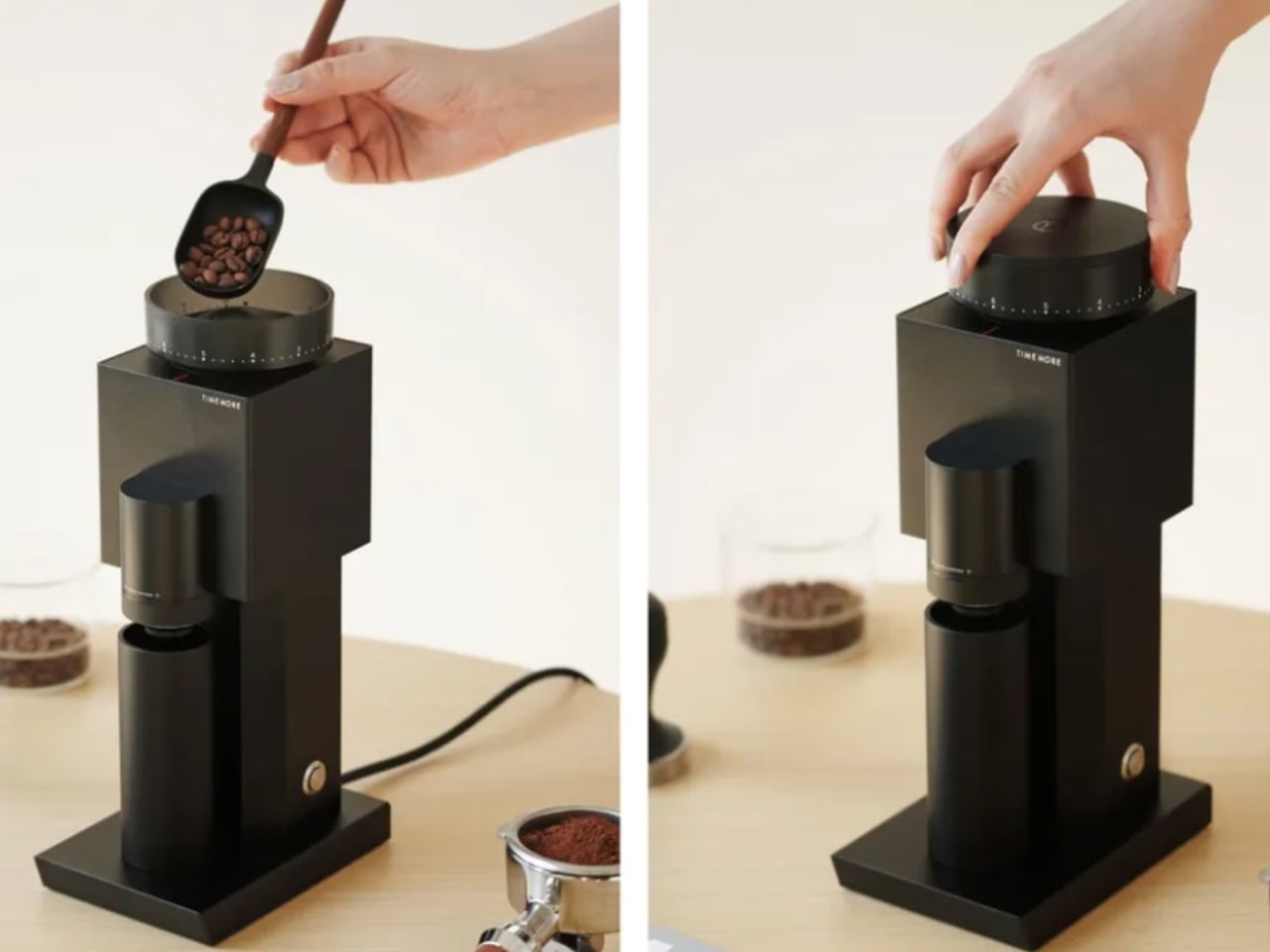
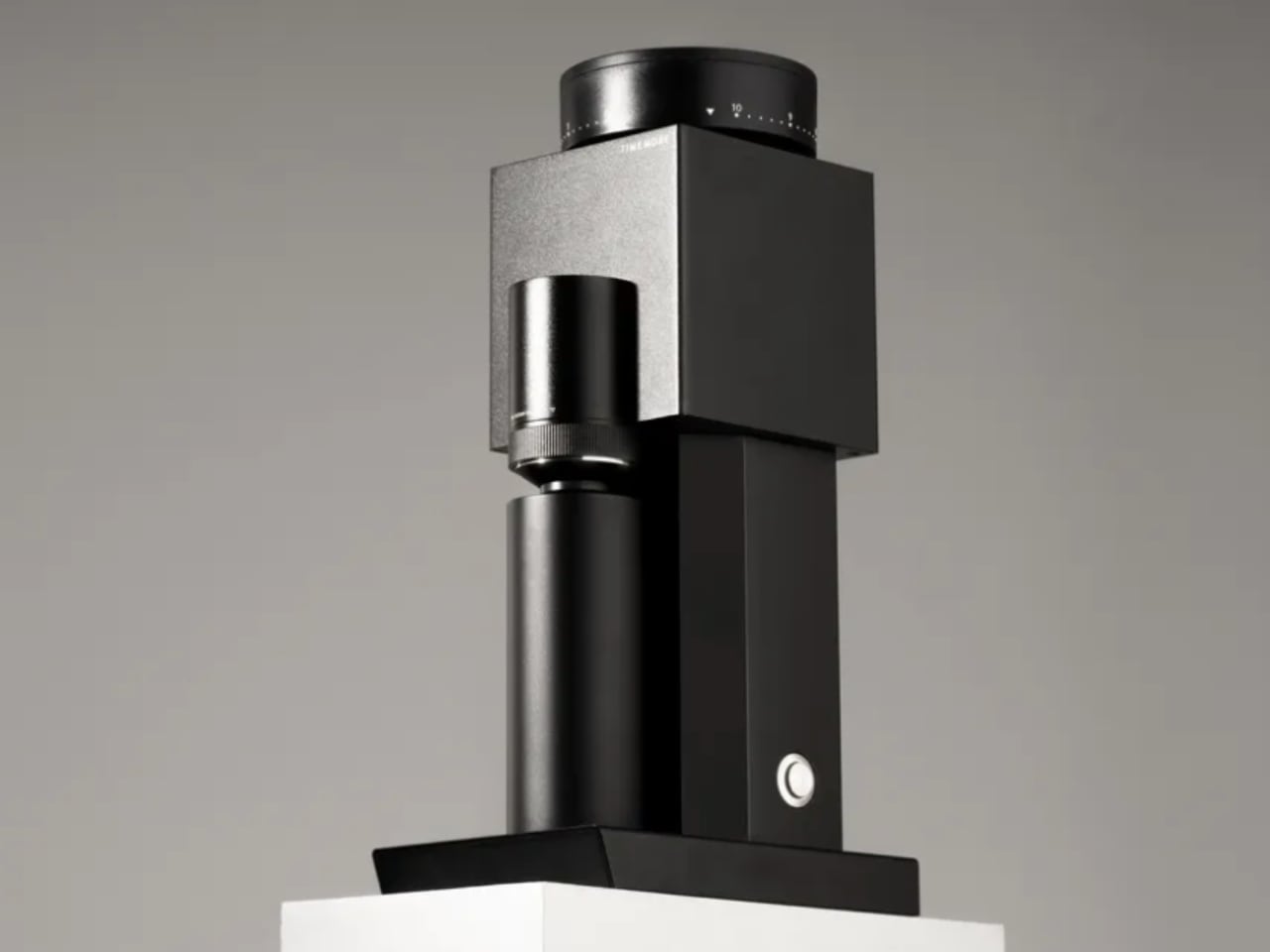
For coffee enthusiasts, the grind is as crucial as the beans. The Bricks Coffee Grinder, a 2024 Good Design Award winner, perfectly balances functionality and style. This grinder goes beyond being just a kitchen tool—it’s an example of how thoughtful design can enhance the coffee-making experience. Whether you’re a professional barista or a home brewer, the Bricks Coffee Grinder delivers precision, efficiency, and aesthetic appeal in a compact package.
Background
Coffee culture has evolved, with consumers becoming more knowledgeable about making the perfect cup. Central to this process is the grind. Coffee grinders have moved beyond mere functionality, embracing design and craftsmanship. The Bricks Coffee Grinder was created with these evolving needs in mind.
The development of the Bricks grinder focused on making high-quality grinding accessible to everyone without sacrificing aesthetics. The design draws on traditional hand grinders while incorporating modern elements to improve ease of use and grind consistency. This tool was made for those who understand that a great grind is essential for a great cup of coffee.
Specifications
Material: Crafted from durable, high-quality materials with sleek metal and ceramic construction.
Grind Settings: Multiple settings, from coarse to fine, to suit various brewing methods such as espresso, pour-over, or French press.
Manual Operation: Hand-crank design offers a tactile, engaging experience for coffee lovers who appreciate grinding their beans by hand.
Compact and Portable: Designed for easy storage and portability, ideal for home use and travel.
Why the Design is Notable
The Bricks Coffee Grinder is remarkable because it combines functionality with a sleek design. Many grinders focus on function or form, but the Bricks grinder balances both. Its minimalist aesthetic, paired with the tactile pleasure of manual grinding, transforms the task into an enjoyable experience.
Another key feature is the grind precision. With adjustable settings, users can achieve the exact grind consistency needed for their preferred brewing method. This level of precision is often found in high-end, professional grinders, but the Bricks grinder delivers this in a compact, user-friendly package.
Additionally, the Bricks Coffee Grinder emphasizes portability without compromising performance. Its compact design makes it easy to carry for those who want to bring their coffee ritual on the go. The sturdy construction ensures durability for daily use, all while maintaining aesthetic appeal.
Evaluation Comments
The Good Design Award jury praised the Bricks Coffee Grinder for its simplicity and attention to detail. They commended the product for blending traditional manual grinding with modern design principles. The user-friendly operation caters to both novices and experienced coffee enthusiasts.
The judges were also impressed by the Bricks grinder’s focus on sustainability. Its manual operation reduces reliance on electricity, making it an eco-conscious choice compared to electric grinders. The durable materials highlight the product’s commitment to longevity, cutting down on waste by reducing the need for frequent replacements.
Yanko Design’s Take
The Bricks Coffee Grinder represents how form and function can work together. The design reimagines a simple tool, providing both visual and practical value. Its compact size and portability make it perfect for coffee lovers who value quality and convenience in their coffee-making routine.
We appreciate the craftsmanship of the Bricks grinder. Manual operation saves energy and offers a more personal coffee-making experience. The ability to precisely control the grind size adds to its appeal, catering to various brewing preferences, from espresso to pour-over.
The attention to detail—whether in the smooth crank motion, finely tuned grind settings, or premium materials—ensures that this grinder will stand the test of time in terms of durability and design appeal.
3 Things We Love About the Design
Sleek Aesthetic and Durability
The Bricks Coffee Grinder’s minimalist design adds visual appeal to any kitchen. Crafted from high-quality materials, it combines beauty with durability, ensuring it will last through years of daily use. Its sleek finish complements modern kitchen decor, and its compact form ensures it won’t take up much counter space.
Precision Grinding
With multiple grind settings, the Bricks grinder allows users to achieve the perfect grind size for their preferred brewing method. This level of precision is usually reserved for higher-end electric grinders, but the Bricks model offers this in a manual, tactile experience. Whether you prefer a coarse grind for French press or a fine grind for espresso, this grinder delivers.
Portability and Environmental Friendliness
The Bricks Coffee Grinder’s portability is a significant advantage. Its compact size makes it easy to carry, making it perfect for coffee enthusiasts who enjoy freshly ground coffee on the go. Additionally, its manual operation eliminates the need for electricity, reducing energy consumption and making it an eco-friendly choice.
The Bricks Coffee Grinder is beyond a coffee tool—it’s an experience. Its thoughtful design and superior performance make it a must-have for any serious coffee lover. With a focus on sustainability, precision, and user experience, it’s clear why this product earned a 2024 Good Design Award.
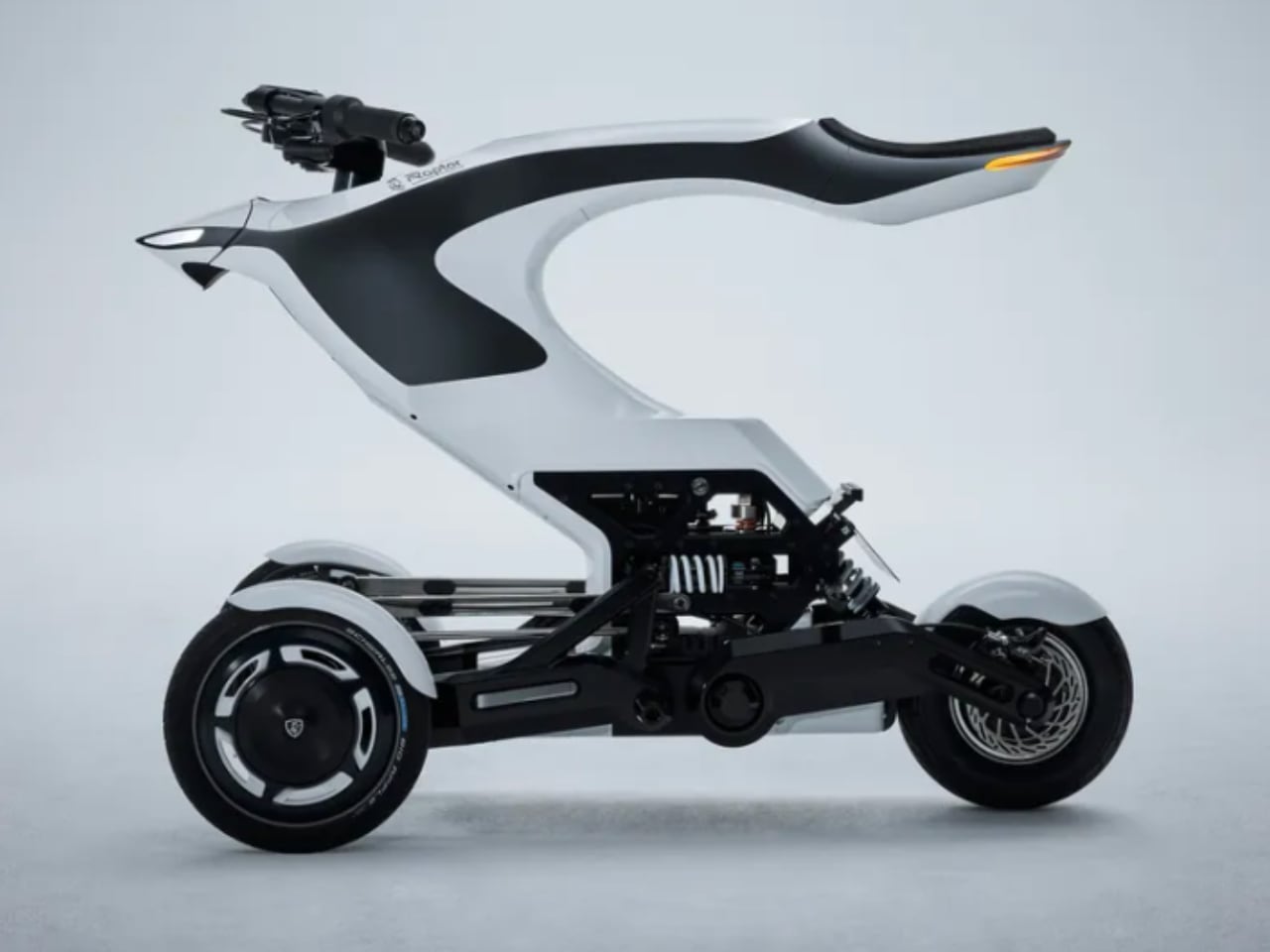
Raptor: Next-Gen Mobility Platform – The Future of Sustainable Transportation
Mobility is evolving quickly, with advancements in electric platforms and autonomous driving reshaping the future of transportation. The Raptor: Next-Gen Mobility Platform, a 2024 Good Design Award winner, embodies this transition. Developed as a versatile and energy-efficient platform, Raptor pushes the boundaries of urban and shared mobility solutions. Its design and technological integration position it as a leading innovation in next-generation mobility, balancing performance, sustainability, and accessibility.
Background
The Raptor platform was created to address modern mobility challenges like urban congestion, environmental sustainability, and the demand for flexible, modular transportation solutions. Traditional vehicle designs limit adaptability and scalability, making it hard to keep up with the rapidly changing needs of urban environments. The Raptor platform was designed to serve multiple use cases, from personal transportation to shared mobility services, while maintaining a low carbon footprint.
Urban centers worldwide seek efficient transportation systems that reduce emissions and ease traffic congestion. Raptor’s modular architecture meets these needs, adapting to various types of vehicles, from lightweight personal transporters to shared shuttles. Its development reflects the growing trend toward electric platforms that fit seamlessly into the smart cities of tomorrow.
Specifications
Platform Type: A modular, electric-powered platform designed for multiple vehicle configurations.
Powertrain: Fully electric with energy-efficient propulsion systems aimed at reducing emissions.
Modular Design: Can be adapted for different vehicle formats, from personal mobility devices to larger public transportation vehicles.
Autonomous Capabilities: Equipped with advanced sensors and software, allowing for future autonomous driving applications.
Sustainability: Energy-efficient systems paired with recyclable materials for a reduced environmental impact.
Connectivity: Integrates with smart city infrastructure and other digital ecosystems for seamless operation in urban settings.
Why the Design is Notable
The Raptor platform sets itself apart with its forward-thinking approach to mobility. Unlike traditional platforms designed for a single purpose, the Raptor features a modular design that can be configured for different vehicle types. This provides an ideal solution for various mobility needs, from personal e-scooters to shared shuttles and delivery vehicles.
Another highlight is its environmental focus. The electric powertrain reduces emissions and ensures energy efficiency, aligning with global trends toward sustainable urban living. Using recyclable materials lowers its ecological footprint, making it a responsible choice for future transportation needs.
The Raptor’s integration with smart city systems and potential for autonomous driving ensure that it can evolve with advancing technology. Built to work seamlessly with digital infrastructures, it offers the potential for autonomous fleet management and efficient urban traffic flow.
Evaluation Comments
The Good Design Award judges were impressed by the Raptor platform’s versatility, modularity, and sustainability. They highlighted how the platform adapts to various vehicle types without sacrificing efficiency or performance. The ability to create different vehicle formats from the same structure is a significant innovation that sets the Raptor apart.
The platform’s environmental impact also stood out. Its energy-efficient electric powertrain and use of recyclable materials are crucial steps toward making urban mobility more sustainable. The platform’s readiness for smart city integration and future autonomous driving systems was also a key factor in its recognition, showcasing its long-term potential in urban transportation.
Yanko Design’s Take
We see the Raptor platform as a major advancement in next-generation mobility. Its modular nature provides flexibility in vehicle design and represents a sustainable shift in how we approach transportation in cities. The platform’s adaptability makes it relevant for various uses, from personal mobility devices to shared transport solutions.
What is remarkable to us is how the Raptor is built for the future. With its electric powertrain, it tackles the critical issue of reducing emissions in congested cities, while its potential for autonomous driving aligns it with future technology. Its integration into smart city ecosystems shows a commitment to solving today’s mobility problems and preparing for tomorrow’s challenges.
3 Things We Love About the Design
Modular and Adaptable Design
The Raptor platform’s modular design is a distinctive feature. It allows manufacturers to create multiple vehicle formats from the same platform, making it highly versatile. Whether it’s a compact e-scooter or a larger shared shuttle, the Raptor accommodates various needs, offering flexibility that is rare in the mobility space.
Sustainability at Its Core
We also admire the focus on sustainability. The electric powertrain ensures zero emissions during operation, contributing to cleaner air in urban areas. Additionally, the platform’s use of recyclable materials in its construction means it has a reduced environmental impact, aligning with global goals of reducing waste and promoting green living.
Smart City Integration and Future-readiness
The Raptor platform’s ability to integrate with smart city infrastructure is forward-thinking. Its built-in connectivity and potential for autonomous driving make it a future-proof solution that can evolve with urban transportation systems. As cities become smarter and more reliant on digital infrastructure, the Raptor’s seamless integration offers a clear advantage.
The Raptor: Next-Gen Mobility Platform raises the bar for urban transportation solutions. Its versatility, sustainability, and ability to integrate with advanced digital systems position it as a powerful example of how design and technology can work together to shape the future of mobility.
We're in the awkward stretch between Amazon's October Prime Day event and next month's Black Friday sales, so it's admittedly a slow week for tech deals. Nevertheless, we've found a few steep discounts on premium OLED TVs from Samsung and LG, the entry-level Apple Pencil, our favorite cheap running earbuds, recommended power banks, Sony headphones and more. Here are the best tech deals from this week that you can still buy today.
Samsung S90C OLED TV (65") for $1,300 at Best Buy ($300 off MSRP): The S90C's QD-OLED panel mixes the typical advantages of an OLED TV — excellent contrast with deep black tones, clear motion, wide viewing angles and so on — with a layer of quantum dots. The latter helps it deliver a wider gamut of more vibrant colors and generally improved brightness compared to traditional OLED sets. This model is from 2023, but it receivedhighmarksacrossthe web, and the differences between it and the newer S90D aren't massive. For reference, that updated set costs $300 more as of this writing. We may see further discounts as we get closer to Black Friday, of course, but for now this deal is only about $20 more than the lowest price we've tracked for the 65-inch model. It's also available at Amazon, albeit from a third-party seller.
LG C3 OLED TV (65") for $1,297 at Amazon ($203 off): The LG C3 is another well-regarded premium TV from last year. Its WOLED panel isn't quite as bright or color-rich as a good QD-OLED set, but it offers top-notch contrast, motion response and viewing angles. Like the S90C, it has four HDMI 2.1 ports and can play in 4K at 120Hz, the maximum refresh rate supported by the PlayStation 5 and Xbox Series X. Unlike the S90C, it supports the popular Dolby Vision HDR format. Its webOS software is generally easier to navigate than Samsung's Tizen platform, too. Outside of select in-store deals and a very brief dip to $1,245 earlier this year, this is the lowest price we've seen for the 65-inch variant. Again, there's a newer model available, but most reviews suggest that it's not a huge upgrade, and it costs $300 extra right now.
The Sony ULT Wear.
Photo by Billy Steele/Engadget
Sony ULT Wear for $148 at Amazon ($52 off): While the ULT Wear aren't a top pick in our guide to the best wireless headphones, they're worth considering at this price if you prefer a (very) bass-heavy sound profile. Decent active noise cancellation, a refined design, above-average call quality and a solid 40-ish hours of battery life add to the appeal, though again, you really need to be a "basshead" to enjoy them. We gave the pair a score of 78 in our review. This deal marks an all-time low, and it's also available at Walmart.
Apple Pencil (USB-C) for $65 at Walmart ($14 off): Here's a new low for Apple's entry-level iPad stylus. This model doesn't support pressure sensitivity or wireless charging, so those who can afford to step up to one of Apple's more expensive Pencils should do so. But if you just want a pen for casual doodling or note-taking — or if you own a 10th-gen iPad, which doesn't support those better options — this one should do the job at a more palatable price.
JLab Go Air Sport for $14 at Amazon ($16 off): The Go Air Sport is the budget pick in our guide to the best running headphones. They aren't the cleanest-sounding set of wireless earbuds around, but their hook-style design stays in place while you're on the move, they have an IP55 water-resistance rating and, most importantly, they're very affordable. This deal is among the lowest prices we've tracked; just clip the $6 on-page coupon, and note that it only applies to the teal colorway. Other colors are also on sale for $20, which is still a decent value.
The Amazon Fire TV Stick 4K Max.
Photo by Jeff Dunn / Engadget
Amazon Fire TV Stick 4K Max + Xbox Core Wireless Controller (Sky Cipher) + 1-month Xbox Game Pass Ultimate for $80 at Amazon ($67 off): If you happen to be in the market for a streaming stick and a new Xbox controller, Amazon is bundling its top-end Fire TV Stick with said gamepad at a discount. This is mainly a deal because it includes the "Sky Cipher" version of the Series X/S pad, which usually costs between $60 and $70 on its own. (If you don't care about the color, you'll likely be able to save more by getting the Max and a standard Xbox controller separately around Black Friday.) Amazon is selling this bundle to push the streamer's ability to play Xbox games over the cloud, so it's also throwing in a month of Game Pass Ultimate. The 4K Max still tends to promote Prime Video and other Amazon services above all else, but it's fast, and it supports all the major apps. We've also found it to be a surprisingly decent retro gaming machine.
Resident Evil 4 (PS5) for $22 at Amazon ($8 off):In other video game deals, this is an all-time low for the physical PS5 copy of last year's Resident Evil 4 remake. The Xbox version is available for the same price. Just note that you can save a couple bucks through PSN if you don't mind buying digital.
Anker Prime Power Bank for $90 at Amazon ($40 off): The Anker Prime is the premium pick in our guide to the best power banks. It might be overkill for most, but its hefty 20,000mAh capacity and pair of 100W USB-C ports allow it to recharge multiple laptops, let alone smartphones and tablets, at full speed. There's a 65W USB-A port on top of that, plus a handy display that keeps you updated on the battery's status. We've seen this discount a few times before, but it matches an all-time low. The deal is also available at Anker.com with the code WS7DV2DWW6CW.
Samsung Bar Plus USB flash drive (128GB) for $13 at Amazon ($8 off): The Bar Plus is a basic but dependable thumb drive if all you need is a simple stick to hold and transfer files. We saw this discount during Amazon's October Prime Day sale earlier in the month, but it comes within a dollar of the drive's all-time low all the same. The 128GB model has usually sold between $15 and $20 over the past year.
Razer Basilisk V3 gaming mouse for $40 at Amazon ($30 off):We recommend the Basilisk V3 in our gaming mouse buying guide for those who don't mind using a cable and prefer a more ergonomic, right-handed shape. This deal has been live for a couple of weeks but still matches the device's all-time low. Note that Razer released an updated version with an improved sensor earlier this month — we'll test that one soon, but the upgrades appear to be fairly minor in practice.
Follow @EngadgetDeals on Twitter and subscribe to the Engadget Deals newsletter for the latest tech deals and buying advice.
This article originally appeared on Engadget at https://www.engadget.com/deals/samsung-and-lg-oled-tvs-are-close-to-all-time-lows-plus-the-rest-of-the-weeks-best-tech-deals-171803519.html?src=rss
We're in the awkward stretch between Amazon's October Prime Day event and next month's Black Friday sales, so it's admittedly a slow week for tech deals. Nevertheless, we've found a few steep discounts on premium OLED TVs from Samsung and LG, the entry-level Apple Pencil, our favorite cheap running earbuds, recommended power banks, Sony headphones and more. Here are the best tech deals from this week that you can still buy today.
Samsung S90C OLED TV (65") for $1,300 at Best Buy ($300 off MSRP): The S90C's QD-OLED panel mixes the typical advantages of an OLED TV — excellent contrast with deep black tones, clear motion, wide viewing angles and so on — with a layer of quantum dots. The latter helps it deliver a wider gamut of more vibrant colors and generally improved brightness compared to traditional OLED sets. This model is from 2023, but it receivedhighmarksacrossthe web, and the differences between it and the newer S90D aren't massive. For reference, that updated set costs $300 more as of this writing. We may see further discounts as we get closer to Black Friday, of course, but for now this deal is only about $20 more than the lowest price we've tracked for the 65-inch model. It's also available at Amazon, albeit from a third-party seller.
LG C3 OLED TV (65") for $1,297 at Amazon ($203 off): The LG C3 is another well-regarded premium TV from last year. Its WOLED panel isn't quite as bright or color-rich as a good QD-OLED set, but it offers top-notch contrast, motion response and viewing angles. Like the S90C, it has four HDMI 2.1 ports and can play in 4K at 120Hz, the maximum refresh rate supported by the PlayStation 5 and Xbox Series X. Unlike the S90C, it supports the popular Dolby Vision HDR format. Its webOS software is generally easier to navigate than Samsung's Tizen platform, too. Outside of select in-store deals and a very brief dip to $1,245 earlier this year, this is the lowest price we've seen for the 65-inch variant. Again, there's a newer model available, but most reviews suggest that it's not a huge upgrade, and it costs $300 extra right now.
The Sony ULT Wear.
Photo by Billy Steele/Engadget
Sony ULT Wear for $148 at Amazon ($52 off): While the ULT Wear aren't a top pick in our guide to the best wireless headphones, they're worth considering at this price if you prefer a (very) bass-heavy sound profile. Decent active noise cancellation, a refined design, above-average call quality and a solid 40-ish hours of battery life add to the appeal, though again, you really need to be a "basshead" to enjoy them. We gave the pair a score of 78 in our review. This deal marks an all-time low, and it's also available at Walmart.
Apple Pencil (USB-C) for $65 at Walmart ($14 off): Here's a new low for Apple's entry-level iPad stylus. This model doesn't support pressure sensitivity or wireless charging, so those who can afford to step up to one of Apple's more expensive Pencils should do so. But if you just want a pen for casual doodling or note-taking — or if you own a 10th-gen iPad, which doesn't support those better options — this one should do the job at a more palatable price.
JLab Go Air Sport for $14 at Amazon ($16 off): The Go Air Sport is the budget pick in our guide to the best running headphones. They aren't the cleanest-sounding set of wireless earbuds around, but their hook-style design stays in place while you're on the move, they have an IP55 water-resistance rating and, most importantly, they're very affordable. This deal is among the lowest prices we've tracked; just clip the $6 on-page coupon, and note that it only applies to the teal colorway. Other colors are also on sale for $20, which is still a decent value.
The Amazon Fire TV Stick 4K Max.
Photo by Jeff Dunn / Engadget
Amazon Fire TV Stick 4K Max + Xbox Core Wireless Controller (Sky Cipher) + 1-month Xbox Game Pass Ultimate for $80 at Amazon ($67 off): If you happen to be in the market for a streaming stick and a new Xbox controller, Amazon is bundling its top-end Fire TV Stick with said gamepad at a discount. This is mainly a deal because it includes the "Sky Cipher" version of the Series X/S pad, which usually costs between $60 and $70 on its own. (If you don't care about the color, you'll likely be able to save more by getting the Max and a standard Xbox controller separately around Black Friday.) Amazon is selling this bundle to push the streamer's ability to play Xbox games over the cloud, so it's also throwing in a month of Game Pass Ultimate. The 4K Max still tends to promote Prime Video and other Amazon services above all else, but it's fast, and it supports all the major apps. We've also found it to be a surprisingly decent retro gaming machine.
Resident Evil 4 (PS5) for $22 at Amazon ($8 off):In other video game deals, this is an all-time low for the physical PS5 copy of last year's Resident Evil 4 remake. The Xbox version is available for the same price. Just note that you can save a couple bucks through PSN if you don't mind buying digital.
Anker Prime Power Bank for $90 at Amazon ($40 off): The Anker Prime is the premium pick in our guide to the best power banks. It might be overkill for most, but its hefty 20,000mAh capacity and pair of 100W USB-C ports allow it to recharge multiple laptops, let alone smartphones and tablets, at full speed. There's a 65W USB-A port on top of that, plus a handy display that keeps you updated on the battery's status. We've seen this discount a few times before, but it matches an all-time low. The deal is also available at Anker.com with the code WS7DV2DWW6CW.
Samsung Bar Plus USB flash drive (128GB) for $13 at Amazon ($8 off): The Bar Plus is a basic but dependable thumb drive if all you need is a simple stick to hold and transfer files. We saw this discount during Amazon's October Prime Day sale earlier in the month, but it comes within a dollar of the drive's all-time low all the same. The 128GB model has usually sold between $15 and $20 over the past year.
Razer Basilisk V3 gaming mouse for $40 at Amazon ($30 off):We recommend the Basilisk V3 in our gaming mouse buying guide for those who don't mind using a cable and prefer a more ergonomic, right-handed shape. This deal has been live for a couple of weeks but still matches the device's all-time low. Note that Razer released an updated version with an improved sensor earlier this month — we'll test that one soon, but the upgrades appear to be fairly minor in practice.
Follow @EngadgetDeals on Twitter and subscribe to the Engadget Deals newsletter for the latest tech deals and buying advice.
This article originally appeared on Engadget at https://www.engadget.com/deals/samsung-and-lg-oled-tvs-are-close-to-all-time-lows-plus-the-rest-of-the-weeks-best-tech-deals-171803519.html?src=rss
Move over Sony, Canon is trying to take the lead in bleeding-edge tech for mirrorless cameras. The company’s new $4,300, 45-megapixel EOS R5 II offers advanced features like eye-tracking autofocus (AF) that can’t be found on any recent Sony model. The new camera is also pushing Sony’s A1 and other models in the key areas of speed, video and autofocus. And it’s arguably more desirable than Canon’s own upcoming flagship R1 as it has nearly double the resolution.
I’ve had the R5 II for a few weeks, evaluating not only its practicality and speed for both professionals and serious amateurs, but also how it stacks up against Sony's A1, the gold standard for high-resolution mirrorless cameras. And frankly, I'm impressed.
Design and handling
I love the handling of Canon’s mirrorless cameras and the EOS R5 II may be its sweetest design yet.
The body and controls are very similar to the R5, apart from a couple of changes. Canon moved the power switch to the top right where it’s easier to access, and added a dedicated photo/video switch on the left. The company gave photo and video modes their own settings, making it much easier to jump from one to the other. Canon also made a rare change to its menu system, adding a new olive green tab for control customization. This new tab also contains the settings for eye control AF tracking.
Otherwise, the R5 II’s layout is similar to its predecessor. That’s a good thing, as the control placement is the most natural of any camera I’ve used, from the comfortable grip that provides a secure place to hold, to the nicely tactile controls that fall perfectly to hand.
Moving to the displays, the R5’s 2.1-million-dot fully articulating rear touch screen was already sharp and easy to use, so Canon didn’t mess with that. The R5 II has the same sharp 5.76-million dot OLED electronic viewfinder as before, but the company boosted the brightness and redesigned the optics to accommodate the new eye control autofocus.
Steve Dent for Engadget
The R5 II supports CFexpress Type B cards for capturing 8K RAW video, along with SD UHS II if you’re okay with cheaper and slower media. Other key features include headphone and microphone ports, a full-sized HDMI input and a USB-C port for charging and transfers. Canon also released three new battery grips, including one with a cooling fan that extends video shooting times, as I’ll discuss soon.
I’m a big fan of the R5 II’s design, and my pro photographer friend agreed, saying that like most Canon products, the R5 II's ergonomics are so good the device is comfortable to hold for long periods of time. He also said he slightly preferred the R5 II's handling to his Sony A9 III and A1 cameras, thanks to how easy it is to use with one hand.
Performance
Steve Dent for Engadget
The EOS R5 II offers a blend of speed and resolution that rivals and sometimes even surpasses the Nikon Z8 and Sony A1. That's mostly due to the new stacked 45-megapixel sensor and updated Digic X processor to crunch all those pixels.
The R5 II can shoot bursts at up to 30 fps in electronic shutter mode with a blackout-free view. That’s slower than the R1, but I’ll trade a small hit in performance in exchange for the extra resolution. I was able to capture about 100 RAW frames before the buffer filled. Speeds drop to 12 fps with the mechanical shutter, but there’s rarely any need to use it because there’s no issue with rolling shutter distortion – thanks to the stacked sensor. The R5 II’s new pre-capture mode can record up to 15 photos when you half-press the shutter. That’s great for photojournalists or wildlife photographers who may otherwise miss a shot by a fraction of a second.
Canon’s "Dual Pixel" autofocus has always been good, but on the R5 II it’s the best I’ve ever seen. When shooting bursts with a subject biking toward the camera, 80 percent of my shots were in focus. And the EOS R5 II now tracks animals, birds and vehicles, on top of faces, eyes and bodies of people.
Steve Dent for Engadget
The camera also has a couple of new autofocus tricks, including one called action priority. That keeps the AF focused around the ball in three specific sports: volleyball, basketball and soccer. I didn’t notice any particular AF improvement, as my hit rate seemed to be about the same without it, but dedicated sports photographers might see the difference.
Another new function keeps the tracking point on your subject even if someone crosses in front of them. That did seem to work well most of the time, but it would occasionally wander off and lock onto someone else.
When Canon launched the R5 II and R1 in July, it introduced pre-registered person priority AF that lets your camera memorize up to ten specific people, like star athletes for instance. This feature functioned as advertised, switching AF to a registered person and tracking them instead of other people in the scene.
Finally, I tested Canon’s famous eye control AF that detects where the photographer is looking and moves the subject tracking point there. This is an undeniably cool feature and has improved compared to the first implementation on the EOS R3, but is still too unreliable for professional use.
Steve Dent for Engadget
In fact, the pro photographer friend I mentioned pointed out that though eye control feels futuristic, it’s still a bit too flakey for paid gigs where focus reliability is paramount.
On the R5 II, in-body stabilization is the best I’ve seen on any Canon camera, keeping the sensor rock-steady for handheld shooting, with up to 8.5 stops of shake reduction. It was so reliable that I never felt the need to carry a tripod when using slow shutter speeds.
I’ve always found Sony cameras to be slightly superior to Canon when it comes to autofocus and speed. I can no longer say that, as the EOS R5 II is very even with Sony’s latest models. My Sony-using photographer friend agreed, saying he couldn’t see any real difference between the R5 II his A1 or A9 III.
Image quality
Image quality on the R5 II is largely the same as the R5, and that’s a good thing. The 45-megapixel sensor produces photos as good as or better than the Sony A1 at a much cheaper price, and compares favorably to Nikon’s similarly priced Z8.
When shooting in RAW mode at lower ISOs, the R5 II offers good dynamic range in high contrast bright and dark scenes. Like other stacked sensor cameras, though, there’s a bit more noise than with regular CMOS sensors. Quality also drops slightly in electronic shutter mode, so it’s better to use the mechanical shutter in tricky lighting conditions.
High ISO performance isn’t too bad for such a high-resolution camera either, with noise staying under control up to ISO 12,800. After that, the R5 II doesn’t quite measure up to models like the Nikon Z7 II or Sony A7R V, as both of those offer cleaner images with less grain.
Steve Dent for Engadget
If you don’t want the hassle of processing RAW, JPEG rendering is excellent straight out of the camera, with well balanced sharpening and noise reduction. For low-light shooting, skin tones are flattering at all ISO settings, and the best among all cameras in this price range.
One new notable feature on the R5 II is the AI-powered upscaling applied after the photo is taken. The result isn’t quite as good as a dedicated app like Topaz, but it’s not bad considering it’s in-camera processing.
Video
The original EOS R5 would have been a darn near perfect video camera if not for its pesky overheating issues. Canon has improved this to a degree with a new passive cooling design and $400 fan grip. With those updates, heat is only really an issue at the highest resolutions (8K 60p and 4K 120p). However, these limitations are less severe on the rival Nikon Z8.
Steve Dent for Engadget
Aside from the heating issue, the EOS R5 II has impressive specs. It can shoot up to 8K 60p and 4K 120p video, but does so with far less rolling shutter than the R5, again thanks to the new stacked sensor. The camera now has Canon Log 2 (CLog 2) capability that allows for higher dynamic range capture than the R5.
Video autofocus is outstanding at all resolutions, with rapid acquisition of the subject and reliable tracking. Face- and eye-detection work very well, and I only occasionally noticed AF lag with fast-moving subjects.
As for stabilization, I could shoot smooth footage while handheld in optical mode with no crop, provided I didn’t move the camera too much. Digital stabilization allowed for more movement while only cropping in a touch, and the enhanced setting let me shoot smoothly while walking with a 1.5x crop. Panasonic’s S5 II is still the best in this regard, but the R5 II is close behind.
As for quality, video on the EOS R5 II is extremely sharp, particularly with supersampled 4K HQ. Other 4K modes are subsampled, but nearly as sharp. Rolling shutter is well managed, so you won’t really notice it unless you do whip pans or jostle the camera while shooting.
Canon’s excellent color science delivers warm skin tones and accurate colors. RAW video allows lots of room for adjustments in post, while the CLog 2 brings dynamic range up to 14 stops to enable shooting in contrasty conditions. With all this, the Canon R5 II is now my go-to camera for shooting video — even over Sony and Panasonic models.
Wrap-up
Steve Dent for Engadget
The $4,300 EOS R5 II is Canon’s best camera in years, thanks to improvements in key areas like autofocus, video, shooting speeds and overall feel. Newly introduced tech like eye control AF is less useful, but it’s still nice to see Canon try to innovate, and the feature should improve in subsequent models.
The R5 II is up against some great competition in this price range, especially the $4,000 Nikon Z8 that holds its own against this camera in most situations. However, Canon’s autofocus is slightly faster and more reliable, and I greatly prefer the R5 II’s handling. The only other full-frame option with a stacked sensor and similar resolution is the Sony A1, which costs $2,200 more.
The main issues with the R5 II are overheating, the wonkiness of action priority and unreliable eye control autofocus. However, it now stacks up extremely well against Sony's A1 in terms of speed and autofocus, while offering superior stabilization and handling. Which one you choose may simply come down to brand preference or existing lens collection.
This article originally appeared on Engadget at https://www.engadget.com/cameras/canon-eos-r5-ii-review-canons-most-powerful-camera-yet-puts-sony-on-notice-160013865.html?src=rss
Qualcomm has canceled its Windows on ARM PC dev kit, otherwise called the Snapdragon X Elite Developer Kit. Refunds are going out, sales have ceased and support for the kit has stopped, according to reporting by The Verge. It was originally supposed to ship in June before being delayed.
In an email to customers, Qualcomm chalked the whole thing up to quality control. It said the mini PC “comprehensively has not met our usual standards of excellence” and “we have made the decision to pause this product and the support of it, indefinitely.” Interestingly, some kits had already been mailed out to consumers. All units will be refunded, even those that have shipped.
As previously mentioned, it was originally supposed to launch back in June alongside the chips that powered those first Copilot Plus PCs. Qualcomm hasn’t given a reason as to why it took months to make the decision to cancel the product.
Developer Jeff Geerling received the kit and gave it a teardown and review. He said it landed “with a thud” and called out the lack of Linux support and resale restrictions. Geerling also found that the unit was missing an HDMI port, despite having all of the chips in place for an internal DisplayPort to HDMI conversion.
Some have speculated that this HDMI port issue caused the production delays and even led to the eventual cancellation. To that end, Qualcomm emailed customers last month to alert them they were planning on shipping the dev kit with a USB-C to HDMI dongle instead of a traditional HDMI port.
Whatever the reason for the cancellation, this kit was supposed to be a crucial item of hardware to help devs port apps to Windows on Arm. Microsoft and Qualcomm have been urging developers to ready their apps for Snapdragon X Elite laptops.
This article originally appeared on Engadget at https://www.engadget.com/apps/qualcomm-axes-its-windows-on-arm-pc-dev-kit-153303185.html?src=rss
Meditation is known to offer mental well-being benefits by encouraging the observation of thoughts neutrally before refocusing attention on the breath or another focal point. Essentially, meditation encourages observing thoughts and emotions without fixating on positives or avoiding negatives. Even though meditation doesn’t demand equipment, meditation apps, cushions, chairs, pods, and innovative products could provide a helpful start and assist in sustaining the routine.
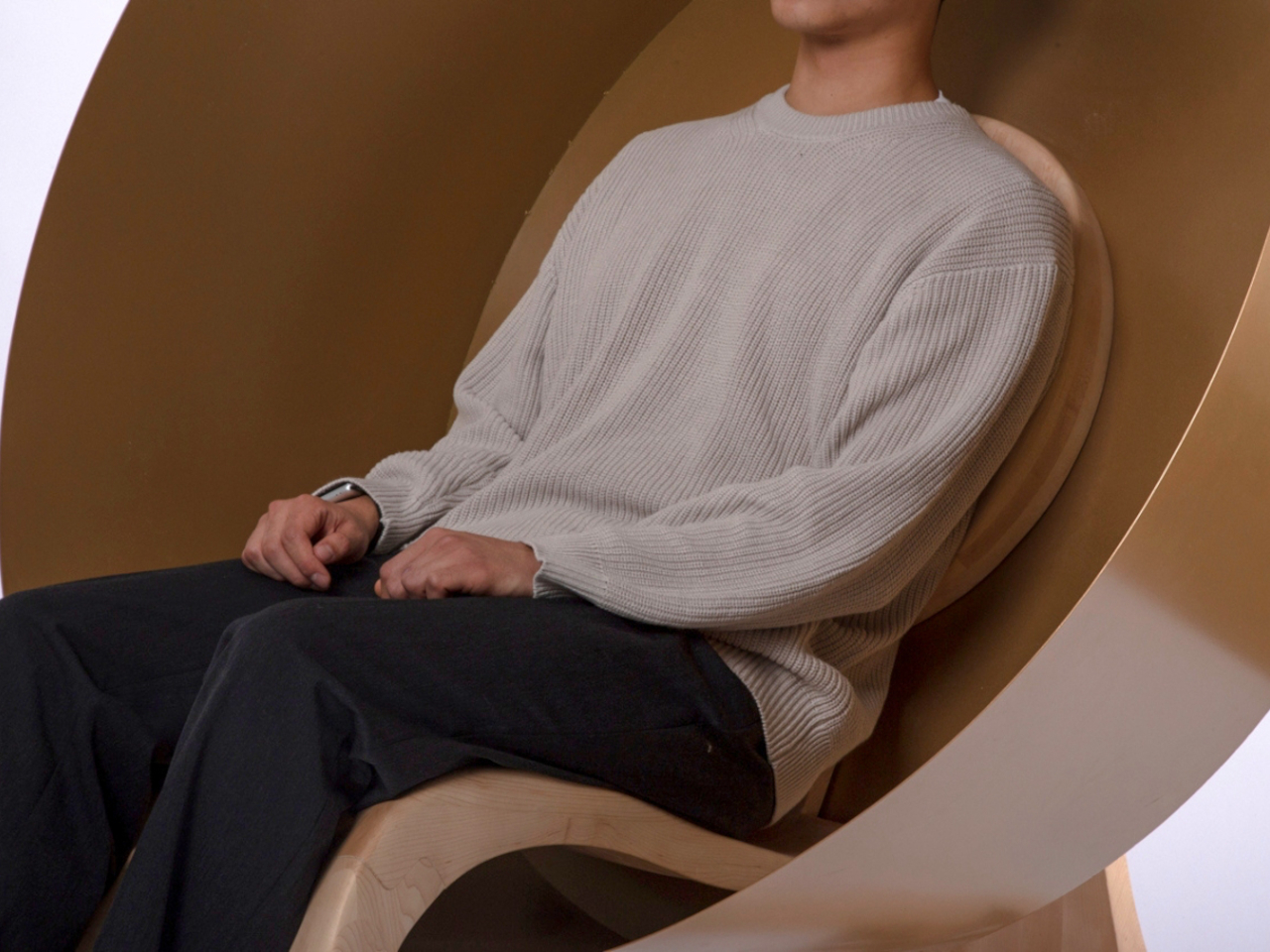
For anyone seeking a momentary escape from stress, the “Goyo” chair offers a compact solution. This avant-garde piece draws inspiration from Tibetan singing bowls used in meditation, featuring a rounded steel design that cocoons you in tranquility. The chair’s bowl-like shape, complemented by a smooth maple wood seat and stand, cocoons you, shielding you against stressors. Its ergonomically angled backrest and seat enhance comfort during meditation, while the option to strike the bowl produces soft, soothing sounds. While it has museum-like appearance, the chair is designed for relaxation and comfort, providing a peaceful oasis within a hectic day.
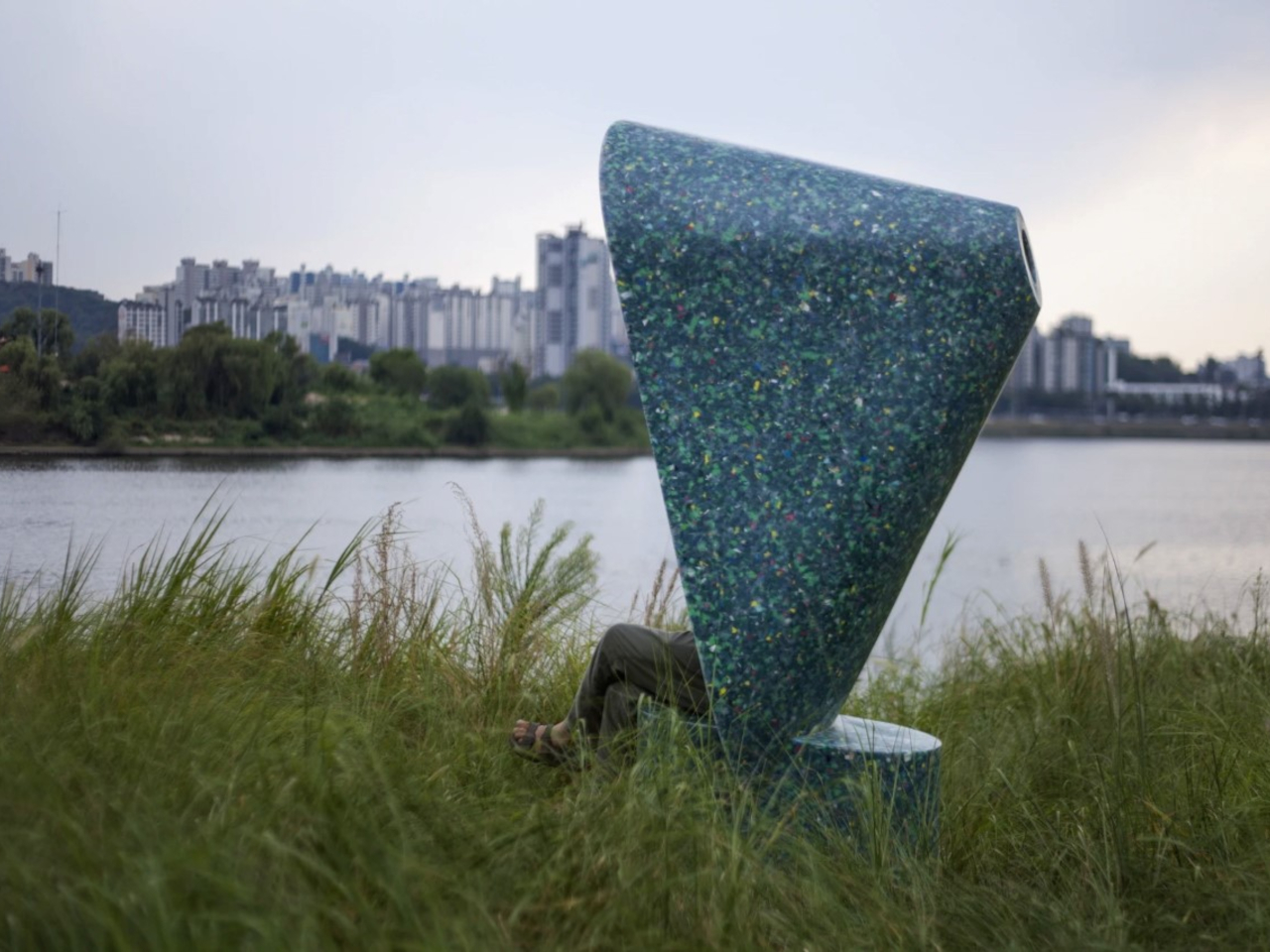
The Amplification Of The Senses Chair is a uniquely designed public seat along Seoul’s Han River. It enhances the environment’s natural sounds to create a relaxing ASMR experience. Crafted to encourage reflection and tranquility, the chair’s megaphone-shaped backrest amplifies river and nature sounds while blocking peripheral vision for focused serenity. Made from recycled plastic waste, it’s an eco-friendly effort that cleanses both the environment and the mind. Nature-focused, sustainable, and calming, these chairs redefine relaxation and environmental responsibility.
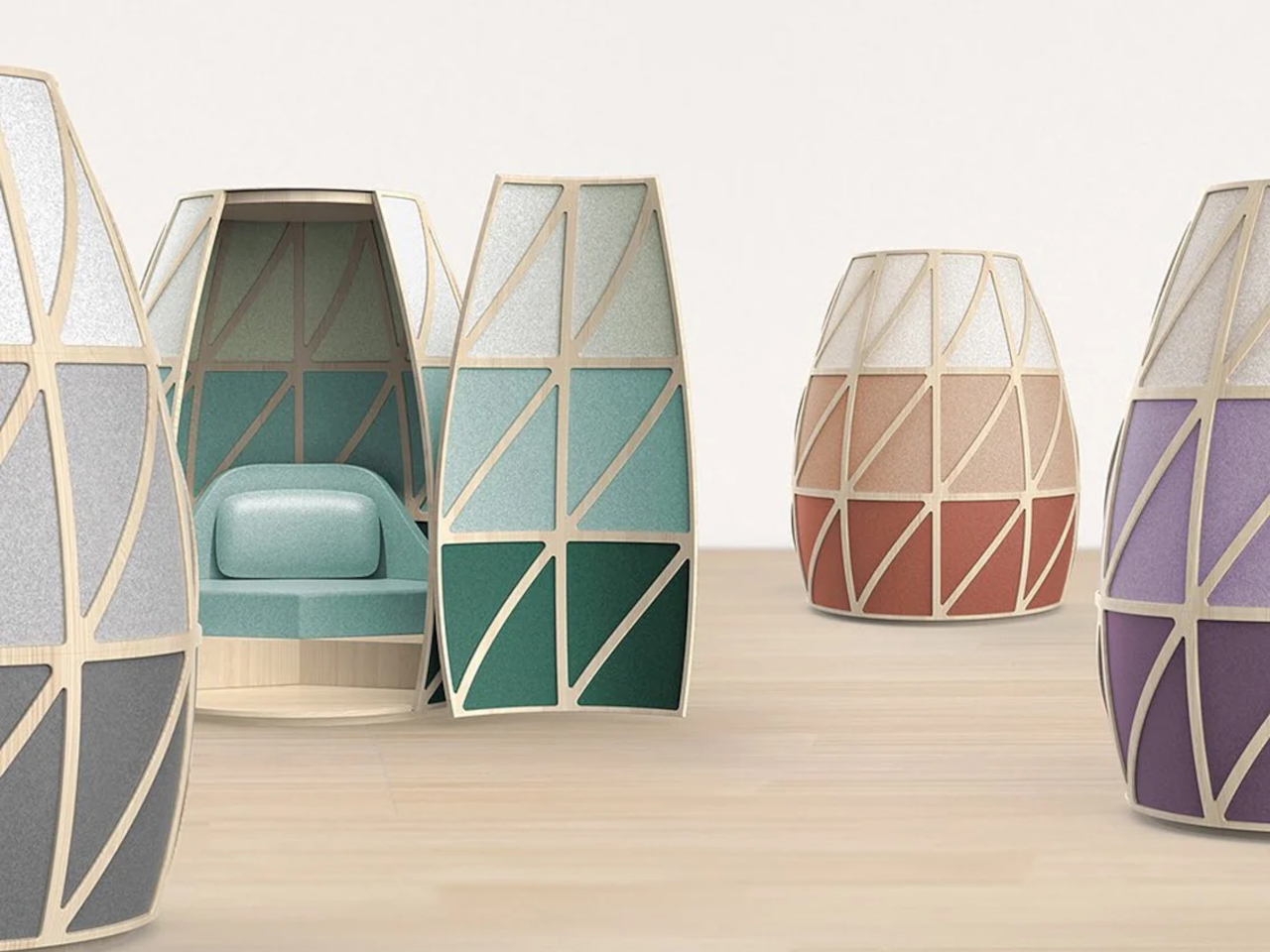
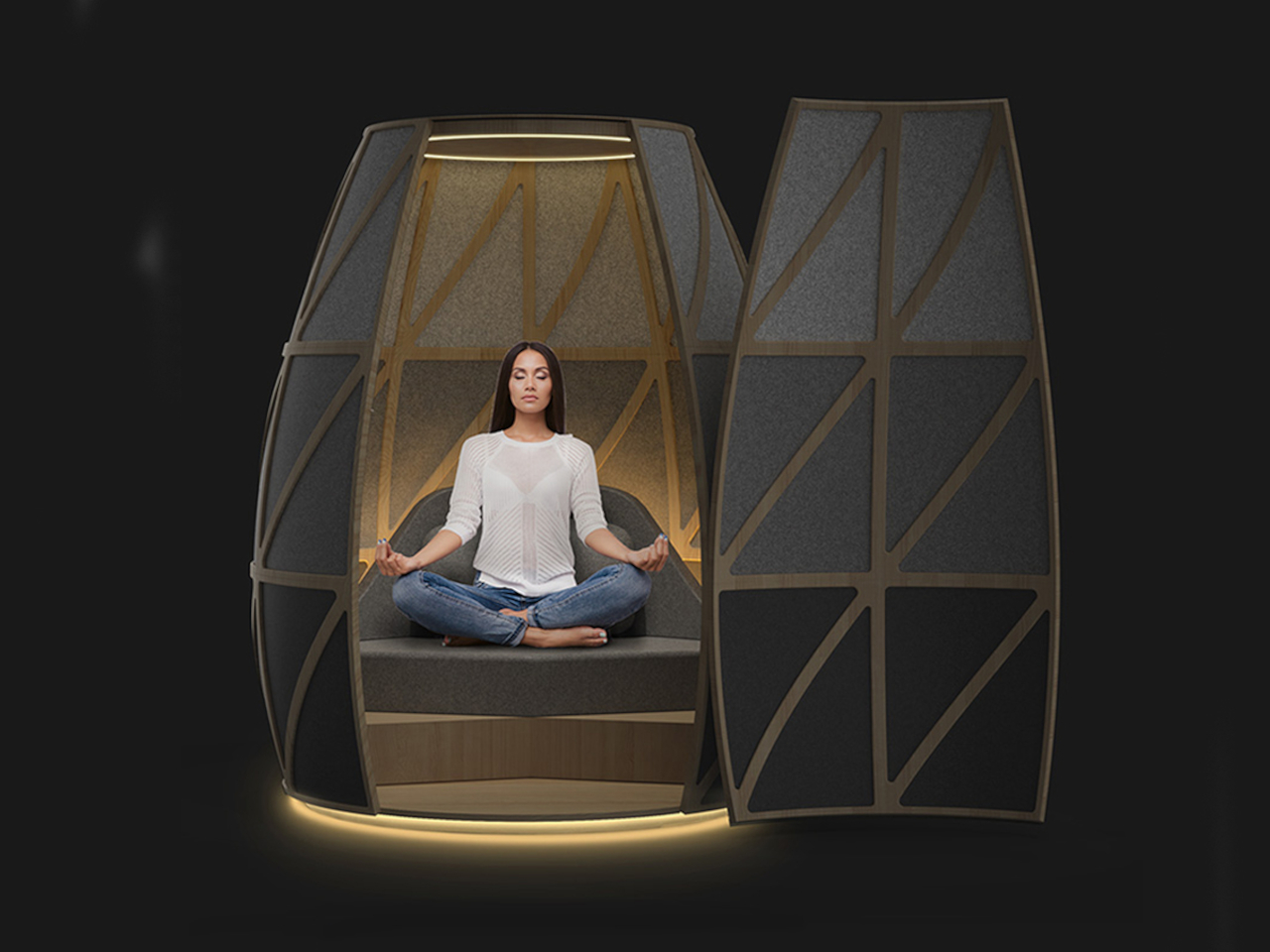
The Iris pod, designed by Deepak Chopra and Yves Behar, offers a tranquil sanctuary amid bustling environments. As remote work reshapes office dynamics, integrating purposeful breaks has gained significance. Iris pods, a collaboration between OpenSeed, Deepak Chopra, fuseproject, and Yves Behar, address this need. These meditation pods, located in high-traffic areas like offices, cocoon users in peaceful isolation. Studies reveal that using Iris pods enhances workflow and meditation benefits. The pods feature essential oils, immersive sound and light tech, and guided meditations curated with Chopra’s expertise.
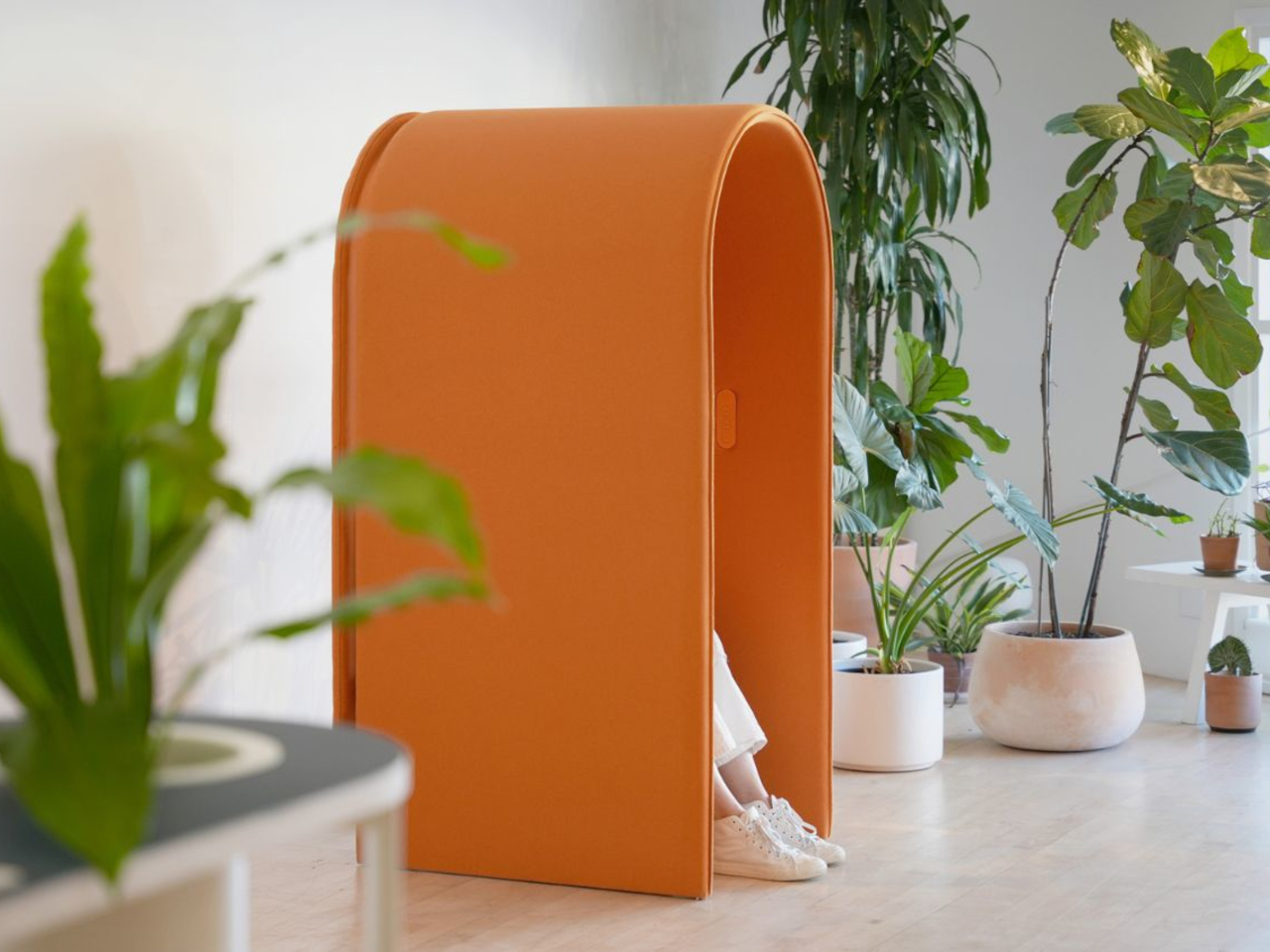
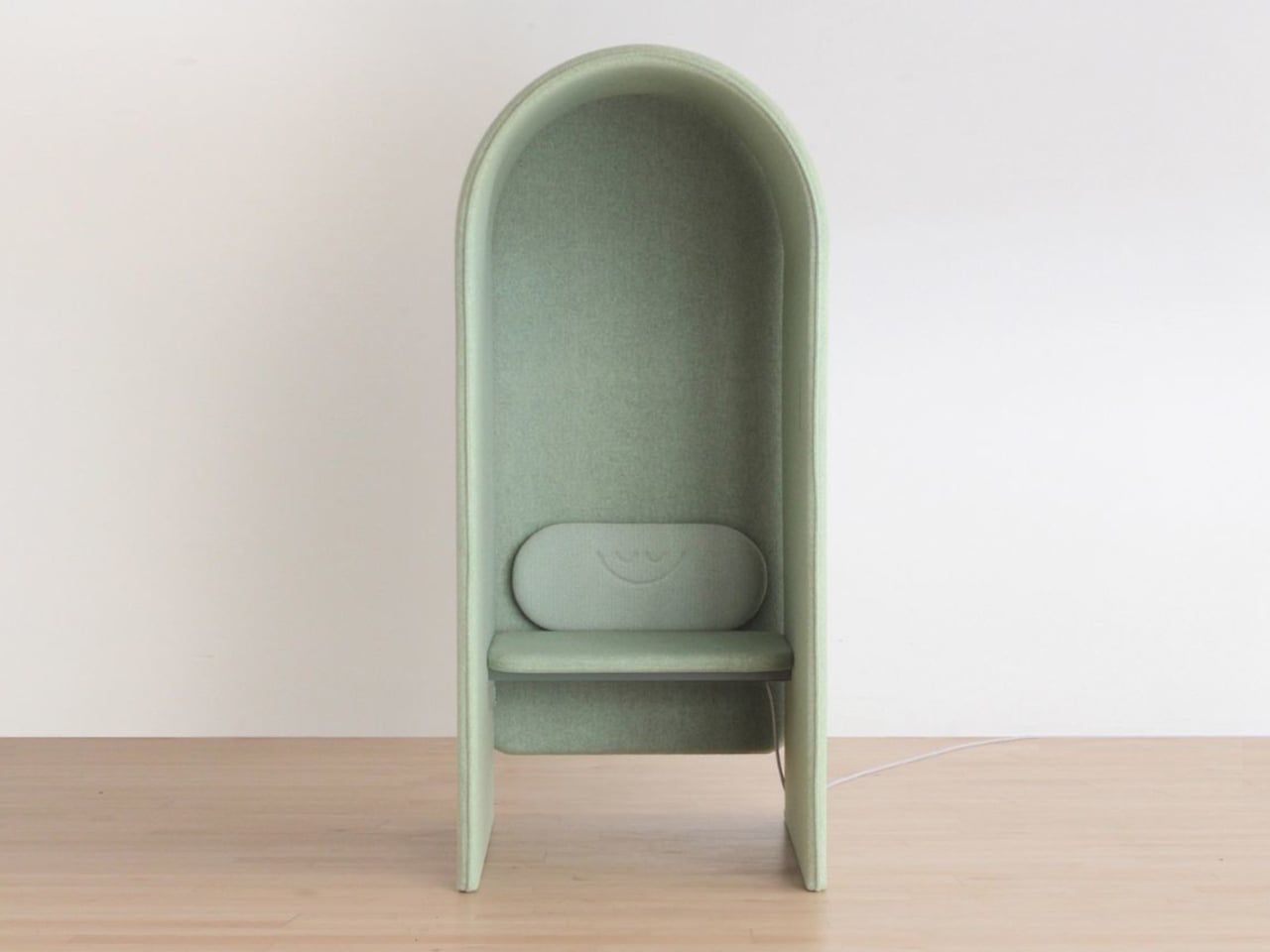
A collaboration between a design studio and Headspace has birthed the Headspace Pod – a unique furniture piece designed for public spaces like offices, universities, and lobbies. Resembling a large curved mailbox, it offers a cushioned seat and backrest for comfortable meditation sessions. Free from screens or plugs, the pod promotes distraction-free meditation, aided by built-in directional audio. Three buttons inside the pod allow you to choose from 10-minute sessions for relaxation, refreshment, or focus. While not fully enclosed, its ergonomic design aims to provide a calming and focused atmosphere. Tailored for breaks in various public spaces, the Headspace Pod introduces a new way to meditate.
Experience nature-infused meditation with the Lakeside Meditation Pod by architect Thilina Liyanage. Resembling an egg or conch shell, this outdoor space floats on a lake, immersing yoga practitioners in natural tranquility. The pod accommodates up to 5 individuals and an instructor, accessed via a short staircase. Crafted from wood and composite panels, it blends seamlessly with its environment. Liyanage’s biophilic design approach shines through, harmonizing architecture and nature. The pod’s unique aesthetic and lakeside position offer a serene setting for meditation, capturing the essence of both design and mindfulness.
The Float Meditation Cushion ingeniously supports ergonomic comfort in yoga poses like the simplified lotus (padma asana) and kneeling (vajra asana). Molded foam achieves an ideal blend of firmness and comfort, enabling lengthy meditation without ankle or knee strain. Like an ergonomic office chair for meditation, the Float ensures proper limb, hip, and spine alignment, negating yoga mat-induced slouching. Rooted in ancient Indian and Japanese practices, the cross-legged and seiza kneeling poses offer digestive benefits, flexibility, improved blood flow, posture enhancement, focus, anxiety reduction, and energy revitalization. Welcoming beginners, the cushion aids in adopting these postures comfortably on any surface. Designed for simplicity and portability, it incorporates a strategic handle-like cutout, akin to a yoga mat’s convenience. Emphasizing optimal meditation posture, the cushion accommodates seated and kneeling positions and incorporates a magnetic attachment for added lumbar support by extending the backrest.
Integrating ‘Spatial Sound and Vibration with Established Healing Techniques’, the Opus SoundBed presents a distinct folding design that compacts to ottoman pouf dimensions. Designed by acclaimed designer Yves Béhar of fuseproject, the bed transcends being merely a therapeutic tool, resembling a chic accessory adaptable to any room and easily unfurled for meditation and healing. When fully expanded, the bed aims to offer an immersive home experience that rejuvenates the body and rejuvenates the nervous system. Through comprehensive body vibrations and spatial sound, it introduces an enhanced therapeutic approach that aids in stress reduction and the release of happiness-associated hormones.
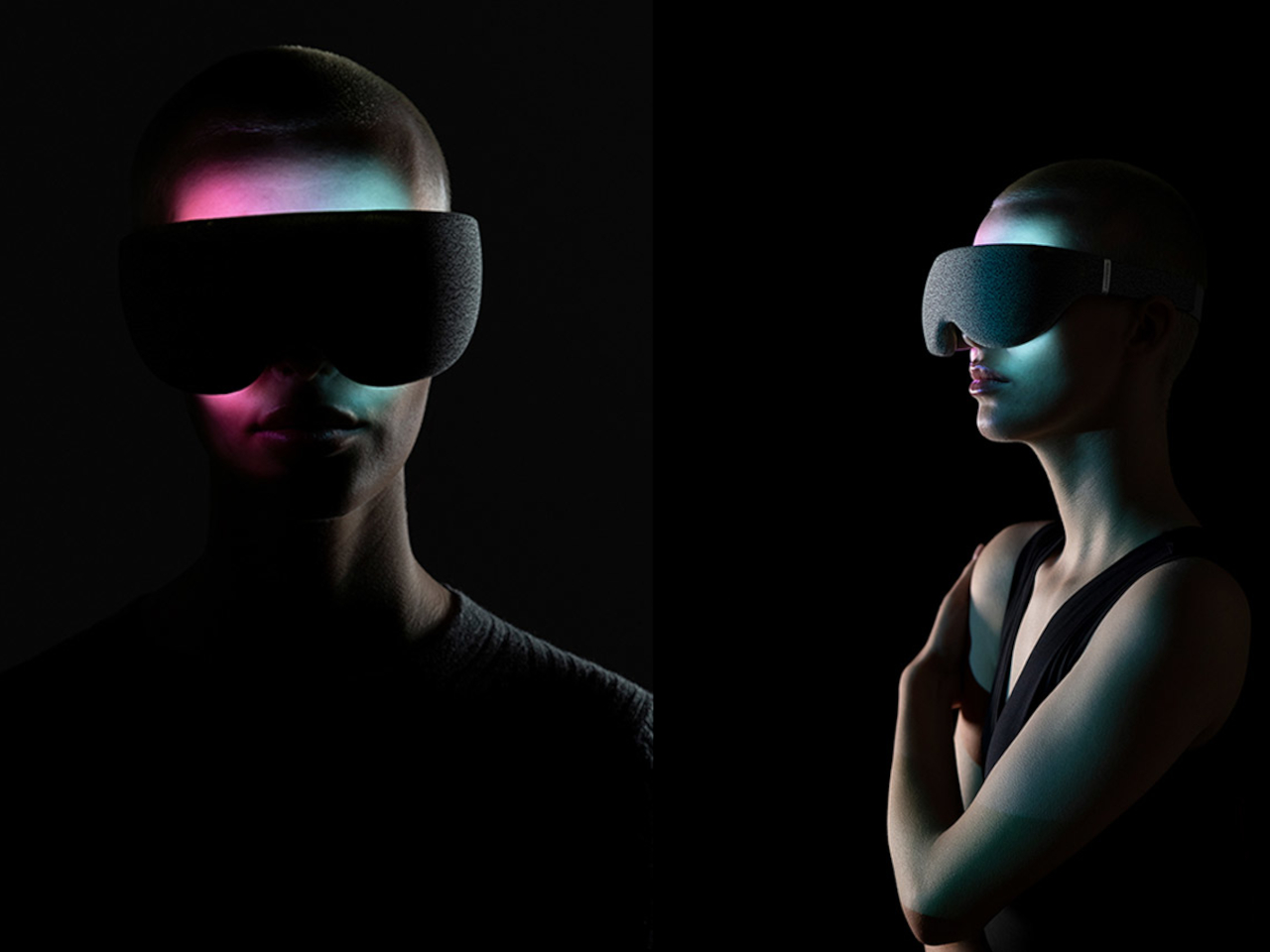
In today’s stress-ridden world, a tech-integrated meditation headset offers much-needed solace. Layer Design’s LightVision headset, crafted for Resonate, transforms meditation into an enchanting experience. LED lights create dynamic visuals that emerge as biomorphic patterns, engaging closed eyes to trigger the brain’s frequency-following response. Wrapped in textile casing, the minimal, ergonomic design comfortably envelops the face, fostering distraction-free tranquillity. While its effectiveness raises intrigue about potential eye strain, if resolved, this headset could be the stress-relieving catalyst sought by the modern world. By merging sensory input and technology, it elevates meditation routines, potentially ushering in a new era of mental well-being.
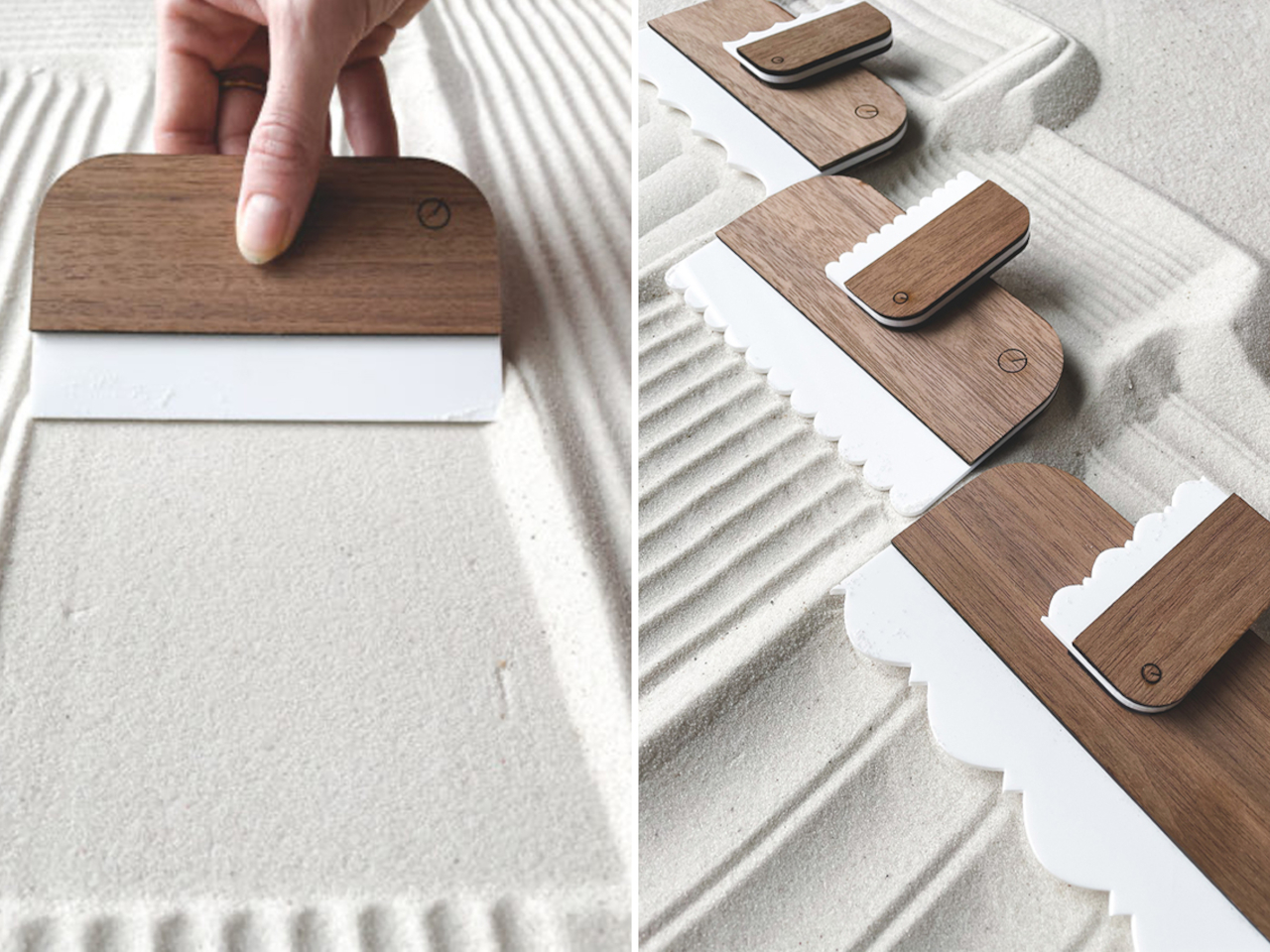
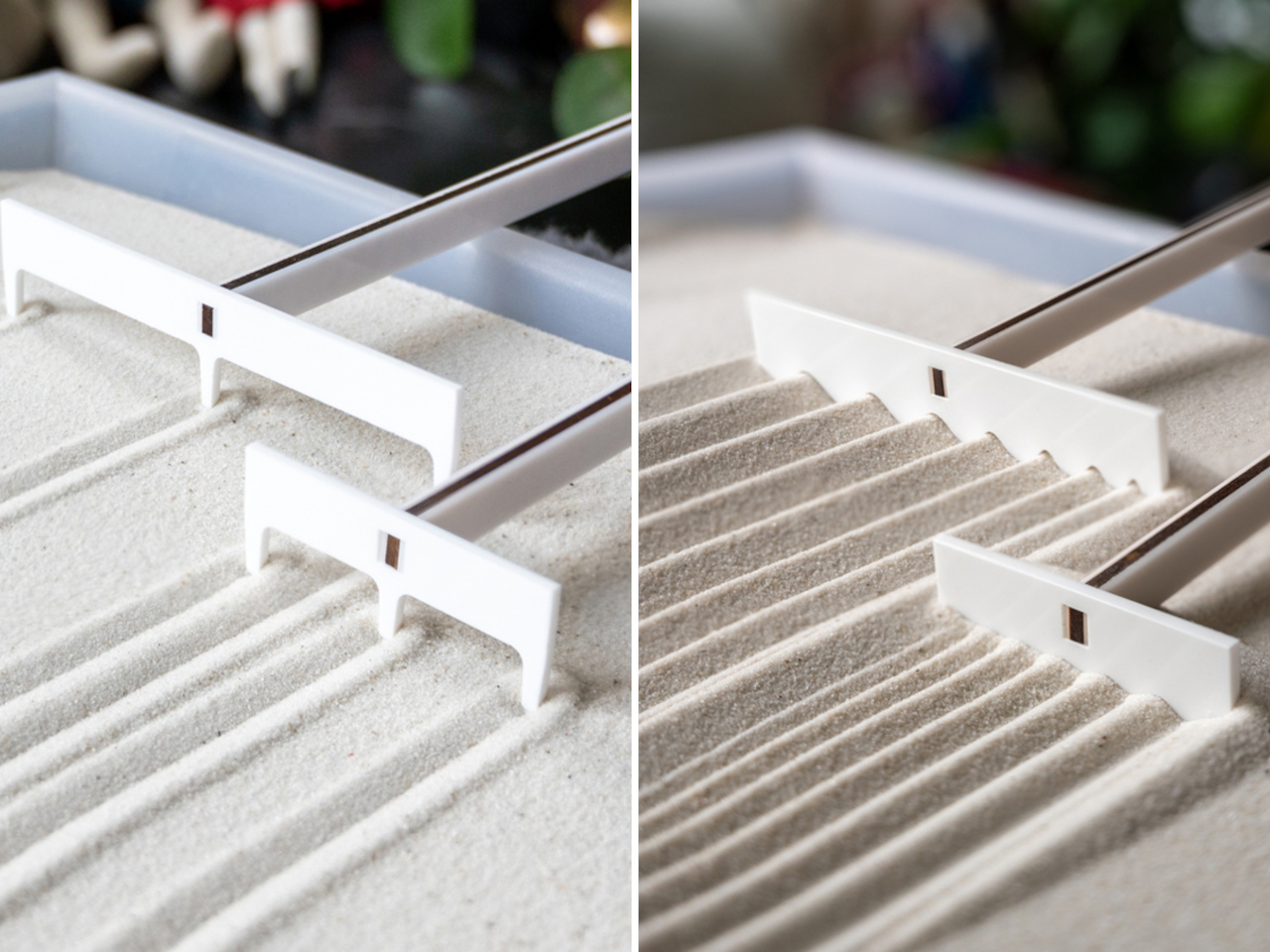
Scaled for desktop Zen gardens, Project Rotate and Zen Garden artist Yuki Kawae collaborate on a collection of Kawaerakes and hand rakes. These downsized tools bring the meditative art of sand raking to compact spaces. Groove and ridge sets, each comprising six handheld rakes, offer diverse sand designs with their natural wood handles and white trimming. Kawae’s traditional hand rakes, featuring longer handles, allow for intricate designs. Completing the set is a sand leveller for a fresh start. Project Rotate’s simple yet innovative rake profiles amplify creative possibilities, enhancing the Zen Garden experience with intuitive tools for mindfulness and imagination.
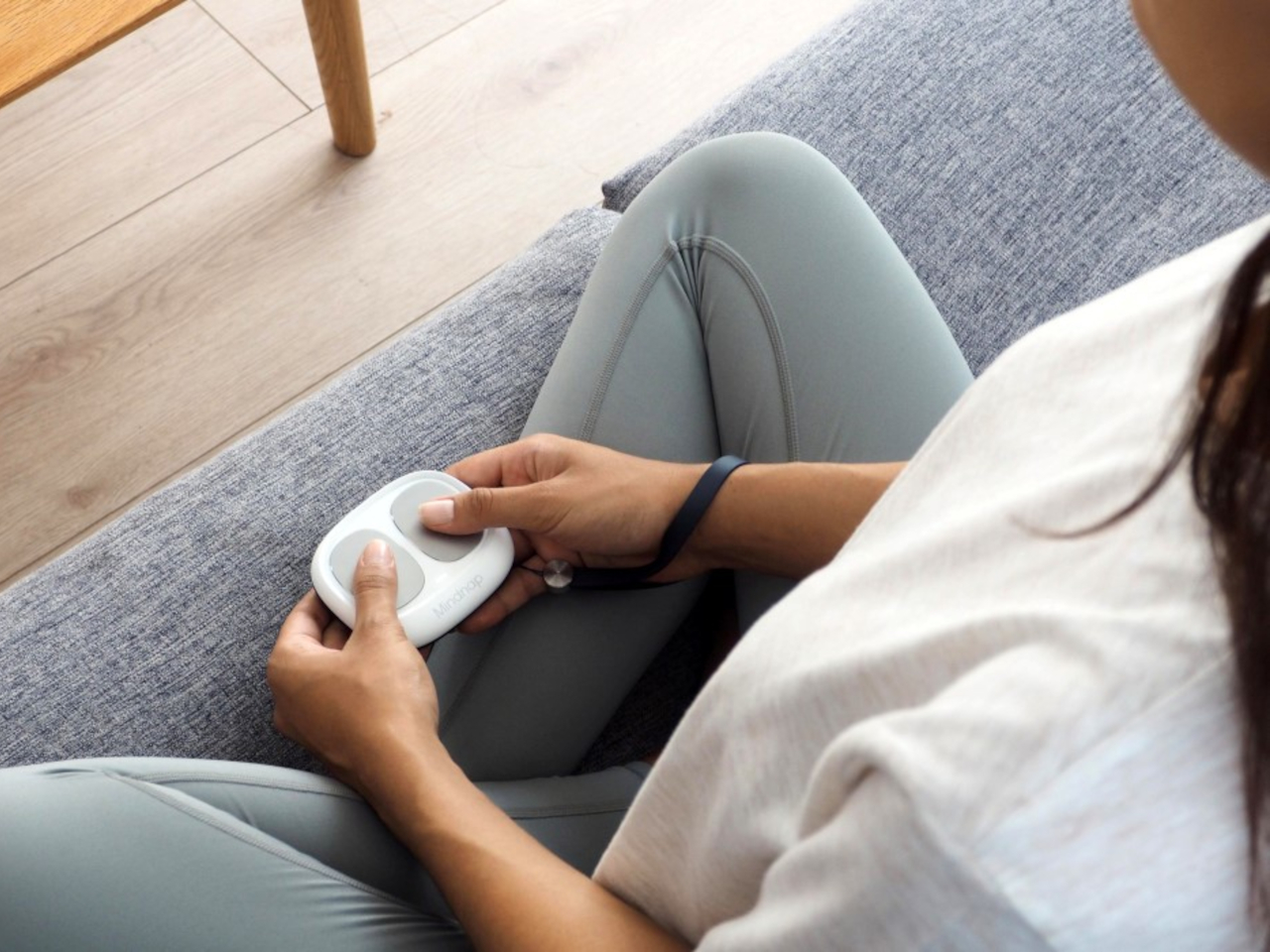
The portable MindNap device enhances meditation by guiding deep breathing. With thumb-placed metal pads detecting biosignals, it vibrates gently for inhaled and exhaled cues. Paired with an app, one can choose from creativity, focus, relaxation, or energy settings. By analyzing internal cues like heart rate and BMP, it tailors breathing patterns to desired states, reducing stress and anxiety while improving focus and creativity. It energizes too, boosting blood flow. Available in two colors, the MindNap includes a portable leather case for on-the-go clarity and sanity in today’s demanding times.
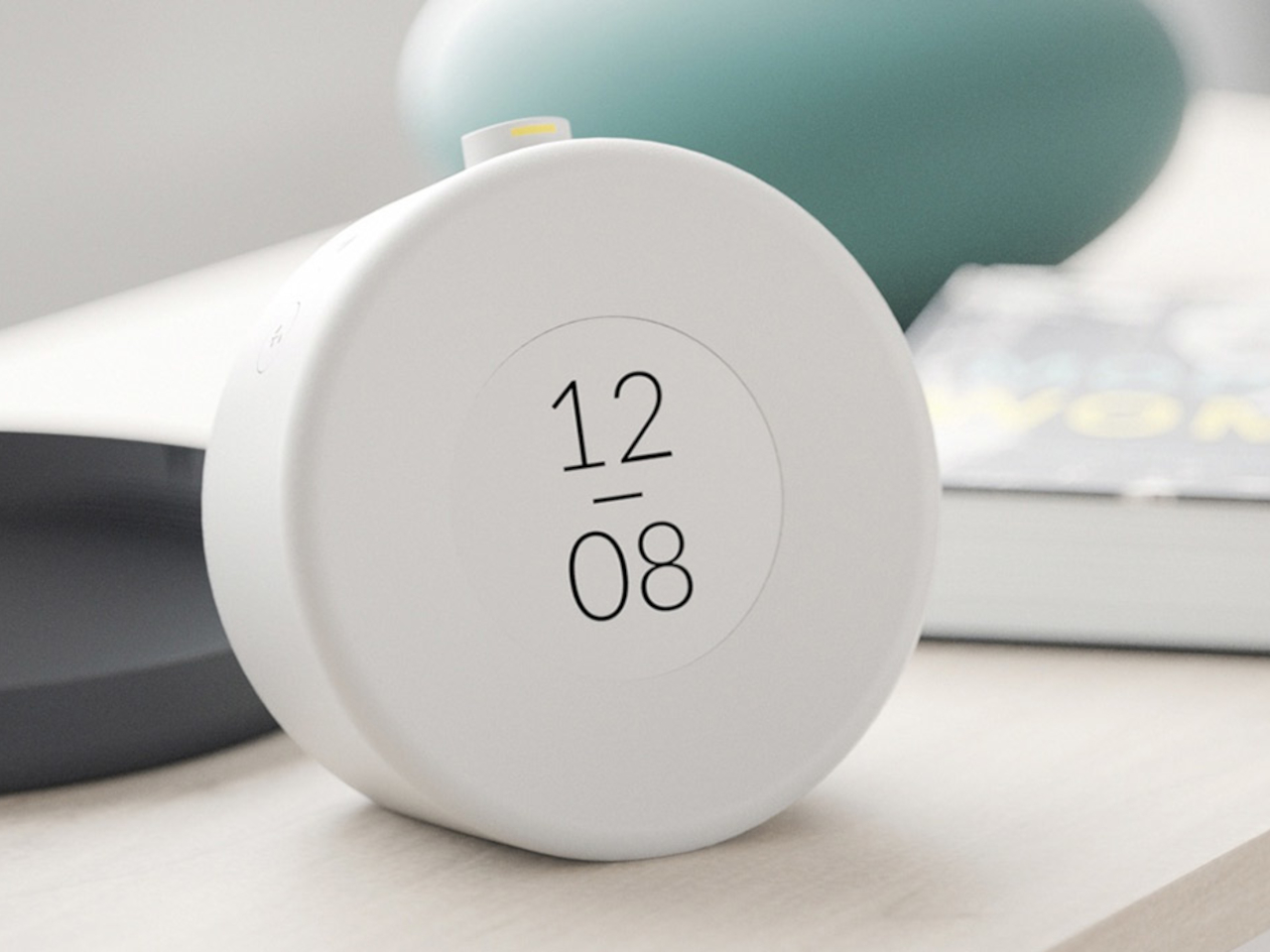
For non-morning people, the Mudita Bell calming alarm clock offers a natural wake-up call based on circadian rhythms. It replaces pre-sleep phone scrolling with its E-Ink screen, reducing blue light exposure. Minimalist design soothes eyes pre-bed and upon waking. With acoustic sounds, it gently wakes without irritation. The clock tracks air quality and suggests improvements like humidifiers for healthier sleep. It also includes preset meditation timers, promoting overall wellness.
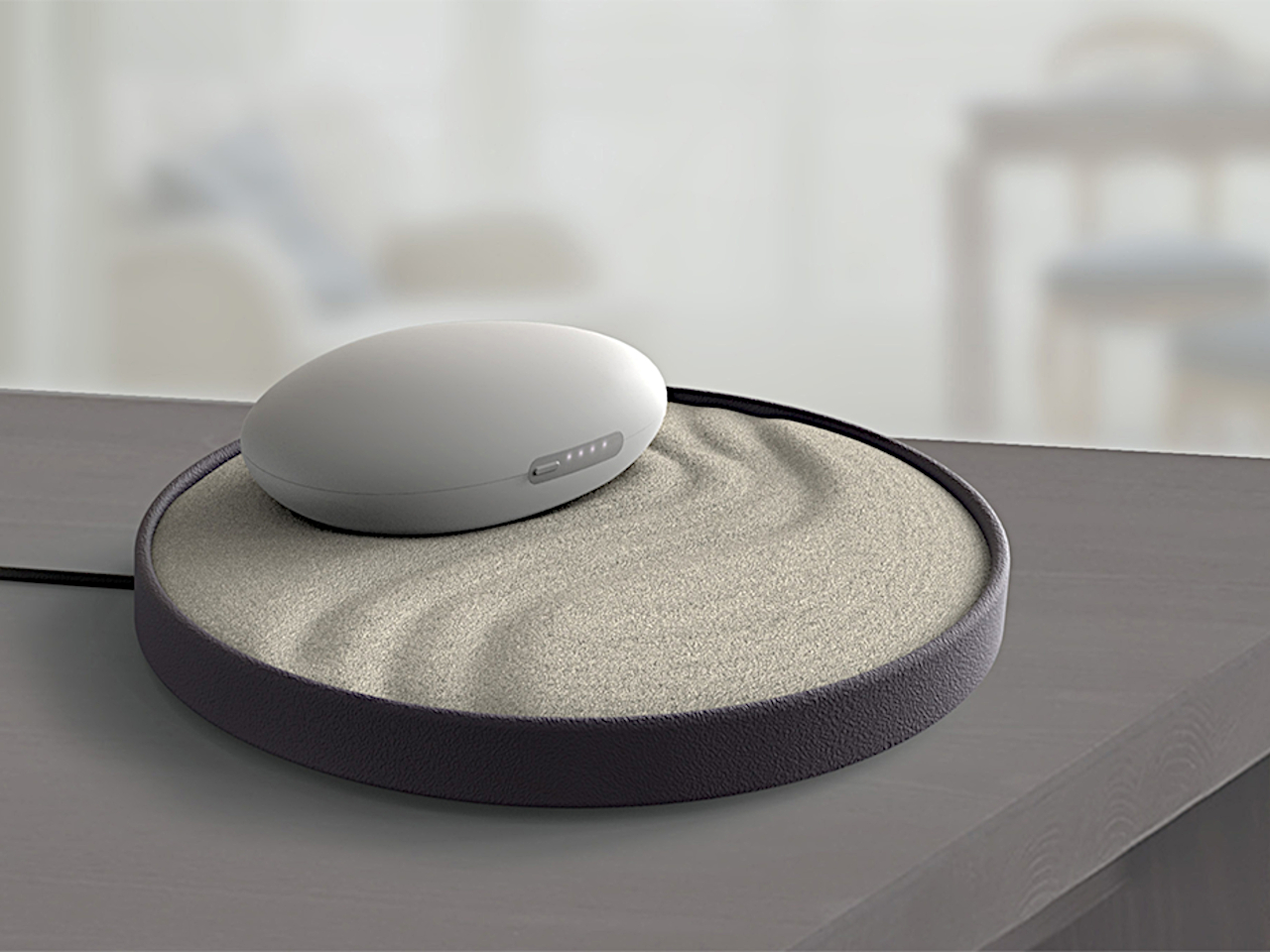
Ayama, an iF Design Talent Award-winning device, aids anxiety with rhythmic breathing. Resembling a stone, it expands and contracts using integrated motors for pranayama techniques, clearing energy channels to induce calm. Intuitive and adjustable, Ayama offers modes like ujjayi and kapalabhati to combat stressors, enhancing focus and tranquility. The wireless charging zen garden serves as a reminder for emotional well-being. By simplifying pranayama, Ayama empowers users to battle anxiety’s challenges, promoting relaxation and balance through a button-press and controlled breath.
To initiate your meditation practice, try experimenting to discover what aligns with your personality and daily routine. Begin with straightforward techniques, gradually extending your session time, without feeling obligated to engage in lengthy sessions.















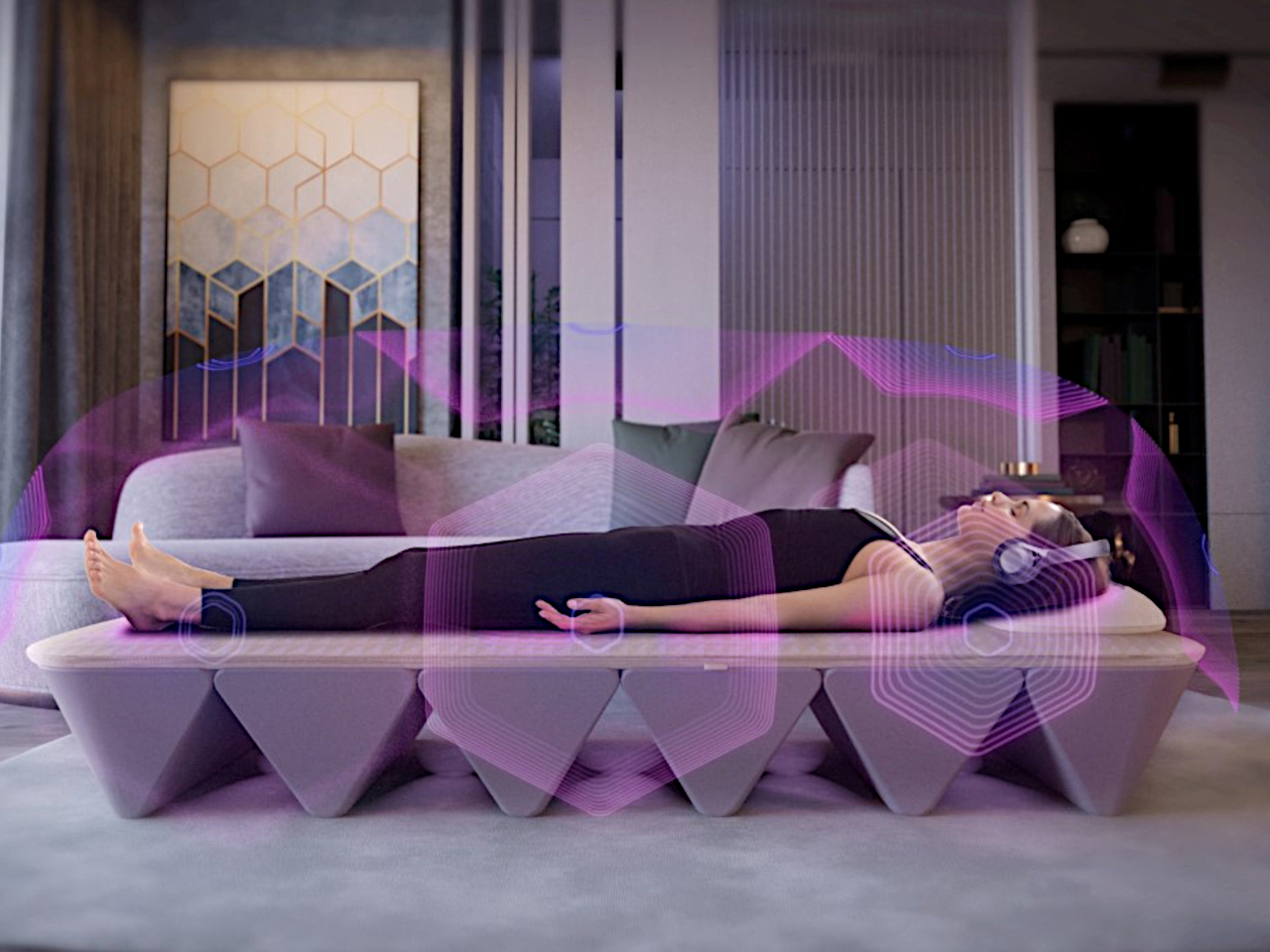
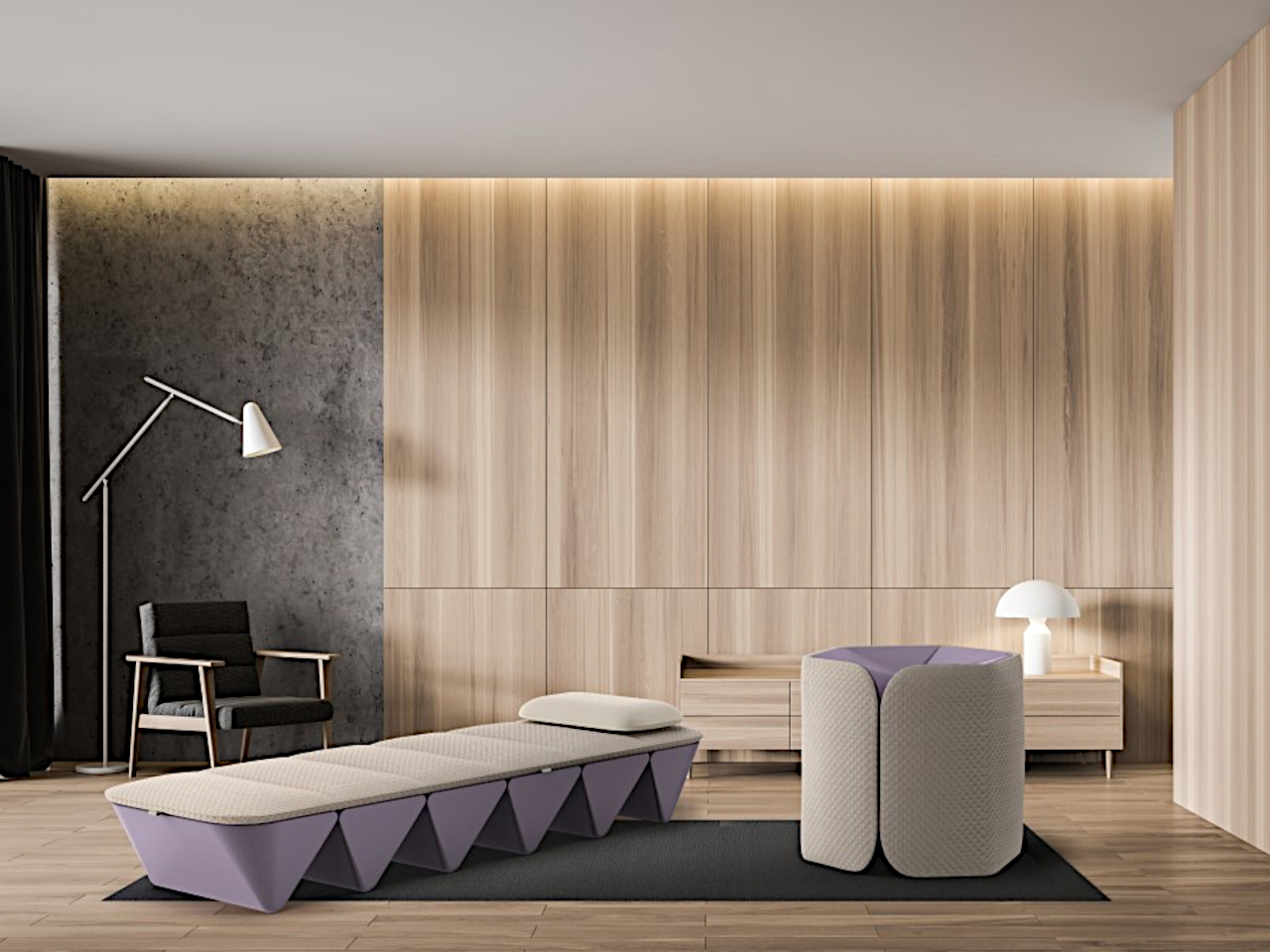
 presents a distinct folding design that compacts to ottoman pouf dimensions. Designed by acclaimed designer Yves Béhar of fuseproject, the bed transcends being merely a therapeutic tool, resembling a chic accessory adaptable to any room and easily unfurled for meditation and healing. When fully expanded, the bed aims to offer an immersive home experience that rejuvenates the body and rejuvenates the nervous system. Through comprehensive body vibrations and spatial sound, it introduces an enhanced therapeutic approach that aids in stress reduction and the release of happiness-associated hormones.