SpaceX has reportedly taken the step many onlookers have long expected: filing paperwork to hold an initial public offering (IPO) on the stock market and become a publicly traded company. Rumors had long pointed toward the IPO taking place by July.
The company filed draft IPO registration paperwork with the US Securities and Exchange Commission confidentially, according to Bloomberg. As such, the public won’t get a chance to closely scrutinize SpaceX’s finances just yet. Taking the confidential approach means SpaceX can obtain feedback from the SEC before making the details public and announcing key factors like the price range and number of shares it’s planning to sell at the outset.
SpaceX is said to have designs on holding the largest IPO in history. It’s reportedly looking to raise $75 billion in the offering, which would far exceed the current record held by Saudi Aramco, which pulled in $24 billion in its 2019 IPO.
It’s expected that SpaceX will seek an IPO valuation of $1.75 trillion. When the Elon Musk-led business swallowed up the Elon Musk-led xAI earlier this year (which means SpaceX is now the parent of X and Grok), the entire company was valued at $1.25 trillion.
This article originally appeared on Engadget at https://www.engadget.com/big-tech/spacex-has-reportedly-filed-for-the-biggest-ipo-in-history-154547537.html?src=rss
Lucid Motors has recalled over 4,000 Gravity SUVs after discovering a problem with seat belts. The company told the National Highway Traffic Safety Administration (NHTSA) that some of the anchors for the second-row seat belts weren't welded properly. This means that there's a chance they won't actually hold passengers during a collision.
The company blames the issue on a seat supplier changing its manufacturing process "without notice to or approval by Lucid." It says it has reverted to the original design and that newer models aren't impacted by the recall. Vehicles manufactured after February 14, 2026 are good to go.
Lucid will have to inspect each and every Gravity SUV affected by the recall and potentially install a new bracket or a whole new seat. Owners will receive instructions to bring their vehicles to service centers. The company hasn't reported any injuries related to the defect, which is good news.
4,000 may not sound like a particularly high number, but this isn't Toyota or Ford. The number accounts for nearly every Gravity SUV manufactured since it launched last year, according to The Tech Buzz. It's been reported that the company sold around 15,800 vehicles in 2025, but that accounts for every model in the lineup.
NEWS: Lucid's CEO says he replaced the company's entire software leadership team following the extremely buggy launch of their Gravity SUV.
"We're working through this. We will be over the hump by end of January, latest, latest, end of March." https://t.co/D9ARNVwA5Q
This isn't the first issue that has popped up regarding Lucid's Gravity SUV. The company had to recall many vehicles due to an issue with the airbags at the tail-end of last year. The model has also been plagued by software issues, though numerous patches seem to have cleared that up. The three-row electric SUV starts at $80,000.
The company has been burning through cash without too much to show for it, according to Autoblog. This would doom other manufacturers, but Lucid has an extremely wealthy benefactor. The majority stakeholder is The Saudi Public Investment Fund, which has invested billions in the company. Lucid's VP of Communications, Nick Twork, says the country "stands behind us as a long-term partner."
This article originally appeared on Engadget at https://www.engadget.com/transportation/evs/lucid-motors-recalls-over-4000-gravity-suvs-over-seat-belt-defect-155321460.html?src=rss
MindsEye developer Build a Rocket Boy remains so convinced that corporate foul play contributed to the disastrous launch of its debut game that it’s now planning to prove it to its audience via in-game content.
In a wide-ranging interview with GamesBeat, BARB CEO and CTO Mark Gerhard said MindsEye will soon receive a multiplayer update, as well as a new mission called Blacklist in which the studio will "share some of the evidence of the sabotage with the community." Gerhard didn’t elaborate further, beyond revealing that the new mission will also introduce a playable female character, but promised further updates to the game in the coming months.
BARB hopes its DLC will inspire the MindsEye communityto create their own user-generated content with its Arcadia platform, which was always the long-term plan for the troubled action game. "The end state we want to be at is where the community can make their own [content] and can dream up their own creations, and again, without being a studio or needing to program or anything," Gerhard told GamesBeat. "They can actually make really fun and compelling experiences for themselves and their friends. That’s our mission. And I think that’s going to be more and more evident over the next few months."
MindsEye was riddled with bugs and performance issues when it launched last June, resulting in players demanding refunds and the studio hurriedly attempting to patch things up. Layoffs soon followed, with BARB co-CEO Lezlie Benzies reportedly addressing the remaining staff to reassure them of the game’s future. According to an IGNreport, the former president of Rockstar North and GTA producer told employees at the time that saboteurs both external and within the company were to blame for the game’s nightmarish rollout.
In his new interview with GamesBeat, Gerhard took responsibility for the bugs and crashes that led to what he admitted was "without doubt, the worst launch in history," but echoed Benzies’ previous comments about the reputational damage the game suffered. "Obviously, we were kind of caught flat-footed on that," he said. "We didn’t counter the negative narrative. We weren’t sophisticated enough to have done that. But, we’re aware. We’ve called that out. Some of the negativity has been orchestrated around this, and thankfully, as a result, it stopped."
Gerhard said that the studio has collected "very strong evidence" of the alleged leaks following months of "thorough investigations," adding that the case is now in the hands of authorities in the UK and US.
BARB recently parted ways with co-publisher IOI Partners (a subsidiary of Hitman developer IO Interactive), and will be solely responsible for publishing responsibilities on MindsEye going forward. As a result, the planned MindsEye and Hitman crossover event is no longer going ahead.
This article originally appeared on Engadget at https://www.engadget.com/gaming/mindseye-will-litigate-its-own-launch-sabotage-controversy-in-dlc-form-152344593.html?src=rss
What should have been a routine release has revealed some of the features Anthropic has been working on for Claude Code. As reported by Ars Technica, The Verge and others, after the company released Claude Code's 2.1.88 update on Tuesday, users found it contained a file that exposed the app's source code. Before Anthropic took action to plug the leak, the codebase was uploaded to a public GitHub repository, where it was subsequently copied more than 50,000 times. All told, the entire internet (and Anthropic's competitors) got a chance to examine more than 512,000 lines of code and 2,000 TypeScript files.
In the aftermath, some people claim to have found evidence of upcoming features Anthropic is working to develop. Over on X, Alex Finn, the founder of AI startup Creator Buddy, says he found a flag for a feature called Proactive mode that will see Claude Code work even when the user hasn't prompted it to do something. Finn claims he also found evidence of a crypto-based payment system that could potentially allow AI agents to make autonomous payments. In a Reddit post spotted by The Verge, another person found evidence that Anthropic might have been working on a Tamagotchi-like virtual companion that "reacts to your coding" as a kind of April Fools joke.
"A Claude Code release included some internal source code. No sensitive customer data or credentials were involved or exposed," an Anthropic spokesperson told Bleepingcomputer. "This was a release packaging issue caused by human error, not a security breach. We're rolling out measures to prevent this from happening again."
As with any other leak, it's worth remembering plans can and often do change. Just because a company has written the code to support a feature doesn't mean it will eventually ship said feature.
This article originally appeared on Engadget at https://www.engadget.com/ai/claude-code-leak-suggests-anthropic-is-working-on-a-proactive-mode-for-its-coding-tool-150107049.html?src=rss
If you're feeling anxious about AI and what it means for the future of humanity, you should watch The AI Doc: Or, How I Became an Apocaloptimist. As I noted in my review, the film aims to deliver some clarity amid all the hype. Now that it's in theaters, we sat down with director Daniel Roher, who won an Oscar for his film Navalny, to dive deeper into his complicated feelings around AI.
The entire topic made him nervous, Roher said, so he decided to team up with similarly anxious colleagues to demystify AI using film. He describes the goal of the project to be a sort of "first date" with AI, a way to hear about its potential benefits from AI boosters, while also taking in the many negatives brought up by critics. It’s probably too late to stop AI entirely, but he thinks we can at least try to find ways to limit the worst impulses of the tech industry.
"I wanted to make this movie because I was scared shitless, that's the crux of it," he said in an interview on the Engadget Podcast. "I didn't understand what AI was. I didn't understand why everyone was talking about it and why it seemed to be this thing that came outta the woodwork and all of a sudden, people were talking about it like it was the apocalypse or like it was gonna be the most optimistic, greatest thing ever."
Ultimately, Roher arrived at the term “apocaloptimist,” which balances the contradictory ideas that AI can both seriously harm society, and that we can still shape the future by criticizing or outright rejecting it. "It's a worldview. It's choosing not to buy into a binary that's asking us to see this as either apocalypse and the end of the world, or through the rose-colored glasses of unvarnished optimism, which is also sort of a fallacy," he said.
On the one hand, he's well aware the major players pushing AI are, at best, flawed. When I mentioned Marc Andreessen’s recent comments about proudly having no inner thoughts, Roher added,” They're just fucking weird. They're just nerds who became billionaires because they were born at the right time and they had the right interests. They're brilliant in their own way and they have abilities, but they don't understand what it is to exist. They don’t know what real human beings navigate and go through.They have a very narrow worldview that's callous and cold and calculated.”
For many, the overnight ubiquity of this largely untested technology and the collective wealth and power of those supporting it means rampant negative externalities are all but guaranteed. But Roher's apocaloptimism (we'll see if the term quite catches on) chafes against cynicism and doomsaying. He points to OpenAI’s Sora video generation app, which was heavily criticized as a tool that could lead to more realistic deepfakes, but was unceremoniously killed last week.
"I think people were [made] uncomfortable by it, and good,” Roher said. “And, shame on OpenAI for releasing this thing without any thoughtfulness. I guess the low bar of like, at least they had the decency to pull back and retract it, but only after public condemnation." He added, "to the cynical people saying we're all fucked, I'm like, no fuck you, we're not. Collective action matters.”
And notably, the entire goal is to think more deeply about the uses of technology than the people actually creating it. "These guys, when you actually sit down with them, they don't have clarity, they can't make you feel better. They don't know themselves. They're just motivated by the unbridled optimism of the greatest profit-making technology in the history of humanity. "
This article originally appeared on Engadget at https://www.engadget.com/entertainment/tv-movies/the-ai-docs-director-was-scared-shitless-by-ai-so-he-made-a-movie-about-it-145747961.html?src=rss
Today at the New York International Auto Show, Subaru announced its first three-row electric SUV: the Getaway.
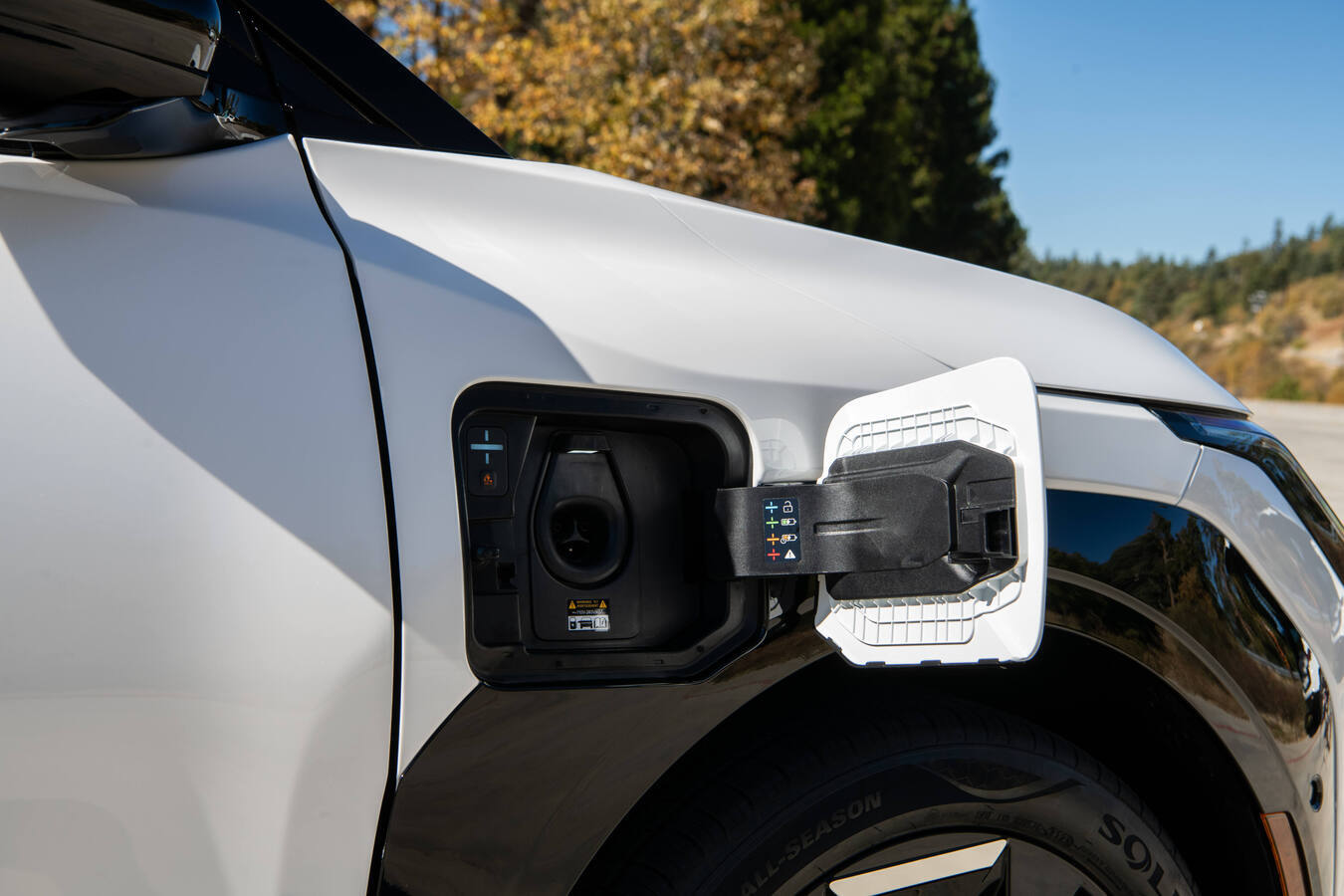
Like Subaru's other EVs, the Getaway is based on Toyota's e-TNGA platform and it shares many features and specs with the 2027 Highlander EV. Initially, all models will come with the company's Symmetrical all-wheel drive system, 420 horsepower and a native NACS-compatible charging port. That said, charging speeds don't look especially impressive as the Getaway's estimated 150kW system is expected to refill its battery from 10 to 80 percent in around 30 minutes.
The first batch of Getaways will arrive late this year as 2027 models featuring a 95.8kWh battery that Subaru says will provide more than 300 miles of range on a single charge and a zero to 60 time of under five seconds. It will also come with preconditioning tech to help maintain charging speeds in cold weather (down to 14 degrees Fahrenheit). Then later in the first half of 2027, Subaru will release a standard-range model with a 77kWh power pack and AWD. The EV SUV offers 8.3 inches of ground clearance while its X-Mode system provides settings for Snow/Dirt, Deep Snow/Mud, Grip control and Downhill Assist along with a tow rating of up to 3,500 pounds.
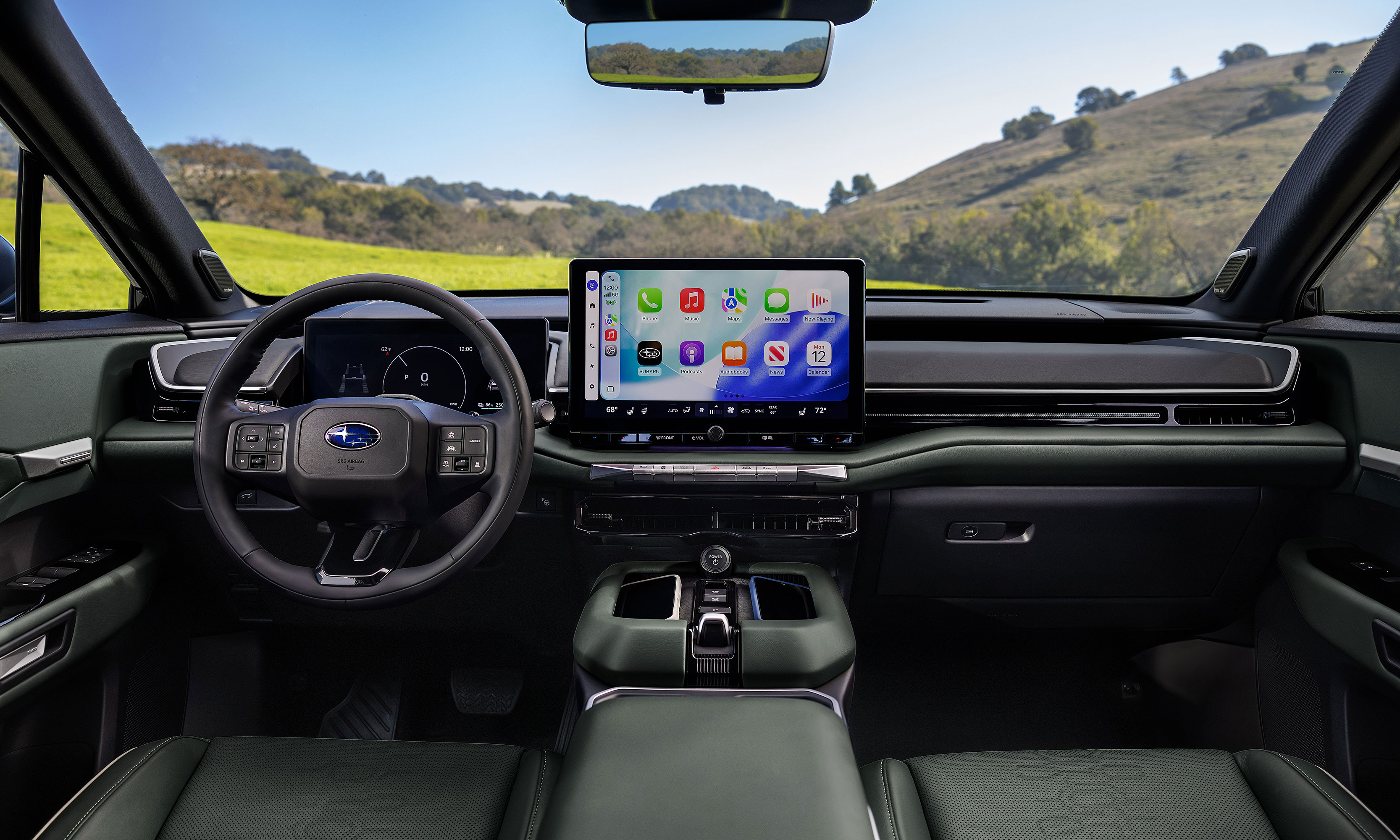
The Getaway's infotainment system is based around a 14-inch touchscreen with support for both Android Auto and CarPlay.
Subaru
On the inside, the Getaway will offer seating for up to seven people by way of a second-row bench, though if you don't mind dropping the passenger count to six, you can also opt for two captain's chairs. Its infotainment system is based around a 14-inch touchscreen with support for both wireless Android Auto and Apple CarPlay, while the driver gets a secondary 12.3-inch digital instrument cluster.
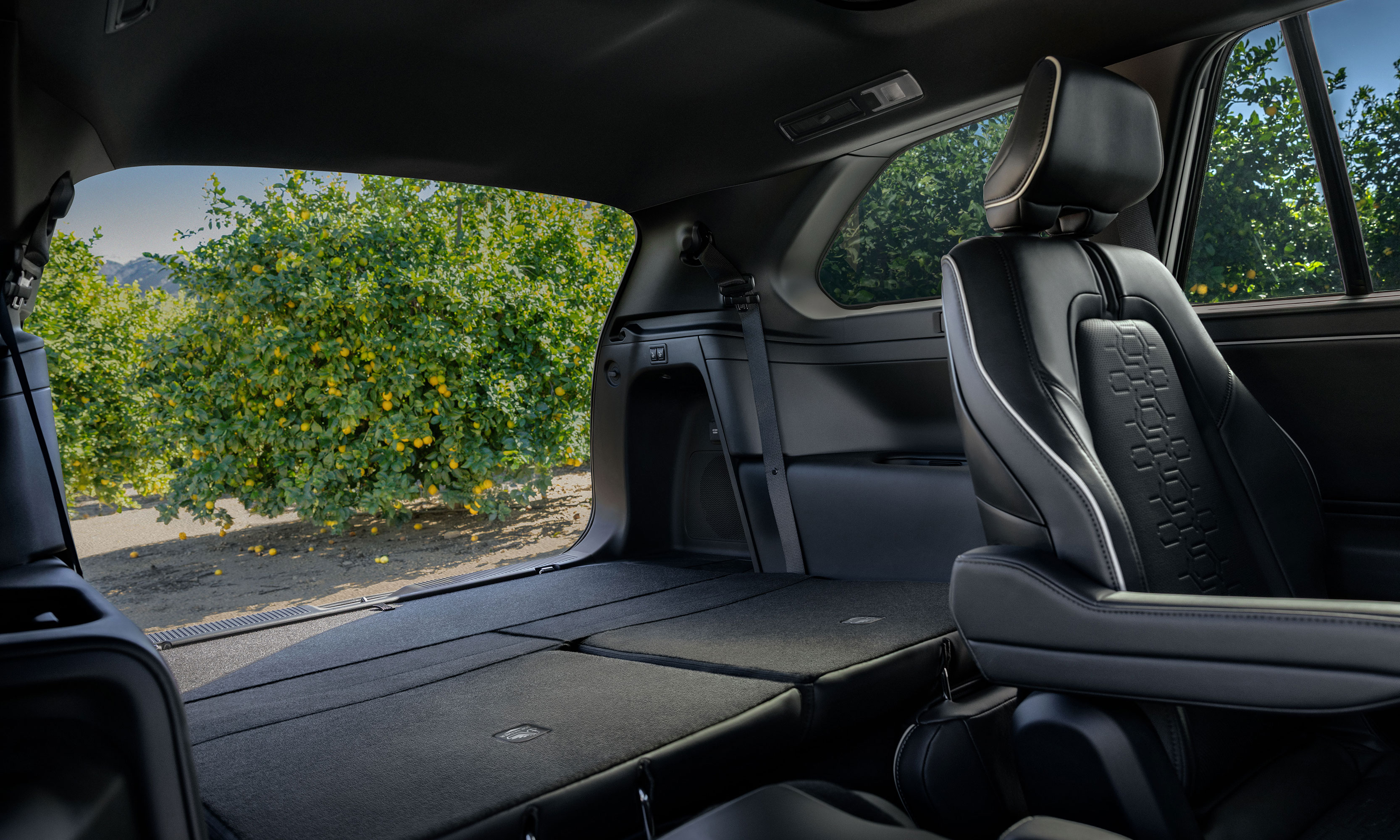
As you'd expect from a Subaru, the Getaway also comes with a lot of outdoorsy features like ladder-type roof rails on "most" trims, plus the option of 19 or 20-inch wheels and up to 45.6 cubic feet of cargo space with the third row seats folded down. Heated front seats will also come standard, with the ability to upgrade to ventilated seats in the first two rows and a heated steering wheel on more premium trims.
Subaru claims the Getaway has more cargo space than a Kia EV 9 with the third row folded.
Subaru
In the end, while the Getaway might not be the most original EV SUV due to its similarities to Toyota's upcoming Highlander EV, for any Subaru fans with larger families, this vehicle could be just what they need to make the jump from gas to electric.
Specific details on pricing and trim levels are expected closer to the Getaway's official release date in late 2026.
This article originally appeared on Engadget at https://www.engadget.com/transportation/evs/the-getaway-is-subarus-first-three-row-electric-suv-142500177.html?src=rss
The horrible winter of 2026 is behind us in New England; now we’ve moved on to the season where there’s a threat of rain basically every day. Given that, the updated Storm Radar app from The Weather Company (owners of the Weather Channel app) caught my eye. There are tons of good weather apps out there, and I’m the kind of nerd that likes to try them all, and Storm Radar feels pretty unique to me.
The main interface is, as you’d expect, your local radar. Tapping on any point of the map calls up a detailed forecast for that exact point, with data coming via The Weather Company’s “gridded forecast on demand” (FOD) system. The default view is precipitation, but there are multiple other layers you can add including temperature, cloud cover, nearby lighting strikes, wind and so forth. There are also overlays for storm cells being tracked; you can tap on those and see things like the direction, speed and range of the storm.
In addition to that standard radar view, Storm Radar has just added something called high-res single site radar. As the name suggests, it pulls data specifically from a single weather station in much greater detail than the typical radar map; The Weather Company says the standard view is based on its FOD system which uses a variety of sources, including the company’s own APIs.
The single-site radar, on the other hand, includes reflectivity data, which measures the amount of energy returned to a radar receiver from precipitation. The National Oceanic and Atmospheric Administration (NOAA) says reflectivity is “he most frequently used product by forecasters to indicate where precipitation and severe weather is occurring.” That's a level of specificity I find delightful.
Naturally, there’s some AI baked into the updated app as well. In my testing, it responds pretty clearly to natural language questions like “what’s the best time to go for a run.”There’s a more conversational element to the AI experience that should be rolling out in the coming weeks, as well.
Like the standard Weather Channel app, you can use Storm Radar for free, but its most advanced featuers require a premium subscription. $4 a month or $20 per year unlocks all of Storm Radar’s features; you can also get a Weather Channel Premium Pro subscription for $5 a month or $30 a year which includes Storm Radar as well as removing ads and providing more detailed data (like hourly forecasts for eight days rather than two). That pricing is about in line with what other weather apps are charging for premium features these days. So if the basic iPhone weather app isn’t cutting it, Storm Radar may be worth a look. It’s only on iOS for now, but it’ll eventually come to Android too.
This article originally appeared on Engadget at https://www.engadget.com/apps/the-new-storm-radar-app-is-a-treasure-trove-of-data-for-weather-nerds-133646812.html?src=rss
A couple of years after its overseas debut, Kia’s EV3 will finally come to the US. The automaker said at the New York International Auto Show that the 2027 edition of the subcompact electric SUV will arrive stateside later this year. Kia won't announce pricing until closer to its sale date, but it has previously said it would target a starting price of $35,000.
The EV3 could be a welcome addition for Americans shopping for a smaller electric SUV. Compact ones that won't break the bank are a relative scarcity in the US, especially after Volvo killed the EX30. The EV3 is close to a 1:1 match with the Kia Sportage, the automaker’s best-selling model, in terms of size and target price.
Kia's SUV will be available in standard-range (58.3 kWh) and long-range (81.4 kWh) options. The former has an advertised range of 220 miles, while the larger one ups that to 320 miles.
The EV3 has a native NACS charging port on the front passenger side.
Kia
The EV3 uses Kia's 400-volt architecture, so it won't charge as quickly as the EV9 and other 800-volt models. Still, Kia says DC fast charging can power the EV9 from 10 to 80 percent in 29 minutes for the standard model or 31 minutes for the long-range tier. The vehicle includes a native NACS charging port on the front passenger side. Meanwhile, Kia's Vehicle-to-Home (V2H) feature, which can provide power to your home during peak usage hours, will be available as a premium option.
As for how much the EV3 will cost, Kia said in 2023 it would target a price range of $35,000 to $50,000. However, the world has changed slightly since then, so we'll have to wait until later this year to confirm. You can learn more on Kia’s website.
This article originally appeared on Engadget at https://www.engadget.com/transportation/evs/kia-shows-off-the-2027-ev3-at-the-ny-auto-show-132500658.html?src=rss
Way back in 2017, Roland carved out a little niche for itself with the introduction of the Go:Mixer line. The small, portable audio interfaces are a convenient way to connect a mic and multiple musical instruments (or audio sources) to your phone for more professional public performances or on-the-go recording. At this year’s NAMM show, the company unveiled the latest in the family — the Go:Mixer Studio — and it’s the most premium version to date.
The Studio adds a display, multitrack output and onboard effects along with a far more luxurious design. At $300, there’s also a far more luxurious price tag. The Go:Mixer Pro-X was already a capable option, and competing products from Mackie and Zoom are also vying for your hard-earned musical dollars. The big question, then, is can the Studio make a case for itself at this elevated price point?
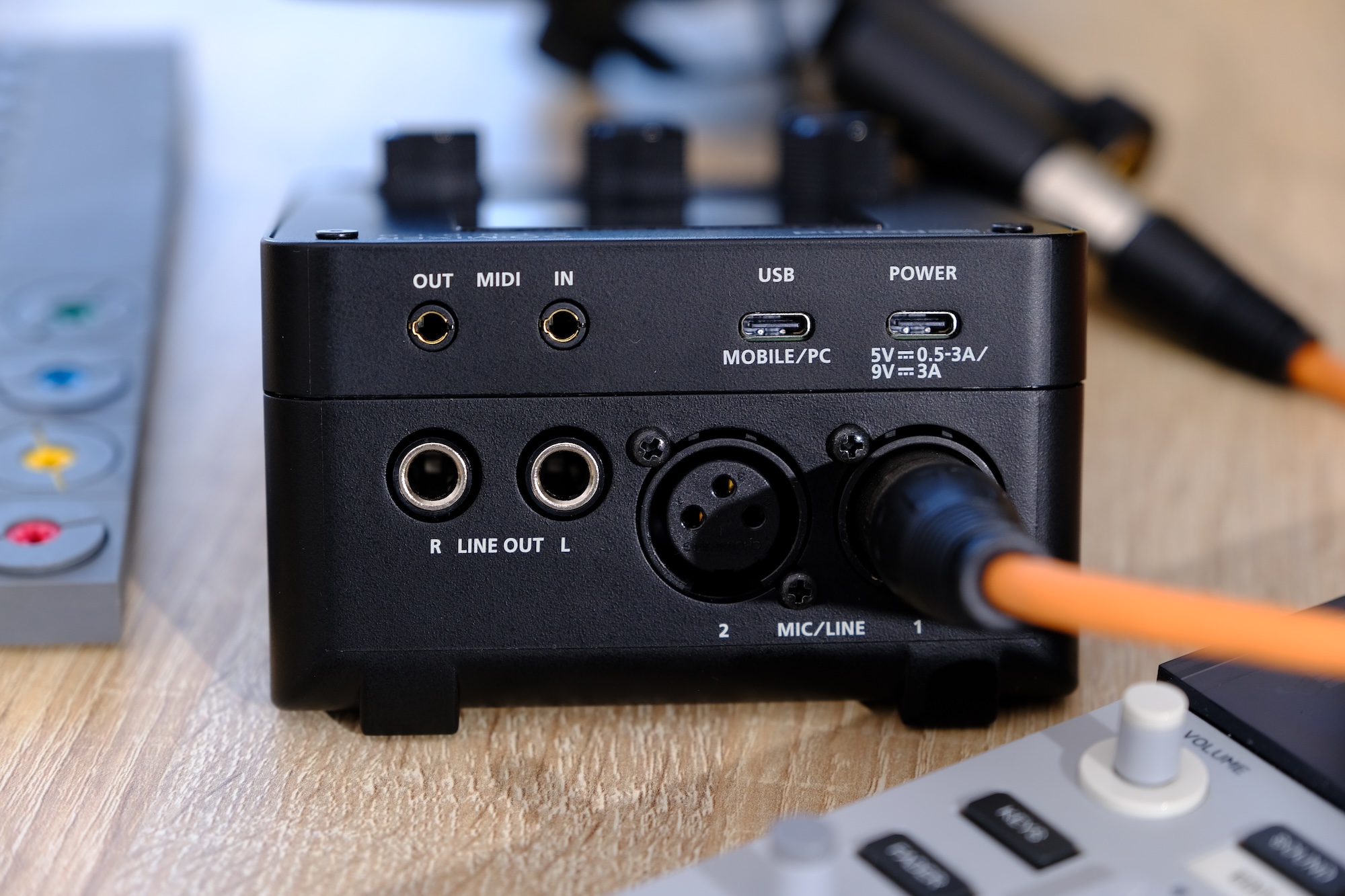
Right off the bat, in terms of usefulness, the Studio is a solid step up from the Pro-X thanks to the addition of a second XLR port. So if your band is a duo, or you simply need two microphones, each performer can now have their own. This also opens the Studio up for basic podcast situations, too. Technically, you could always connect more microphones through other inputs, but now you can do so without adapters or additional hardware like preamps. The rest of the connectivity remains similar with ¼-inch line-in and guitar ports, headset mic support, a 3.5mm aux input and USB-C for audio from your phone and connecting to the app.
Other headline upgrades include a much higher maximum sample rate of 24bit/192kHz (the Pro-X capped out at 16bit/48kHz) and there’s MIDI connectivity for the first time in the Go:Mixer series. The new effects consist of a compressor, EQ and reverb. EQ and compression are available at the channel level, allowing for a good amount of creative control over your mix, while reverb is global. There’s a decent selection of different types of reverb, too, with enough controls to configure them to your taste. I found some of them to be a bit robotic, or not very musical, but others sounded more traditional and appropriate for my vocals and synthesizers.
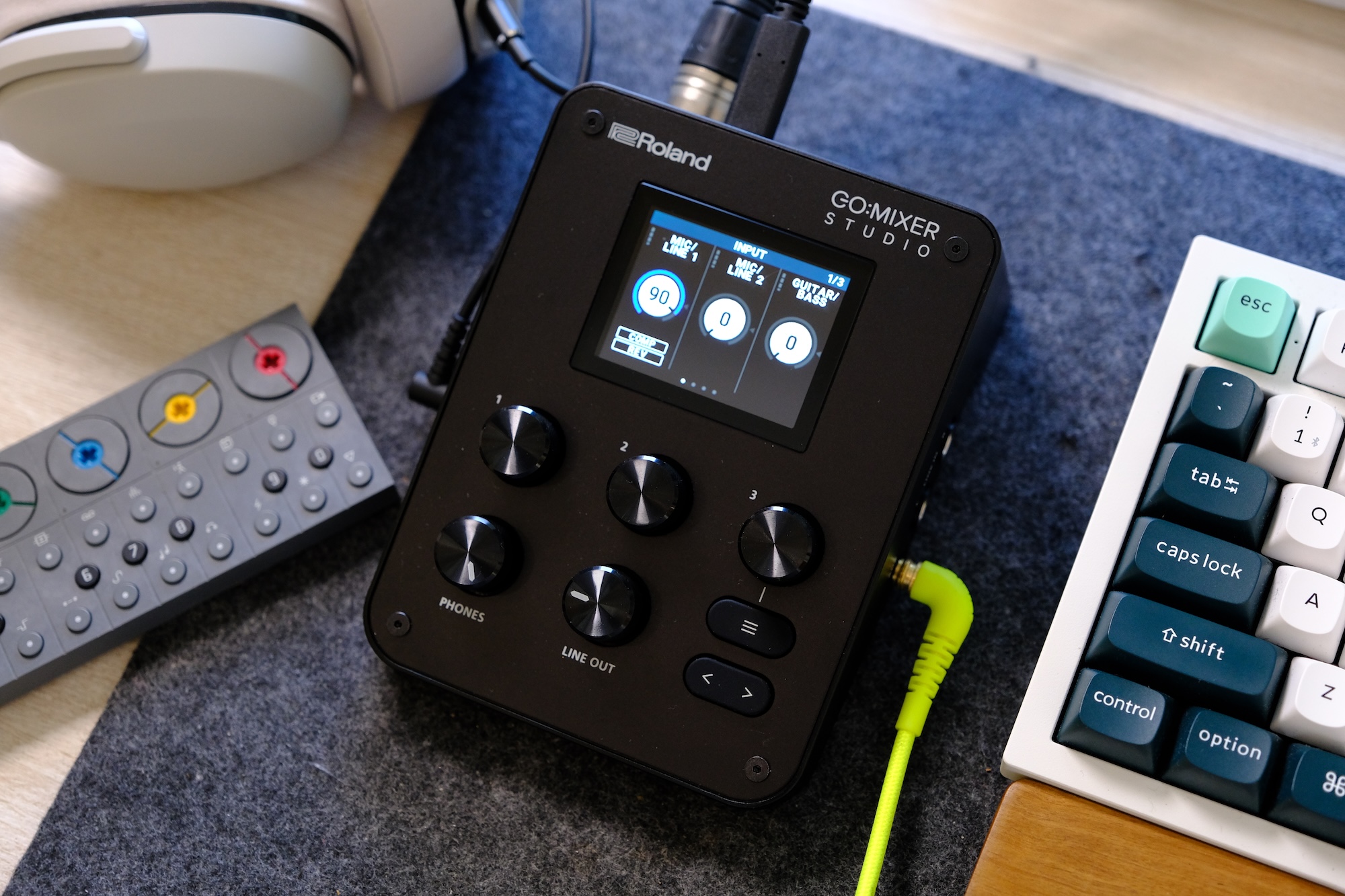
The Go:Mixer series was doing just fine without a display up until this point, but the benefits of having one are instantly clear. On the Pro-X, the only visual feedback for your levels was a solitary LED that indicated your audio was in the red. If you had multiple inputs, you might not even know which one was too loud. The first benefit of the Studio’s display, then, is visible VU meters. They’re not huge, and the display only shows information for three tracks at a time. This means you might have to page through a few screens to see the one you want, but it’s infinitely more useful than before.
The next obvious advantage of the screen is being able to control settings on the device via a menu. Navigation is intuitive, with the screen divided into three sections, corresponding to the three knobs just below it. The default screen, for example, shows the channels Mic 1, Mic 2 and Guitar/Bass. Turn the first knob clockwise to change the gain of Mic 1. The second knob for Mic 2 and so on. Click a knob and, where applicable, you’ll enter a sub-menu where those three dials control whatever is shown above them. This dynamic system works pretty well and took seconds before it felt natural.
The main limitation is that you can only see three of the mixer channels on screen at a time and there’s no way to manually reorder them. If you have a microphone connected and USB audio playing at the same time, you can’t see the levels or control both of those things from the same screen. You have to keep paging screens back and forth.
The good news is that Roland’s Go:Mixer Cam mobile app does offer a visual mixer that lets you see more or less every channel on screen at once and adjust levels quickly that way. It’s primarily designed for creating videos of your performance, but it doubles as a remote mixer if needed. There is one caveat with the app, though, which is that you won’t be able to use your phone as a USB audio source — say, for backing tracks — if you want to record video with the Go:Mixer Cam app. That’s something to be mindful of.
Roland 's Go:Mixer Studio has a display for the first time in the series
James Trew for Engadget
The app does have a cool feature, which could also be a lifesaver: You can change the “mix” after recording. If you record a performance, but find that your vocals are a bit low, or your synth is too high in the mix, you can adjust the levels and re-export it with better balance. You have options to export as video or audio only, so you can share one to YouTube and then a version for Soundcloud all from the same app. Small detail, but if you want to use the app and have the mixer sample rate set to something other than 48kHz, it’ll warn you that it needs to revert to 48kHz and restart the device before you can carry on.
If you prefer recording on the desktop, there’s also a GoMixer Editor app for Windows and Mac. It’s actually a much easier way to change settings and see what’s going on thanks to the extra visual real estate. The EQ section for each channel looks like a regular software EQ where you raise or lower points on a frequency chart. The compressor also has visual feedback to show when it’s active, which is lacking on the device itself. Obviously, the Studio has a mobile focus, but the desktop app has two big selling points.
First, if you prefer to set your mix levels, compression amount and so on at home, you can do that more easily with the desktop app and then save it in a memory slot. You can then quickly recall this “Scene” on the device while out at a gig. The second is that, for the first time in the series (according to me at least), the Studio is a viable mixer and audio interface for the desktop. The build quality is solid and weighty, not like the light plastic of previous models. It feels premium and this could just as well be used at home for streaming and podcasting as much as on the go. The desktop app makes it even more useful in this scenario.
In terms of what’s missing, this might be very use-case specific. I enjoy using this for electronic music production or pseudo DJ type performances. As such, I’d love to see at least one fader rather than just knobs, but this is true of every model to date. I’d also love for there to be a way to see all the channels at once on the device’s screen. I know it’d be a bit cramped and there’d be no easy way to adjust the mix at the same time, but as an overview you could drop into, it might be handy. And if we’re out here making wishes for any Studio Pro model, an SD card slot for native recording would really elevate the portability element so you wouldn’t need to connect a phone, just a power bank.
The Go:Mixer Studio has two XLR inputs
James Trew for Engadget
Roland has a few competitors in this space, most notably IK Multemida which makes a few portable interfaces. Perhaps the most similar is the iRig Pro Duo and Quattro. The Duo comes in a little cheaper than the Studio at around $235 but lacks a display and build quality. I also personally find IK Multimedia’s apps, while functional, less user friendly. Mackie has the M Caster Studio ($200) which adds Bluetooth connectivity but has fewer physical ports — that one too is a little older. Zoom’s interfaces often center on their ability to record directly onto the device, but have more of a vocal/spoken word focus. The H5 Studio ($299) has a display, built-in mic and onboard recording, but its mixer functionality and outputs for live performance are secondary features.
For musical performers, Roland continues to dominate this niche, and the Go:Mixer Studio is clearly the company’s most refined interface to date. The connectivity covers most use cases, even podcasting, and the layout of the dials makes it easy to use in live environments. The display is a welcome addition that goes a long way to making this feel both more useful and more premium. Perhaps the biggest selling point this time around is that the Studio no longer feels like an extra interface you bring with you for live gigs. It can easily be your main desktop audio interface too, making that $300 price tag suddenly feel a lot more palatable.
This article originally appeared on Engadget at https://www.engadget.com/audio/roland-gomixer-studio-review-portable-professional-and-plenty-of-polish-130000723.html?src=rss
There's just something magical about a robot that can convert into a car, tank or plane. It seems that Hollywood agrees as there are several major franchises based around that concept. As someone who grew up in the 80s and 90s, Transformers hold a special place in my heart, despite Michael Bay's best efforts at tarnishing its legacy. I spent countless hours as a kid playing with Hasbro and Takara's plastic figures, but there was one type of toy I always wanted but never got: a robot that could transform on its own just like the ones I watched on TV. That changed a few years ago when Robosenlaunched its line of officially licensed auto-converting models, and from what I've seen, its latest release featuring Soundwave might be its best yet.
Design: More than meets the eye
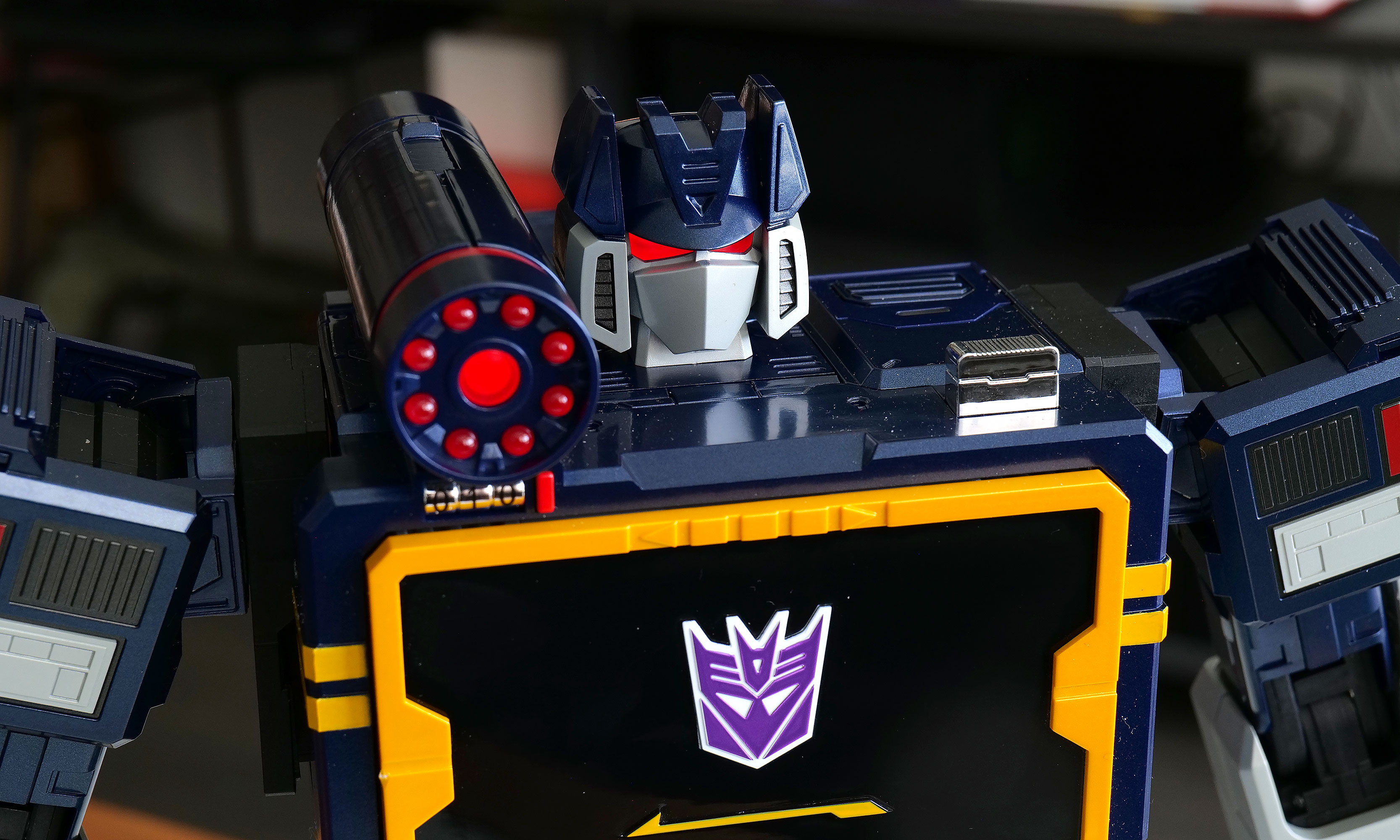
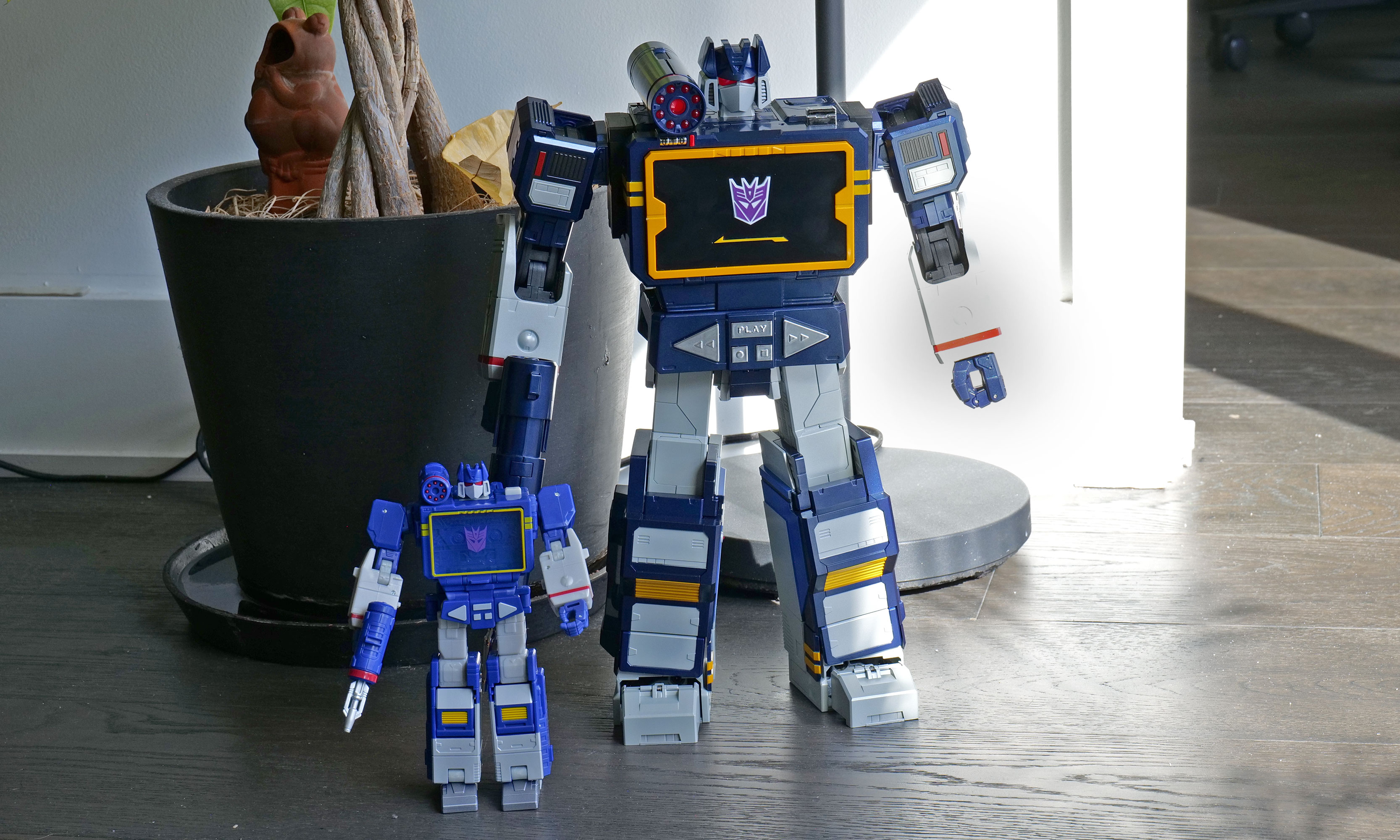
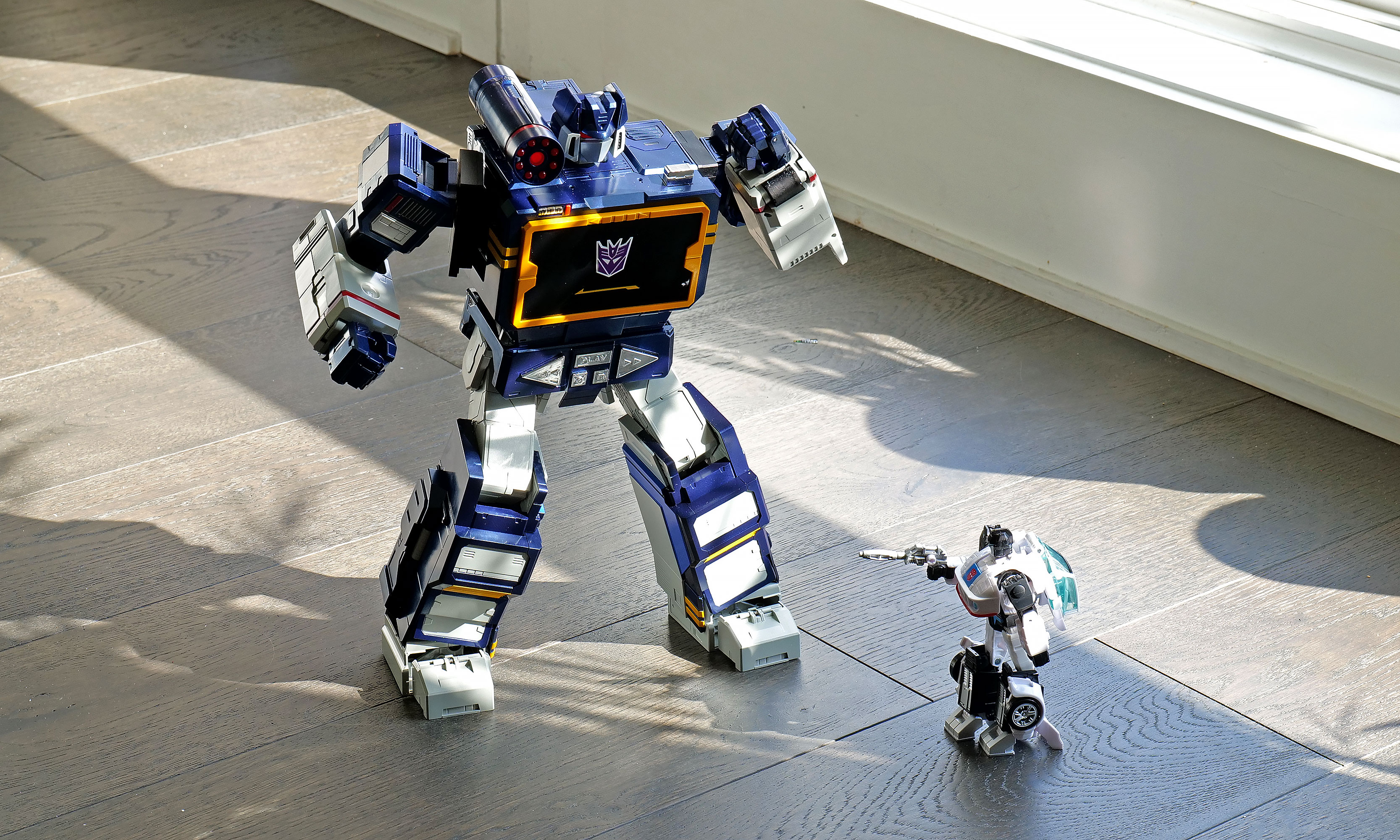
As a follow-up to previous bots featuring Optimus Prime, Megatron, Bumblebee, Grimlock and others, Soundwave was a superior choice, and Robosen has done a more than respectable job of bringing him to life. Not only can he spit out classic lines performed by original voice actor Frank Welker, both his robot and alt modes are a vision straight out of the first-generation (G1) cartoon. Everywhere you look, there are a ton of lovingly crafted details like the working eject button for the cassette slot and all sorts of lights. Robosen's head sculpt is spot on, and it even includes additional LEDs for his eyes and shoulder cannon. Granted, there is a bit of kibble (aka what fans call out of place parts leftover from transformation), like hands that don't properly fold away when Soundwave turns into a boombox, but that's really nitpicking. Between his incredibly accurate design, vocoder-powered vocals and an imposing stature that stands at around 14 inches tall, there's no way you can call this rendition of Soundwave uncharismatic.
A simply superior head sculpt.
Sam Rutherford for Engadget
However, the real magic happens when you turn him on (there's a little button on his back) and say "Hey, Soundwave." From here, you can use more than 50 different voice commands to boss him around like you're the leader of the Decepticons. This includes asking him to say iconic lines, respond to an Autobot attack or just wishing someone a happy birthday. Naturally, the most impressive request is asking him to transform, at which point 28 high-precision servo motors and multiple motion sensors coordinate. This allows Soundwave to convert from boombox mode to robot and back again, complete with the required sound effects. Even as a jaded adult, there's still something incredibly enchanting about watching a Transformer actually transform on its own. But that pales in comparison to the one-of-a-kind reaction my four-year-old son gave me when I repeated the process for him. There was a joy in his face I'm not sure a grown-up can truly express, as he gets to experience this without knowing this bot costs a cool $1,400.
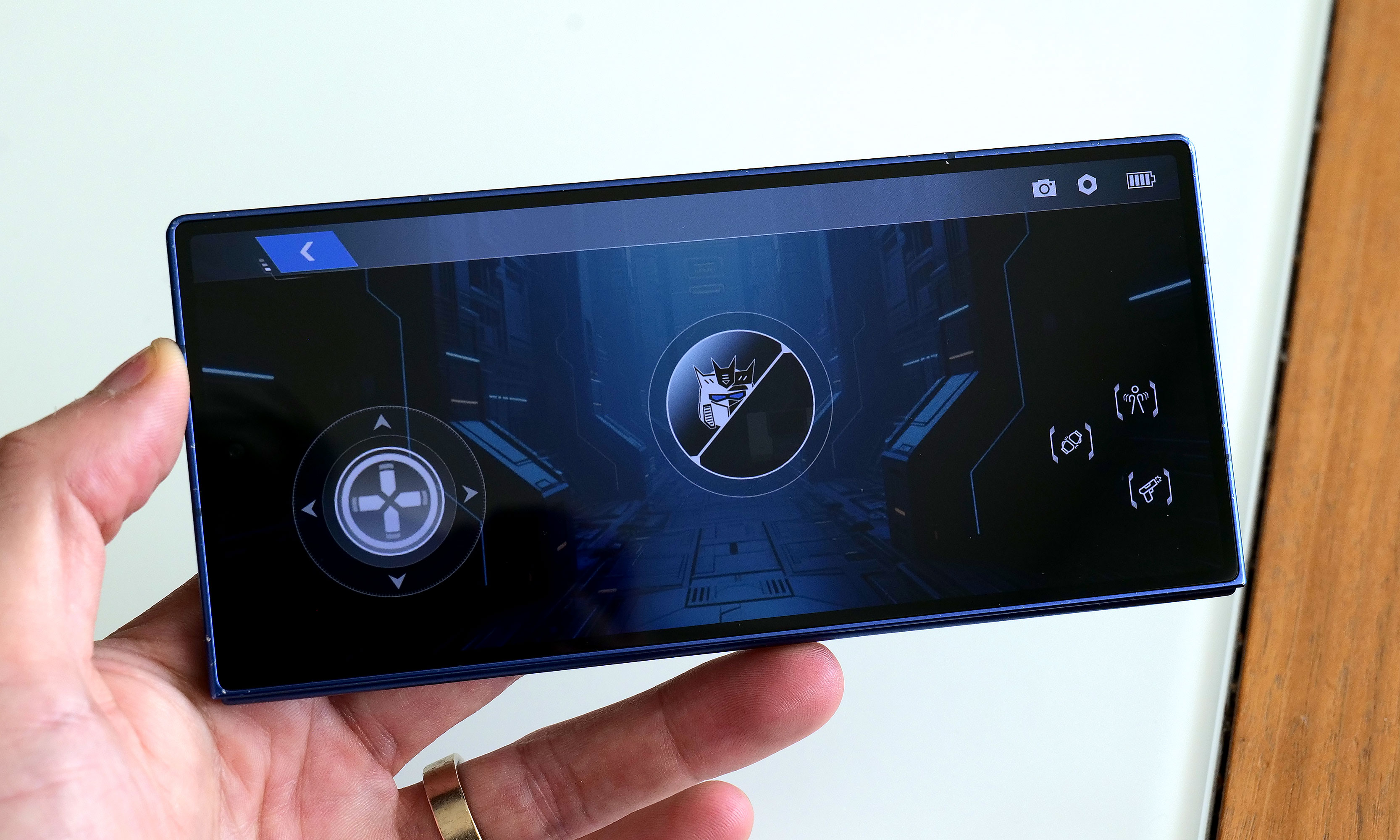
Robosen's free mobile app features a D-pad so you can easily tell the robot where to walk.
Sam Rutherford for Engadget
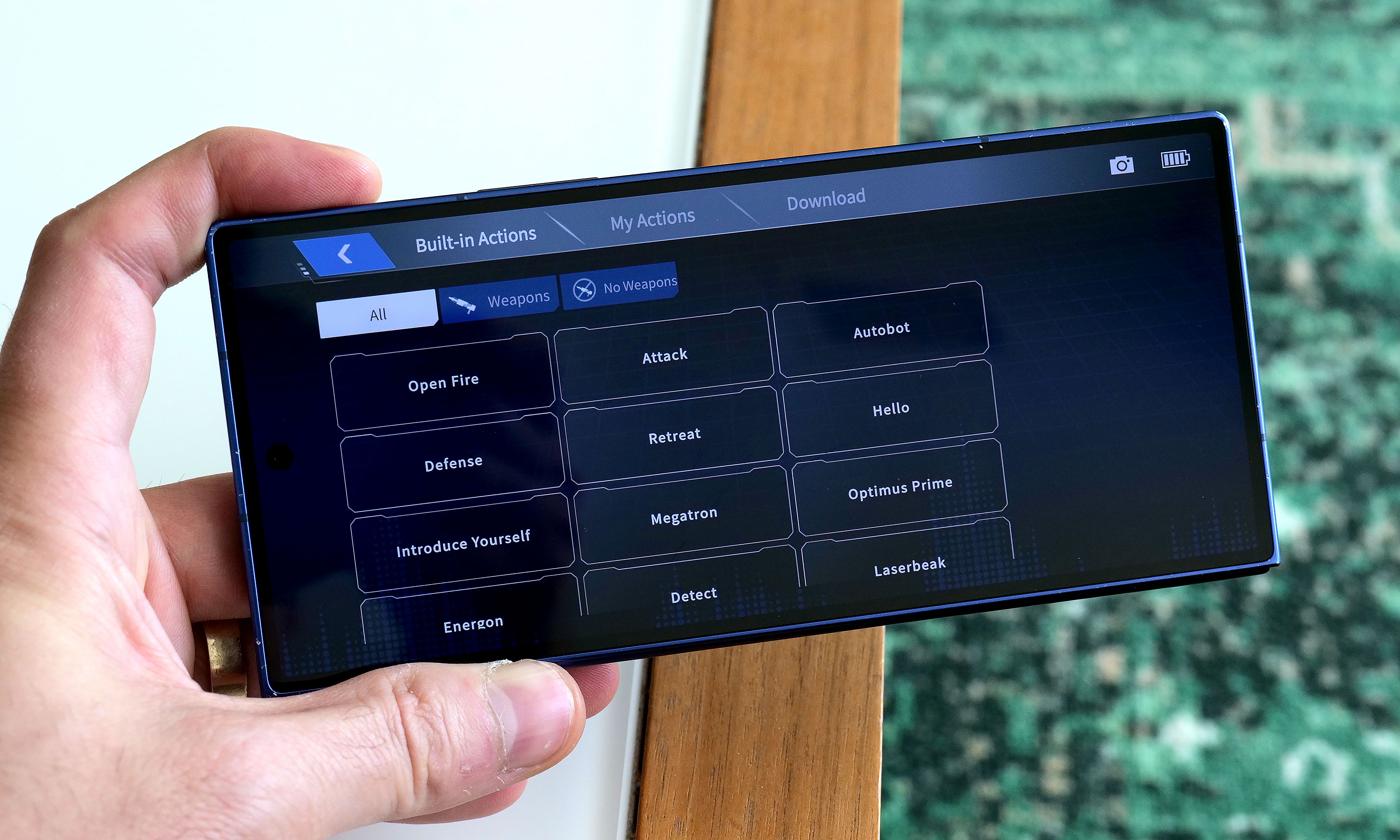
While testing Soundwave's various commands, I did notice that his voice recognition can be somewhat hit or miss. I found that even a little background noise can cause issues. To be consistently heard, you have to speak louder than you think you should. The real key is being very deliberate with a sharp "Hi" or "Hey" to activate Soundwave's wake phrase properly. Alternatively, if you prefer not to yell at your robots, there's also a free companion app that allows you to send commands by simply pressing a button, which was super easy to set up and quickly became my preferred control scheme.
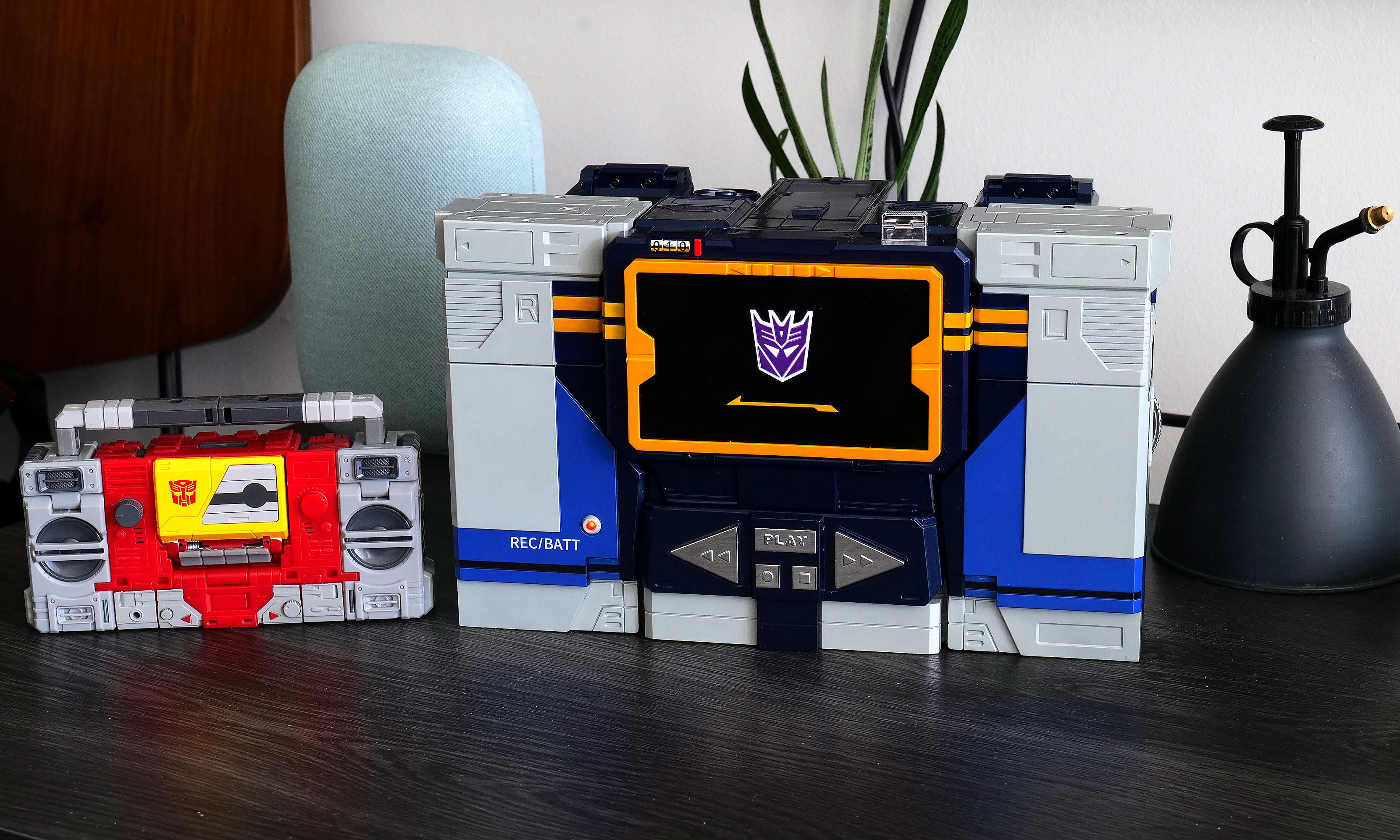
Here is Robosen's version of Soundwave (right) compared to the Studio Series 86 figure (left).
Sam Rutherford for Engadget
In addition to making it easier to get Soundwave to walk around (it's much more fun to use a virtual D-pad than yell "Walk forward" all the time), the app also provides a more straightforward way of discovering what he can do while reducing the ambiguity of voice commands. There are handy buttons for all his voice lines and poses, plus there’s a toolkit for creating some of your own. You can also download more from the app, though there weren't any for me to test out because Soundwave wasn't officially out yet at the time of writing. There's even a Mini Theatre mode that allows the bot to perform short skits, and if you're lucky enough to own some of Robosen's other Transformers toys, like Megatron, some of these scenes can even be performed in tandem.
I don't think any Autobots have a chance against a Soundwave this big.
Sam Rutherford for Engadget
One awkward thing about Roboen's more sophisticated approach to toy robots is that Soundwave loses some of his structural integrity when his motors are off. For example, when you power him down in robot mode, he bends over backwards and gets stuck halfway between his humanoid and boombox forms. I assume this is to prevent him from falling over, which is a good thing; it just looks kind of weird. On the flip side, if you pick him up while in stereo mode, his limbs tend to droop. However, perhaps the biggest downside to Soundwave is one inherent to his design. Because his alt mode is a boombox instead of a vehicle like Optimus, Bumblebee and others, he can't pull double duty as a remote control car. But what Soundwave lacks in mobility, he makes up for with his signature acoustic skills.
Audio: Not just a bot, he's a real boombox too
From the front, Soundwave's boombox alt mode looks damn near perfect.
Sam Rutherford for Engadget
Soundwave turning into a boombox that can't play music just wouldn't make sense. Thankfully, that's not an issue as this bot's buttons aren't just for show. Hitting Play lets you listen to original tracks from the G1 cartoon, complete with the ability to pause or skip to the next track. You can also hold the record button to save a personal message for later, though I found this feature has a bit of a learning curve as Soundwave tends to cut out one or two seconds from the beginning and end of a clip.
Inside the app, there's also a big list for all of Soundwave's voice lines and poses.
Sam Rutherford for Engadget
Most importantly, if you want Soundwave to play other tunes, you can pair it with your phone or pretty much any other mobile device and use him just like a typical Bluetooth speaker. Now it probably won't be a surprise when I say that Soundwave's audio quality is mediocre at best. With all the various sensors, motors and moving parts, there probably isn't a ton of room for fancy drivers, so things sound tinny and flat. But in a way, that's kind of endearing because the vast majority of portable speakers back in the 80s didn't sound great either. The one thing I wish Robosen had included was a proper cassette player to really capitalize on Soundwave's classic audio capabilities. That said, even though I still have stacks of CDs and DVDs in my house, I don't have any tapes (despite their resurgence), so I get why that feature didn't make it.
Battery life
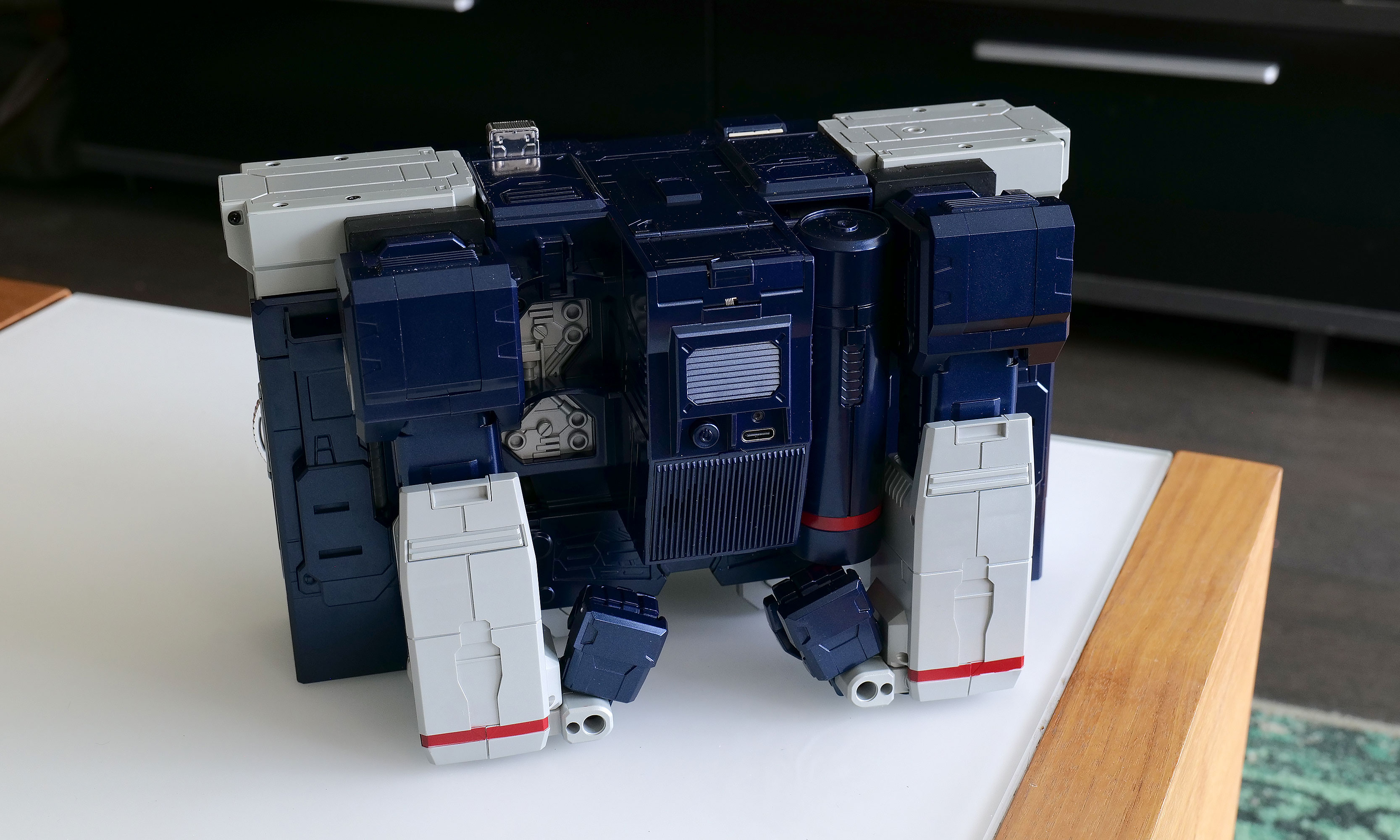
It may not be period accurate, but the addition of a USB-C port around back for power is a really nice touch.
Sam Rutherford for Engadget
Soundwave comes with a built-in 1,650mAh battery which takes about 120 minutes to charge from dead to full while offering a standby time of around 60 minutes. During my testing, I found you can get a solid 20 to 30 minutes of playtime out of him, which felt like plenty. Of course,that depends a ton on how much moving around you tell him to do. And while it certainly isn't period authentic, I really appreciate the inclusion of a USB-C port for charging.
Wrap-up
The funny thing about Robosen's Soundwave is that a toy like this would have been priceless to me as a child. But now that I'm older and I have to attach a value that goes beyond its basic price, things are a lot trickier.
I love Robosen's attention to detail. The figure looks incredible and getting voice lines from the original actor shows there's more than meets the eye to the robot’s design. But most importantly, seeing Soundwave transform on his own and stomp around like he does in the show will never get old.
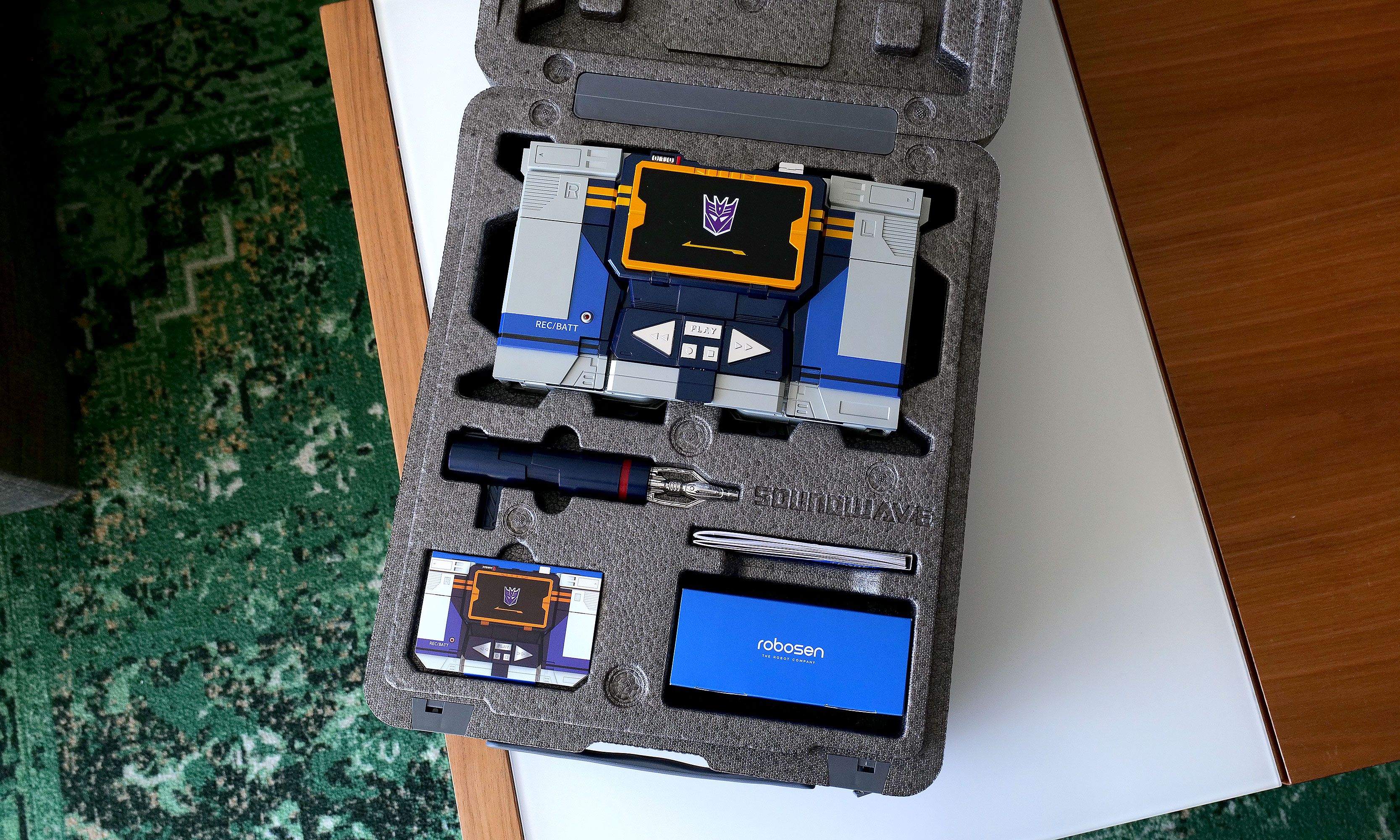
As you'd expect from a toy this expensive, Robosen's packaging is excellent.
Sam Rutherford for Engadget
On the other hand, $1,400 can buy the whole family a nice three-day vacation or more than two dozen regular Transformers toys. That kind of math makes it difficult to add this Cybertronian to the household register. But for anyone who has a budget similar to a Michael Bay movie, this take on Soundwave really does feel like a dream come true. Aside from some of Robosen's other products, this robot is certainly made of sterner stuff.
This article originally appeared on Engadget at https://www.engadget.com/general/robosen-soundwave-review-a-childhood-dream-made-real-120000804.html?src=rss