Microsoft has announced that the Xbox app is now available on all Arm-based Windows 11 PCs. The app's release follows an update Microsoft made to its Prism emulator in December 2025, which translates x86 and x64 apps to Arm, and now includes support for AVX and AVX2. Both extensions play a role in making games run efficiently on Windows.
Windows on Arm users will be able to use the Xbox app to purchase, download and stream PC games, and Microsoft says that "more than 85 percent of the Game Pass catalog" now runs on Arm PCs. Unlike Valve's SteamOS, Windows on Arm also supports anti-cheat software like Epic's Easy Anti Cheat, which means you can access a wider library of online multiplayer games in comparison to what you can get on the Steam Deck.
Microsoft has been working on getting Windows running on Arm for years at this point, and the company made a major push with its own Arm-based hardware and the launch of the Copilot+ PC program in 2024. Many Copilot+ PCs use Qualcomm's Snapdragon chips, the latest of which the company announced in September 2025. Up until this point Microsoft's handheld efforts have been focused on PCs running AMD chips, but expanded support for Arm and Qualcomm's own teases certainly makes it seem like an Arm-based Windows 11 handheld could be announced sooner rather than later.
This article originally appeared on Engadget at https://www.engadget.com/gaming/pc/microsoft-ports-the-xbox-app-to-arm-based-windows-pcs-191049475.html?src=rss
Back in August, Adobe debuted Acrobat Studio. The new service saw Adobe bring the humble PDF into the 21st century with support for a handful of new genAI features, including PDF Spaces, a hub where you can upload up to 100 documents and have AI summarize them. Now the company is enhancing the capabilities of those hubs with the introduction of four new genAI features inside of Adobe Acrobat, Acrobat Studio and Adobe Express.
The next time you add documents and files to a PDF Space, you can prompt Adobe's built-in AI assistant to generate a presentation from those materials. The software will first create an outline. From there, you can select from a handful of "professional" designs to build the presentation around, and then make tweaks. Adobe says the majority of changes, including copy edits and image swaps, can be made without the need to generate entirely new slides. Once you're happy with the results, you can share the presentation with your co-workers for further editing. Adobe has also made it easier to collaborate inside of PDF Spaces. With this latest update, you can invite others to add files and leave notes.
On the subject of editing, you can now carry out a dozen different tweaks using natural-language prompts. That includes adding text, comments, images and e-signatures. If you're old-fashioned like me, Adobe has also reworked the Help section to offer step-by-step instructions on how to complete most tasks.
Last but not least, Adobe is borrowing a page from NotebookLM by adding a feature that allows users to generate podcasts from a PDF Space. This works much like it does in Google's app. Acrobat will default to centering the generated podcast around two hosts having a conversation about the material you want summarized.
Adobe says Acrobat's AI features have been highly popular, in part because users are finding those tools are saving them time. As you might expect, the company reports students have had a particularly strong response to its efforts to add AI inside of Acrobat, seeing as the app can generate summaries of course material while providing citations for fact checking.
This article originally appeared on Engadget at https://www.engadget.com/ai/adobe-acrobat-can-now-generate-presentations-and-audio-podcasts-from-your-documents-140000146.html?src=rss
Adobe has announced updates for Premiere and After Effects, including new AI-powered tools that are meant to speed up your video editing tasks. In Premiere, the company’s video-editing software, it has unveiled a new AI-powered Object Mask feature that lets you easily pick and track persons or objects moving through your video clips. You simply have to hover over that object and click to generate a mask overlay in seconds. While the mask is supposed to be accurate from the start, you can adjust and resize it as needed. Adobe says the feature uses its own AI model for the feature and that the processing happens on-device. It also says that it doesn’t use your activities and data to train its models.
The company has also given its Shape Mask tool an upgrade. You can generate its redesigned Ellipse, Rectangle and Pen masks directly from the toolbar. Further, it updated their controls to make moving or adjusting the masks more precise. The masks can now also track objects on your video clips 20 times faster than their predecessors, which means you won’t have to keep such a close eye on the status bar. Another new Premiere update lets you easily bring media from from Firefly Boards, Adobe’s AI-powered digital canvas, into the program. In addition, Adobe Stock is now fully integrated within Premiere.
For After Effects, Adobe has rolled out an update that lets you import SVG files that are commonly used in Illustrator. You can now also build graphics and photorealistic objects inside images with 3D parametric meshes, consisting of cubes, spheres, cylinders, cones, toris and planes, within the visual effects software.
This article originally appeared on Engadget at https://www.engadget.com/ai/adobe-unveils-new-ai-powered-video-editing-tools-for-premiere-140000970.html?src=rss
With the spring approaching, it's time to start thinking about how you'll file your taxes. Unfortunately, with the recent demise of Direct File, there isn't a free, government-provided alternative to TurboTax in 2026, and you'll need to look to other federal programs, including IRS Free File, to file your paperwork. If you don't qualify for Free File, chances are you'll need to dish out cash for Intuit's software. And while we hate to suggest you give money to a company that has spent decades lobbying to ensure America's tax system remains a nightmare, we can at least save you some money if TurboTax is your only option.
Right now, Amazon has discounted the deluxe desktop edition of TurboTax by 44 percent. That gets you $35 off software that normally costs $80, which you can use to file both your individual state and federal taxes. For most Americans, that should cover their needs.
However, if you're self-employed, you'll need to pony up for the more expensive Business version of TurboTax, which is currently 42 percent off, or $54 off. One last thing to note: you'll need a PC with either Windows 11 or macOS Sonoma to run the software, so an older machine won't do, unfortunately. H&R Block is having a similar sale on their Deluxe software as well.
This article originally appeared on Engadget at https://www.engadget.com/deals/turbotax-deluxe-is-on-sale-for-only-45-ahead-of-tax-season-204848111.html?src=rss
If you weren't able to shut down your Windows 11 device recently, Microsoft has rolled out an emergency fix addressing a couple of critical bugs that popped up with its latest January 2026 Windows security update. The latest "out-of-band" update repairs an issue for some Windows 11 devices that would only restart when users tried to shut down or hibernate. The same update restores the ability for Windows 10 and Windows 11 users to log into their devices via remote connection apps.
Microsoft said the inability to shut down or hibernate affected Windows 11 devices using Secure Launch, a security feature that protects a computer from firmware-level attacks during startup. As for the remote connection issue, Microsoft explained in its Known issues page that credential prompt failures were responsible when users tried to log in remotely to affected Windows 10 and 11 devices.
According to WindowsLatest, some lingering issues with the January 2026 Windows security update are still affecting users, like seeing blank screens or Outlook Classic crashing. Back in October, Microsoft had to issue another emergency fix for Windows 11 related to the Windows Recovery Environment. For those still hesitant to upgrade to Windows 11, Microsoft is allowing you to squeeze some more life out of Windows 10 by enrolling in Extended Security Updates.
This article originally appeared on Engadget at https://www.engadget.com/computing/microsoft-issues-emergency-fix-afer-a-security-update-left-some-windows-11-devices-unable-to-shut-down-192216734.html?src=rss
In another attempt to reduce our attention spans to mush, TikTok has released the PineDrama app, which offers serialized drama series that are roughly a minute per episode. As first spotted by Business Insider, the app is designed exactly like TikTok, but instead of trendy dance videos, you can scroll through and watch "micro dramas."
For those new to the category, micro dramas are bite-sized TV shows shot in vertical video and available in minute-long episodes. Don't expect any nominations for Best Original Screenplay with series like The Officer Fell For Me or Married to my past life's nemesis, since they typically offer soap opera vibes with cliffhangers that keep users scrolling to the next episode. The app is designed to keep people on it with a Discover tab, a place to save favorites and the ability to react in real time alongside other viewers.
Right now, the micro dramas on PineDrama are all free to watch and don't have any ads. It's unclear if TikTok will introduce any costs or ads to the app, since other micro drama options like DramaBox or ReelShort have a paid structure. Late last year, TikTok also introduced a way to watch micro dramas within its own app, with a section called Minis. It's not the first time we're seeing shorter TV show formats, since Quibi made waves with a format of episodes that were less than 10 minutes long. However, maybe even 10 minutes was too long since the startup eventually called it quits after eight months.
This article originally appeared on Engadget at https://www.engadget.com/entertainment/tv-movies/tiktoks-latest-spinoff-app-feels-a-lot-like-quibi-but-with-shorter-and-cornier-content-185702010.html?src=rss
In another attempt to reduce our attention spans to mush, TikTok has released the PineDrama app, which offers serialized drama series that are roughly a minute per episode. As first spotted by Business Insider, the app is designed exactly like TikTok, but instead of trendy dance videos, you can scroll through and watch "micro dramas."
For those new to the category, micro dramas are bite-sized TV shows shot in vertical video and available in minute-long episodes. Don't expect any nominations for Best Original Screenplay with series like The Officer Fell For Me or Married to my past life's nemesis, since they typically offer soap opera vibes with cliffhangers that keep users scrolling to the next episode. The app is designed to keep people on it with a Discover tab, a place to save favorites and the ability to react in real time alongside other viewers.
Right now, the micro dramas on PineDrama are all free to watch and don't have any ads. It's unclear if TikTok will introduce any costs or ads to the app, since other micro drama options like DramaBox or ReelShort have a paid structure. Late last year, TikTok also introduced a way to watch micro dramas within its own app, with a section called Minis. It's not the first time we're seeing shorter TV show formats, since Quibi made waves with a format of episodes that were less than 10 minutes long. However, maybe even 10 minutes was too long since the startup eventually called it quits after eight months.
This article originally appeared on Engadget at https://www.engadget.com/entertainment/tv-movies/tiktoks-latest-spinoff-app-feels-a-lot-like-quibi-but-with-shorter-and-cornier-content-185702010.html?src=rss
I came out of my CyberGhost review with a positive opinion, feeling it had earned its spot in my best VPN roundup. However, even an expert review is subjective, and there's a chance CyberGhost will not work for you. If that’s the case, here's how to cancel your subscription.
How to stop your CyberGhost subscription renewing
Cancelling your CyberGhost subscription won't end it right away, unless you delete your account or get the refund (I'll explain how to do both of those later). Instead, the way to cancel CyberGhost is to stop your subscription from renewing at the end of each billing period. Once you've done that, you can keep using CyberGhost until your current period ends.
The following steps will cancel auto-renewal if you got CyberGhost through its website. If you bought it through an app store instead, see the next section.
At the top-right of the screen, click the box labeled My Account. Enter your username and password if you aren't logged in already.
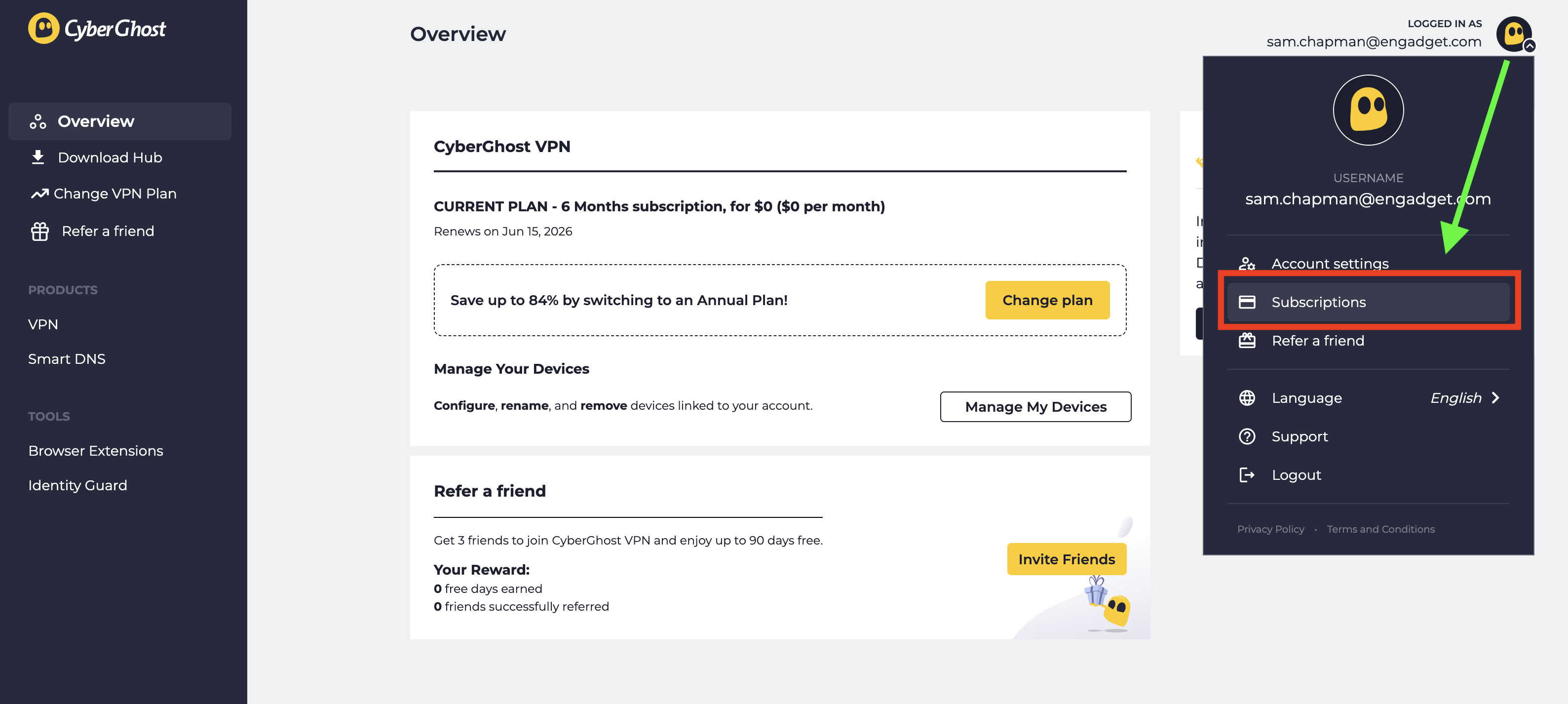
Look at the top-right corner of the new screen and click the CyberGhost logo next to your email address. From the drop-down menu, select Subscriptions.
Find the subscription you want to cancel and select Cancel Subscription.
When prompted, click Continue to Cancel.
Click the logo at top-right, then click Subscriptions to manage auto-renewal.
Sam Chapman for Engadget
This will turn off automatic billing for your account. The next time you would have been billed, your subscription will expire. You can resubscribe by purchasing another term. If you're within the refund period — 14 days for a monthly subscription and 45 days for all others — you can now request your money back.
How to cancel CyberGhost if you subscribed through an app store
When you subscribe to an app through the Apple App Store or Google Play Store, the store handles the billing; the app provider doesn't process the money itself. If you bought CyberGhost through an app store and want to cancel, you'll have to ask the app store in question, not CyberGhost. Here's how to do it.
If you subscribed through the Apple App Store, you'll need to cancel through your Apple ID. Here are the steps.
Open the Settings app on your home screen.
At the top of the Settings menu, you'll see your name. Tap it.
In your Apple Account menu, tap Subscriptions.
Scroll until you find your CyberGhost subscription, then tap on it.
Tap the words Cancel Subscription, then follow the prompts.
Here's what to do if you subscribed through the Google Play store. Similar to the Apple process, you'll go through the list of subscriptions on your profile.
Open the Google Play Store app.
Tap the circle in the top-right corner with the first letter of your name.
Find the Payments & Subscriptions menu and tap on it. On the next menu that appears, tap Subscriptions.
Scroll down until you find your CyberGhost subscription. Tap on it, then click Cancel Subscription.
Follow the prompts to complete cancellation.
How to delete your CyberGhost account
Before you set out to delete your CyberGhost account altogether, make sure you've cancelled auto-renew first by following the steps in the previous section. If you don't, you might still be charged for the subscription you're not using, and it's a huge hassle to end that without an account.
Once you've done that, log into your account on cyberghostvpn.com and click on your account profile at the top-right, just like when you canceled auto-renewal. Below the username/password window and the message about an activation key, you'll see the words Delete My Account in tiny letters.
How to find the button that deletes your CyberGhost account.
Sam Chapman for Engadget
Click on them. On the page that appears, select Delete My Account again. Follow any more prompts you're given to annihilate your username for good (note that you can't use it again afterwards).
How to get a refund from CyberGhost
To get a refund on your CyberGhost subscription, you have to be inside the window for the plan you chose. With a monthly plan, the refund period is 14 days. For all other plans, it's 45 days. If this time has elapsed, there's unfortunately no way to get your money back.
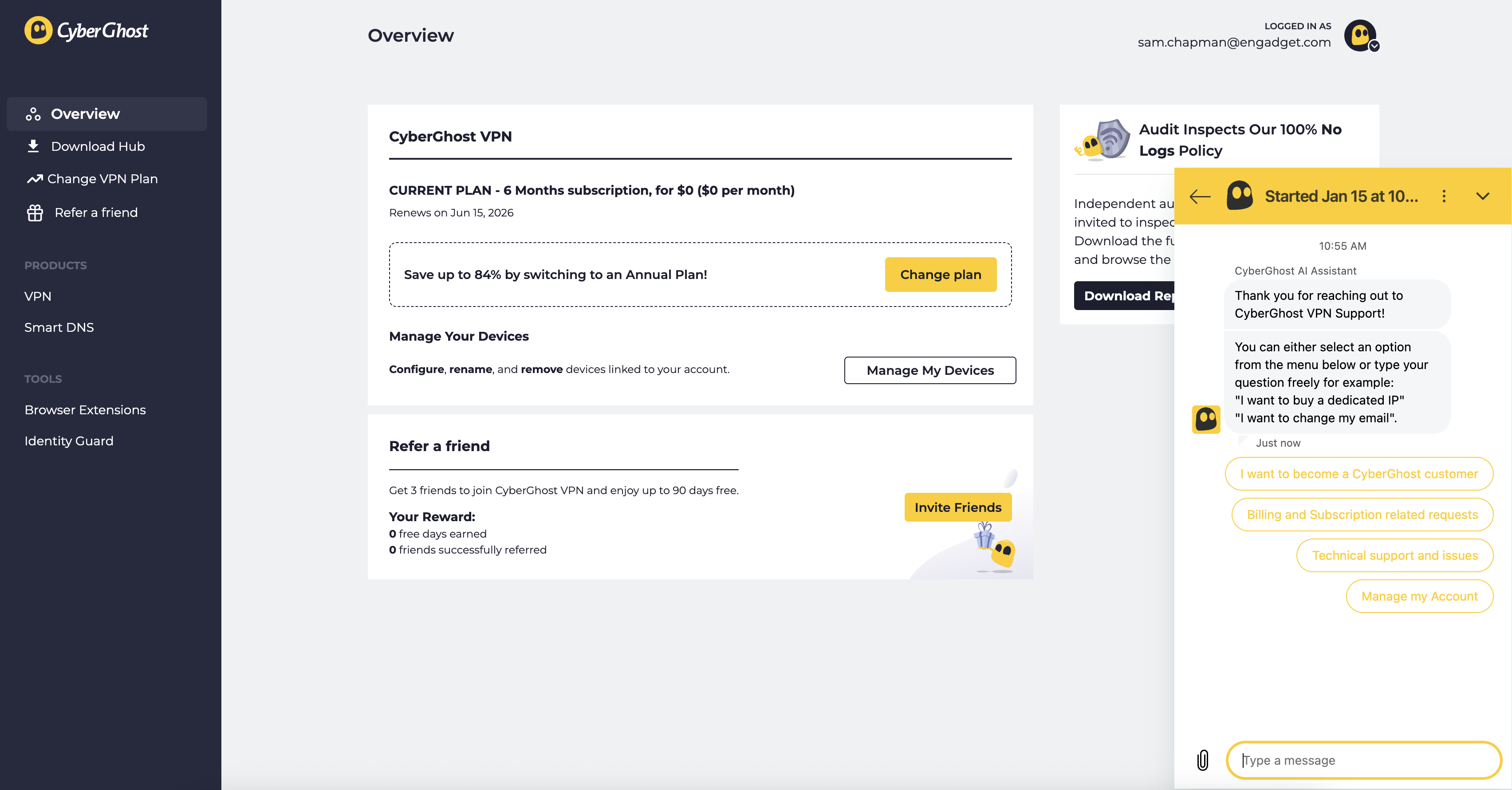
If you are within the refund period, you can get your money by sending a request through customer support. You can email support@cyberghost.ro, submit a ticket through this link or open a live chat conversation by clicking the Live Chat button at the bottom-right of any page on cyberghostvpn.com. No matter what method you choose, the conversation will go faster if you have your order number on-hand — check your inbox if you don't know it.
Start a live chat conversation by clicking the live chat button at the bottom-right of any screen on CyberGhost's website.
Sam Chapman for Engadget
If you went through an app store, you'll need to request your money back from that platform instead. Apple and Google Play handle their own monetary transactions, which means they also process refunds.
Best CyberGhost alternatives
After you've cancelled and/or deleted CyberGhost out of your life, you still need a VPN; the benefits of masking your IP address and changing your virtual location don't go anywhere. You can check out my best list (linked at the top) or best free VPN roundup for ideas, or check out the review for my favorite service, Proton VPN.
Proton VPN is my top choice because of its focus on user freedoms and attention to quality in everything it does. If you're willing to pay a bit more for extreme simplicity and total reliability, ExpressVPN is ideal for beginners. If you're a speed demon and just want to keep your downloads fast, go with Surfshark.
This article originally appeared on Engadget at https://www.engadget.com/cybersecurity/vpn/how-to-cancel-cyberghost-and-get-a-refund-130000311.html?src=rss
Claude Cowork, Anthropic's AI assistant for taking care of simple tasks on your computer, is now available for anyone with a $20 per month Pro subscription to try. Anthropic launched Cowork as an exclusive feature for its Max subscribers, who pay a minimum of $100 per month for more uses of Claude's expensive reasoning models and early access to experimental features. Now Claude Cowork is available at a cheaper price, though Anthropic notes "Pro users may hit their usage limits earlier" than Max users do.
Like other AI agents, the novelty of Claude Cowork is its ability to work on its own. If you have the macOS Claude app and a Pro subscription, you can prompt Claude Cowork to work on tasks on your local computer, like creating documents based on files you have saved or organizing your folders. The feature is an evolution of Claude Code, Anthropic's AI coding agent, and can similarly use connectors and the Claude Chrome plugin to work with other apps and the web.
As part of this expanded rollout, Anthropic has included a few fixes inspired by early user feedback. You'll now be able to rename sessions with Claude Cowork ("Tasks" in the parlance of the Claude app) and the company says the AI assistant will offer better file format previews, more reliable use of connectors to other apps and confirmation messages before it deletes files.
Coding agents top the list of applications of AI that have gained real traction in the last year, so Anthropic applying what it learned with Claude Code to a more general collection of computer tasks makes sense. Claude Cowork is still limited to macOS and Anthropic's paid subscribers, but assuming the AI agent continues to be popular, it wouldn't be surprising if the company brought it to other platforms.
This article originally appeared on Engadget at https://www.engadget.com/ai/anthropic-opens-up-its-claude-cowork-feature-to-anyone-with-a-20-subscription-194000021.html?src=rss
Meta is killing the standalone Workrooms app on February 16, 2026. The company presented Workrooms as a virtual reality space where teams can meet and collaborate in an immersive environment when it launched the product. Now Meta says its Horizon platform has evolved enough to support “a wide range of productivity apps and tools,” so it “made the decision to discontinue Workrooms as a standalone app.”
The company recently slashed its spending on the metaverse and started the process to lay off more than 1,000 employees from its Reality Labs division. Due to those layoffs and organizational changes, it closed three of its VR studios. Reality Labs had lost more than $70 billion since 2021, and Meta told Engadget that it had decided to shift some of its investments from the metaverse towards wearables, such as its AI-powered Ray-Ban smart glasses. The company is also discontinuing Horizon managed services, its subscription service that helps organizations manage their Quest headsets, in February.
Users will no longer be able to access the Workrooms app or any of their data in it starting on February 16. Meta is allowing people to download their data if they need it until that date.
This article originally appeared on Engadget at https://www.engadget.com/big-tech/meta-is-closing-down-its-vr-meeting-rooms-as-part-of-its-wider-cull-140000422.html?src=rss