Struggling with messy data in Excel can be a real headache, especially when you’re on a tight deadline. But what if there was a way to make this process smoother and more efficient? In this guide created by Simon Sez IT, you will learn a range of techniques to clean your Excel data, from removing […]
If you found the original Apple Vision Pro a little out of your budget you might be interested to know that Apple is rumored to be working on a more affordable headset that might launch sometime later this year. Building upon the groundbreaking features of its more expensive model, the more affordable Apple Vision Pro […]
For the people who think Artificial Intelligence is a bit of a gimmick, the MOFT Snap Flow helps you harness the power of Human Intelligence. Designed to attach to the back of your phone, the MOFT Snap Flow gives you the sleekest possible note-taking solution ever designed. While the company is best known for designing ‘invisible’ stands for phones and laptops, the Snap Flow takes the phone stand to another creative level. Sure, it props your iPhone up at an angle when you want hands-free viewing… but flip the Snap Flow open and you’re greeted with a tiny Post-It-sized notepad, a foldable pen, and a tiny folder for organizing your paperwork, to boost productivity and creativity anywhere. It’s analog beauty at its best, allowing you to quickly jot down ideas, take notes, make lists, capture verses, or make subway doodles – without an app, a screen, or the cloud. Just good old-fashioned ink and paper.
Your smartphone can be an extremely noisy place, mentally and visually. You could get a call while you’re typing an email, an Instagram DM while working on a deck, or just get sidetracked by a flurry of notifications during a video call. Your phone is a multipurpose device, and when you’re trying to concentrate on a single task, that multipurpose nature goes from blessing to curse really fast. That’s where the notepad becomes a sanctuary. You can allow your mind to think without being distracted, since pen and paper don’t inundate you with messages and notifications. That’s what the MOFT Snap Flow hopes to provide – a personal space that lets you ditch digital distractions, and apps snooping on you or storing/stealing your personal information. The Snap Flow’s notepad gives you that slice of analog, but while being conveniently snapped against the back of your smart device. It’s slim, lightweight, and hey, it also works as a phone stand.
The design is sheer genius. The Snap Flow is like a mini notebook that sits on the back of your phone. Open it the way you would a book, and you’re greeted with blank papers (or as MOFT calls it, a ‘canvas’) on your left, an organizing folder system on your right, and a flat-packed pen. Lift the pen off its magnetic base and fold its three-panel design to go from flat to a grippy prism-shaped writing tool. You can now use the pen on the paper to write notes, capture ideas, make to-do lists, or just doodle away. Believe me, there’s something truly primal about ideating on paper with a pen that a digital notepad cannot compete with. It feels intuitive and allows you to feel more productive.
Once you’ve sketched on a canvas, tear it off and either mount it on the magnetic clipboard on the right side of the Snap Flow, or tuck it away in a hidden folder behind the clipboard for later. Effectively, you’re left with a miniature organizer that’s smaller than the size of your phone… and that isn’t including the fact that there’s a stand built into the design too.
Nobody does invisible stands better than MOFT, and the Snap Flow embraces that culture too. A flap on the bottom lets you open the Snap Flow’s stand, which lets you vertically rest your phone on any flat surface – or simply rotate the Snap Flow to have your phone rest horizontally. MOFT’s most user-loved feature gives your iPhone its very own kickstand that sits fairly flat against the phone’s back. Prop it up on a table without your phone and it becomes a miniature focus. Clever, eh?
The MOFT Snap Flow measures 7.56mm thick, and weighs a mere 62 grams. Aside from the stack of papers and that Invisible Pen, the Snap Flow has yet another slot for storing up to 2 payment cards, doubling as a wallet for good measure. Each Snap Flow is made from MOFT’s proprietary scratch-resistant MOVAS eco-friendly vegan leather. The Snap Flow comes in 4 color options ranging from subtle to eye-catching, and starts at just $39. The package includes the stand and pen, along with two sets of paper – one regular and one sticky. For non-iPhone users, there’s even a magnetic ring sticker included that turns any non-supported smartphone or case into a MagSafe one so you can securely attach your Snap Flow and take notes mindfully without any of that visual or mental clutter!
Have you ever wondered why the WiFi signal in your home is strong in one room but weak in another? Or why sometimes your internet seems slower even though you’re paying for high-speed service? The culprit often lies not in the service itself but in the placement of your WiFi router. Think of your WiFi router as the heart of your home network system. Its location can either make or break the quality of your internet connection. Proper placement isn’t just about putting the router anywhere that’s convenient; it’s about strategically positioning it to maximize its effectiveness. In this article, we’ll explore five essential tips to help you place your router for the best possible WiFi coverage throughout your home.
1. Centralize Your Router
One of the simplest yet most effective tips is to place your router in the center of your home. The router ’emits’ connectivity through waves… so think of these waves as ripples – the further they travel, the weaker they get. The more they bounce off objects, the weaker they get. A video by a physicist above shows exactly how WiFi travels around in your home. If your router is placed at one end of the house, the signal has to travel a longer distance to reach the farthest rooms, leading to weaker coverage in those areas. By centralizing the router, you ensure a more even distribution of the signal, minimizing dead zones.
For example, if your home has multiple floors, consider placing the router on the main floor in a central location. This placement allows the signal to reach both the upper and lower floors more efficiently. Additionally, central placement can help reduce interference from walls and other obstructions that can weaken the signal. Remember, the goal is to give your WiFi signal the shortest, most direct path to all areas of your home.
2. Elevate the Router
Once you’ve found the central spot for your router, the next step is to elevate it. Placing your router on a high shelf or mounting it on the wall can make a significant difference in your WiFi coverage. WiFi signals tend to spread out and downward, so positioning the router higher up allows the signal to cover a larger area with fewer obstructions. Try to look around in offices, hotels, or at the airport and you’ll notice that WiFi routers are always wall or ceiling-mounted. There are a bunch of good reasons for this.
Think of it this way: if you place your router on the floor, the signal has to pass through furniture, appliances, and other objects that can absorb or deflect it, weakening the strength. By elevating the router, you reduce the number of obstacles the signal encounters, leading to better performance. Sniper mentality, in short! Additionally, mounting the router on the wall can help avoid interference from other electronic devices that are often found at ground level, such as TVs and gaming consoles.
3. Avoid Obstacles
Obstacles are one of the main enemies of a strong WiFi signal. Large metal objects, thick walls, and electronic devices can all interfere with your WiFi signal, causing it to weaken or drop entirely. When choosing a spot for your router, try to keep it away from such obstacles as much as possible.
For instance, placing your router next to a large metal refrigerator or inside a cabinet can severely impact its performance. Metal absorbs and reflects WiFi signals, causing significant signal loss. Similarly, thick walls, especially those made of concrete or brick, can block the signal from passing through. If your router has to transmit through several thick walls to reach certain rooms, you might experience weaker connectivity in those areas. To combat this, place your router in an open area, free from obstructions, and consider using WiFi extenders or mesh networks for larger homes.
4. Optimal Antenna Position
Many routers come with adjustable antennas, and how you position these antennas can impact your WiFi coverage. A common mistake is to leave the antennas pointing in the same direction. However, adjusting the antennas can help direct the signal more effectively.
For multi-floor homes, the best practice is to position one antenna vertically and one horizontally. The vertical antenna will help distribute the signal to the floors above and below, while the horizontal antenna ensures better coverage on the same floor. This configuration allows the signal to spread more uniformly throughout the home. In single-floor homes, positioning both antennas vertically can provide a wider range of coverage across the floor. Experiment with different angles and positions to find what works best for your specific home layout.
5. Limit Interference
Lastly, minimizing interference from other electronic devices is crucial for maintaining a strong WiFi signal. Many household devices operate on the same frequency as your WiFi router, leading to potential interference that can degrade your internet performance. Common culprits include microwaves, cordless phones, baby monitors, and Bluetooth devices.
To limit interference, try to place your router away from these devices. If possible, avoid placing the router in the kitchen where appliances like microwaves can interfere with the signal. Additionally, consider using a dual-band or tri-band router, which can help separate your devices across different frequency bands, reducing the likelihood of interference. Dual-band routers operate on both the 2.4 GHz and 5 GHz frequencies, allowing you to allocate different devices to each band. For instance, you can reserve the 2.4 GHz band for devices that require longer range but can tolerate slower speeds, like smart home devices, and use the 5 GHz band for devices that need higher speeds and can be closer to the router, like laptops and gaming consoles.
Achieving optimal WiFi performance in your home isn’t just about having the latest router or the fastest internet plan; it’s about strategic placement and understanding how WiFi signals work. These tips come from a mix of technical knowledge and practical experience, and while every home is different, the principles remain the same. Implement these strategies and watch as your WiFi performance reaches new heights, providing you with the seamless connectivity you need in today’s connected world.
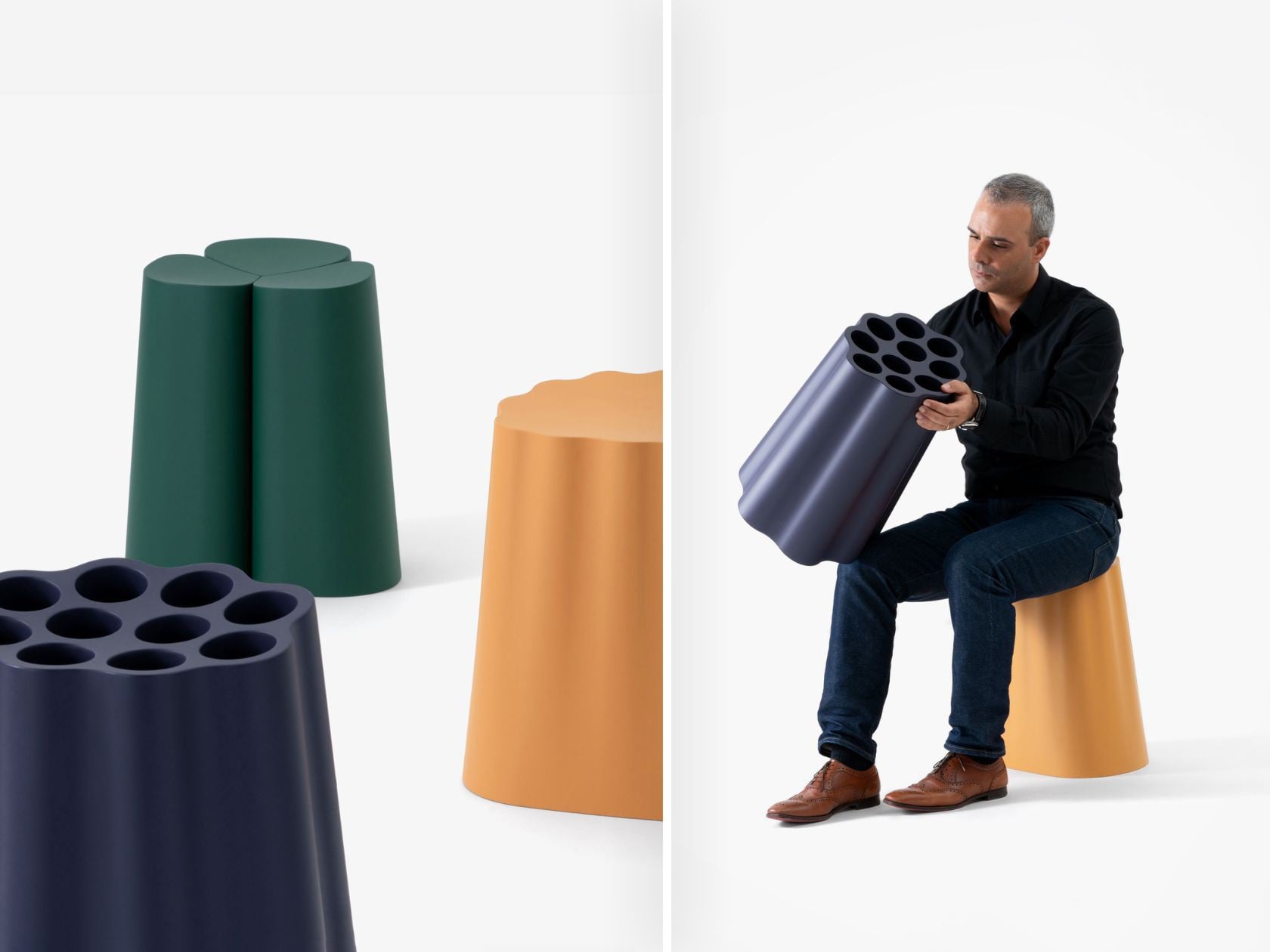
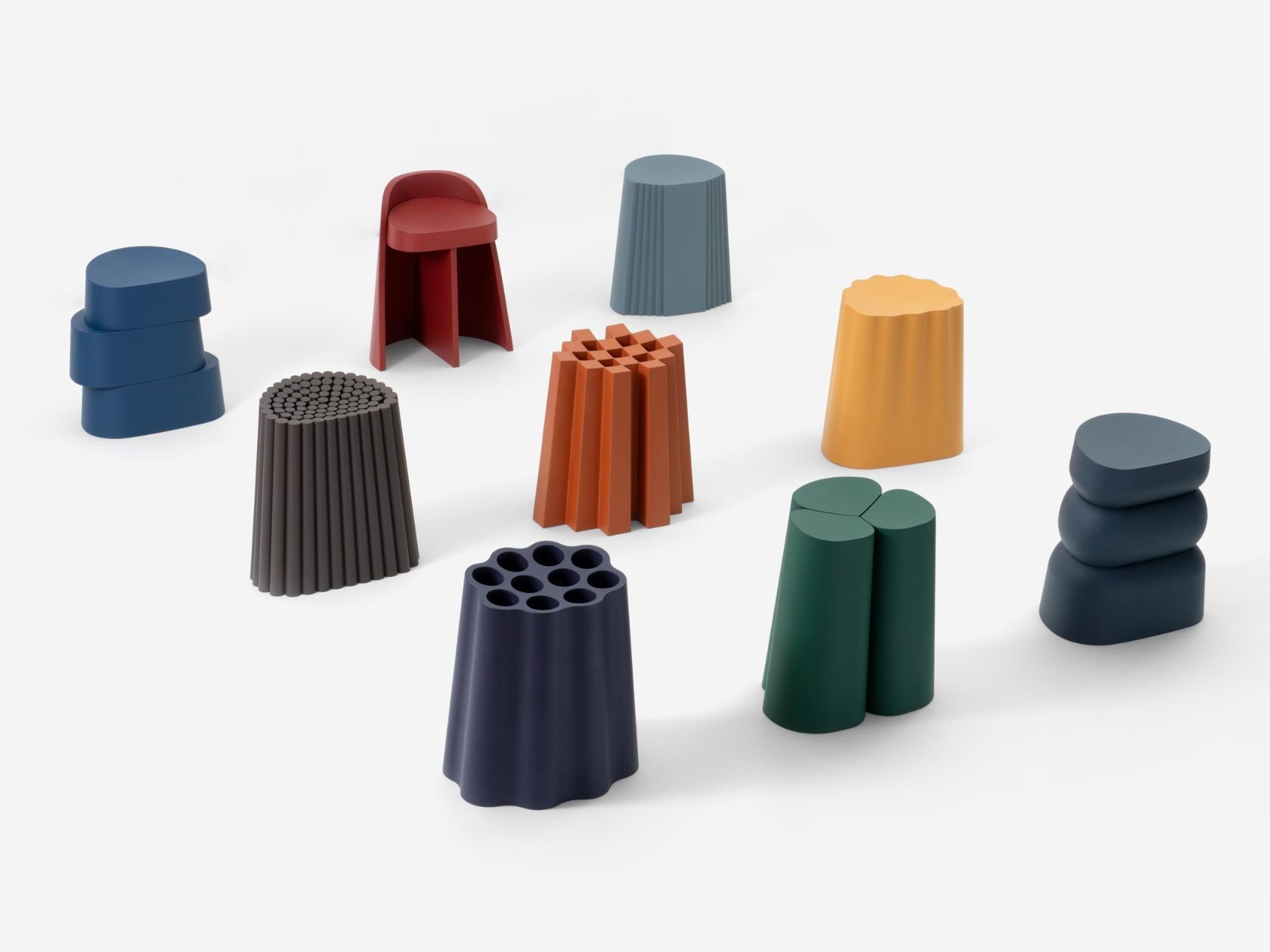
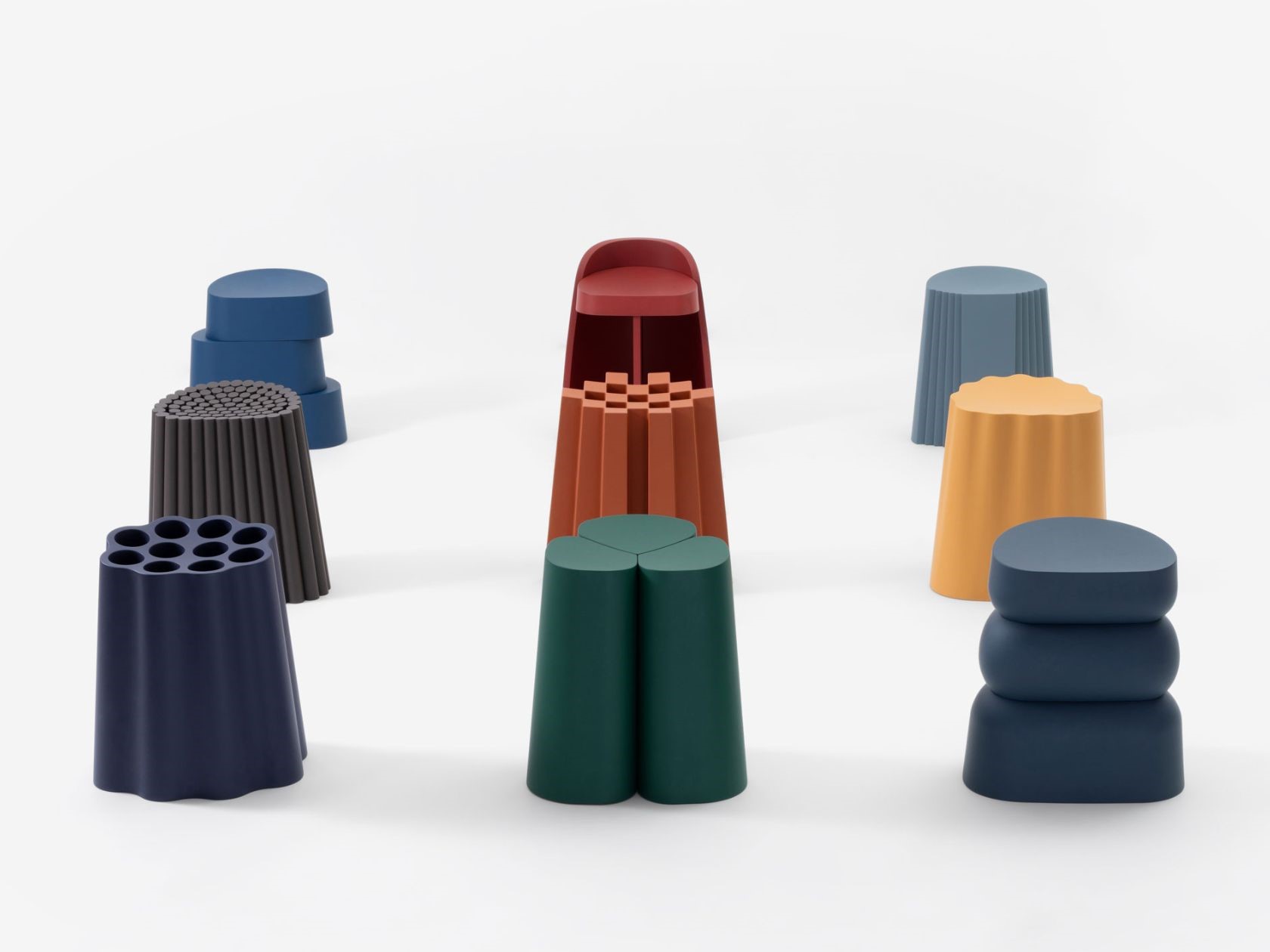
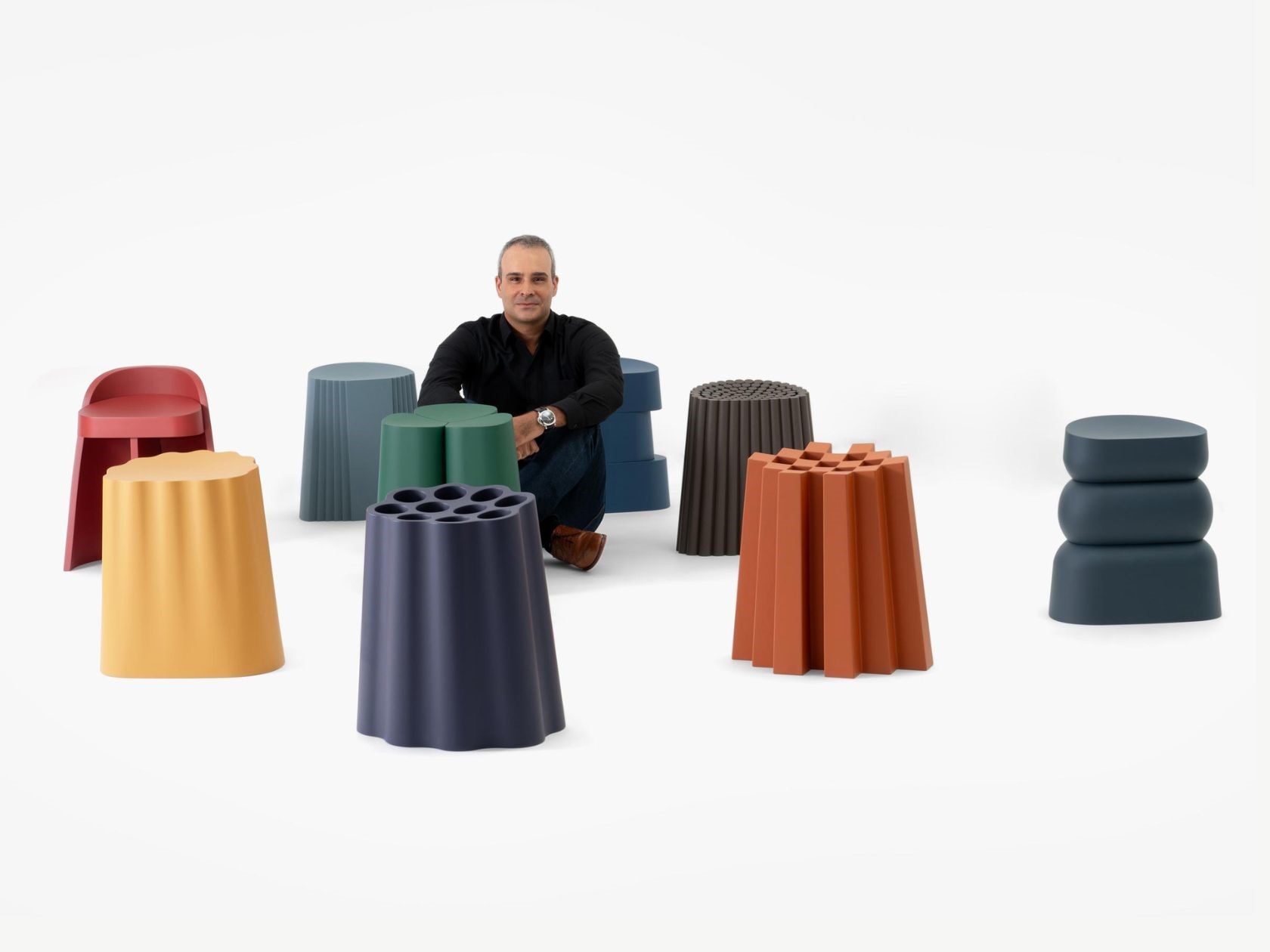
“Inspired by Nature” is a stunning collection of nine stools that beautifully captures the essence of the natural world. Drawing inspiration from the elements, forms, and colors that surround us, each piece in this collection is thoughtfully crafted to reflect the beauty and diversity of nature. Designed by the renowned Italian designer Andrea Ponti, this collection is a testament to his commitment to sustainability and innovative design.
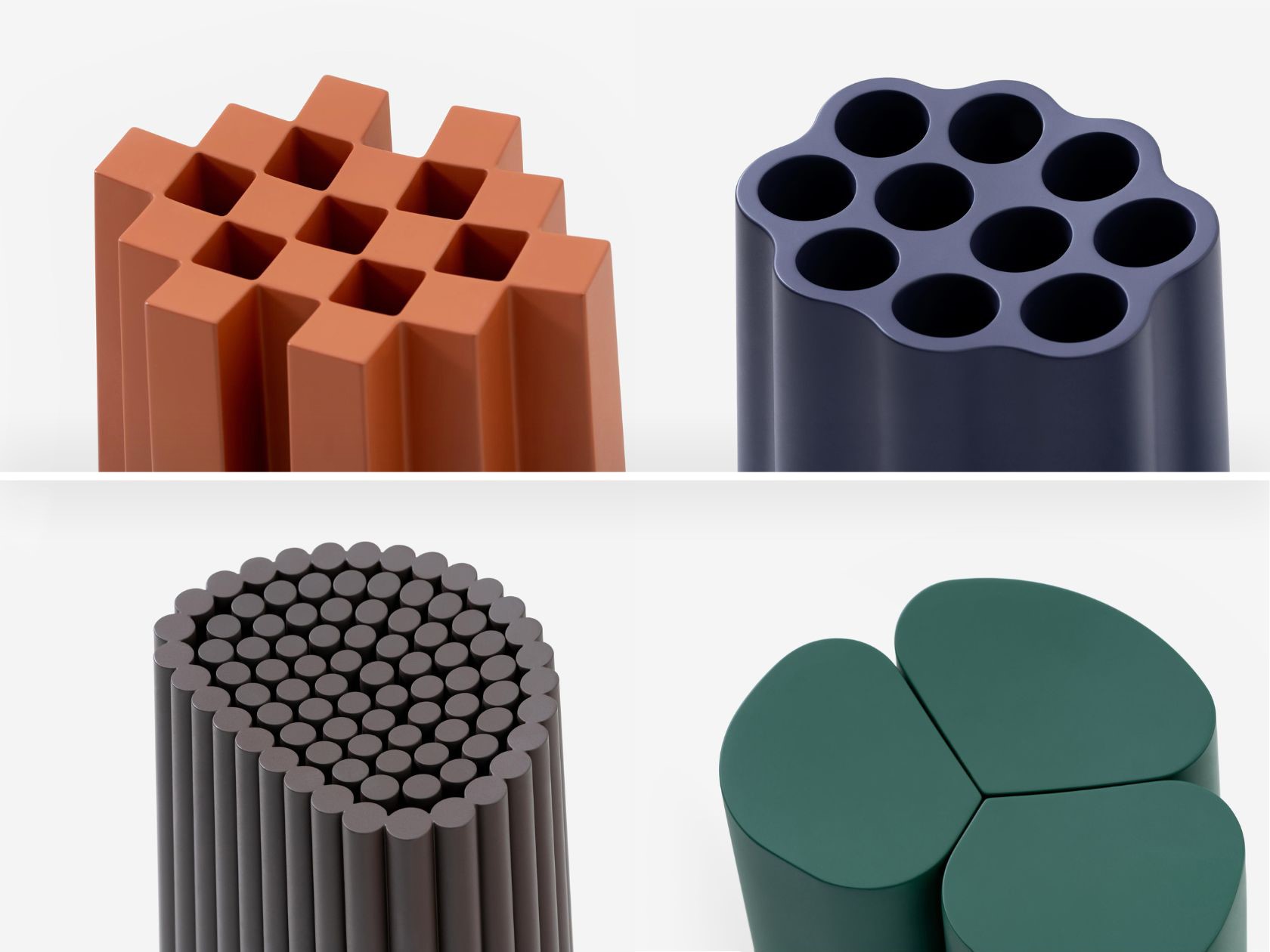
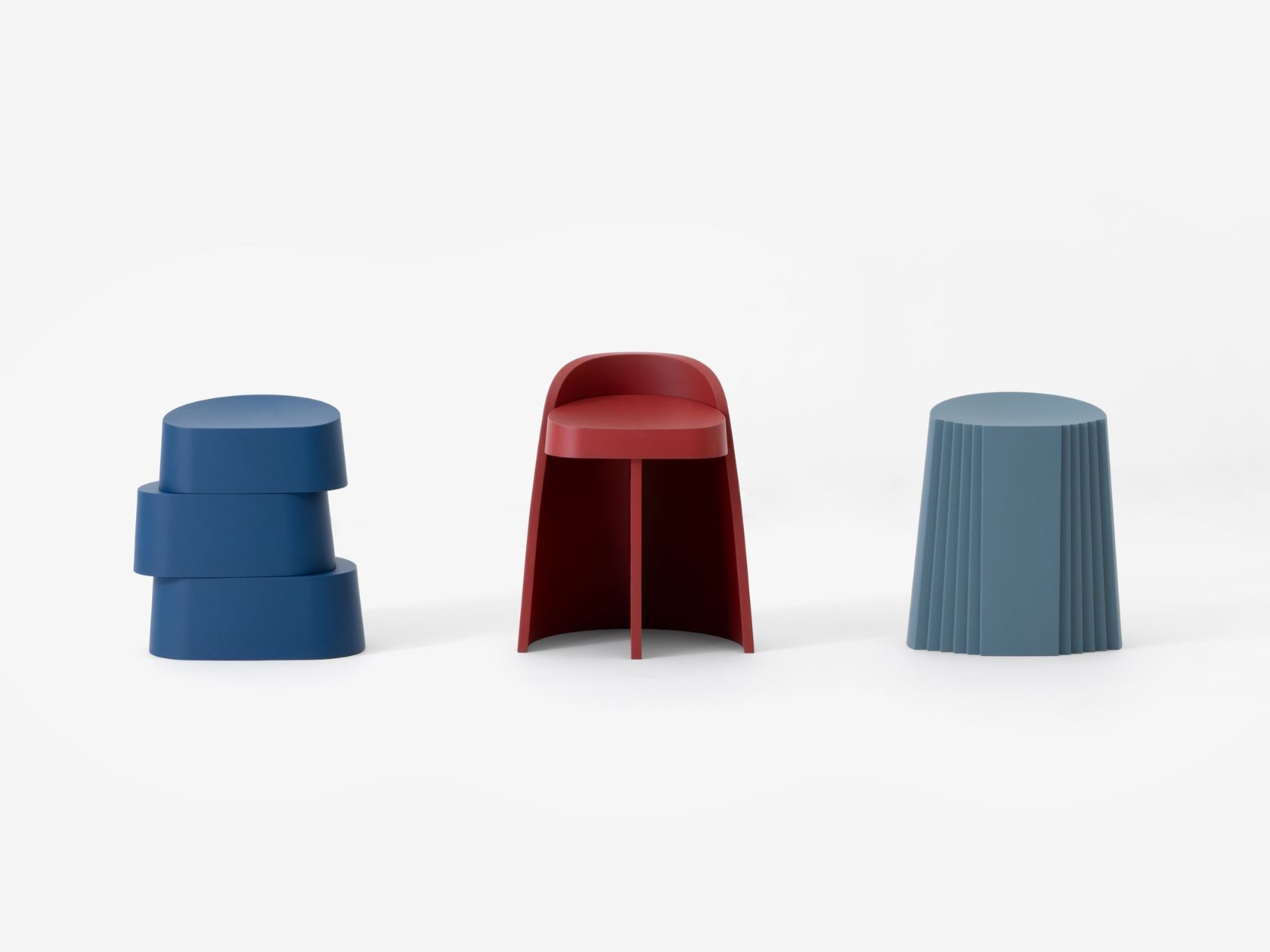
Each stool in the Inspired by Nature collection shares a consistent design language, marked by a rounded footprint, a tapered silhouette, and a concave seat. This cohesive design suggests continuity and mirrors the patterns found in nature. Despite this shared design, each stool maintains its own unique identity, with distinct shapes and specific colors that echo different elements of the natural world. This deliberate variety within a uniform framework is what makes the collection so captivating.
The Inspired by Nature collection is made entirely from recycled ABS, reflecting Ponti’s dedication to sustainable design practices. This choice of material not only reduces waste but also underscores the collection’s connection to the environment. By using recycled materials, Ponti demonstrates that sustainability goes beyond eco-friendly practices; it is about creating products that forge lasting relationships between people and nature. The use of recycled ABS is a conscious decision that aligns with the broader goals of environmental stewardship and responsible design.
The uniqueness of each stool in the collection is intentional and crafted to evoke the essence of the natural world. The careful selection of hues and forms is designed to tap into our deepest emotions, fostering an intimate link between us and the environment. Each piece is more than just a functional object; it is a representation of nature’s beauty and diversity. This emotional connection is a crucial aspect of Ponti’s design philosophy, as it seeks to create not just products, but experiences that resonate on a deeper level.
Andrea Ponti, formerly of the Polytechnic of Milan, is a celebrated designer known for his innovative and sustainable designs. His previous works, such as the imposing Kanban side table, the Shadows in the Window furniture collection, and the Diga, Koma, and Torus kitchen utensils, have all been acclaimed for their exceptional design and functionality. With the Inspired by Nature collection, Ponti continues to push the boundaries of design, creating pieces that are not only beautiful but also meaningful. His work consistently emphasizes the importance of sustainability and the role of design in fostering a harmonious relationship between humans and their environment.
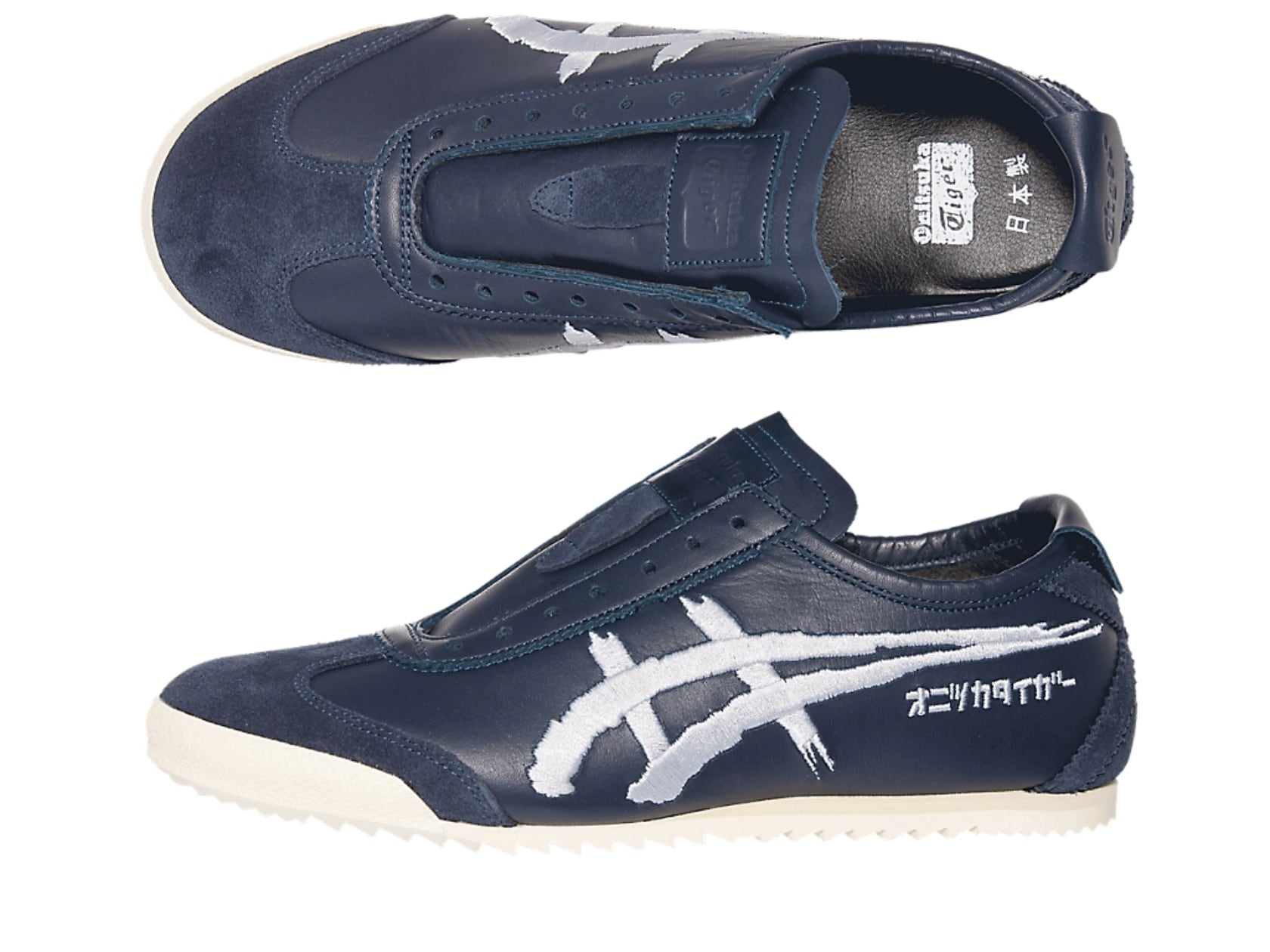
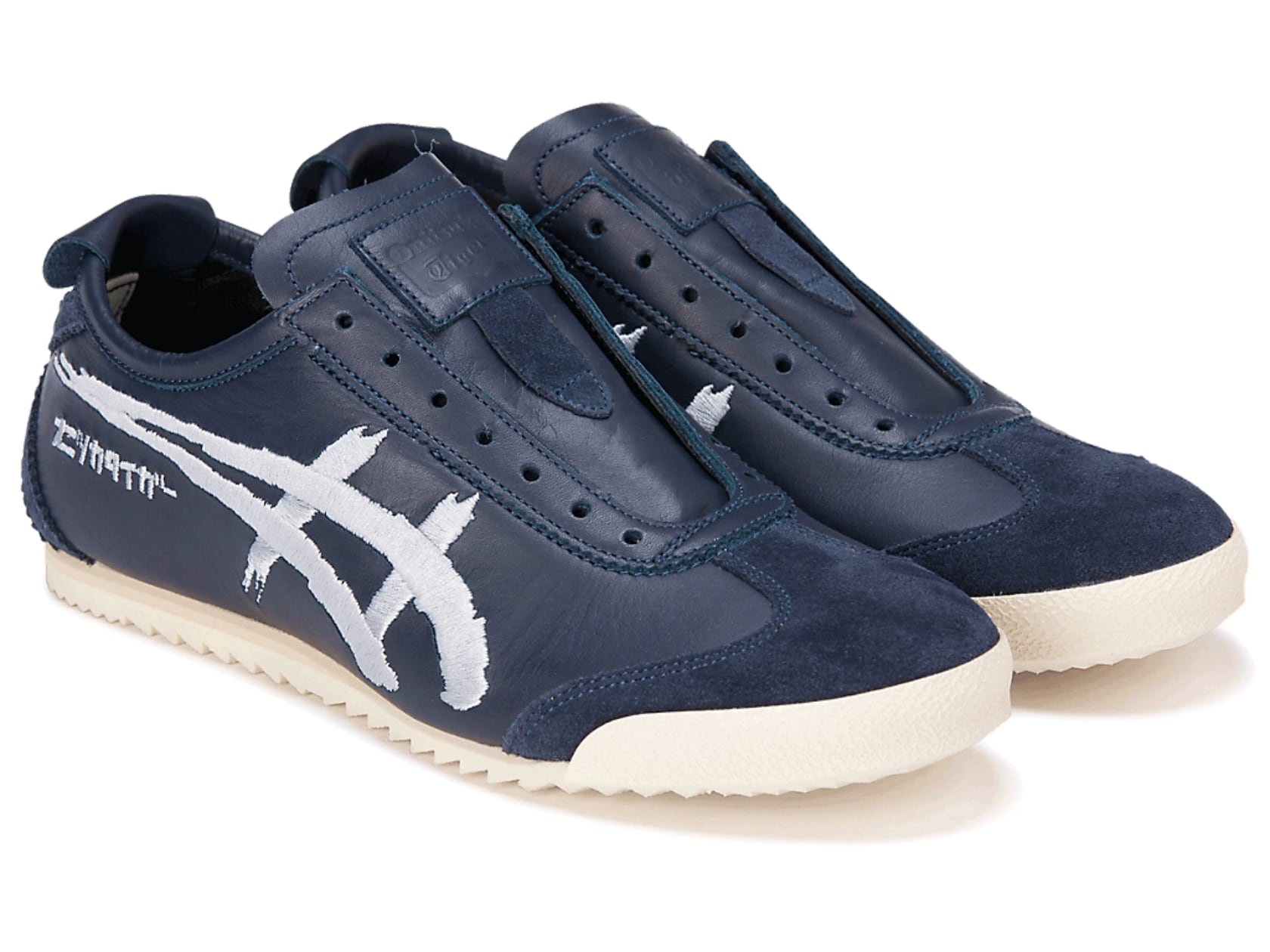
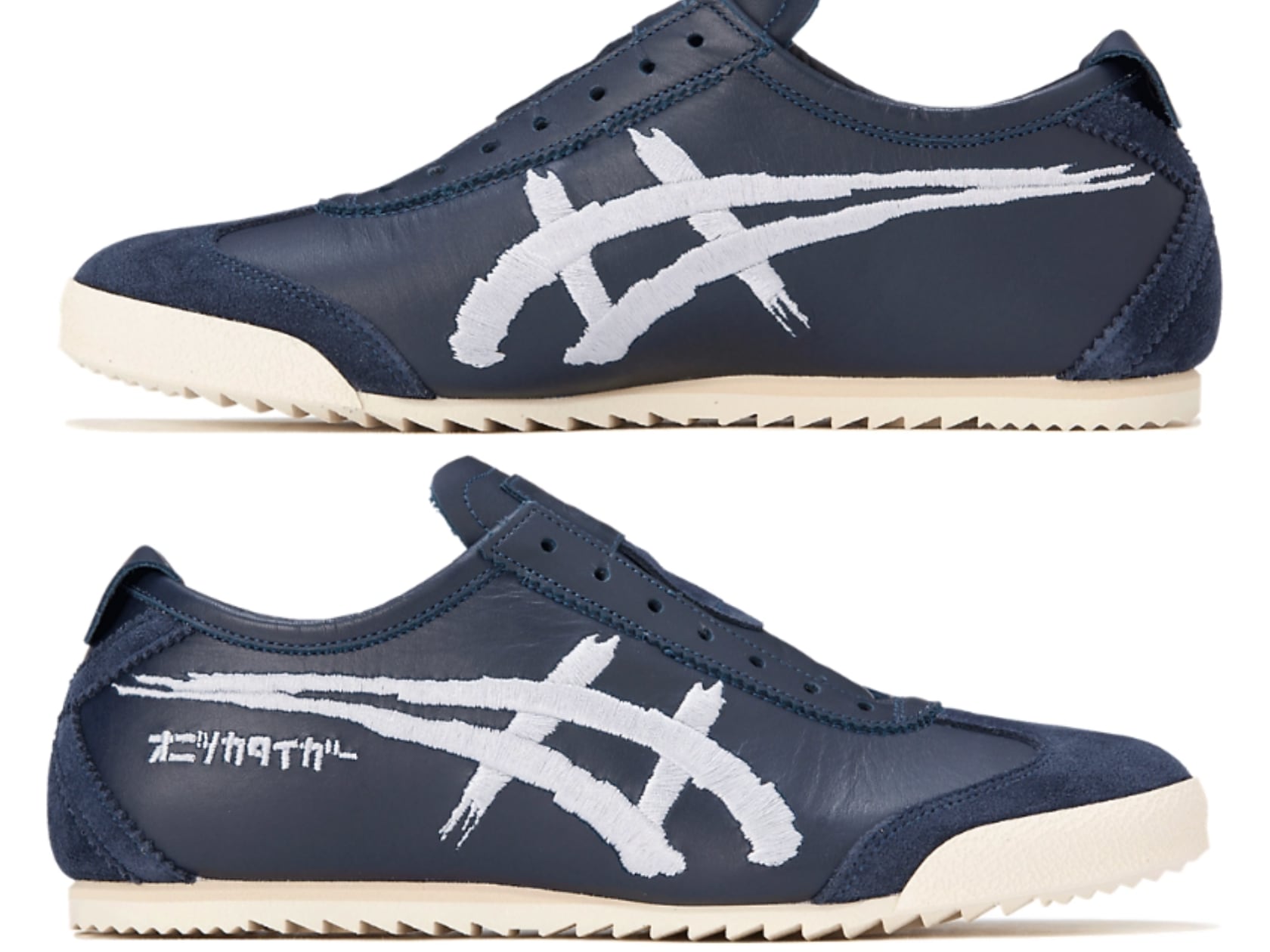
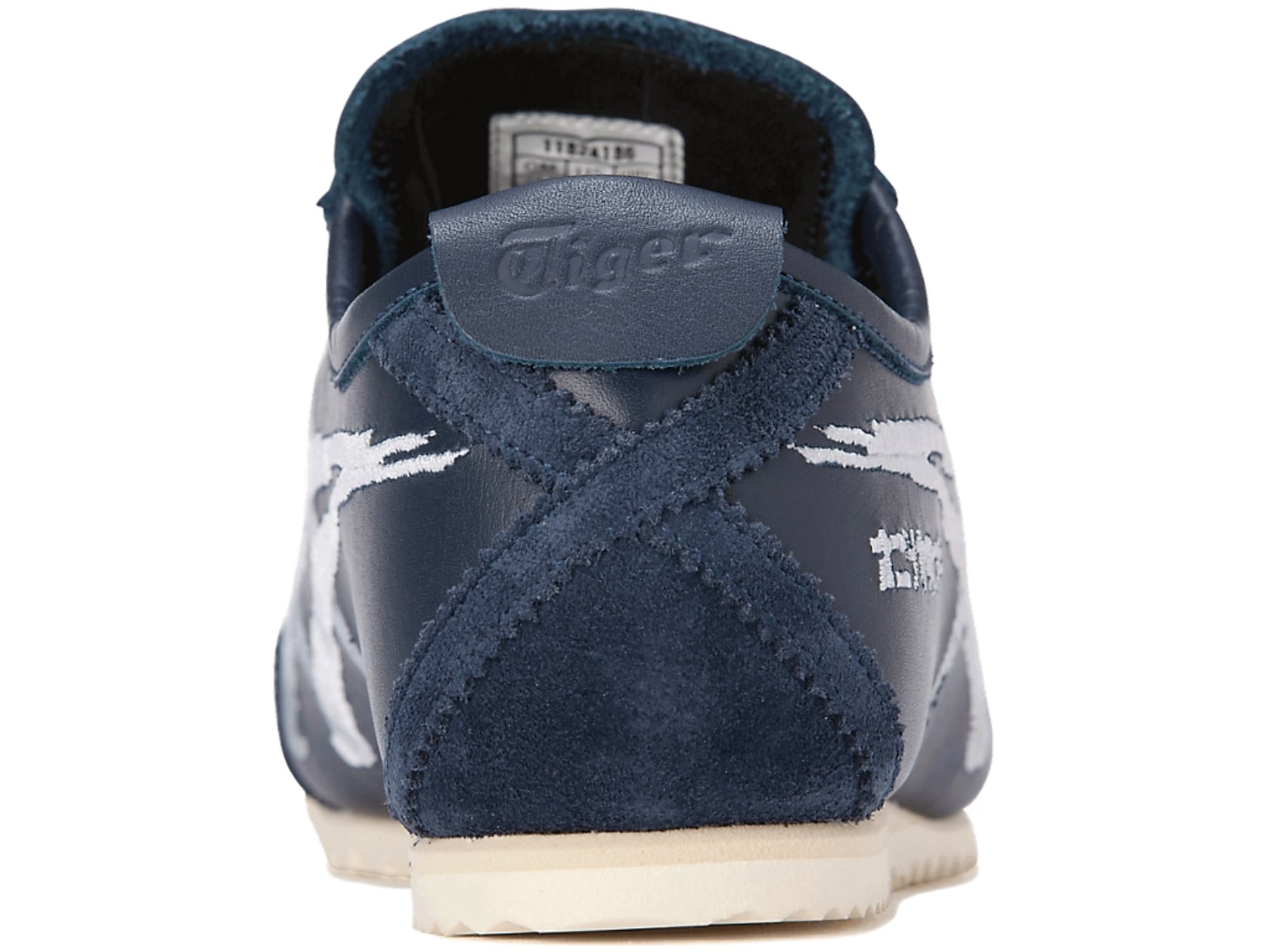
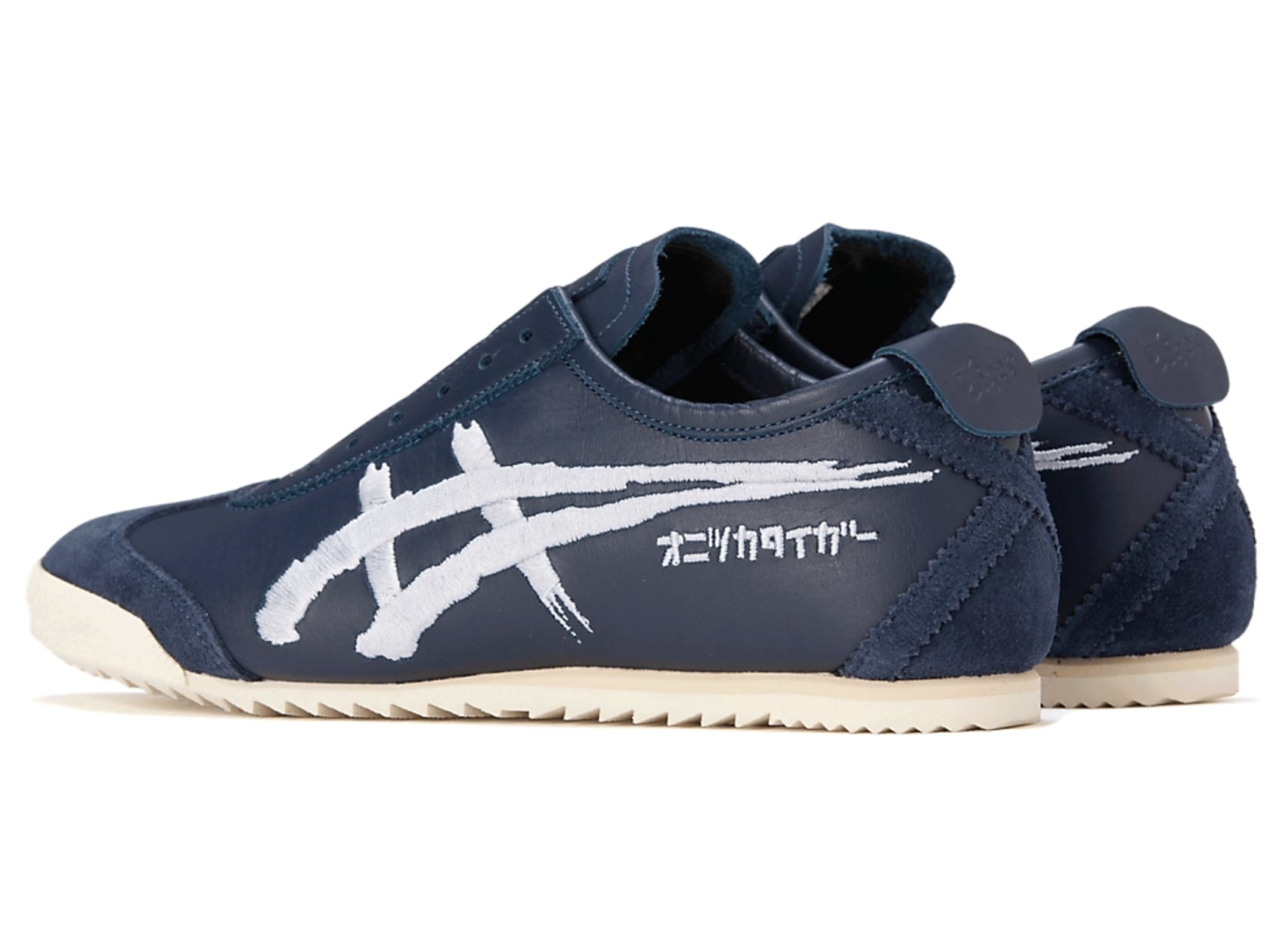
The Onitsuka Tiger Mexico 66 Deluxe combines traditional craftsmanship with modern design to create a unique and stylish sneaker. The first thing you notice about these shoes is the embroidered stripes that resemble brush strokes, giving them an artistic flair. This detail adds a tactile depth and visual interest that sets them apart. The deep navy color, called Peacoat, paired with Pure Silver accents, offers a sophisticated yet versatile look. Made from natural leather, these shoes provide durability and comfort. Adding to their charm, the Katakana script on the side spells out “オニツカタイガー” (Onitsuka Tiger), highlighting the brand’s Japanese heritage and giving the shoes a unique cultural touch.
The embroidery on the stripes goes beyond decoration, showcasing the meticulous craftsmanship involved. The brush stroke effect captures the look of traditional Japanese calligraphy, with intricate details that mimic the flow and texture of ink. This artistic element transforms the sneakers into wearable art. The combination of smooth and frayed edges in the embroidery adds an authentic feel as if each stripe was painted by hand.
The color scheme of these shoes is striking yet subtle, making them suitable for various styles and occasions. The Peacoat navy provides a rich, deep base, while the Pure Silver accents add a touch of elegance. This versatile color combination ensures that the Mexico 66 Deluxe can be paired with both casual and more polished outfits, making them a great addition to any wardrobe.
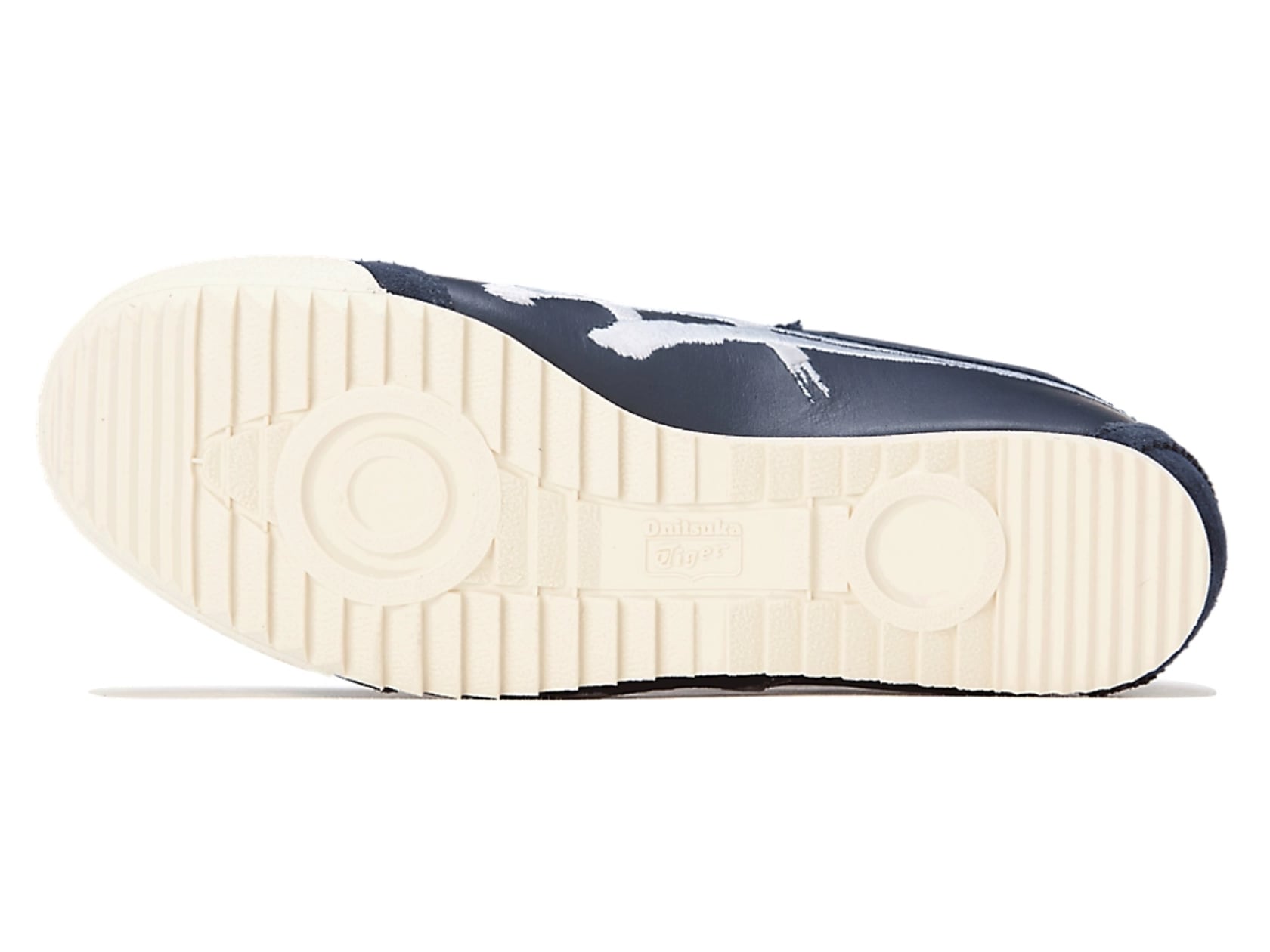
The upper part of the Mexico 66 Deluxe is crafted from high-quality natural leather, offering a premium feel and exceptional durability. The rubber outsole ensures good traction and comfort, making these shoes practical for everyday wear. The attention to detail in the materials and construction reflects the high standards of Japanese manufacturing, a hallmark of the “NIPPON MADE” series.
Wearing these shoes feels like a unique experience every time. The soft leather molds to your feet, enhancing comfort with each wear. They are perfect for all-day wear, whether you’re running errands or attending a casual event. The shoes’ premium materials and craftsmanship ensure they remain comfortable and stylish, even after long periods of use.
One of my favorite features is how these shoes look and feel great. The embroidered stripes and elegant color scheme make them pop or blend in depending on the setting. They’ve become my go-to choice for casual outings and more refined gatherings.
I’ve put these shoes through their paces, and they have held up remarkably well. Whether walking through city streets or taking on light outdoor activities, the Mexico 66 Deluxe has proven durable and reliable. The rubber outsole provides excellent grip, making it versatile enough to handle different environments.
The Katakana script on the side is a subtle yet impactful detail that adds to the shoes’ unique appeal. It emphasizes the brand’s Japanese roots, giving the shoes an authentic and distinctive character you won’t find in other sneakers.
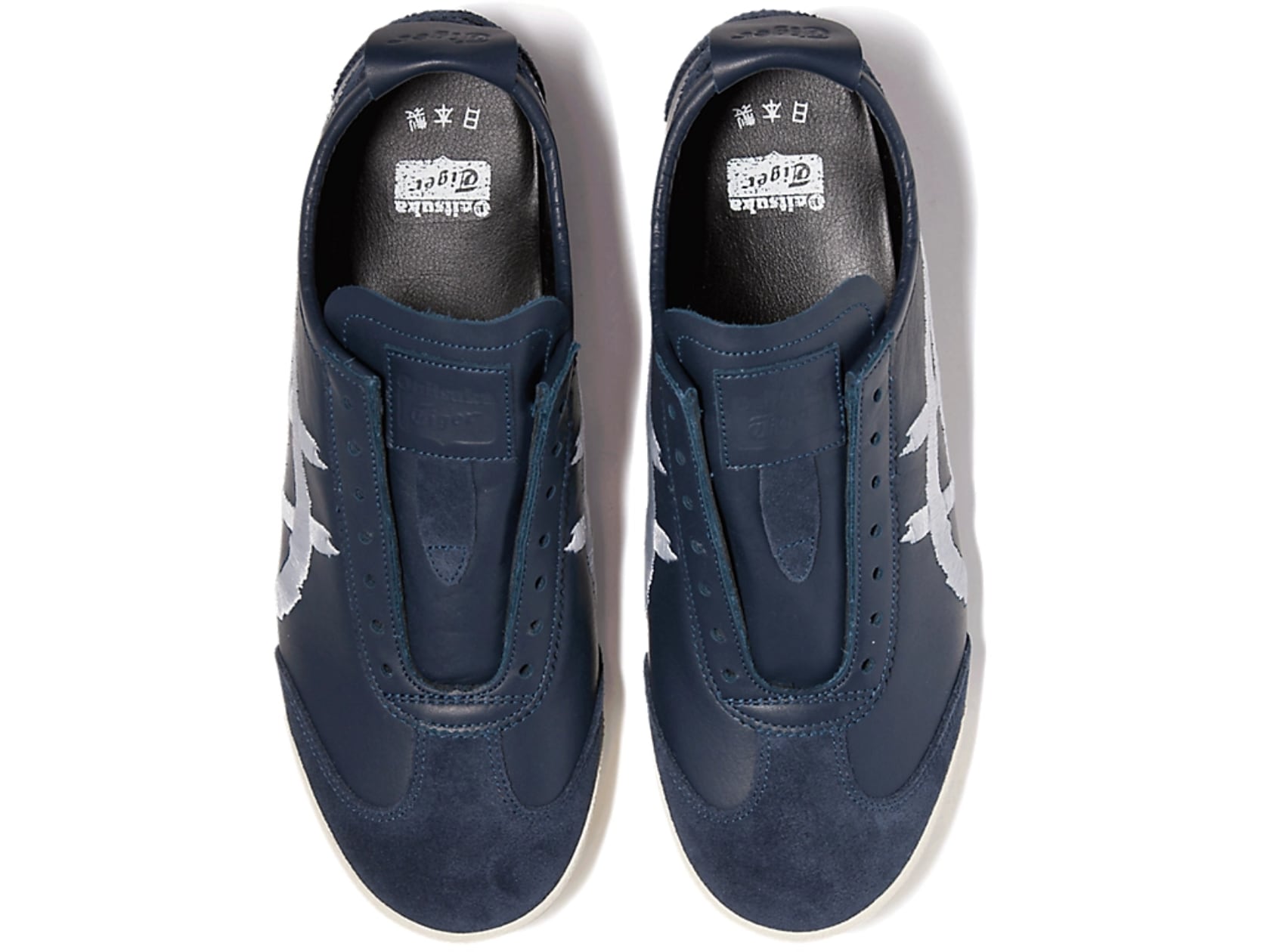
Another feature of these shoes is that they use two shades of leather. The combination of smooth leather and suede adds a rich texture and depth to the design. The smooth leather provides a sleek, polished look, while the suede adds a touch of sophistication and warmth. This mix of materials enhances the visual appeal and contributes to the overall comfort and fit of the shoes.
A striking aspect of the Mexico 66 Deluxe is its laceless design, which I’m a big fan of. This feature adds to the sleek look and makes the shoes easy to slip on and off. However, it’s important to note that these shoes are designed and made for the Japanese market, which means they might run small. If you’re considering buying a pair, it’s advisable to go a size up, especially if you plan on wearing them with socks.
Onitsuka Tiger MEXICO 66 SD: ColorsBIRCH/GREEN
Overall, the Onitsuka Tiger Mexico 66 Deluxe offers a perfect blend of art, culture, and craftsmanship. The unique design elements, high-quality materials, and cultural touches make these sneakers a standout choice for anyone looking to add a bit of artistic flair to their footwear collection. Whether you’re a fan of Japanese culture or simply appreciate well-crafted shoes, the Mexico 66 Deluxe is an excellent choice.
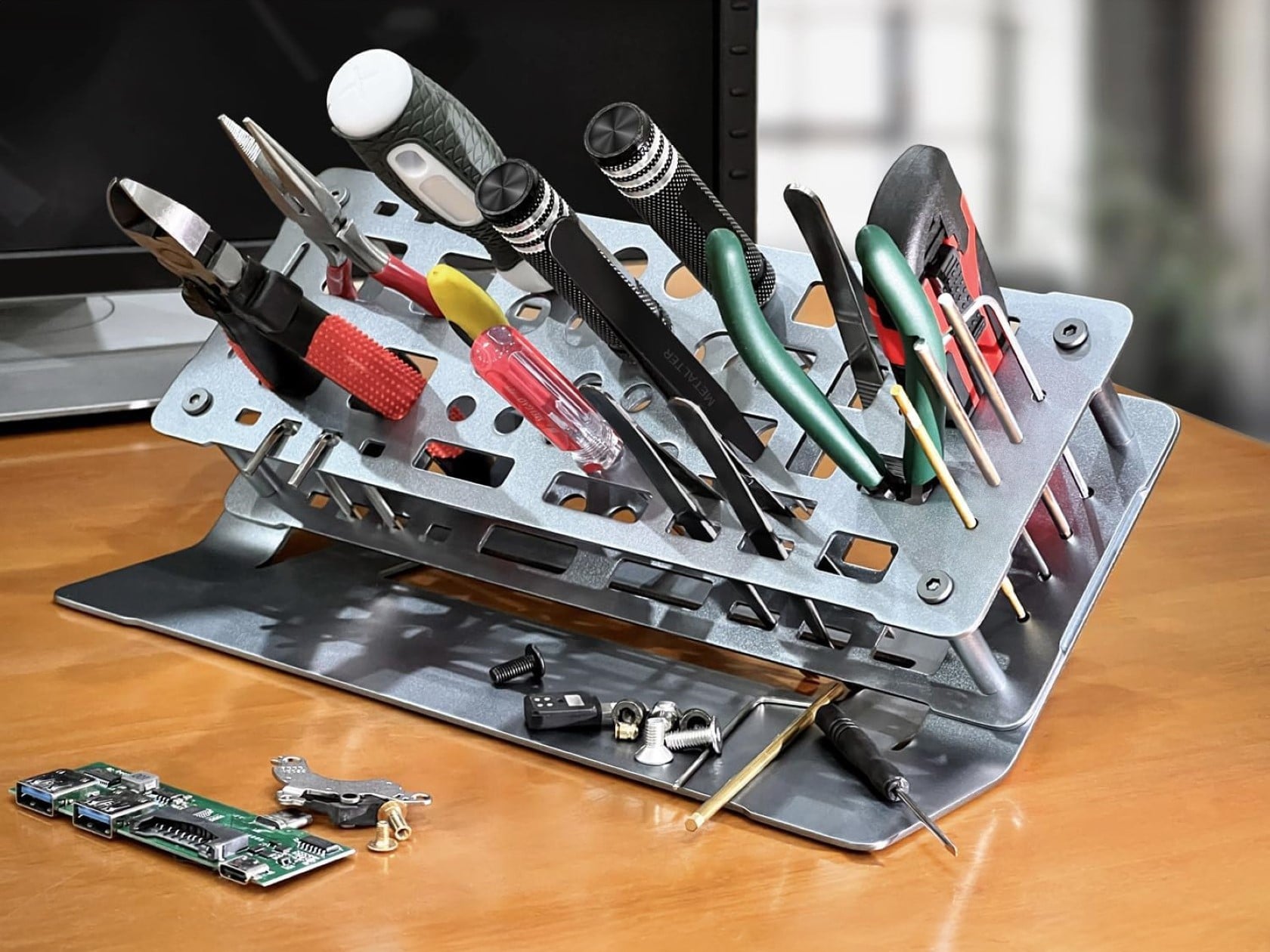
It has the elegance of a minimalist laptop stand, with the ability to hold practically any DIY or compact workshop tool. Say hello to the Screwdriver Rack from Metalter. It’s made of a grand total of 3 metal plates, held together using four screws. It’s visually simple, yet acts as a nifty organizer for your cluttered workshop. With slots to place your screwdrivers, pliers, cutters, Allen keys, files, and all your other tinkering paraphernalia, Metalter’s Screwdriver Rack keeps your desk clean while you work on all your technical and small-scale DIY projects. If you love to solder, fix watches, build circuits, repair gadgets, or fiddle around with EDC and other tools… this $25 bad boy is perfect.
The rack features a slick, sheet metal design made from anodized aluminum (sort of the same as your MacBook). It’s classy, lightweight, and does the job well. Different cutouts on the rack allow you to dock different tools in, although nothing’s set in stone. You can use the rack exactly however you want, depending on how many tools you have. Separate them by category or frequency, the system is a whole lot better than having a cluttered drawer cabinet filled with your tools that you then have to fish through.
Featuring 50 cutouts for organized storage, this tool organizer boasts a convenient 45-degree angle for effortless access to your equipment, and a non-slip base that prevents the rack from moving around. The double-layered design keeps tools upright and separated, while the platform at the bottom provides additional storage for hardware. For even greater convenience, consider adding a magnetic strip to the bottom platform so that your screws and bolts don’t go rolling around while you work.
Google won’t kill third-party cookies in Chrome after all, the company said on Monday. Instead, it will introduce a new experience in the browser that will allow users to make informed choices about their web browsing preferences, Google announced in a blog post. Killing cookies, Google said, would adversely impact online publishers and advertisers. This announcement marks a significant shift from Google's previous plans to phase out third-party cookies by early 2025.
“[We] are proposing an updated approach that elevates user choice,” wrote Anthony Chavez, vice president of Google’s Privacy Sandbox initiative. “Instead of deprecating third-party cookies, we would introduce a new experience in Chrome that lets people make an informed choice that applies across their web browsing, and they’d be able to adjust that choice at any time. We're discussing this new path with regulators, and will engage with the industry as we roll this out.”
Google will now focus on giving users more control over their browsing data, Chavez wrote. This includes additional privacy controls like IP Protection in Chrome's Incognito mode and ongoing improvements to Privacy Sandbox APIs.
Google’s decision provides a reprieve for advertisers and publishers who rely on cookies to target ads and measure performance. Over the past few years, the company’s plans to eliminate third-party cookies have been riding on a rollercoaster of delays and regulatory hurdles. Initially, Google aimed to phase out these cookies by the end of 2022, but the deadline was pushed to late 2024 and then to early 2025 due to various challenges and feedback from stakeholders, including advertisers, publishers, and regulatory bodies like the UK's Competition and Markets Authority (CMA).
In January 2024, Google began rolling out a new feature called Tracking Protection, which restricts third-party cookies by default for 1% of Chrome users globally. This move was perceived as the first step towards killing cookies completely. However, concerns and criticism about the readiness and effectiveness of Google's Privacy Sandbox, a collection of APIs designed to replace third-party cookies, prompted further delays.
The CMA and other regulatory bodies have expressed concerns about Google's Privacy Sandbox, fearing it might limit competition and give Google an unfair advantage in the digital advertising market. These concerns have led to extended review periods and additional scrutiny, complicating Google's timeline for phasing out third-party cookies. Shortly after Google’s Monday announcement, the CMA said that it was “considering the impact” of Google’s change of direction.
This article originally appeared on Engadget at https://www.engadget.com/google-isnt-killing-third-party-cookies-in-chrome-after-all-202031863.html?src=rss
Condé Nast, the media conglomerate that owns publications such as The New Yorker, Vogue and Wired, has sent a cease-and-desist letter to AI-powered search startup Perplexity, according to The Information. The letter, which was sent on Monday, demands that Perplexity stop using content from Condé Nast publications in its AI-generated responses and accused the startup of plagiarism.
The move makes Condé Nast the latest in a growing list of publishers taking a stand against the unauthorized use of their content by AI companies, and comes a month after similar action taken by Forbes. Perplexity and Condé Nast did not immediately respond to a request for comment from Engadget.
Perplexity, a San Francisco-based startup, is valued at $3 billion and backed by high-profile investors including the Jeff Bezos family fund and NVIDIA, has recently come under scrutiny for not respecting copyright and ripping off content to feed its AI-generated responses. The controversy surrounding the company extends beyond copyright concerns.
A recent investigation from Wiredreveled that the startup’s web crawlers do not respect robots.txt, a type of file that website owners can use to block bots from scraping their content. Last month, Amazon Web Services reportedly launched an investigation to determine whether the startup broke its rules around web scraping. Shortly after, a report from Reuters showed that Perplexity was just one of the many AI companies ignoring robots.txt.
This practice has sparked concerns about the ethical and legal implications of AI development and its impact on content creators and publishers. In response, Perplexity executives have talked about starting a revenue-sharing program with publishers, although it is still unclear what its terms will be.
Condé Nast CEO Roger Lynch has warned that “many” media companies could face financial ruin by the time it would take for litigation against generative AI companies to conclude. Lynch has called upon Congress to take “immediate action” by asking AI companies to compensate publishers for the use of their content and striking licensing deals in the future. Earlier this month, three senators introduced the COPIED Act, a bill that aims to protect journalists, artists and songwriters from AI companies using their content to train AI models.
This article originally appeared on Engadget at https://www.engadget.com/conde-nast-has-reportedly-accused-ai-search-startup-perplexity-of-plagiarism-191639677.html?src=rss
Just last week, Microsoft announced a limited-edition Deadpool-themed Xbox controller with a bright red design and a less-than-conventional ergonomic design, if you know what I mean. Let’s just say that biblically accurate controller had curves in all the right places, and was exactly as hilariously audacious as its inspiration, the merc with a mouth. The biggest problem was that the controller was limited to just 2 units, which would be gifted to the winner of a Twitter (or X) competition… and the second biggest was that there wasn’t a Wolverine controller to match. However, 3D artists at Do3D have solutions for both of those problems.
Meet the unofficial Wolverine Xbox Controller, complete with a yellow body and even three Adamantium claws appearing outward from behind the controller. Designed to pair perfectly with its Deadpool counterpart, this controller actually comes as a set of 3D files you can buy and 3D print on your own.
The Wolverine-themed controller augments the controller’s body in a similar way to its Deadpool counterpart. An attachment fixes to the back, providing a themed take on the handheld unit. In Deadpool’s case, it was a rather cheeky little attachment… however, Wolverine’s controller has his signature back-of-the-fist with three Adamantium claws emerging from within. The attachment is purely cosmetic, and doesn’t affect the grip or gameplay at all. The controller’s body, on the other hand, comes with a diamond plate-inspired texture, along with the wolverine whisker pattern on the front in black.
The controller isn’t available as is, but Do3D is selling detailed 3D files for those looking to print the parts. Once printed (and painted), you can simply disassemble the outer plastic housing of your existing Xbox controller and replace it with this one, provided the print is 100% accurate and without any errors or flaws. We recommend going for ABS, known for its durability… but a PLA filament should work just as well too. You may have to do some additional spray-painting work to make the controller look exactly as shown in the renders here.
The best part is that Do3D is even selling an unofficial version of Microsoft’s Deadpool controller, which you can similarly buy and 3D print. Both the Deadpool and Wolverine controllers can be used with or without their magnetic attachments, and while individual files cost $19, you can buy the combo for just $29 on Do3D’s website and print as many controllers as your heart desires.


 eco-friendly vegan leather. The Snap Flow comes in 4 color options ranging from subtle to eye-catching, and starts at just $39. The package includes the stand and pen, along with two sets of paper – one regular and one sticky. For non-iPhone users, there’s even a magnetic ring sticker included that turns any non-supported smartphone or case into a MagSafe one so you can securely attach your Snap Flow and take notes mindfully without any of that visual or mental clutter!