iOS 18 Brings Enhanced Customization and Apple Intelligence to iPhone Users

Apple’s iOS 18 is set to redefine how we interact with our iPhones, introducing features designed to make the device more personal, capable, and intelligent. This update emphasizes deeper customization, enhanced connectivity, and innovative intelligence features, aiming to offer a user experience that adapts to individual needs and preferences. From a redesigned Photos app to advanced privacy features and intelligent assistance, iOS 18 promises to transform how users engage with their devices.

Personalization Unleashed

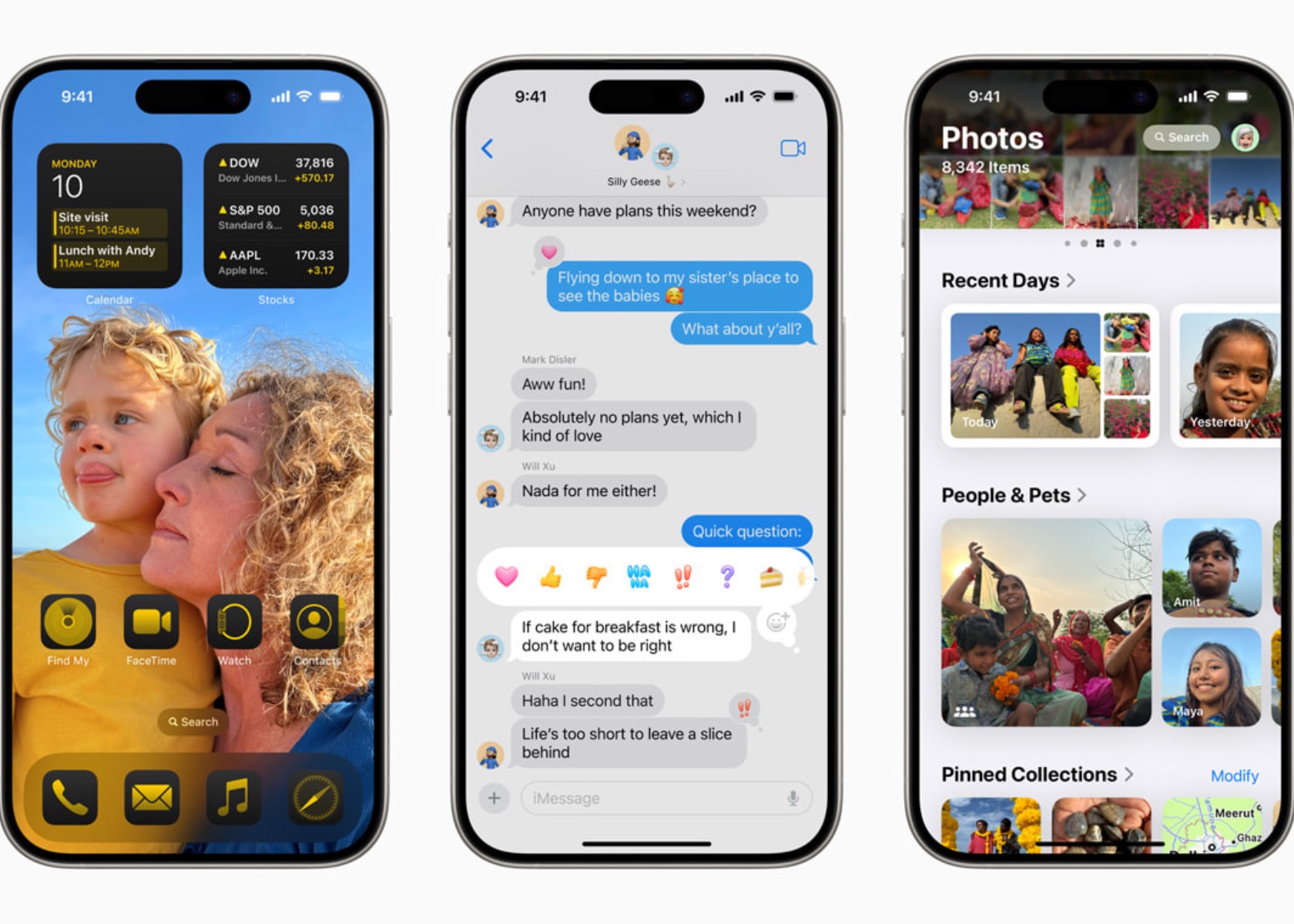
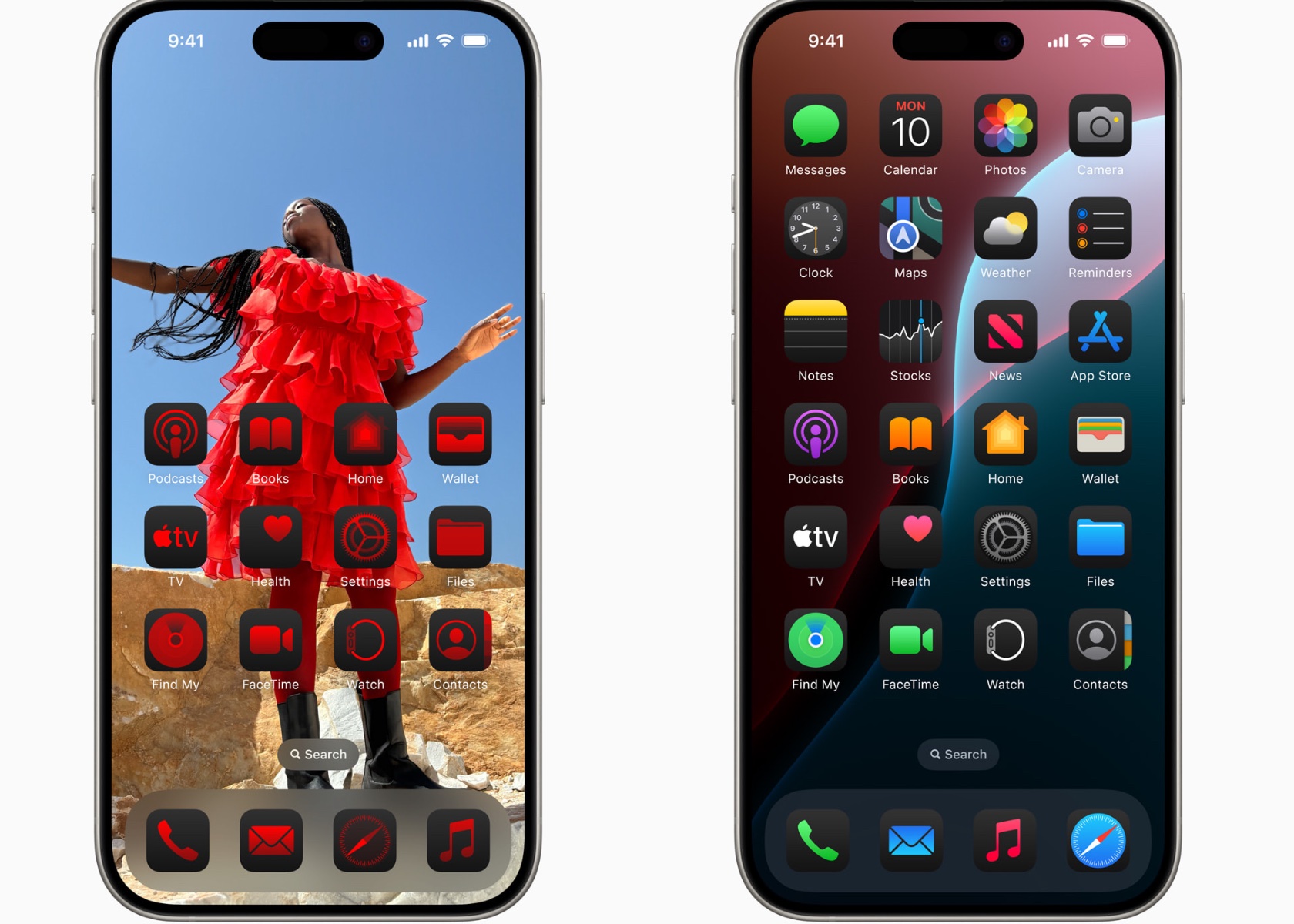
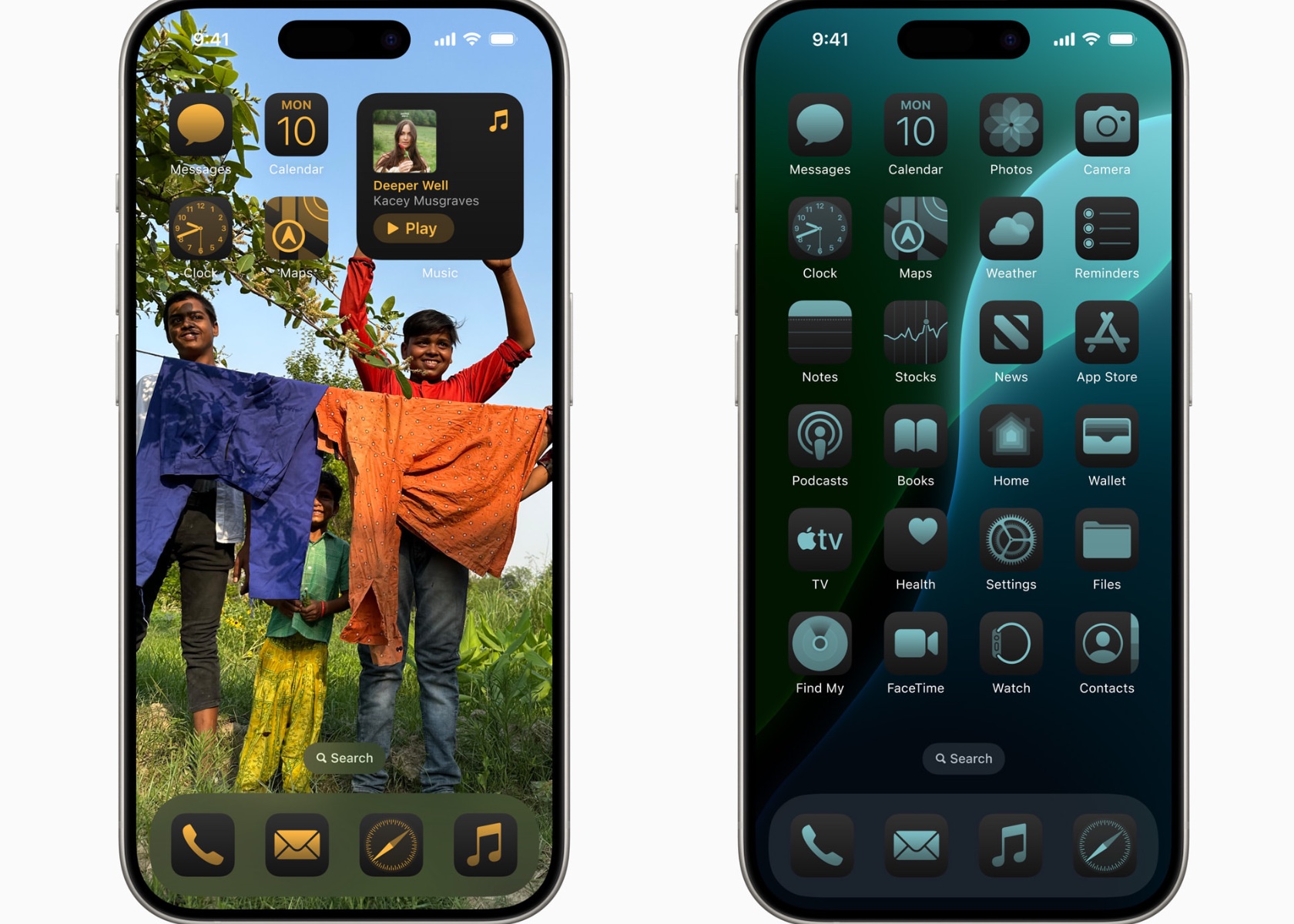
iOS 18 gives users unparalleled freedom to customize their iPhones. Users can arrange apps and widgets in any open space on the home screen, perfectly framing their favorite wallpapers. This flexibility allows for a home screen that not only looks good but also functions in a way that fits your lifestyle. Dark mode introduces a sleek, sophisticated look, while new tint options let you add a personal touch by color-coordinating your home screen. Larger app icons cater to those who prefer a bold, minimalist aesthetic, ensuring your home screen looks exactly how you want it.
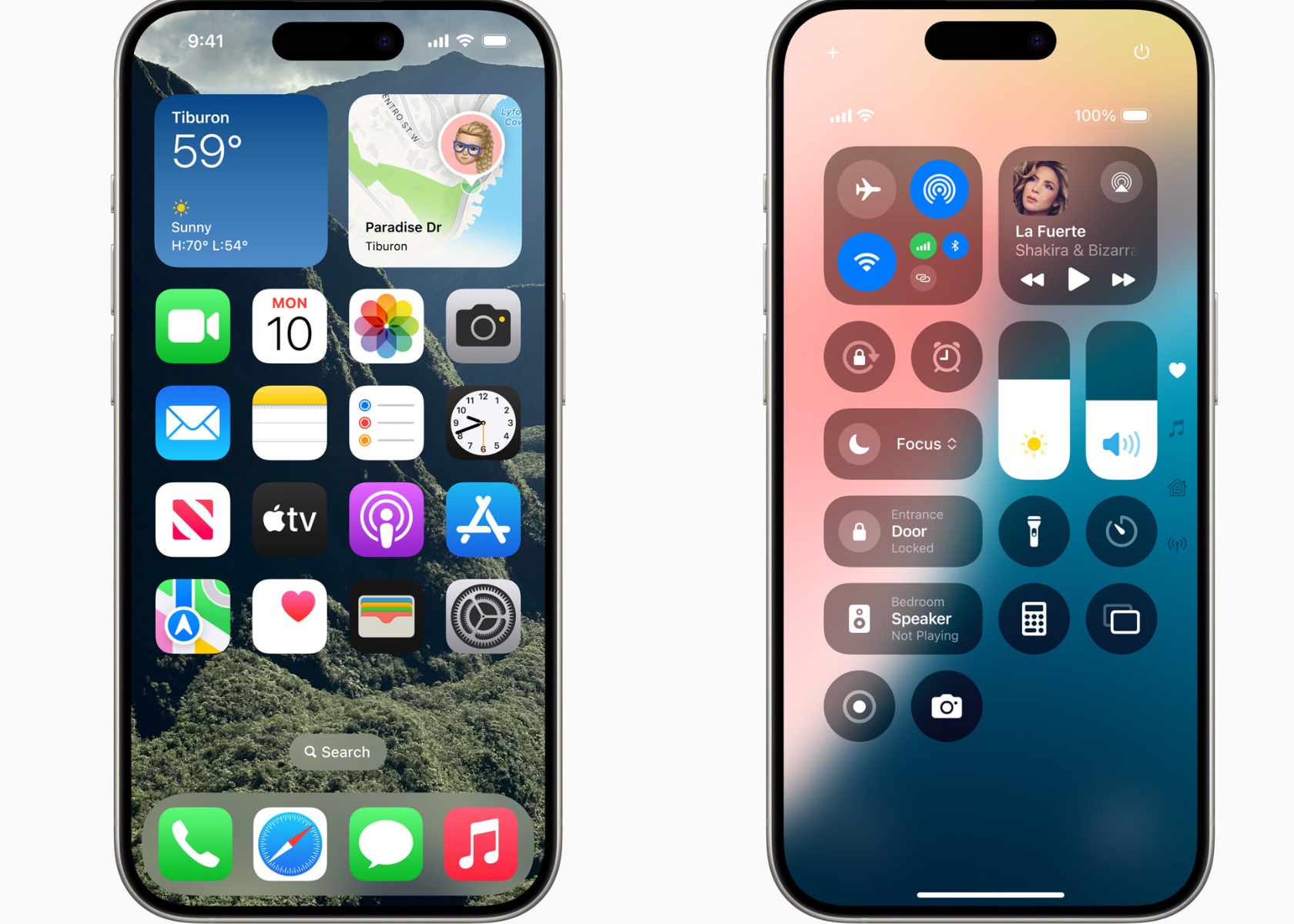
The customization extends beyond the home screen. The Control Center has been completely redesigned to offer a more intuitive and flexible way to access the features you use most. Media playback, home controls, and connectivity settings are now grouped for quick access, making it easier than ever to manage your daily tasks. The new controls gallery lets you add and organize controls from third-party apps, enhancing your iPhone’s functionality. Whether you need to unlock your car or capture content for social media, everything is just a swipe away.
Revolutionized Photos App

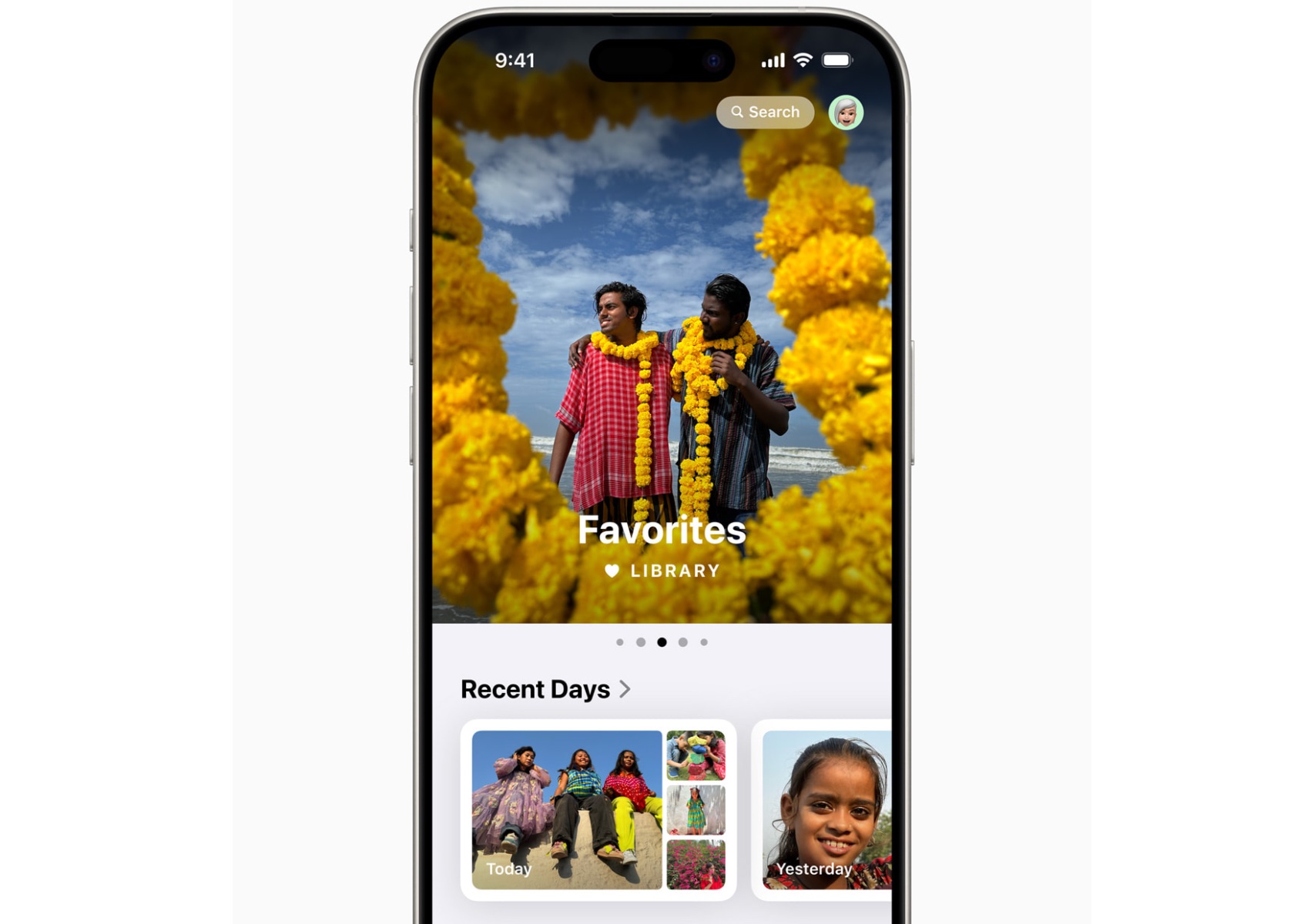
The Photos app has undergone its biggest redesign ever. A unified view makes it easy to browse your library, with new collections organizing your photos by themes like recent days, people, and trips. Customizable carousels highlight your best memories daily, ensuring you spend less time searching and more time reminiscing. Autoplaying content and pinned collections keep your favorite moments at your fingertips.
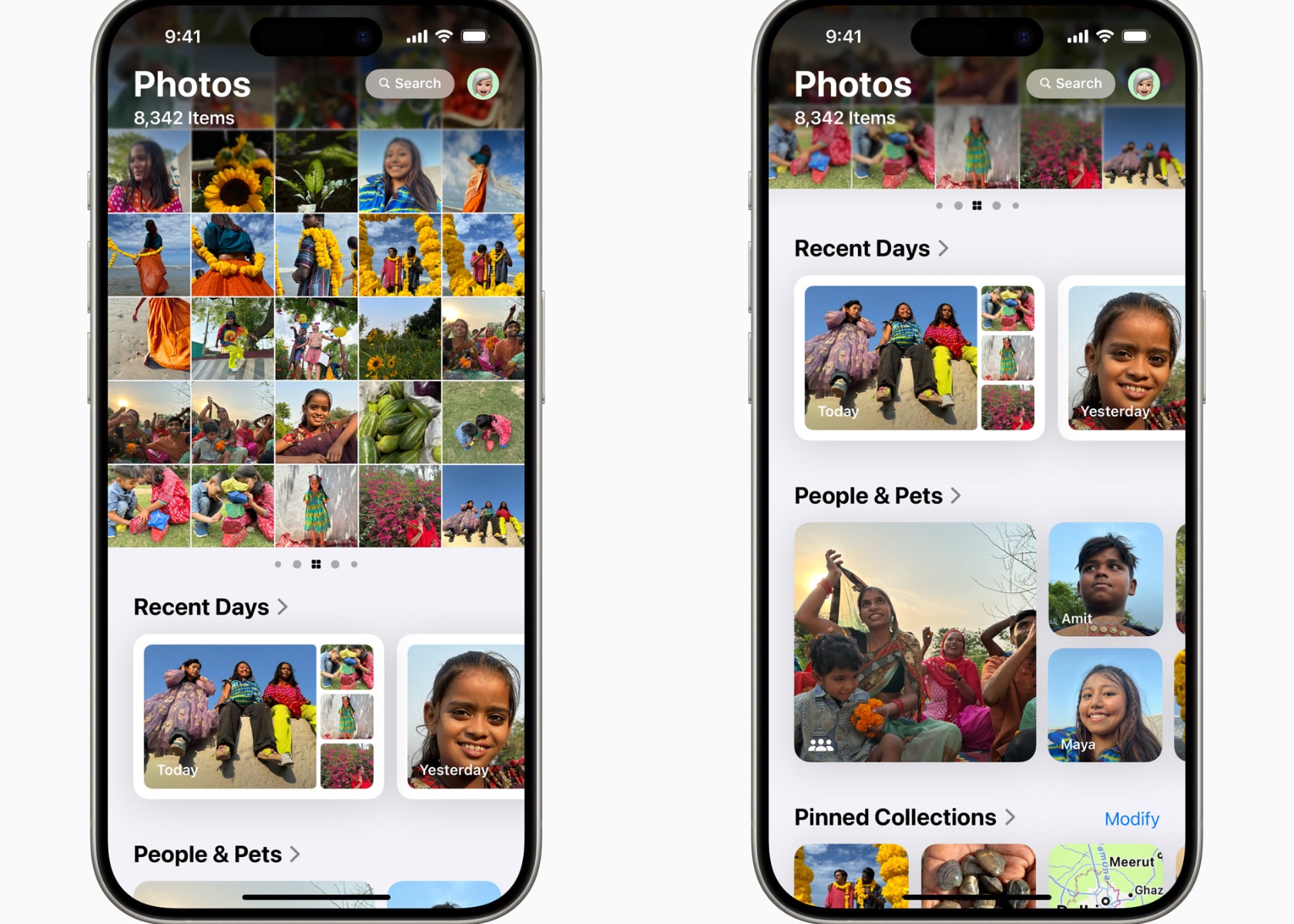
Photos have never been more organized or accessible. The new collections feature groups your photos by theme, making it simple to find specific memories. Daily highlights in the carousel bring your best moments front and center, allowing you to relive your adventures effortlessly.
Staying Connected in New Ways

Messages get a significant upgrade with new text effects, expanded Tapbacks, and the ability to schedule messages. Whether you’re sending a birthday reminder or expressing excitement with animated text, communication feels more dynamic. Plus, Messages via satellite ensures you stay connected even without cellular or Wi-Fi, using the same technology behind Apple’s Emergency SOS.

Expressing yourself in Messages is now more fun and versatile. The new text effects and Tapback options allow for greater creativity, while scheduled messages ensure your important notes are sent on time. The addition of satellite messaging keeps you connected in remote areas, making sure you’re never out of touch.

Enhanced Email Management

Mail has received significant enhancements with on-device intelligence that categorizes your inbox into primary, transactions, updates, and promotions. This makes managing your emails more efficient, helping you stay on top of what matters most. The new digest view consolidates relevant emails from businesses, making it easier to interact with important messages.

Email management is more intuitive with iOS 18’s on-device categorization, helping you prioritize important messages. Safari’s new features enhance your web browsing experience by providing quick summaries and a more focused reading environment.

Introducing Apple Intelligence

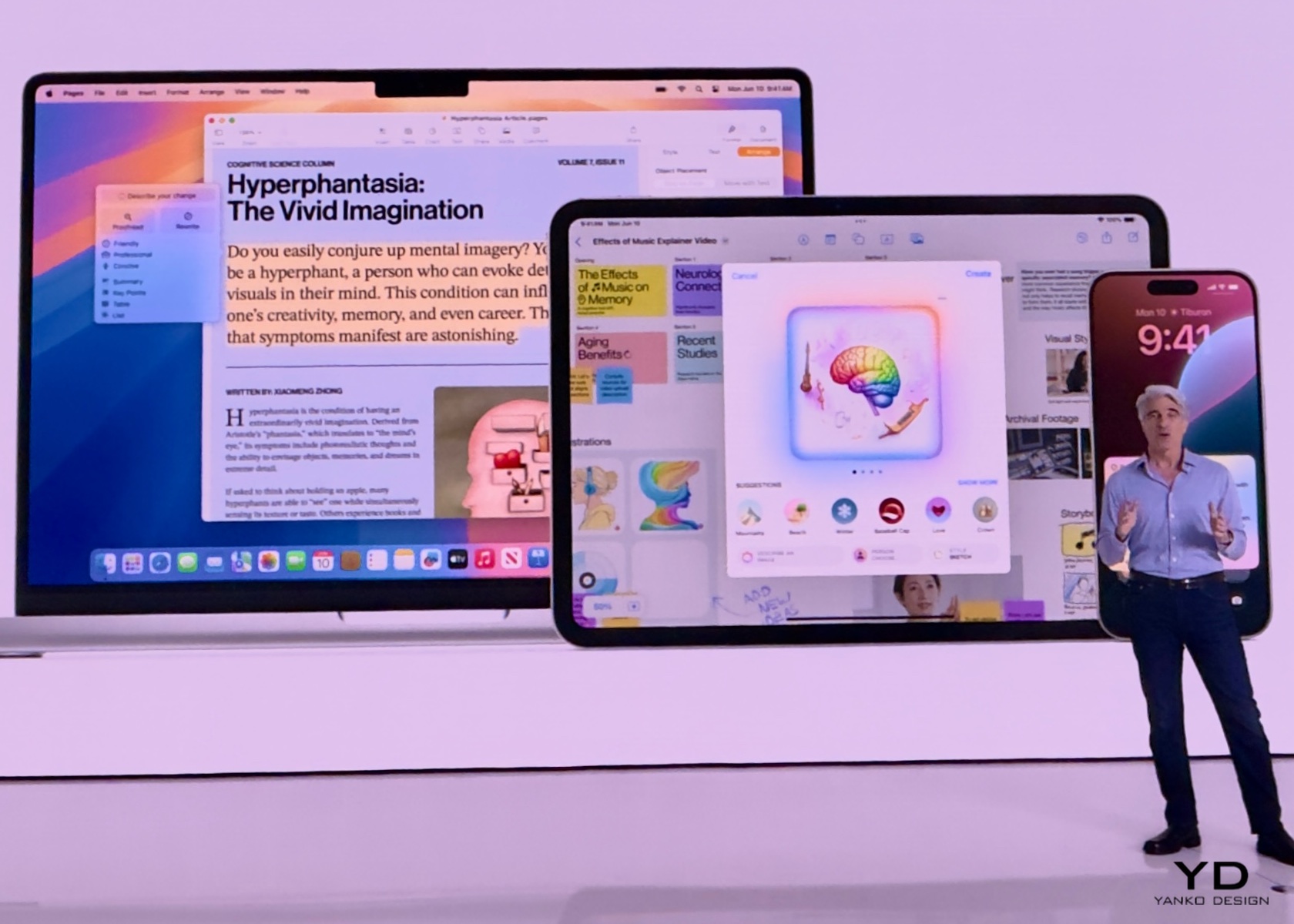
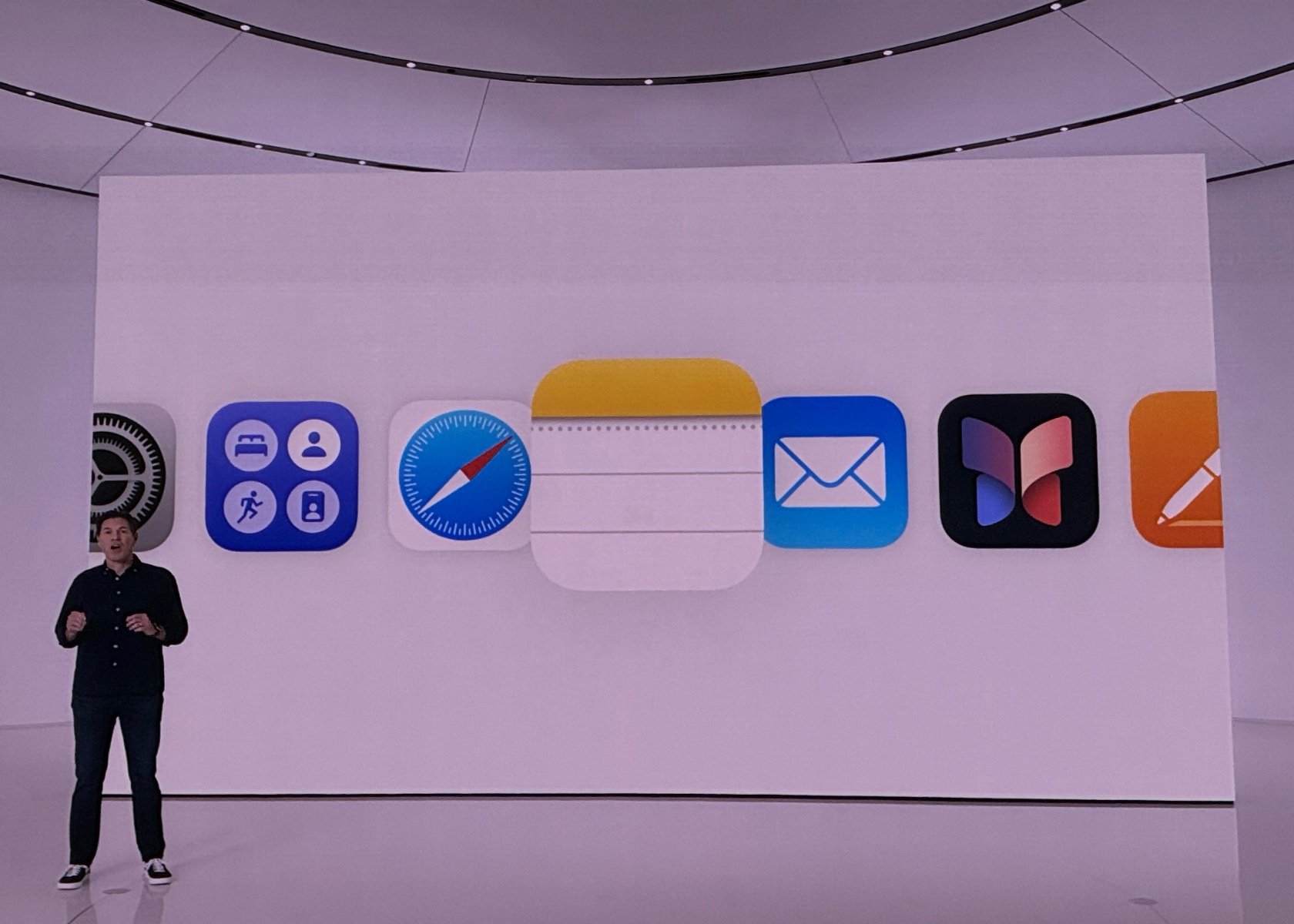
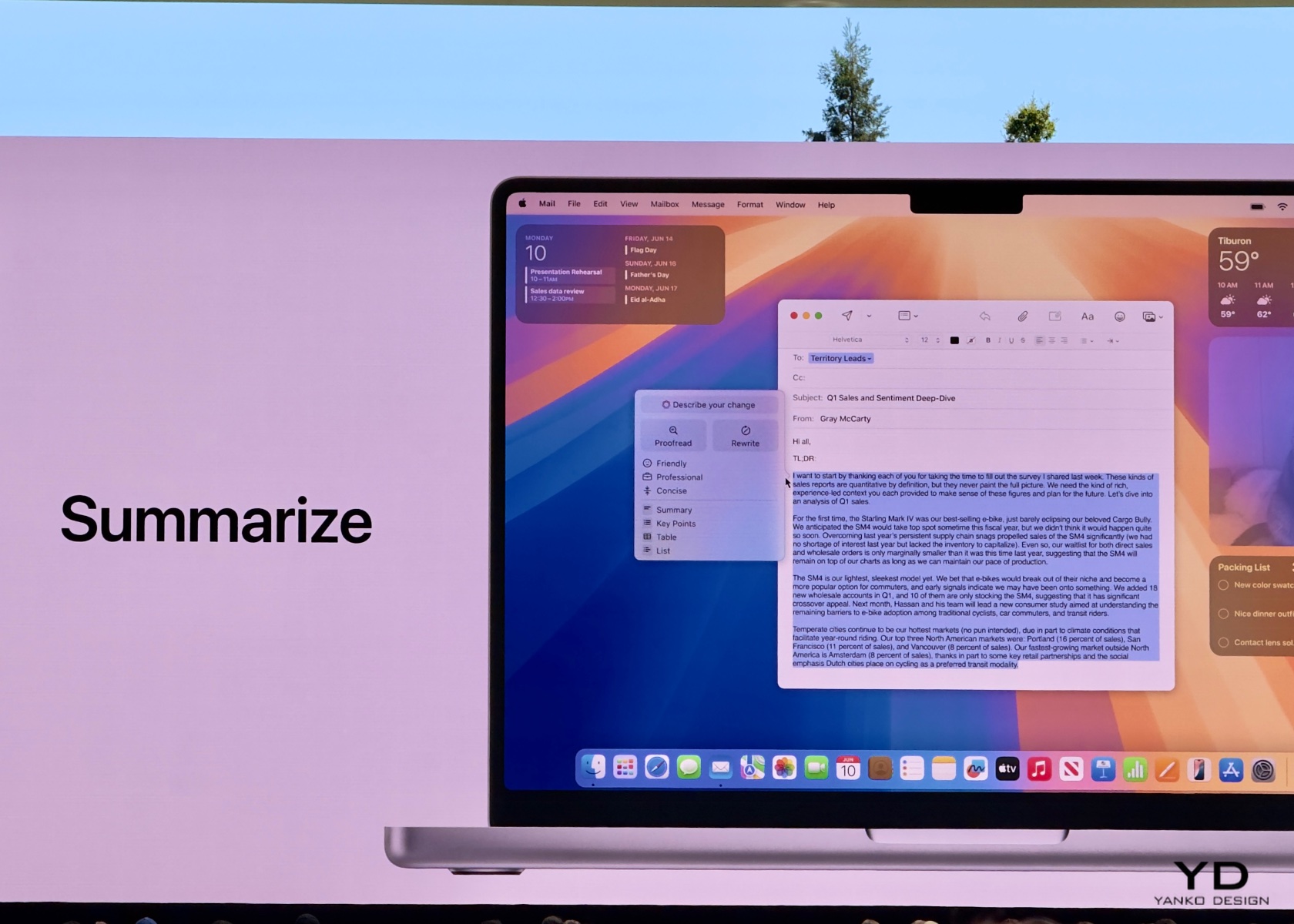
Deeply integrated into iOS 18 and built with privacy from the ground up, Apple Intelligence unlocks new ways for users to enhance their writing and communicate more effectively. With brand-new systemwide writing tools built into iOS 18, users can rewrite, proofread, and summarize text nearly everywhere they write, including Mail, Notes, Pages, and third-party apps. New image capabilities make communication and self-expression even more fun. With Image Playground, users can create playful images in seconds, choosing from three styles: Animation, Illustration, or Sketch. Image Playground is easy to use, built right into apps like Messages, and also available in a dedicated app.

Memories in Photos lets users create the stories they want to see just by typing a description. Apple Intelligence will pick out the best photos and videos based on the description, craft a storyline with chapters based on themes identified from the photos, and arrange them into a movie with its own narrative arc. In addition, a new Clean Up tool can identify and remove distracting objects in the background of a photo — without accidentally altering the subject.

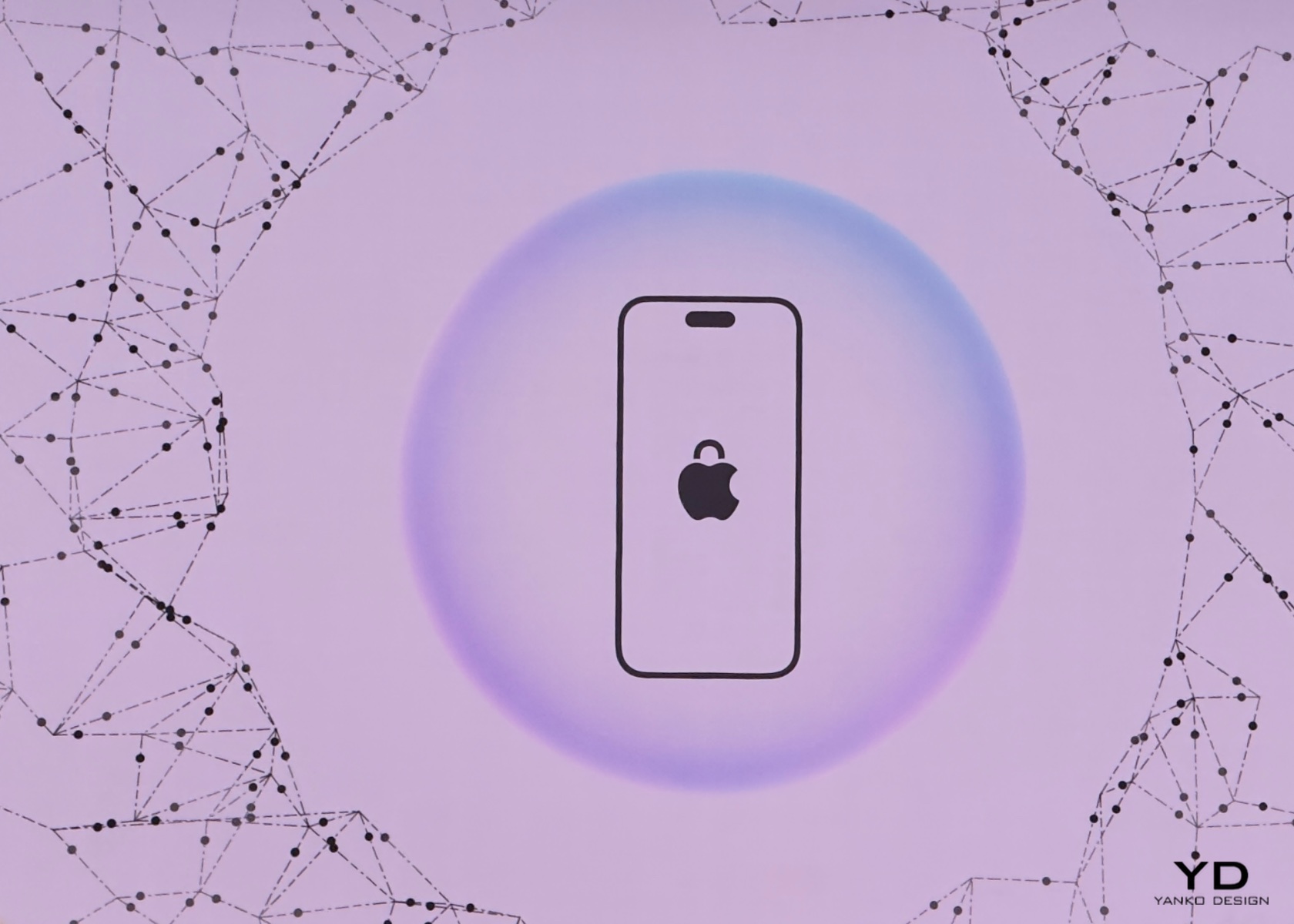
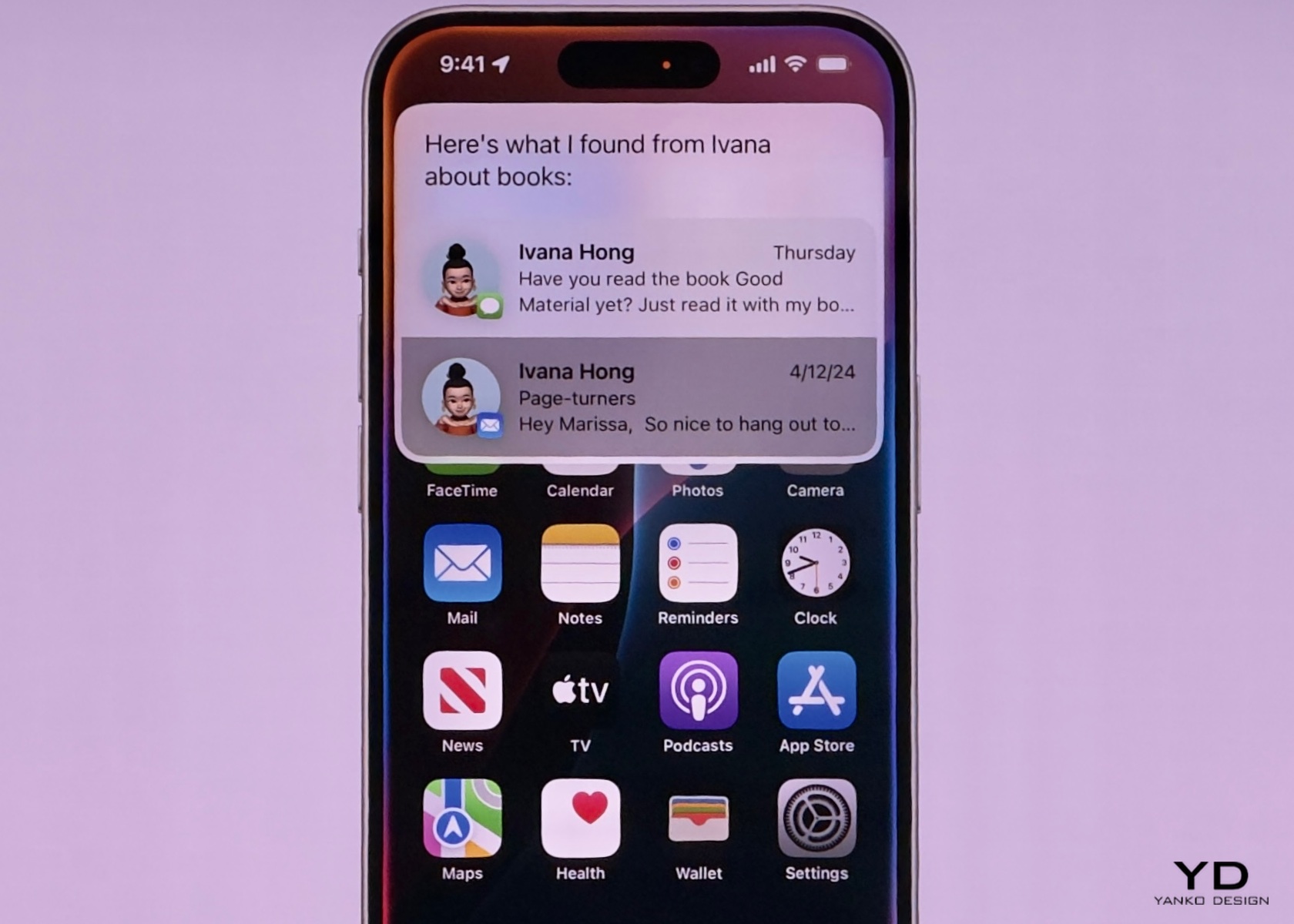
With the power of Apple Intelligence, Siri takes a major step forward, becoming even more natural, contextually relevant, and personal. Users can type to Siri and switch between text and voice to communicate with Siri in whatever way feels right for the moment. With Private Cloud Compute, Apple sets a new standard for privacy in AI, with the ability to flex and scale computational capacity between on-device processing and larger, server-based models that run on dedicated Apple silicon servers. When requests are routed to Private Cloud Compute, data is not stored or made accessible to Apple and is only used to fulfill the user’s requests, and independent experts can verify this privacy.

Additionally, access to ChatGPT is integrated into Siri and systemwide writing tools across Apple’s platforms, allowing users to access its expertise — as well as its image- and document-understanding capabilities — without needing to jump between tools.

iOS 18 introduces several additional features that enhance user experience and functionality across various apps. In Apple Maps, users can explore thousands of hikes across national parks in the United States and easily create custom walking routes, which are accessible offline. Maps users can also save their favorite national park hikes, custom routes, and locations to an all-new Places Library, adding personal notes about each spot.

Game Mode significantly enhances the gaming experience by providing more consistent frame rates, especially during long play sessions, and making wireless accessories like AirPods and game controllers incredibly responsive.

Apple Pay now offers new ways to pay, including redeeming rewards and accessing installments from eligible credit or debit cards. With Tap to Cash, users can send and receive Apple Cash by simply holding two iPhone devices together. Tickets in Apple Wallet offer a richer experience for fans, providing key event information such as stadium details and recommended Apple Music playlists.

SharePlay with Apple Music allows more users to share control of music playing from HomePod, Apple TV, or any Bluetooth-enabled speaker, making group listening sessions more fun and engaging.

The AirPods experience becomes even more personal and convenient with Siri Interactions, allowing AirPods Pro (2nd generation) users to simply nod their head yes or shake their head no to respond to Siri announcements. Voice Isolation ensures clearer call quality in noisy environments, and updates provide the best wireless audio latency for mobile gaming, along with Personalized Spatial Audio for more immersive gameplay.

In the Notes app, formulas and equations entered while typing are solved instantly with Math Notes. New collapsible sections and highlighting make it easier to emphasize important information.

The Journal app features an all-new insights view to help users track their journaling goals. Users can search and sort entries easily, save time spent journaling as mindful minutes in the Health app, and log their state of mind directly in Journal. A Journal widget is available for quick entry from the home screen or lock screen, and audio recordings are automatically transcribed. Users can also export and print journal entries.

Calendar becomes even more useful by showing both events and tasks from Reminders. Users can create, edit, and complete reminders directly from Calendar, and the updated month view provides a comprehensive overview of events and tasks.

The Health app has a redesigned Medical ID feature, making it easier for first responders to find crucial information in an emergency. The app also helps users better understand their data during pregnancy by making adjustments and recommendations to reflect changes in their physical and mental health.

Emergency SOS Live Video allows users to share context through streaming video and recorded media. During an emergency call, dispatchers can request live video or media from the user’s camera roll over a secure connection, making it easier and faster to get help.

The post iOS 18 Brings Enhanced Customization and Apple Intelligence to iPhone Users first appeared on Yanko Design.
How Apple Intelligence could avoid Microsoft and Google’s AI mistakes

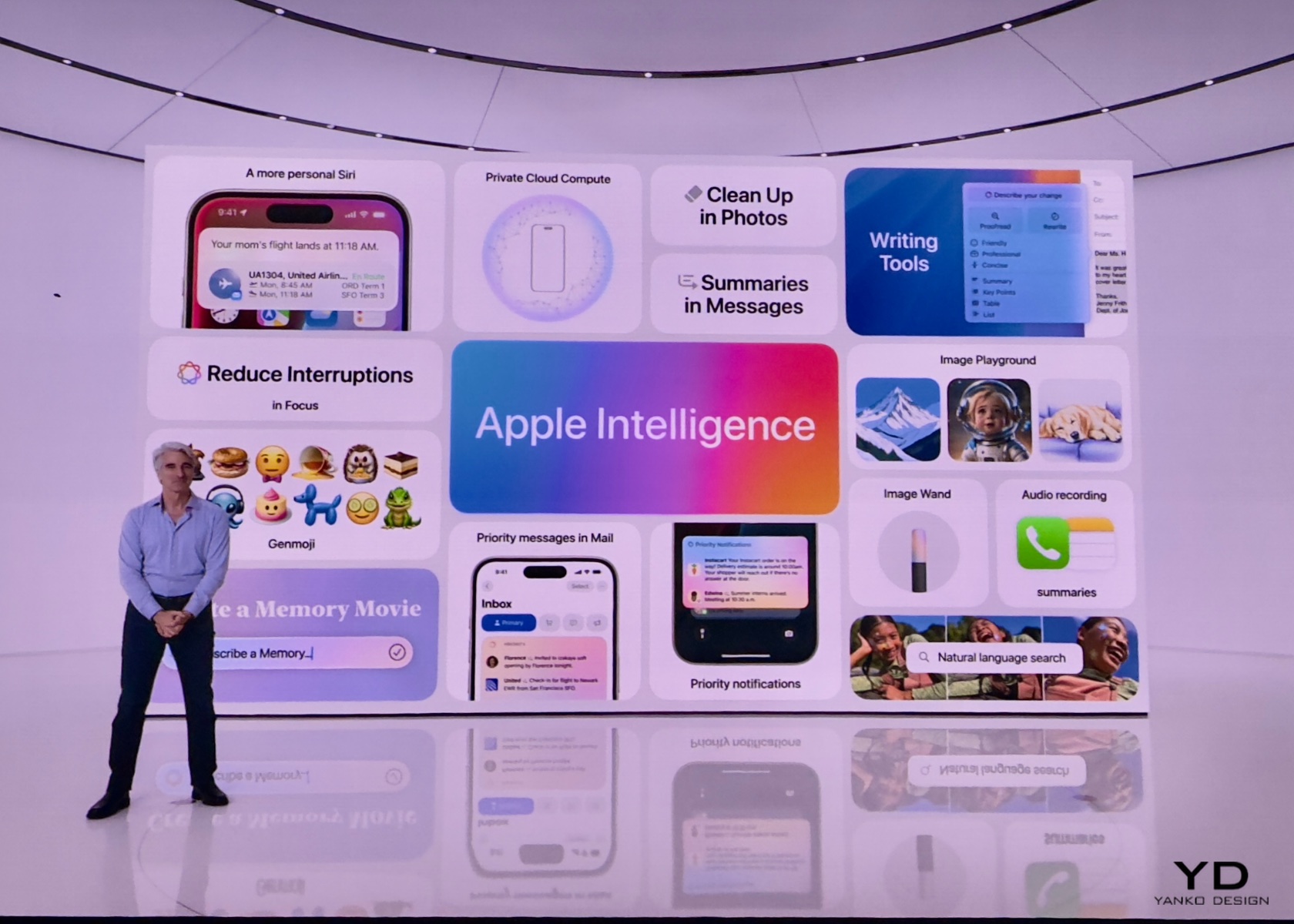
Apple's spin on AI is finally here, and it already seems smarter than Microsoft Copilot and Google Bard. Apple Intelligence focuses on privacy and "personal intelligence," with a bit of an assist from ChatGPT. While we haven't tested it ourselves yet, Apple appears to be avoiding the pitfalls of Microsoft's Recall feature, as well as Google Bard's unfortunate early gaffes. The company isn't trying to capture everything you're doing on your computer, and it's being careful about how it's using larger AI models like ChatGPT. 

Shortly after the WWDC 2024 keynote ended, Engadget's Cherlynn Low and Devindra Hardawar discussed why they think Apple is taking a more thoughtful approach to AI.

This article originally appeared on Engadget at https://www.engadget.com/how-apple-intelligence-could-avoid-microsoft-and-googles-ai-mistakes-000751533.html?src=rss

Apple Intelligence at WWDC 2024: The Future of Personalized and Secure AI

Apple Intelligence is a revolutionary step in making your devices smarter and more in tune with your daily life. Imagine having an assistant that not only responds to your commands but also understands your needs and habits. Unlike traditional AI, which relies on generic data, Apple Intelligence integrates deeply with your personal context. It knows your routine, preferences, and relationships, making interactions more meaningful and tailored specifically to you.

What is Apple Intelligence?

Apple Intelligence redefines how you interact with technology, making it feel like a natural extension of yourself. Whether managing your schedule, writing emails, or capturing moments, the intelligence within your devices anticipates your needs and offers solutions proactively. Moreover, it’s built with privacy at its core, ensuring your personal data remains secure and confidential. In an era where privacy concerns are paramount, Apple Intelligence sets a new standard by processing most tasks directly on your device and using private cloud computing only when necessary.

Apple Intelligence

Apple Intelligence is designed to simplify tasks, anticipate your needs, and provide relevant suggestions, all while keeping your data secure. This transformation goes beyond adding new features; it’s about enhancing your user experience. For busy professionals, students, and families, having a device that understands and adapts to your unique context can streamline daily tasks, reduce stress, and enhance productivity. By prioritizing user privacy, Apple Intelligence also addresses growing concerns about data security, making it a trustworthy assistant in the digital age.

Is Apple Intelligence the First True GenAI Ecosystem That’s Secure?

Absolutely. Apple has set the bar high with the first truly secure generative AI ecosystem. Apple Intelligence ensures that your data remains private by performing most of the processing on your device. For more complex tasks that require additional computing power, it uses Private Cloud Compute. This innovative approach allows Apple to harness the full potential of generative AI while ensuring that your personal data is never exposed or compromised.

Apple’s commitment to privacy extends to its server operations as well. All server-based models run on dedicated Apple silicon servers, and the code is open to independent inspection. This means you can trust that your information is handled with the utmost care and transparency. By combining cutting-edge AI capabilities with rigorous privacy standards, Apple Intelligence delivers powerful, personalized intelligence without sacrificing security.

The importance of this secure ecosystem cannot be overstated. In a time where data breaches and privacy concerns are rampant, Apple Intelligence offers peace of mind. Users can confidently rely on their devices to handle sensitive information and perform complex tasks without fear of data misuse. This makes Apple Intelligence a technological advancement playing a vital development role in fostering user trust and safety in digital environments.

Elements and Features of Apple Intelligence

Apple Intelligence is built into your iPhone, iPad, and Mac, bringing a suite of powerful features that make everyday tasks easier and more enjoyable. Let’s dive into what this means for you.

1. Writing Tools

Apple Intelligence includes systemwide writing tools that act like a personal editor wherever you write. Whether you’re drafting an email, jotting down notes, or crafting a blog post, these tools enhance your writing by providing real-time suggestions and corrections. Rewrite allows you to adjust the tone of your text to suit different audiences, whether you need to be more formal for a cover letter or add some humor to a party invitation. Proofread checks your grammar, word choice, and sentence structure, offering edits and explanations to help you improve.

Summarize is another fantastic feature, perfect for condensing long articles or documents into digestible key points or paragraphs. Imagine being able to take a lengthy research paper and quickly create a concise summary for easier review. These tools are integrated into apps like Mail, Notes, and Pages, as well as third-party apps, making them accessible whenever and wherever you need them. With Apple Intelligence, your writing becomes clearer, more precise, and tailored to any situation.

These tools are particularly useful because they enhance communication and productivity. For students, professionals, and casual users alike, having an intelligent assistant that helps refine and improve writing can save time and reduce errors. Whether you’re preparing a report, sending an important email, or simply jotting down ideas, these features ensure that your written communication is effective and polished.

2. Priority Messages and Notifications

Managing your communications has never been easier with Apple Intelligence’s Priority Messages and Notifications. This feature ensures that you see the most important emails and notifications first. For example, a same-day dinner invitation or a boarding pass for an upcoming flight will appear at the top of your inbox, so you never miss critical information. Instead of previewing the first few lines of each email, you can see summaries that highlight the key points, making it easier to manage your inbox efficiently.

The new Reduce Interruptions Focus mode is a game-changer for those who need to stay focused on important tasks. It filters notifications to show only the ones that require immediate attention, such as a text about an early pickup from daycare. This means fewer distractions and more time to concentrate on what matters most. By prioritizing urgent messages and minimizing unnecessary interruptions, Apple Intelligence helps you stay organized and in control of your communications.

These features are crucial for anyone who juggles multiple responsibilities. By keeping you informed of the most important messages and minimizing distractions, Apple Intelligence helps improve productivity and reduce stress. Whether you’re managing work emails, family schedules, or social invitations, having a streamlined communication system ensures that you stay on top of what truly matters without getting overwhelmed by the noise.

3. Audio Recording and Transcription

In the Notes and Phone apps, Apple Intelligence introduces advanced audio recording and transcription capabilities. This feature is incredibly useful for capturing detailed notes during calls and meetings. When you record a conversation, Apple Intelligence transcribes the audio in real-time, allowing you to read and review the content immediately. This makes it easy to keep track of important discussions and decisions without missing any details.

Once the recording is finished, Apple Intelligence generates a summary of the key points, making it simple to recall and share the most important information. For instance, after a brainstorming session, you can quickly review the main ideas and action items without having to listen to the entire recording. This feature saves time and enhances productivity by ensuring that you have accurate and organized notes at your fingertips.

The importance of these features lies in their ability to enhance efficiency and accuracy. For students, professionals, and anyone who attends meetings or interviews, having an automatic transcription and summary tool can significantly reduce the time spent on note-taking and ensure that no critical information is missed. This allows you to focus more on the conversation and less on capturing every detail manually.

4. Image Playground and Genmoji

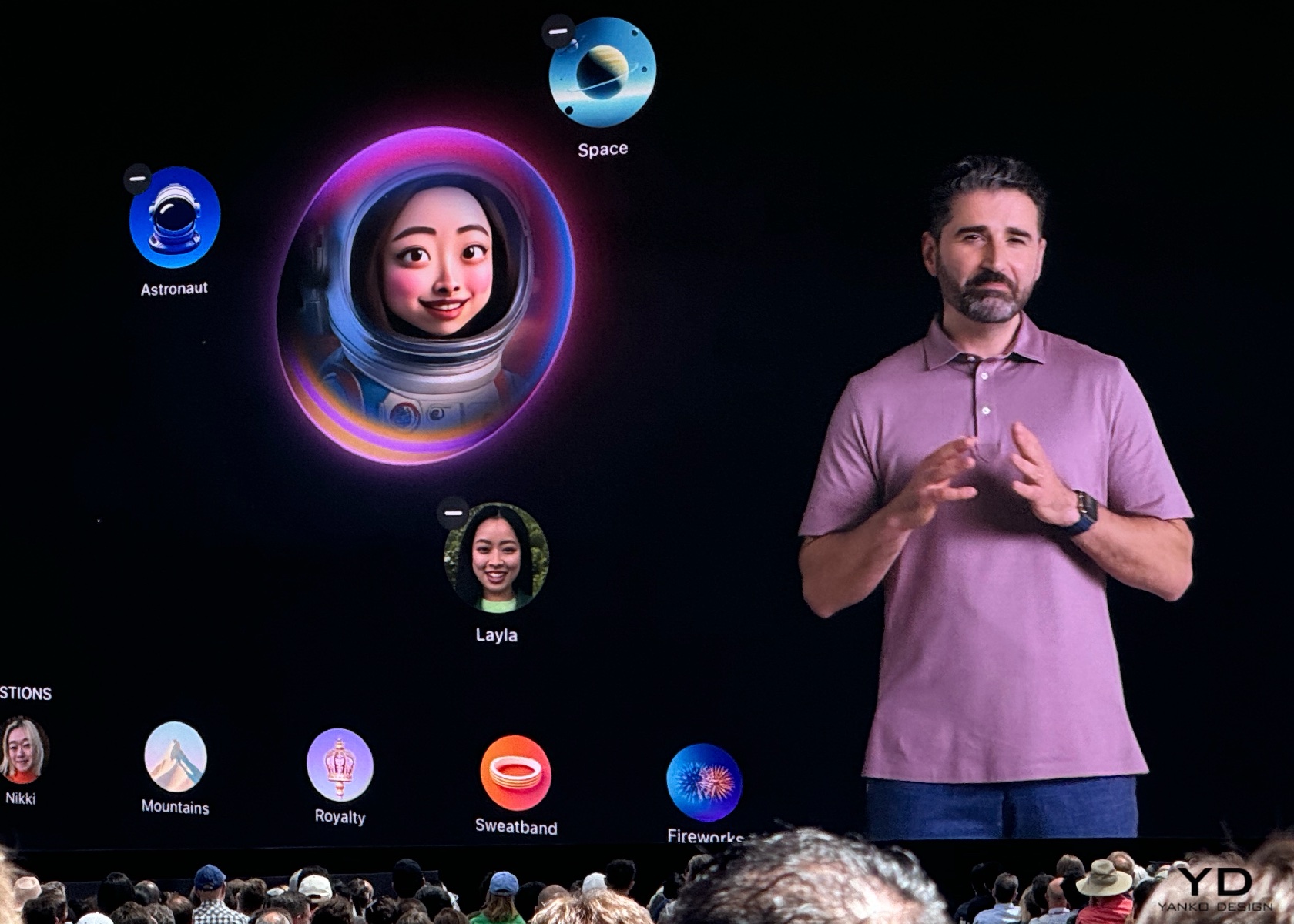
Image Playground and Genmoji are two exciting features powered by Apple Intelligence that make communication and self-expression more fun and creative. Image Playground lets you create engaging images in seconds, choosing from styles like Animation, Illustration, or Sketch. It’s built right into apps like Messages, so you can easily spice up your conversations with personalized visuals. Whether you’re creating an image of your family hiking or a fun meme for a group chat, the possibilities are endless.

Genmoji takes emojis to the next level by allowing you to create unique, personalized emojis based on descriptions or photos. For example, typing “smiley relaxing wearing cucumbers” generates a Genmoji that you can use in your messages or as a sticker. You can even create Genmoji of friends and family members based on their photos, adding a personal touch to your digital interactions. These features make it easier and more enjoyable to express yourself visually, whether you’re chatting with friends or creating content for social media.

These features are especially significant in today’s online interactions. Visual elements, such as images and emojis, are essential for expressing ourselves. With tools to create personalized and unique visuals, Apple Intelligence enriches our connections with others. This approach makes conversations more engaging and allows for deeper, more personal expression, ultimately fostering stronger relationships and more enjoyable interactions.

5. Enhanced Photo and Video Search

Apple Intelligence makes finding and managing your photos and videos a breeze with enhanced search and editing capabilities. Using natural language processing, you can search for specific photos and videos with simple descriptions. For example, searching for “Maya skateboarding in a tie-dye shirt” quickly pulls up the exact photo from your library. This feature saves time and makes it easier to relive your favorite moments.

The Clean Up tool is another handy feature that helps you enhance your photos by removing distracting objects from the background without altering the main subject. This is perfect for tidying up those almost-perfect shots. Additionally, the new Memories feature allows you to create movies from your photos and videos by simply typing a description. Apple Intelligence selects the best images, crafts a narrative, and even suggests music from Apple Music to match the mood. This makes it effortless to create beautiful, shareable memories from your digital collection.

These features are invaluable for everyone who captures and stores digital memories. With the sheer volume of photos and videos we accumulate, having tools that simplify searching and editing can save significant time and effort. Whether you’re organizing a photo album, creating a digital scrapbook, or just looking for that perfect picture from last summer, Apple Intelligence makes it easier to manage and enjoy your visual content.

6. Siri Enhancements

Powered by Apple Intelligence, Siri is now more capable and contextually aware than ever before. This transformation means your assistant can understand and act on a wider range of requests, making it even more useful in your daily life. Whether you need to schedule an email, switch from Light to Dark Mode, or add a new address to a contact card, Siri can handle these tasks with ease. It can follow along if you stumble over words and maintain context from one request to the next, providing a more seamless interaction.

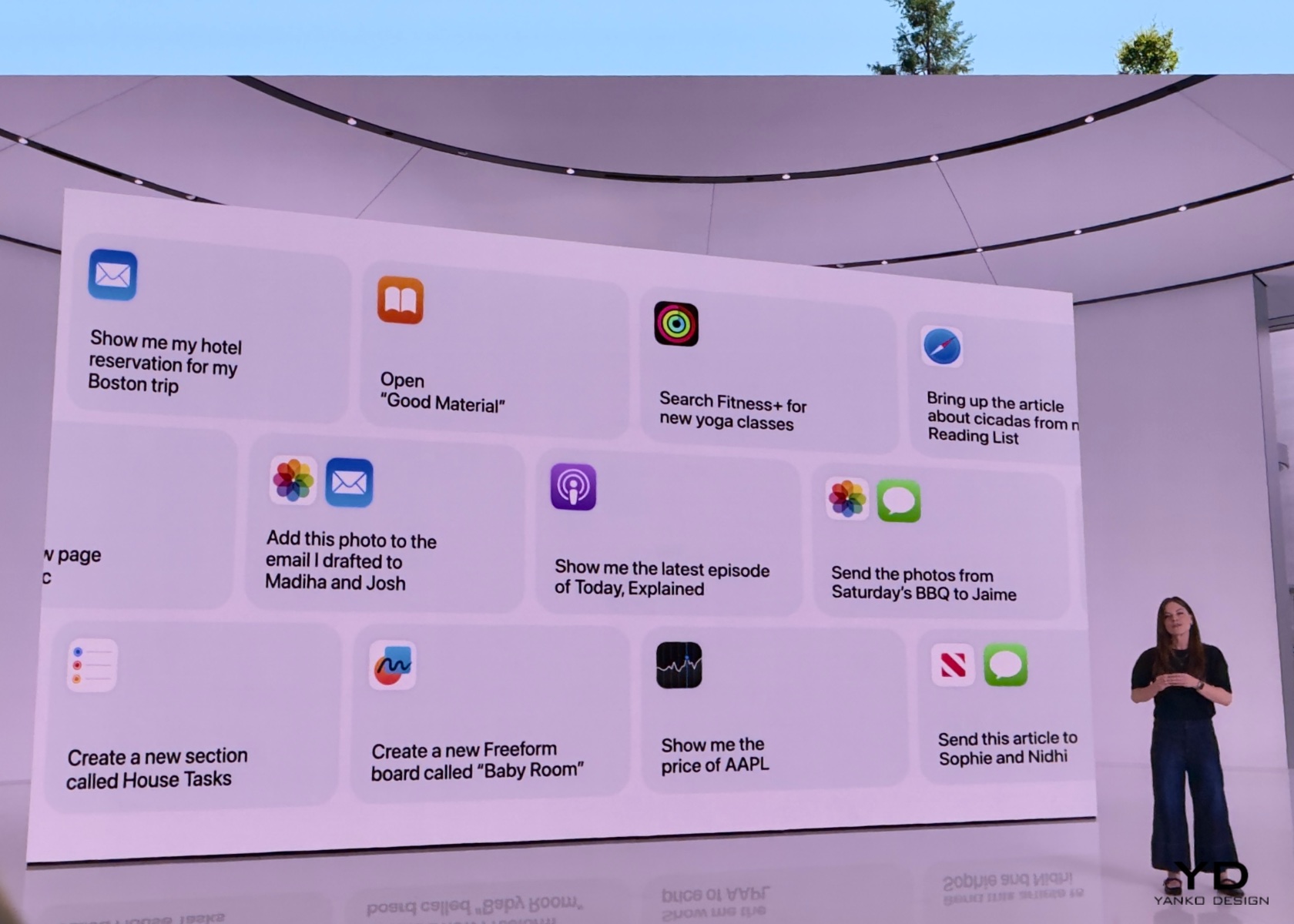
One of the most exciting improvements is Siri’s ability to perform hundreds of new actions across Apple and third-party apps. For instance, you can ask Siri to bring up an article from your Reading List, send photos from a recent event to a friend, or play a podcast recommended by a contact. The new design includes an elegant glowing light around the edge of the screen when Siri is active, making it visually engaging and easier to know when Siri is listening.

Siri now pulls from your messages, emails, and other apps to provide more personalized assistance. If a friend texts you their new address, you can simply say, “Add this address to his contact card,” and Siri will update the contact information without needing additional input. Additionally, Siri can understand and follow up on previous requests, making it easier to carry on more natural, conversational interactions. Imagine planning a day trip; you could ask about the weather at your destination, book a reservation at a local restaurant, and get directions—all in a seamless flow of conversation.

Another significant enhancement is Siri’s deep integration with personal context. For example, you can ask, “What’s the weather like near Muir Woods?” and then follow up with, “Create an event for a hike there tomorrow at 9 a.m.” Siri maintains the context of “there” to schedule the hike without needing you to repeat the location. The assistant also supports switching between text and voice input seamlessly, which is perfect for situations where speaking aloud isn’t convenient.

These improvements are crucial for making technology more accessible and user-friendly. By expanding its capabilities and making it more contextually aware, Apple Intelligence ensures that users can rely on Siri for a wider range of tasks. This can significantly enhance productivity and convenience, making it easier to manage daily activities and access information quickly. For anyone looking to streamline their workflow or simplify their interaction with technology, these enhancements make Siri an even more integral part of everyday life. Whether you’re coordinating a busy schedule, managing home automation, or simply trying to stay organized, the new capabilities make your digital assistant more indispensable than ever.

Conclusion

Integrating deeply with personal context, Apple Intelligence redefines how we interact with our devices. It understands your routines, preferences, and relationships, offering solutions that feel tailor-made just for you. With most tasks processed on your device, it keeps your data secure while boosting productivity through advanced writing tools, priority notifications, and real-time transcription. Fun features like Image Playground and Genmoji bring a personal touch to visual communication, while enhanced photo and video search make managing digital memories a breeze. Siri’s enhanced abilities enable smooth, conversational interactions, making everyday tech use more intuitive and efficient, all while upholding strong privacy standards. I hope this helps answer and explain what Apple Intelligence is, what the features are, and how you can benefit from them.

The post Apple Intelligence at WWDC 2024: The Future of Personalized and Secure AI first appeared on Yanko Design.

How does Apple send your data to its cloud AI servers? Very carefully, it claims.

For years, Apple has touted privacy as its major advantage over rivals like Google and Microsoft. Instead of relying on cloud processing to improve or organize your images, which requires sending your photos to Google's servers, Apple handles those tasks directly on your device. But with the advent of Apple Intelligence, the company's take on artificial intelligence, the company is stepping out of its comfort zone with "Private Cloud Compute." It says "private" right in the name, so it has to be secure, right?

While Apple AI will run some models locally, it will occasionally have to send data to Apple's servers for complex requests. So how is the company squaring this with its previous security stance? 

According to Craig Federighi, Apple's SVP of Software Engineering, the company is being very careful about how its sending your data to its servers. "You're putting a lot of faith in the cloud... with Private Cloud Compute, the stakes are even higher," he said in a WWDC 2024 conversation with Apple's AI head, John Giannandrea, and YouTube influencer iJustine.

During the WWDC keynote, Federighi showed off how Apple AI could help him reschedule a meeting and determine if he could still attend his daughter's dance recital. Apple AI was able to determine who his daughter actually was, where her event was located, and the estimated travel time from his meeting.

Federighi says Apple isn't sending all of your data to the cloud, instead it's only uploading the most important bits of information relevant to your Apple AI query. Additionally, your server request is anonymous, since it's using the same IP masking technology as iCloud Private Relay. Federighi also noted that Apple's cloud servers have no permanent storage and don't have the ability to keep logs. 

To make things even more secure, Federighi says Private Cloud Compute servers are running software with published images for security researchers to audit. Apple Intelligence devices can only talk with servers running those approved images — if there are any changes to the servers, the local devices will also need to be updated to see them.

That process may a bit restrictive, but that's precisely the point. Federighi calls it "a step up" in the level of trust you can have with server computing. "It's essential that you know no one—not Apple, not anyone else, can access the information used to process your request," he said.  

This article originally appeared on Engadget at https://www.engadget.com/how-does-apple-send-your-data-to-its-cloud-ai-servers-very-carefully-it-claims-233312425.html?src=rss

This Pocket-Friendly Home In Kazakhstan Is 3D-Printed In Just Five Days

Designed by BM partners and 3D-printed using one of COBOD’s BOD2 models, this unnamed home in Almaty, Kazakhstan is deemed as Central Asia’s first 3D-printed house. The home is designed to withstand extreme weather conditions and seismic areas. It is irrefutable proof that 3D-printed homes can handle such challenging situations. And what’s even more interesting is that the home can be printed in five days, while also being cheaper than a conventional home.

Designer: BM Partners x COBOD

To print the walls of the home, the COBOD 3D printer ejected a cement-like mixture in multiple layers from a nozzle, much like typical 3D-printed architecture. But, a very strong cement-like mix was utilized, since Almaty has very strict seismic regulations. This mix can withstand extreme weather conditions and even an earthquake up to 7.0 on the Richter scale.

“To enhance the building’s structural integrity, BM Partners used a special strong concrete mix with a compression strength of almost 60 MPa (8,500 PSI), substantially exceeding the 7-10 MPa (1,015-1,450 PSI) typical of conventional brick and stone used in Kazakhstan,” said COBOD. “This mix, comprising locally sourced cement, sand, and gravel enhanced with the D.fab admixture, a joint development of COBOD International and Cemex, allows for customized concrete formulations tailored to regional needs. Considering Kazakhstan’s extreme climate conditions, varying from minus 57 to plus 49 degrees Celsius (minus 70.6 to plus 120 degrees Fahrenheit), the building incorporates expanded polystyrene concrete as insulation for the walls, enhancing both the thermal and acoustic performance of the wall.”

Once the cement-like mixture has been extruded, and the walls have been constructed, human builds add doors, windows, and furniture to the home. The whole process from the printer setup to the installation of the future takes around two months. The end result is an interior space with a floor area of 100 sq m, all located within on floor. The home has a simple and uncomplicated layout, amped with generous glazing, and a spacious living room. The home perfectly showcases the expansive capabilities of 3D-printed construction. The home is currently priced at roughly US$21,800 making it much cheaper than the cost of average local homes.

The post This Pocket-Friendly Home In Kazakhstan Is 3D-Printed In Just Five Days first appeared on Yanko Design.
This Modular Handbag Ditches Stitches for Interlocking Leather Pieces

In 2022, reports highlighted a significant trend among Iranian students and entrepreneurs: nearly 50% expressed a desire to emigrate, and 62% were undecided about returning home. This emigration wave, driven by the pursuit of better opportunities, underscores a broader narrative of seeking growth despite facing mental, emotional, and physical challenges. Olka, meaning “homeland” in Persian, is a product born from this very spirit of resilience and transformation.

Olka is a bag that symbolizes the journey of Iranian youth who venture abroad to build better lives. Inspired by these stories, it captures the essence of migration as a path fraught with pain yet ripe with potential for growth. The design metaphorically represents this journey, where every slit and seam is a stepping stone toward creating something beautiful, similar to a flower blooming through adversity.

Designer: Maryam Hosseini

Leather, known for its durability, often outlasts the threads used in stitching, which degrade faster, compromising the overall longevity of leather products. Olka addresses this issue innovatively by eliminating stitches altogether. Instead, it uses a modular interlocking system where leather pieces fit seamlessly together. This not only enhances the product’s durability but also streamlines production, as the assembly process is faster and more efficient. Additionally, any damaged component can be easily replaced, extending the bag’s life and making it sustainably fashionable.

One of Olka’s standout features is its consumer-centric design approach. The bag comprises 72 genuine cow leather pieces, each meticulously designed in 2D and 3D using AutoCAD and precisely cut with laser technology. These pieces are interwoven, creating a sturdy, cohesive structure without the need for stitching. Consumers have the option to order the bag in separate components, accompanied by a manual, allowing them to assemble it themselves. This DIY aspect fosters a deep emotional connection and sense of belonging, as users actively participate in the creation of their bag.

Olka also includes a handcrafted inner bag made from genuine cow leather, which can be used independently as a minimalist crossbody bag. This dual-functionality adds to the product’s versatility and appeal, catering to various needs and occasions.

The journey to creating the bag involved extensive research across several domains, including interlocking systems, modular design, consumer behavior, DIY product trends, and the migration patterns of young Iranians. This thorough exploration ensured that Olka was not just a product, but a solution that resonates deeply with its target audience. The primary challenge faced during Olka’s development was ensuring that the interlocked components provided strength comparable to traditional stitching. Additionally, the concept of delivering the bag in separate pieces for consumer assembly required meticulous testing to guarantee ease of use and durability. The successful resolution of these challenges is a testament to the innovative spirit and technical expertise behind the bag.

The post This Modular Handbag Ditches Stitches for Interlocking Leather Pieces first appeared on Yanko Design.
Apple may integrate Google’s Gemini AI into iOS in the future

Apple is integrating GPT-4o, the large language model that powers ChatGPT into iOS 18, iPadOS 18 and MacOS Sequioa thanks to a partnership with OpenAI announced at WWDC, the company’s annual developer conference, on Monday. But shortly after the keynote ended, Craig Federighi, Apple’s senior vice president of software engineering said that the company might also bake in Gemini, Google’s family of large language model, into its operating systems.

“We want to enable users ultimately to choose the models they want, maybe Google Gemini in the future,” Federighi said in a conversation with YouTuber iJustine after the keynote. “Nothing to announce right now.”

The news is notable because even though Apple did mention plans to add more AI models into its operating system in the keynote, it didn’t mention Gemini specifically. Letting people choose the AI model they want on their devices instead of simply foisting one on them would give Apple devices a level of customization that none of its competitors like Google or Samsung have.

Catch up here for all the news out of Apple's WWDC 2024.

This article originally appeared on Engadget at https://www.engadget.com/apple-may-integrate-googles-gemini-ai-into-ios-in-the-future-220240081.html?src=rss

Resident Evil 7 and the Resident Evil 2 remake are coming to iPhone, iPad and Mac

On a day when there were a few other Apple-related announcements, Capcom snuck in one of its own. Two more Resident Evil games are coming to iOS, iPadOS and macOS: Resident Evil 7 Biohazard, coming next month, and the Resident Evil 2 remake, which is “currently in development.” Capcom promises a “console quality experience” for the games, which run on the publisher’s RE Engine and use Apple’s MetalFX Upscaling tech.

The company says both games will have a free demo (for “a portion of each game”) at launch, but you’ll need to make “a single purchase” to unlock each title’s full experience. Capcom hasn’t announced pricing for the new games. For reference, the App Store’s current installments in the series, Resident Evil 4 and Resident Evil Village, cost $30 and $16, respectively (plus extra for optional DLC).

Speaking of downloadable content, Capcom says Resident Evil 7’s main game and Not A Hero DLC will launch together as a bundle. Optional DLC will include the Gold Edition upgrade, which includes End of Zoe, Banned Footage Vol. 1 and Vol. 2, the 5-Coin Set, Survival Pack and Madhouse difficulty mode.

The iOS and iPadOS versions of Resident Evil 7 will include “enhanced controls with a new Auto Fire feature.” The idea is to make the game more playable on touch screens with an option to automatically fire weapons after aiming at enemies for a set time. The game will also support MFi gamepads.

To play Resident Evil 7, you’ll need recent Apple devices. It only supports the iPhone 15 Pro series, iPads and Macs with Apple Silicon chips (M1 or later). Capcom hasn’t yet provided the hardware requirements for Resident Evil 2.

Resident Evil 7 Biohazard arrives on July 2, and Capcom says you can pre-order it today. However, it isn’t yet live in the App Store at the time of publication.

This article originally appeared on Engadget at https://www.engadget.com/resident-evil-7-and-the-resident-evil-2-remake-are-coming-to-iphone-ipad-and-mac-210355411.html?src=rss

Camera concept has touchscreen manual controls for panoramic photography

When I was traveling around New Zealand last year, I was treated to a daily visual feast. Everywhere I looked, I felt like I was in a scene from Lord of the Rings. Capturing images and videos on my smartphone camera didn’t do it justice. I was wishing I invested in a good DSLR camera, although taking photos and videos on my mobile device was pretty convenient already. But a higher quality camera would probably have captured these panoramic views better than my “measly” phone camera.

Designers: Álvaro Arregui Falcón, Mireia Gordi i Vila, Lucas Seidenfaden

Having something like the Keirin concept camera would also have captured the scenery beter since its focus is panorama photography. The name itself actually comes from the Japanese motor-paced cycle racing which happens in an oval track. The prototype shows that it has a curved OLED touchscreen where all the controls are located and actually wraps around the back panel. The touchscreen idea for the controls should make it easier to learn how to use than the usual manual controls on cameras. It is also pretty compact and almost the same size as a mobile phone.

The prototype tries to show that the design can actually work with the UI that they’re looking to create for the camera. It has a wide rear-mounted screen that you can use as a panoramic viewfinder and swiping through it will bring you the different manual exposure controls. It assumes of course that those who want to use this kind of camera are not the point and shoot kind of photographers but those that want to control things like aspect ratios and exposure in order to better capture panoramic photos.

The plan is for the Keirin to have a 60MP full-frame sensor with a 35mm lens and it needs to have SSD storage and mobile connectivity so your images can be backed up to the cloud automatically. It can also attach other peripherals like a panoramic optical viewfinder and a wireless flash unit. It’s highly unlikely this camera will be a commercially viable product though but it’s a nice idea to have.

The post Camera concept has touchscreen manual controls for panoramic photography first appeared on Yanko Design.

Apple was right about the iPad Calculator App… After 14 years, the iPad Calculator is Game-Changing

After over a decade, the iPad finally got a calculator app. Let’s just get one thing straight – Apple just made the calculator glamorous.

Steve Jobs debuted the iPad back in January 2010, that’s a whopping 14 and a half years ago… and mysteriously enough, the iPad never shipped with an Apple-branded calculator app. Whenever pressed on the issue, Apple spokespeople always had the same answer – they didn’t want to release a calculator app just for the sake of it. They wanted to get it right by designing the best-ever calculator app for the iPad. Up until yesterday, all that felt like deflection, that Apple didn’t quite care about calculators on the iPad (after all, it was an entertainment and visual productivity device). Today, however, Apple is vindicating itself after over a decade of judgment. The new iPad Calculator app debuted at WWDC and it’s INCREDIBLE.

The new Calculator app for the iPad comes with a familiar interface, but uses the iPad’s larger screen to its advantage, delivering more oomph thanks to larger real estate. It has a history feature and built-in unit conversions, but if you have an Apple Pencil lying around, the Calculator experience gets MUCH more interesting.

Pair the Calculator with the Pencil and you get what Apple calls Math Notes, a more interactive, personal experience that takes your hand-written notes and graphs and turns them into computable datasets. Write an equation and the calculator understands your handwriting and solves the equation for you. Draw geometry, label the parts, and add a ‘=’ sign and the app intuitively understands what you want to calculate, giving you the answer. It’s like the self-answering Horcrux book from Harry Potter and the Chamber Of Secrets but on steroids. The app understands what you’re drawing/writing and how you’re doing so too. It mimics your handwriting to deliver answers (so when you write 2+2=, it adds ‘4’ to the end in a similar writing style). You can change parts of your calculations and the answers update in real-time. You can turn equations into graphs, change variables, and watch the graph change in real-time too.

This brilliant reinterpretation of the calculator comes thanks to Apple’s integration of the calculator’s features in its Notes app. It’s nothing like anything we’ve seen before. In fact, we’ve seen ChatGPT and Google Bard (or Gemini) fail in this exact area, with their inability to understand graphs or photos of equations, resulting in hilariously wrong answers. The iPad calculator app sidesteps all that by giving you the ability to intuitively take notes and compute calculations using the Pencil. You don’t need to upload an image from a text book, just draw stuff out instead. Now whether the Math Notes will be able to do all this correctly is something entirely different. It could end up making the same mistakes as GPT and Google, or create unique errors that will only be made evident once the Calculator and Math Notes features roll out with iOS 18 this fall. For one, I can definitely say that math teachers are NOT going to be happy about all of this!

The post Apple was right about the iPad Calculator App… After 14 years, the iPad Calculator is Game-Changing first appeared on Yanko Design.