Samsung Color E-Paper display could open the doors to new product designs

Samsung is a tech giant with its hands in many industries, but one of its biggest businesses is in making displays. These cover anything from TVs to laptops to smartphones to signage, supporting a variety of display technologies like LCD, LED, and everything in between. One kind of technology it has barely touched, however, is Electronic Paper Displays or EPDs, the same kind of eye-friendly, battery-efficient screens found on eBook readers. That is changing now, however, with Samsung dipping its toes into this market with a new Color E-Paper display that’s currently aimed at indoor signage and posters but could also be extended to new types of devices in the very new future.

Designer: Samsung

E Ink signage is becoming more common these days, especially as these electronic paper displays start to show improvements in color rendering. It’s not hard to see the benefits of the technology for this particular use case, since EPDs don’t use power to retain their image and use very little power when changing what’s on display. Although it is hardly the first of its kind, even for the tech giant, Samsung’s presence in this growing market is pretty much a stamp of approval from a brand that sells large TVs and screens for the same purpose of advertising in indoor signage.

Image courtesy of invidis

The new Samsung Color E-Paper display seems to be really pushing the boundaries of the technology. The 32-inch has a QHD resolution of 2560×1440, though its real boasting feature is the 60,000-color gamut (six per pixel) which is quite high for a color electronic paper. This is thanks to the new E Ink Spectra 6 panel, the very same that flaunted artistic designs and images on the ASUS ROG Project DALI at Computex 2024 last week. This laptop concept utilizes a smaller panel that acts as a canvas for owners to customize the design of the laptop cover as they desire.

ASUS ROG Project DALI laptop concept @ Computex 2024

While the gigantic size of the Samsung Color E-Paper limits it to applications like signs and posters, it does make one wonder if Samsung will stop there. Its collaboration with E Ink could, in fact, lead to more devices with smaller screens, particularly in the eReader market that Samsung has never ventured into before. And with its close ties with Wacom, it could even add stylus support for these devices, potentially putting the likes of the Amazon Kindle and Kobo on notice.

Image courtesy of SamMobile

The post Samsung Color E-Paper display could open the doors to new product designs first appeared on Yanko Design.

Bigme HiBreak E Ink smartphone takes another stab at eye-friendly mobility

As powerful and as helpful as smartphones have become, they have also become sources not only of distraction but also of poor health. Staring at screens all day is bad enough, but they can also affect our sleep if used late into the night. Unfortunately, it’s almost impossible for many people to detach from their phones or even reduce their use, so a few designers and manufacturers have tried to come up with alternatives like minimalist phones. eReader maker Bigme is proposing a different kind of answer, one that smashes an eBook reader and a smartphone in one pocketable design, creating a phone-sized E Ink device that is actually a functional phone.

Designer: Bigme

This isn’t the first time we’ve seen a phone-sized eReader. We reviewed the Onyx BOOX Palma a while back and found it to be quite capable as a pocket reader. But despite its phone-like looks, it’s technically a tiny Wi-Fi-only device. In contrast, the Bigme HiBreak can plug in a SIM card and connect to 4G LTE networks. Yes, 4G LTE speeds only, which is probably fine because the device’s screen won’t be able to catch up with the network speed anyway.

1

The HiBreak comes in two flavors with different 5.84-inch E Ink screens. One is a pure black and white screen like a traditional eReader, while the other supports a few colors at a lower resolution than black and white. Despite the advancements in E Ink technology, the ultra-slow refresh rates of these panels will take the fun out of scrolling and swiping through social media, which is probably for the best. What it offers, instead, is a gentler reading experience, especially if you’re the type who likes to read text-only documents on the go.

Of course, the Bigme HiBreak is a true smartphone, one that runs Android 11 on practically mid-range hardware. It does have Google Play support, so you can install any app available that supports that old OS version but don’t expect the experience to be as smooth as on a regular phone. On the flip side, that 3,300 mAh battery is going to last you for days rather than just hours. It has a 13MP main camera, more for “scanning” documents than taking pretty pictures, and a 5MP front camera for emergency video calls.

In terms of aesthetics, the Bigme HiBreak is truly a shrunken-down eReader, complete with wide bezels and a rather plain design. It’s almost like it’s intentionally uninspiring in order to cut down on your smartphone use unless that use is for lots of reading. But while it does solve the problem of eyecare, a device that runs a full Android stack with cellular connectivity won’t do any wonders for those distracting notifications unless you decide to ignore them since they won’t look that nice on the E Ink screen anyway.

The post Bigme HiBreak E Ink smartphone takes another stab at eye-friendly mobility first appeared on Yanko Design.
Android tablet with monochrome LCD screen has a different fix for tired eyes

E Ink devices are transforming into more than just simple eBook readers. Some are even really just Android tablets in disguise, promising a more eye-friendly experience not just when reading books but also when surfing the Web, typing documents, or even scrolling through social media. These devices might feel like powerful e-readers, but they are a bit less impressive as Android devices exactly because of their most important feature: the slow E Ink screen. Out of nowhere, a new device has popped up promising a performance that’s almost on par with a modern Android tablet but with the same benefits of an E Ink screen, a promise that not only sounds too good to be true but will also cost you if you do decide to make the gamble.

Designer: Daylight Computer

What makes E Ink screens more eye-friendly is the fact that they traditionally don’t blast your eyes with light, especially blue light that’s been associated not only with eye strain but also with skewed sleep patterns. Unfortunately, even the fastest E Ink display is exponentially slower than even the slowest LCD screen, which makes it less comfortable to use for anything that involves constantly changing content, including typing quickly on the screen.

Daylight DC-1 is a new kind of tablet that tries to bridge those two worlds using a new “Live Paper” display that could be a special version of Sharp’s IGZO LCD screen. Unlike your typical display, it only shows shades of black and gray, but that’s not exactly what’s special about it. The claim is that, like ePaper screens, it doesn’t emit blue light, it can be viewed under direct sunlight, and is easy on the eyes. In the dark, it can use an amber-colored backlight that is still less straining than regular white light. Unlike ePaper screens, however, it can support a refresh rate of 60Hz, which is what most Android tablets can do at the bare minimum. Technically, it can go up to 120Hz, but that still depends on software support.

That software is a custom version of Android, so this device should be able to run any Android app, though there’s no word on whether it supports Google Play Store. the Daylight DC-1 definitely makes big promises, which is basically a watered-down, eye-friendly Android tablet experience. It can do almost anything, whether that’s typing a novel or scribbling notes with the included Wacom-powered pen. It really bridges the gap between regular Android tablets and this new breed of Android-powered E Ink readers.

There is, of course, a catch, and it’s a pretty big one. The device costs $729, and that’s only a pre-order for a device that’s still scheduled to ship later this year. That’s a pretty steep price coming from a brand that popped up almost out of nowhere. The theory does sound, well, sound, and the promises are definitely tempting, but these are very high stakes for a device that has yet to actually prove that theory out in the wild.

The post Android tablet with monochrome LCD screen has a different fix for tired eyes first appeared on Yanko Design.
eBook readers are about to become a little bit more sustainable

eBook readers, often just called eReaders, have come a long way since the earliest days of the likes of the Amazon Kindle. Not only do some of them now support pen input for jotting down notes, some even have color E Ink screens that add a bit of life to There are also some that are practically Android tablets with e-paper displays instead of LCDs or OLEDs, offering a more eye-friendly digital lifestyle. Unfortunately, those new features do add up, making the newer generation of these devices more expensive than their forebears. That means that these color eBook readers are even more of an investment than before, and their longevity is now more important compared to the past. Thankfully, manufacturers are taking notice and may have started the journey toward a greener future for this market with Kobo blazing the trail.

Designer: Kobo

Amazon’s Kindle might be the household name when it comes to eBook readers, but it is hardly the only game in town, not by a long shot. In fact, when it comes to innovation, you could even say that it lags terribly behind, banking only on its industry clout and expansive library to maintain its lead. As far as major brands are concerned, Kobo can be considered second place, but its latest moves have definitely put it ahead of the game in some aspects.

It has recently launched three new eReaders, two of which have color E Ink screens. While the technology is hardly new, it is the first time a major brand adopted it. In contrast, Amazon has only been rumored to be working on a similar device, but given how long it took to come out with a pen-enabled Kindle, it might still take a while. Then again, now that Kobo has stolen its thunder, it might be a bit motivated to expedite its schedule.

What’s more interesting, however, and one that almost flew under the radar, is that Kobo’s three new readers will also be its most repairable devices. It has apparently partnered with self-repair experts iFixit in making the new Kobo Libra Colour, Kobo Clara Colour, and Kobo Clara BW more repair-friendly, which means that repair kits and instructions will be made available. As of this writing, details are still non-existent, but it’s still a huge step forward and a first for the eBook industry.

What this practically means is that these three devices could very well become the longest-lasting of their kind, allowing owners to replace certain parts for as long as those parts are available. As eReaders graduate from cheap and almost disposable plastic devices into powerful and sophisticated machines, the need to make them more durable and resilient also grows. To its credit, Kobo has been making major strides toward sustainability, including the use of more than 85% recycled plastic in its devices. This pleasant surprise goes above and beyond what any eReader manufacturer has so far done, putting Kobo on the same track as the likes of Apple, Samsung, and Google in the smartphone market.

The post eBook readers are about to become a little bit more sustainable first appeared on Yanko Design.
World’s First E-Ink Smartphone with a QWERTY Keyboard will get your eyes and hands to fall in love

It’s like if the smartphone, Kindle, and Blackberry had a baby… and frankly, it’s gorgeous.

The Minimalist Phone stands at a rather unique junction of two trajectories – one, with smartphones getting more and more advanced, and being able to do much more than they previously did, and another, with phones that are designed to be ‘dumb-phones’ that just handle the basics, and don’t have you becoming a screen addict. Strangely enough, even though the two of them should really never have an intersection point, it seems like the Minimalist Phone IS that intersection point. It’s a unique combination of traditional smartphone features, coupled with a no-nonsense design that cuts all the clutter, but reintroduces the QWERTY keyboard, bringing a world of user-focused functionality back. And just if you’re wondering, yes, the Minimal Phone works exactly like any other smartphone – it runs Android 13, supports all your favorite apps, has a fingerprint reader, 4G LTE, and surprisingly enough, both rear and front-facing cameras so you can click color photos just like you would on a regular phone. (You’ll still need to view them in color on a regular screen though)

Oh, and it also has a 3.5mm jack.

Designers: Andre Youkhna and Armen Youssefian

Click Here to Buy Now: $325 $450 ($125 off, exclusive perk for YD Readers only). Hurry, only a few left!

“Live more. Scroll less,” say Andre Youkhna and Armen Youssefian, the folks who designed the Minimal Phone, a smartphone designed to switch the existing relationship where we’re slaves to our technological devices. Here, the smartphone empowers you, giving you the features of a phone without the layer of addictive interfaces and notifications. In essence, the Minimal Phone behaves just like your existing smartphone but has a different approach to interface, features, hardware, etc.

The e-ink display of the Minimal phone offers users a comfortable, glare-free reading experience, significantly reducing eye strain even during prolonged use.

Just like the Fairphone focuses on supply-chain transparency, the Minimal Phone focuses on a user-centric design. The device boasts a 3.5-inch-wide e-ink touchscreen that runs all your apps, lets you send/receive messages, watch videos, and even browse the internet. It has a 300PPI resolution and a 90Hz refresh rate, which even by regular OLED screen standards, is pretty impressive. However, the e-ink screen notably, trades color for high-contrast, daytime visibility, and a much longer battery life. The lack of color isn’t really a bug, but rather a feature that helps deliver information without any distractions, ensuring you use your phone for exactly what you need and don’t spend more time on it than necessary.

Under the screen lies a 43-key QWERTY keyboard that brings back the glory days of being able to type out messages without accidental presses and those godawful typos that are still a problem with touchscreen keyboards. The Minimal Phone’s QWERTY keyboard is 70mm wide, and each key has a respectable travel of 0.15mm, giving you a confident and reliable typing experience.

When you’re not typing out messages and emails (or sh*tposting on X), the phone’s touch-sensitive screen lets you easily browse the internet, use apps, and perform regular smartphone-related functions. Building on the ongoing trend of the minimal OS courtesy brands like Nothing, the one on the Minimal Phone is fairly utilitarian too, with clear text, easy-to-navigate menus, and even widgets. The only difference, however, is the landscape nature of the display, which means apps look/feel different on the Minimal Phone. Nevertheless, you can still use all your favorite Android apps like Uber, Spotify, Instagram, WhatsApp, even Maps.

Its software capabilities aside, the Minimal Phone has some impressive hardware too. Under its hood you’ve got a MediaTek 6769 processor with 6GB of RAM, 128GB of storage, and a 4000mAh battery that should last up to a week on a full charge. The Minimal Phone has Bluetooth 5.0, dual-band WiFi, NFC, and 4G LTE. The phone stands at 4.7 inches tall, 2.8 inches wide, 0.39 inches (or 10mm) thick. It’s got a fingerprint reader built into the power button, a USB-C port, a single SIM tray, a 12MP main camera and an 8MP front-facing selfie-cam, and most impressively, still retains a 3.5mm aux input, quite literally giving you the best of all worlds! The Minimal Phone starts at a discounted price of $325, and is designed to be completely repairable, complying with the latest EU regulations.

Click Here to Buy Now: $325 $450 ($125 off, exclusive perk for YD Readers only). Hurry, only a few left!

The post World’s First E-Ink Smartphone with a QWERTY Keyboard will get your eyes and hands to fall in love first appeared on Yanko Design.
Dasung introduces a portable color E Ink monitor for eye-friendly computing anywhere

We have become very dependent on our computers, including the ones we keep in our pockets, but these powerful devices come with very harmful impacts on our health and lifestyle. Never mind the poor posture and negative social practices we develop through the use of computers and smartphones, even the very screens we look at affect not just our eyes but also our sleeping patterns. E-paper displays like E Ink have long been praised for their eye-friendly technology, but the old generation of these screens were so bad that they were good only for text that barely changes, like those in books. E Ink has thankfully evolved significantly over the years to the point that you can now have a portable monitor that combines E Ink and color to give your eyes a break when using laptops or smartphones.

Designer: Dasung

E Ink devices are getting larger and more complex as seen with the variety of color E Ink readers moonlighting as powerful Android tablets now available in the market. Despite their benefits in terms of comfort and power savings, E Ink screens are still significantly slower and show considerably fewer colors than even the most basic and cheapest LCD panel. That’s why selling an E Ink monitor for regular computer use sounds almost outlandish if not impractical, but that’s exactly the proposition that Dasung has been making with its line of Paperlike Color E Ink monitors.

The new 12-inch Paperlike Color takes that idea to a whole new level by making that E Ink monitor portable. It has a 12-inch screen that has an impressive 2560×1600 resolution, but only if you’re viewing black and white (or grayscale) images and text. The E Ink Kaleido 3 technology that it uses is able to display only 4,096 colors and usually at half the resolution, so it won’t exactly be mind-blowing. Of course, that’s the price to be paid for a screen that won’t tire out your eyes, at least not as much and as often as regular monitors.

The Paperlike Color (12-inch) also has other benefits, like an extremely light and slim profile made possible by having no battery at all. E Ink uses very little power, only when changing what’s being displayed, so it won’t drain your laptop or phone too much. Then again, if you will be using it like a regular monitor, that means content will be changing a lot, which would nullify this benefit and possibly produce visual artifacts. That said, companies that use color E Ink have strategies to address and improve the speed performance, but not to the same level as LCDs and OLEDs.

And therein lies the biggest question mark on this curious design, whether the benefits far outweigh the costs, both figurative and literal. Reading mostly static content and text is definitely more pleasurable, but it will only make sense if you use it on the side as a second monitor for your laptop. But then, it won’t really help you give your eyes much of a break if you’ll be using the laptop’s regular screen most of the time anyway. The E Ink monitor could be a nice external display for your smartphone, but that would run into the same limitations as color E Ink eReaders today. And with Dasung’s typical pricing, the Paperlike Color (12-inch) will probably be out of reach for many computer users, limiting it to a few enthusiasts who might find a place for it in their workflow.

The post Dasung introduces a portable color E Ink monitor for eye-friendly computing anywhere first appeared on Yanko Design.
Dual-screen E Ink reader doubles as a laptop for double productivity

Just like smartphones, laptops are undergoing a bit of change and experimentation with foldable, dual-screen, or even transparent laptops coming out of the woodwork. It’s only a matter of time before that trend makes its way to other devices, though there are signs of that happening in the e-book reader industry already. E-readers, as they are called, are breaking out of their shell, and some are even Android tablets that just happen to use e-paper displays. Compared to this unexpected design, however, those Android-powered E Ink readers sound almost unambitious, because this particular device actually puts together two E Ink displays to offer an almost literal book reader, a notebook, and a laptop all rolled into one.

Designer: LCFC (Hefei) (a Lenovo subsidiary)

Dual-screen laptops might not be new to our ears after the aborted Microsoft Surface Duo, the ASUS ZenBook Duo, and the Lenovo Yoga Book 9i. The idea behind this design is to bring the same dual-screen experience some users enjoy on desktops to the laptop without completely losing the advantage of portability. That use case might make perfect sense for a laptop that runs a conventional operating system with plenty of applications, but it isn’t as straightforward for e-book readers, even the ones running Android.

And yet, that’s exactly what the Gemini “Dual Screens Wisdom E-Ink Book” is trying to do, albeit with a slightly different focus. It connects two 7.8-inch E Inks screens using a 360-degree hinge that lets you fold it close like a book or fold it in the opposite direction completely to transform it into a tablet. In addition to reading, the device is designed to make it more natural to write down notes, possibly on what you’re reading. Note-taking is so central to the Gemini’s purpose that other features are framed in that perspective.

You can, for example, fold it half upright like a laptop for typing out notes. Of course, you’ll have to make do with an on-screen keyboard, but typing on an E Ink screen is notoriously awkward, uncomfortable, and inefficient, far worse than typing on a regular LCD or OLED display. You could potentially connect a Bluetooth keyboard, though that does lose the charm of being able to use this as a laptop. The Gemini also has a stylus you can write with, but the more interesting aspect of the pen is the detachable microphone module that you can use to record voice notes or even lectures.

The design of the Gemini is actually a bit peculiar thanks to an extended edge that’s thicker than the rest of the device. Not only is this where most of the electronics are housed, but it also seems to have controls like a dial and buttons, almost reminiscent of those display tablets for drawing. When using the Gemini like a laptop, you will be resting your wrist on this “bump,” but that will actually force you to reach further down to actually type on the E Ink screen, not to mention you risk triggering those buttons. There is no definite word yet on when and where the Gemini will launch, but it will happen sometime this year, though it remains to be seen whether it will elicit the same interest as dual-screen laptops.

The post Dual-screen E Ink reader doubles as a laptop for double productivity first appeared on Yanko Design.
3D-printed E Ink typewriter offers distraction-free writing with modern perks

Most if not all of us may have dreamed of writing some form of literature like a book or even a novel. It may be an adventure inspired by the latest bestseller that you read, a tear-jerking drama drawn from personal experiences, or even a technical matter intended to pass down knowledge to future generations. Although we still call it “writing,” the fact is that books today are all typed on some kind of machine or another, be it a computer or even an old-school typewriter, each with its own strengths and weaknesses. A computer, of course, delivers plenty of flexibility and convenience, but those also come at the cost of complexity and, more importantly, distractions. Distraction-free typing devices have been popping up here and there to cater to the needs of writers, but this particular design lets you create your own solution and, if necessary, even repair the digital typewriter yourself.

Designer: Vicente Cruz

There are quite a few distraction-free typewriter designs, but almost all of them have one important feature in common: they all use an e-paper display like E Ink. This usually monochrome screen is not just eye-friendly, it is also not that conducive to the colorful images and animations on the Web that distract us from our writing task. The technology is starting to catch up, though, but the advantages of E Ink still make it the perfect screen for such a purpose.

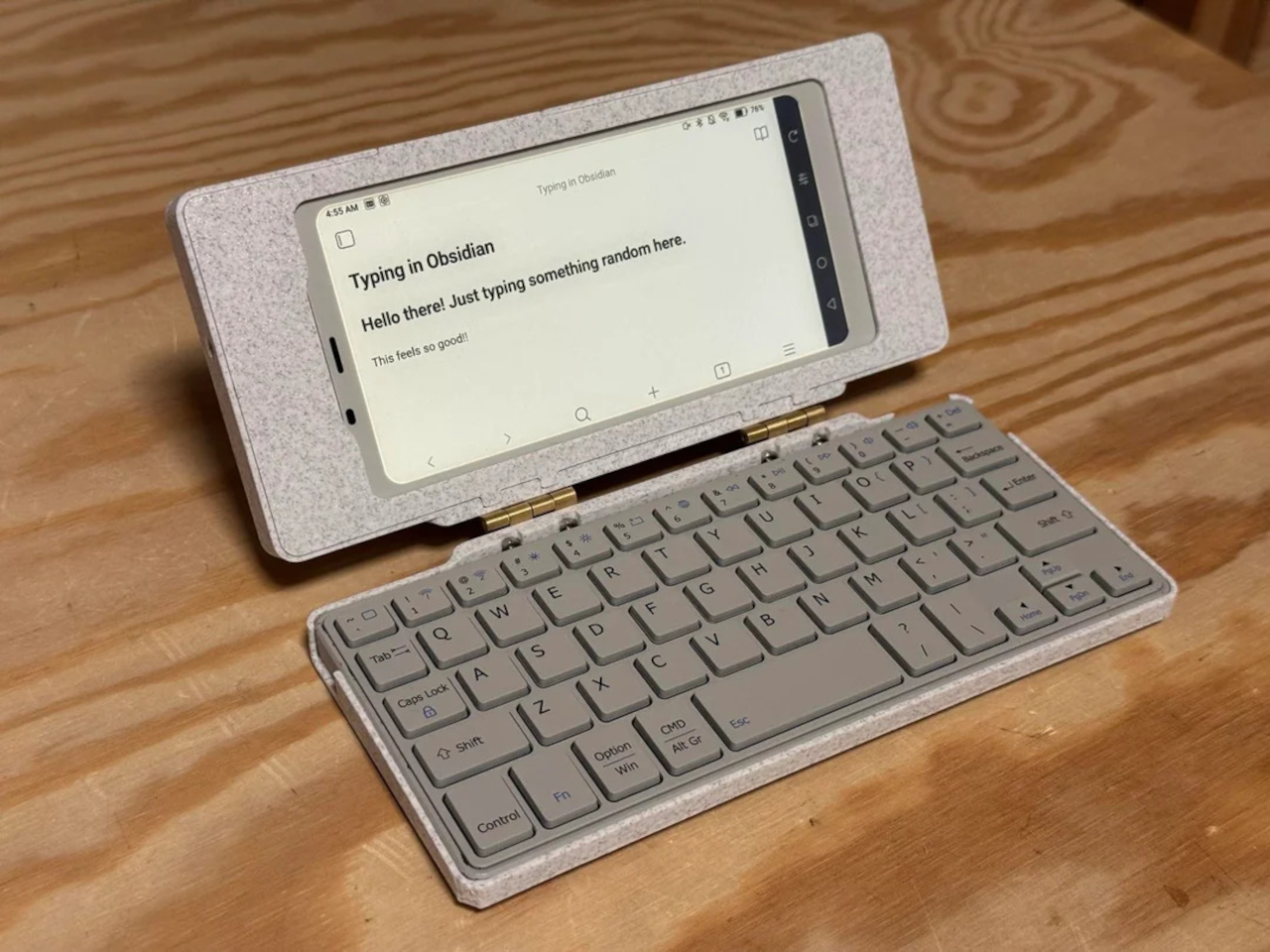
The Tapico Typer is a design that leverages that technology but also goes to the extreme when it comes to offering a distraction-free environment. You basically just have a keyboard with a somewhat small 4.2-inch E Ink screen centered on top. It doesn’t even have a battery, at least in this iteration of the design, so you’ll have to rely on an external power source like a power bank. It does have an SD card slot, however, which is the only way to get your files off the device since it has no network connectivity or even a USB data connection.

If that sounds extreme, it’s because it really is by design. The Tapico Typer is, interestingly, inspired more by a calculator than the old mechanical typewriter. It’s a single-function device that does only one thing but does it to perfection. It also means you have complete ownership of your content, free from subscription services and cloud storage. And, of course, there’s nothing to distract you on the screen, though the phone you place beside it could still steal your focus.

The digital typewriter is mostly 3D-printed and self-made, so it would be possible to follow the original’s design to make your own. Many of the components are available off shelves and there isn’t much soldering involved, so most of the work boils down to designing the chassis. A future plan is to include some internal power source or at least a way to use AA batteries that could last for months thanks to how little power E Ink displays consume. This also means that The Tapico Typerc can also be easily repaired, ensuring it will be your writing partner for a very long time.

The post 3D-printed E Ink typewriter offers distraction-free writing with modern perks first appeared on Yanko Design.
Infinix E-Shift Color promises near-infinite phone design customization

Although we look at our phone screens almost all the time, it is really the back of our phones that gives them their personality. From the colors to the textures of their back even to the camera bump or bumps, this side of the phone is what other people see the most and, therefore, provides the most motivation for personalization and customization. A phone’s design, however, is permanent once it leaves the factory, and unless you put stickers or cases on it, its appearance will never change. Infinix, however, is presenting a solution to that design problem with a piece of technology that adds an almost literal splash of color to the back of your phone and changes that into a mesmerizing display of colors as often as you want, especially while it’s charging.

Designer: Infinix

Putting stickers or whatnot on the back of your phone is a sure way to ruin its future. Cases, on the other hand, are more temporary, but they not only add bulk but also limit your design options to what’s already available. Wouldn’t it be rad if you could change the color or even the colorful patterns on the back of your phone on a whim, similar to how you’d change your wallpaper every so often? Infinix’s E-Shift Color technology first unveiled at CES 2024 does exactly that, and it’s getting a little help from the same technology that powers your favorite e-book reader.

E-Ink Prism 3 is the latest iteration from the e-paper display expert that brings color to this traditionally colorless screen. In a nutshell, it uses electric charges to cause microstructures in the panel to change their color, similar to how an E Ink screen works. And just like an E Ink screen, it only uses power when changing colors, so displaying that static colored pattern will use almost no power to maintain that appearance, unlike a typical LCD or OLED screen. In practice, this means that you can change the phone’s back to a particular color and have it stay that way for as long as you like without draining the battery.

This opens the door to dynamic designs and personalization, with users picking the colors they want and having it change when they grow tired of it. It even has the possibility of rapidly animating these color changes while charging the phone, presuming you like to put it down flat on its face. Either way, it’s a fun experiment that will definitely appeal to the more youthful audience that Infinix targets, and it’s not hard to see how brands can also take advantage of this feature for marketing.

Because of E-Ink Prism’s segmented nature, the Infinix E-Shift Color is also limited to following certain patterns only, patterns that are also set in stone during manufacturing. It’s not like having access to a digital canvas where you create arbitrary pixel art images or animations. That could probably come in future iterations of the technology, but even this first attempt could very well be a huge selling point for people who want to make their phones look as alive and expressive as they are.

The post Infinix E-Shift Color promises near-infinite phone design customization first appeared on Yanko Design.

Lenovo ThinkBook laptops at CES 2024 offer innovative style and flexibility

As the world’s biggest PC maker, Lenovo has to cast its net wide in order to target as many customers as possible. It’s definitely a tall order, considering how different the needs and appetites of people can be. It could try to make a product for each category under the sun, or it could instead make a smarter choice of designing its computers to be as flexible as possible. At CES 2024, Lenovo is unleashing a flood of new laptops, desktops, and accessories designed to cater to this varied audience, particularly addressing the productivity and creativity needs of today’s creators and designers, with a little help from AI, of course.

Designer: Lenovo

Lenovo ThinkBook Plus Gen 5 Hybrid

Laptops are no longer what they used to be from decades ago. They now come in different form factors, like those that can bend over backward and those that can split into two. The latter has some benefits in how you can use the tablet part independently without being weighed down by the keyboard, but there seems to be one thing missing from this design. With the new ThinkBook Plus Gen 5 Hybrid, Lenovo is adding that missing piece, allowing owners to have the best of both Windows and Android worlds while seamlessly switching between the two.
At first glance, you might mistake this 2-in-1 detachable laptop for a simple Windows or Android tablet with a keyboard base. In reality, however, these are actually two separate devices that can run independently or together, depending on what you need. The tablet side does sound like a typical Android slate with a Qualcomm Snapdragon 8+ Gen 1 processor and a large 14-inch 2.8K OLED screen that you can use with Lenovo’s active stylus pen. The laptop base that has the keyboard, however, is also a computer in its own right, powered by an Intel Core Ultra 7 processor with 32GB of RAM and Intel Arc graphics. The general idea is that you can use the device as a typical Windows 11 laptop when joined together and still enjoy the more touch-friendly Android 13 OS in tablet form.
The flexibility, however, doesn’t stop there. Both halves have their own batteries so that the Windows laptop base can run on its own even without the tablet half. Of course, you’ll have to connect an external display to see what’s going on, but it’s not that difficult a problem to solve. More importantly, you also still have access to Android running inside the tablet even when it’s docked to the laptop base via a Picture-in-Picture window. This duality and harmony offer unprecedented flexibility and capability for people who live in both worlds of Windows and Android.

Lenovo ThinkBook 13x Gen 4 SPE

Some people prefer to keep their laptops looking clean and professional, but others like to personalize their property with all kinds of stickers that, unfortunately, leave their mark forever. There’s just no middle ground between these two extremes, at least not until the ThinkBook 13x Gen 4 SPE landed at CES 2024. Building on Lenovo’s previous E-Ink toting laptop, this proof-of-concept device takes that power-saving display technology and puts it at the service of style that everyone can enjoy.

The biggest difference with this new model is the Lenovo E Ink Prism technology that now supports a range of colors rather than just the typical grayscale of e-paper displays. This opens the door to more possibilities in terms of personalization, allowing users to customize the appearance of their laptops to their heart’s desires. Best of all, the display uses very little power, so it can even change the displayed image dynamically even when the laptop is powered off without impacting battery life.

This special creative edition builds on the regular Lenovo ThinkBook 13x Gen 4, which does have a sleek and stylish dual-tone design of its own. This is powered by the latest Intel Core Ultra processors which have a dedicated neural processing unit (NPU) for AI-powered tasks like noise cancellation and system optimization. It also boasts using 50% recycled aluminum in the bottom cover of the Luna Grey colorway, 90% Post-Consumer Recycled Content (PCC) plastic in the power adapter, and 30% PCC in the speaker enclosures.

Lenovo Laptops and Desktops for All

Beyond these two noteworthy laptops, Lenovo also has a few other new computers to show off in the Las Vegas showroom. The ThinkBook 14 i Gen 6+, for example, offers no-nonsense productivity behind its large 14.5-inch 3K display, delivering the power that designers need to get their work done. The ThinkBook 16p Gen5, on the other hand, pulls out all the stops with a 14th-gen Intel Core i9 processor and NVIDIA GeForce RTX 4060 laptop graphics. With an even larger 16-inch 3.2K screen, creators have more space to use when crafting their designs and projects.

On the desktop side, the Lenovo ThinkCentre neo 50a 27 Gen 5 and ThinkCentre neo 50a 24 Gen 5 all-in-one PCs offer a sleek, space-saving design that doesn’t skimp on performance with an Intel Core i7 chip and 32GB of RAM. The real star of the show here, however, is the new Lenovo ThinkCentre neo Ultra, its first mini PC, delivering performance in a small package. It runs on an Intel Core i9 processor paired with NVIDIA GeForce RTX 4060 graphics and leverages plenty of AI-assisted features. And for those times when you need to jump on a video call, Lenovo’s Magic Bay Studio brings an AI-assisted 4K camera that will make you look clear, sharp, and professional.

Availability

  • Lenovo ThinkBook Plus Gen 5 Hybrid – Q2 2024, starting at $1,999
  • Lenovo ThinkBook 13x Gen 4 – Q1 2024, starting at $1,399
  • Lenovo ThinkCentre neo Ultra – Q2 2024, starting at $1,499
  • Lenovo ThinkCentre neo 50a 24 Gen 5, 50a 27 Gen 5 – Q1 2024, starting at $799 and $899, respectively
  • Lenovo ThinkBook 14 i Gen 6 – Q2 2024, bundle with ThinkBook Graphics Extension starting at $2,199
  • Lenovo ThinkBook 16p Gen 5 – Q1 2024, starting at $1,599
  • Lenovo Magic Bay Studio – April 2024, $199.99

Unfortunately, since it’s just a proof-of-concept design, there is no word yet on whether the E Ink Lenovo ThinkBook 13x Gen 4 SPE will be made available in the market.

The post Lenovo ThinkBook laptops at CES 2024 offer innovative style and flexibility first appeared on Yanko Design.