5 Best Shipping Container Tiny Homes of January 2026

Shipping container architecture continues to reshape residential design as we move into 2026. What began as a niche solution for sustainable living has matured into a mainstream housing option that balances affordability with architectural ambition. The current market shows container homes increasingly designed with modern interiors, smart home systems, and architectural detailing that support long-term residential use rather than temporary installations.

The designs featured this month represent the cutting edge of container home innovation. From compact 20-foot single-container retreats to expansive multi-container configurations, these homes prove that repurposed steel can create spaces that feel generous, light-filled, and remarkably comfortable. Each project demonstrates how thoughtful design transforms industrial materials into environments worth calling home, addressing both spatial efficiency and livability in ways that traditional construction often struggles to match.

1. Double Duo by Custom Container Living

Custom Container Living’s Double Duo reimagines what’s possible when you move beyond single-container limitations. Using two 40-foot containers positioned to create 640 square feet of interior space, this design offers room to breathe that most tiny homes simply can’t match. The layout includes a generous living area, two separate bedrooms, and two full bathrooms, making it suitable for families or those who refuse to compromise on personal space. The exterior flexibility allows buyers to choose between raw industrial steel or warmer wood cladding, giving each home a distinct character.

Step through the entrance and the difference becomes immediately apparent. The living room accommodates full-sized furniture without feeling cramped, with space for an entertainment center, substantial sofa, and coffee table that wouldn’t look out of place in a conventional home. The kitchen runs adjacent to this social space, equipped with double sinks, a proper four-burner propane stove with oven, a fridge/freezer, and a microwave. Those willing to invest in upgrades can add a dishwasher and stacked washer/dryer, while abundant cabinetry ensures storage never becomes an afterthought in daily life.

What We Like

  • Dual-container configuration creates genuine room separation instead of forcing everything into one open space.
  • Two bathrooms eliminate morning conflicts and make hosting guests far more comfortable.
  • Kitchen rivals what you’d find in many traditional homes with its appliance selection and counter space.
  • Exterior customization options let owners express personal style rather than accepting a one-size-fits-all aesthetic.

What We Dislike

  • Larger footprint requires more land than ultra-compact container homes, which may limit placement options.
  • Using two containers increases both initial cost and complexity compared to simpler single-container builds.
  • A propane stove means ongoing fuel management rather than the simplicity of all-electric systems.
  • Industrial origins still show in ceiling height and structural elements despite the spacious floorplan.

2. Teeny Tiny Haus by Backcountry Containers

Backcountry Containers’ Teeny Tiny Haus in Stonewall, Texas, proves you can fit a complete vacation home into a single 20-foot container. At just 130 square feet, this retreat matches the footprint of compact European tiny houses while maintaining all essential functions. The design includes a dedicated bedroom area, a functional kitchen, and a full bathroom, all within steel walls measuring 20 feet long and 8 feet wide. Every inch serves a purpose, with the layout optimized to prevent the space from feeling cramped despite its minimal dimensions.

The success of the Teeny Tiny Haus lies in spatial efficiency rather than compromise. The bedroom accommodates a proper sleeping area without sacrificing access or comfort, while the kitchen includes the necessary appliances and prep space for actual cooking rather than just reheating. The full bathroom means no awkward outdoor facilities or makeshift shower arrangements. For couples seeking a weekend escape or solo travelers wanting a personal retreat, the compact footprint becomes an asset rather than a limitation, requiring minimal maintenance while delivering maximum function in a vacation property context.

What We Like

  • Complete home functionality packed into 20 feet demonstrates exceptional space planning.
  • Texas Hill Country location provides a proven example of climate-appropriate container living.
  • Compact size means lower heating and cooling costs that keep ongoing expenses manageable.
  • Single-container format simplifies both initial setup and any future relocation needs.

What We Dislike

  • 130 square feet pushes livability boundaries for anything beyond weekend use.
  • Limited storage means careful editing of belongings becomes essential.
  • The narrow 8-foot width restricts furniture choices and traffic flow patterns.
  • Small footprint makes hosting guests impractical beyond very brief visits.

3. Mark T by Sonic Steel

Sonic Steel’s Mark T in Port Neil, South Australia, takes a vertical approach by stacking three containers into a light-filled coastal retreat. The 40-foot high-cube container forms the main living level, while a compact 7-foot module houses the staircase connection, and a 20-foot unit creates an elevated master bedroom. Painted uniformly black, the exterior sheds any obvious industrial appearance, looking more like intentional modern architecture than repurposed shipping materials. The stacked configuration creates distinct zones within the home rather than relying on open-plan compromises.

Walking through reveals attention to residential comfort at every turn. The central kitchen anchors the main floor, designed to encourage gathering rather than isolation during meal prep. Generous windows throughout both levels flood spaces with natural light, while luxury vinyl flooring and powder-coated tapware add refinement that distances the home from its cargo container origins. The bathroom includes a proper shower, sink, and odorless composting toilet that reduces water consumption without sacrificing functionality. A Rheem gas hot water system handles domestic needs, with electrical and plumbing arriving ready for connection to simplify the installation process.

What We Like

  • Stacked design creates true room separation between living and sleeping areas.
  • Coastal Australian setting showcases how containers adapt to challenging salt-air environments.
  • Generous windows throughout both levels maximize natural light and cross-ventilation.
  • Pre-installed systems reduce on-site construction time and complexity.

What We Dislike

  • The staircase between levels creates accessibility challenges for those with mobility limitations.
  • Stacked configuration requires more complex foundation and structural engineering than ground-level designs.
  • The black exterior absorbs significant heat in sunny climates despite the coastal location.
  • Custom nature of the three-container system limits standardization and economies of scale.

4. The Nook

The Nook demonstrates how a single 20-foot shipping container can become a contemporary home for solo dwellers or minimalist couples. At 160 square feet, this compact residence offers slightly more breathing room than ultra-tiny alternatives while maintaining exceptional affordability. The black steel exterior paired with cedar accent panels creates a modern aesthetic that turns heads without requiring extensive customization. Inside, the efficient layout positions the sleeping area, kitchenette, and bathroom within easy reach, eliminating wasted circulation space while maintaining clear functional zones throughout the compact floorplan.

Closed-cell foam insulation throughout the ceiling, walls, and floor ensures year-round comfort regardless of external temperature swings, making the home viable in varied climates rather than limiting it to temperate regions. Strategic window and door placement maximizes natural light penetration and outdoor views, creating an unexpectedly airy atmosphere despite the modest square footage. The Nook serves multiple purposes beyond primary residence, working equally well as a guest suite, home office, or studio space. The budget-friendly approach makes container living accessible to first-time tiny home buyers or those needing auxiliary space without major financial commitment.

What We Like

  • Cedar accents warm the industrial aesthetic without requiring full exterior cladding.
  • Closed-cell insulation addresses thermal performance concerns that plague many container conversions.
  • Multiple use cases beyond the primary dwelling extend practical value.
  • Entry-level price point opens container living to broader audiences.

What We Dislike

  • 160 square feet still requires a significant lifestyle adjustment and belongings editing.
  • Kitchenette designation suggests appliance limitations compared to full kitchen setups.
  • Single-container format means no room for expansion without major reconfiguration.
  • A compact bathroom likely means space constraints for fixtures and storage.

5. Rising Sun by UnContained Dreams

UnContained Dreams’ Rising Sun makes the most of its 9.6-foot height and 8-foot width to create a comfortable, compact home. The design addresses thermal performance head-on, applying closed-cell spray foam to all interior surfaces, including the ceiling, floor, and walls. This insulation strategy keeps the interior cozy during winter months and cool throughout summer, solving one of container architecture’s most persistent challenges. Multiple strategically placed windows ensure the space stays bright and inviting despite the narrow footprint, with thoughtful positioning that maintains privacy while maximizing daylight penetration.

The exterior combines metal with wood trim, achieving a functional appearance that balances industrial utility with residential warmth. Doors cut into the container provide practical entry points and ventilation options, while the interior layout allocates space for all essential living functions without feeling cramped. Rising Sun targets buyers seeking straightforward, well-insulated housing that requires minimal ongoing maintenance. The design philosophy emphasizes practical solutions over architectural showmanship, delivering a home that performs reliably across varying climate conditions while remaining accessible to those new to alternative housing models.

What We Like

  • Comprehensive spray foam insulation eliminates the thermal bridging issues common in container homes.
  • Taller 9.6-foot height creates more interior volume than standard container dimensions.
  • Metal and wood exterior combines durability with visual appeal.
  • Straightforward design reduces complexity and potential maintenance headaches.

What We Dislike

  • 8-foot width constrains furniture placement and room layout options significantly.
  • Emphasis on practicality means less architectural drama than more ambitious container projects.
  • Compact dimensions limit suitability for families or those working from home.
  • Single-container format offers no expansion possibilities without adding separate modules.

Making the Right Choice

Container home architecture has evolved far beyond its experimental origins into a legitimate housing category. The five homes featured here represent different approaches to the same fundamental challenge: transforming industrial steel boxes into comfortable living environments. From the spacious Double Duo to the ultra-compact Teeny Tiny Haus, each design makes specific trade-offs between space, cost, and complexity that suit different buyer priorities and lifestyle requirements.

The current market reflects growing sophistication in container home design, with builders addressing insulation, natural light, and spatial efficiency more effectively than early pioneer projects. Whether you’re drawn to vertical stacking like the Mark T or prefer ground-level simplicity like The Nook, January 2026 offers container home options that feel less like compromises and more like intentional architectural choices. These homes prove that starting with shipping containers doesn’t mean accepting industrial aesthetics or cramped quarters in your final living space.

The post 5 Best Shipping Container Tiny Homes of January 2026 first appeared on Yanko Design.

5 Best Transparent Tech Of January 2026 That Just Beat Nothing at Its Own Game

Transparent technology has moved far beyond its novelty phase to become a legitimate design movement reshaping how we interact with our devices. What started as a nostalgia trip courtesy of Nothing’s transparent phones has evolved into a full-blown aesthetic revolution where seeing the guts of your gadgets is no longer just acceptable but desirable. The best transparent designs do more than simply expose circuitry; they create visual narratives about how technology works while delivering genuine functional benefits that justify their existence beyond mere eye candy.

January 2026 has given us a particularly strong lineup of transparent tech that ranges from retro-futuristic audio devices to gaming powerhouses wrapped in see-through shells. These designs prove that transparency works across every category of consumer electronics when executed with intention and intelligence. The following five products represent the pinnacle of this movement, each bringing something unique to the table while celebrating the beauty of visible mechanics and electronic components in ways that feel fresh rather than gimmicky.

1. Transparent Sony Walkman Concept

This transparent cassette recorder concept represents everything compelling about retro-futurism executed with modern design sensibilities. The device combines the tactile satisfaction of analog media with visual transparency that transforms mechanical components into the main attraction. Those exposed gears and rollers work their magic through crystal-clear housing that makes the entire mechanism visible during operation, creating a mesmerizing display of analog technology in motion. The top-mounted mechanical elements evoke luxury watch movements where visible complexity becomes the primary selling point rather than something to hide behind opaque shells.

The design succeeds because it creates genuine tension between old and new technologies rather than simply copying vintage aesthetics. A digital display nestles among analog components, suggesting computational intelligence working alongside mechanical systems. Those pixel-perfect UI elements visible through transparent housing indicate this isn’t merely a playback device but something with smart capabilities. The tiny control buttons along the top edge deliberately reference 80s Sony recorders while embracing modern miniaturization techniques. This Walkman concept could easily exist in Blade Runner’s world or on a contemporary design enthusiast’s shelf with equal credibility.

What We Like

  • The visible gear systems create a hypnotic viewing experience during tape playback.
  • The combination of analog mechanics and digital intelligence feels genuinely innovative.
  • The transparent housing transforms mechanical movement into visual entertainment.
  • The design language successfully bridges multiple decades of technology evolution.

What We Dislike

  • Physical media dependence limits practicality for streaming-era consumers.
  • The concept status means you cannot actually purchase this beautiful object.

2. Pomera DM250 Crystal Neon Yellow

The limited-edition Pomera DM250 in Crystal Neon Yellow ditches conventional white or black finishes for a vivid, almost glowing green shell that channels cyberpunk aesthetics straight out of futuristic cinema. The transparent design feels deliberately pulled from a William Gibson novel, mixing nostalgia for vintage computing with an ultra-modern sensibility that makes the device feel both retro and cutting-edge simultaneously. This isn’t just a writing tool but a statement piece that announces your commitment to focused creativity before you type a single word.

The core philosophy here centers on unwavering dedication to one task: getting words onto the screen without distractions. The DM250 sports a compact yet full-size 80-key keyboard paired with a crisp monochrome LCD that strips away every possible distraction. The software is deliberately minimal, offering everything a writer needs for text creation while providing nothing that might derail focus or waste precious writing time. That transparent shell showcasing the device’s internal components serves as a visual reminder of its pure functionality, where every element exists to support the writing process rather than tempt you toward multitasking.

What We Like

  • The monochrome display eliminates distractions that kill writing productivity.
  • The full-size keyboard delivers proper typing ergonomics in a compact form.
  • The Crystal Neon Yellow finish makes a bold visual statement.
  • The single-purpose design philosophy respects writers’ focus needs.

What We Dislike

  • The monochrome display feels dated compared to modern screen technology.
  • Limited functionality beyond text editing restricts versatility for mixed workflows.

3. RedMagic Astra Gaming Tablet

Nothing spent years teasing transparent design language, while RedMagic simply dropped the Astra with a full transparent strip down its back panel, complete with faux circuit board details that scream technological prowess. The visual trickery taps into tech enthusiast psychology that made transparent Game Boys and iMacs cultural phenomena decades ago. Those faux components create an impression of hardware sophistication perfectly aligned with gaming tablet expectations. RedMagic effectively claimed transparent tablet territory before Nothing could plant their flag, proving that execution speed sometimes matters more than brand heritage in emerging design categories.

The transparent strip serves as eye candy on what might be the most compelling compact gaming tablet available. RedMagic packed the Astra with the Snapdragon 8 Elite processor and hardware that puts most full-sized tablets to shame. The 9.06-inch form factor feels genuinely manageable for handheld gaming while maintaining enough screen real estate for immersive experiences. Aggressive pricing makes the iPad Mini look overpriced and underpowered by comparison. The Astra knows exactly what it wants to be: a gaming powerhouse that happens to work as a tablet, rather than a tablet that sorta plays games. This focused approach pays dividends across every aspect, from display technology to thermal management systems.

What We Like

  • The Snapdragon 8 Elite processor delivers flagship performance in a compact package.
  • The transparent design differentiates it from generic black rectangles flooding the market.
  • The 9.06-inch size balances portability with usable screen space for gaming.
  • Aggressive pricing undercuts competitors while delivering superior hardware specifications.

What We Dislike

  • Faux circuit board details might feel inauthentic to purists wanting real component exposure.
  • Gaming focus means it might not excel at productivity tasks that some users expect from tablets.

4. Nothing-Inspired Transparent Robot Vacuum

Designer Taeyeon Kim took the transparent tech aesthetic and applied it to one of the most mundane household appliances imaginable, creating an independent concept that reimagines how cleaning technology could integrate into daily life. The transparent philosophy celebrates inner workings rather than hiding them behind opaque plastic shells that make appliances invisible and forgettable. This vacuum features a completely clear shell exposing all internal components from the motor and sensors to the circuitry, making it function, transforming utilitarian hardware into something worth displaying prominently.

Most robot vacuums are designed for invisibility, tucked away in corners where they won’t interfere with carefully curated interior design schemes. Kim’s concept takes the opposite approach entirely, embracing transparency and modularity to create a cleaning system that actually wants to be seen and interacted with regularly. The exposed components serve educational purposes, helping users understand how their cleaning technology actually works while making maintenance and troubleshooting more intuitive. The modular design philosophy means components can be swapped or upgraded without replacing the entire unit, extending product lifespan while reducing electronic waste that plagues the appliance industry.

What We Like

  • The transparent shell transforms a mundane appliance into an interesting design object.
  • Exposed components make maintenance and troubleshooting more intuitive for users.
  • The modular philosophy extends product lifespan through component upgrades.
  • The design challenges the appliance industry norms around hiding technology from view.

What We Dislike

  • Visible dirt accumulation in transparent components might require more frequent cleaning.
  • The concept status means this innovative design isn’t available for purchase yet.

5. Sony WF-C710N Glass Blue Earbuds

The Glass Blue variant of Sony’s WF-C710N earbuds challenges the industry’s tendency toward either clinical white or anonymous black with a design choice that celebrates rather than conceals technological sophistication. The transparent housing goes beyond mere novelty to create a visual narrative about the engineering packed into these tiny devices. Sony offers four color options, but the Glass Blue stands out by making the internal components part of the aesthetic rather than something requiring concealment. The naturally elegant, compact form factor prioritizes both aesthetics and functionality in ways that prove transparent design works even at this miniature scale.

Sound quality remains Sony’s primary focus despite attention-grabbing aesthetics that could easily overshadow performance. The unique 5mm drivers deliver powerful bass and crystal-clear vocals across all music genres, while Digital Sound Enhancement Engine processing restores high-frequency elements often lost in compressed digital audio files. This technical prowess ensures the WF-C710N earbuds sound as impressive as they look, delivering an audio experience satisfying even discerning listeners who prioritize performance over style. The noise-canceling capabilities work seamlessly with the compact design, proving that transparent housings don’t require compromises in acoustic performance or active noise management systems.

What We Like

  • The Glass Blue finish makes a bold statement against boring black or white alternatives.
  • The 5mm drivers deliver impressive audio quality from compact components.
  • Digital Sound Enhancement Engine processing restores lost audio details effectively.
  • Active noise canceling proves transparent design doesn’t compromise acoustic performance.

What We Dislike

  • The transparent design might show dirt and debris accumulation more visibly than opaque alternatives.
  • The 5mm drivers might not satisfy audiophiles seeking maximum bass response depth.

The Transparent Future

Transparent technology has matured from gimmick to genuine design movement with staying power. The five products showcased here demonstrate how exposure of internal components can serve both aesthetic and functional purposes when executed thoughtfully. Designers are moving beyond simply slapping clear cases on existing products to creating devices where transparency informs every aspect of the user experience, from interaction patterns to maintenance accessibility. The visual honesty of exposed mechanics and circuitry creates connections between users and their technology that opaque housings cannot replicate.

What makes January 2026’s transparent offerings particularly compelling is their diversity across product categories and price points. From retro-futuristic Walkman concepts to pragmatic writing tools and gaming tablets, transparent design proves its versatility. These products suggest we’re entering an era where seeing how our devices work isn’t just acceptable but expected by consumers who want deeper relationships with their technology. The transparent revolution is just beginning, and these five designs point toward a future where every electronic device might celebrate rather than hide its technological sophistication.

The post 5 Best Transparent Tech Of January 2026 That Just Beat Nothing at Its Own Game first appeared on Yanko Design.
7 Best Minimalist Home Decor Swaps To Declutter Your Space

Decluttering your home doesn’t mean emptying it. The real transformation happens when you replace bulky, single-purpose objects with designs that work harder, look better, and take up less mental space. Minimalist home decor swaps prioritize intention over accumulation, choosing pieces that blend function with form so seamlessly they feel like they’ve always belonged there. Each item earns its place not through compromise but through clarity.

These seven swaps prove that less isn’t about deprivation. It’s about choosing objects that serve multiple roles, disappear when not in use, or turn everyday rituals into moments worth noticing. From shoehorns that vanish into the background to mirrors that double as vases, each design replaces clutter with calm. Your space becomes easier to navigate, simpler to maintain, and infinitely more intentional in how it supports your daily life.

1. Invisible Shoehorn

Most shoehorns live in that awkward space between useful and ugly. They lean against walls, slide under furniture, or get tossed into closets where you can never find them when your hands are full. This shoehorn takes a different approach entirely. Its long stainless steel body handles the practical work of protecting your footwear and your lower back, while its transparent stand makes the whole thing look like a sculptural accent rather than a utilitarian tool.

The magic happens when you step back and realize you’re not looking at a shoehorn at all. The clear stand holds the polished metal at just the right angle, creating visual interest without announcing its purpose to everyone who walks past your entryway. It replaces the need for a separate decorative object while solving the chronic problem of where to put the shoehorn when you’re done with it. You get function and form occupying the same footprint.

Click Here to Buy Now: $299.00

What We Like

  • The transparent design hides the shoehorn in plain sight, eliminating visual clutter.
  • The extended length means you can put on shoes without bending or straining your back.
  • The polished surface slides smoothly without catching on delicate socks or stockings.

What We Dislike

  • The transparent stand may require occasional cleaning to maintain its clarity.
  • Some might prefer a shorter version for travel or smaller spaces.

2. Key Holder Wakka

Keys create chaos in ways that seem disproportionate to their size. They end up on kitchen counters, buried in bags, or tossed onto random surfaces throughout your home. The Wakka Key Holder turns the simple act of putting your keys away into something you’ll actually want to do. The wooden base anchors the design with natural warmth, while the magnetic ring creates a satisfying connection that you can hear and feel.

That audible tap when metal meets magnet becomes a tiny ritual that marks your arrival home. The sound itself is calming, almost meditative, turning a forgettable action into a moment of intentional pause. The key ring works independently when you need it, and the wooden base stands alone as a sculptural element even when the keys are gone. This swap replaces messy key bowls or hooks that accumulate clutter with a singular object that does one thing exceptionally well.

Click Here to Buy Now: $45.00

What We Like

  • The powerful neodymium magnet keeps keys secure without fumbling.
  • The brisk tapping sound creates a satisfying sensory experience.
  • Available in Silver/Maple and Silver/Walnut to match different interior styles.

What We Dislike

  • The magnetic system is only compatible with the included keyring design.
  • The wooden base requires a dedicated surface spot rather than wall mounting.

3. Penguin x MOEBE Book Stand

Books pile up in ways that make spaces feel chaotic even when everything else is tidy. Stacks lean precariously on nightstands, current reads disappear into shelves, and bookmarks slip out when you’re trying to remember your place. This bent steel stand treats books as objects worth displaying rather than just storing. It holds volumes open for reading, props single books upright for visibility, or works in pairs as bookends, depending on your needs.

The single-sheet construction means no visible fasteners or complicated assembly to wrestle with. The matte finish in stainless steel, cream, black, or Penguin orange stays visually quiet while the angled base supports different book thicknesses without wobbling or tipping. It replaces bulky bookends, flimsy wire stands, and the habit of leaving books face-down to hold your place. Your reading material gets a dedicated home that makes returning to the page feel natural.

What We Like

  • The versatile design works as a reading stand, display prop, or bookend.
  • The seamless bent steel construction creates clean lines without hardware.
  • Multiple color options coordinate with different interior aesthetics.

What We Dislike

  • The minimal footprint works best with standard book sizes.
  • Pairs are needed for full bookend functionality.

4. Miniature Bonfire Wood Diffuser Set

Traditional diffusers either look clinical or try too hard to blend in, taking up counter space without contributing much to the room’s atmosphere. This miniature bonfire flips that equation completely. The stainless steel construction creates a tiny sculptural fire pit that doubles as an essential oil diffuser, with miniature firewood pieces that spread fragrance as gently as an actual forest breeze. The camping aesthetic brings outdoor calm indoors without requiring commitment to literal nature decor.

The real versatility shows up when you realize the trivets transform the whole setup into a functional pocket stove. You can use it to warm small amounts of food or create an authentic camping experience right at your table. This single object replaces conventional diffusers, decorative candles, and even emergency heating elements. The rust-resistant material means it lasts, and the bundled firewood pieces with their tiny tying knots add handmade charm that mass-produced diffusers can’t match.

Click Here to Buy Now: $99.00

What We Like

  • The rust-resistant stainless steel ensures lasting durability.
  • The included trivets convert the diffuser into a functional pocket stove.
  • The Mt. Hakusan essential oil captures authentic forest fragrance.

What We Dislike

  • The compact size limits oil capacity for larger rooms.
  • The campfire aesthetic may not suit all interior styles.

5. Lotus Clock

Wall clocks usually do one thing, and catchall dishes do another, which means you end up with both competing for wall and surface space. The Lotus Clock merges these functions into a single design that draws inspiration from nature’s problem-solving. The curved metal tray sits beneath the clock face like a lotus leaf collecting morning dew, creating a natural resting spot for keys, coins, and the small items that usually scatter across entryway tables.

The biomimetic approach makes the dual functionality feel intentional rather than forced. The wooden frame features soft rounded corners that read as approachable, while the clean white face keeps time-reading effortless even from across the room. The broad flat hands coordinate with the tray’s finish, whether you choose soft gold or gentle green, creating visual harmony between timekeeping and storage. This swap eliminates the need for separate wall clocks and entryway organizers, freeing up both vertical and horizontal real estate.

What We Like

  • The integrated tray provides dedicated storage for daily carry items.
  • The biomimetic design feels both poetic and practical.
  • Multiple colorway options allow personalization while maintaining minimalist aesthetics.

What We Dislike

  • The tray size limits what can be stored there comfortably.
  • Wall mounting is required, which may not work for renters.

6. ClearFrame CD Player

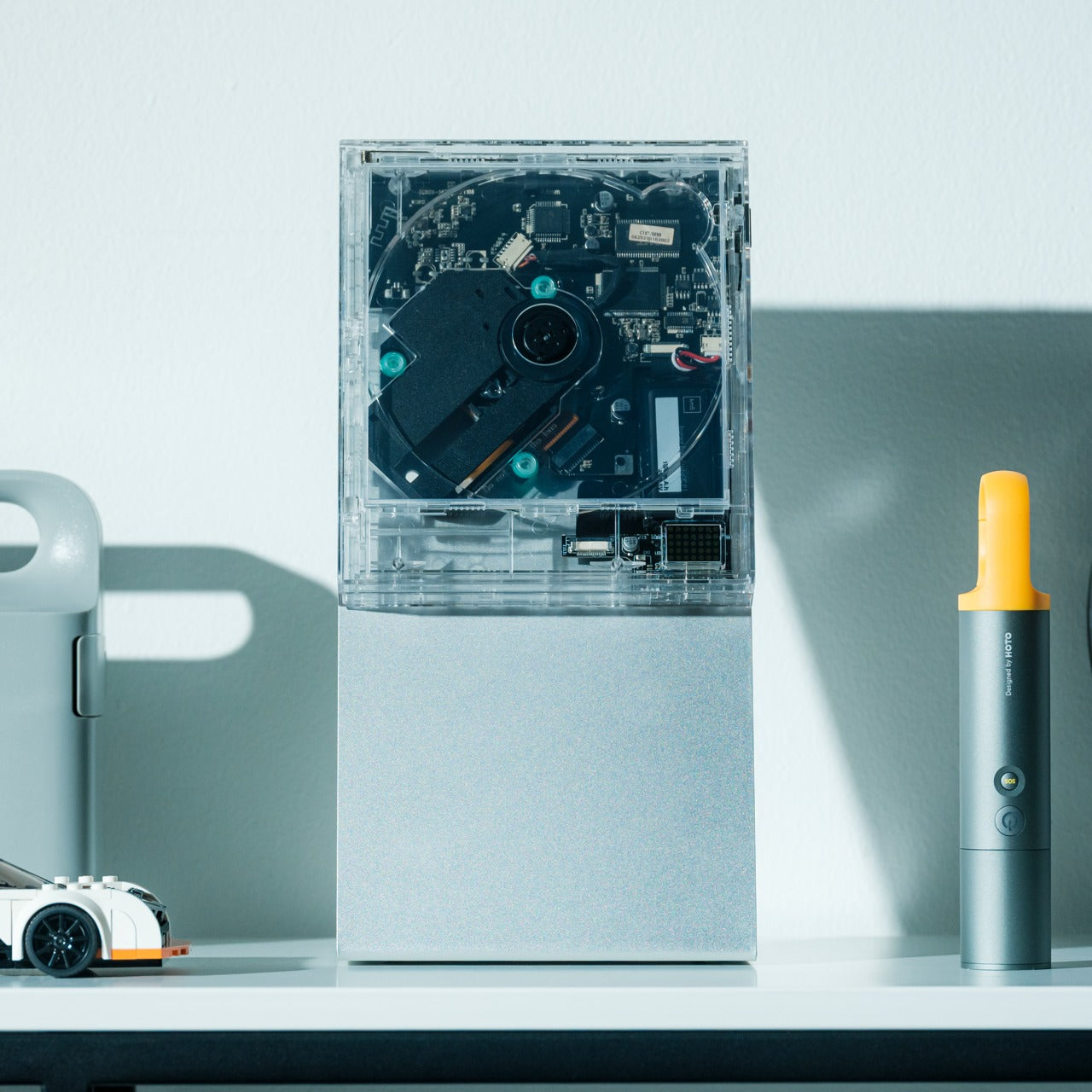
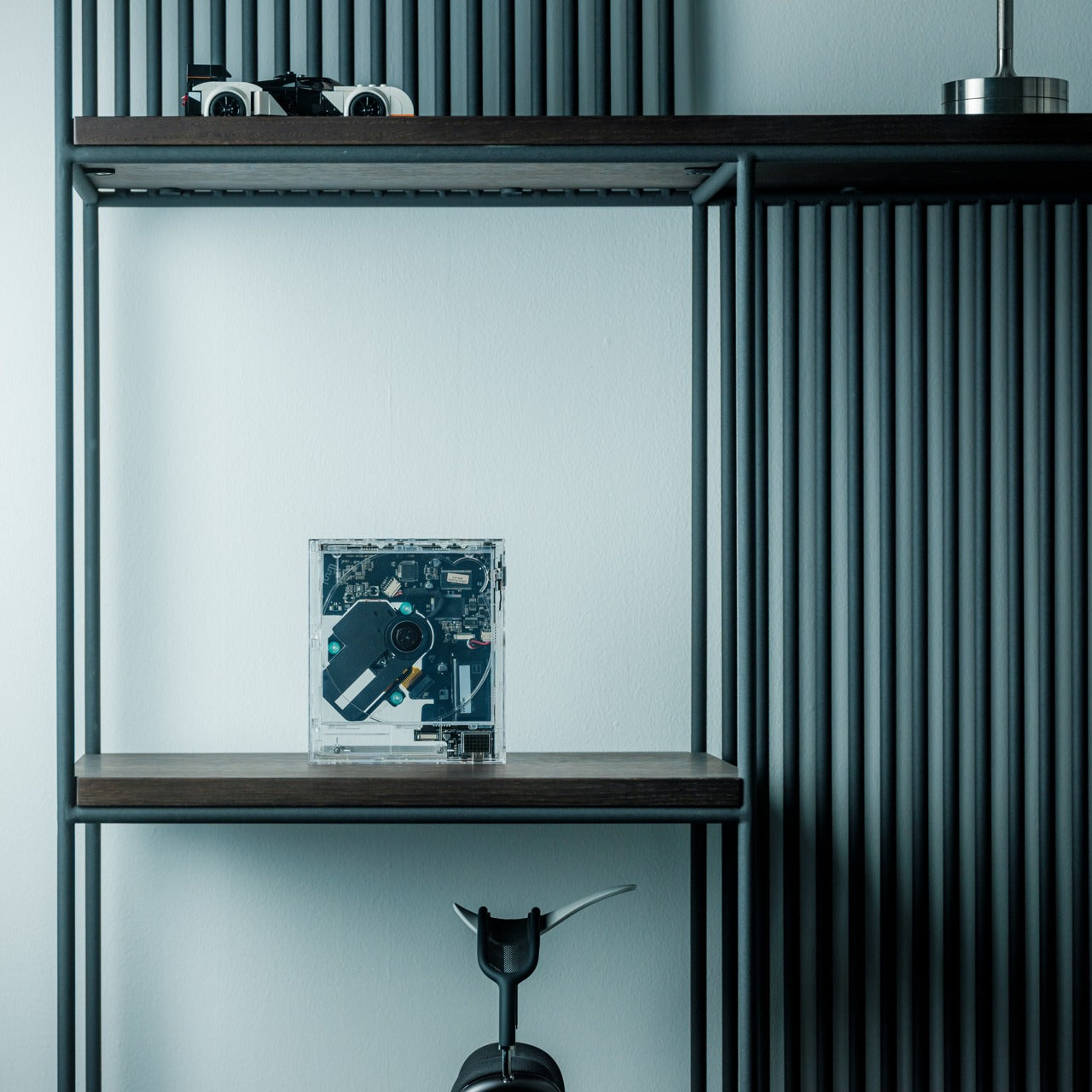
Physical media creates display challenges that streaming never will. CD collections sit in drawers or bulky towers that broadcast “clutter” even when organized. The ClearFrame CD Player reframes music as something worth exhibiting. The crystal-clear polycarbonate body turns the disc and album artwork into a miniature gallery, while the exposed black circuitry invites you to appreciate the engineering as part of the aesthetic rather than something to hide away.

The transparent design means the player becomes part of your decor, whether it’s playing or silent. Bluetooth connectivity, seven-hour battery life, and wall-mount capability give it flexibility that traditional players lack. It works on shelves, desks, or mounted as wall art, adapting to your space rather than demanding accommodation. This swap replaces both oversized stereo systems and hidden-away music players with something that celebrates physical media while taking up minimal space and maximum attention.

Click Here to Buy Now: $199.00

What We Like

  • The transparent polycarbonate showcases both album art and internal engineering.
  • Bluetooth connectivity and a rechargeable battery offer placement flexibility.
  • Multiple mounting options adapt to different room configurations.

What We Dislike

  • The focus on CDs excludes vinyl collectors.
  • The transparent design shows dust and fingerprints more readily.

7. JewelVase Mirror Stand

Mirrors, accessory storage, and vases typically occupy separate zones in your home, each claiming surface area and visual attention. The JewelVase collapses these categories into a single polyhedron form that functions as all three. The mirror reflects light and lets you check your appearance, the structure holds rings and bracelets, and the basin accepts water for fresh flowers. Each function enhances the others rather than competing for dominance.

The bioplastic construction contains rice husks, bringing material sustainability into the minimalist equation without sacrificing durability. The unique angled shape creates visual interest that earns its spot on any desk, table, or shelf, while the reflective surface doubles whatever beauty you place in front of it. Even pouring water becomes a small meditative ritual when the mirror shows you the flower from both sides simultaneously. This swap eliminates multiple accessories, consolidating them into one elegant object that does more with less.

Click Here to Buy Now: $59.00

What We Like

  • The multipurpose design combines a mirror, an accessory stand, and a vase.
  • The bioplastic material incorporates sustainable rice husk content.
  • The polyhedron shape creates sculptural presence without bulk.

What We Dislike

  • The vase capacity suits single stems rather than large arrangements.
  • The angled mirror may not work for full-face viewing.

Making Space by Choosing Better

These seven swaps share a common philosophy. They refuse the false choice between function and beauty, instead insisting that thoughtful design delivers both simultaneously. Each piece earns its place by doing more than one thing well, by disappearing when appropriate, or by transforming mundane tasks into moments worth savoring. Your space becomes less about what you’ve removed and more about what you’ve chosen to keep.

Decluttering through minimalist swaps creates lasting change because you’re not fighting against your needs. You’re meeting them with objects designed to take up less room, require less maintenance, and contribute more to the atmosphere you’re trying to create. The result feels lighter, not because you’re doing without, but because everything present is pulling its weight. That’s where real minimalism lives, in the space between empty and intentional.

The post 7 Best Minimalist Home Decor Swaps To Declutter Your Space first appeared on Yanko Design.

5 Best LEGO Creations of January 2026

LEGO has spent decades proving that plastic bricks can build anything from childhood memories to architectural masterpieces. January 2026 continues that tradition with designs that push beyond simple construction into genuine cultural commentary. These aren’t just toys gathering dust on shelves. They’re conversation pieces that bridge art history, gaming nostalgia, comedy legends, sports culture, and the maker movement into something you can actually hold.

What makes these five stand out is their refusal to play it safe. Each one takes risks with form, function, or concept. Some open to reveal hidden worlds. Others capture movement frozen in absurdity. The best designs this month understand that LEGO’s real magic lies in surprising people who thought they’d seen everything the medium could offer.

1. LEGO Campbell’s Soup Can Opens to Reveal Andy Warhol’s Factory Studio

This LEGO Ideas submission transforms Warhol’s most famous subject into an architectural achievement that honors both pop art and the artist’s creative process. The 24-stud diameter curved exterior alone represents great technical skill, but that’s just the packaging for what’s inside. Months of research went into recreating The Factory’s actual layout, visual language, and cultural significance. The printed artworks covering interior walls reference Warhol’s practice of painting on the floor surrounded by finished pieces.

The metallic interior creates a jarring contrast against the familiar red and white label, mimicking that disorienting moment when commercial design becomes fine art. Props from the actual studio populate the space: the disco ball reflecting celebrity culture, the motorcycle representing Warhol’s fascination with danger and fame, the couch where artists and socialites blurred boundaries. The silver-wigged minifigure presides over it all like a tiny curator. This works as both a display piece and an educational tool, making 1960s avant-garde culture accessible through the universal language of LEGO.

2. LEGO Editions 43019 Soccer Ball Opens to Stadium Interior

This 1,498-piece build measures 15 inches long, 10.3 inches wide, and 2.8 inches tall when fully assembled. The ball exterior alone would make a decent display piece, but cracking it open reveals the real achievement: a complete miniature stadium tucked inside curved walls. Stands, pitch, and match details occupy space most designers would leave hollow. Tiny fans populate the seating areas while players freeze mid-action on the field, capturing that electric moment before kickoff.

The engineering required to create both a recognizable ball exterior and a detailed stadium interior deserves recognition. This isn’t hollow packaging with loose pieces rattling around. Every element serves the dual design, allowing two completely different display configurations from one set. Show the closed ball for sports memorabilia aesthetic, or open it up to reveal the intricate stadium work. That versatility makes it perfect for shelves, desks, or dedicated LEGO display areas. The commitment to surprising builders at every construction stage elevates this beyond typical sports merchandise.

3. LEGO Monty Python Ministry of Silly Walks Build

John Cleese’s Mr. Teabag finally exists in brick form, complete with exaggerated proportions capturing every knee-flinging motion from the legendary sketch. The Technic joints provide genuine articulation rather than decorative suggestion, allowing precise recreation of those impossibly specific movements. This build solves a difficult problem: translating physical comedy into a static medium while preserving all the visual humor that made the original sketch memorable.

The facial expression captures Mr. Teabag’s deadpan bureaucratic seriousness with museum-quality attention to sculptural detail. That silhouette reads instantly from across any room, making it display-worthy alongside traditional LEGO architecture sets. The bowler hat and umbrella complete the aesthetic, transforming simple accessories into essential elements of British absurdist comedy. This works whether you’re a Python fanatic who can quote entire sketches or simply appreciate builds with genuine personality. The wit translates perfectly into plastic brick form.

4. LEGO Portal 2 Test Chamber Creator with Modular Design

The Portal franchise earned its legendary status through ingenious puzzles, dark humor, and an aesthetic so distinctive that orange and blue instantly evoke Aperture Science. KaijuBuilds translated that sterile-yet-sinister world into brick form with this LEGO Ideas submission. The sophisticated modular tile system features 18 unique configurations across 29 total modules, letting builders reconstruct famous chambers or design entirely new challenges. Around 1,280 pieces include Chell, Wheatley, Atlas, P-body, turrets, portals, a Companion Cube, and that infamous cake.

Attention to detail extends to overgrown tiles referencing Portal 2’s decayed facility sections, complete with a white rat nodding to mysterious Rattman. The modular approach mirrors the in-game test chamber editor, transforming this from a frozen diorama into an actual spatial puzzle playground. You can play with configurations rather than building one static scene, which captures the core Portal experience of manipulating space to solve problems. That interactive design philosophy makes this more than fan service. It’s a genuine translation of game mechanics into a physical building system.

5. LEGO Ender-Inspired 3D Printer Model

LEGO and 3D printing occupy similar creative territory, both transforming ideas into physical objects through systematic processes. Despite this natural kinship, no official LEGO model has captured the specific machine democratizing small-scale manufacturing. This fan submission fixes that gap with a recognizably Ender-inspired design capturing both the utilitarian aesthetic and basic kinematic structure of Creality’s popular printer lineup. The build doesn’t actually function like some ambitious LEGO projects, but that misses the point entirely.

Someone unfamiliar with 3D printing could assemble this and understand how Cartesian motion systems work, how hotend assembly relates to the build plate, and why vertical lead screws matter for Z-axis stability. For people who already own an Ender or similar machine, it offers nostalgia and novelty in seeing familiar hardware translated into tabletop collectible form. This bridges two maker communities that share fundamental DNA: the systematic joy of creating physical objects layer by layer, whether through molded plastic bricks or extruded filament.

The New Direction of LEGO Design

These five builds represent where LEGO culture is heading: designs that celebrate specific communities, translate complex ideas into accessible forms, and trust builders to appreciate nuance. They’re not chasing mass appeal. They’re serving passionate audiences who want their interests reflected in brick form, whether that’s pop art history, gaming nostalgia, or maker culture.

The best part is how these designs use LEGO’s constraints as creative fuel rather than limitations. Curved soup cans, modular game chambers, articulated comedy, nested stadiums, and kinematic printer structures all push the medium into new territory. January 2026 proves that after decades of innovation, LEGO still has surprises left to build.

The post 5 Best LEGO Creations of January 2026 first appeared on Yanko Design.
7 Best 2026 Gadgets & Tools Every Digital Nomad Needs in Their Backpack

The digital nomad lifestyle thrives on contradiction. You need professional-grade tools that disappear into a carry-on. Power without bulk. Connection without cables. The freedom to work from a Bali café or a Berlin co-working space demands gear that adapts as quickly as your location changes. The right equipment doesn’t just make remote work possible—it makes it effortless, turning any corner of the world into your office.

This year’s standout gadgets understand that nomadic work isn’t about compromising between portability and performance. These seven designs solve real problems that emerge when your desk is wherever you set down your laptop. They’re built for the constant motion between airports and coffee shops, for the moments when a stable internet connection matters more than a stable address, for professionals who measure workspace in grams and millimeters.

1. HubKey Gen2: Your Entire Setup in a Cube

The chaos of the modern nomadic workspace often comes down to ports. Your sleek ultrabook offers maybe two USB-C connections, yet you’re constantly reaching for monitors, ethernet reliability, external drives, and power. What begins as minimalist hardware design becomes a tangle of dongles and adapters stuffed into every pocket of your tech pouch. HubKey Gen2 rethinks this entirely, consolidating 11 different connections into a palm-sized cube that sits exactly where you need it.

Beyond the connectivity sprawl, this device addresses another friction point: the small actions buried in menus and keyboard shortcuts that disrupt your workflow. Four programmable keys and a central control knob transform software commands into physical gestures. Mute your microphone, adjust volume, toggle camera privacy, or switch between tasks with tactile certainty. For someone working across time zones and video calls, having media controls at your fingertips rather than three clicks deep makes the difference between smooth professionalism and fumbling mid-presentation.

What We Like

  • The 11-in-1 hub eliminates the need for multiple adapters, significantly streamlining your packing list.
  • Dual 4K display support means you can plug into external monitors at co-working spaces or client offices without compromise.
  • Physical shortcut keys and a control knob bring immediate access to privacy toggles and media controls.
  • The compact cube design fits easily in a backpack’s tech compartment without adding bulk.

What We Dislike

  • The stationary cube format works best on stable desks, which isn’t always guaranteed in nomadic setups.
  • At a premium price point, it’s an investment that may not suit budget-conscious travelers.

2. OrigamiSwift Folding Mouse: Full-Size Precision in Your Pocket

Laptop trackpads work fine until they don’t. After hours of detailed work—editing photos, building spreadsheets, designing mockups—your fingers cramp and precision suffers. Full-sized mice offer the ergonomic relief you need but consume precious backpack real estate. OrigamiSwift solves this spatial puzzle with origami-inspired engineering that lets a complete mouse fold completely flat, transforming from 40 grams of barely-there weight into a proper productivity tool the moment you need it.

The transformation happens in under half a second. One flip and the mouse springs into an ergonomic form that fits naturally in your palm, ready for extended work sessions, whether you’re at a standing desk in Bangkok or a wobbly café table in Lisbon. When you pack up, it collapses just as quickly into a profile thin enough to slide into a notebook pocket. The Bluetooth connection means one less cable to manage, and the full-size functionality means you’re not sacrificing comfort for convenience.

Click Here to Buy Now: $79.00

What We Like

  • The foldable design delivers genuine full-size mouse comfort without occupying significant bag space.
  • Weighing only 40 grams, it’s essentially weightless in your daily carry.
  • The instant transformation in under 0.5 seconds means you can deploy it as quickly as you open your laptop.
  • Ergonomic shaping provides the comfort needed for extended work sessions across multiple time zones

What We Dislike

  • Bluetooth connectivity requires occasional charging, adding one more device to your power management routine.
  • The folding mechanism, while durable, introduces moving parts that could potentially wear over time.

3. StillFrame Headphones: Creating Focus Anywhere

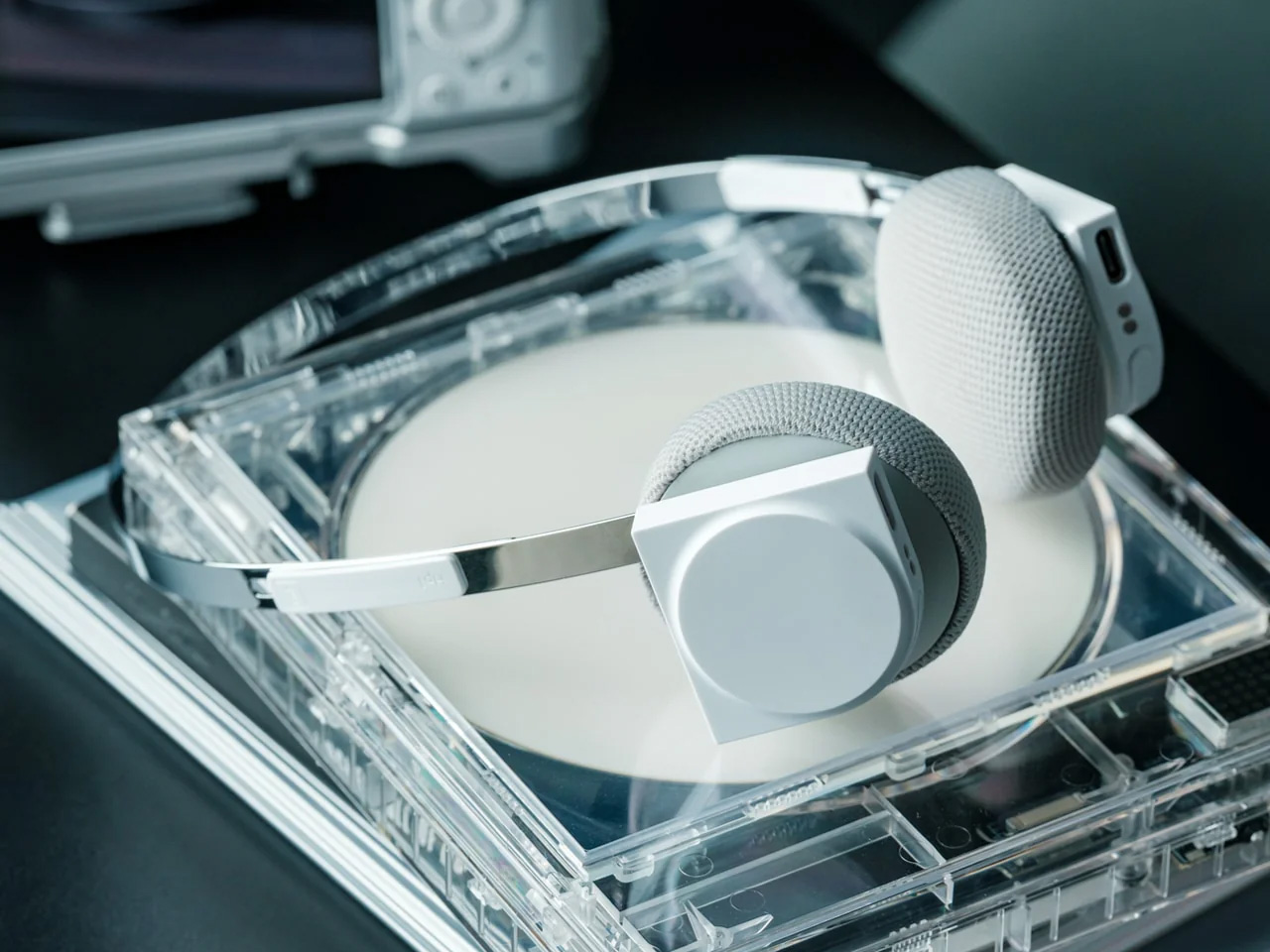
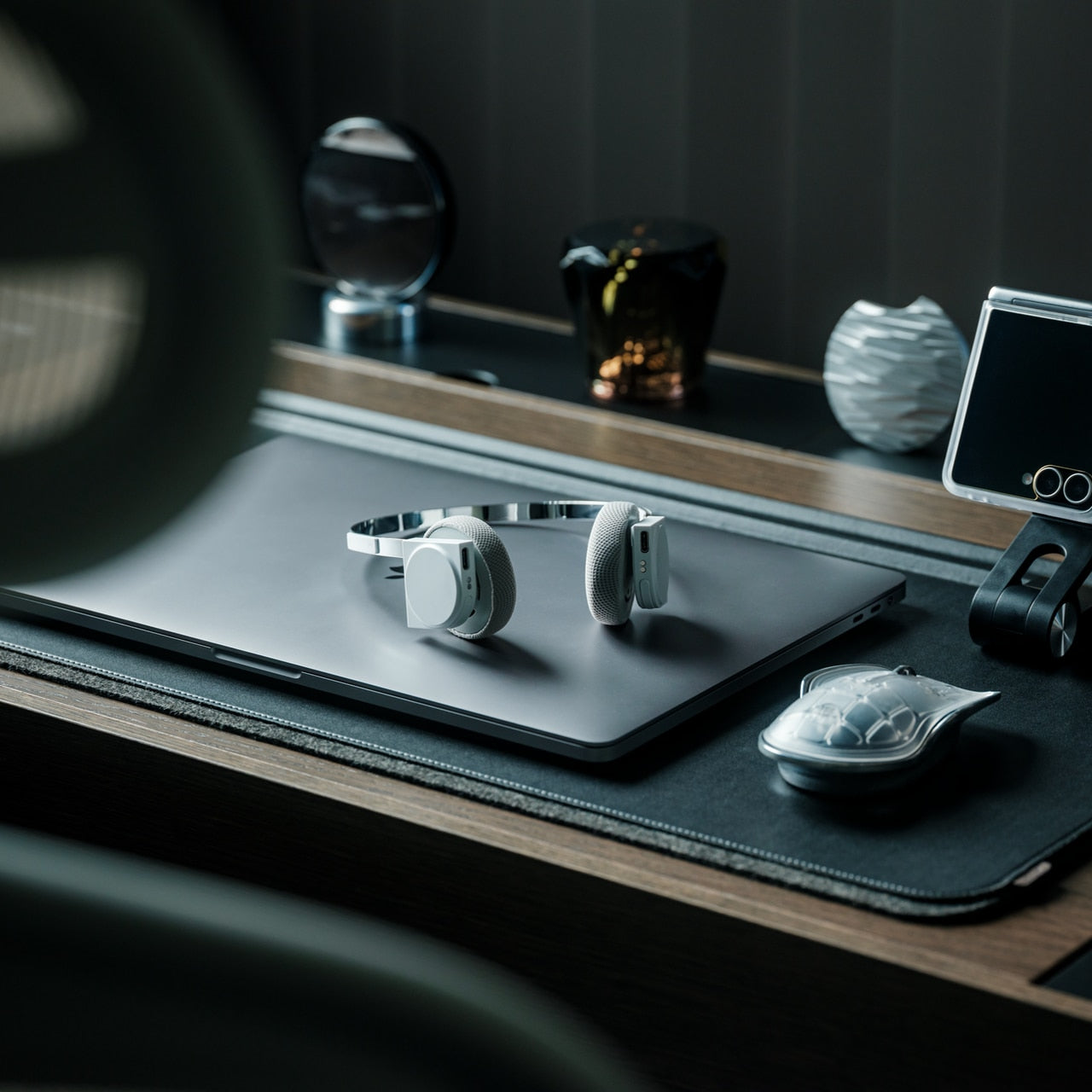
Airports, cafés, co-working spaces—the nomadic office is rarely quiet. Concentration becomes a portable skill, and headphones evolve from accessory to essential tool. StillFrame approaches audio with a design philosophy borrowed from the deliberate era of physical media, when albums were objects you held, and listening was an intentional act. The result sits comfortably between in-ears and over-ears, at just 103 grams, with 40mm drivers that open up soundscapes rather than just pumping audio into your ears.

The real utility emerges in the switching. Active noise cancellation erases the chaos when you need to disappear into deep work. Transparency mode keeps you connected to your surroundings when you’re waiting for a gate announcement or want to stay aware in an unfamiliar city. Twenty-four hours of battery life means you can travel from New York to New Delhi without reaching for a charging cable, maintaining your focus through layovers and long-haul flights.

Click Here to Buy Now: $245.00

What We Like

  • The 24-hour battery life eliminates anxiety about running out of power during long travel days.
  • Weighing just 103 grams, these headphones stay comfortable through marathon work sessions.
  • Both noise-cancelling and transparency modes adapt to shifting environments from silent libraries to bustling streets.
  • The 40mm drivers create an open soundstage that makes both music and podcasts more immersive.

What We Dislike

  • The on-ear design may not provide the same noise isolation as full over-ear models in extremely loud environments.
  • The retro-inspired aesthetic, while distinctive, may not appeal to those preferring more modern styling.

4. Memento Business Card Log: Analog Memory in a Digital World

Digital contacts sync across devices, but they don’t capture the texture of a conversation. The nomadic lifestyle means constantly meeting collaborators, clients, and fellow travelers—connections that could turn into partnerships if you remember not just names but contexts. The Memento Business Card Log stores up to 120 business cards using a binding system that lets you reorganize and reference them easily, but more importantly, it provides space for the handwritten details that transform a card into a memory.

Japanese brand Re+g built this organizer around the idea that writing things down changes how you remember them. After a chance meeting at a conference in Singapore or a productive coffee chat in Copenhagen, you can note what you discussed, ideas that emerged, or even just the person’s working style. These annotations become retrieval cues that software contact lists can’t replicate. When you reconnect weeks or months later, those handwritten notes help you pick up the conversation with genuine context rather than generic pleasantries.

Click Here to Buy Now: $35.00

What We Like

  • The capacity for 120 business cards means you can collect connections throughout extended trips without needing to transfer them.
  • Handwritten note space beside each card captures conversational context that digital contacts miss.
  • The unique binding system allows easy reorganization as your network and priorities evolve.
  • Minimal, tactile paper design from Re+g elevates organization into something you’ll actually enjoy using.

What We Dislike

  • The analog format means cards aren’t automatically backed up if the log is lost or damaged.
  • Physical storage takes up more space than purely digital contact management.

5. Inseparable Notebook Pen: Never Hunt for a Pen Again

The friction of creativity often isn’t the idea—it’s the split second when you can’t find something to write with. Inspiration arrives during a walking tour, mid-conversation, or while half-asleep on a red-eye flight. By the time you’ve rummaged through your bag for a pen, the thought has scattered. The Inseparable Notebook Pen uses a magnetic clip that attaches securely to your notebook, ensuring your writing tool lives exactly where you reach for it.

The design focuses on seamless integration. A built-in silencer makes attaching and detaching the pen a quiet, satisfying gesture rather than a clumsy snap. The minimalist form fits any notebook style without visual clash, and the smooth ink flow handles everything from quick notes to detailed sketches. For digital nomads who alternate between typing and handwriting—brainstorming on paper before building in software—this pen becomes an extension of your process rather than something you have to think about.

Click Here to Buy Now: $19.95

What We Like

  • The magnetic clip ensures the pen is always exactly where your notebook is, eliminating lost-pen frustration.
  • The built-in silencer creates a refined, quiet attachment experience.
  • Minimalist design complements any notebook without stylistic compromise.
  • Smooth ink flow handles varied writing needs from rapid note-taking to careful sketching.

What We Dislike

  • The pen is designed specifically for notebooks with compatible magnetic areas, limiting versatility.
  • As a single pen solution, you’ll need backup options if the ink runs out mid-journey.

6. MagBoard Clipboard: Flexibility Without Binding

Traditional notebooks lock you into linear page order and permanent binding. That structure helps for continuous journals but frustrates project-based thinking where ideas need to be rearranged, removed, or reordered. MagBoard uses a magnet and lever mechanism to secure up to 30 loose sheets, letting you compose, decompose, and reorganize pages however your thinking demands. The hardcover backing means you can write standing, leaning against a wall, or anywhere without a stable surface.

For nomads juggling multiple projects, this flexibility becomes essential. Keep client notes separate until a meeting, then compile them in order. Sketch design concepts on individual sheets and arrange them spatially before committing to a sequence. Remove finished work without the orphaned pages that haunt traditional notebooks. The water-resistant cover handles the unpredictability of working outdoors or in transit, and the simple cleaning means coffee spills don’t become permanent damage.

Click Here to Buy Now: $45

What We Like

  • The magnetic lever system holds up to 30 sheets securely while allowing instant reorganization.
  • Hardcover design enables writing anywhere, even standing or without a desk surface.
  • Water-resistant and easy-to-clean materials protect your work in unpredictable environments.
  • Complete flexibility to add, remove, or rearrange pages matches project-based workflows.

What We Dislike

  • Loose sheets can be lost more easily than bound pages if not carefully managed.
  • The hardcover adds some weight compared to lighter, flexible notebooks.

7. Rolling World Clock: Time Zones at a Glance

Working across continents means constantly calculating time zones. Is it too late to call your client in Tokyo? When does your team meeting in New York start relative to your current location in Cape Town? Digital clocks and apps provide answers, but they require pulling out your phone and breaking focus. The Rolling World Clock offers a tactile, immediate solution: a 12-sided desktop piece that displays the current time in major cities simply by rolling it to the desired timezone.

Each of the twelve sides represents a location—London, Paris, Moscow, Los Angeles, Karachi, Mexico City, New York, Shanghai, Tokyo, Sydney, Cape Town, and New Caledonia. A single hand shows the hour for whichever city faces up. The minimalist design eliminates digital distractions while adding a physical, almost playful element to time awareness. When you’re working from temporary desks and rented apartments, this small object becomes both functional tool and a reminder of the global nature of your work.

Click Here to Buy Now: $49

What We Like

  • The twelve-sided design covers major global time zones in one compact object.
  • Physical rolling creates a tactile, screen-free way to check international times.
  • Minimalist aesthetics work as both functional tool and desk decoration.
  • Available in black and white options to match different workspace styles.

What We Dislike

  • Limited to twelve preset cities, which may not include all the locations you coordinate with.
  • The single-hand design requires some interpretation compared to digital displays showing exact minutes.

Building Your Mobile Office

The nomadic workspace is personal, built piece by piece until it reflects exactly how you work rather than where. These seven gadgets share a common understanding: that portability and capability aren’t opposites. They fit into the rhythms of constant movement, solving the small frictions that accumulate when your office exists in a backpack. Connection without cables. Writing without searching. Time awareness without screens.

The best gear for digital nomads doesn’t announce itself. It disappears into your process, working so seamlessly you forget it’s there until you need it. Whether you’re coordinating across twelve time zones, capturing ideas before they evaporate, or creating focus in chaotic airports, these designs adapt to your location rather than constraining it. Your backpack becomes not just luggage but the architecture of your professional life, carefully curated for the work that matters wherever it happens.

The post 7 Best 2026 Gadgets & Tools Every Digital Nomad Needs in Their Backpack first appeared on Yanko Design.
10 Best Gifts for Men Who Live in Their Garage (He’ll Finally Come Back Inside)

You know the type. The guy who claims he’s “just organizing” but has basically set up a second living room among the power tools and oil stains. The one who needs three reminders before he’ll come in for dinner. If your garage dweller needs a reason to rejoin civilization, these design-forward gifts might just do the trick. Each one brings something special enough to compete with his beloved workshop, clever enough to earn a spot inside the house, and interesting enough to keep him there.

These aren’t your typical gadgets or gear. They’re conversation pieces, functional art, and genuinely useful tools that happen to look incredible on a shelf, desk, or coffee table. From nostalgic tech reimagined for modern life to precision instruments that make everyday rituals feel special, each design offers him something his garage can’t: style that actually fits with the rest of the house. Time to reclaim your space.

1. LEGO Editions 43019 Soccer Ball

The genius of this 1,498-piece LEGO set lies in its complete transformation. At first glance, it’s a striking soccer ball replica, measuring 15 inches in length and 10.3 inches in width. But crack it open, and you’ll find an entire miniature stadium tucked inside, complete with stands packed with tiny fans, detailed pitch markings, and players frozen mid-match. It’s the kind of build that rewards patience and delivers genuine surprise, making it perfect for anyone who appreciates engineering that goes beyond the obvious.

What makes this particularly brilliant as a garage-to-living-room gateway gift is its dual display nature. He can showcase it as a closed ball one week, then reveal the intricate stadium interior the next. The craftsmanship required to create both a recognizable exterior and a fully realized interior world demonstrates LEGO’s commitment to builders who want more than simple assembly. It’s complex enough to provide hours of focused building time, yet compact enough to earn permanent display rights on a bookshelf or mantle where everyone can admire it.

What We Like

  • Two completely different display options in one set give it serious shelf versatility.
  • The hidden stadium interior creates genuine surprise and rewards careful building.

What We Dislike

  • At 1,498 pieces, it’s a time commitment that might keep him in the garage even longer initially.
  • Not a replica of the official 2026 match ball, which might disappoint purists.

2. OrigamiSwift Folding Mouse

This isn’t just another travel mouse. OrigamiSwift takes inspiration from Japanese paper folding to create a Bluetooth device that transforms from pocket-flat to full-sized in under half a second. The engineering behind that instant activation is remarkable, using a simple flip mechanism that feels satisfying every single time. For someone who’s accustomed to using awkward laptop trackpads or bulky peripherals, the seamless transition from storage to a working tool feels almost magical.

The ergonomic design proves you don’t need to sacrifice comfort for portability. It fits naturally in hand during extended work sessions, whether he’s finally setting up that home office or just answering emails from the couch instead of his garage workbench. The precision tracking works on virtually any surface, turning kitchen counters, coffee tables, or actual desks into productive workspaces. It’s the kind of tool that removes excuses for staying isolated in the garage when he could just as easily work from anywhere in the house.

Click Here to Buy Now: $79.00

What We Like

  • Folds completely flat for genuinely effortless portability without compromising full-size comfort.
  • Instant 0.5-second activation makes it ready exactly when you need it.

What We Dislike

  • Bluetooth connectivity requires charged batteries, unlike traditional wired mice.
  • The folding mechanism, while durable, represents a potential point of failure over time.

3. Portable CD Cover Player

There’s something beautifully rebellious about physical media in our streaming age, and this portable player leans into that nostalgia while adding visual flair. The built-in pocket displays the CD’s jacket art prominently, turning album covers into rotating art exhibitions. Combined with the integrated speaker and rechargeable battery, it becomes a standalone audiovisual experience that works anywhere in your home. The minimalist design manages to feel both retro and contemporary, fitting seamlessly into modern interiors without looking like a museum piece.

The wall-mountable option transforms it from a portable device into a permanent installation, giving him a legitimate reason to bring his music collection out of garage storage and into shared living spaces. The built-in speaker delivers surprisingly warm sound for its size, perfect for background listening during dinner prep or lazy Sunday mornings. It’s a conversation starter that celebrates physical music ownership while making it accessible and visible. Streaming services can’t compete with the tangible ritual of selecting an album, displaying its artwork, and experiencing it as a complete artistic statement.

Click Here to Buy Now: $199.00

What We Like

  • Displays album artwork prominently, turning music into a visual and audio experience.
  • Wall-mountable design gives it a permanent living space.

What We Dislike

  • Limited to audio CDs, excluding the vast world of streaming and digital files.
  • Built-in speaker, while convenient, won’t match dedicated audio systems for serious listening.

4. MagBoard Clipboard

This reimagines the humble clipboard through a lens of pure functionality. The magnetic lever mechanism secures up to 30 sheets without punching holes, printing lines, or imposing any structure on how you work. Rearrange pages freely, remove what you don’t need, and add sheets as inspiration strikes. The hardcover backing provides a stable writing surface even while standing, making it genuinely useful for sketching ideas, taking notes during calls, or jotting down thoughts anywhere in the house.

The water-resistant, easy-to-clean surface means it can handle real life, not just carefully controlled environments. For someone used to scribbling notes on whatever’s handy in the garage, this offers the same freedom with significantly more sophistication. It’s minimal enough to leave on a coffee table without looking like office clutter, functional enough to actually use daily. The flexibility to use loose paper means no commitment to a particular notebook style or layout, just pure, frictionless capture of whatever needs remembering.

Click Here to Buy Now: $45.00

What We Like

  • Magnetic binding allows complete freedom to rearrange, add, or remove pages.
  • Hardcover design enables note-taking while standing or moving around.

What We Dislike

  • Lacks the permanence of bound notebooks, making long-term organization trickier.
  • A maximum 30-sheet capacity might feel limiting for extensive projects.

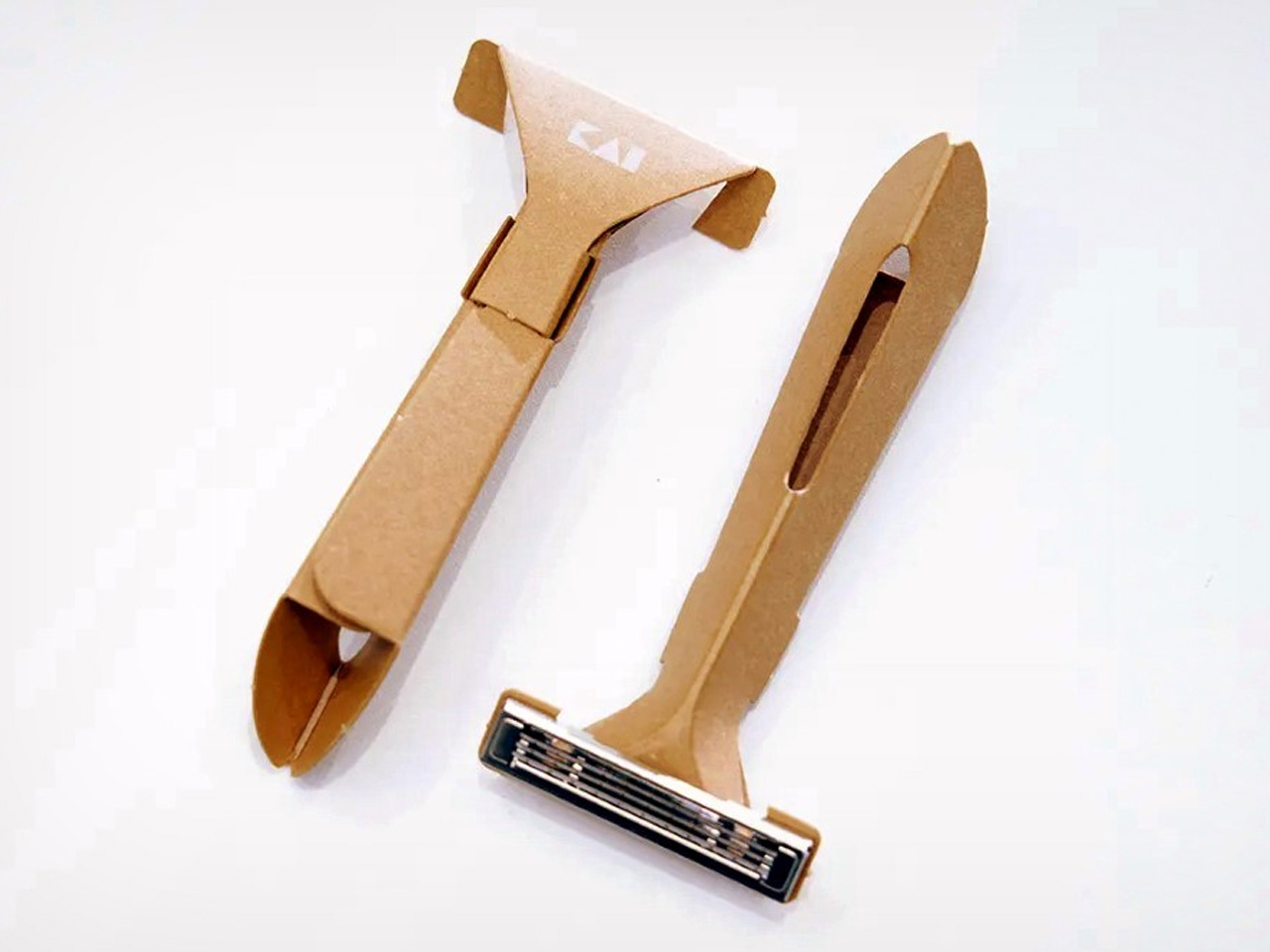
5. Auger PrecisionFlex Razor

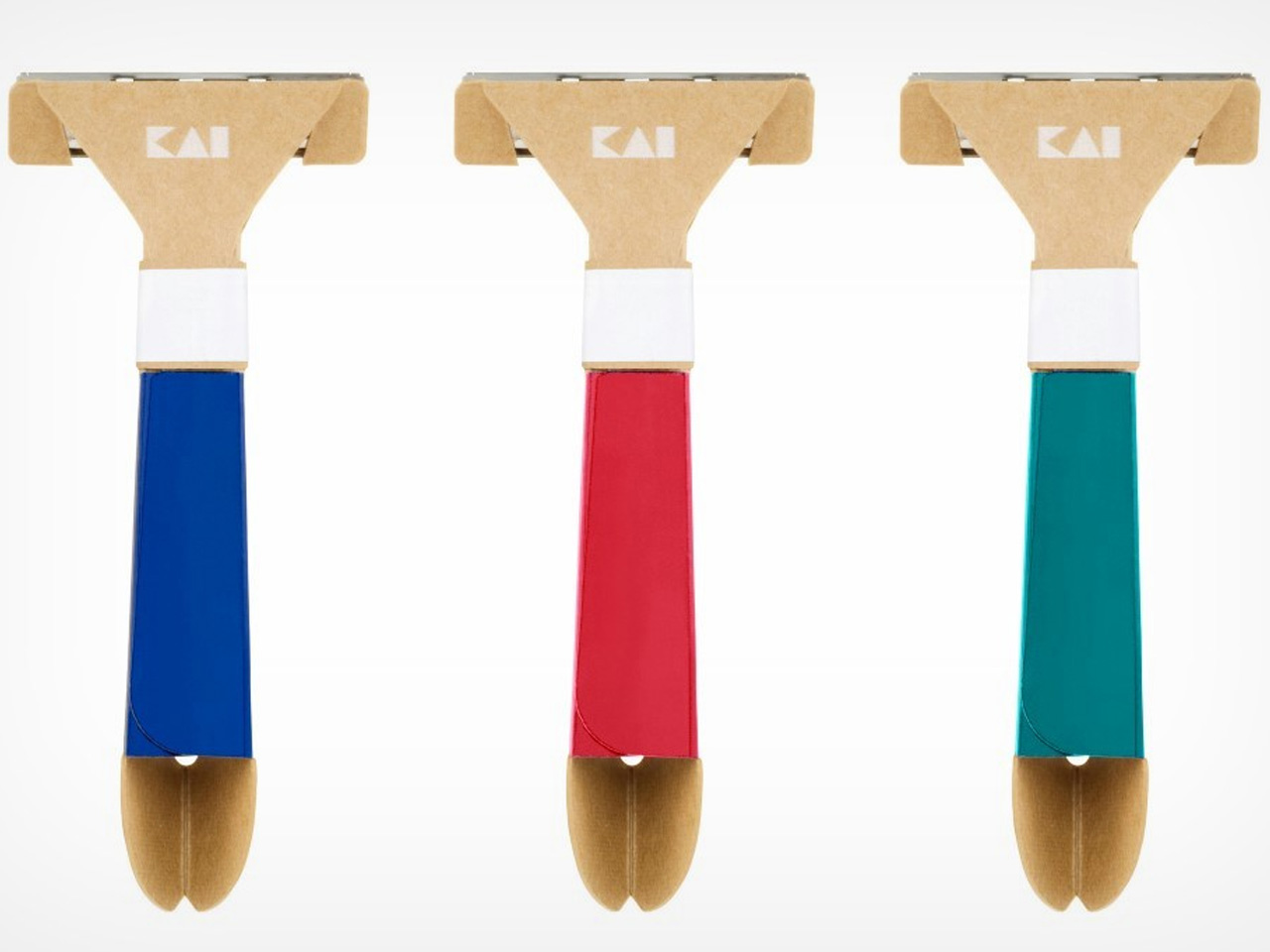
Kai Corporation brings over a century of Japanese blade-making expertise to this precision instrument. The 5-blade system with 3D pivoting head adapts to facial contours with the widest range of motion in the industry, gliding effortlessly from jawline to neckline. But the real innovation is the world-first 30-degree adjustable head angle, activated by a simple lever pull. This allows seamless transitions between shaving angles, perfect for sculpting crisp beard lines or executing smooth reverse shaves without breaking flow.

Grooming becomes a ritual rather than a chore with tools this well-engineered. The independent suspension mechanism ensures consistent blade contact without requiring pressure, reducing irritation and delivering genuinely close shaves. For someone who might typically rush through morning routines to get back to projects, this transforms the bathroom into a space worth spending time in. The minimalist sophistication of the design looks right at home on a bathroom counter, elevating the entire space. True precision doesn’t announce itself loudly; it’s felt in every controlled, effortless stroke.

Click Here to Buy Now: $45.00

What We Like

  • Industry-leading pivot range adapts to every facial contour for consistent contact.
  • 30-degree adjustable head angle offers unprecedented flexibility for detail work.

What We Dislike

  • Replacement blade cartridges represent ongoing costs compared to safety razors.
  • Premium engineering comes with premium pricing that might feel excessive for basic grooming.

6. Titanium Artisan Spirits Cup

At just 22 grams, this titanium vessel feels almost impossibly light in hand, yet its presence is anything but insubstantial. The hammered texture serves dual purposes: creating a non-slip surface and enhancing the aromatic profiles of sake, tequila, or whiskey. Each sip becomes a multisensory experience as the texture catches light and the finely engineered thin lip ensures smooth contact that doesn’t interfere with flavor. The vibrant anodized finish means each cup carries unique coloring, adding personalized character to any collection.

This is the kind of object that elevates everyday moments into something worth savoring. Instead of cracking a beer in the garage, imagine him actually joining you for evening drinks in the living room, using a vessel that turns casual sipping into a ceremony. The compact 2.05-inch diameter and 2.17-inch height fit perfectly in the hand and look striking against both modern and rustic settings. Premium titanium construction ensures this becomes an heirloom piece, something that endures through countless toasts and celebrations. It’s a gift that suggests his time and rituals deserve beautiful tools.

Click Here to Buy Now: $27.00

What We Like

  • Remarkably lightweight at 22 grams while maintaining a substantial premium feel.
  • Hammered texture enhances aromatics and provides a secure grip.

What We Dislike

  • Small capacity suits spirits but won’t work for larger pours.
  • Anodized finish uniqueness means you can’t perfectly match a set.

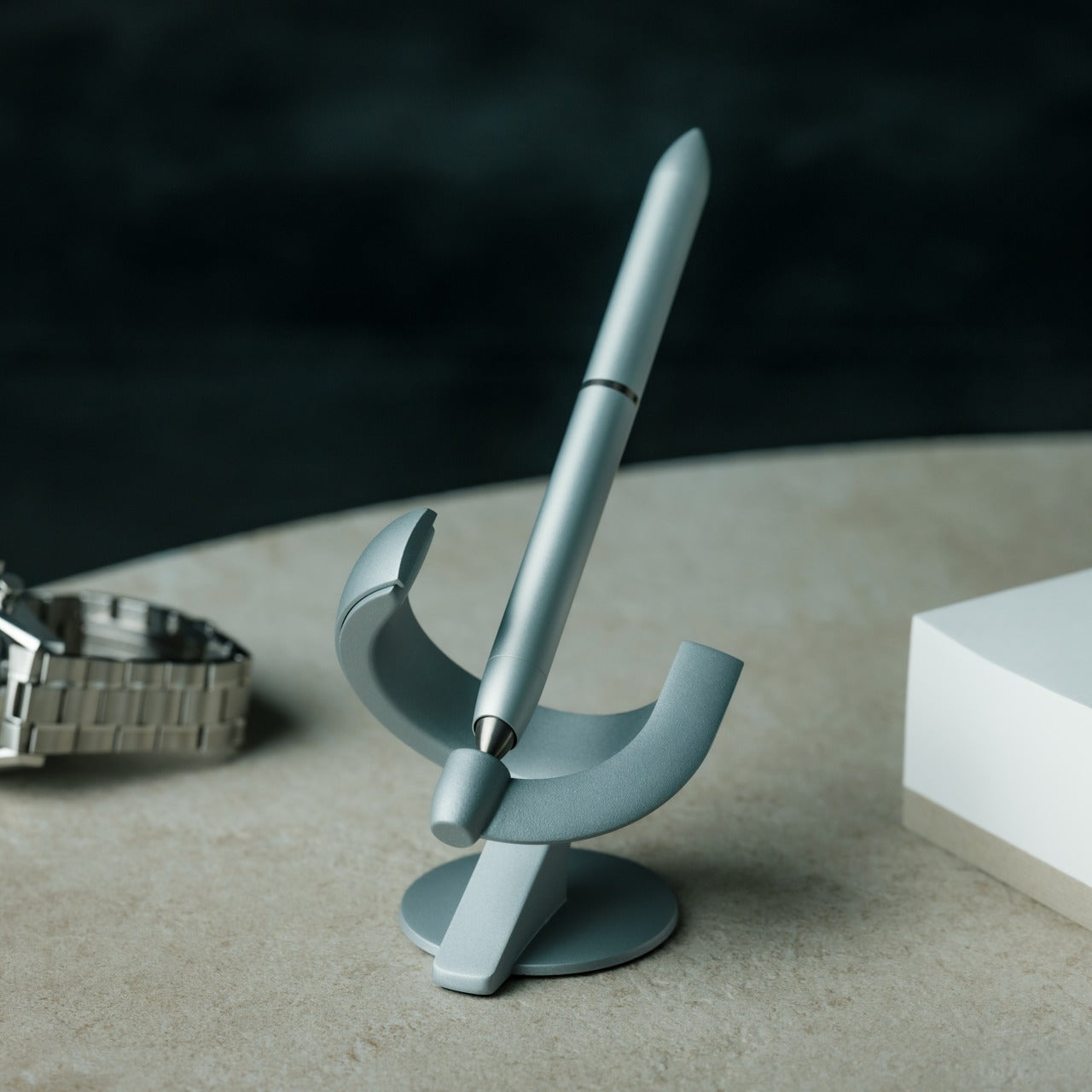
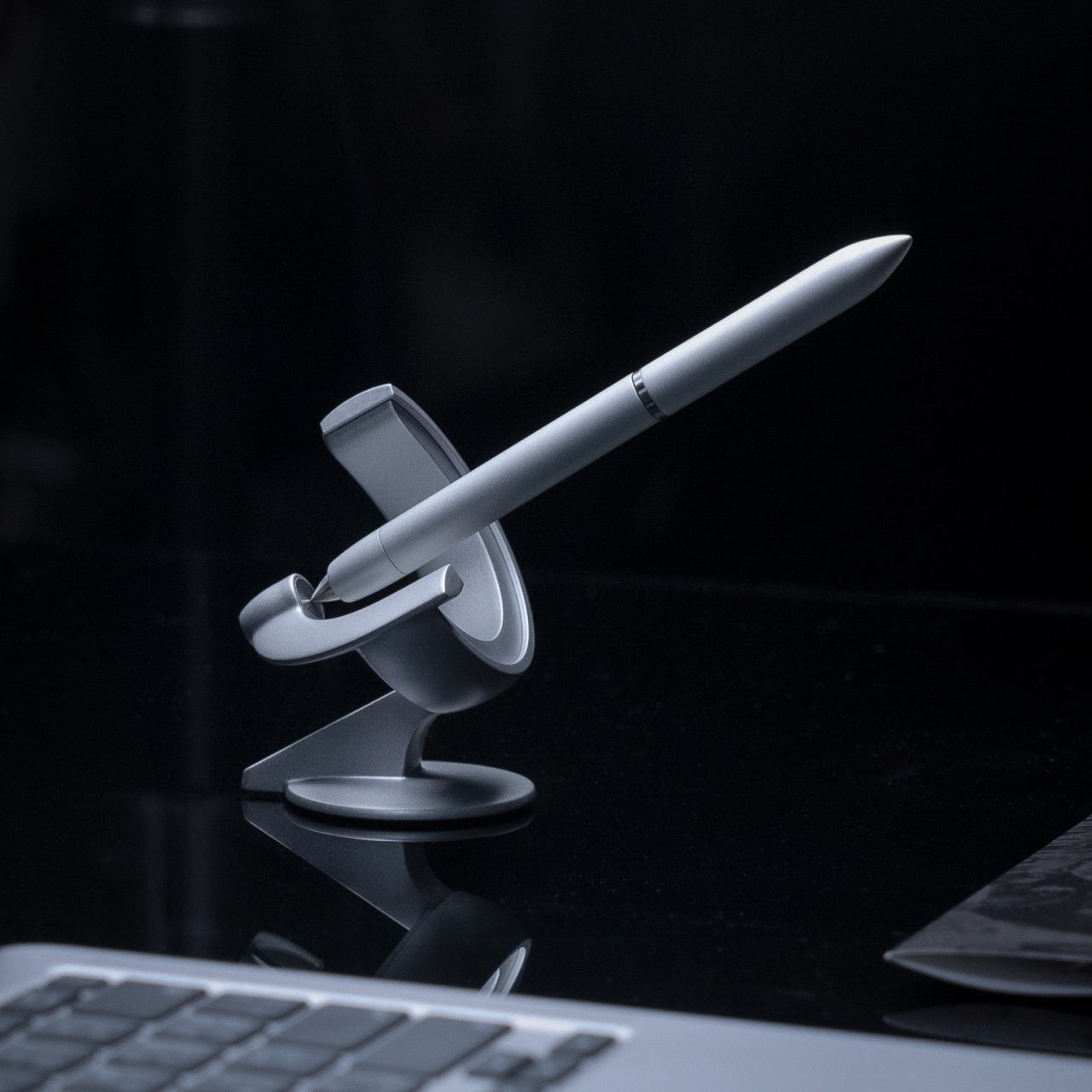
7. Levitating Pen 3.0

This isn’t just a writing instrument; it’s a physical manifestation of defying expectations. The pen balances at a 60-degree angle on a pinpoint, held in place by a charged magnetic field, gently bobbing and spinning for up to 30 seconds. The spacecraft-like silhouette cuts a futuristic profile on any desk, while the seamless casing made from aircraft-grade materials houses a precise ballpoint tip. The revised, taller pedestal showcases an even more dramatic floating experience than previous versions.

For someone who spends hours tinkering in the garage, this speaks directly to the satisfaction of engineering done beautifully. It’s designed to inspire wonder, encourage daydreaming, and reinforce belief in achieving seemingly impossible goals. Having this on a desk in the home office or living room creates a constant visual reminder that ideas can become reality. The spinning movement naturally draws the eye and invites conversation, making it far more than a functional object. It’s a desk sculpture that happens to write, a conversation piece that celebrates the creative process itself.

Click Here to Buy Now: $139.00

What We Like

  • Genuinely mesmerizing levitation and spinning action create constant visual interest.
  • Aircraft-grade materials ensure serious quality in a whimsical package.

What We Dislike

  • Requires proximity to a magnetic base, limiting portability as an actual writing tool.
  • Novelty factor might wear off faster than practical desk accessories.

8. Side A Cassette Speaker

This Bluetooth 5.3 speaker nails the balance between nostalgic form and modern function. Styled as an authentic mixtape complete with a transparent shell and a side A label, it packs a surprisingly warm sound tuned to evoke soft, cozy analog tones. The included clear case doubles as a display stand, transforming it from a pocket-sized speaker into a legitimate desk companion or shelf accent. MicroSD card support means offline playback without Wi-Fi, just load tracks and press play like the cassette days.

The sub-$50 price point makes this an easy gift that punches well above its weight in character and functionality. It’s perfect for someone who appreciates objects with personality, things that tell stories and spark memories. Instead of him listening to music alone in the garage on whatever speaker he’s had for years, this becomes a reason to share music in communal spaces. The compact form means it travels easily between rooms, bathroom to kitchen to living room. It’s tech that doesn’t take itself too seriously while still delivering genuine quality.

Click Here to Buy Now: $45.00

What We Like

  • Faithful cassette styling with a transparent shell creates instant nostalgia and conversation.
  • MicroSD support enables offline playback independent of streaming services.

What We Dislike

  • Compact size limits bass response compared to larger speakers.
  • Novelty design might not appeal to those preferring minimalist modern aesthetics.

9. BlackoutBeam Tactical Flashlight

With 2300 lumens of output and a 300-meter throw, this flashlight delivers professional-grade illumination in an everyday-ready package. The 0.2-second instant-on response eliminates lag when light is needed immediately, whether during power outages, nighttime navigation, or emergencies. IP68-rated waterproof aluminum construction withstands rain, impact, and even submersion without compromising performance. This is serious durability engineered into a sleek, industrial design that never looks out of place.

For someone comfortable working in the garage, having legitimate tools is non-negotiable. This flashlight earns its place in the home emergency kit while looking good enough to leave accessible rather than buried in storage. The blinding brightness cuts through darkness with clinical precision, making it invaluable for everything from checking breakers to late-night dog walks. Quality flashlights represent the intersection of preparedness and practicality, the kind of tool you hope not to need but feel better having. It’s compact enough for daily carry yet powerful enough for genuine tactical applications.

Click Here to Buy Now: $89.00

What We Like

  • Extraordinary 2300-lumen output with 300-meter throw provides serious illumination.
  • IP68 waterproof rating and aluminum construction ensure reliability in harsh conditions.

What We Dislike

  • High-output modes drain batteries quickly, requiring frequent recharging.
  • Maximum brightness can be unnecessarily excessive for routine indoor use.

10. StillFrame Headphones

These wireless headphones exist in the space between in-ears and over-ears, offering open comfort that makes extended listening feel effortless rather than fatiguing. The 40mm drivers create a wide, open soundstage that brings melodic textures into sharper focus and turns quiet tracks into full landscapes. Design echoes the quiet geometry of ’80s and ’90s CDs, a deliberate homage to when music had physical weight, and albums earned their shelf space. Featherlight construction belies the full-bodied sound quality.

Active noise cancelling provides isolation when focus demands it, while transparency mode keeps him connected to surroundings when awareness matters. This adaptability means transitioning seamlessly from solitude to engagement without removing the headphones. For someone who might use audio as a reason to stay isolated in the garage, these actually encourage moving through the house while maintaining that personal sound bubble. The considered design looks sophisticated enough to wear anywhere, turning headphones from purely functional gear into something approaching personal style. Music becomes a physical ritual again, measured and meant to be felt.

Click Here to Buy Now: $245.00

What We Like

  • Open design offers comfort between in-ear and over-ear extremes for extended wear.
  • 40mm drivers with a wide soundstage deliver impressive clarity and spatial detail.

What We Dislike

  • Open design may leak sound, potentially disturbing others in quiet environments.
  • Premium positioning commands higher pricing than basic wireless headphones.

Mission Accomplished: Reclaiming Your Space

These ten gifts share a common thread beyond simply being well-designed objects. Each one transforms routine activities into moments worth savoring, elevating everyday rituals from mundane necessity to genuine pleasure. They’re beautiful enough to display proudly in shared living spaces, functional enough to use daily, and interesting enough to provide legitimate alternatives to endless garage tinkering. When tools and objects are this thoughtfully crafted, they naturally earn places in the home rather than exile to workshop storage.

The best part about gifts like these is that they don’t demand that he abandon his interests or change his nature. They simply provide compelling reasons to bring those interests into the house, to share spaces and time while still engaging with the things he loves. Whether it’s building LEGO on the coffee table, enjoying a drink with proper glassware, or listening to music on headphones that don’t look like gaming gear, each item builds a bridge between garage sanctuary and shared home life. Sometimes, all it takes is the right object to shift where someone wants to spend their time.

The post 10 Best Gifts for Men Who Live in Their Garage (He’ll Finally Come Back Inside) first appeared on Yanko Design.

Japan Just Solved Tiny Home Living With 7 Genius Accessories

Japan has always understood what the rest of the world is only now discovering: small spaces don’t mean small lives. As tiny homes continue gaining momentum globally, Japanese designers are leading the charge with accessories that do more with less. These aren’t just space-savers. They’re thoughtfully engineered pieces that transform limitations into possibilities, proving minimalism can be both functional and beautiful.

The tiny home movement demands intelligent design. Every object must earn its place, which means multifunctionality isn’t a bonus—it’s essential. Japanese creators have mastered this philosophy through decades of living in compact urban dwellings, and now their innovations are reshaping our understanding of home essentials. From collapsible kitchen tools to multi-purpose devices, these seven accessories embody the spirit of doing more while owning less.

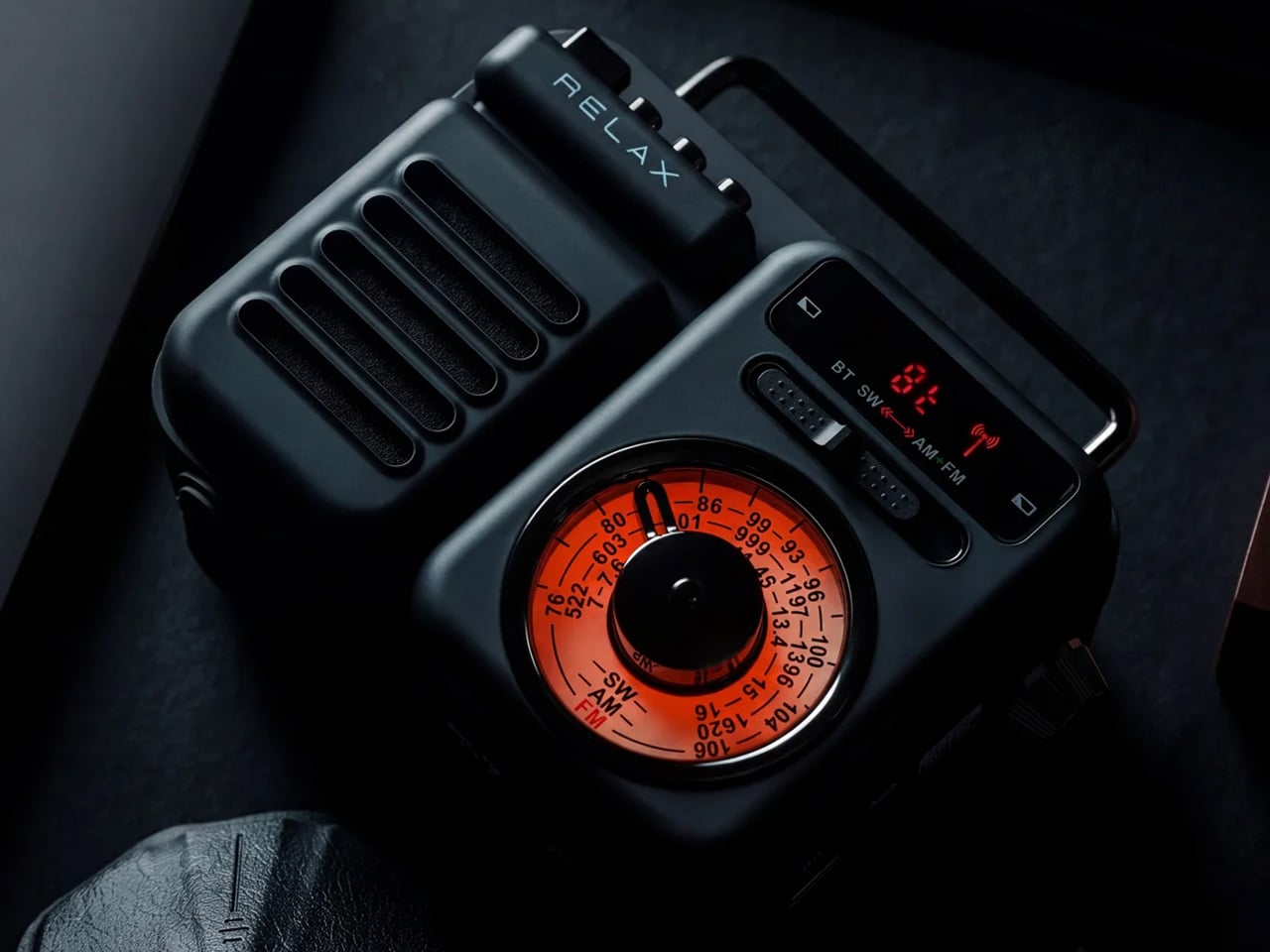
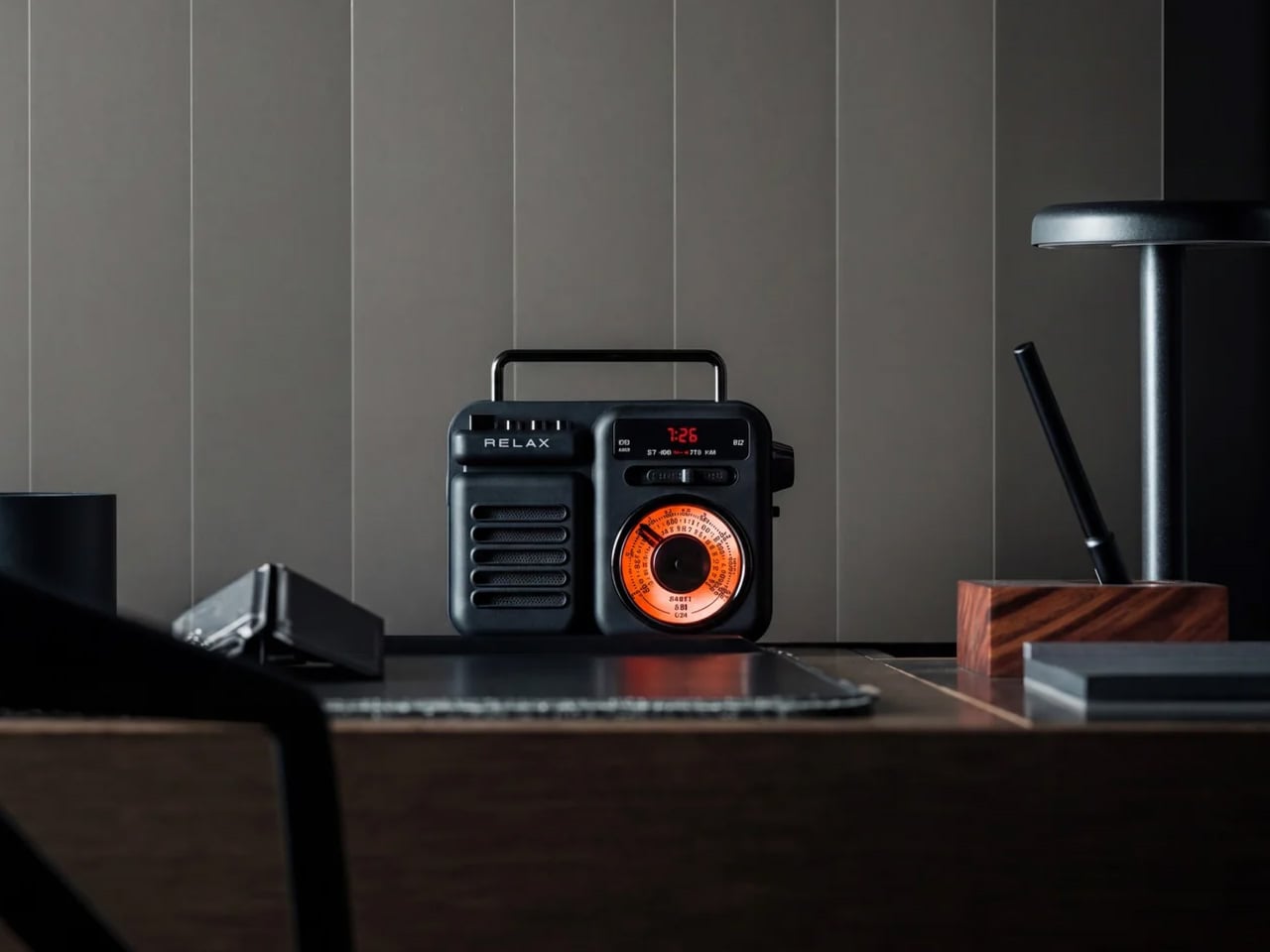
1. RetroWave 7-in-1 Radio

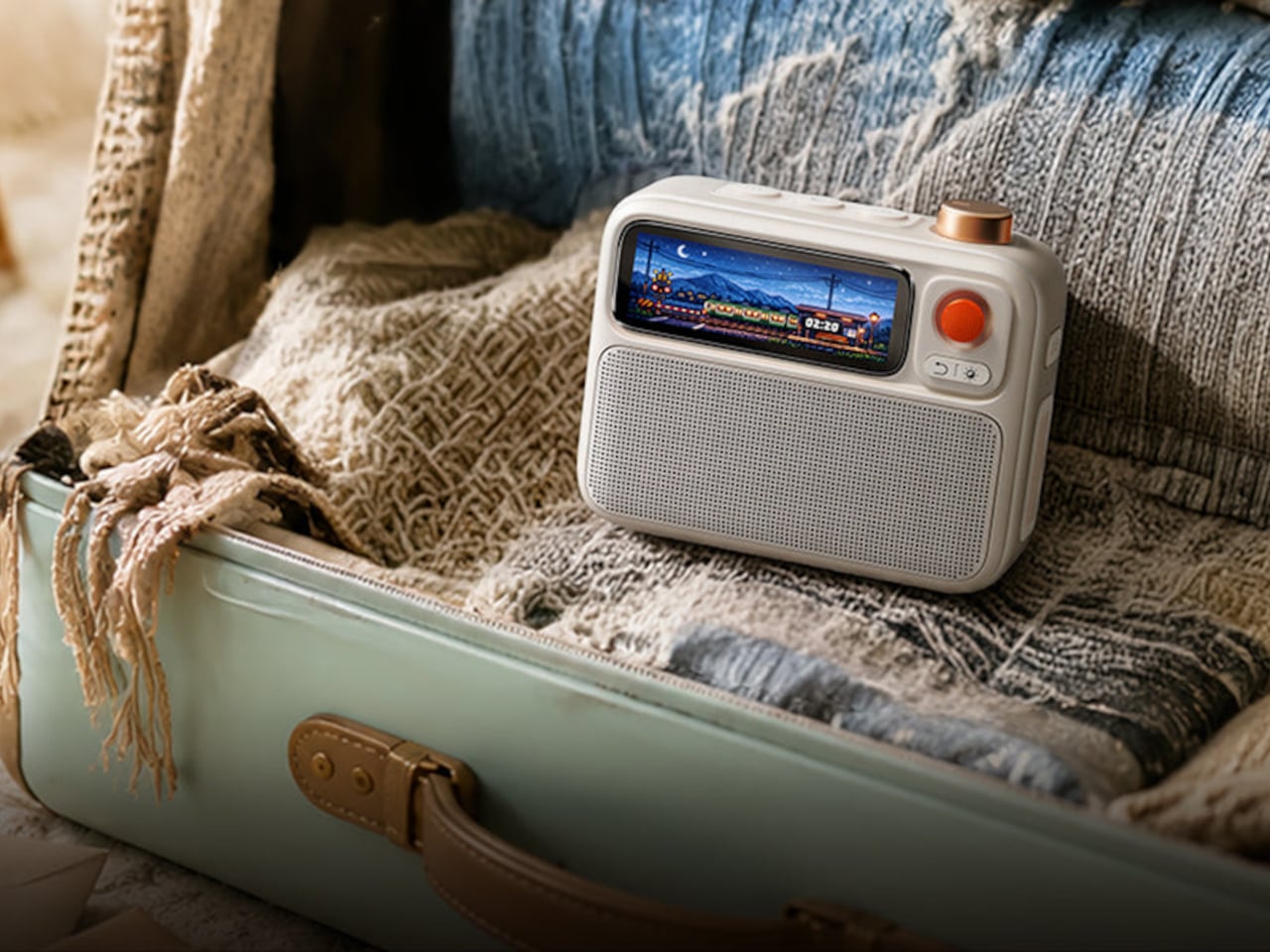
The RetroWave proves that nostalgia and practicality can coexist beautifully. This compact radio channels vintage Japanese aesthetics through its tactile tuning dial and clean lines, but beneath that retro exterior lies serious modern functionality. It streams Bluetooth audio, plays MP3 files from USB or microSD cards, tunes into FM/AM/SW broadcasts, and moonlights as a flashlight, power bank, SOS alarm, and clock. For tiny home dwellers who need every item to pull double duty, this seven-function device eliminates the need for separate gadgets cluttering precious counter space.

Emergency preparedness becomes effortless when your entertainment system doubles as survival equipment. The hand-crank charging and solar panel mean you’re never stranded without power, whether you’re off-grid by choice or circumstance. The design language speaks to Japanese minimalism while respecting analog traditions, creating something that feels equally at home on a shelf or in a bug-out bag. This isn’t about choosing between form and function—the RetroWave delivers both in a footprint smaller than most standalone speakers.

Click Here to Buy Now: $89.00

What We Like

  • The hand-crank and solar charging eliminate battery anxiety completely
  • Seven genuine functions mean seven other devices you don’t need to own
  • Bluetooth streaming bridges analog aesthetics with contemporary listening habits
  • The compact size fits anywhere without announcing its emergency capabilities

What We Dislike

  • The retro dial might slow down precise station tuning for some users
  • Solar charging works best with direct sunlight, limiting indoor recharging speed

2. 8-in-1 EDC Scissors

Who decided that multitools need to be bulky? These palm-sized scissors challenge that assumption with a sleek design that conceals eight different functions. The oxidation film finish creates a handsome matte black aesthetic while adding rust resistance, making these as durable as they are compact. Scissors, knife, lid opener, can opener, cap opener, bottle opener, shell splitter, and degasser live within a 5.1-inch frame that disappears into drawers, pockets, or tiny kitchen organizers. For homes measured in square feet rather than square meters, this consolidation matters.

The genius lies not in cramming tools together but in thoughtful integration. Each function works without compromise, maintaining the precision you’d expect from dedicated implements. Japanese design philosophy shines through the restraint—there’s no unnecessary bulk, no gratuitous features. The black coating transforms utilitarian metal into something you’ll want visible on your counter rather than hidden away. When your kitchen barely fits a cutting board, having a toolbox that fits in your palm becomes genuinely liberating.

Click Here to Buy Now: $59.00

What We Like

  • Eight tools occupy the space that one normally would
  • The oxidation coating adds durability while looking sophisticated
  • Palm-sized dimensions make storage effortless in any tiny space
  • The design proves multitools can be elegant, not just practical

What We Dislike

  • A smaller size may require more grip strength for tougher jobs
  • The integrated design means you can’t use two functions simultaneously

3. Iron Frying Plate

JIU eliminates the awkward dance between stovetop and table by making the pan your plate. This mill scale steel frying surface comes with a detachable wooden handle that releases with one hand, transforming cookware into servingware instantly. The 1.6mm-thick construction distributes heat beautifully while remaining light enough for comfortable handling. Rust-resistant and uncoated, it arrives ready to use straight from the box. For tiny homes where kitchen storage is measured in inches, losing the need for separate serving dishes creates genuine breathing room.

The philosophy goes deeper than saving space. Eating directly from what cooked your food connects you to the meal in ways china plates never could. The rustic appeal of seared proteins still sizzling on steel brings restaurant energy into the smallest kitchens. Japanese craftsmanship shows in the details—the stick-resistant surface that needs no chemical coatings, the balanced weight distribution, the seamless transition from flame to table. This isn’t about making do with less. It’s about recognizing that sometimes one exceptional piece beats two mediocre ones.

Click Here to Buy Now: $69.00

What We Like

  • The detachable handle transforms the cooking vessel into a serving dish instantly
  • Mill scale steel develops character and improves with use over time
  • No chemical coatings mean healthier cooking and easier maintenance
  • Eliminating separate plates cuts storage needs and dishwashing time

What We Dislike

  • Metal retains heat longer, requiring careful handling after cooking
  • The uncoated surface needs proper seasoning and care to maintain performance

4. Pop-Up Book Vase Edition 4

Flowers deserve drama, and this pop-up book vase delivers it in the most space-efficient package imaginable. Crack the cover to reveal three-dimensional vase cutouts that transform flat pages into sculptural vessels. Edition 4 introduces gray, yellow, and green designs with varied shapes that offer fresh perspectives—literally, since flipping the book upside down completely changes your arrangement’s presentation. Made from natural pulp with water-resistant coating, these aren’t decorative props but functional vases. When not in use, they collapse to book thickness and slide onto shelves beside actual reading material.

The concept challenges what vases must be. Traditional ceramic versions demand dedicated storage even when empty, sitting idle between floral moments. This innovation shrinks that footprint to nearly nothing while expanding creative possibilities. Each page offers a different aesthetic, meaning one item provides three distinct looks. The whimsy feels intentionally Japanese—playful yet purposeful, artistic yet practical. For tiny homes where every object must justify its existence, a vase that disappears when not needed while offering multiple design options, becomes genuinely valuable.

Click Here to Buy Now: $39.00

What We Like

  • Three vase designs in one item triple your decorating options
  • Book-flat storage means it virtually disappears between uses
  • The water-resistant coating makes it genuinely functional, not just decorative
  • Upside-down orientation adds creative flexibility to arrangements

What We Dislike

  • Paper construction requires gentler handling than ceramic alternatives
  • The pop-up mechanism may weaken with extremely frequent opening and closing

5. Obsidian Black Mini Grip Tongs

Precision matters when space is tight, and these mini tongs deliver restaurant-level control in a fraction of the size. Available in 4.9-inch and 7-inch lengths, they’re crafted from SUS821L1 stainless steel—twice as strong as standard SUS304, allowing thinner, lighter construction without sacrificing durability. The obsidian black finish elevates them beyond mere utensils into objects worth displaying. Whether plating delicate appetizers, flipping shrimp, or arranging Instagram-worthy presentations, these tongs put professional deftness into compact packages that suit tiny kitchens where every drawer inch counts.

The size proves liberating rather than limiting. Standard tongs feel cumbersome when you’re maneuvering in tight spaces or handling small portions, but these scaled-down versions match the reality of cooking for one or two in condensed quarters. The corrosion-resistant steel ensures longevity that justifies the investment, embodying the Japanese principle of buying quality once rather than cheap replacements repeatedly. Their sculptural appearance means they can hang on exposed rails without looking utilitarian—important when tiny homes often blur kitchen and living spaces into single rooms.

Click Here to Buy Now: $25.00

What We Like

  • The compact size offers precision impossible with full-length tongs
  • Superior steel strength allows elegant thinness without compromising durability
  • The black finish looks intentional on open storage and exposed racks
  • Lightweight construction reduces hand fatigue during detailed plating work

What We Dislike

  • Shorter length means less distance from heat sources during cooking
  • The specialized size might not suit those who prefer standard dimensions

6. Heritage Craft Unboxing Knife

Opening packages becomes an aesthetic experience with this circular cutter carved from solid aluminum. Inspired by Paleolithic hand axes, the design reimagines ancient tools through modern machining that leaves wave-like patterns across the surface. These aren’t just decorative—they provide a secure, non-slip grip. The tapered form and striking appearance transform a mundane task tool into a desk object worth displaying prominently. For tiny homes where every visible item contributes to the overall aesthetic, this cutter earns its spot through beauty and mystery rather than hiding shamefully in drawers.

The symbolism runs deeper than surface appeal. Using metal instead of stone represents human evolution in physical form—a daily reminder that tools can be thoughtful rather than thoughtless. The raw, handcrafted quality contrasts beautifully with mass-produced plastic alternatives while taking up minimal space. Japanese design philosophy shines through the balance of form and function, creating something that inspires even during routine tasks. When you’re opening the constant stream of packages that tiny home living often requires, why not do it with something that brings joy rather than just utility?

Click Here to Buy Now: $99.00

What We Like

  • The sculptural form justifies prominent display rather than drawer storage
  • Ancient inspiration creates conversation-worthy design with genuine depth
  • Wave patterns provide functional grip while enhancing visual appeal
  • Aluminum construction balances durability with comfortable weight

What We Dislike

  • The artistic form might feel less intuitive than traditional box cutter shapes initially
  • The premium design comes at a higher price than basic alternatives

7. Slim Fold Dish Rack

This collapsible dish rack shrinks from 14 inches to 1.2 inches in one second flat. The patent-pending spring mechanism makes deployment and collapse equally effortless, transforming substantial drying capacity into pocket-sized storage. Its minimalist construction provides ample ventilation and accommodates plates, utensils, and cookware of various sizes without bulk. Dishwasher-friendly and easy to clean, it works equally well in permanent tiny homes or mobile camping setups. When counter space measures in precious square inches, reclaiming 14 inches of depth the moment dishes dry becomes genuinely transformative.

The innovation addresses a persistent tiny home frustration: bulky essentials that can’t be eliminated but consume disproportionate space. Traditional dish racks squat permanently on counters, monopolizing real estate even when empty. This design respects that dishes need drying without demanding permanent territorial claims. The spring system proves Japanese engineering at its finest—sophisticated mechanism, simple operation, reliable performance. The ability to pocket the rack when collapsed opens possibilities for RV living, boat galleys, and other extreme space constraints where every item must justify not just its function but its physical footprint.

Click Here to Buy Now: $75.00

What We Like

  • One-second deployment and collapse eliminates fussy setup procedures
  • The collapsed 1.2-inch profile fits virtually anywhere, including large pockets
  • Generous 14-inch expanded size accommodates a full meal’s worth of dishes
  • Dishwasher compatibility makes maintenance effortless and thorough

What We Dislike

  • The spring mechanism requires occasional inspection to maintain smooth operation
  • Lighter construction may shift under heavier cookware without stabilization

Making Space for What Matters

These seven accessories represent more than clever design. They embody a philosophy that tiny living advocates have embraced: abundance comes from quality, not quantity. Each piece eliminates multiple lesser items while adding functionality and beauty. The Japanese influence is evident not in exotic aesthetics, but in thoughtful problem-solving that respects both space and user experience. These aren’t compromises forced by limited square footage but genuinely superior solutions.

The tiny home movement continues growing because it promises freedom from excess, not deprivation. Smart accessories like these make that promise tangible. They prove small spaces can accommodate full lives when every object pulls its weight. Whether you’re downsizing deliberately or maximizing what you have, these compact essentials demonstrate that intelligent design creates spaciousness regardless of actual dimensions. The trend isn’t really about tiny homes at all. It’s about intentional living, and these seven pieces show exactly what that looks like.

The post Japan Just Solved Tiny Home Living With 7 Genius Accessories first appeared on Yanko Design.

90s Are Back: 7 Products Every Millennial Needs in 2026

Remember when technology felt magical instead of invisible? When gadgets had personality, and your favorite album came with artwork you could actually hold? The ’90s gave us tactile experiences that today’s sleek minimalism often forgets. Now, designers are bringing back the spirit of that era with products that blend nostalgic forms with modern capabilities. These aren’t dusty relics pulled from storage bins. They’re reimagined essentials that capture what made the ’90s special while delivering the performance we expect in 2026.

Millennials grew up straddling two worlds: an analog childhood and a digital adulthood. These seven products speak directly to that experience, offering familiar shapes and rituals wrapped in contemporary functionality. From music players that look like mixtapes to flame lamps crafted with instrument-making techniques, each piece proves that nostalgia and innovation make better partners than we realized. Whether you’re rebuilding your retro haven or just want technology that sparks joy instead of anxiety, these designs deliver that perfect balance.

1. Samsung AI OLED Cassette and Turntable

Samsung Display dropped two conversation starters at CES 2026 that blur the line between tech demo and actual product you’d want in your living room. The AI OLED Cassette takes the classic tape deck silhouette and transforms it into a smart speaker with two tiny 1.5-inch circular OLED displays sitting exactly where those spinning reels used to hypnotize you. The left screen handles playback controls while the right displays a digital waveform that dances with your music. Both screens respond to touch, so you can skip tracks or adjust settings without fumbling for your phone.

The Turntable goes bigger with a 13.4-inch circular OLED touchscreen that mimics an actual vinyl record player. This isn’t just about displaying album art. The screen becomes an ambient art piece, showing visuals that match your playlist’s mood. Picture hosting friends while your turntable displays swirling colors that sync with jazz or geometric patterns that pulse with electronic beats. The AI integration suggests new music based on what you play, learning your taste over time. These aren’t production models yet, but they showcase where display technology could take us when designers stop making everything a black rectangle.

What We Like

  • The cassette’s standalone functionality means you can discover and control music without an external device.
  • The touch-sensitive displays offer direct interaction that feels intuitive despite the retro packaging.
  • AI-powered recommendations built into the device eliminate the need for phone connectivity.
  • The turntable’s 13.4-inch display transforms any room into a visual experience.
  • Ambient visuals that match your music create an atmosphere impossible with traditional speakers.
  • The circular OLED technology opens creative possibilities beyond typical flat screens.

What We Dislike

  • These remain concept devices without confirmed production plans.
  • Pricing would likely put them in premium territory beyond typical smart speakers.
  • The cassette’s small 1.5-inch display might prove difficult for detailed control.
  • Relying on AI recommendations could frustrate users who prefer manual curation.
  • The turntable’s large circular display demands significant surface space.
  • Without physical media playback, purists might question calling it a turntable.

2. Harmony Flame Fireplace

Real fire indoors sounds risky until you see how this brass lamp handles it. Craftsmen who typically make musical instruments apply those same meticulous techniques to create a safe fireplace that fits on your dining table or patio. The brass box burns bioethanol, an eco-friendly fuel that produces actual flames without smoke, odor, or the mess of traditional fireplaces. Light reflects off the polished brass surface, creating shifting patterns as the flames dance. This turns functional lighting into moving art that changes throughout the evening.

The connection to musical instrument craftsmanship shows in the details. Each lamp gets hand-finished, ensuring the brass develops its signature warm glow. Bioethanol burns clean enough for indoor use while providing the psychological comfort of genuine fire. No installation means you can move it wherever the mood takes you. The flame’s unpredictable movement offers something screens can’t replicate: organic beauty that never repeats itself. This addresses a specific ’90s memory: when gathering around fire pits or candles created natural gathering spots before everyone retreated to separate screens.

Click Here to Buy Now: $239.00

What We Like

  • Handcrafted by musical instrument makers ensures premium build quality.
  • Bioethanol fuel burns clean without smoke or unpleasant odors.
  • Safe for indoor use brings real fire into spaces traditional fireplaces can’t reach.
  • No installation required means portable ambiance anywhere you want it.
  • The brass surface creates mesmerizing light reflections as flames move.
  • Eco-friendly fuel choice aligns with modern environmental consciousness.

What We Dislike

  • Bioethanol fuel requires ongoing purchases, unlike electric alternatives.
  • Open flames still demand attention and caution around children or pets.
  • The brass construction places it in a higher price bracket.
  • Fuel consumption costs add up with regular use.
  • Limited heat output makes it more about ambiance than warmth.
  • Brass requires occasional polishing to maintain its signature shine.

3. RetroWave 7-in-1 Radio

This radio looks like something you’d find in a ’90s camping supply catalog, but its capabilities extend far beyond FM stations. Seven functions pack into one device: Bluetooth speaker, MP3 player, AM/FM/shortwave radio, flashlight, clock, power bank, and SOS alarm. That combination addresses both daily listening and emergency preparedness, making it relevant whether you’re hosting a backyard party or riding out a power outage. The retro aesthetics make it attractive enough to keep visible instead of buried in an emergency kit.

Bluetooth connectivity lets you stream modern playlists while the USB and microSD slots enable offline playback. The shortwave radio capability feels especially ’90s, when scanning international stations offered a window into distant cultures. Hand-crank and solar charging mean it works when the grid doesn’t. The built-in flashlight and SOS alarm complete the emergency features. This versatility reflects the ’90s ethos of multipurpose tools before planned obsolescence became standard. One device replacing seven separate gadgets creates less clutter while ensuring you’re covered for various scenarios.

Click Here to Buy Now: $89.00

What We Like

  • Seven functions in one device reduce clutter and redundancy.
  • Hand-crank and solar charging provide power independence.
  • Shortwave radio access connects you to international broadcasts without the internet.
  • Bluetooth and MP3 playback bridge nostalgic form with modern features.
  • Emergency SOS alarm and flashlight add genuine safety value.
  • The nostalgic design makes it attractive for daily display.

What We Dislike

  • Multiple functions mean compromises compared to specialized devices.
  • Hand-crank charging requires significant effort for limited power.
  • Solar charging depends on the weather and sunlight exposure.
  • The retro aesthetic might feel too utilitarian for some home styles.
  • Shortwave reception quality varies dramatically by location.
  • Seven functions create a learning curve for optimal use.

4. Perpetual Orrery Kinetic Art

This mechanical solar system model channels the elegance of 18th-century European craftsmanship into a desktop sculpture that never stops moving. Inspired by grand orreries that once graced aristocratic libraries, this version uses intricate mechanisms similar to sophisticated wristwatches to recreate planetary orbits. Planets circle the sun at their relative speeds while the moon goes through visible phases. Even the Tempel-Tuttle comet makes its elliptical journey, appearing periodically like its celestial counterpart.

The kinetic aspect transforms this from static decoration into living art. Watching planets trace their paths provides the same meditative quality as observing aquarium fish, but with educational value built in. The mechanical movement connects to ’90s educational toys that made learning tangible rather than screen-based. Every gear and orbit gets carefully calibrated, turning astronomy into something you can observe daily at arm’s reach. The brass and metal construction gives it substantial weight and permanence, qualities often missing from modern tech gadgets designed for planned replacement.

Click Here to Buy Now: $449.00

What We Like

  • Perpetual motion creates ever-changing visual interest, unlike static art.
  • Mechanical movement provides educational value about celestial mechanics.
  • The 18th-century-inspired design brings historical elegance to modern spaces.
  • Intricate gearing mirrors sophisticated wristwatch craftsmanship.
  • No batteries or power required for operation.
  • Watching planetary orbits offers meditative, calming effects.

What We Dislike

  • The premium craftsmanship commands a significant investment.
  • Delicate mechanisms require careful handling and placement.
  • Dust accumulation on moving parts needs occasional attention.
  • The large footprint demands dedicated display space.
  • Mechanical complexity means difficult repairs if something breaks.
  • Some might find it too ornate for minimalist aesthetics.

5. Side A Cassette Speaker

This Bluetooth speaker disguises itself as a transparent mixtape, complete with Side A labeling and visible “reels” inside the clear shell. The cassette shape isn’t just cosmetic nostalgia. It comes with a clear case that doubles as a display stand, letting you prop it up like you once displayed your most treasured mix. Bluetooth 5.3 handles wireless connectivity while a microSD slot allows offline playback of MP3 files. The sound tuning deliberately evokes the warm, slightly compressed character of actual tape playback rather than clinical digital precision.

At under fifty dollars, this hits the sweet spot between genuine functionality and affordable nostalgia. The transparent shell reveals internal components, mimicking see-through electronics that defined ’90s youth culture. You can actually read the Side A label, adding to the mixtape illusion. The compact size fits easily in bags or pockets, making it practical for travel or outdoor use. This succeeds because it doesn’t try to be an audiophile device. It embraces the cassette’s original purpose: sharing music you love in a format that carries emotional weight beyond pure fidelity.

Click Here to Buy Now: $45.00

What We Like

  • The transparent shell and Side A label nail the mixtape aesthetic.
  • Bluetooth 5.3 provides reliable wireless connectivity.
  • microSD playback works offline without phone dependency.
  • Warm sound tuning captures cassette character instead of sterile precision.
  • The clear case converts into a functional display stand.
  • Under fifty dollars makes it an impulse purchase or an easy gift.

What We Dislike

  • The small size limits bass response and overall volume.
  • Tuned warmth might frustrate those wanting a flat frequency response.
  • The microSD slot only accepts MP3 format, not lossless files.
  • Battery life likely won’t match larger speakers.
  • The novelty factor might wear off after initial excitement.
  • Compact dimensions mean less impressive sound than larger alternatives.

6. Portable CD Cover Player

This device solves a problem streaming services created: what do you look at while listening to music? It plays audio CDs while displaying the album artwork in a dedicated pocket, reuniting the visual and auditory experience that made physical media special. The built-in speaker and rechargeable battery mean it goes anywhere, but the minimalist design also makes it worthy of permanent display. You can even mount it on the wall, turning it into a rotating art gallery that changes with your listening mood.

The combination of portability and display functionality sets this apart from typical CD players. Album artwork wasn’t just decoration in the ’90s. It provided context, told stories, and often became iconic imagery tied to the music itself. This player acknowledges that streaming thumbnails can’t replace holding a jewel case while listening to a new album for the first time. The built-in speaker eliminates setup complexity. Just insert a CD, position the artwork, and press play. That simplicity reflects the ’90s plug-and-play mentality before every device demanded app downloads and account creation.

Click Here to Buy Now: $199.00

What We Like

  • Dedicated artwork display reunites visual and audio elements of albums.
  • Built-in speaker provides true portability without additional equipment.
  • A rechargeable battery eliminates cord clutter for placement flexibility.
  • Wall mounting capability transforms it into a rotating art display.
  • Minimalist design works as decoration even when not playing.
  • Playing physical CDs forces intentional listening instead of endless skipping.

What We Dislike

  • CD collections take up storage space; streaming eliminates.
  • Built-in speaker quality likely can’t match dedicated audio systems.
  • The format limits you to CDs you actually own or purchase.
  • Wall mounting requires an additional bracket sold separately.
  • Physical media scratches and degrades over time.
  • Younger users might not own any CDs to play.

7. Invisible Shoehorn

This stainless steel shoehorn with transparent stand brings utilitarian elegance to something usually hidden in closets. The long handle eliminates back strain when putting on shoes, a small relief that compounds over the years of daily use. The polished steel surface glides smoothly without snagging socks or stockings. When placed in its clear acrylic stand, the shoehorn becomes sculptural, looking nothing like its typical function. It hides in plain sight as an attractive decoration rather than an obvious utility.

The transparent stand concept reflects ’90s fascination with revealing function through form. See-through electronics, skeleton watches, and visible mechanics all shared this philosophy: showing how things work makes them more interesting. A shoehorn seems mundane until you consider how many people strain their backs daily because they don’t have one handy. The long stainless steel construction ensures durability measured in decades rather than years. This represents the opposite of disposable culture: buying something once and using it daily for life.

Click Here to Buy Now: $299.00

What We Like

  • The long handle protects lower backs from repeated strain.
  • Polished stainless steel prevents sock snags and tears.
  • The transparent stand creates a sculptural display from mundane objects.
  • Durable construction ensures decades of reliable use.
  • Unique aesthetic makes it acceptable for visible placement.
  • The smooth surface glides effortlessly for easy shoe wearing.

What We Dislike

  • The minimalist aesthetic might be too subtle for those wanting obvious function.
  • Stainless steel shows fingerprints and requires occasional cleaning.
  • The transparent stand adds bulk compared to wall-mounted options.
  • Higher price point than basic plastic alternatives.
  • The long design requires dedicated storage or display space.
  • Some might find the “invisible” concept pretentious for a shoehorn.

Bringing It All Together

These seven products share a common thread beyond ’90s aesthetics: they make technology feel approachable again. Each one prioritizes tactile interaction and visible personality over disappearing into seamless ecosystems. You can actually touch controls, see mechanisms working, and display these devices proudly instead of hiding them. That philosophy defined ’90s product design before everything became black glass rectangles designed to vanish into backgrounds.

Millennials bridge generations that experienced distinct technology eras. These products honor that position by combining familiar forms with modern capabilities. Whether you’re streaming through a cassette speaker or watching planets orbit on your desk, you’re participating in design that values presence over absence. The ’90s taught us that objects could spark joy and conversation. These seven products prove that the lesson still resonates in 2026, offering alternatives to invisible technology that serves function while sacrificing soul.

The post 90s Are Back: 7 Products Every Millennial Needs in 2026 first appeared on Yanko Design.
5 Best Desk Accessories to Reset Your Work-From-Home Setup in January 2026

January arrives with its familiar promise of renewal, and your work-from-home setup deserves the same attention as your fitness goals or morning routines. The desk where you spend eight hours daily becomes more than furniture—it transforms into the command center of your productivity, creativity, and professional presence. After months of accumulated cable chaos, scattered pens, and makeshift arrangements, the new year offers the perfect excuse to reimagine your workspace with intention.

The right desk accessories don’t just organize; they elevate your entire work experience through thoughtful design and purposeful engineering. These five pieces represent the intersection of form and function, where premium materials meet clever problem-solving. From levitating pens that spark creative breaks to monitor stands that finally solve the Mac mini placement puzzle, each accessory addresses a specific pain point while adding visual sophistication to your desk landscape.

1. Alogic Aspekt Omni Fold Stand

Apple’s Mac mini has always been a spatial enigma—too beautiful to hide away, yet too awkward to display properly. The little computing powerhouse typically ends up pushed to the side with cables sprawling in every direction, never quite integrating into your desk aesthetic. Alogic spotted this design gap and responded with the Aspekt Omni Fold Stand, a monitor stand that elegantly solves the Mac mini placement problem by building its home directly into the base.

The engineering here feels revelatory in its simplicity. Rather than creating another shelf or separate mount, Alogic carved a precision groove into their premium monitor stand specifically calibrated for the M4 Mac mini. This transforms your setup into a modular iMac where computer and display unite visually while remaining independently upgradeable. The stand eliminates cable clutter by centralizing your hub, while the aluminum construction matches Apple’s design language perfectly. Starting your year with this level of spatial organization creates a foundation for everything else on your desk.

What We Like

  • Transforms the Mac mini and monitor into a cohesive all-in-one aesthetic.
  • Precision-engineered groove prevents the computer from sliding or shifting.
  • Centralizes cables and ports for a cleaner desk appearance.
  • Premium aluminum construction matches Apple product quality.

What We Dislike

  • Specifically designed for the Mac mini limits universal appeal.
  • Premium materials result in a higher price point than basic stands.

2. FoldLine Pen Roll

Digital tools dominate our workflows, yet the ritual of putting pen to paper remains irreplaceable for sketching ideas, signing documents, or journaling thoughts. The FoldLine Pen Roll recognizes this enduring need and transforms pen storage from utilitarian afterthought into an intentional design object. Crafted from a single piece of Italian leather, this isn’t merely a case—it’s a portable writing station that unfolds into a defined work surface wherever you land.

The origami-inspired geometry creates natural compartments without stitching or partitions. Your pens nestle into folded leather channels that prevent rattling and scratching; even metal-bodied instruments remain separated and protected. Opening the roll becomes a small ceremony that signals transition into focused work mode, whether you’re at a café table or hotel desk. The leather develops character through use, aging beautifully while maintaining structure. Resetting your desk for January means honoring analog tools with the same design consideration you’d give your laptop or monitor.

Click Here to Buy Now: $135.00

What We Like

  • Single-piece Italian leather construction ensures durability and elegance.
  • Unfolds into a stable tray that defines a workspace on any surface.
  • Natural folding system protects pens without scratches or noise.
  • Compact form travels easily in bags without adding bulk.

What We Dislike

  • Leather requires occasional conditioning to maintain suppleness.
  • Limited capacity suits curated pen collections rather than large inventories.

3. ClearMind Kendama

Desk accessories typically focus on productivity optimization, but sustained focus requires deliberate breaks that refresh your mind without derailing concentration. The ClearMind Kendama from Tokyo Kendama introduces a physical skill toy to your workspace, offering three-minute mental resets between video calls or during creative blocks. This traditional Japanese toy—a wooden handle connected to a ball—challenges hand-eye coordination while providing satisfying tactile feedback that screens simply cannot deliver.

Tokyo Kendama recalibrated the classic design specifically for modern desk use. Larger cups make landing tricks more achievable, building confidence rather than frustration during brief breaks. The bearing system minimizes string twists, maintaining smooth operation throughout the day. The balanced weight distribution creates precise movements that feel meditative rather than chaotic. Keeping the ClearMind Kendama within reach establishes a healthier relationship with breaks, replacing endless phone scrolling with intentional physical engagement that genuinely refreshes your attention span for the next task.

Click Here to Buy Now: $59.00

What We Like

  • Physical skill development provides genuine mental breaks from screens.
  • Larger cups and recalibrated balance increase success rates for beginners.
  • The bearing system prevents string tangles during extended use.
  • Compact desktop footprint requires minimal space when not in use.

What We Dislike

  • The initial learning curve may frustrate users seeking immediate gratification.
  • Wooden construction shows wear marks from repeated trick attempts.

4. OrigamiSwift Folding Mouse

Laptop trackpads serve their purpose, but precision work demands a proper mouse—a truth that becomes problematic when your workspace shifts between home office, coffee shops, and coworking spaces. The OrigamiSwift Folding Mouse solves this portability paradox by delivering full-size comfort and control in a device that collapses completely flat. Inspired by origami’s transformation principles, this Bluetooth mouse adapts to your location rather than forcing workspace compromises.

The folding mechanism activates in under half a second with a simple flip, springing the mouse to life immediately. At just 40 grams, it disappears into your bag or pocket until needed, yet the ergonomic shape feels substantial and natural during extended work sessions. The design acknowledges that January resolutions often include workspace flexibility—maybe you’re committing to working from different environments or finally embracing that digital nomad dream. OrigamiSwift ensures your tools match your ambitions, providing desktop precision regardless of where you unfold your laptop.

Click Here to Buy Now: $79.00

What We Like

  • Folds completely flat for effortless transport in any bag.
  • Full-size ergonomic comfort prevents hand fatigue during long sessions.
  • Instant 0.5-second activation from folded to functional state.
  • Ultra-lightweight 40-gram construction adds negligible travel weight.

What We Dislike

  • The folding mechanism represents a potential long-term durability concern.
  • Bluetooth connectivity requires occasional battery recharging.

5. Levitating Pen

Every desk needs a conversation piece that transcends pure utility, an object that sparks curiosity and provides momentary wonder during grinding workdays. The Levitating Pen achieves this through magnetic engineering that suspends the pen vertically in mid-air without batteries or electronics. The precision-machined pedestal creates a magnetic field perfectly calibrated to balance the pen, transforming a writing instrument into a kinetic sculpture that commands attention on any desk surface.

Manufactured using CNC machining with tolerances under 0.1mm—the same facility producing Apple products—this pen demonstrates obsessive attention to detail. The Swiss-made ballpoint cartridge ensures writing performance matches the engineering spectacle. Beyond aesthetics, the levitating mechanism serves a practical purpose: taking brief mental breaks by spinning the pen, watching its hypnotic wobble for thirty seconds before returning refreshed to your task. Starting January with this level of design consideration signals your commitment to a workspace that inspires rather than merely functions.

Click Here to Buy  Now: $79.00

What We Like

  • Magnetic levitation creates a mesmerizing desk centerpiece without power requirements.
  • High-precision CNC manufacturing ensures reliable hovering performance.
  • Swiss ballpoint cartridge delivers a smooth, professional writing experience.
  • Spinning motion provides meditative micro-breaks during intensive work.

What We Dislike

  • The pedestal requires permanent desk space that cannot be repurposed.
  • Premium manufacturing process results in significant investment cost.

Resetting Your Workspace Intentionally

The desk accessories you choose reveal your priorities and shape your daily experience more than most people realize. These five pieces represent different facets of the modern work-from-home reality: spatial organization, analog appreciation, mental refreshment, location flexibility, and design inspiration. Each addresses specific pain points while elevating your workspace beyond pure function into something that genuinely sparks joy during those long January afternoons.

Resetting your desk for the new year isn’t about buying everything at once—it’s about identifying which aspect of your current setup drains energy rather than creating it. Maybe you’re drowning in cable chaos around your Mac mini, or perhaps you’re scrolling through your phone during breaks when your mind needs actual engagement. Start with the accessory that solves your most persistent frustration, then build from there as your workspace evolves throughout the year.

The post 5 Best Desk Accessories to Reset Your Work-From-Home Setup in January 2026 first appeared on Yanko Design.

5 Best Reading Nook Essentials to Restart Your Book Club Goals in 2026

Book clubs thrive on intention, and 2026 is calling for a refresh. The ritual of reading together deserves more than cramped corners and harsh overhead lighting. Creating a dedicated reading nook transforms your literary habits from scattered moments into meaningful experiences. These five essentials blend form with function, turning any space into an inviting sanctuary where pages turn naturally, and conversations flow.

The best reading nooks aren’t about excess. They’re about selecting pieces that enhance comfort while celebrating the act of reading itself. From ambient lighting that sets the perfect mood to clever tools that keep your place without damaging precious spines, each element serves a purpose. These designs honor the tactile joy of physical books while adding visual interest that makes your reading corner a destination worth visiting daily.

1. Bookish Bookmark

Every dedicated reader knows the frustration of trying to keep a book open while juggling a cup of tea or taking notes. The Bookish Bookmark solves this age-old problem with elegant simplicity. This transparent acrylic paperweight curves naturally to hold pages open without forcing the spine into unnatural positions, respecting the integrity of your favorite volumes while keeping them accessible.

The genius lies in its transparency. Unlike traditional paperweights that obstruct text, this bookmark disappears visually while doing its job. You can read straight through it without interruption, making it perfect for those moments when you need both hands free to sketch ideas or reach for snacks during intense book club discussions. The book-shaped design adds a meta touch that book lovers will appreciate.

Click Here to Buy Now: $65.00

What We Like

  • The curved design respects the natural form of books, preventing spine damage that can devalue collectible editions.
  • The transparent material means no more awkward repositioning to read past an opaque weight.
  • It eliminates the need for makeshift solutions like coffee mugs or phones that can leave marks or cause spills.
  • The dedicated design shows thoughtfulness toward the reading experience itself.

What We Dislike

  • Acrylic resin can scratch over time with rough handling, potentially affecting its clarity.
  • The transparency that makes it functional also makes it easy to misplace on cluttered surfaces.
  • It works best with standard-sized books, leaving oversized art books or tiny pocket editions without ideal support.
  • The minimalist design lacks personalization options for readers who enjoy expressive accessories.

2. Anywhere Use Lamp

Lighting makes or breaks a reading environment. The Anywhere Use Lamp brings warmth and flexibility to your reading nook with its mushroom-inspired portability. Six high color rendering LEDs cast a soft glow that’s bright enough for comfortable reading without the harshness of overhead lights. The modular design means you can reposition it instantly, following natural light throughout the day or moving between rooms.

Battery power changes everything for the reading nook design. Four AA batteries free you from outlet proximity, letting you claim any corner as your literary retreat. The tactile satisfaction of pressing anywhere on the lamp’s cap to cycle through four brightness levels adds a sensory element to your reading ritual. Choose between black, white, or the new Industrial edition with its deliberately imperfect metal base that celebrates authentic character.

Click Here to Buy Now: $149.00

What We Like

  • The portable design using AA batteries liberates your reading nook from electrical constraints.
  • Warm LED lighting reduces eye strain during extended reading sessions while creating an inviting ambiance.
  • The haptic feedback from adjusting brightness adds satisfying physicality to the experience.
  • Modular construction allows easy disassembly for transport to outdoor book club meetings or weekend retreats.

What We Dislike

  • Battery replacement creates ongoing costs and environmental considerations compared to rechargeable options.
  • The compact size limits coverage area for larger reading spaces or group gatherings.
  • AA batteries add weight that slightly contradicts the portable promise.
  • The minimalist aesthetic, while elegant, offers limited decorative personality for eclectic spaces.

3. Pop-Up Book Vase

Reading nooks benefit immensely from living elements. The Pop-Up Book Vase brings nature into your literary space with whimsical charm. This clever design opens like a storybook to reveal three-dimensional vase cutouts that hold fresh flowers. Three different vase designs within one book format mean you can refresh your display without purchasing new pieces, simply by turning pages to reveal new arrangements.

Natural pulp construction with water-resistant coating protects against spills while maintaining an organic aesthetic. The vase can be positioned normally or flipped upside down for dramatically different perspectives, encouraging the kind of creative thinking that enriches book discussions. Flowers add color, fragrance, and vitality to reading spaces, creating sensory layers that make settling in with a book feel truly special.

Click Here to Buy Now: $39.00

What We Like

  • Three distinct vase designs provide variety without clutter, perfect for small spaces.
  • The pop-up mechanism delights visitors and adds conversation-starting visual interest.
  • Natural materials align with sustainable living values while complementing book aesthetics.
  • Fresh flowers improve air quality and mood, both beneficial for focused reading and lively discussions.

What We Dislike

  • The water-resistant coating requires careful maintenance to prevent degradation over time.
  • Structural integrity depends on proper setup, making it less intuitive than traditional vases.
  • Page-turning mechanisms can weaken with frequent repositioning, limiting design changes.
  • The creative format takes up more surface area than conventional cylindrical vases.

4. Fire Capsule Oil Lamp

Ambient lighting elevates reading from routine to ritual. The Fire Capsule Oil Lamp provides up to 16 hours of continuous illumination from its 80ml capacity, creating a serene atmosphere that invites longer reading sessions. The precision-engineered lid keeps the glass chimney dust-free, maintaining crystal clarity that showcases the living flame. This isn’t just functional lighting—it’s a centerpiece that transforms your reading nook into a sanctuary.

The included aroma plate expands functionality beyond illumination. Add essential oils to infuse your space with scents that enhance focus or relaxation during reading sessions. Paraffin oil burns clean and odorless, creating a safe ambiance for both novice and experienced users. The cylindrical form stacks beautifully for storage, while the protective drawstring pouch makes it portable for outdoor book club gatherings, where you can use insect-repelling oils.


Click Here to Buy Now: $89.00

What We Like

  • The generous 16-hour burn time supports marathon reading sessions and extended book club meetings.
  • Clean-burning paraffin oil eliminates the smoke and odor concerns that candles present near books.
  • The aroma plate feature creates multi-sensory reading experiences that deepen immersion.
  • Stackable design solves storage challenges while the included pouch enables outdoor literary adventures.

What We Dislike

  • Open flame requires vigilant supervision, especially in homes with children or pets.
  • Paraffin oil represents an ongoing expense and requires dedicated storage space.
  • The glass chimney, while beautiful, introduces fragility that demands careful handling.
  • Flame lighting lacks the instant convenience of electric options for quick reading sessions.

5. StillFrame Headphones

Modern reading encompasses multiple formats. The StillFrame Headphones honor audiobook listeners and those who prefer ambient soundscapes while reading physical books. At just 103 grams, they vanish physically while delivering substantial audio through 40mm drivers that create an expansive soundstage. The design splits the difference between in-ears and over-ears, offering comfort for the 24-hour battery life that powers all-day listening.

The retro-inspired geometry references the CD era when albums demanded dedicated attention, making these headphones philosophically aligned with focused reading. Active noise cancelling creates isolation for deep concentration, while transparency mode maintains environmental awareness for shared spaces. This adaptability serves book club members who alternate between private reading and group discussions, supporting both modes with a simple tap.

Click Here to Buy Now: $245.00

What We Like

  • The 24-hour battery life eliminates charging anxiety during long reading days or travel.
  • Featherlight construction at 103 grams prevents the fatigue associated with heavier headphones.
  • Dual-mode functionality adapts to changing environments without requiring different devices.
  • The wide soundstage enhances audiobook narration and creates immersive atmospheres for background music during reading.

What We Dislike

  • The premium design comes with corresponding pricing that may stretch book club budgets.
  • On-ear style can cause discomfort during extremely extended wear despite light lightweight.
  • The aesthetic, while striking, demands commitment to a specific design language.
  • Bluetooth connectivity introduces another device to charge and maintain in your reading ecosystem.

Building Your 2026 Reading Ritual

These five essentials work together to create reading environments that honor literature. The combination addresses lighting from multiple angles, supports the care of physical books, introduces natural elements, and acknowledges evolving consumption formats. Investing in a dedicated reading space signals a commitment to your book club goals, transforming intentions into daily practices that last throughout the year.

Quality tools enhance experiences worth repeating. When your reading nook becomes genuinely inviting rather than merely functional, returning to it feels effortless. These designs demonstrate that thoughtful curation matters, that small details compound into significant improvements. Your 2026 book club goals deserve this foundation, where every element serves both purpose and pleasure in equal measure.

The post 5 Best Reading Nook Essentials to Restart Your Book Club Goals in 2026 first appeared on Yanko Design.