These Are The Best 2024 iPad Pro and iPad Air Cases You Can Buy Today

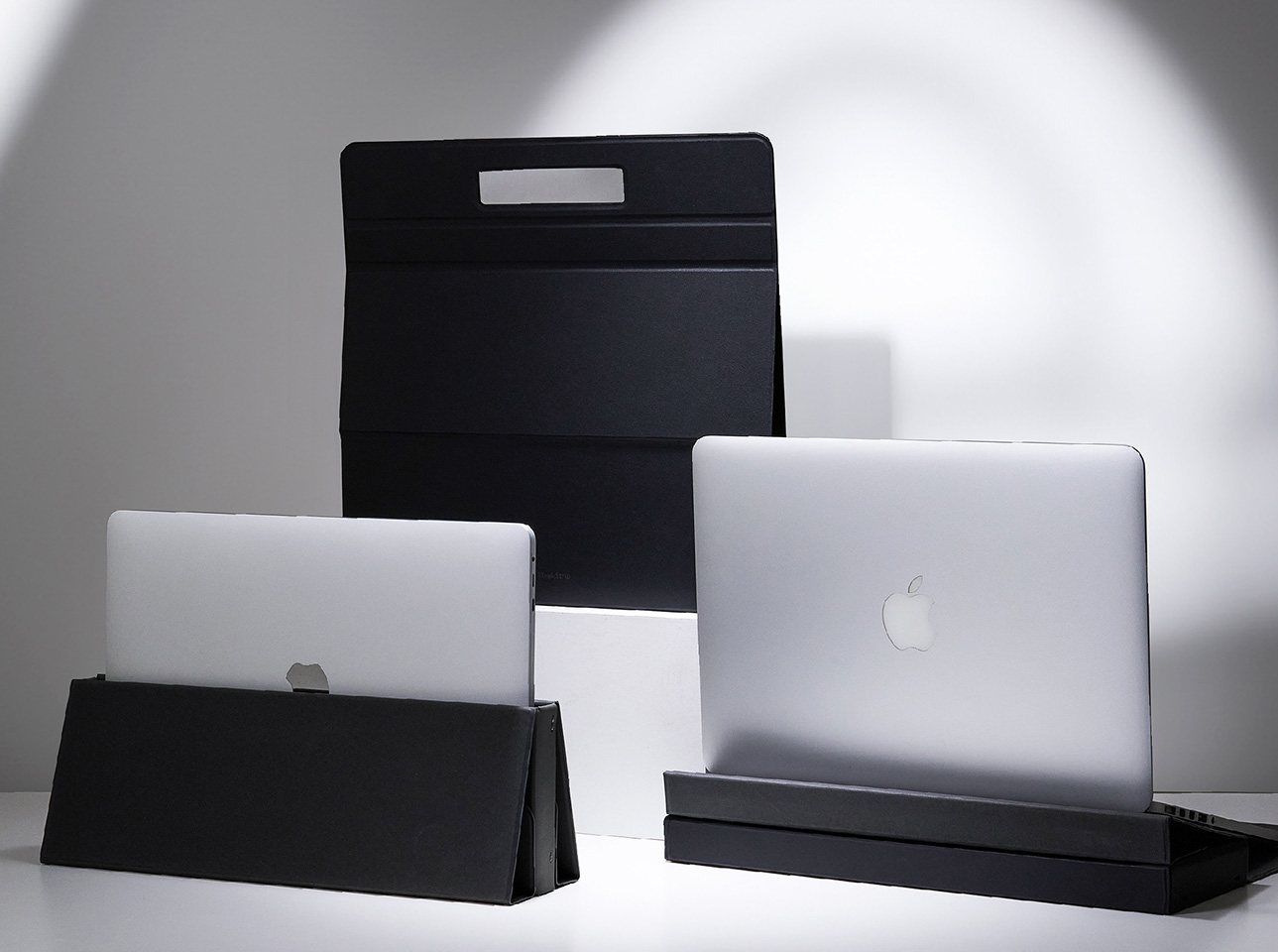
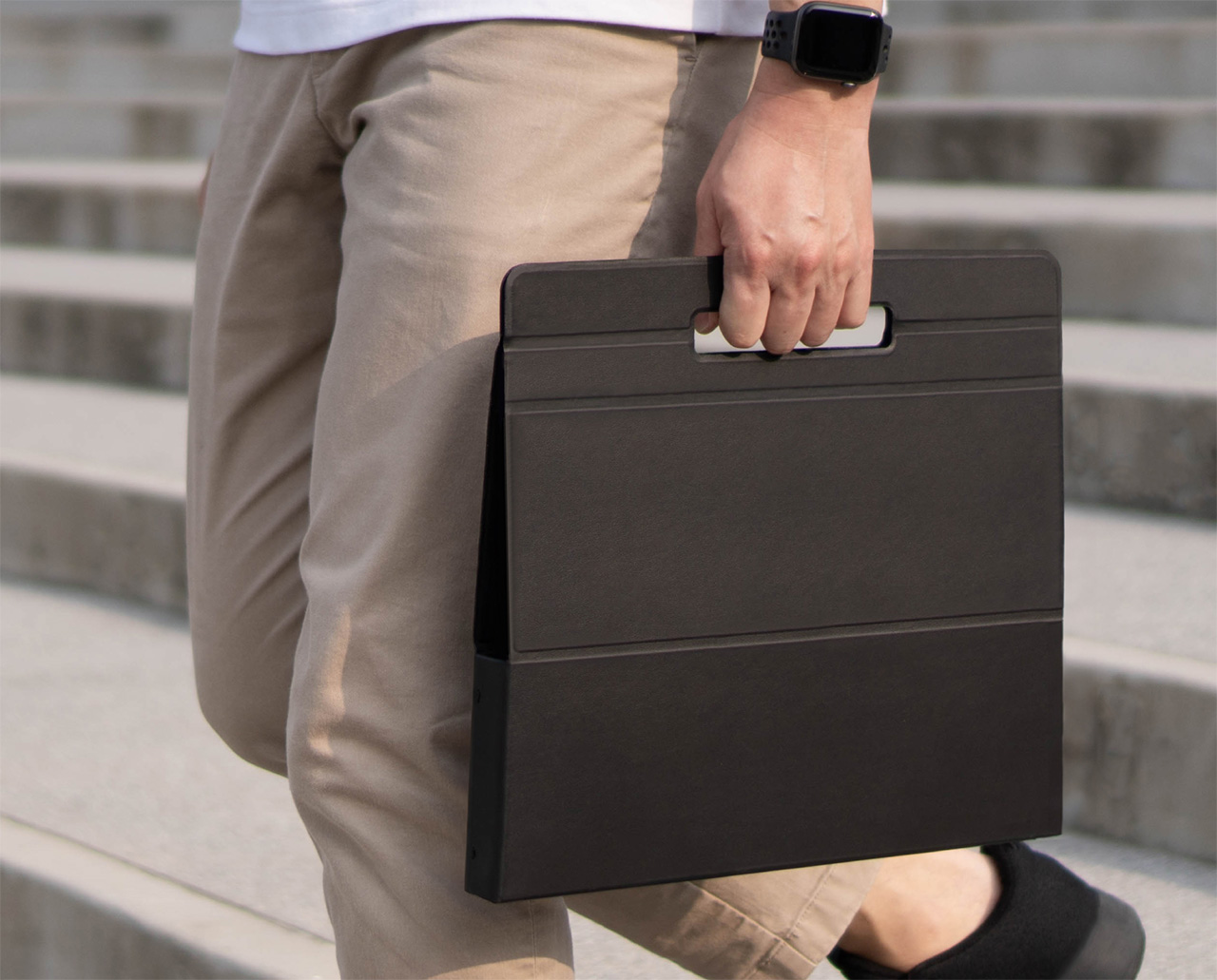
I always say – leave the hardware to Apple and the accessories to third-party companies. Apple makes some great gadgets, but their accessories leave you wanting for more – whether it’s the breakable charging cables, the substandard MagSafe wallet for the iPhone, the FineWoven cases and straps that apparently look terrible after just weeks of use, or the iPad accessories that are a little too basic and overpriced. If you’re spending big bucks on a cutting-edge tablet, you deserve a great case that lets you use your iPad to the best of its abilities – that means A. being able to position/orient your iPad however you see fit, and B. having a built-in keyboard that lets you use your tablet to do everything from composing mails to running your business. ESR’s Magnetic Cases for the new iPad Pro and the iPad Air let you do just that, leveraging the tablet’s powerful M4 chipset (or the M2 for the Air) and its capabilities to the best possible limit. ESR’s Shift and Rebound cases are everything your iPad needs to function as a wonderful primary or secondary device. The Shift Magnetic Case lets you use your iPad as a powerful tablet, with the ability to dock your device at multiple angles, or even elevate it to eye-level thanks to a series of hidden magnets. The $98 Rebound Magnetic Keyboard Case 360, on the other hand, turns your iPad into a laptop for practically less than 1/3rd the price of Apple’s $349 Magic Keyboard. With a friction hinge and a built-in keyboard, the Rebound gives you a makeshift laptop that operates in both landscape and portrait modes.

Designer: ESR Team

Click Here to Buy Shift Magnetic Case: $48.59 $61.99 and Rebound Magnetic Case: $98.99 $119.99 (Use coupon code “YANKOIPAD10” to get an additional 10% off). Hurry, deal ends in 48-hours!

Shift Magnetic Case

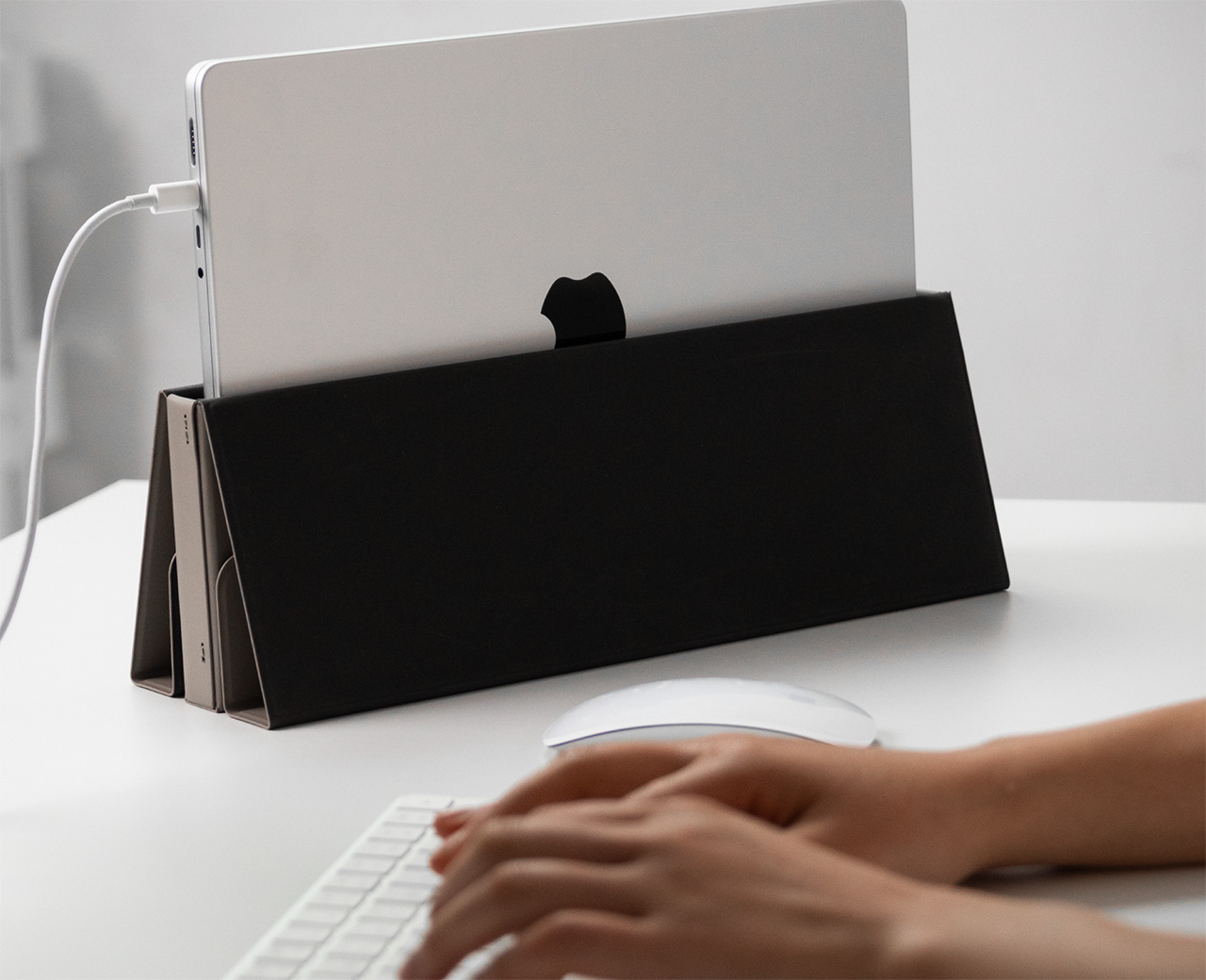
If you’re just looking for a hands-down great folio case for the iPad, the Shift Magnetic Case is an absolute no-brainer. Made from vegan leather, the case sports a microfiber inner that protects your iPad from scratches and bumps. Open the case and you can use it as is, or dock it in up to 9 separate angles thanks to the presence of not one, but two kickstands. An upper kickstand lets you dock your iPad Pro or Air at a lower incline, giving you an almost tablet PC-style experience that’s perfect for sketching, note-taking, editing, and doodling. A lower kickstand, however, props your iPad at a steeper incline, turning it into a front-facing screen for taking meetings, watching content, attending conference calls, or just using alongside your regular machine as a secondary screen. Ridges on the back of the folio cover let you adjust angles, giving you the ability to fine-tune your iPad’s placement to match your gaze. You can store your Apple Pencil in the Shift Magnetic Case either by snapping it to the side of your iPad (in the charging position), or tuck it into a bespoke pouch at the back.

Shift Magnetic Case

The word Magnetic plays a key role in the Shift’s design, since it doesn’t attach physically around your iPad the way regular wraparound cases do. Instead, it comes with a magnetic backplate that lets you affix your iPad to the case in a matter of seconds, snapping it in place. This clever feature isn’t just for overall convenience, because the Shift Magnetic Case lets you attach your iPad to the case even in portrait mode, giving you a portrait stand in a way other stand cases for the iPad don’t. Moreover, you can magnetically attach your iPad at a height too, giving you a tablet case that’s more at an eye-level.

Rebound Magnetic Keyboard Case 360

For someone who finds the iPad experience incomplete without a companion keyboard, the Rebound Magnetic Keyboard Case 360 lets you quite literally take a rebound from your existing laptop! MUCH more affordable than Apple’s own Magic Keyboard Case for the iPad Pro and Air, the Rebound Magnetic Case comes with a friction hinge that lets you adjust your iPad at any angle, while lifting it off the tabletop surface for better visibility. The case also packs a wireless keyboard that has a backlight like the one on Apple’s own Magic Keyboard for the iPad, along with a trackpad that quite literally brings the laptop experience to your portable tablet. Much like its sibling the Shift, the Rebound Magnetic Case boasts that satisfying magnetic attachment too, allowing you to snap your iPad in place both horizontally or vertically, depending on what you’re using the iPad for.

The Shift and Rebound Magnetic Cases are compatible with all 2024 iPad Air (M2) and Pro (M4) devices. That means they come in 2 sizes (for 11 and 13-inch models), and are designed to protect and elevate (both literally and metaphorically) your iPad experience to greater heights! The Shift Magnetic Case comes in 6 colors and starts at a price of $48.59, while the Rebound Magnetic Case offers 7 colors, has a 500mAh battery that runs the keyboard for up to 3 months, and is priced at $98.99.

Click Here to Buy Shift Magnetic Case: $48.59 $61.99 and Rebound Magnetic Case: $98.99 $119.99 (Use coupon code “YANKOIPAD10” to get an additional 10% off). Hurry, deal ends in 48-hours!

The post These Are The Best 2024 iPad Pro and iPad Air Cases You Can Buy Today first appeared on Yanko Design.

5 Tips On How To Decorate A Rented Home

Decorating a rented home presents a unique set of challenges. Unlike homeowners, renters often face restrictions when it comes to making large or permanent changes to their living spaces. These could be from landlords, from buildings with really rigid homeowner associations, from nosy neighbors, or even from annoying co-living flatmates. However, this doesn’t mean that rented homes have to lack personal flair or style. With some clever and considerate decorating strategies, you can transform a rental into a warm and inviting space that feels fully your own. Here are five tips to help you decorate your rented home effectively, without risking your security deposit.

1. Understand Your Lease Agreement

Before embarking on your decorating journey, the first step is to thoroughly understand your lease agreement. Most rental agreements have clauses that limit the kind of modifications you can make. It’s important to know what is allowed and what isn’t. For example, some leases will allow painting, provided you repaint the walls back to their original color when moving out, while others might prohibit changing the wall color altogether.

If you’re unsure, have a conversation with your landlord or landlady. Express your desire to make the space feel more like home and discuss any specific alterations you’re considering. Sometimes, they may approve changes if they believe it could increase the property’s appeal or value. Documenting these permissions can prevent misunderstandings later on too, so always have stuff in writing, whether it’s an email or a text chain.

2. Invest in Removable Solutions

When you can’t make permanent changes, removable options become your best friends. Products like peel-and-stick wallpaper have revolutionized rental decorating by providing an easy way to add vibrant patterns and colors without damaging the underlying wall. Similarly, adhesive hooks and strips (like 3M Command strips) can hang artworks and photos without leaving holes that might upset your landlord.

An excellent example of such adaptability is the use of temporary backsplashes in kitchens and bathrooms. Brands like Smart Tiles offer a range of styles that mimic the look of real tiles and can be peeled off when it’s time to move out. This approach allows renters to embrace bold designs and personal style without compromising the integrity of the rental property.

Removable designs also allow you to take stuff that belongs to you when you’re shifting. Investing in a beautiful wallpaper will hurt when you have to leave the wallpaper behind. Painting your landlord’s credenza or armoire may make it look beautiful, but it can’t be taken with you. Pick and choose the renovations you want to do so that you don’t feel the guilt of leaving stuff behind when you move out.

3. Opt for Flexible Furniture Choices

Choosing the right furniture can make all the difference in a rental. Opt for pieces that are versatile and can adapt to different spaces. For instance, modular sofas can be reconfigured to fit various living room layouts, while extendable dining tables can accommodate guests when needed and be compacted for daily use.

Invest in furniture that serves multiple purposes to save space and money. A storage ottoman, for instance, can act as a seat, a footrest, and a place to store linens or seasonal clothing. Similarly, a daybed can be used as a sofa during the day and a guest bed at night. These choices not only maximize functionality but also ease the transition from one rental to another.

4. Maximize Lighting Without Rewiring

Lighting is a crucial element of home décor that can significantly affect the ambiance of a space. Since most rental agreements prohibit changes to fixtures, renters must find non-permanent ways to illuminate their homes. Floor lamps, table lamps, and string lights can dramatically change the mood of a room without the need for permanent fixtures (we recommend checking out Gantri‘s unique 3D-printed lights). Even mirrors can help spaces look well-lit, and much bigger than they already are. Consider the strategic placement of mirrors to amplify natural light. Positioning a large mirror opposite a window can double the light in a room, making it feel larger and more open. Such setups are especially beneficial in smaller apartments or areas with limited natural light.

5. Add Personal Touches with Accessories

Finally, personalize your space with accessories. Soft furnishings like throw pillows, curtains, and area rugs can add color, texture, and warmth to a rental home. They are also easily replaceable and can be taken with you to your next home.

Art is another great way to express individuality. Instead of nailing frames to the wall, consider leaning artwork against it or using picture ledges. Plants are also excellent for adding vibrancy and life to your décor. They not only beautify your space but improve air quality too.

In decorating a rented home, the goal is to create a space that reflects your personality and style without infringing on the terms of your lease. With these tips, you can achieve a personalized home that can evolve with your tastes, all while maintaining a good landlord/tenant relationship. Decorating your rented space smartly and stylishly proves that even temporary accommodations can feel like a true home. So go ahead, infuse your rental with charm and character, and make it a place you love to come back to every day. After all, home is where the heart is, right??

The post 5 Tips On How To Decorate A Rented Home first appeared on Yanko Design.

This $599 Exoskeleton gives your legs Superhuman Powers while helping you save 50% energy

It isn’t Iron Man’s suit, but it’s still a pretty big augmentation to humans and their capabilities.

The promise of great technology is to make life easy for everyone… the only problem is that a lot of times, it takes YEARS before great technology can become accessible to everyone. EVs were very niche before they weren’t, DARPA (the defense research wing of the US government) played a pivotal role in developing the internet for communication on the front lines in the 1960s before the internet finally became household technology. Cameras were incredibly specialist equipment before they became small enough to fit into a smartphone, and exoskeletons were originally developed for military personnel to give them superhuman strength, before ending up in warehouses to allow workers to lift heavy objects without using all their energy. If you went online, chances are you wouldn’t be able to simply buy an exoskeleton for yourself (or you’d probably end up paying thousands of dollars for it), but the folks at Dnsys are hoping to make the technology accessible to all humans.

The $599 X1 is an exoskeleton that aids with mobility by giving your legs an extra set of mechanical muscles. Powerful enough to reduce the energy you spend walking/running/trekking by a staggering 50% and reduce your load by nearly 83 lbs, the Dnsys X1 runs on a set of 900W motors that output 1.2 horsepower with a top speed of 27km/h (16.7mph), allowing you to walk, climb, and run with more agility and less exertion. The entire device, which straps to your waist and thighs, weighs a paltry 1.6 kilograms (3.5 lbs) and has a battery that offers a range of 25 kilometers, allowing you to push your boundaries further without being restrained by your human limitations.

Designer: Dnsys

Click Here to Buy Now: $599 $1198 (50% off) Hurry! Only 10 left of 890. Raised over $1,000,000.

The X1 hopes to shatter the misconception that exoskeletons just belong in warehouses. Quite like Apple’s Vision Pro became one of the first VR headsets to actually be seen in real society, with people wearing them in cafes and subways, the Dnsys X1 aims at being the exoskeleton for all kinds of outdoor use. You could be an explorer or trekker looking to cover lots of ground, a backpacker trying to walk large distances with a heavy backpack, a photographer looking to navigate an outdoor location with a lot of gear, or just a fitness enthusiast looking to get in your movement while protecting your knees and legs from strain or injuries. The X1 gives your legs a set of helping hands (or helping legs, if you want to switch the idiom), allowing you to move faster, farther, and with much less energy.

The hallmark of the Dnsys X1 is its ultra-lightweight construction, weighing a mere 1.6kg, thanks to the utilization of aerospace-grade aluminum alloy and carbon fiber. This not only ensures durability but significantly reduces weight, making it an unobtrusive companion for any journey. The exoskeleton’s sophisticated motor, the DNA-1, embodies sheer power, delivering 1.2 horsepower and a torque of 50 Nm/kg, which, in simpler terms, is similar to the power performance of a Formula One race car.

Making an exoskeleton isn’t as easy as simply slapping motors onto a body brace. The X1 employs advanced AI algorithms to adapt to the user’s walking pattern, offering instantaneous walking assistance that makes every step feel lighter. This AI innovation, combined with state-of-the-art motion sensors, enables the device to conserve up to 50% of the user’s energy, essentially halving the strain of carrying heavy loads during challenging treks or climbs. Imagine exploring the wild with the ability to walk or run with less fatigue, climb higher, and embark on longer adventures, all while protecting your knees and reducing the risk of physical exertion-related injuries. The X1’s clever design also enables all kinds of movements, aiding you with walking forwards and backwards, sideways, upwards, or even any odd movement that would result from you walking on an uneven path or terrain.

Different modes let you achieve different tasks. A regular mode gives you a maximum range of 25 kilometers (15.5 miles), aiding with load reduction and energy conservation, while a Boost mode, activated simply by pressing a button on the sides, gives you the full effect of the X1’s 1.2 horsepower output. The regular mode is perfect for walking and climbing, while the boost mode is the equivalent of going full throttle, allowing for more machine power that gives you maximum speeds of 27km/h or 16.7mph. Conversely, instead of having the X1 boost your performance, you can even flip to a Workout mode which restrains your walking ability, making you put more effort in. Designed to be the equivalent of training with weights or resistance bands, this mode is for maximizing your exercise, making it perfect for strength training and isokinetic exercise. The resistance mode also helps reduce impact on your knees during downhill walks, helping prevent injuries.

The X1 starts at $599, a massive 50% reduction over its original $1198 retail price. It includes an app that also works to monitor device status in real-time, and track medical-grade health data such as hip joint mobility and step frequency. Each X1 ships with a smart battery capable of kinetic energy recovery (KERS) for high efficiency, a charging dock, and a charging cable. The Dnsys X1 ships globally starting July 2024.

Click Here to Buy Now: $599 $1198 (50% off) Hurry! Only 10 left of 890. Raised over $1,000,000.

The post This $599 Exoskeleton gives your legs Superhuman Powers while helping you save 50% energy first appeared on Yanko Design.

Native Union’s snap-on MagSafe Power Bank gives your iPhone an extra 5000mAh battery

The great thing about phones is their ability to do a whole multitude of tasks. The terrible thing about them is that they discharge at the most inconvenient time, and suddenly you’re left with 5% battery and no charger or charging point in sight. The wireless MagSafe power bank was designed for pretty much this occasion, allowing you to quickly snap a device onto the back of your phone for extra juice… and while Apple’s own MagSafe Power Bank isn’t on the shelves anymore, the (Re)Classic from Native Union does the job remarkably well. Measuring just .086cm thick (that’s as thick as your iPhone), the (Re)Classic attaches to your iPhone’s back (or any smartphone with the MagSafe sticker), letting you easily and wirelessly charge your phone. The slim design merges right into your iPhone’s profile, so you don’t have to contend with a bulky power bank that makes handling your phone difficult.

Designer: Native Union

Touted to be Native Union’s slimmest power bank ever, the (Re)Classic packs a cool 5000mAh battery that matches the one inside your iPhone, giving you a full 100% worth of extra charge to pull you through the day or even through a weekend with moderate phone use. 15W of wireless charging gets your phone juiced at the fastest wireless charging speed possible, and if that doesn’t satisfy you, plugging your phone into the power bank’s USB-C port bumps up charging speeds to 20W. The (Re)Classic supports pass-through charging too, which means you can charge the power bank WHILE it’s charging your phone or any other device.

Notably, though, it’s Native Union’s design choices that make the (Re)Classic such a nifty pick. Unlike most power banks that have housing made from either plastic or metal, the (Re)Classic opts for Yatay™, a premium plant-based leather alternative made in Italy. The vegan leather feels just as premium and comfortable as regular leather while giving your power bank a distinctly different aesthetic from the plastic ones you’d find online, or the fancy metal ones that can often give your phone an industrial aesthetic which many may not like.

The Yatay-leather power bank works directly with your phone, or even complements Native Union’s own cases, which have a similar design language. LED lights on the (Re)Classic’s body let you know how much battery your power bank has, and Native Union even ships one of their top-selling braided charging cables along with each $69.99 (Re)Classic Power Bank.

The post Native Union’s snap-on MagSafe Power Bank gives your iPhone an extra 5000mAh battery first appeared on Yanko Design.

This ‘Foldable’ Security Camera has a hinge that also lets you ‘shut down’ your camera!

Most cameras follow a simple architecture – they’re either cylindrical shaped, following the traditional shape of camera lenses, or they’re spherical shaped, allowing for 360° rotation. Not that cameras need to be any awkward or unique shape, but it helps when something breaks the mold, creating a design that stands out for being radically unique. Meet the Psync Genie S, a camera that thinks outside the box, by making a camera that quite literally IS a box. With a ‘lid’ that contains the camera lens and the floodlight, the Genie S automatically adjusts itself to face anywhere on a vertical axis, letting it look straight, up, or down. However, the lid also has another feature, it acts as a literal privacy shutter by simply allowing you to ‘shut down’ your camera. Turn the camera off and its lid quite literally closes to have the lens face directly downward, effectively turning the camera off!

Designers: Milian Lu and Duo Li

Drawing inspiration from Bauhaus principles, the Genie S boasts a minimalist aesthetic. Clean lines and geometric shapes prioritize function without compromising style. But the camera’s true innovation lies in its transformable design. Unlike most static security cameras, the Genie S features a unique “Open Box” design that physically transforms based on its operational state. This movement provides instant feedback to users, letting them know whether the camera is active or not. It’s a subtle yet effective detail that enhances the user experience.

Beyond its rather quirky-yet-functional form, the Genie S packs a powerful technological punch. At its heart lies a tiny, custom-developed dual-axis gimbal system. This innovative technology allows for a wide field of view, capturing a significant portion of your space with 350-degree horizontal and 135-degree vertical coverage. Furthermore, the Genie S boasts a crisp 2K resolution with 6x zoom, allowing you to see clear details even when zoomed in on specific areas.

One of the most intriguing features of the Genie S is its “ViewSay” technology. This AI-powered system goes far beyond simple motion detection. ViewSay analyzes and interprets the visual data it captures, providing users with intelligent notifications. Imagine receiving a notification that says “Pet cat playing on the couch” instead of a generic “motion detected” alert. This level of detail allows for a more informed response and peace of mind.

The Genie S prioritizes user control over data privacy. Unlike some security cameras that rely on cloud storage subscriptions, the Genie S offers local storage options (32GB or 64GB). This ensures your data remains private and eliminates any hidden fees associated with cloud storage. Additionally, users can customize motion detection alerts to receive notifications only for specific events, such as people, pets, or vehicles. This minimizes unnecessary alerts and allows you to focus on what truly matters.

The post This ‘Foldable’ Security Camera has a hinge that also lets you ‘shut down’ your camera! first appeared on Yanko Design.

The new Apple Pencil Pro is a death-sentence for Wacom

Wacom was once an industry leader in the sketching tablet PC market. However, it’s no match for the deadly combo of the new iPad Pro M4 and the Apple Pencil Pro. Announced at the iPad keynote yesterday, the new Pencil Pro packs features so unique, it makes regular capacitive styluses look like tools from the Stone Age. The new Pencil Pro has a new squeeze gesture to activate quick menus, can track rotation to have objects and brushes rotate in real-time (known as barrel roll), and even has a haptic motor for feedback – while still packing features from previous models like the hover feature, pressure and tilt sensitivity, and low-latency. If all that wasn’t enough, the Pencil Pro even has Find My support, allowing you to locate your stylus if it ever gets lost. The Wacom Pro Pen 3 on the other hand, has buttons.

Styluses have existed for decades at this point, and if you asked anyone ten years back which was the most well-designed stylus and tablet combo for creatives, the answer would invariably be something from Wacom’s lineup. The company had three options back in the day, the budget Wacom Bamboo, the mid-range Wacom Intuos, and the flagship Wacom Cintiq. Apart from the Cintiq, none of the other tablets had screens – they were just massive trackpads that you could only draw on with styluses. The Cintiq was the closest thing to an iPad – it had a screen, allowed multi-touch gestures, and came with controls galore… the only problem was that it didn’t work independently, it needed to be tethered to a desktop or laptop to work. The Cintiq, along with the Intuos and Bamboo, came with a stylus that featured a pressure and tilt-sensitive tip, along with programable buttons that let you undo or redo tasks, and a stylus tip on the back of the pen also that activated the eraser, mimicking how most pencils come with erasers on their reverse tip. The styluses also operated without batteries, allowing for hours of sketching without needing to charge the pen periodically.

The Wacom Cintiq Pro is anywhere between 5-8 times thicker than the 2024 iPad Pro

Cut to yesterday when Apple dropped the iPad Pro M4 and the comparison is incredibly stark. For starters, whenever anyone asks me whether they should buy an iPad or a Wacom, the answer is almost always the former… because when you’re not sketching on the Wacom, it’s useless, but when you’re not sketching on the iPad, it’s still an iPad. The difference seems even greater with the new iPad Pro being Apple’s thinnest device yet at just 5.1mm thick, while the 16-inch Wacom Cintiq is a whopping 25mm thick – 5 times thicker than its competitor. Cut to the larger 22-inch Cintiq and it’s a staggering 40mm thick, or the equivalent of 8 iPad Pros stacked one on top of the other.

However, a hardware comparison between a trillion-dollar electronics giant and Wacom, that’s valued at just half a billion dollars doesn’t seem fair. What does seem fair, however, is to just look at one singular product to see how far Apple’s outpaced its competition – the humble stylus. Wacom played a critical role in perfecting its EMR stylus technology, which was game-changing a decade or so ago. The pens ran without batteries, could sense pressure and tilt with stunning accuracy, and an eraser on the rear, becoming the creative industry’s go-to for digital sketching. When Apple debuted the Pencil, it had the same features except without any buttons. The Pencil 2, on the other hand, got a tap feature that let you swap between brush and eraser, and a unique charging mechanism that allowed you to charge your stylus simply by snapping it to the side of an iPad (it subsequently also got a hover function with newer iPad models). Apple’s newly announced Pencil Pro, which dropped yesterday, however, is an entirely different beast.

The new Pencil Pro has the hover function, lets you squeeze to activate a quick menu, and even supports barrel rolls that allow you to rotate brushes or objects simply by rotating your stylus. In true Apple fashion, it doesn’t have any buttons on it, but you can still tap to alternate between brush and eraser, and you even get a brush preview when your stylus is near the screen, letting you know how your brush is oriented. If all that wasn’t enough, the new Pencil Pro even packs Apple’s Find My feature, letting you locate a lost pencil through your iPad or iPhone.

The Pencil Pro can be squeezed to activate a quick menu

A great stylus on the iPad Pro, which already comes with an industry-leading chip, laptop-grade performance, a brilliant camera setup and LiDAR sensor, and an app store, basically makes the iPad or Wacom question moot. The only true advantage Wacom’s tablets have at this point is that they’re bigger than iPads, starting at 16 inches and maxing out at 27 inches diagonally. They also cost MUCH more than the iPad Pros, with the Cintiq Pro 16″ starting at $1599, and the Cintiq Pro 27″ having an eye-watering $3499 price tag. That’s Vision Pro territory for a sketching tablet.

The haptic motor gives you feedback when you squeeze the Pencil Pro

There still is a market for Wacom products. They’re massive, preferred by the hardcore animation and visual industries, and are platform-agnostic, which means you can easily run Windows or Linux programs on them, which most power users will appreciate over being limited to the iPadOS. But for the most part, the iPad Pro and Pencil Pro are so far ahead of their competition at this point, that they’ve made Wacom’s tablets (an already niche creative-focused gadget) even more niche… almost to the point of obscure.

The post The new Apple Pencil Pro is a death-sentence for Wacom first appeared on Yanko Design.

The Apple Vision Pro is already playing a critical role in the Automotive, Filmmaking, and Healthcare industry

Who knew that Porsche would become the Vision Pro’s most valuable customer?!

Addressing people for the first time since the Vision Pro went on sale in March, Tim Cook decided to give viewers an update of the Vision Pro’s success during this year’s iPad keynote. Although it isn’t clear exactly how many spatial headsets the company sold so far, although the Vision Pro is surely finding its footing in certain industries beyond just the average movie-watching and multi-screen workspace scenarios that Apple sold us on back at WWDC last year when the headset was first announced.

Cook mentioned that the Vision Pro is already becoming a crucial part of Porsche’s showroom experience, with the automotive giant investing heavily in building spatial experience centers around the Vision Pro and their cars. Prospective buyers can wear the Vision Pro to easily and quickly see all the car’s color options in virtual reality instead of looking at images or swatches in a catalog. The Vision Pro’s incredibly high resolution displays help customers experience the car in ways that were never though possible, allowing Porsche to provide a new dimension to their showroom’s UX in ways that other car companies cannot. Additionally, the headset also enables track experiences, and can also be used to train service technicians, harnessing the true power of Spatial Computing. Quite like the Apple Watch eventually settled into becoming a healthcare device, even though the company originally wanted it to be a fashion-tech wearable, the Vision Pro is only now finding its footing months after its announcement and delivery.

What’s remarkable is that Apple’s Vision Pro managed to breach the filmmaking industry and the healthcare industry just months after being delivered – something that Meta hasn’t really spoken at length about when it comes to their devices, and something that Microsoft’s own Hololens has taken years to achieve (at least in the healthcare and military research industries). Cook spoke about Dr. Tommy Korn, using the Vision Pro to improve surgical eye care through simulations and visualizations, while director Jon M. Chu was using the Vision Pro to oversee the entire post-production process for his upcoming film Wicked.

While entertainment and healthcare seemed like sure shot areas where the Vision Pro would create some form of procedural disruption, seeing Porsche invest so heavily in reinventing their showroom and technical training domains by relying on Vision Pros is fascinating. It’s been just over 2 months since the first Vision Pro was delivered to customers, so one can only wait and see what updates Apple provides us with over the next few months. The 2024 WWDC will mark the first anniversary of the headset’s announcement, and maybe we’ll get a few more upgrades to the device’s software as well as some updates on its industrywide acceptance. Hopefully even a price drop, perhaps? Or maybe that’s just wishful thinking!

The post The Apple Vision Pro is already playing a critical role in the Automotive, Filmmaking, and Healthcare industry first appeared on Yanko Design.

Steve Jobs would be absolutely proud of how far the new iPad Pro M4 has come

Here’s a snapshot of the new iPad Pro – an industry-leading M4 Chipset, Tandem OLED screen technology, a design thinner than any other Apple device ever made, nano-textured glass, studio-quality mics, graphite-sheet-infused hardware and copper-infused logo for better thermals, and an absolutely game-changing Apple Pencil Pro. It’s almost as if Apple is operating with alien technology.

I’ve mentioned this in the past that the iPad Pro really has no true competitor. It’s left Android tablets so far behind that almost every Galaxy, Pixel, or OnePlus tablet is just a budget competitor with Apple’s regular iPad. The iPad Pro has always been in a league of its own, and truth be told, I entered the Apple event thinking we’d get an incremental iPad Pro M3 update… because why does Apple really have to blow minds any more than it already has? Turns out I was absolutely wrong, because the more-than-one-year wait for a new iPad Pro was absolutely worth it.

The tablet PC itself was a category that Jobs pioneered, ushering in a new era of handheld devices that would go on to become the intermediary between a phone and a laptop. Jobs introduced the iPad as a multimedia device back in the day, but today the iPad Pro is much more. In fact, it’s so ridiculously powerful that it could dethrone even Apple’s own MacBook. The landscape camera and Magic Keyboard with the function row are just two small updates that put the iPad Pro more and more in MacBook territory… except with an XDR touchscreen, a brilliant stylus, a flawless front-facing camera with LiDAR, and with FaceID – all features that the MacBook currently lacks.

Yes, I sincerely believe that if Jobs were around today, the iPad Pro M4 would have blown his mind because I’m pretty sure the CEOs of Samsung, Google, OnePlus, Huawei, and Microsoft are all mighty pissed at how much Apple has leapfrogged their own tablet efforts. There’s really no comparison between tablets the way there is between phones and even to some extent between smartwatches. No Qualcomm chipset matches the M4’s capabilities, neural engines (NPUs) on tablet chipsets aren’t that common or powerful (to our knowledge, only Microsoft’s Surface Pro has them), and the fact that the iPad is so good it could potentially eat into Chromebook sales is probably really irking some companies right now.

So what makes this iPad so ground-breaking? Well, for starters, pretty much all of us entered into this keynote expecting the usual – a chip upgrade, the shifting of the camera module, and maybe some Pencil tweaks. However, what Apple served up instead was miles ahead of what anyone could think. The first iPad Pro was touted as a magical piece of glass, given how thin and compact it was – this new iPad Pro, even with its new almighty M4 chip, is thinner than any iPad ever made. At 5.3 and 5.1 millimeters respectively (the 11 and 13-inch models), the new iPads are thinner than the thinnest iPod. Heck, they’re a full 40% thinner than an AirTag. AN AIRTAG.

That isn’t all, Apple’s new design is a combination of incredible engineering and borderline futuristic material sciences. The new screen gets bumped up from Retina to Tandem OLED, a technology that Apple developed in-house, merging two OLED panels together to bring screen brightness up to a peak of a whopping 1600 nits. Meanwhile, a nano-textured glass helps cut glare while refracting ambient light perfectly without causing any clarity issues. A better screen, an M4 chipset, and a radically thinner design obviously means the iPad Pro is prone to immense heating (it doesn’t have a fan the way laptops do either), but that’s where Apple’s ingenuity shines again. Instead of simply relying on machined aluminum, the new iPad Pro’s housing has graphite sheets incorporated into it… and that Apple logo on the back, that also has copper infused into it too, helping turn the iPad’s body into a much more efficient heat sink to dissipate heat.

The iPad Pro’s nano-textured glass

The new iPad Pros also have better speakers, a set of studio-grade microphones, and a repositioned landscape camera that manages FaceID as well as functions as the perfect video-conferencing camera with CenterStage capabilities. The camera sits right where the wireless charging coil for the Apple Pencil would otherwise sit, so the fact that Apple’s managed to squeeze both of those in, while still making the iPad Pro thinner than before seems like a borderline miracle.

The new iPad Pro is also complemented by a redesigned Magic Keyboard that’s slimmer, and has an all-new function key row and a pressure-sensitive trackpad… and a Pencil Pro that’s so ground-breaking it puts other styluses to shame (fun fact, the Pencil Pro got 5 full minutes of coverage in a 44 minute keynote, including an in-depth breakdown by Procreate CEO, James Cuda), but more on that in a separate article. Despite its radical redesign, the iPad Pro doesn’t get a price-bump. Instead, it still starts at $999 for the 256Gb model (the 128Gb model is now discontinued), and $129 for the Pencil Pro. Even by Apple’s own standards, that’s a massive technological leap for the same price each year. Like I said, Jobs would be absolutely chuffed.

The post Steve Jobs would be absolutely proud of how far the new iPad Pro M4 has come first appeared on Yanko Design.

This $59 Electric Screwdriver is the size of a pencil but packs 52 bits and a powerful battery

It’s the year 2024 and if you’re still manually rotating your screwdrivers, you’re doing something wrong. Meet the SES Nano, a ridiculously compact electric screwdriver that’s no larger than a pencil and weighs a paltry 2 ounces or 58 grams. Arrowmax, the folks behind the SES Nano, has practically perfected the art of electric screwdrivers, and the SES NANO builds on the backs of all that research and development. This tiny screwdriver packs 5 torque settings, peaking at 5 kgf.cm that’s powerful enough to work with even the tightest screws. A simple two-button interface lets you easily choose whether you want to rotate the screwdriver clockwise or counter-clockwise, letting you tighten or loosen screws without any elbow grease. Just load one of the SES NANO’s 52 bits, hold the driver in place, press the button, and watch the magic happen. The SES NANO’s tiny design makes it a no-brainer against most conventional electric drivers that are much larger, and is perfect for your workshop or DIY kit whether you’re working with watches or phones, laptops, computers, drones, tiny models, or even your spectacles.

Designer: Arrowmax

Click Here to Buy Now: $59 $89 (34% off) Hurry! Only 6 days left.

Despite its compact size and measuring just over 5 inches in length and weighing a mere 58 grams, the SES NANO boasts an impressive torque output of up to 5.0 kgf.cm at 250 RPM. This translates to tackling various projects, from repairing delicate electronics like smartphones and glasses with precision control to confidently assembling flat-pack furniture. The lightweight design, crafted from a single piece of high-grade CNC aluminum alloy, ensures durability while making it easy to maneuver and reducing fatigue during use. Simple one-button operation with clear forward and reverse controls ensures user-friendliness for anyone, regardless of DIY experience.

The SES NANO goes beyond just being small and convenient. With its ingenious design that integrates a robust output circuit board, a precision gearbox, and a secure bit-locking mechanism seamlessly into a single unit, it prioritizes both efficiency and precision. This innovative design minimizes the overall volume of the power unit while maximizing its effectiveness. An LED display keeps you informed about critical details like the current battery level (displayed as a percentage), the selected torque mode (out of 5 available modes), and charging status. Strategically placed 4 LED lights on the chuck illuminate the work area, providing a shadowless light source for focused operation, especially in tight or poorly lit environments.

The SES NANO comes with a comprehensive set of 59 S2 steel screwdriver bits, including commonly used Phillips, star, and nut driver heads, all featuring a standard 4mm hex shank for secure fitment within the driver. This wide variety of bits ensures you’re equipped to handle most screw types you might encounter during various DIY tasks. The inclusion of a handy 58mm extension tip further enhances the SES NANO’s versatility, allowing you to reach and tackle screws in tight spaces or deep recesses that may otherwise be inaccessible with a standard screwdriver. The universal Type-C charging port, a common connector found in most modern devices, ensures convenient and hassle-free power top-ups using a power bank, laptop, or any USB-C wall charger. The best part, you can access the SES Nano’s charging port right through the case, allowing you to juice your screwdriver without even taking it out!

Each SES NANO ships with its all-encompassing case that contains the driver itself along with 52 well-arranged driver bits to choose from, ranging from common to specialty bits. The case also contains an extender tool that lets you extend the reach of your SES NANO to access hard-to-reach spots or sunken screws, a magnetizer that helps you re-magnetize bits, and finally a USB-C charging cable for your device. The SES NANO starts at a discounted $59, and ships globally starting June 2024.

Click Here to Buy Now: $59 $89 (34% off) Hurry! Only 6 days left.

The post This $59 Electric Screwdriver is the size of a pencil but packs 52 bits and a powerful battery first appeared on Yanko Design.

With Springs for Tires, this SUV is Breaking All the Rules to Test a Simple Theory

Why do cars have air-filled tires? And why do spring suspensions exist as separate entities? What if someone just made tires out of springs, wouldn’t that kill two birds with the same stone? Moreover, spring tires would be more durable, wouldn’t require air, and could therefore never get punctured. All of these questions make a lot of sense, and to be honest, Germans even experimented with spring tires in the 1900s during rubber shortages, but soon reverted back to good-old air-filled rubber tires soon thereafter, sticking to it when they developed the autobahn too.
A YouTuber by the name of Garage54 decided to put this experiment to the test, just to see how things would play out. Instead of rubber treads, G54’s car was outfitted with wheels made of springs in the hopes of being able to travel well on snowy roads and off-road trails. Hate to give you spoilers, but the experiment almost instantly failed, in part because metal doesn’t make a good rubber substitute, and also because G54 quite literally welded springs to his tire. However, it was a great starting point for what I personally think is a pretty unique theory. The design could be optimized, material considerations could be made, and if there’s anyone I trust with getting things right, it’s The Q, who designed the Wheelless Bicycle we saw last year!

Designer: Garage 54

The project started, as most do, with seeing an image on the internet of a spring tire from the early 20th century – designed to boost off-roadability. Of course, good ideas have a certain sticky nature to them, so the fact that nobody uses spring tires anymore was a warning sign to begin with… but then again, I bet you’re just as curious as I am. What if you replaced bouncy rubber tires with bouncy spring tires? How much of a difference could it really make?!

The process of attaching springs to the wheel was quite literally as simple as sanding down the wheel, bending a few massive springs, and welding them in place. To make sure the springs don’t make direct contact with the ground (and potentially destroy the roads), an extra metal strip was then welded around the rim.

A look at the springs that were going to be attached to the wheel

Bending and spot-welding the springs in place

Attaching the rim

Finally, the new tires got a spray of red paint to increase their visibility. Even in their new avatar, they were just about as thick as the original wheels, making the modification incredibly easy.

G54 then attached the tires to his Mercedes-Benz G-Class

The tires, however, ran into a few snags as G54 drove the car on sludgy snowy roads. For starters, metal doesn’t provide much friction, so even though the spring shape promised to easily conquer off-road paths, the tires tended to either rotate in place or slip in all four directions. Secondly, rubber and air are infinitely lighter than steel springs, so the new wheels added immense weight to the car, causing it to literally sink in the snow – this happened especially when the car was stationary. What also didn’t help the weight problem was the fact that snow managed to fill right up inside the hollow spring tires, adding to the vehicle’s bulk. The springs also managed to catch stray twigs and branches, creating more problems than they solved. And as far as suspension was concerned, the new wheels hardly offered any improvements.

Although an instant flop, the experiment had a few areas of improvement. For starters, manually welding together a metal wheel will result in imperfections that then affect the car’s performance. However, before we dismiss metal tires entirely, it’s worth noting that NASA has been extensively testing airless metal mesh wheels for its Mars rover, allowing the vehicle to quite literally drive on the most off-road terrain mankind has ever witnessed! If NASA can do it, I’m sure us normies could figure something out too!

The post With Springs for Tires, this SUV is Breaking All the Rules to Test a Simple Theory first appeared on Yanko Design.