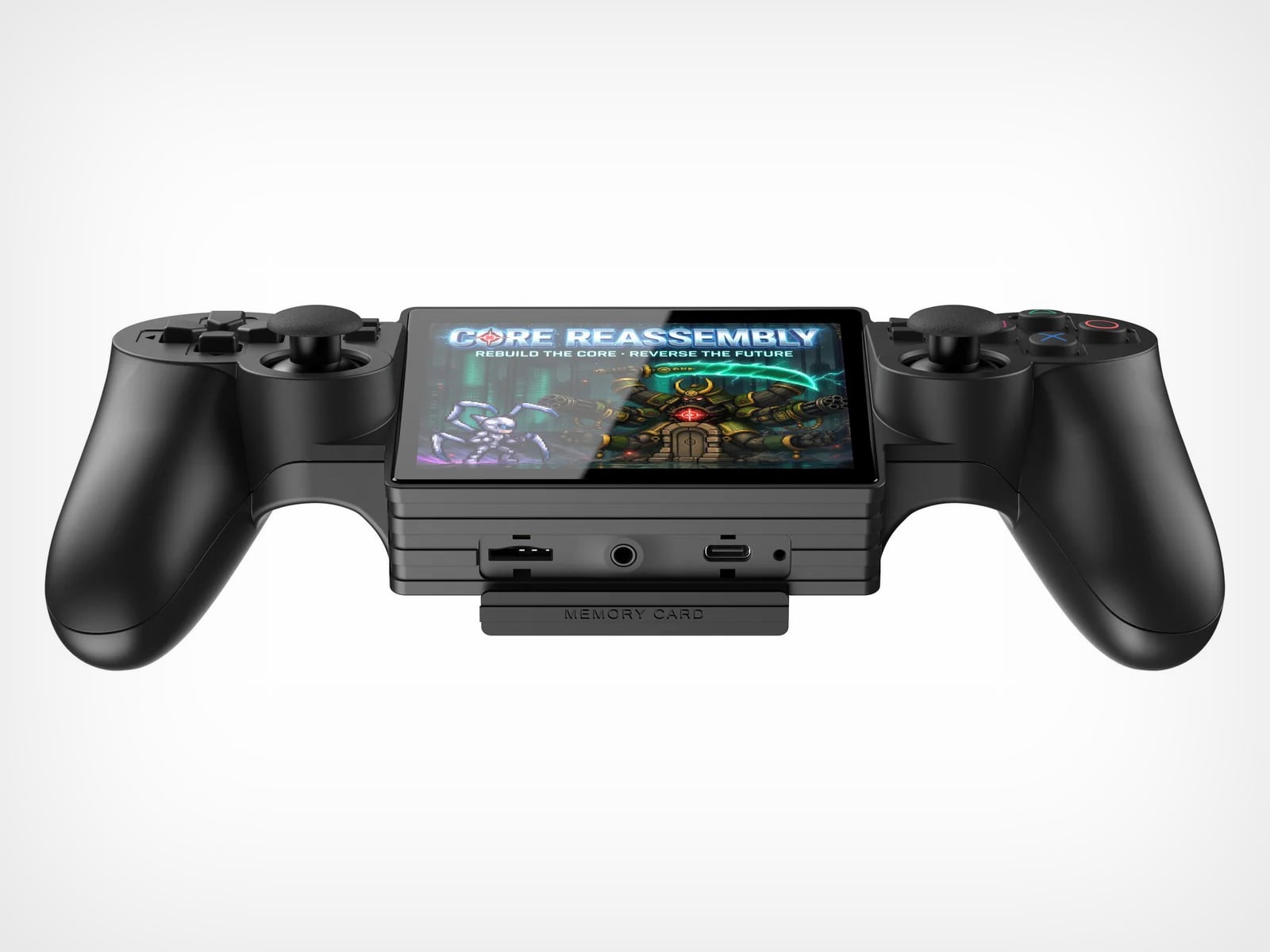
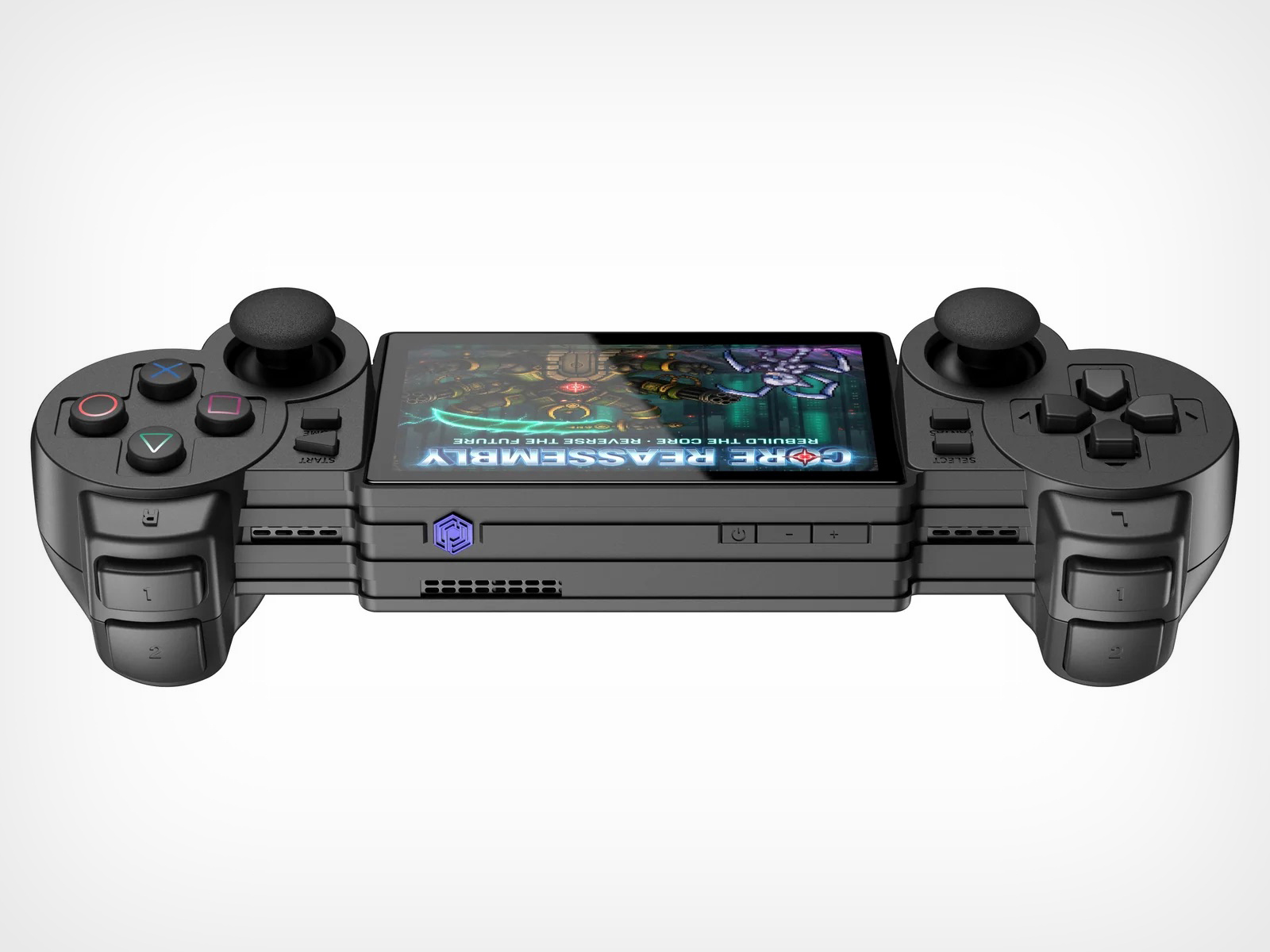
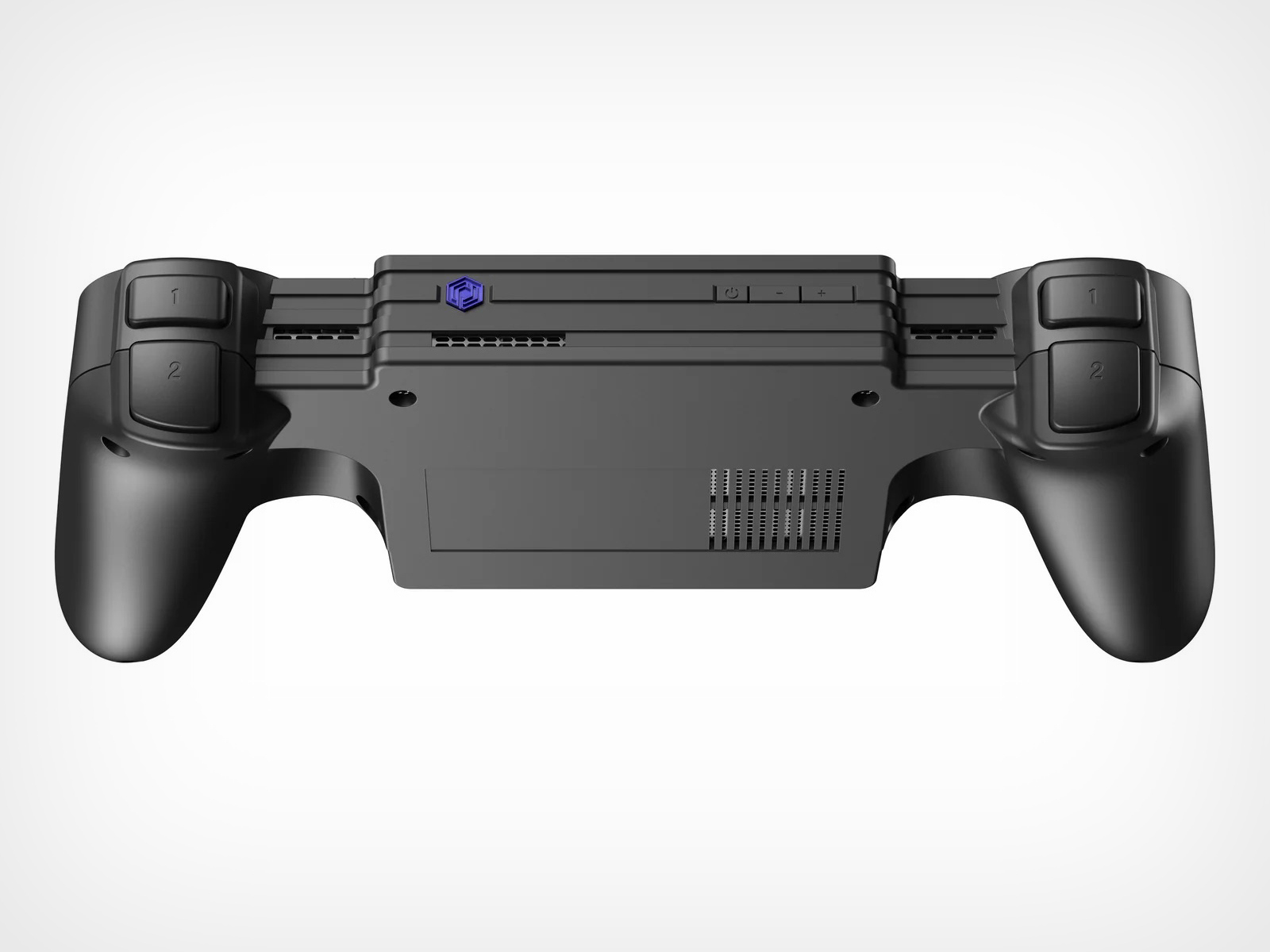
Nintendo had a choice when designing the Switch 2. They could iterate on the formula that made the original a cultural phenomenon, refining the single-screen hybrid into a faster, sharper, better version of itself. Or they could reach back into their own history, pull out the design philosophy that once made the DS family the best-selling handheld hardware line of all time, and merge two eras of thinking into something genuinely new. They picked the first path. Designer Juan Manuel Guerrero just sketched out the second.
The concept arrives as a series of beautifully lit 3D renders: a folding Nintendo Switch with dual screens, a hinge running through the center of the body, and Joy-Cons in the familiar blue-red split attached to either end. The renders carry the finish of product photography, which makes it genuinely easy to forget this never shipped. Closed, it looks like a sleek, pocket-ready device with a tighter footprint than the original Switch. Open, it recalls something older and warmer, the quiet satisfaction of flipping a DS open on a long car ride, except now the screens are large, the controllers are proper, and the whole thing feels built for today. The proportions are deliberate, the design choices are considered, and the whole thing wears its Nintendo identity without apology.
Designer: Juan Manuel Guerrero
The Nintendo DS sat at 154.02 million lifetime units for years, the gold standard for Nintendo hardware, until the Switch finally crept past it in early 2026 with 155.37 million. Two hardware generations, both cultural touchstones, separated by fewer than two million units across a combined history of roughly three decades. The closeness of that race matters. The DS built those numbers on a genuine design idea, a spatial logic where two screens gave developers room for two distinct kinds of information at once, and players responded to that for fifteen years. Guerrero’s concept asks whether the Switch era ever had to leave that behind.
Phantom Hourglass let you draw on the bottom screen to annotate your own maps and solve puzzles, an idea original enough to win awards at the time. Pokemon Diamond and Pearl split the party menu from the battlefield, giving battles a spatial clarity the GBA never had room for. GTA: Chinatown Wars ran the full city map on the lower display and handed the top panel entirely to the action. These were designs built entirely around the format, dependent on the split in a way that made them fall apart on a single screen. That vocabulary has been sitting idle for the better part of a decade.
Samsung’s Galaxy Z Fold 6 runs a 7.6-inch interior display and represents the sixth generation of the company working foldable hardware into something genuinely reliable. Motorola, OnePlus, Google, and Huawei all have competitive entries in the space. Display durability and hinge reliability have been largely solved through successive product generations and real commercial pressure. A dual-screen Switch in 2025 wouldn’t be asking anyone to invent something new; the foldable category has already done the hard engineering work. Guerrero’s concept asks someone to point that already-mature technology at a gaming audience.
The DS touchscreen read as a toy gimmick in 2004. The Wii’s motion controls got laughed at before that console sold 101 million units. The Switch itself looked like a confused category play until it climbed past 155 million units and became Nintendo’s best-selling platform ever. That history of moves that look sideways before they land is the context Guerrero’s concept actually lives in. The foldable technology exists, the Joy-Con design language holds across both halves of the fold, and the IP is coherent. Someone drew it. Now it’s genuinely difficult to look at the Switch 2 without wondering what the other path could have looked like.
Most wearable tech that puts an AI assistant in your ear assumes you want only theirs. The earpiece, the speaker, the entire software stack, all funneled through one model chosen for you before you even open the box. Rokid’s latest update to the AI Glasses Style takes a different position entirely, turning the glasses into what is effectively an open platform where you pick the brain behind the voice.
The update makes the Style the first smart glasses to natively support Google’s Gemini, sitting alongside OpenAI’s ChatGPT, DeepSeek, and Alibaba’s Qwen in a unified interface. Users toggle between them freely, which means reaching for Gemini for a quick Google Maps query and switching to ChatGPT for something else entirely is up to you.
The glasses themselves debuted at CES 2026 in January, and the hardware makes a reasonable case for the category. At 38.5 grams, with a TR90 frame and titanium alloy hinges, they sit closer to a regular pair of prescription glasses than anything resembling a prototype. The frame takes prescription lenses directly, with a fitting service starting at $79, including photochromic options in over 200 colors that darken within 25 seconds.
Powering the AI and imaging workload is a dual-chip setup: an NXP RT600 handles always-on, low-power tasks, while a Qualcomm AR1 manages heavier processing. The same Qualcomm chip is in Meta’s Ray-Ban glasses, though the battery life here runs to 12 hours, noticeably longer than Meta’s. A 12MP Sony-sensor camera sits at the bridge, capturing 4K stills and 3K 30fps video with up to 10 minutes of continuous recording. A privacy indicator light signals to people nearby when the camera is active.
Audio comes through directional AAC speakers built into the temples, focused toward the ears with minimal bleed. The AI interaction itself works through a two-finger tap to summon any of the four models, head gestures for call management, and voice prompts in 12 supported languages. Real-time translation, navigation, photo recognition, and AI-generated meeting summaries are all part of the feature set, fed through whichever model the user has selected.
For anyone already oriented around a specific AI assistant, the practical appeal is straightforward. Someone in Google’s ecosystem gets Gemini in their glasses without compromise; someone who prefers ChatGPT for writing picks that instead. At $299 to start, with a lens fitting service folding in prescription and photochromic options, the Style has cleared 15,000 units sold ahead of its formal global rollout, which is a reasonable early signal for a category still working out what it wants to be.
At some point in the last couple of years, something quietly shifted in the gaming world. Not in the blockbuster, billion-dollar-franchise sense, but in the more personal, “why am I actually having more fun with this tiny device than my main console” sense. Search interest in retro gaming handhelds jumped 400% year-over-year, hitting 90,500 monthly searches in January 2026 alone. That’s not a blip. That’s people rediscovering something they forgot they wanted, and then telling everyone they know about it.
What’s driving it isn’t hard to understand. Modern gaming has gotten heavy, with big installs, long tutorials, and games that feel like part-time jobs. A retro handheld sidesteps all of that. You pick it up, you’re playing something in thirty seconds, and it fits in your jacket pocket. The designs themselves have become worth caring about, too, from machined aluminum bodies to translucent clamshells to square screens that look like props from a ’90s anime. These aren’t budget toys. Some of them are genuinely beautiful objects that happen to play games. Here are seven that are worth your attention.
Anbernic RG Cube: The one with the square screen that somehow works
The first thing you notice about the RG Cube is the screen shape, a perfect square, and your brain immediately goes: that can’t be right. Gaming moved to widescreen fifteen years ago. A 1:1 display in 2024 looks like a design mistake, or at best a gimmick. It is neither. The 3.95-inch IPS panel at 720×720 turns out to be native to more retro games than you’d expect, with Game Boy, arcade titles, and Nintendo DS with dual-screen stacking all living here without compromise.
The broader package is hard to argue with. An octa-core Unisoc T820 processor and 8GB of RAM run Android 13, with emulator support up through PS2 and GameCube, though more demanding titles on those systems will push its limits. The asymmetric thumbstick layout borrows from the Steam Deck playbook, and the Saturn-inspired D-pad is precise without drama. At around $170, it comes in Beige White, Radiant Purple, Black, Grey, and the radiant purple has no right looking as good as it does.
What we liked
Square 1:1 screen is genuinely ideal for Game Boy, arcade, and DS emulation
RGB lighting and color options make it a genuinely attractive object
What we disliked
Widescreen games require letterboxing or aspect-ratio compromise
Demanding PS2 and GameCube titles push the processor to its limits
ModRetro Chromatic: The Game Boy Color that Nintendo never made
There’s a version of this product that could have been embarrassing: a magnesium alloy Game Boy Color clone bundled with a new Tetris cartridge, sold at $199. On paper, it sounds like a premium nostalgia trap. In practice, it’s one of the most carefully considered handheld devices released in years. It’s FPGA-based, meaning it reconstructs the Game Boy hardware at the circuit level rather than emulating it in software, which produces zero input latency and a millisecond-accurate match to original hardware behavior.
The physical design earns its price in ways spec sheets can’t capture. The curved battery compartment gives your hands something to grip. A physical volume wheel, a detail so obvious it’s shocking how rarely it appears on modern devices, lets you kill the sound without touching a menu. Colors run from Inferno and Bubblegum to a very wearable Wave blue, with English or Japanese button labeling as an option. It plays physical Game Boy and Game Boy Color cartridges only, which is either a dealbreaker or a feature, depending on how you think about focus.
What we liked
FPGA hardware delivers true zero input lag, not a software approximation
Magnesium alloy shell feels premium and genuinely durable
Comes bundled with a new Tetris cartridge
What we disliked
Plays only Game Boy and Game Boy Color cartridges, no ROMs or other systems
AA battery requirement adds ongoing cost; rechargeable Power Core is sold separately
Analogue Pocket: The one photographers keep picking up
The Analogue Pocket is the device that made the retro handheld conversation respectable. It uses an FPGA rather than software emulation and plays Game Boy, Game Boy Color, and GBA cartridges out of the box. Via cartridge adapters, it adds Game Gear, Neo Geo Pocket Color, Atari Lynx, TurboGrafx-16, PC Engine, and SuperGrafx. Via its microSD slot and the OpenFPGA community platform, it loads cores for nearly every retro system that ever existed. The 3.5-inch LCD at 1600×1440 and 615 ppi is, simply, one of the sharpest displays ever put in a handheld.
At $239, it sits at the premium end of this list, and it’s also frequently out of stock. Firmware updates require a microSD card reader, which feels like friction that shouldn’t exist on a $239 device. TV output needs the separately sold $99 Dock. These aren’t dealbreakers so much as signals that Analogue built this for the dedicated enthusiast first. If you want one device to handle everything in your retro library for the next decade, this is probably it.
What we liked
OpenFPGA community support covers an enormous range of retro systems
Plays GBA in addition to GB and GBC, plus many more with adapters
MicroSD slot enables ROM loading
Premium aluminum build with a distinctly modern design language
What we disliked
Frequently out of stock; restocks sell out within minutes
Firmware updates require an external microSD card reader
TV output requires a separately purchased $99 Dock
Retroid Pocket Flip 2: The clamshell that brought the GBA SP back with PS2 power
The GBA SP was the handheld that arguably peaked the clamshell form factor: it folded, it protected its own screen, and it had a backlit display before that was standard. The Retroid Pocket Flip 2 arrives in 2025 with that same closing-hinge energy, but with a 5.5-inch 1080p AMOLED screen, a Snapdragon 865 processor, and enough emulation horsepower to run PlayStation 2, GameCube, and Wii. When closed, it has roughly the same desk footprint as a modern smartphone. Closing the lid puts it to sleep; opening it wakes it up.
Color options include a translucent Ice Blue, GameCube Purple, a two-tone 16-bit US, and Black. Retroid clearly understands its audience. The AMOLED panel brings deep blacks and accurate color to games designed for CRTs, and the results are often striking for titles you’ve played a hundred times. At $229 for the Snapdragon variant, there is no meaningful clamshell competitor at this performance level. One persistent note from extended use: the form factor rewards shorter sessions more than marathon ones, which is maybe appropriate for a device meant to live in a bag pocket.
What we liked
5.5-inch AMOLED at 1080p is impressive for the price
Handles PS2, GameCube, Wii, and Dreamcast emulation
Translucent Ice Blue colorway is a design highlight
What we disliked
Thicker than it looks in product photos
Extended sessions can feel less comfortable than flat handhelds
AYANEO Pocket Micro Classic: The one that fits in an actual pocket
The Game Boy Micro launched in 2005 as Nintendo’s most polarizing hardware decision. It was tiny, it was beautiful, it only played GBA games, and it was discontinued within a year. Design historians were kinder to it than the market was. The AYANEO Pocket Micro Classic is clearly in conversation with that history. It removes the analog joysticks, uses a CNC-machined aluminum alloy frame with a seamless all-glass front, and produces something that slides into a front jeans pocket without catching on anything.
The 3.5-inch borderless IPS display at 960×640 in a 3:2 ratio is built for GBA emulation, with 4x pixel-perfect upscaling. Available in Obsidian Black, Charm Red, Vintage Grey, and Gold, each colorway has a different character. The Gold skips “gaming device” and lands somewhere closer to “considered object.” The MediaTek Helio G99 handles everything up through PS1 confidently. If your retro library is 8-bit and 16-bit with a strong GBA presence, the Pocket Micro Classic is probably the most beautiful way to play it.
What we liked
CNC aluminum and all-glass build is genuinely premium for the category
No joysticks make it notably slimmer and more pocketable
Android 13 with Play Store access expands utility beyond emulation
What we disliked
No joysticks limit N64, Dreamcast, and PSP playability
The original TrimUI Brick arrived in 2024 with an unusually sharp 3.2-inch IPS screen at 1024×768, giving it a pixel density of 405 PPI, a number that belongs on a premium smartphone, not a $55 device. The Brick Hammer edition, launched in 2025, replaces the plastic shell with a full CNC-machined aluminum alloy in Gunmetal Gray, Rose Gold, and Fluorescent Green. The metal shell doubles as a heatsink, dropping operating temperatures noticeably. Three interchangeable shoulder button sets ship in the box.
The software runs CrossMix OS on a Linux base: clean, fast, minimal overhead. Load your ROMs, pick a game, and play. Battery life lands around four to six hours. The processor handles Game Boy through PS1 without complaint; N64 gets through most titles; Dreamcast is inconsistent. The CNC backplate can be engraved, which no other device at this price point offers. The Rose Gold aluminum version sitting next to a MacBook on a desk looks less out of place than it has any right to, and that’s a strange and interesting thing to say about a $99 handheld.
What we liked
CNC aluminum Hammer shell runs noticeably cooler than the original plastic
Swappable shoulder buttons and engravable backplate are genuinely rare customization options
Rose Gold and Gunmetal colorways punch well above the budget tier
What we disliked
No analog joysticks, which limits 3D game compatibility
Dreamcast and demanding N64 titles run inconsistently
Miyoo Mini Plus (and Mini Flip): The one that started the whole obsession
If there’s a single device responsible for bringing this category to mainstream attention, the Miyoo Mini Plus is probably it. It weighs 200 grams, fits in a jeans pocket, has a 3.5-inch IPS screen at 640×480, and runs OnionOS, a community-built firmware that turns a modest Cortex-A7 processor into a near-perfect front end for everything from the NES to the original PlayStation. The interface is clean, the emulator library covers over a hundred platforms, and save states work the way save states should.
The Miyoo Mini Flip takes the same hardware and wraps it in a GBA SP-style clamshell, adding screen protection and an extra wave of nostalgia. Early production runs had hinge concerns, though those appear to have been addressed in more recent batches. At $69-99, this is the gateway to the category that doesn’t feel like a compromise. The honest question isn’t whether this device is worth the money, since it clearly is. It’s whether starting here will satisfy the itch, or simply make you want to own the other six devices on this list as well.
What we liked
Genuinely pocketable at 200g, fits in a jeans pocket without bulk
Covers NES through PS1 with confident performance
Mini Flip clamshell adds nostalgic GBA SP energy and screen protection
Most shelving solutions ask you to commit before you can even start. Drill a hole here, anchor a bracket there, then live with the consequences if you change your mind six months later. The TAB, designed by Berlin-based architect Michael Hilgers for housewares brand Purstahl, takes a different approach entirely. It clamps onto any vertical panel up to 38mm thick, no drilling, no damage, and releases just as easily when you want to move it.
The form itself is the most unexpected part. Where most clip-on accessories default to a rectangle, the TAB is a circle, a 30cm disc of 2mm aluminum with a fine-textured powder coating. That’s a small but meaningful choice; a circular shelf sitting against the side of a bookcase or cabinet reads more like a deliberate design detail than a functional add-on. It comes in two versions, TAB_left and TAB_right, which simply determine which direction the shelf extends from the clamp.
The thinness of the aluminum is doing more work than it looks like. At 2mm, the shelf sits flush and close to the panel face rather than jutting out awkwardly, which matters in tighter rooms. The powder coating adds color without bulk, and Purstahl offers enough options to match or contrast with the furniture underneath. That flexibility is part of the appeal: the TAB can read as an accent piece or disappear into the background, depending on the color you pick.
What makes it genuinely interesting is how widely the word “panel” applies. Hilgers frames his approach as “pragmatic design,” meaning objects that work with what already exists rather than replacing it. The TAB clamps onto a bookshelf side, the edge of a wardrobe, a balcony railing, a freestanding room divider, anywhere a flat vertical surface falls within that 38mm thickness range. That’s a broader set of possibilities than a 30cm disc might initially suggest.
The one thing Purstahl doesn’t mention is a maximum load rating, which is a fair thing to wonder about at €79 per unit. A small plant, a few magazines, or an espresso cup are probably fine. A heavy ceramic pot or a stack of hardcovers is a less certain proposition, and it would help to know the limits before buying. The screw clamp mechanism does allow for repositioning, so there’s room to adjust if the shelf shifts under load.
Hilgers has built a consistent body of work around the idea that existing furniture doesn’t need replacing, only rethinking. The TAB fits neatly into that logic. It’s a small, unhurried intervention in a room you already have, and the more interesting question is less about whether it works and more about how many panels around your home you’d actually want to put it on once you start looking at them differently.
Daily utility meets design in EDC multitools. And here at Yanko Design, we have this knack for recognizing the best tools for you, which would provide advanced features and excellent value when you need them. In the market flooded with multitools that are designed to fold and twist, Prometheus Design Werx has surprised the demanding with the stunning idea of the SPD Ti-Spork Chop – a multitool in its own unibody design.
While multitools that fold and feature pull-out accessories from the body are a common sight, it is unusual for a multitool to arrive in a one-piece design with construction that’s durable enough to withstand whatever you can throw at it. Looking at the Ti-Spork Chop, you can instantly count it out as a viable pocket tool, but spare a thought and read further before you arrive at a conclusion.
The look of the Ti-Spork Chop is self-explanatory of what the design entails. But the first thing that can disturb many is how to fit that EDC into the pocket. To ensure that it is possible and effortless, the one-piece multitool features a pocket clip to hold it in place inside the pocket. And when you’re unsure of having it in the pocket, the tool’s lanyard hole makes carrying it worry-free. The look may not obviously suggest, but this tool has six built-in functions.
It obviously starts with the combination of a spoon and fork in the front, which clearly wins it the word ‘Spork’ (combination of spoon and fork) in its name. Besides, making it a valuable EDC for casual campers and serious adventurers are features like the bottle opener, box/can opener, and a prybar. Of course, the pocket clip on one side and the lanyard in the middle are other notable options that make the tool even more handy.
Describing various scenarios in which the multitool can be used, the company notes, “Whether you’re shoveling canned peaches, stirring your precious hot cup of instant coffee with powdered creamer in some remote, dangerous corner of the world, or opening a bottle of Jarritos, our Ti-Spork Chop has got you covered.” It’s “A titanium spork to rule them all…” the company website reads.
All these tools are packed on a Ti-Spork Chop that’s milled from a single piece of 6AL-4V grade-5 titanium. The construction makes it highly durable and exceptionally resistant to corrosion. The design, as opposed to that of other folding multitools, ensures that it is easy to clean. Weighing roughly 30g and measuring about 4.72 inches long, the lightweight but incredibly robust Prometheus Design Werx multitool is available on the company website for only $79.
A small city balcony has a way of making every square meter feel personal, just barely. There’s room for a folding chair, maybe a potted plant, and the occasional optimistic thought about al fresco breakfast. What there usually isn’t, though, is any real surface. Designer Michael Hilgers noticed this particular gap, and the balKonzept is his answer: a railing-mounted table that hooks onto the balcony railing with no tools, no hardware, and no permanent commitment.
The form is immediately legible. A wedge-shaped body in recyclable polyethylene curves at the rear into a smooth hook, looping over the railing and gripping it via an adjusting screw underneath. That single mechanical gesture is the entire installation. The raised trough at the back sits above the railing line and acts as a windbreak for objects resting on the work surface below. The unit comes in at 60 cm wide and roughly 40 cm deep on the interior side.
The material choice is worth pausing on. Polyethylene, produced in a Brandenburg plastics factory through rotational molding, is not a glamorous option. It won’t feel precious the way powder-coated steel does. What it does do is survive outdoor life without complaint: frost-resistant, UV-stable, and recyclable at its end of life. Rotational molding also produces hollow, seamless shells with consistent wall thickness, which matters for something exposed to seasonal temperature extremes.
The table height is a fixed function of whatever railing it’s hanging on; subtract 21 cm from the railing height, and that’s the surface level. That means the balKonzept works very differently on a low French-style balcony versus a taller contemporary glass railing, with no way to adjust it beyond moving the piece. For anyone wanting to sit and work at a comfortable height, the railing geometry will decide the experience before any other consideration does.
Where the design earns its keep is in the planter box. Filling it with soil and roots is one option, but the trough is deep enough to function as an improvised cooler, and Rephorm’s own description cheekily acknowledges this, noting it works just as well with ice cubes and sparkling wine as it does with geraniums. That kind of built-in flexibility is the whole point; the balKonzept doesn’t commit to being one thing, which is probably what a small balcony needs most.
The N64 Funtastic series was Nintendo’s most chaotic design decision, and that’s a compliment. Launched in 1999, the translucent controllers and consoles arrived at the tail end of a broader cultural moment: Apple had just cracked open the iMac G3’s candy-colored shell and shown the world that visible circuitry could be beautiful, and the consumer electronics industry was scrambling to catch up. Nintendo’s version came in six flavors, including Ice Blue, a saturated cyan-teal that looked like it had been poured directly from a Jolly Rancher mold. The controllers were transparent all the way through, which meant you could see every lever, spring, and pivot point in the mechanism. That was the whole point. Showing the guts was the product.
Killscreen, the Florida-based controller studio that has built its entire catalog on surgical retro revisionism, has now transplanted that exact aesthetic onto a PS5 DualSense. The Funtastic Ice Blue/Clear is a limited-edition PS5 controller with an Ice Blue translucent front shell and a crystal-clear back exposing the circuit board, wiring, and battery assembly beneath. It is native PS5 hardware, with wireless connectivity, haptic feedback, and adaptive triggers all intact. The base price is $139, with optional Omron hair triggers, mechanical face buttons, and GuliKit TMR thumbsticks available as upgrades.
Designer: Killscreen
Killscreen co-founder Erik Consorsha is upfront about the fundamental absurdity here: “There’s something slightly wrong about putting a Funtastic-style translucent controller on modern hardware. That’s exactly why we did it.” That instinct for productive wrongness is the throughline in everything Killscreen has released. The CubeSense put GameCube colorways and C-stick nubs on a DualSense. The 1080-R matched, with forensic precision, the exact gray of a factory-sealed 1995 PS1 controller, cracking one open just to get the color right. Each release is a deliberate category violation: taking an aesthetic that belonged to one console, one era, one design culture, and suturing it onto hardware from a completely different lineage. The Funtastic Ice Blue/Clear does the same thing, except the donor and recipient have never shared a design language in their lives.
The original Ice Blue N64 Funtastic controller sits next to the Killscreen version in the press photos, and the color match is uncomfortably close. What the image also captures is 25 years of ergonomic progress in a single frame: the N64’s trident silhouette, one of the most geometrically baffling controllers ever mass-produced, against the DualSense’s precisely contoured twin-grip body. Same shade, completely different idea of what a human hand needs. The face buttons on the Killscreen controller are bright primary yellow, blue, and green, pulled from the N64’s own candy palette rather than PlayStation’s iconic shape symbols, and on a Sony controller body they read as genuinely disorienting in the best possible way.
The 1999 Nintendo controllers were a single homogeneous translucent color all the way through: same Ice Blue from the front plate to the grip tips to every molded ridge. Killscreen splits the register three ways: Ice Blue translucent on the front half, crystal-clear on the rear panel, and matte gray on the trigger caps, thumbstick tops, and d-pad. That tripartite material logic is more visually considered than anything Nintendo attempted in 1999. The clear back is where the real design confidence lives: you can see the circuit board, the wiring harness in yellow and red, the USB-C port, and a Killscreen “Human Machine Interface” label on the main board. The internals are the display object.
The upgrade options change the character of the controller considerably. The base $139 configuration retains the stock DualSense trigger mechanism with adaptive resistance. Adding Omron hair triggers for $20 converts those into short-travel tactile clicks at around 2mm of travel, eliminating progressive resistance entirely in favor of on/off precision. Mechanical face buttons at another $20 swap the rubber membrane pads for microswitches, producing crisp tactile feedback more commonly associated with high-end mechanical keyboards. The GuliKit TMR thumbsticks at $39 use tunnel magnetoresistance sensors instead of traditional potentiometers, which means no contact wear and no drift. Fully specced, the controller lands at $208.
Killscreen assembles and tests every unit in-house in Florida, and the run is genuinely limited, consistent with how every prior drop has gone. The Funtastic Ice Blue/Clear is compatible with PS5 and PC. If the CubeSense and 1080-R are any indication, this one will be gone before most people finish debating whether they need it.
LEGO has been on something of a quiet creative tear lately, and March brought a batch of sets that feel less like toy-aisle filler and more like design objects with a sense of purpose. From fan-submitted Ideas concepts to official Icons releases, this month’s standouts prove that the medium of interlocking bricks is capable of cultural commentary, mechanical ingenuity, and the kind of display-shelf presence that makes grown adults rearrange their living rooms. We picked five that caught our eye the hardest.
What connects these builds is an unusual level of ambition in how they handle subject matter. A soup can that contains an entire art studio. A sewing machine that actually functions. A 1977 computer recreated in startling fidelity. Two F1 helmets that had their real-world counterparts carried through the Melbourne paddock. And a book nook that folds shut like a novel and hides Victorian London inside. LEGO bricks have always been about building, but these five sets are also about storytelling, and each one does it with enough design intelligence to reward a closer look.
1. LEGO Campbell’s Soup Can
In 1962, Andy Warhol turned a grocery store staple into a cultural lightning rod. Now, a LEGO Ideas submission is translating that same iconic cylinder into a buildable object that opens to reveal a miniature recreation of The Factory, Warhol’s Manhattan studio. Building smooth curves at a 24-stud diameter in a medium designed around right angles requires serious geometric problem-solving, but the real ambition is conceptual. This is a container narrative, where the exterior tells one story, and the interior tells another.
Pop the lid, and the metallic interior walls contrast sharply with the familiar red and white shell. Printed artworks cover the floor and walls, echoing Warhol’s habit of painting directly on the ground with canvases scattered around him. The Warhol minifigure (signature silver wig included) presides over a space populated by props sourced from the actual studio: the disco ball, the motorcycle, the couch where visitors mingled. It is both a display piece and an education in pop art history, packed into a form that would sit comfortably on a bookshelf between actual art books.
2. LEGO Functional Sewing Machine
Most LEGO builds that replicate real-world machines are static approximations, capturing shape while ignoring mechanism. BrickStability’s sewing machine breaks that pattern. Turn the crank on the side, and the needle element actually moves up and down, translating rotational input into linear reciprocating motion, the same fundamental conversion real sewing machines have performed since the mid-1800s. A sewing machine that does not sew is a sculpture. One that moves when cranked is a teaching tool, and the difference between those two categories is the entire point.
The visual fidelity matches the mechanical ambition. The body is predominantly black, faithful to the color of nearly every vintage machine before white motorized models took over. Ornate gold brickwork traces the decorative detailing that Singer and similar manufacturers applied to their cast-iron machines, a design language that treated industrial tools as domestic furniture. LEGO spools of colored thread sit alongside brick-built tailoring scissors, completing a scene that feels like a small corner of a seamstress’s workstation frozen in time.
3. LEGO Apple II Computer
Steve Jobs walked through the kitchen appliance aisle at Macy’s in 1977 and decided a personal computer should feel like it belonged in a home. The result, designed by Jerry Manock and powered by Wozniak’s engineering, was the Apple II: a warm beige enclosure that communicated domesticity instead of machinery. LEGO Ideas builder BrickMechanic57 has now translated that design philosophy into 1,772 bricks, and the attention to detail rewards anyone familiar with the original.
The Pantone beige carries consistently across the computer body, monitor, and pair of Disk II floppy drives. The rainbow Apple II badge sits front and center above the keyboard, and the monitor screen is removable, offering two display states: the authentic green-on-black DOS boot screen or a clean powered-off panel. That swappable detail reveals a builder who understands the Apple II was not just a machine but an object that changed state, and capturing both conditions respects the full experience of owning one.
4. LEGO Editions Ferrari F1 helmets (Hamilton and Leclerc)
LEGO revealed these two sets at the Australian Grand Prix in Melbourne as the 2026 season opened, with both drivers carrying life-sized brick-built versions through the paddock. The consumer sets are more modest (886 pieces for Leclerc, 884 for Hamilton, $89.99 each, shipping May 2026), but the detail transfer from real helmet to brick form is where the design work lives. Both replicate the drivers’ 2025 helmet liveries using printed brick elements and a new visor piece developed specifically for this line.
Hamilton’s version uses a golden yellow base that makes Ferrari’s identity feel unexpectedly bold, with his number 44 and sponsor graphics distributed across the curved surface. Leclerc’s helmet goes the opposite direction: predominantly red and white with a cleaner, more structured layout. The #JB17 tribute at the crown honors Jules Bianchi, and a smooth white visor band reads almost architecturally, dividing the piece the way a cornice divides a building facade. Both sets include their respective driver as a minifigure for the first time, each in a red Scuderia Ferrari HP racing suit.
5. LEGO Icons Sherlock Holmes: Book Nook
LEGO’s first official Sherlock Holmes set introduces a new product concept called the Book Nook: a 1,359-piece display designed to slot between actual books on a shelf. When folded shut, the Sherlock Holmes: Book Nook (set 10351, $129.99) presents a flat, bookend-style exterior with a tiled black silhouette of Holmes against a tan background. It is restrained, intentional, and designed to sit alongside a Conan Doyle collection without looking like a toy intruding on a literary shelf.
Unfold it, and the restraint gives way to density. The interior reveals a Victorian Baker Street facade: a bookshop with a revolving display window, a shadowy terraced residence with a sliding front door, and a recreation of 221B, complete with a fireplace, a clue board, and a violin. Five minifigures populate the scene, including Holmes, Watson, Irene Adler, Moriarty, and a newcomer named Paige (whose name is almost certainly a pun). The open display measures over 8 inches high and 14.5 inches wide, giving the street and interiors enough room to breathe without overwhelming a shelf. The Book Nook concept is smart because it understands how adult collectors actually live: not everyone has a display cabinet, but most people have bookshelves.
Where LEGO Design Is Heading In 2026
These five builds share something beyond good brick engineering. Each one treats its source material with enough respect to move past surface-level recreation into something more layered: a can that contains a cultural biography, a machine that honors its subject by functioning, a computer that captures two operational states, helmets that tell a story about driver identity, and a book nook that understands how display space works in a real apartment.
March 2026 is evidence that the LEGO design community, both official and fan-driven, is thinking harder about what a build can communicate beyond its physical shape. The best sets this month are not the biggest or the most expensive. They are the ones that made us pause and look closer, which is all any well-designed object needs to do.
Gaming earbuds have long operated on an unspoken assumption: that total audio immersion requires cutting yourself off from the world around you. Sealed tips, passive isolation, the whole sensory cocoon. The ROG Cetra Open Wireless throws that logic out entirely, producing a pair of gaming earbuds that wants you to hear both the firefight and the person calling your name from the other room.
The open-ear design rests outside the ear canal rather than sealing into it, sitting against the outer ear with liquid silicone hooks that wrap around the back. It is the same air conduction approach used in sports earbuds, where hearing your environment is a feature rather than a flaw. The difference here is that ROG has tuned the hardware around gaming, not just fitness, which changes both the driver choice and the connectivity options.
Each earbud is built around a 14.2mm diamond-like carbon-coated diaphragm driver. DLC coatings are favored in higher-end audio hardware because the material’s rigidity resists deformation at high frequencies, resulting in cleaner transient response and lower distortion. Open-ear designs lose low-end naturally from air leakage, so ROG included Phantom Bass, a perceptual processing mode that restores the sense of low-frequency weight without sealing the canal.
The connectivity is where the gaming identity becomes explicit. Bluetooth 6 handles general pairing, but the included USB-C 2.4GHz dongle, running ROG’s SpeedNova technology, delivers latency 6 times lower than Bluetooth mode. That difference is meaningful in competitive play where audio sync affects reaction timing. The dongle also supports one-way passthrough charging, keeping a phone powered while the low-latency connection stays active.
Communication gets its own dedicated hardware: four MEMS microphones arranged for beamforming pickup, with AI noise cancellation suppressing ambient sound in real time. ROG’s testing, conducted by PAL Acoustic Technology, a Microsoft-certified third-party lab, puts the MOS-LQO voice quality score at 4.1, clearing the Microsoft Teams certification threshold of 3.9. For earbuds worn during commutes or at the gym, that score carries practical weight.
Battery life is rated at 16 hours per charge in Bluetooth mode, with the charging case adding 48 hours more, bringing the combined total to 64 hours. A 15-minute charge delivers 3 hours of playback. Physical buttons handle on-device control rather than touch surfaces, which stay reliable in sweaty or wet conditions. EQ profiles, button mappings, and lighting are all adjustable through Gear Link, a browser-based tool that needs no software installation.
The ROG Cetra Open Wireless is priced at $229.99 and available through the ASUS eStore, Amazon, Micro Center, and Newegg. For gaming earbuds that pull off the unusual trick of staying useful to a competitive mobile gamer and to someone who simply cannot afford to be sonically sealed off from their surroundings, it makes a harder argument against itself than the open-ear format usually does.
When Clicks unveiled the Clicks Communicator at CES 2026, the device immediately stood out in a sea of look-alike smartphones. It pairs a physical QWERTY keyboard with a communication-first philosophy that feels intentionally different from the current slab phone crowd. Clicks also shared several specifications at the time, yet it did not confirm exactly when the phone would launch.
At a Mobile World Congress (MWC) off-site event in Barcelona, Clicks offered a clearer update on where the Communicator stands today. The company used the event to signal that the project is progressing beyond the early reveal phase. It positioned the Communicator as moving steadily toward launch.
Designer: Clicks
Clicks showcased the Communicator to media and potential partners, and I had the opportunity to briefly go hands-on with the device. The unit on display was still a mockup rather than a final production model. Even so, it offered a useful glimpse at how the hardware direction is taking shape.
In hand, the Communicator feels nice and compact, and it sits comfortably in the palm. The balance feels considered, and the overall shape makes it easy to grip without feeling slippery or awkward. Typing also felt comfortable during my short time with it, which is the “make or break” moment for any keyboard phone.
The build felt solid, even in mockup form. One of the most interesting design touches is a magnetic, swappable back panel that snaps on with a confident fit. That modular detail gives the phone a more personal, tool-like vibe, and it suggests Clicks is thinking about long-term ownership rather than quick upgrades.
According to Adrian Li, founder and CEO of Clicks, the Communicator has generated significant interest from the industry over the past few months. Li said the company has been approached by several mobile carriers as well as major retailers that are interested in bringing the device to market. For a young hardware company entering the competitive smartphone space, that attention could be critical.
Carrier partnerships in particular could play a decisive role in the Communicator’s success. While some niche smartphones rely primarily on direct online sales, carrier support can expand a device’s reach through retail stores and bundled service plans. Li noted that Clicks is currently in discussions with potential carrier partners as it explores different distribution strategies for the phone.
Although the prototype shown at MWC was not yet fully functional, the hardware design already reflects the Communicator’s core idea of efficient communication. The device features a compact 4-inch class AMOLED display positioned above a physical backlit QWERTY keyboard. The keyboard is designed to deliver tactile feedback for fast, accurate typing, and it also supports gesture controls for scrolling and navigation.
Under the hood, the Communicator is powered by MediaTek’s Dimensity 8300 processor and runs Android 16. That combination should provide access to the full Android app ecosystem while keeping the experience centered on messaging and productivity. The phone is expected to ship with 256GB of internal storage and support microSD expansion of up to 2TB, which is increasingly rare in modern smartphones.
The rest of the hardware stays firmly in modern smartphone territory. The Communicator includes a 50 MP rear camera with optical image stabilization, plus a 24 MP front camera for video calls and selfies. A 4,000 mAh silicon carbon battery powers the device, with support for USB-C charging and Qi2 wireless charging.
Connectivity options include 5G, Wi Fi 6, Bluetooth, and NFC. A combination of nano SIM and eSIM support gives users flexibility when choosing carriers. The Communicator also retains a 3.5mm headphone jack, which will matter to power users and anyone who still prefers wired audio.
Clicks is building several software features around the phone’s communication first pitch. The device includes a Message Hub that aggregates conversations from multiple messaging platforms into a single interface, which should reduce app hopping. A customizable notification light known as the Signal LED can display different colors depending on which contact or app is reaching out.
Despite its productivity focus, the Communicator is not meant to be a limited-function device. Clicks positions it as either a primary smartphone for users who prioritize messaging or a secondary device that complements a larger entertainment-focused phone. That flexibility could be a key part of its appeal, especially for people who want a more focused tool without giving up modern apps.
As for when the Communicator will reach consumers, Clicks says more information is coming soon. According to the company, the official launch date will be revealed in roughly two months. Until then, the Communicator remains in the promising middle ground between concept and product.
For now, the Communicator blends nostalgia with modern smartphone capabilities in a way that feels deliberate rather than gimmicky. The compact in-hand feel, comfortable typing, and sturdy build are encouraging signs, even if this was not yet a final unit. If carrier and retail interest continues to build, Clicks may be on track to ship a device that serves people who still value fast typing and focused communication in an increasingly distraction-heavy mobile world.