8BitDo FlipPad controller for enjoying portrait games on Android and iOS

Let’s be honest, most of us casual mobile gamers prefer portrait games that can be enjoyed quickly for a short dopamine boost. Playing platformer or arcade titles that require precise input on-screen are better played with a stylus, giving you the strategic advantage if you’ve got the reflexes to back your skills. 8BitDo is introducing a portrait mode clip-on controller accessory for gamers like me who prefer to keep things minimal.

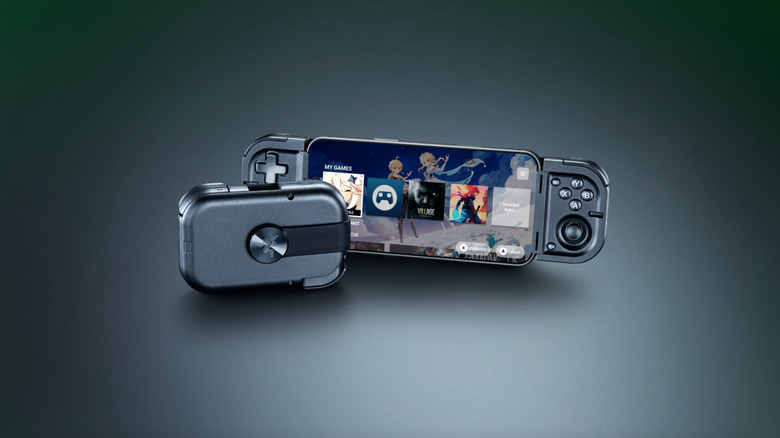
This flip-style gamepad, designed for Android and iOS (officially supported by Apple) mobile devices, is palm-sized for ultra-portability. Coming to CES 2026, the microcontroller will be officially available in the summer of 2026. There is no word on the release date, nor are there many details, but we’ll share what’s available of this retro-forward accessory that looks inspired by the Game Boy DMG color theme.

Designer: 8BitDo

Called the FlipPad, this portrait orientation controller is a good option to have along with your standard mobile controllers that operate in landscape orientation. I can very well imagine playing White Out Survival, Vampire Survivors, Road to Valore: Empires, Subway Surfers, and other mobile games using the compact controller. The USB-C accessory has 12 face buttons and a D-Pad, which should be good enough for portrait games, as they generally don’t demand the shoulder trigger buttons as input.

I know most of your mobile gamers will be looking to use the controller for emulators, especially titles that have an on-screen gamepad similar to this. The flip-style controller is designed in a way that it can overlay over the on-screen keyboard for maximum ergonomic comfort. That’s the reason the controller is compatible with most third-party applications and emulators like the Delta Emulator. I presume the controller will come with an in-built rechargeable battery and lack Bluetooth connectivity since it plugs directly into your smartphone via the USB-C port.

For games that are natively portrait-oriented and take up the complete screen, the FlipPad will contract the screen size to accommodate the overlaying gamepad section. It’s more like a physical controller to have the tactile input of the buttons rather than fiddling around with the on-screen buttons.

The post 8BitDo FlipPad controller for enjoying portrait games on Android and iOS first appeared on Yanko Design.

MCON Slim Hands-on at CES 2026: The Ultra‑Thin MagSafe Controller That Turns Your iPhone Into a Gaming Console

Last year, Ohsnap debuted the MCON controller on Kickstarter and nearly broke the website. Over 16,000 people pledged almost $2 million to make the product a reality, and not only did the company ship every single MCON out to every backer, they casually came back to CES this year with not one, but TWO more versions of the device. The more impressive of the two is the MCON Slim, a controller that’s nearly as thin as your standard smartphone, packing in an entire gaming controller (along with trigger buttons) into that ridiculously small form factor.

Designed by 21 year-old Josh King, the MCON Slim is clearly his magnum opus. The youngster (incubated by Dale Backus’ Ohsnap) mentioned how the smartphone was such a powerful device, but all we ever use it for is doomscrolling and emails. The MCON was supposed to prove to the world that the smartphone can be an incredible handheld gaming device, comparable to the Razer Switchblade or even dare I say the Nintendo Switch. Now, the MCON Slim cements that idea even further. Imagine a device, the thickness of a MagSafe power bank), capable of turning your iPhone into the next best gaming console.

Designer: Josh King (Ohsnap)

If you’ve seen the MCON before, think of the Slim as the iPhone Air of gaming controllers. It’s ridiculously sleek, snapping to the back of your phone and literally absorbing your iPhone’s camera bump into it. When shut, it’s still slim enough to slide right into your pocket without you feeling a thing. However, when you’re craving some serious gaming, slide the controller out and you’ve got a makeshift handheld console in mere seconds, with an actual D-Pad, action buttons, two touch-sensitive joypads, and even trigger buttons on the back.

Before you get your hopes up, the MCON Slim is still in its ‘proof of concept’ stage, and won’t launch anytime soon. Josh mentions they’ll probably roll the Slim out in time for the iPhone 18… which works just fine given that I plan on upgrading my iPhone just around that time! The design, however, is beyond impressive. The sliding interaction is flawless, even though the Ohsnap team miniaturized practically everything. The trigger buttons have actual movement, with nearly 3mm of travel. And the best part, the MCON Slim plays nice with the iPhone’s camera module (unlike past versions). A gorgeous fidget-spinner-shaped cutout lets you use the iPhone’s camera even with the Slim controller attached to the back of your phone. Heck, even the flashlight is accessible, which means your gaming console, ahem, smartphone has zero compromises.

And the best part is that the controller slides right out of the dock, turning your phone into a Nintendo Switch of sorts. The connection is all via Bluetooth, which means you can place your phone on a table a few feet away from you while you game with the detached controller in your hands. The slimness results in just two sacrifices – firstly, those pop-out grips from the original MCON don’t make it to this device. And to be honest, I don’t miss them at all. Secondly, the joypads go from physically moving controls to touch-sensitive ones… something that most casual gamers should be fine with. For the pedantic ones, the original MCON (and the upcoming MCON Lite) offers a perfect alternative.

The sad part here is that there’s absolutely no tech spec to talk about. The MCON Slim is entirely a work in progress right now, which means design details, battery life, pricing, everything is subject to change. However, Josh did mention that the MCON Slim should arrive around the same time as the iPhone 18, or in other words – we’ll probably get the MCON Slim before we get GTA VI.

The post MCON Slim Hands-on at CES 2026: The Ultra‑Thin MagSafe Controller That Turns Your iPhone Into a Gaming Console first appeared on Yanko Design.

Acer AMD Ryzen Laptops Bring AI Across Three Very Different Days

AMD’s Ryzen AI 400-series chips are showing up in laptops people might actually carry every day. Acer is rolling them out across three very different lines, thin-and-light, mainstream, and gaming, and all of them are Copilot+ PCs with NPUs built for on-device AI. Built on the Zen 5 architecture, these processors aim to enhance productivity and creative work without constantly leaning on the cloud or draining the battery by lunchtime.

The lineup splits into three personalities. Swift Go 16 AI is built for people who live out of a backpack. Aspire 14 and 16 AI are for students and young professionals who need one machine to do everything. Last but not least, Nitro V 16 AI is for gamers who still have to write essays or edit videos when the match ends. The interesting part is how Acer uses the same AMD Ryzen AI 400-series foundation to make three very different days feel smoother.

Designer: Acer

Acer Swift Go 16 AI

Swift Go 16 AI is the laptop that spends its time in cafés and lecture halls. It runs up to an AMD Ryzen AI 9 465 processor with Radeon 880M graphics, up to 32 GB of LPDDR5X memory, and up to 1 TB of PCIe Gen 4 SSD storage. That headroom handles a dozen tabs, a video call, and a Copilot window without the fans screaming, and it all lives in a laser-etched aluminum chassis that opens a full 180 degrees.

Display options range from 16-inch 16:10 WUXGA IPS to WUXGA+ OLED with 100 % DCI-P3 and up to 400 nits, so spreadsheets and color-sensitive work both look right. A 5 MP IR camera with HDR and Human Presence Detection makes video calls less painful, while DTS:X Ultra speakers and a multi-control touchpad handle audio and gestures. Wi-Fi 7, Bluetooth 5.4, dual USB-C, dual USB-A, HDMI 2.1, and MicroSD mean you stop hunting for dongles.

Acer Aspire 14 AI and Aspire 16 AI

Acer Aspire 14 AI

The Aspire 14 AI and Aspire 16 AI are the laptops that bounce between classes, offices, and kitchen tables. Both use WUXGA 1920 × 1200 16:10 displays with refresh rates up to 120 Hz, with touch, non-touch, and OLED options. The 16-inch model can be configured with up to an AMD Ryzen AI 9 465 and Radeon 880M graphics, while the 14-inch tops out at a Ryzen AI 7 445 and Radeon 840M, both with up to 32 GB of LPDDR5X and 1 TB of PCIe Gen 4 SSD storage.

Acer Aspire 16 AI

Full-flat 180-degree hinges and large touchpads make it easy to share a screen or navigate long documents. Both sizes include 1080p FHD IR webcams with privacy shutters, DTS Audio dual speakers, and triple-mic arrays, plus Wi-Fi 6E and Bluetooth 5.3. Two USB-C, two USB-A, HDMI 2.1, a MicroSD card reader, and an audio jack cover most scenarios without extra gear. Acer’s AI layer, Intelligent Space, AcerSense, PurifiedView, PurifiedVoice, and My Key, sits on top of Copilot+ to make translation, noise reduction, and quick shortcuts feel like part of the machine.

Acer Nitro V 16 AI

Nitro V 16 AI is the AMD-powered gaming laptop that still has to behave like a normal computer when the game is closed. It pairs up to an AMD Ryzen AI 9 465 processor with up to an NVIDIA GeForce RTX 5070 Laptop GPU, backed by up to 32 GB of DDR5 memory and up to 2 TB of PCIe M.2 NVMe SSD storage. That combination is built for high-refresh shooters and GPU-accelerated creative work, not just casual titles.

The 16-inch 16:10 WUXGA 1920 × 1200 panel runs at 180 Hz with 100 % sRGB and a MUX switch, so you can flip between power-saving hybrid mode and direct GPU mode when you care about every frame. Dual-fan, dual-intake, dual-exhaust cooling keeps the chassis under control, while DTS:X Ultra audio, a 4-zone RGB keyboard, and an FHD IR webcam with a shutter handle the rest of the experience. Wi-Fi 6E, Bluetooth 5.4, USB 4 Type-C, three USB-A ports, HDMI 2.1, RJ-45, and a Kensington lock round it out, and Acer’s Intelligent Space and NitroSense give you knobs to tune performance and AI-assisted features without digging through control panels.

Acer and AMD at CES 2026: Three Laptops, One AI Backbone

Swift Go 16 AI is the thin-and-light that leans on OLED and Wi-Fi 7 for people who work wherever they can find a table. Aspire 14 and 16 AI are the everyday machines that quietly stretch multi-day battery life and 16:10 high-refresh screens across school, work, and home. Nitro V 16 AI is the gaming rig that still has to write essays and render timelines. Underneath, they all share AMD’s Ryzen AI 400-series processors, Copilot+ PC status, and Acer’s own AI tools, which is the real CES 2026 story here, AI moving from a single button on the keyboard into the way the whole laptop is specced and shaped.

The post Acer AMD Ryzen Laptops Bring AI Across Three Very Different Days first appeared on Yanko Design.

ROG’s CES 2026 Flagships Rethink What a Gaming Machine Looks Like

Gaming laptops have settled into a comfortable rhythm. A 16-inch clamshell, an RGB keyboard, a high-refresh panel, and a GPU that fits into a backpack. Most people buy them, use them, and expect roughly the same experience from every generation. ROG’s CES 2026 lineup arrives at a moment when AI hardware, OLED panels, and new hinge engineering are all maturing at once, and the company seems very interested in experimenting with what that makes possible.

ROG’s most interesting products are not just faster versions of last year’s machines. The Zephyrus Duo GX651 stretches the idea of a laptop into a dual-screen workstation with five operating modes, while the Flow Z13-KJP shrinks a gaming PC into a tablet-sized slab with enough unified memory and NPU power to run a 70-billion-parameter language model on a train. Supporting them are the refreshed Zephyrus G14 and G16 ultraportables and the holographic ROG G1000 desktop.

Designer: ASUS Republic of Gamers (ROG)

ROG Zephyrus Duo GX651

The Duo is the laptop for people who never have enough screen space. Both the main and secondary panels are 16-inch 3K ROG Nebula HDR OLED touchscreens running at 120 Hz with 0.2 ms response times, 100% DCI-P3, and ΔE < 1 color accuracy. In practice, that means a game or timeline can live on the top screen while chat, mixer controls, or reference material sit on the lower one, without feeling like a cramped compromise.

The 320-degree hinge and kickstand let the Duo shift between five operating modes, from traditional clamshell to dual-screen desktop, presentation stand, or drawing surface. A full-size wireless keyboard and touchpad can move off the chassis entirely, so you can push the screens closer and treat the machine like a tiny dual-monitor rig on a hotel desk or studio table. It is a laptop that behaves more like a modular workstation than a fixed shape.

ROG packs up to an Intel Core Ultra processor and an NVIDIA GeForce RTX 5090 Laptop GPU, up to 64 GB of LPDDR5X memory, and up to 2 TB of PCIe Gen 5 SSD storage into a chassis that measures 0.77 in thick and weighs about 6.28 lb. ROG Intelligent Cooling uses liquid metal, a vapor chamber, dual fans, and a dedicated graphite sheet for the second display to keep both panels and the chassis comfortable during long sessions.

ROG Flow Z13-KJP

The Flow Z13-KJP is a 13.4-inch 2-in-1 that leans into AI as much as gaming. It runs an AMD Ryzen AI Max+ 395 with Radeon 8060S graphics and a 50 TOPS NPU, paired with up to 128 GB of LPDDR5X unified memory at 8,000 MT/s. ROG explicitly says that the combination can run a 70-billion-parameter LLM locally, which is a very different pitch from “this tablet can play your favorite games.”

The Z13-KJP uses a 16:10 QHD Nebula display at 180 Hz with 500 nits brightness and 100% DCI-P3, protected by Gorilla Glass DXC. The chassis mixes aluminum with real carbon fiber on the back, weighs about 1.75 kg, and measures 14.6 mm thick. ROG Intelligent Cooling with liquid metal, a vapor chamber, and second-generation Arc Flow fans keeps the Ryzen AI chip and integrated graphics from throttling when running AI workloads or games.

The Kojima Productions collaboration is more than a paint job. Designed by Yoji Shinkawa and inspired by Ludens, the Flow Z13-KJP ships with custom Armoury Crate themes and wallpapers, plus matching peripherals like the Delta II-KJP headset and Keris II Origin-KJP mouse. The detachable RGB keyboard cover with 1.7 mm travel and built-in kickstand let it flip between console-style play, creator tablet, workstation, or ultraportable laptop, treating gaming, creation, and AI experimentation as different moods rather than separate devices.

ROG Zephyrus G14 and G16

ROG Zephyrus G14

The Zephyrus G14 and G16 are the ultra-slim siblings that round out the laptop story. The G14 uses a 14-inch 3K Nebula HDR OLED at 120 Hz, weighs 1.5 kg, and measures 1.59 cm thick, while the G16 offers a 16-inch 2.5K Nebula HDR OLED at 240 Hz, weighs 1.85 kg, and measures 1.49 cm thick. Both can be configured with Intel Core Ultra processors, up to RTX 5080 or RTX 5090 Laptop GPUs, and Copilot+ PC certification.

ROG Zephyrus G16

The Slash Lighting array on the lid, upgraded from seven zones to 35, gives both machines a more refined aesthetic, while the CNC-aluminum chassis, liquid metal thermal compound, and six-speaker audio systems with dual woofers keep them firmly in the premium tier. They are the machines for people who want serious gaming and creative horsepower but still need something that can slip into a backpack for travel and daily use without feeling like a compromise.

ROG G1000 Desktop

The ROG G1000 is the desktop counterpart, a 104 L ATX ultra-tower built to be seen as much as used. At its core, the built-in AniMe Holo fan is the world’s first holographic fan system in a prebuilt gaming PC, projecting customizable holographic visuals through the front panel. The fan sits in an independent chamber with a hinge-door design, so the airflow does not interfere with the main components, and system noise stays low.

The ROG Thermal Atrium, dedicated to CPU cooling, channels fresh air through a 420 mm AIO liquid cooler with three fans and isolated airflow paths. Equipped with up to AMD Ryzen 9 9950X3D and ROG Astral GeForce RTX 5090 or AMD Radeon 9070XT GPUs, up to 128 GB DDR5 memory with AEMP II, and up to 4 TB PCIe 5.0 SSD storage, the G1000 is tuned and ready for peak performance from day one. Quick control keys on the chassis, extensive Armoury Crate and Aura Sync lighting control, and easy tool-less access for upgrades make it a desktop that earns its showpiece status by actually being usable as a daily driver.

ROG at CES 2026: Form Factors for the Next Decade

The Zephyrus Duo and Flow Z13-KJP are two answers to the same question: what does a gaming machine look like when AI, OLED, and new hinges are all on the table? The Duo stretches the laptop into a dual-screen studio that can sit at the center of a desk, while the Flow Z13-KJP compresses a Copilot+-class PC into a tablet that can run massive models on the go. For Yanko Design readers, the interesting part is not just the jump to RTX 5090 or 50 TOPS NPUs, but the way those specs are being used to justify new shapes, new workflows, and new ways of thinking about what a gaming laptop or tablet can be when you stop assuming it has to look like every other machine released in the past decade.

The post ROG’s CES 2026 Flagships Rethink What a Gaming Machine Looks Like first appeared on Yanko Design.

Acer Gaming Stack Cuts Ping With Wi-Fi 7 and RTX 50 at CES 2026

This year’s CES might finally be the time when gaming laptops and accessories start to look different because of AI and connectivity, not just because of higher model numbers. Intel Core Ultra Series 3 processors, NVIDIA RTX 50-series GPUs, and Wi-Fi 7 are all arriving at once, and the question for gamers is less “how fast is the GPU?” and more “how does the whole setup feel when you sit down to play or stream?”

Acer’s answer is a full stack. The Predator Helios Neo 16S AI sits at the top as the OLED flagship, with two new Nitro V 16 AI models for casual or mobile players, a Predator 5G CPE, and mesh routers to keep latency down, and a headset and mouse that plug into the same software layer. The story is about how these pieces fit together into a gaming environment rather than just another hero laptop announcement.

Designer: Acer

Predator Helios Neo 16S AI

The Helios Neo 16S AI is the machine for people who want to carry a small desktop replacement. It can be configured with up to an Intel Core Ultra 9 386H and an NVIDIA GeForce RTX 5070 Laptop GPU, part of the new RTX 50-series built on NVIDIA’s Blackwell architecture. Pair that with up to 64 GB of DDR5-6400 memory and 2 TB of PCIe NVMe SSD storage, and you have a laptop that handles modern games and creative workloads without feeling like a compromise.

The 16-inch WQXGA OLED panel runs at 2560 × 1600 with a 165 Hz refresh rate, 1 ms response time, HDR support, and 100 % DCI-P3 color. That combination makes a difference in dark sci-fi scenes and bright spell effects, where IPS panels usually wash out. Cooling is handled by a 5th-generation AeroBlade 3D metal fan and liquid-metal thermal grease, which is important when you pack that much CPU and GPU into an 18.9 mm-thick metal chassis.

Intel Killer DoubleShot Pro Wi-Fi 6E, Thunderbolt 4, HDMI 2.1, and a MicroSD reader make it easy to plug into fast networks and external displays. As a Copilot+ PC, the Helios Neo 16S AI can run AI-assisted features like Live Captions for in-game voice chat or real-time translation, and Acer’s Intelligence Space and PredatorSense software sit on top to tune performance and surface AI tools for both gaming and content creation, turning the NPU into something that actually does useful work.

Nitro V 16 AI and Nitro V 16S AI

Acer Nitro V 16 AI ANV16-i51

The Nitro V 16 AI and Nitro V 16S AI share a lot under the hood, up to an Intel Core Ultra 7 355 and RTX 5070 Laptop GPU, with up to 32 GB of DDR5 and 2 TB of SSD storage. The standard Nitro V 16 AI uses a 16-inch WUXGA 1920 × 1200 panel at 180 Hz with 100 % sRGB and a MUX switch, giving casual players and creators a smooth, color-accurate screen without jumping to OLED pricing.

Acer Nitro V 16S AI ANV16-i51

The Nitro V 16S AI keeps the same display and core specs but trims the chassis to under 17.9 mm at its thickest point, making it easier to slide into a backpack for LAN nights or travel. Both include 4-zone RGB keyboards, DTS:X Ultra audio, Intel Killer Wi-Fi 6E, FHD IR webcams with shutters, NitroSense, and Acer Intelligence Space for performance tuning and AI-assisted features. They are the machines for people who want serious hardware that still feels approachable, portable, and not covered in aggressive gamer styling.

Predator Connect X7S and Acer Connect Ovia / M4D

The network layer matters as much as the laptop. The Predator Connect X7S 5G CPE is a tower that combines 5G mobile broadband with Wi-Fi 7 tri-band, supporting 5G downlink speeds up to 4.67 Gbps and Wi-Fi 7 throughput up to 5,764 Mbps. Multi-Link Operation and Hybrid QoS tie into Intel’s Killer Prioritization Engine, so a gaming laptop can stay responsive even when the rest of the house is streaming or downloading, which matters more than raw bandwidth when you are trying to keep ping stable.

The Acer Connect Ovia T360 and T520 mesh routers bring Wi-Fi 7 into apartments and larger homes, with dual-band and tri-band options and per-node coverage up to 90 m² and 110 m². They support MLO, WPA3, and are managed through the Acer Connect app. For people who game or work on the road, the Acer Connect M4D 5G Mobile Wi-Fi acts as a portable hotspot with dual-band Wi-Fi 6 for up to 16 devices, 15-hour battery life, and a dock that turns it into a tiny home router when you get back.

Predator Galea 570 and Cestus 530

The Predator Galea 570 is the headset that plugs into this ecosystem. It uses 50 mm drivers with a 20 Hz–20 kHz response and Environmental Noise Cancellation on both the detachable boom mic and built-in mic, so team chat stays clear even in noisy rooms. Triple-mode connectivity, 2.4 GHz wireless, Bluetooth 5.4, and wired, plus up to 30 hours of battery life in Bluetooth mode, make it a headset that moves between PC, console, and mobile without constant re-pairing.

The Predator Cestus 530 gaming mouse uses a PixArt PAW3395 sensor with up to 26,000 DPI, 650 IPS tracking, and an 8,000 Hz polling rate in wired and 2.4 GHz modes. Seven programmable buttons rated for 80 million clicks and a 500 mAh battery sit under a 105 g shell, with Predator QuarterMaster software and Windows Dynamic Lighting handling tuning and RGB. Together, the headset and mouse complete the desk without adding friction, connecting the same way the laptop does and tuning through the same software layer.

Acer at CES 2026: A Gaming Stack Built for AI and Always-On Connectivity

The Predator Helios Neo 16S AI and Nitro V 16 AI duo handle the heavy lifting with RTX 50-series GPUs and Copilot+ PCs that treat AI as part of the experience, not a bolt-on. The Predator Connect X7S, Ovia mesh, and M4D hotspot keep those machines fed with low-latency connections, while the Galea 570 and Cestus 530 round out the desk with audio and input that match the same design language. The CES 2026 message is that Acer is not just launching another gaming laptop; it is sketching out what a complete, AI-aware gaming environment looks like when you consider the network, the peripherals, and the way people actually move between rooms and networks during a typical day of play.

The post Acer Gaming Stack Cuts Ping With Wi-Fi 7 and RTX 50 at CES 2026 first appeared on Yanko Design.

Gamesir Swift Drive controller has force feedback steering wheel for ultimate racing fun

GameSir doesn’t shy away from experimenting with new designs and functionality for its controllers to enhance the experience for mobile gamers. Tarantula Pro with swappable face button labels is a good example. For gamers like me who fancy the odd gaming session on my G8 Plus, playing the AAA racing titles like Grid Legends is stress-busting. I prefer a compact setup for my mobile gaming needs, and investing in a full-blown gaming simulator or desk-mounted setup is not feasible.

The next logical upgrade is a mobile controller that gives me more than just the joysticks and buttons. Set to reveal at CES 2026, the GameSir Swift Drive controller is exactly what racing fanatics like me wished for. The hybrid controller features a miniature direct-drive steering wheel positioned in the center, delivering force feedback and 1080-degree rotation for immersive racing game action.

Designer: Gamesir

For racing sim fans, the quandary has always been to either choose a portable setup, or go for more detailed but bulky setups. This gamepad hits the sweet spot for casual gamers like me who always wanted something that’s compact. GameSir has to be applauded for fitting the world’s smallest direct-drive motor on the gamepad for physical resistance and road texture when turning the wheel. A thumbstick that moves laterally simply cannot achieve this level of realism. The controller’s unique wheel can be adjusted for rotation ranging from 30 degrees to 1080 degrees, and has a high-precision Hall Effect encoder that has 65,000 levels of steering control resolution. Meaning, you can feel the fast-paced turning of a Formula-1 car, or experience the heavier input of driving a truck simulator.

If that’s not enough, GameSir has included haptic motors in the triggers for gamers to feel the nuances of ABS braking or the vibration when tires lose grip on a tight chicane. You can toggle between XInput and DInput modes so that you can either play on the controller as a standard gamepad or a dedicated steering wheel. The RGB lights on top simulate the current in-game RPMs, which should help advanced gamers trigger gear shifts perfectly. The controller will connect via a 2.5GHz low-latency wireless option and have an estimated battery life of 20 to 30 hours, depending on the force feedback options in use. Without these advanced inputs, the controller lasts for 50 hours.

Swift Drive controller is going to be priced at around $150, and if it delivers what is being promised, that amount is worth every penny. Carrying an extensive gaming setup in your backpack is not something that every gaming accessory maker can brag about. Along with the Swift Drive gamepad, GameSir will also reveal the Turbo Drive yoke-style steering wheel and pedals. The rig will have a built-in turbine fan to simulate the airflow for the sensation of speed in-game.

The post Gamesir Swift Drive controller has force feedback steering wheel for ultimate racing fun first appeared on Yanko Design.

This LEGO Portal 2 Set Lets You Design/Build Your Own Test Chambers With 1,280 Pieces

The Portal franchise has earned its place in gaming history through ingenious puzzle design, dark humor, and an aesthetic so iconic that a simple orange and blue color scheme instantly evokes the Aperture Science testing facility. Now, LEGO builder KaijuBuilds has translated that sterile-yet-sinister world into brick form with the Portal 2: Test Chamber Creator, a project currently seeking support on LEGO Ideas.

The set features a sophisticated modular tile system with 18 unique configurations across 29 total modules, allowing builders to reconstruct famous test chambers or design entirely new challenges. With around 1,280 pieces, the build includes Chell, Wheatley, Atlas, P-body, turrets, portals, a Companion Cube, and even that infamous cake. The attention to detail extends to overgrown tiles that reference Portal 2’s decayed facility sections, complete with a white rat as a nod to the mysterious Rattman. The modular approach mirrors the in-game test chamber editor, which means you can actually play with spatial configurations rather than building a single frozen scene.

Designer: KaijuBuilds

The Aperture Science facility aesthetic translates surprisingly well to LEGO’s design language because both share a love of modular systems and clean geometric forms. Portal works on minimalist white panels, colored power conduits, and spatial reasoning. This build captures that by making reconfigurability the core feature. Tiles come in different sizes (8×8, 4×4, 4×8) and snap onto an orange base with visible connection points. Some tiles show pristine testing surfaces while others feature vegetation breaking through panels, directly referencing Portal 2’s narrative about a facility decaying over decades. The observation windows sit where GLaDOS would watch test subjects fail, and those structural details do heavy lifting in establishing atmosphere.

The character roster features all the iconic beings and bots and whatnots. Chell appears in her orange jumpsuit with the Aperture Science tank top. Wheatley exists as a buildable personality core with his blue eye. Atlas and P-body (the co-op robots from Portal 2) demonstrate awareness that the franchise extends beyond Chell’s story. The turrets manage to look simultaneously adorable and threatening with their white chassis, red sensors, and antenna stems. Two portal pieces come in translucent orange and blue, likely using curved or printed elements to create those characteristic oval shapes. The portal gun sits in Chell’s hands, completing the loadout any fan would expect.

Those 18 unique tile types across 29 modules provide enough variety to build compact chambers or combine everything into larger, more complex puzzles. Some tiles feature orange and blue power line conduits that connect mechanisms in the actual game. Dark grey tiles break up monotonous white surfaces. Button tiles, overgrown sections, observation windows, and the Heavy Duty Super-Colliding Super Button all serve gameplay purposes Portal fans recognize immediately. The structure uses long and short connectors with technic pins and 2L axles to hold everything together, which should make reconfiguration reasonably straightforward without constant collapse during redesign sessions. The orange base with its studded connection points does the critical work of making the whole modular system functional rather than theoretical.

The functional elements push this past display territory into actual play value. The Companion Cube dropper holds and releases cubes, mimicking those ceiling-mounted dispensers from the game. The aerial faith plate triggers manually to launch minifigures upward. A tilting elevated platform angles in different directions for variable chamber layouts. The door swings open for chamber entrances and exits. These mechanisms aren’t revolutionary in LEGO terms, but they’re deployed strategically to recreate specific Portal gameplay moments. The laser grid uses red transparent pieces across a 3×6 area. It won’t vaporize minifigs, but it provides the visual language of hazards you’d design chambers around. The deadly goo gets two 8×8 tiles in translucent orange, which is the correct color unlike some fan builds that use green acid from generic video game conventions.

There’s even a cake hidden somewhere because at this point it’s mandatory for Portal merchandise. The cultural penetration of “the cake is a lie” has been both blessing and curse for the franchise, but you can’t release Portal LEGO without acknowledging it. The white rat perched on structural pillars references Doug Rattmann, the Aperture scientist who left cryptic murals throughout the facility. That’s a deeper cut than casual fans would catch. The test chamber sign displays “25” along with hazard pictograms, grounding the build in Aperture Science’s obsessive signage culture. The facility loved warning test subjects about dangers they couldn’t avoid. Small crows appear on the pillars too, adding those environmental details that make the difference between a good build and one that captures a world.

Portal maintains relevance fifteen years after its 2007 release through memorable writing, innovative mechanics, and an aesthetic that spawned endless memes. GLaDOS remains one of gaming’s most iconic antagonists. “Still Alive” transcended the game to become a cultural touchstone. The orange and blue portal color scheme is instantly recognizable across demographics. Portal 2 expanded the universe in 2011 with co-op gameplay, more complex puzzles, and deeper lore about Aperture Science’s history. The games influenced puzzle design across the industry and demonstrated that shorter, tightly designed experiences could compete with sprawling open-world titles. That legacy makes Portal a strong candidate for LEGO treatment, especially given LEGO’s existing relationship with video game properties and Valve’s general receptiveness to licensed products.

LEGO Ideas operates as a platform where fans submit designs for potential official sets. Projects reaching 10,000 supporters enter review, where LEGO evaluates production feasibility, licensing complexity, and market viability. The Portal 2: Test Chamber Creator sits at roughly 1,700 supporters with 543 days remaining. Voting requires a free LEGO Ideas account and takes about thirty seconds (you can cast your vote here). Reaching 10,000 votes doesn’t guarantee production since LEGO considers factors beyond popularity (licensing negotiations with Valve, manufacturing costs, retail strategy), but fan support gets projects in front of decision-makers. LEGO has produced gaming sets before, from Minecraft to various Nintendo properties. Portal’s enduring cultural presence and Valve’s track record with merchandise partnerships suggest this build has legitimate production potential if it clears the voting threshold.

The post This LEGO Portal 2 Set Lets You Design/Build Your Own Test Chambers With 1,280 Pieces first appeared on Yanko Design.

ONEXSUGAR Wallet Gaming Handheld Looks Like a Clutch When Closed

Most gaming handhelds today, from Steam Deck to ROG Ally, are big, loud slabs that look like shrunken consoles. They are great for playing, less great for slipping into a bag without announcing themselves. The category has settled into a familiar silhouette, thick bezels, and aggressive angles that scream gaming from across the room. ONEXSUGAR’s Wallet asks what happens if a handheld tries to look more like something you would quietly carry every day.

The ONEXSUGAR Wallet is a foldable-screen gaming handheld that, when closed, looks like an oversized wallet or clutch, a long, rounded rectangle with almost no visible tech. The name comes from this closed state, where it reads more like a personal object than a console. You can hold or pocket it without broadcasting that you are carrying a gaming PC, treating discretion as a core part of the design rather than an afterthought.

Designer: One-Netbook (via ITHome)

The Wallet uses a clamshell design with a flexible display inside. When you open it, the screen unfolds into a single large canvas, one continuous display bending at the hinge like a foldable phone scaled up to handheld size. That lets ONEXSUGAR keep the closed footprint small while giving games and media more room to breathe when you flip it open, reconciling portability with a genuinely usable screen.

Once open, the Wallet reveals a familiar handheld layout, a central screen flanked by controls on the left and right. Each side has an analog stick, a D-pad or face buttons, and additional inputs and speaker grilles. The controls are baked into the chassis, not detachable, so the whole thing feels like a single, unified object rather than a tablet with clip-on gamepads, which should help with rigidity and ergonomics.

The aesthetic language leans soft and minimal, with heavily rounded corners, smooth surfaces, and almost no branding. Early shots show at least white and dark grey versions, with small gold accents and a subtle logo. It looks more like lifestyle tech than aggressive gamer gear, the kind of device that would not look out of place next to a phone and earbuds on a table, which is an unusual stance for a gaming product.

The wallet-like shape and clamshell closure change the relationship between device and user. Closed, it protects the screen and hides the controls, making it easier to toss into a bag or carry in hand without worrying about sticks catching or buttons being pressed. Opened, and it becomes a full-fledged handheld. That duality could make it more practical for people who want serious gaming hardware that does not dominate their everyday carry.

The ONEXSUGAR Wallet hints at a future where foldable screens reconcile big displays with discreet objects, and where handhelds borrow cues from wallets and clutches instead of only from consoles. It is still a tease rather than a shipping product, but as a piece of industrial design thinking, it suggests that gaming hardware can afford to be softer, quieter, and a bit more playful about how it shows up in the world.

The post ONEXSUGAR Wallet Gaming Handheld Looks Like a Clutch When Closed first appeared on Yanko Design.

SN Operator Brings the Cartridge Ritual to Steam Deck and PCs

Retro gaming has mostly split into two camps: ROMs and emulators on one side, original cartridges and aging consoles on the other. A lot of people have boxes of SNES games they love, but end up playing downloaded copies on a laptop because it is easier. The Epilogue SN Operator tries to bring those physical carts back into the loop without dragging a CRT out of storage or rewiring your living room.

The SN Operator is a transparent dock that adds a Super Nintendo or Super Famicom slot to a computer or handheld over USB-C. You plug it into a Windows, macOS, Linux machine, or a Steam Deck, drop in a cartridge, and play through Epilogue’s Playback app or your emulator of choice. It behaves like a cartridge slot for your computer, not a black-box ripper, keeping the ritual of inserting a physical cart alive.

Designer: Epilogue

The Playback app handles the heavy lifting, running an in-app emulator that keeps saves synchronized between devices, supports co-op play, modern controllers, cheats, and integrates with RetroAchievements. You are playing from the original cartridge with your own save file, but you get achievements, soft reset, and fast forward layered on top. That turns a 30-year-old game into something that fits a 2025 setup without losing the tactile connection.

The handheld angle is where the SN Operator starts to feel unexpectedly useful. It plugs into a Steam Deck or similar device and effectively turns it into a portable Super Nintendo with a real cartridge slot. Setup is simple: install Playback, connect via USB-C, and you are playing carts on the couch or on a train. Saves stay in sync with your desktop, so you can bounce between screens without juggling files.

The preservation side lets you back up game data and save files from cartridges in a couple of clicks, archiving them on your computer before backup batteries die. Epilogue frames this as keeping titles and personal progress alive for decades, not as a piracy tool. The device is meant for legally owned cartridges and personal, non-commercial use, with no game ROMs included, and it protects cartridge integrity during reads.

Counterfeit detection analyzes cartridge data to help you spot bootlegs in a market where fakes are getting harder to identify by eye. It is not perfect, and results are informational only, but for collectors spending serious money on rare carts, having a hardware tool that can flag suspicious boards is useful on top of the play and backup functions, helping you know exactly what you are putting on the shelf.

The transparent design feels right for this niche. A clear polycarbonate shell shows off the PCB and connector, with dust flaps keeping things clean. Transparent tech is a staple of 1990s gaming, and SN Operator leans into that nostalgia without feeling kitschy. It is a piece of hardware you want on the desk, a little window into the circuitry that is quietly keeping your Super Nintendo library alive on modern machines, whether you plug it into a tower or a handheld.

The post SN Operator Brings the Cartridge Ritual to Steam Deck and PCs first appeared on Yanko Design.