UGREEN built an AI Recorder into its 10,000mAh Power Bank and I don’t know if that’s genius or crazy…

Representational Image

At CES 2026, where every tech company seemed legally obligated to add AI to something, Ugreen announced a power bank with voice recording. The MagFlow AI Voice Recording Magnetic Power Bank packs 10,000 mAh, wireless charging, and AI-powered note-taking into one device. It’s either brilliantly practical or completely unnecessary, depending on how often you find yourself needing both a dead phone and a voice memo at the exact same moment.

The real question is what market Ugreen’s actually targeting. Dedicated AI recorders like Plaud and Limitless offer superior transcription and integration with productivity tools. Meanwhile, power bank buyers are mostly obsessed with capacity, charging speed, and MagSafe compatibility. Ugreen’s product sits awkwardly between these worlds, somehow simultaneously targeting both the serious note-taker as well as the charging purist. Maybe that’s the genius: creating a category where none existed, or maybe it’s just feature creep with good intentions.

Designer: Ugreen

Representational Image

You’ve got 10,000 mAh, which is respectable but standard for MagSafe-compatible power banks in 2026. Wireless charging is included, though the company hasn’t confirmed whether there’s a USB-C port for wired fast charging. A digital display shows battery level and presumably real-time charging stats. Then there’s the voice recording hardware with built-in AI for translation and summarization, which sounds impressive until you realize Ugreen hasn’t explained how you’ll actually access these recordings. Is there an app? Does it sync to your phone? Do you have to plug it into a computer and dig through files like it’s 2015?

Representational Image

Compare this to something like the Plaud NotePin, which costs around $169 and is purpose-built for recording. It connects seamlessly to your phone, transcribes in real time, integrates with LLMs like ChatGPT for summaries, and weighs practically nothing. Or look at the power bank side of things. Ugreen’s own Qi2 25W MagFlow Power Bank retails for $89.99 (currently $69.99 on Amazon) and does one thing exceptionally well: charges your devices fast. This new AI version will almost certainly cost more, probably around $120 to $150 if I had to guess, which puts it in direct competition with premium power banks that offer higher capacity or faster charging speeds. Not to mention most AI services do come with the looming threat of a subscription fee at some point. Imagine subscribing to a power bank…

Jokes aside, the bundling makes sense if you’re the kind of person who carries too much stuff and wants to consolidate. A journalist running between interviews could theoretically use this to charge their phone while recording background audio for articles. Students might appreciate having one device that keeps their laptop alive during lectures while capturing notes they can summarize later. But these use cases feel niche, and niche products need exceptional execution to justify their existence. Ugreen hasn’t shown us that yet. The company has a solid track record with GaN charging technology and their NASync NAS series crushed it on Kickstarter with $6.6 million raised. They know how to build hardware. Whether they can build software that makes voice recording feel natural on a battery pack is the real test.

The post UGREEN built an AI Recorder into its 10,000mAh Power Bank and I don’t know if that’s genius or crazy… first appeared on Yanko Design.

DuRoBo Krono Brings an AI-Powered Pocket ePaper Focus Hub to the US

Trying to read or think on a phone never quite works. Notifications interrupt articles halfway through, feeds wait one swipe away from whatever you were concentrating on, and even long reads become just another tab competing for attention. E‑readers tried to solve this, but most stopped at books and stayed locked into one ecosystem. DuRoBo, a Dutch e‑paper specialist, is bringing Krono to CES 2026 in Las Vegas with a different ambition, treating focus, reflection, and idea capture as equally important.

Krono is a pocket‑sized smart ePaper focus hub that has made waves in Europe and is now entering the US market. It wraps a 6.13‑inch E Ink Carta 1200 display with 300 PPI clarity into a minimalist, mechanical‑inspired body that measures 154 × 80 × 9 mm and weighs about 173 g. It is for capturing and shaping thoughts with on‑device AI, ambient audio, and a Smart Dial that feels more tactile than tapping glass.

Designer: DuRoBo

The paper‑like screen, anti‑glare etching, and dual‑tone frontlight make it comfortable for long reads, whether books, saved articles, or PDFs. The compact body feels closer to a large phone than a tablet, which encourages carrying it everywhere as a dedicated space for slower content. The display mimics paper well enough that you can read for hours without the eye strain from backlit screens.

The Smart Dial and Axis bar are the main interaction story. The dial lets you flip pages, adjust brightness or volume, and, with a long‑press, open Spark, Krono’s idea vault. The Axis along the top rear houses eight breathing lights that glow subtly while you read or work, reinforcing the sense of a calm, separate device. The dial and lights give Krono a more analog feel, turning navigation and focus into something you do with your hand.

Spark is where AI enters. Press and hold the dial to dictate a thought, meeting note, or passing idea, and Krono records it, transcribes it with speech‑to‑text, and runs an AI summary that turns it into a structured note. Text Mode lets you refine that note on the e‑paper screen. The whole process happens on‑device, keeping ideas private and the interface calm.

Libby AI is the on‑device assistant that answers prompts and helps with outlines or clarifications without dragging you into a browser. Krono runs Android 15 with full Google Play Store access, powered by an octa‑core processor, 6 GB of RAM, and 128 GB of storage, so it can run Kindle, Notion, or other tools. DuRoBo’s own interface keeps the experience geometric and minimal.

The built‑in speaker and Bluetooth audio are part of the focus story. You can listen to music, podcasts, or audiobooks while reading or writing, turning Krono into a self‑contained environment for commutes or late‑night sessions. The 3,950 mAh battery and tuned refresh algorithms support long stretches of use, not constant app‑hopping, which is what you want from a device that is supposed to be a reprieve from the usual screen.

Krono’s CES 2026 appearance is more than just another e‑reader launch. It is DuRoBo’s attempt to give US readers and thinkers a pocketable device that treats focus, reflection, and idea capture as first‑class design problems. The specs matter, but the real promise is a small, quiet object that can sit between a book and a phone, borrowing the best of both without inheriting their worst habits.

The post DuRoBo Krono Brings an AI-Powered Pocket ePaper Focus Hub to the US first appeared on Yanko Design.

Govee’s Gaming Pixel Light now lets you generate 8-bit animated GIFs using AI Prompts: Hands-on at CES 2026

We have quickly grown accustomed to asking AI to write our emails or create stunning headshots for our LinkedIn. This incredible interaction has lived almost exclusively on our computer and phone screens, a fascinating but ultimately contained experience. The real question has always been when this creative AI would break free from the flat display and start interacting with our physical environment. That moment appears to be arriving now, and it is starting with, of all things, a desk lamp that can generate its own art.

Govee’s implementation of its AI Lighting Bot 2.0 in products like the Gaming Pixel Light is a clever and surprisingly practical application of generative AI. It transforms a simple smart light into an intelligent art creator that anyone can use. The ability to generate custom GIF animations just by typing what you want to see is a game-changer for ambient lighting and personalization. This technology moves far beyond simple color cycling or pre-programmed scenes, offering a clear glimpse into a future where our smart devices are not just responsive, but genuinely creative partners.

Designer: Govee

And let’s be honest, the idea initially sounds a bit like a solution searching for a problem. But the hardware itself makes a compelling case. The Gaming Pixel Light is a dedicated 52 by 32 pixel canvas, which is a perfect, low-stakes resolution for the kind of quirky, lo-fi art that generative models excel at creating. It is not trying to render a photorealistic scene; it is built for the exact brand of retro, 8-bit nostalgia that defines so many gaming setups. The fact that it can run these animations at a smooth 30 frames per second means your text prompts result in genuinely dynamic visuals, not some clunky, stuttering slideshow. Govee’s dual-plane pixel engine even allows for layered designs, so the AI has a surprisingly deep toolkit to play with.

We saw a demo of a campfire GIF on the Gaming Pixel Light and it really did look like something out of a Game Boy Color or an 8-bit game come to life. We even tested the feature on Govee’s curtain lights although the Gaming Pixel Light’s compact form factor (and targeting towards a gaming audience) made it a perfect canvas for this feature. All you do is enter a prompt and Govee’s AI Lighting Bot 2.0 not only creates the image, it renders an animation, and applies it to the lights seamlessly. Everything happens through an app, and for the most part, there are certain limitations/censorships in place so that you don’t generate images that are offensive or inappropriate. Govee hasn’t capped the number of generations per month, but they did mention that future versions will allow iterative tweaking of the GIFs. For now, it’s very WYSIWYG and an image that’s generated can’t be ‘edited’. Govee’s tip, however, is to be as thoroughly detail-oriented with your prompting.

What makes this system particularly interesting is how Govee has tailored the AI interaction to the hardware. For graphic displays like this pixel light, it is a “single-turn” interaction: you type a prompt, you get a GIF. It is direct, fast, and avoids the conversational baggage that would feel tedious for a purely visual output. This is a smart distinction from how the AI works with their linear strip lights, which allows for more complex, multi-turn conversations about mood and color. It shows a level of thoughtful design that recognizes different products demand different interfaces. This is the kind of ambient computing that actually feels useful, turning a passive decorative object into an active, personalized art station that constantly evolves with your imagination.

The post Govee’s Gaming Pixel Light now lets you generate 8-bit animated GIFs using AI Prompts: Hands-on at CES 2026 first appeared on Yanko Design.

Razer’s Project AVA Brings Holographic AI Companions to Your Desk

Remember watching sci-fi movies as a kid and dreaming about the day you’d have your own holographic assistant? Well, that future just arrived, and it’s cuter than we ever imagined. Razer unveiled Project AVA at CES 2026, and honestly, it’s giving us all the futuristic vibes we didn’t know we needed.

Picture this: a sleek cylindrical device sitting on your desk, projecting a 5.5-inch animated 3D hologram that actually talks to you, learns your habits, and becomes your daily companion. It sounds like something straight out of a Black Mirror episode, but in the best possible way.

Designer: Razer

What makes Project AVA so fascinating isn’t just the holographic technology itself (though let’s be real, that’s pretty spectacular). It’s how Razer has reimagined what AI companionship could look like in our physical spaces. Unlike Siri hiding in your phone or Alexa trapped in a speaker, AVA exists as a visible presence on your desk. She has facial expressions, tracks eye movement, and her lips actually sync when she talks. It’s the kind of detail that transforms a gadget into something that feels surprisingly alive.

The personality customization is where things get really interesting. You can choose from different avatars, each with their own distinct personality. There’s Kira, an anime-style character perfect for gaming enthusiasts. There’s Zane for those wanting a more professional vibe. And then, in what might be the most genius collaboration ever, there’s an avatar modeled after League of Legends legend Lee “Faker” Sang-hyeok, plus characters from Sword Art Online. Razer clearly understands its audience, and they’re leaning hard into gaming and anime culture in the best way possible.

But here’s what really sets AVA apart: she’s powered by xAI’s Grok engine, which gives her some seriously sophisticated AI capabilities. This isn’t just a voice assistant that sets timers and plays music. AVA learns from your interactions and evolves her personality based on how you communicate with her. She can help organize your schedule, brainstorm creative projects, analyze data, and even provide real-time gaming coaching by actually watching your screen and offering strategic advice.

The gaming features deserve special attention because they’re genuinely innovative. Through what Razer calls “PC Vision Mode,” AVA can analyze your gameplay in real-time and offer coaching tips. Before you worry, Razer has been clear that AVA is designed as a coach and trainer, not an automated playing tool, so she won’t get you banned from competitive games. She’s more like having a knowledgeable friend watching over your shoulder, offering helpful suggestions.

From a design perspective, the cylindrical unit houses impressive tech: dual far-field microphones, an HD camera with ambient light sensors, and of course, Razer’s signature Chroma RGB lighting because aesthetics matter. The device connects to your Windows PC via USB-C, ensuring the high-bandwidth data transfer needed for those real-time features to work smoothly.

What’s particularly clever about Project AVA is how it addresses something we’ve all experienced with traditional AI assistants: the disconnect. When you’re talking to a voice in a speaker, it feels transactional. But when there’s a holographic character making eye contact and responding with facial expressions, the interaction becomes more engaging and, dare I say, more human.

Razer is calling AVA a “Friend for Life,” which might sound like marketing hyperbole, but it hints at something bigger happening in tech culture. We’re moving beyond thinking about AI as tools and starting to explore how they might serve as companions in our daily lives. It’s a fascinating cultural shift that raises interesting questions about how we’ll interact with technology in the coming years.

For anyone interested in being part of this next wave of AI innovation, reservations are open now for a $20 deposit, with the device expected to launch in late 2026. Whether you’re a tech enthusiast, a collector of innovative gadgets, or just someone who’s always wanted their own holographic companion, Project AVA represents something genuinely new in the consumer tech space.

The post Razer’s Project AVA Brings Holographic AI Companions to Your Desk first appeared on Yanko Design.

Artly Robots Master Latte Art and Drinks for CES 2026 Debut

People gather around a robot arm in a café, half for the drink and half for the performance. Most automation in food and beverage still feels either like a vending machine or a novelty, and the real challenge is capturing the craft of a skilled barista or maker, not just the motion of pushing buttons. The difference between a decent latte and a great one often comes down to subtle pressure, timing, and feel.

Artly treats robots less like appliances and more like students in a trade school, learning from human experts through motion capture, multi-camera video, and explanation. At CES 2026, that philosophy shows up in two compact robots, the mini BaristaBot and the Bartender, both built on the same AI arm platform but trained for different kinds of counters. Together, they make a case for automation that respects the shape of the work instead of flattening it.

Designer: Artly AI

Click here to know more.

mini BaristaBot: A 4×4 ft Café That Learns from Champions

The mini BaristaBot is a fully autonomous café squeezed into a 4 × 4 ft footprint, designed for high-traffic, labor-constrained spaces like airports, offices, and retail corners. One articulated arm handles the entire barista workflow, from grinding and tamping to brewing, steaming, and pouring, with the same attention to detail you would expect from a human who has spent years behind a machine. “At first, I thought making coffee was easy, but after talking to professional baristas, we realized it is not simple at all. There are a lot of details and nuances that go into making a good cup of coffee,” says Meng Wang, CEO of Artly.

The arm is trained on demonstrations from real baristas, including a U.S. Barista Champion, with Artly’s Skill Engine breaking down moves into reusable blocks like grabbing, pouring, and shaping. Those blocks are recombined into recipes, so the robot can reproduce nuanced techniques such as milk texturing and latte art, and adapt to different menus without rewriting code from scratch or relying on rigid workflows. “Our goal is not to automate for its own sake. Our goal is to recreate an authentic, specific experience, whether it is specialty coffee or any other craft, and to build robots that can work like those experts,” Wang explains.

“The training in our environment is not just about action: it is about judgment, and a lot of that judgment is visual. You have to teach the robot what good frothing or good pouring looks like, and sometimes you even have to show it bad examples so it understands the difference.” That depth of teaching separates Artly’s approach from simpler automation. The engineering layer uses food-grade stainless steel and modular commercial components, wrapped in a warm, wood-clad shell that looks more like a small kiosk than industrial equipment.

A built-in digital kiosk handles ordering, while Artly’s AI stack combines real-time motion planning, computer vision, sensor fusion, and anomaly detection to keep quality consistent and operation safe in public spaces where people stand close and watch the whole process. “Our platform is like a recording machine for skills. We can record the skills of a specific person and let the robot repeat exactly that person’s way of doing things,” which means a café chain can effectively bottle a champion’s technique and deploy it consistently across multiple sites.

The ecosystem supports plug-and-play deployment, with remote monitoring, over-the-air updates, and centralized fleet management. A larger refrigerator and modular countertops in finishes like maple, white oak, and walnut let operators match different interiors. For a venue, that means specialty coffee without building a full bar, and for customers, it means a consistent drink and a bit of theater every time they walk up.

Bartender: The Same Arm, Trained for a Different Counter

The Bartender is an extension of the same idea, using the Artly AI Arm and Skill Engine to handle precise, hand-driven tasks behind a counter. Instead of focusing on espresso and milk, the robot learns careful measurement, shaking, or stirring techniques, and finishing touches that depend on timing and presentation, all captured from human experts and turned into repeatable workflows. “If the robot learns the technique of a champion, it can repeat that same pattern at different locations. No matter where it performs, it will always create the same result that person did,” Wang notes.

Dexterity is the key differentiator. The Bartender uses a dexterous robotic hand and wrist-mounted vision to pick up delicate garnishes, handle glassware, and move through sequences that normally require a trained pair of hands. The same imitation-learning approach that taught the BaristaBot to pour latte art is now applied to more complex motions, so the arm can execute them smoothly and consistently in a busy environment.

For a hospitality space, the Bartender offers a way to standardize recipes, maintain quality during peak hours, and free human staff to focus on conversation and creativity rather than repetitive prep. Because it shares hardware and software with the BaristaBot, it fits into the same remote monitoring and fleet-management framework, making it easier to run multiple robotic stations across locations without reinventing operational infrastructure for each new skill type.

Artly AI at CES 2026: From Robot Coffee to a Skill Engine for Craft

The mini BaristaBot and the Bartender are not just two clever machines; they are early examples of what happens when a universal skill engine and a capable arm are pointed at crafts that usually live in human hands. For designers and operators, that means automation that respects the shape of the work, and for visitors at CES 2026, it is a glimpse of a future where robots learn from experts and then quietly keep that craft alive, one cup or glass at a time, without demanding that every venue become bigger or that every drink become simpler just to fit a machine.

Click here to know more.

The post Artly Robots Master Latte Art and Drinks for CES 2026 Debut first appeared on Yanko Design.

Acer AMD Ryzen Laptops Bring AI Across Three Very Different Days

AMD’s Ryzen AI 400-series chips are showing up in laptops people might actually carry every day. Acer is rolling them out across three very different lines, thin-and-light, mainstream, and gaming, and all of them are Copilot+ PCs with NPUs built for on-device AI. Built on the Zen 5 architecture, these processors aim to enhance productivity and creative work without constantly leaning on the cloud or draining the battery by lunchtime.

The lineup splits into three personalities. Swift Go 16 AI is built for people who live out of a backpack. Aspire 14 and 16 AI are for students and young professionals who need one machine to do everything. Last but not least, Nitro V 16 AI is for gamers who still have to write essays or edit videos when the match ends. The interesting part is how Acer uses the same AMD Ryzen AI 400-series foundation to make three very different days feel smoother.

Designer: Acer

Acer Swift Go 16 AI

Swift Go 16 AI is the laptop that spends its time in cafés and lecture halls. It runs up to an AMD Ryzen AI 9 465 processor with Radeon 880M graphics, up to 32 GB of LPDDR5X memory, and up to 1 TB of PCIe Gen 4 SSD storage. That headroom handles a dozen tabs, a video call, and a Copilot window without the fans screaming, and it all lives in a laser-etched aluminum chassis that opens a full 180 degrees.

Display options range from 16-inch 16:10 WUXGA IPS to WUXGA+ OLED with 100 % DCI-P3 and up to 400 nits, so spreadsheets and color-sensitive work both look right. A 5 MP IR camera with HDR and Human Presence Detection makes video calls less painful, while DTS:X Ultra speakers and a multi-control touchpad handle audio and gestures. Wi-Fi 7, Bluetooth 5.4, dual USB-C, dual USB-A, HDMI 2.1, and MicroSD mean you stop hunting for dongles.

Acer Aspire 14 AI and Aspire 16 AI

Acer Aspire 14 AI

The Aspire 14 AI and Aspire 16 AI are the laptops that bounce between classes, offices, and kitchen tables. Both use WUXGA 1920 × 1200 16:10 displays with refresh rates up to 120 Hz, with touch, non-touch, and OLED options. The 16-inch model can be configured with up to an AMD Ryzen AI 9 465 and Radeon 880M graphics, while the 14-inch tops out at a Ryzen AI 7 445 and Radeon 840M, both with up to 32 GB of LPDDR5X and 1 TB of PCIe Gen 4 SSD storage.

Acer Aspire 16 AI

Full-flat 180-degree hinges and large touchpads make it easy to share a screen or navigate long documents. Both sizes include 1080p FHD IR webcams with privacy shutters, DTS Audio dual speakers, and triple-mic arrays, plus Wi-Fi 6E and Bluetooth 5.3. Two USB-C, two USB-A, HDMI 2.1, a MicroSD card reader, and an audio jack cover most scenarios without extra gear. Acer’s AI layer, Intelligent Space, AcerSense, PurifiedView, PurifiedVoice, and My Key, sits on top of Copilot+ to make translation, noise reduction, and quick shortcuts feel like part of the machine.

Acer Nitro V 16 AI

Nitro V 16 AI is the AMD-powered gaming laptop that still has to behave like a normal computer when the game is closed. It pairs up to an AMD Ryzen AI 9 465 processor with up to an NVIDIA GeForce RTX 5070 Laptop GPU, backed by up to 32 GB of DDR5 memory and up to 2 TB of PCIe M.2 NVMe SSD storage. That combination is built for high-refresh shooters and GPU-accelerated creative work, not just casual titles.

The 16-inch 16:10 WUXGA 1920 × 1200 panel runs at 180 Hz with 100 % sRGB and a MUX switch, so you can flip between power-saving hybrid mode and direct GPU mode when you care about every frame. Dual-fan, dual-intake, dual-exhaust cooling keeps the chassis under control, while DTS:X Ultra audio, a 4-zone RGB keyboard, and an FHD IR webcam with a shutter handle the rest of the experience. Wi-Fi 6E, Bluetooth 5.4, USB 4 Type-C, three USB-A ports, HDMI 2.1, RJ-45, and a Kensington lock round it out, and Acer’s Intelligent Space and NitroSense give you knobs to tune performance and AI-assisted features without digging through control panels.

Acer and AMD at CES 2026: Three Laptops, One AI Backbone

Swift Go 16 AI is the thin-and-light that leans on OLED and Wi-Fi 7 for people who work wherever they can find a table. Aspire 14 and 16 AI are the everyday machines that quietly stretch multi-day battery life and 16:10 high-refresh screens across school, work, and home. Nitro V 16 AI is the gaming rig that still has to write essays and render timelines. Underneath, they all share AMD’s Ryzen AI 400-series processors, Copilot+ PC status, and Acer’s own AI tools, which is the real CES 2026 story here, AI moving from a single button on the keyboard into the way the whole laptop is specced and shaped.

The post Acer AMD Ryzen Laptops Bring AI Across Three Very Different Days first appeared on Yanko Design.
Acer Swift 16 AI Has World’s Largest Haptic Touchpad With Stylus Support

CES 2026 is the year when “AI PC” stops being a buzzword and starts to show up in hardware decisions you can actually touch. Intel’s Core Ultra Series 3 chips and Copilot+ on Windows 11 are pushing laptop makers to rethink what a keyboard, touchpad, and display can do when there is a dedicated NPU and GPU ready to run local models, instead of just sending everything to a server somewhere and waiting for results to trickle back.

Acer’s answer is a two‑track strategy. The Aspire 14 AI and Aspire 16 AI bring Copilot+ and Acer’s own AI tools into mainstream machines that students and young professionals might actually buy, while the Swift AI family, Swift 16 AI, Swift Edge AI, and Swift Go AI, leans harder into thin‑and‑light design, OLED panels, and new interaction surfaces like a giant haptic touchpad for creators and on‑the‑go professionals who need more than a generic ultrabook can offer.

Designer: Acer

Acer Aspire 14 AI and Aspire 16 AI

The Aspire 14 AI and Aspire 16 AI are the kind of laptops that end up doing everything, from lecture notes and spreadsheets to light photo edits and streaming. Both are built around Intel Core Ultra Series 3 processors, up to a Core Ultra 9 386H with the new Intel Graphics, paired with up to 32 GB of LPDDR5X memory and up to 2 TB of PCIe Gen 4 SSD storage on the 16‑inch, or 1 TB on the 14‑inch. That headroom handles hybrid workflows where a dozen tabs, a video call, and a Copilot window are all open at once.

Acer Aspire 14 AI

Both sizes use 16:10 WUXGA displays with refresh rates up to 120 Hz, with options for touch, non‑touch, and even OLED panels, which is unusual in the mainstream segment. The full‑flat 180‑degree hinge lets the screen lie completely flat on a table, useful when two people are huddled over a project or a group is reviewing a design. Large touchpads, thin‑and‑light chassis, and ports like Thunderbolt 4, HDMI 2.1, and USB‑A, with Wi‑Fi 6E and Bluetooth 5.3, keep them plugged into modern peripherals without needing dongle bags.

Acer Apsire 16 AI

Acer layers its own AI on top of Windows 11’s Copilot experiences. Intelligent Space acts as a hub for AI tools, AcerSense handles diagnostics and optimization, PurifiedView and PurifiedVoice clean up video and audio in calls, and My Key is a programmable hotkey that can trigger specific Copilot+ features like Live Captions with real‑time translation. For someone bouncing between languages and remote meetings, those small touches make the AI feel less like a gimmick and more like part of the daily routine.

Acer Swift 16 AI

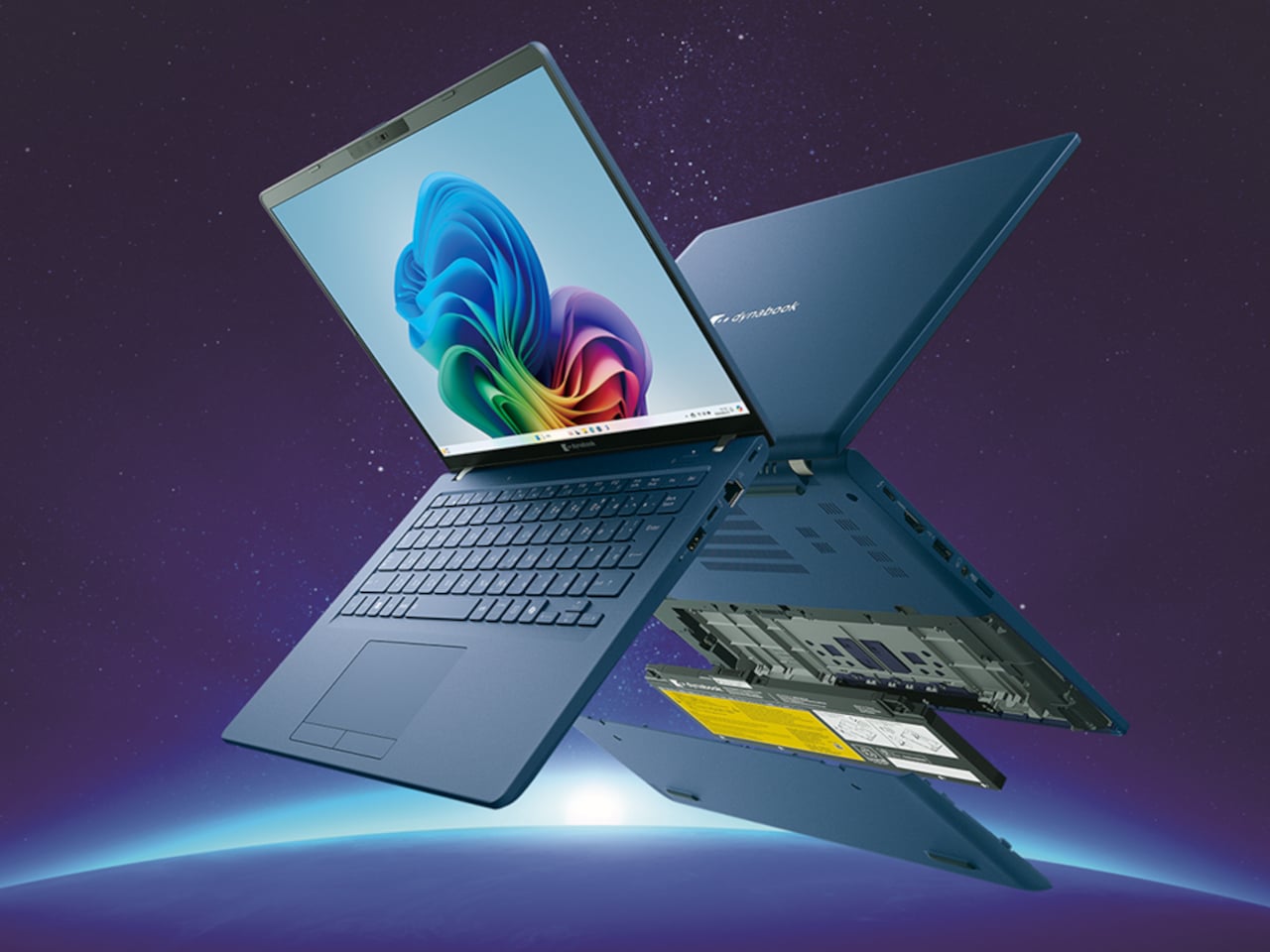
The Swift 16 AI is Acer’s CES flagship for people who live in creative apps. It runs up to an Intel Core Ultra X9 388H with Intel Arc B390 graphics, up to 32 GB of LPDDR5X, and up to 2 TB of SSD storage. The 16‑inch 3K OLED WQXGA+ display, with 120 Hz refresh, 100% DCI‑P3, and VESA DisplayHDR True Black 500, gives animators, video editors, and illustrators a bright, color‑accurate canvas that still fits in a 14.9 mm‑thin aluminum chassis.

Acer Swift 16 AI

The headline feature is the world’s largest haptic touchpad, a 175.5 mm × 109.7 mm glass‑covered surface that supports MPP 2.5 stylus input. You can sketch, scrub timelines, or manipulate 3D models directly on the pad while the screen stays clear for reference or output. Haptics provide precise feedback with fewer moving parts, and Acer’s AI tools, accessed through the Intelligence Space hub, can tie into that surface for gesture‑driven creative workflows that feel more like using a tablet than a traditional laptop.

Acer Swift 16 AI (Best Buy Chassis)

Connectivity and audio round it out with Wi‑Fi 7, Bluetooth 5.4, dual Thunderbolt 4 USB‑C, USB‑A, HDMI 2.1, a MicroSD slot, DTS:X Ultra speakers, and an FHD IR camera. A 70 Wh battery with up to 24 hours of video playback on certain configs means the machine can survive long flights or a full day of on‑site shoots without hunting for an outlet.

Acer Swift Edge 14 AI and Swift Edge 16 AI

Acer Swift Edge 14 AI

The Swift Edge 14 AI and 16 AI focus on portability for people who count grams in their backpacks. Built from a stainless steel‑magnesium alloy chassis, the 14‑inch model weighs under 1 kg and measures just under 14 mm thick, yet still meets MIL‑STD 810H durability standards. Both sizes run up to Intel Core Ultra 9 386H processors with Intel Graphics, up to 32 GB of LPDDR5X, and up to 1 TB of PCIe Gen 4 SSD storage, so they are not trading performance for weight.

Acer Swift Edge 16 AI

Display options go up to 3K WQXGA+ OLED with 120 Hz refresh and 100% DCI‑P3, making them surprisingly capable for color‑sensitive work on the road. Acer’s multi‑control touchpads add gesture layers for media, presentations, and conferencing, letting you adjust volume, skip tracks, or manage calls without hunting for on‑screen controls. FHD IR cameras with Human Presence Detection, DTS:X Ultra speakers, Wi‑Fi 7, Bluetooth 6.0, and Thunderbolt 4 ports round out a package that feels tuned for frequent flyers who still need a proper workstation when they land.

Acer Swift Go 14 AI and Swift Go 16 AI

The Swift Go 14 AI and 16 AI sit as the “just right” machines in the Swift family, balancing performance, portability, and a slightly more accessible entry point. They use up to Intel Core Ultra X9 388H processors with Intel Arc B390 graphics, up to 32 GB of LPDDR5X memory, and up to 1 TB of SSD storage. The laser‑etched aluminum chassis opens a full 180 degrees, making them easy to use in cramped lecture halls or coffee shops.

Acer Swift Go 14 AI

Display options include 2K WUXGA and 3K WQXGA+ OLED panels with wide color gamuts and smooth refresh rates, giving everyday productivity machines a surprisingly premium visual experience. The 5 MP IR cameras with HDR and Human Presence Detection improve video calls and privacy, while DTS:X Ultra speakers and multi‑control touchpads make them feel more like compact media centers than basic ultrabooks. Wi‑Fi 7, Bluetooth up to 6.0, and dual Thunderbolt 4 ports keep them ready for fast networks and external GPUs or docks.

Acer Swift Go 14 AI

As Copilot+ PCs, the Swift Go models support features like Click to Do, Copilot Voice, and Copilot Vision, with Acer’s own Assist, VisionArt, User Sensing, PurifiedView, PurifiedVoice, and My Key layered on top. For someone who wants a thin‑and‑light that can handle both spreadsheets and AI‑assisted creative work, they are the approachable entry point into Acer’s more experimental Swift AI world, offering premium design without the flagship price or the haptic touchpad that some people might not know what to do with.

Acer at CES 2026: Laptops Designed for the AI Era

Aspire AI brings Copilot+ and Acer’s AI suite into familiar 14‑ and 16‑inch shells with optional OLED and 180‑degree hinges for collaboration, while Swift AI experiments with haptic touchpads, under‑1 kg magnesium shells, and OLED‑everywhere displays for creators and travelers. The CES 2026 message is that AI is no longer just a feature buried in software menus, it is starting to shape the hardware itself, from how you press on a touchpad to how light your laptop feels in a bag, which is exactly the kind of shift Yanko Design readers expect from the start of the year when everyone announces what laptops are supposed to look and feel like for the next twelve months.

The post Acer Swift 16 AI Has World’s Largest Haptic Touchpad With Stylus Support first appeared on Yanko Design.
Samsung Freestyle+ Turns a Friendly Cylinder into an AI-Assisted Portable Screen

The first Freestyle tried to make projection feel as casual as dropping a speaker on a table, but still needed some fiddling with focus, keystone, and room darkness. Portable projectors are great in theory, but often fall apart on setup friction, tweaking corners, hunting for the right brightness mode, and dealing with off-color walls. Samsung’s Freestyle+ keeps the same friendly cylinder while letting AI quietly handle the annoying parts, betting that most people would rather point and watch than spend 10 minutes adjusting settings.

The Samsung Freestyle+ is an AI-powered portable projector that builds on the original’s cylindrical, 180-degree tilting design. The headline change is not a wild new form factor; it is a smarter brain. Freestyle+ is pitched as something you can point at a wall, ceiling, or floor, then trust to optimize the picture for whatever surface you happen to be aiming at, turning “point and play” from a slogan into something closer to reality.

Designer: Samsung

AI OptiScreen is the bundle of features that makes that possible. 3D Auto Keystone straightens the image even on angled or uneven surfaces like curtains or room corners. Real-time Focus keeps things sharp as you nudge or rotate the projector. Screen Fit sizes the picture to a compatible screen if you use one. Finally, Wall Calibration analyzes wall color or patterns to keep content legible instead of tinted or washed out.

Freestyle+ pushes out 430 ISO lumens, nearly twice the previous generation, which matters in real living rooms that are not pitch black. The 180-degree rotating stand still lets you throw an image onto a wall, ceiling, or floor without extra mounts. The idea is that you stop worrying about whether a space is right for projection and just drop the cylinder where it makes sense in the moment, whether that is a coffee table, a kitchen counter, or a nightstand.

Freestyle+ behaves like a mini Samsung TV, with Samsung TV Plus, major streaming apps, and Samsung Gaming Hub built in. You can stream shows, watch live channels, or fire up cloud games directly from the projector without plugging in a stick or console. For small apartments or casual setups, that means one object can handle movie night and a bit of gaming without a permanent media cabinet cluttering the wall.

Audio comes from a built-in 360-degree speaker tuned for room-filling sound in a compact body. For people already in the Samsung ecosystem, Q-Symphony support lets Freestyle+ sync with compatible Samsung soundbars, layering its own speaker with the bar instead of muting one or the other. That gives you a more cohesive soundstage when you want to treat the projector like a main screen rather than a sidekick.

Freestyle+ makes the most sense as a roaming screen that follows you from bedroom to living room to kitchen, rather than a projector that lives in a dedicated theater. By combining a familiar, speaker-like form with AI setup, brighter output, built-in streaming, and decent sound, it nudges projection closer to the casual, everyday screen Samsung keeps hinting at, instead of something you only use on special occasions when the room is dark enough and the mood feels right for a movie night.

The post Samsung Freestyle+ Turns a Friendly Cylinder into an AI-Assisted Portable Screen first appeared on Yanko Design.
This DIY AI Astronaut Looks Like a Desk Toy Until You Ask It Questions

Most DIY AI gadgets are bare boards and wires, or at best a 3D-printed box, and that clashes with the idea of leaving them on a shelf or side table. Even clever builds end up looking like projects rather than finished objects. D. Creative’s tiny AI robot is a counterexample, a chatbot built inside a toy astronaut that looks like decor first and a smart assistant second, making it actually display-worthy.

The basic concept is a small astronaut figurine that you can talk to, which talks back using a cloud LLM. All the electronics, ESP32-S3, mic, amp, speaker, battery, and OLED, are hidden inside the toy shell, so on a desk it reads as a cute space figure until it lights up and answers a question or starts blinking to show it is listening.

Designer: D. Creative

The internals pack tightly. An ESP32-S3 Super Mini acts as the brain, a digital I²S microphone hears you, a matching I²S amplifier and tiny speaker reply, and a 300 mAh battery with a charging board keeps it running. The 0.96-inch OLED is tucked into the helmet as the robot’s face, giving the AI a place to look back from when you address it or ask for help.

The builder gutted a light-up astronaut toy, drilled a few holes for buttons and a USB port, and then packed the new hardware inside before closing it back up. This is not a 3D-printed shell but an existing object repurposed, which keeps the proportions and charm of the original toy while hiding the complexity and making the result feel less like a gadget and more like a character.

The interaction loop is straightforward. You speak, the mic captures your voice, the ESP32 sends it over Wi-Fi to a speech-to-text service and then to the Qwen3 LLM, the response comes back as text, and a text-to-speech engine turns it into audio for the speaker. The astronaut’s OLED changes expression to show when it is listening, thinking, or ready to answer, turning a text exchange into something more animated.

Putting the same kind of chatbot you might use in a browser into a toy astronaut changes the relationship. The presence of a body, a face, and a fixed spot on your desk makes the assistant feel more like a little character you share space with, and less like a disembodied voice that lives somewhere in the cloud and has no opinion on where it sits.

This project hints at a pattern other makers can borrow, taking familiar objects and quietly giving them new capabilities instead of always starting from scratch. A tiny AI astronaut that fits into a home without looking like a project points toward a future where more of our everyday decor hides small, conversational brains, and where the line between toy and tool gets pleasantly blurry, with AI companions that feel more like friends than appliances waiting for commands.

The post This DIY AI Astronaut Looks Like a Desk Toy Until You Ask It Questions first appeared on Yanko Design.
ChatGPT-Powered Desk Mic gives your Existing Laptop Realtime Translation and Agentic Powers

The most interesting AI hardware this year might not be a new screen or headset. It might be a microphone. Powerrider frames that idea very literally. It takes the form factor of a conference mic and refits it as a GPT‑4o terminal, so the same stem on your desk that handles Zoom calls can also translate in real time, summarize a briefing, or draft follow‑up emails while the meeting is still in progress.

What makes it feel clever is how little ceremony it adds. There is no new display to manage, just a few sculpted buttons for voice input, translation, and AI control. Tap, talk, and the response appears on your existing laptop, ready to paste into a chat, a slide deck, or a script. In a single accessory you get cleaner audio for podcasting and live streaming, plus a dedicated channel that turns casual speech into an ongoing conversation with ChatGPT.

Designer: Powerrider

Click Here to Buy Now: $59 $120 (56% off). Hurry, only a few left!

The hardware itself (model M1) weighs 290 grams and stands 107 millimeters tall, machined from aluminum alloy with a 60‑degree adjustable boom so you can talk comfortably without hunching over your keyboard. The capsule is an omni‑directional condenser tuned to pick up voice across a 100 to 15,000 Hz range, with DSP noise reduction baked into the signal chain. It samples at 16‑bit/48kHz, which puts it squarely in the clean‑enough category for content work without venturing into audiophile overkill. USB‑C handles both power and data, plus there is a 3.5mm jack if you want to monitor through headphones. The base houses four physical buttons, each programmable through companion software. One button wakes the AI mode, another triggers translation, a third handles dictation, and the fourth is a rotary knob that doubles as a mute toggle and volume dial.
This is where Powerrider stops being a mic and starts being a control surface. You can map those keys to custom GPT‑4o prompts, so tapping one button might fire off “translate the last paragraph into Spanish and make it sound conversational,” while another could trigger “rewrite this email to sound less corporate.” The software supports Windows 7 and up, plus macOS 10.15 or later, which covers most setups that still get security patches. The AI functions pull from a pretty expansive toolkit: text translation, PPT generation, AI drawing, background removal, speech writing, document conversion, image analysis, code generation, reading comprehension, Q&A, writing assistance, table creation, and mind mapping. Some of those feel gimmicky (I have yet to meet anyone who genuinely wants AI‑generated mind maps on demand), but the core translation and drafting tools hit real pain points if you work across languages or spend half your day rewriting the same three types of message.

The hook here is immediacy. Most of us already talk to ChatGPT, but we do it through a browser tab or a pinned app, which means context‑switching, copying text, pasting prompts, and generally breaking flow. Powerrider tries to make that interaction feel more like push‑to‑talk in a game or on a two‑way radio. You hold a key, speak the command, release, and the result lands in your active window or in a floating overlay, depending on how you configure it. That workflow collapses a six‑step process (open ChatGPT, type or paste, wait, copy response, switch back, paste again) into a two‑step one (press, speak). If you live in tools like Notion, Google Docs, or any IDE that supports text injection, the time savings compound quickly. The software also handles screenshot translation, which is genuinely useful if you are reading documentation, design files, or research papers in another language and want inline conversion without manually copying blocks of text into DeepL.

Because the mic itself is a legitimate audio interface, you can use it in OBS, Zoom, or any DAW that recognizes standard USB microphones. The frequency response is wide enough for vocal clarity but not so hyped that you get harsh sibilance or boomy proximity effects. Think more “podcast interview” than “ASMR whisper track.” The omni pickup pattern means you do not have to aim it perfectly, which is nice if you are someone who gestures while talking or shifts around in your chair. The DSP noise reduction does a decent job of killing keyboard clatter and ambient hum, though it is not going to save you if you are recording next to a mechanical keyboard with clicky blues or a window AC unit. For meeting‑quality audio and streaming voiceover work, it sits comfortably in the same tier as entry‑level USB mics like the Blue Yeti Nano or the HyperX SoloCast, but with the GPT layer on top.

The company behind the Powerrider is positioning this as part of a broader peripheral ecosystem, which is where things get more interesting. They are also offering an AI‑powered keyboard (model K1) and an AI‑powered mouse (model S1), both of which follow the same philosophy: take an essential input device and wire it directly to GPT‑4o so you can invoke AI functions without leaving your workspace. The keyboard is a 98‑key Crater mechanical with RGB backlighting, a volume knob, and three custom macro keys dedicated to AI tasks. It supports both wired USB and wireless 2.4GHz/Bluetooth 5.0 across four channels, and the battery will run for 148 hours of continuous typing with the backlight off, or about 16 hours with the RGB cranked. The mouse is a wireless optical with adjustable DPI up to 4000, seven buttons (including dedicated AI, custom, and search keys), and a two‑hour charge time for what they claim is several days of use. Both peripherals plug into the same software suite as the mic, so you can trigger translation, text generation, or document conversion from any of the three devices depending on which one is closest to your hand.

Powerrider is live on Kickstarter right now with a few weeks left in the campaign, and the pricing is structured around bundles. A single mic starts at $59 for the super early bird tier (limited to 300 units) or $69 for the regular early bird. The full “Powerrider AI One Suite” bundle, which includes one mic, one keyboard, and one mouse, is priced at $269 (down from a claimed $608 MSRP). You can also grab the mic plus keyboard for $169 or the mic plus mouse for $149. Add‑on pricing if you are already backing is $119 for the keyboard, $99 for the mouse, and $59 for an extra mic. Those numbers put the mic roughly on par with mid‑tier USB condensers, but with the AI layer effectively thrown in as the value‑add. Whether that trade‑off makes sense depends entirely on how much friction you currently feel when bouncing between your tools and ChatGPT, and whether you are willing to let a hardware button own part of that workflow instead of a keyboard shortcut or Alfred snippet.

Click Here to Buy Now: $59 $120 (56% off). Hurry, only a few left!

The post ChatGPT-Powered Desk Mic gives your Existing Laptop Realtime Translation and Agentic Powers first appeared on Yanko Design.