Japanese Minimalism: 7 Tools That Do More With Less

Japanese design philosophy has always understood something the rest of the world is only now catching up to: true sophistication comes from subtraction, not addition. This approach, rooted in centuries of aesthetic refinement, strips away the superfluous to reveal function in its purest form. The tools that emerge from this tradition don’t just accomplish tasks—they redefine how we think about everyday objects. Each piece becomes a meditation on purpose, where every curve, edge, and material choice serves a reason beyond mere decoration.

The seven tools featured here embody this principle completely. They’re not trying to impress with flashy features or unnecessary complexity. Instead, they achieve something far more difficult: they make the complicated simple. These designs prove that when you remove everything that doesn’t matter, what remains becomes not just functional but beautiful. From kitchen essentials to pocket-sized problem-solvers, each tool demonstrates how Japanese minimalism transforms ordinary objects into instruments of effortless living.

1. Craftmaster EDC Utility Knife

The Craftmaster EDC Utility Knife challenges everything you think you know about pocket tools. Its metallic body sits just 0.3 inches thick and stretches 4.72 inches long, creating a profile slim enough to disappear into any pocket while maintaining the heft that signals quality. The rotating knob deployment system feels tactile and deliberate, engaging an OLFA blade through a mechanism that rewards precision over speed. This isn’t a tool that screams for attention—it earns respect through its restraint, proving that powerful utility doesn’t require bulk or bravado.

The magnetic back serves dual purposes with characteristic Japanese efficiency. It transforms any metal surface into a storage solution, keeping the knife accessible without adding clutter to your workspace. The companion metal scale docks seamlessly to this magnetic base, featuring raised edges that make retrieval from flat surfaces effortless. Both metric and imperial markings ensure universal utility, while the integrated blade-breaker lets you snap off dulled edges without additional tools. The 15-degree curvature protects fingers during operation, and the 45-degree inclination angle makes box-opening safer. Every detail reflects the principle that good design removes friction between intention and action.

Click Here to Buy Now: $79.00

What we like

  • OLFA blade replacement system extends the tool’s functional lifetime indefinitely.
  • Magnetic docking transforms unused metal surfaces into organized storage.
  • The dual-scale ruler eliminates the need for separate measuring tools.
  • 8mm thickness allows the knife to live comfortably in any pocket.

What we dislike

  • The metal construction adds weight compared to plastic alternatives.
  • Blade snapping requires the companion ruler for optimal safety.

2. 8-in-1 EDC Scissors

Conventional wisdom says versatile tools sacrifice quality for quantity. These scissors prove that assumption wrong. The 13-centimeter design fits completely within your palm, creating a tool that travels anywhere without announcing its presence. Eight distinct functions emerge from a single elegant form: scissors, knife, lid opener, can opener, cap opener, bottle opener, shell splitter, and degasser. The oxidation film coating doesn’t just prevent rust—it creates a matte black finish that elevates the tool from utility to aesthetic choice.

The genius lies in how each function integrates without compromising the others. The scissor blades maintain their sharpness because they’re not forced into awkward multi-tool compromises. The bottle opener achieves proper leverage despite the compact form factor. The can opener actually works smoothly instead of becoming an emergency-only frustration. This integration happens because the design started with minimalism as the foundation rather than cramming features into an existing form. The result feels purposeful rather than accidental, proving that constraint breeds creativity when handled with skill and intention.

Click Here to Buy Now: $59.00

What we like

  • Eight genuinely useful functions integrated without bulk or complexity.
  • Oxidation film coating provides both protection and sophisticated aesthetics.
  • Palm-sized dimensions make it genuinely pocketable for daily carry.
  • Each function maintains full effectiveness despite the compact form.

What we dislike

  • The black finish may show wear over time with heavy use.
  • Small size might feel less substantial in larger hands.

3. Rodent Bottle Opener

Kairi Eguchi’s Rodent bottle opener for WELD DESIGN STORE asks a radical question: what happens when you remove everything except absolute necessity? The answer arrives as a simple oval steel pipe, processed only at the section required for uncorking. Advanced 3D pipe laser technology creates the functional opening while leaving the rest of the material untouched, preserving the raw character of freshly cut metal. This approach produces an object that feels honest in a world drowning in overdesign, where the material itself becomes the primary aesthetic element.

The philosophy extends beyond mere appearance into something more profound about how we interact with objects. Using the Rodent requires engaging with the pipe’s industrial nature—there’s no rubber grip, no decorative flourishes to mediate the experience. The cold steel against your palm, the weight that comes from solid construction, the tactile feedback of metal against metal—these sensations connect you directly to the act of opening a bottle. This directness might seem harsh at first, but it creates a relationship with the tool that feels more genuine than cushioned alternatives. The opener becomes a small reminder that sometimes the best design simply reveals material truth.

What we like

  • Single-material construction eliminates weak points and potential failures.
  • Untouched pipe sections preserve the authentic character of industrial steel.
  • Minimal processing reduces manufacturing complexity and environmental impact.
  • The design achieves complete functionality without any superfluous elements.

What we dislike

  • The raw steel aesthetic may not suit every environment or preference.
  • Lack of grip coating means cold metal directly against the hand.

4. Painless Key Ring

Key rings have operated on the same principle for decades: a tightly wound coil that requires finger-destroying force to manipulate. The wave spring key ring borrows technology from aerospace equipment and automotive applications to solve this everyday frustration. The innovative coil design maintains tension without the aggressive grip that damages nails and deforms rings. Adding or removing keys becomes genuinely stress-free, transforming a minor annoyance into a smooth operation that respects both your time and your fingertips.

The engineering reveals itself through performance rather than appearance. The wave spring construction achieves superior durability while reducing weight compared to traditional rings. This means the device in your pocket becomes lighter even as it grows more robust—a combination that seems impossible until you understand how the spring geometry distributes stress. Available in silver and black finishes, the ring adapts to personal aesthetic preferences without adding bulk or complexity. The design proves that solving problems often requires looking beyond established solutions to principles from entirely different fields, importing expertise that transforms the familiar into something better.

Click Here to Buy Now: $29.00

What we like

  • The wave spring mechanism eliminates the fingernail damage of traditional key rings.
  • Aerospace-grade durability ensures the ring won’t deform or fail over time.
  • Lighter construction reduces pocket bulk without sacrificing strength.
  • Silver and black options provide aesthetic flexibility.

What we dislike

  • The unfamiliar mechanism may require a brief adjustment period.
  • Slightly higher cost reflects the advanced spring technology.

5. Compact Modular Grill Plate

Outdoor cooking equipment typically forces a choice: lightweight portability or effective heat distribution. The Compact Modular Grill Plate rejects this false dichotomy through intelligent material layering. The three-layer steel plate construction ensures uniform heat conduction across the entire surface, maintaining the even temperatures that separate mediocre cooking from exceptional results. The modular handle system adapts to different situations—stable bases, unstable campfires, or quick movements between heat sources. When finished, everything packs into a remarkably compact form that defies the plate’s cooking capabilities.

The versatility extends to heat source compatibility that borders on remarkable. Campfire coals, gas burners, and induction stoves all work equally well with the plate’s construction. This universality means the same tool serves backyard gatherings, backcountry adventures, and indoor cooking with identical effectiveness. The even heat distribution preserves moisture in proteins while achieving proper browning, delivering restaurant-quality results in settings where such outcomes typically seem impossible. Available in Basic and Special configurations, the system scales to different needs without abandoning the core principle: proper heat management makes better food, regardless of setting.

Click Here to Buy Now: $89.00

What we like

  • Three-layer steel construction distributes heat evenly for consistent cooking results.
  • The modular handle system adapts to campfires, gas burners, or induction stoves.
  • Compact collapsed form enables easy transport and storage.
  • Material quality delivers professional cooking performance in outdoor settings.

What we dislike

  • Steel construction adds weight compared to aluminum alternatives.
  • Initial investment exceeds disposable camping cookware options.

6. Slim Fold Dish Rack

The Slim Fold Dish Rack solves a problem so common we’ve stopped noticing it: permanent dish racks occupy valuable counter space even when empty. The patent-pending spring mechanism collapses the 14-inch rack down to 1.2 inches in one second, with deployment just as fast. This transformation happens smoothly enough to become genuinely practical rather than a clever trick you stop using after the novelty fades. The collapsed form actually fits in pockets, making it genuinely portable for camping trips, RVs, or anywhere space comes at a premium.

The minimalist structure provides ample ventilation while accommodating plates, utensils, and cookware of varying sizes. The design achieves this flexibility through strategic material placement rather than complex adjustments or attachments that add bulk and failure points. Cleaning becomes effortless—the rack is dishwasher-safe, removing the irony of hand-washing the thing meant to organize your dishwashing. The spring system maintains tension through repeated cycles without loosening or failing, proving that elegantly simple mechanical solutions often outlast their complicated electronic counterparts. Sometimes the best technology is just physics applied with precision and care.

Click Here to Buy Now: $89.00

What we like

  • Patent-pending spring system enables genuine one-second collapse and deployment.
  • Collapsed 1.2-inch profile fits in pockets for complete portability.
  • Dishwasher-safe construction eliminates cleaning friction.
  • Minimalist design provides proper ventilation for various dish sizes.

What we dislike

  • The spring mechanism requires periodic cleaning to maintain smooth operation.
  • Collapsed form may be too compact for users who prefer permanent setups.

7. Effortless Standing Letter Cutter

The Standing Letter Cutter transforms envelope opening from a mundane task into a moment of tactile satisfaction. Slide an envelope across the anodized aluminum bar and watch as it creates a clean incision along one side. The blade makes a surgical opening without generating paper scraps or mangled edges—just a smooth entry that preserves the envelope’s integrity. When not in use, the cutter serves as a paperweight or desk accent, demonstrating how functional objects can occupy space beautifully rather than apologetically.

The anodized aluminum construction achieves that rare balance between substance and refinement. The material feels substantial without being unnecessarily heavy, creating an object that announces quality through tactile experience rather than visual noise. The replaceable blade system extends the cutter’s lifetime indefinitely, embracing repair over replacement in a culture addicted to disposability. This serviceability reflects a deeper design philosophy: good tools should outlast their users, becoming heirlooms rather than landfill material. The simple act of opening mail becomes slightly more pleasurable, which might seem trivial until you realize how many small moments compose a life.

Click Here to Buy Now: $49.00

What we like

  • Anodized aluminum construction provides an elegant desk presence beyond pure utility.
  • Clean incision eliminates paper scraps and simplifies envelope opening.
  • Replaceable blade system extends product lifetime indefinitely.
  • Dual functionality as a paperweight maximizes usefulness per cubic inch.

What we dislike

  • The metal construction may scratch wooden or delicate desk surfaces.
  • Replacement blades require sourcing from the manufacturer.

Why Less Becomes More

These seven tools share a common thread that extends beyond Japanese origin or minimalist aesthetics. Each design starts by questioning assumptions about how objects should look and function. The Craftmaster knife asks why utility tools need bulky handles when slim metal suffices. The palm scissors challenge the notion that versatility requires size. The Rodent opener wonders whether bottle openers need any processing beyond what’s functionally necessary. These aren’t rhetorical questions—they’re design principles that produce tangible results. The tools work better precisely because they attempt less, focusing energy on core functions rather than dissipating effort across unnecessary features.

This approach resonates because it addresses a deeper cultural fatigue with overcomplicating everything. We’re surrounded by objects that try too hard, products that add features to justify price points rather than solve actual problems. Japanese minimalism offers an antidote: tools that respect your intelligence by trusting you don’t need hand-holding or distraction. They accomplish their purposes cleanly, then get out of the way. That restraint becomes its own form of luxury—the space to think, act, and exist without constant negotiation with poorly designed objects. In choosing tools that do more with less, you’re not just simplifying your carry or kitchen. You’re reclaiming mental space from the clutter of modern life, one thoughtfully designed object at a time.

The post Japanese Minimalism: 7 Tools That Do More With Less first appeared on Yanko Design.

Snake-Shaped Razer Boomslang Mouse Returns 20 Years Later With 45K DPI

At the end of the 1990s, when most PC mice were beige, ball-based, and capped at a few hundred DPI, the original Razer Boomslang showed up with a weird snake-head shape and a 2,000-DPI mechanical sensor. Razer now calls it the world’s first gaming mouse, and whether or not you want to argue that title, it definitely helped turn the mouse from a beige accessory into a performance peripheral that people obsessed over.

The Boomslang 20th Anniversary Edition is Razer’s way of revisiting that moment with twenty years of hindsight. It is a one-time release limited to 1,337 units worldwide, each uniquely serialized, with the #1337 unit reserved as a “leet” nod for one lucky fan. It is aimed squarely at people who either owned the original or wished they had, but it is also a fully modern mouse that can live on a current desk without feeling like a prop.

Designer: Razer

On the outside, the new Boomslang keeps the iconic snake-head outline and true ambidextrous form, preserving the low, wide body that made the original stand out. The translucent shell and underglow are deliberate echoes of that first model, but the lighting is now a nine-zone Razer Chroma RGB system that can be tuned in Synapse. The idea is that, at a glance, it still reads as a Boomslang first, and as a spec sheet second.

Inside, everything is from 2025. The Razer Focus Pro 45K optical sensor offers up to 45,000 DPI with 99.8 percent resolution accuracy, a ridiculous number compared to the original’s 2,000-DPI ball. HyperPolling Wireless pushes the polling rate up to 8,000 Hz, which means the mouse can report its position to the PC eight thousand times per second. Gen-4 optical switches handle primary clicks with a 100-million-click lifespan and no debounce delay.

Charging and connectivity also get a full reboot. The mouse is fully wireless and ships with a Razer Mouse Dock Pro that acts as both a magnetic charging base and a dedicated wireless receiver. Drop the Boomslang on the dock, and it starts charging automatically, while the dock handles HyperPolling Wireless up to 8,000 Hz over a single USB cable. It is a neat contrast to the wired-only original that helped define the gaming-mouse category.

Material and feel have been nudged into more premium territory. The primary buttons are wrapped in PU leather for extra grip and a more tactile press, which is a small but noticeable change if you are used to hard plastic shells. Underneath, nine zones of Chroma underglow can be customized with 16.8 million colors and effects, and eight programmable controls can be mapped to macros and profiles in Synapse.

The Boomslang 20th Anniversary Edition is a reminder that the idea of a gaming mouse had to be invented once, by a translucent, snake-shaped oddball that rolled a ball at 2,000 DPI. This remake uses that nostalgia to show how far sensors, switches, and wireless tech have come. For anyone who grew up on early Razer gear, it is a small, serialized time machine that also happens to be a high-end mouse in 2025.

The post Snake-Shaped Razer Boomslang Mouse Returns 20 Years Later With 45K DPI first appeared on Yanko Design.

This MagSafe Battery Pack Looks Like It Belongs in Your Makeup Bag

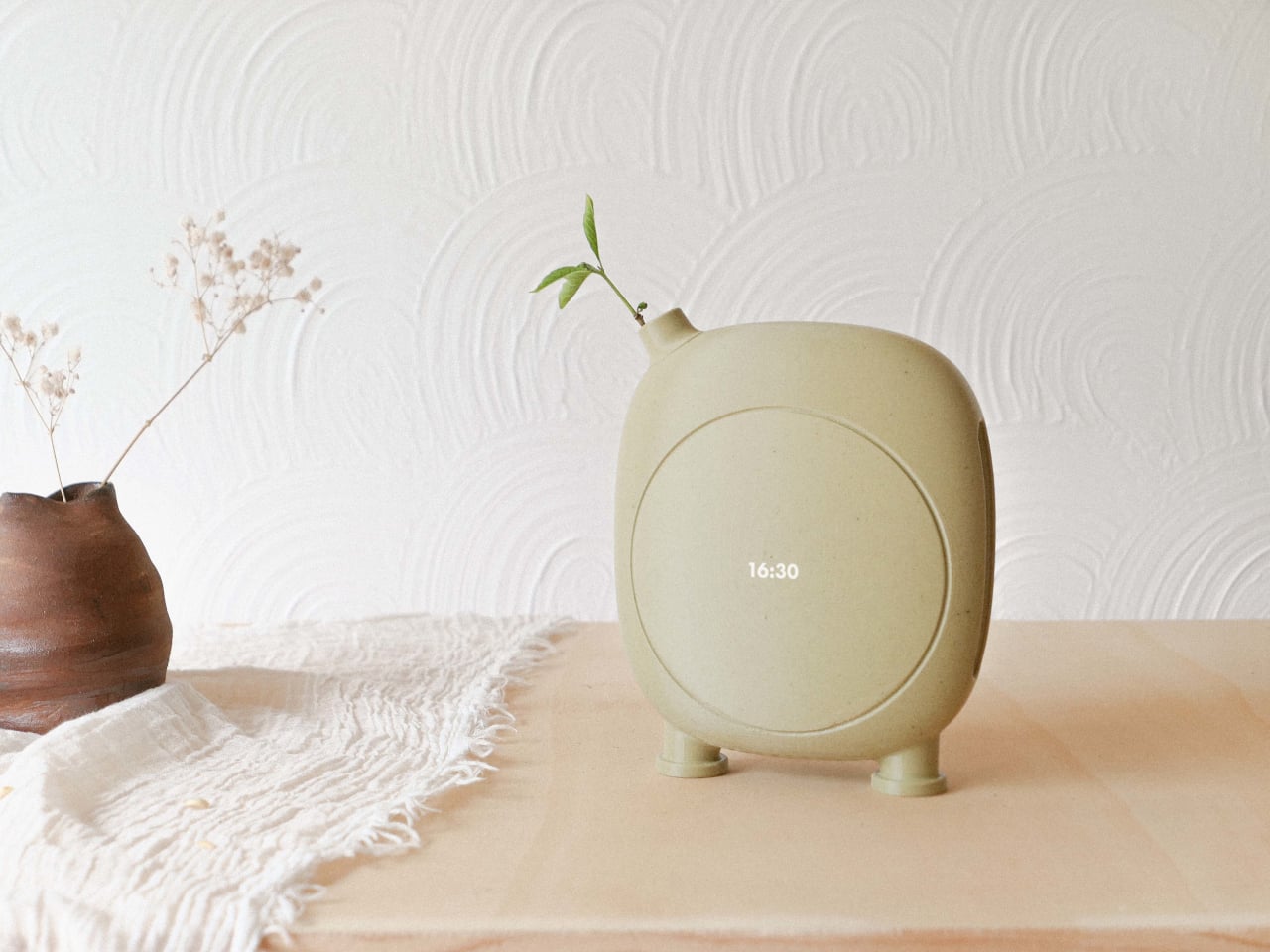
Most power banks and MagSafe battery packs look like small, hard bricks stuck to the back of a carefully chosen phone. There is a gap between the attention people give to phone colors, cases, and desk setups, and the generic plastic blocks they use to charge. Pokoo is a concept that treats a battery pack like a lifestyle object instead of emergency gear, borrowing its design language from instant cameras and cosmetics rather than chargers.

Pokoo is a MagSafe-style battery pack built around a rounded square body with a large circular disc at its center. The disc carries the branding and serves as the visual anchor, while a small indicator light in one corner handles status. The form is deliberately soft, with rounded edges and corners that make it feel more like a compact or a tiny camera than a tech accessory, especially in the warm white and sage-green palette.

Designer: Biu Biu

The battery snaps magnetically to the back of an iPhone, sitting below the camera bump and charging wirelessly. The circular disc and rounded form make the phone and pack feel like they were designed together, visually softening the stack instead of making it look like you strapped a tool to an otherwise clean object. The pastel colors reinforce that impression, turning the combo into something that feels intentional enough to leave on your phone all day.

The circular disc is not just decoration, it flips out to become a kickstand. When you want to watch something, the hinge lets the disc rotate outward, propping the phone in landscape while the battery stays attached and charging continues. That turns Pokoo into a two-in-one object, a power source and a stand, which makes more sense than carrying both separately or balancing your phone against a water bottle.

The top edge includes both USB-C and Lightning ports under a small protective ridge. That dual-port approach acknowledges that most people charge more than one kind of device, and it means Pokoo can handle wired top-ups for accessories or charge itself when wireless is slower. The flexibility makes it more adaptable than single-port packs that force you into one ecosystem or the other.

Pokoo comes in at least three colorways, the original white and green, a soft pink version, and a light blue with pink accents. Those colors push it firmly into lifestyle territory, looking equally at home next to a makeup bag or a laptop. The design language treats the battery as a companion object with personality, not a necessary evil you clip on when your phone is dying.

Pokoo does not reinvent what a battery pack does, it reframes how it looks and how you use it. The flip-out stand, dual ports, and cosmetic-inspired shell turn a mundane accessory into something that feels thoughtful. For people who care about the objects that live on their phones and desks, Pokoo suggests that charging does not require sacrificing aesthetics, and that a power bank can be soft, playful, and multi-functional without losing the utility that actually matters.

The post This MagSafe Battery Pack Looks Like It Belongs in Your Makeup Bag first appeared on Yanko Design.

Enso Tape Measure Makes Pulling Lengths Feel Like a Small Ritual

Most tape measures are purely functional, bright plastic bricks you toss in a drawer, borrow, and never remember. The act of measuring is usually rushed and slightly annoying, even though it is fundamental to making and building. Enso is a concept that asks what happens if you treat measuring as a small ritual instead of a chore, designing the gesture itself rather than just wrapping the same mechanism in prettier housing.

Enso is a tape measure concept that redefines measurement as a ritual, where precision meets care, and not the kind you hide in the drawer. The goal is not to add a screen or smart features, but to redesign the gesture itself, using overlapping circular forms and carefully tuned mechanics to make pulling a length feel calm and deliberate. The name references the Zen circle, a symbol of simplicity and mindful repetition.

Designer: Sshlok Mishrra

The project starts from interaction, not form, studying familiar motions like clicking a pen, twisting a capsule, and, most importantly, dialing a rotary phone. The idea is that the goal is not to redesign the tape, but to redesign the gesture, thinking about emotion, memory, and muscle habits instead of just housing dimensions. That shift lets the form emerge from how your hand wants to move.

The rotary phone acts as the trigger point, the satisfying resistance and weight of dialing, and the silent intelligence behind each click. That experience translates into Enso’s overlapping circular geometry, inspired by eclipses and the tension between concealment and revelation. The tape becomes something you reveal by rotating and sliding discs, not yanking a metal strip out of a box, which changes the pace and feel of the whole interaction.

Enso’s compact, overlapping-disc body feels more like a small object you would keep on your desk than a tool you would hide. The emphasis on clarity with human touch, a tactile poetry between hands and material, means the circular layout invites your hand to explore edges and seams. Measuring becomes a repeatable, almost meditative motion, where the ritual of pulling tape and finding a length feels as considered as the number you record.

1

The concept introduces gradients along the tape, giving measurement a new dimension. The scale is no longer flat, but alive in color and depth. A gradient can make relative length easier to read at a glance, and adding visual depth to the scale reinforces the sense that you are not just reading numbers, you are reading a field of distance that changes as you move along it.

Enso treats a basic tool as an opportunity to design a ritual, not just a product. For designers, makers, and anyone who measures often, a tape that feels good to use and looks good to keep out could quietly change how they approach small tasks. It is a reminder that even the most ordinary tools can carry emotion, memory, and a bit of poetry if someone takes the time to rethink the gesture instead of settling for the same bright plastic box that has lived in drawers for decades.

The post Enso Tape Measure Makes Pulling Lengths Feel Like a Small Ritual first appeared on Yanko Design.

Fairbuds XL Gen 2 Drivers Fit Gen 1 Headphones for a €100 Upgrade

Most wireless headphones quietly become disposable. Batteries fade, cushions peel, and people replace the whole thing every few years instead of fixing what broke. Fairphone’s first Fairbuds XL were an outlier, modular and self-repairable with screws instead of glue. Gen 2 is the next step, not a clean break but a refinement that tries to make keeping and upgrading a pair of headphones feel as normal as replacing them.

Fairbuds XL Gen 2 are over-ear headphones that keep the same modular skeleton but add new 40-mm dynamic drivers, refined tuning, and updated materials. Fairphone claims 30 hours of listening, active noise cancelling with ambient mode, Bluetooth or USB-C wired listening, and two colorways, Forest Green and Horizon Black, which deepen the original palette into something a bit more mature and less obviously plastic.

Designer: Fairphone

The drivers are the most interesting change. Gen 2 ships with new 40-mm dynamic drivers and updated tuning for a more natural, detailed sound, but those drivers are also sold separately as modules. Owners of the 2023 Fairbuds XL can open their existing headphones with a screwdriver and slot in the new drivers, keeping everything else while upgrading the sound. That turns the Gen 2 launch into both a new product and a parts catalog.

The comfort story centers on materials. The headband now uses a breathable net fabric, and the ear cushions switch to a soft birdseye mesh, which improves comfort during long sessions. The IP54 rating handles dust and splash resistance, and the new material identity balances durability with a sleeker look. The switch from PU leather to mesh is practical for warm environments and long wear, without sacrificing the ability to take everything apart when it wears.

The modular design remains unchanged, with nine replaceable parts, including the battery, cushions, drivers, headband, and covers, all held together with screws and no glue. The battery is easily removable, the three-year warranty extends the standard two years, and the LONGTIME™ label certifies products designed for longevity and repairability. The goal is to keep components in use instead of sending whole headphones to the landfill when one piece fails.

Advanced noise cancelling with a switchable ambient mode, an upgraded Fairbuds app with new presets and customizable EQ, and Bluetooth with dual-point connectivity let you move between phone and laptop. You can also plug in over USB-C for battery-free listening. Gen 2 adds auto power-off after 30 minutes of inactivity with ANC off, saving battery and extending runtime per charge, which is a small but thoughtful improvement.

Most Gen 2 products pretend Gen 1 never happened. Fairbuds XL Gen 2 ships drivers that fit both, which means the launch doubles as a parts drop for anyone who bought the original two years ago. That feels unusual enough to notice, especially at €249 for a full headset or roughly €100 to just swap the drivers. Whether or not that changes anyone’s mind about buying repairable gear, it at least shows that upgrading can be designed in from the start instead of being treated as impossible or inconvenient.

The post Fairbuds XL Gen 2 Drivers Fit Gen 1 Headphones for a €100 Upgrade first appeared on Yanko Design.

CIVIVI Elementum II EDC Knife Opens With One Hand for Holiday Wrapping Madness

Holidays mean wrapping presents, slicing tape, and trimming ribbons, and your fingers pay the price. The CIVIVI Button Lock Elementum II makes these tasks effortless with a sharp, pocket‑friendly blade that opens with one hand. It is the kind of tool that disappears in your pocket until the moment you actually need something sharper than a house key.

This flipper knife is built for those small frictions. It is a compact everyday carry folder with a blade just under three inches, a button lock mechanism that feels intuitive, and G10 handles that stay friendly rather than aggressive. The design stays approachable, with rounded lines and a drop point blade that does not announce itself across a room or make anyone uncomfortable at the office or a family gathering.

Designer: CIVIVI

Click Here to Buy Now: $57.38 $76.50 (25% off). Hurry, get a free Christmas Stocking with order over $29! Deal ends in 48-hours.

What gives the knife its practical edge is Nitro V blade steel. It is a nitrogen-enriched stainless that balances toughness, corrosion resistance, and edge retention without becoming fussy to maintain. You can slice an apple, cut wet cardboard, or trim paracord without worrying about rust. It makes for a great gift that will be used daily, not forgotten in a drawer.

Here’s a quick look at what you’ll be getting with the CIVIVI Button Lock Elementum II:

  • Overall Length: 7.06 inches
  • Knife Weight: 3.12 oz
  • Blade length: 2.96 inches
  • Blade steel: Nitro-V
  • Blade shape: Drop Point
  • Blade Grind: Hollow
  • Blade Hardness: 58-60 HRC
  • Pocket Clip: Tip-Up, Right Carry

The proportions feel right for daily carry. The blade measures 2.96 inches, the overall length sits around seven inches open, and the handle thickness is slim enough to ride comfortably in a pocket without printing through fabric. G10 scales on variants like the OD green model offer textured grip, while stainless liners add structure. A deep carry pocket clip keeps it low profile, so it disappears until needed at a desk or outdoors.

The button lock is the centerpiece. Paired with a pivot running on caged ceramic ball bearings, the action feels smooth and fidget-friendly. A press of the button releases the blade, letting it swing closed with a light shake of the wrist, making one-handed use genuinely easy. The spring under the button resists accidental opening, staying secure in the pocket while still satisfying to deploy when wrapping presents or cutting rope.

Everyday moments and holiday tasks blur together naturally with a knife like this. Slicing packing tape on deliveries, trimming threads on a sweater, cutting twine for wreaths, or sharpening a pencil all benefit from a sharp, accessible blade and hollow grind that handles both fine slicing and light utility. The drop point shape stays versatile, and the black stonewashed finish on some variants hides scratches, so it does not look worn after a few weeks.

What makes the CIVIVI Button Lock Elementum II work as a gift is how approachable it feels. The design stays simple and functional, with controls that make sense even to someone whose only knife has been a keychain multitool. CIVIVI offers a range of handle materials and colors, from G10 to carbon fiber and Damascus variants, so matching it to a personality is straightforward. This season feels like the right moment for something that earns its pocket space daily rather than sitting unused by February.

Well-designed tools change how you move through small moments, especially during busy times when everything from gift wrapping to cooking feels slightly more frantic. The CIVIVI Button Lock Elementum II feels like the result of quiet decisions about steel, mechanics, and ergonomics, all aimed at making a knife people actually enjoy carrying. That mix of practicality and satisfaction is what turns it from another folding blade into something that becomes part of the routine, in your pocket or someone else’s.

Click Here to Buy Now: $57.38 $76.50 (25% off). Hurry, get a free Christmas Stocking with order over $29! Deal ends in 48-hours.

The post CIVIVI Elementum II EDC Knife Opens With One Hand for Holiday Wrapping Madness first appeared on Yanko Design.

Xteink X4 is a wallet-sized eReader That Snaps Onto Your Phone

You buy a Kindle or Kobo, load it with books, then leave it on a nightstand while your phone follows you everywhere. Reading apps on phones compete with notifications and social feeds, so you end up doomscrolling instead of finishing that novel you downloaded. Xteink’s X4 tries to solve that by becoming a tiny, magnetic e‑ink sidekick that literally rides on the back of your phone, going wherever it goes.

The Xteink X4 is an ultra-thin magnetic back eReader with a 4.3-inch e‑ink screen and a footprint closer to a deck of cards than a tablet. At 114 by 69 by 5.9 millimeters and just 74 grams, it snaps onto MagSafe or Qi2 compatible phones, or onto any handset using the included adhesive magnetic ring, turning your phone into a dual-screen reading machine without much extra bulk.

Designer: Xteink

The 220 ppi e‑ink display is not as sharp as a Paperwhite, but it is perfectly fine for text at this size. There is no touchscreen and no frontlight, just physical page turn buttons and a power key, so it behaves more like a tiny paperback than a gadget. You need ambient light to read, but in return, you get a very focused, distraction-free surface that does not glow or buzz at you.

The internals are minimal: an ESP32 processor, 128 megabytes of RAM, and a bundled 32GB microSD card with support up to 512GB. The 650mAh battery lasts up to fourteen days with one to three hours of reading per day. It charges over USB-C and connects via 2.4GHz Wi‑Fi and Bluetooth for file transfers, so you can grab books wirelessly or just swap the microSD card.

The X4 only supports EPUB and TXT for documents, plus JPG and BMP for images, and does not run third-party apps or connect to any bookstore. You sideload everything, either over Wi‑Fi or by copying files to the card. For people tied to Kindle or Google Play, this is a hurdle, but for readers with DRM-free libraries, it feels refreshingly simple and vendor-neutral, just you and your files.

Xteink markets it as “More Than a Reader,” suggesting you use the X4 as a digital business card, a tiny calendar, a film production workflow board, or a reference screen for notes and checklists. Because it displays static images and text, it doubles as a little always-on panel you can stick to a monitor, fridge, or phone, not just a book page. The magnetic back makes those experiments feel natural and reversible.

The X4 is really for minimalists, tinkerers, and people who like the idea of a dedicated reading screen that goes everywhere their phone does. It is quirky, with no light, no touch, and no store, but those constraints are the point. It is a tiny reminder to read instead of scroll, thin enough to forget until you need a page instead of a feed, and cheap enough at $69 that the experiment feels worth trying even if you already own a proper eReader gathering dust at home.

The post Xteink X4 is a wallet-sized eReader That Snaps Onto Your Phone first appeared on Yanko Design.

Top 7 Unique Audio Gifts That Beat Generic Tech

Generic wireless earbuds arrive in identical white plastic shells with forgettable names and indistinguishable sound profiles. Smart speakers reduce albums to voice commands and invisible algorithms. Mass-produced audio gear does the job, but it does nothing for the soul. The following collection rejects that sameness entirely. These seven designs treat sound as something worth seeing, touching, and displaying. They transform listening from background noise into intentional ritual, proving that audio equipment can spark conversation, elevate spaces, and reconnect us with the physical pleasure of music.

Each piece here champions visibility over invisibility. Whether through kinetic wooden tiles that dance with your vinyl, transparent frames that showcase spinning CDs, or cassette-shaped speakers that resurrect mixtape culture, these gifts refuse to disappear into pockets and smart home ecosystems. They’re designed for people who curate rather than consume, who value craftsmanship over convenience, and who believe technology should enhance spaces rather than colonize them. For anyone exhausted by tech that looks and feels like everything else, these selections offer genuine alternatives.

1. Orbit Kinetic Turntable

Lillian Brown’s Orbit Kinetic Turntable makes music visible. Thirty-nine handcrafted wooden tiles surround the record platter in concentric circles, flipping and rotating as your album plays. Every bassline triggers motion. Every cymbal crash shifts the pattern. What started as Brown’s senior thesis at the Savannah College of Art and Design became a sculptural performance piece that translates sound waves into physical movement. The tiles respond to frequency and amplitude, creating hypnotic displays unique to whatever you’re spinning.

This isn’t gear that fades into the background. Friends will gather around this turntable to watch music unfold, seeing frequencies become choreographed motion. The wood construction fits contemporary interiors while bridging generations—showing younger listeners that sound once demanded full attention. Brown created something between a turntable and a kinetic sculpture, resurrecting the ritual of intentional listening. It proves music’s physical dimension extends beyond grooves pressed into wax. For collectors ready to showcase vinyl as living art, this is it.

What we like

  • The handcrafted wooden tiles create mesmerizing visual patterns synchronized to your music’s actual frequency and amplitude.
  • The kinetic sculpture element transforms passive listening into an active sensory experience worth gathering around.

What we dislike

  • Availability remains uncertain as the design may still be in concept or a limited production phase.
  • The complex mechanical system likely requires more maintenance than standard plug-and-play turntables.

2. Portable CD Cover Player

The Portable CD Cover Player brings album artwork back from digital exile. A transparent pocket displays your CD jacket prominently while the disc spins behind it. Built-in dual stereo speakers mean no external equipment, while the rechargeable battery lets you mount it anywhere—kitchen walls, bedroom shelves, wherever. It’s for people who kept their CD collections when everyone said physical media was dead. Who remembers studying liner notes and album photography instead of scrolling past thumbnail images?

You can rotate it between rooms or bring it to gatherings where tangible music matters. The minimalist design keeps focus on your collection rather than technology. Streaming services show cover art optimized for phone screens. This player presents it at the proper scale where typography and photography get the prominence the artists intended. It suits anyone rebuilding relationships with albums they once owned, anyone tired of faceless playlists. Physical formats offer something algorithms can’t replicate—the complete artistic statement combining sound, image, and object.

Click Here to Buy Now: $199.00

What we like

  • The transparent jacket pocket prominently displays album artwork at the proper scale, where design details become visible.
  • Wall-mounting capability combined with built-in speakers and a rechargeable battery provides genuine placement flexibility without wire management struggles.

What we dislike

  • The price point may feel substantial for those with extensive CD libraries expecting to use the player daily across their entire collection.
  • Built-in speaker sound quality likely cannot match dedicated external audio systems preferred by serious audiophiles.

3. ClearFrame CD Player

ClearFrame strips away every opaque surface to expose what’s usually hidden. Crystal-clear polycarbonate reveals spinning discs, visible circuitry, and mechanical processes typically concealed behind plastic shells. Black circuit boards become part of the aesthetic rather than hidden components. The design philosophy is simple—technology shouldn’t hide its engineering. Bluetooth connectivity, seven to eight hours of battery, and multiple outputs balance vintage format with modern convenience. Position it on desks, mount it to walls, or prop it on shelves where it catches light.

The transparency transforms electronics into a conversation-starting sculpture for minimalist spaces. Three playback modes paired with one-touch controls make operation intuitive despite visual complexity. Built-in shock protection handles standard CDs, mini discs, and MP3 formats. It works for people who view possessions as curated statements, who want technology that enhances spaces rather than clutters them. The visible mechanics remind you that playback involves real physical processes. Each session feels more intentional than streaming’s invisible delivery. For anyone reconnecting with albums they meant to revisit, this frames them beautifully.

Click Here to Buy Now: $199.00

What we like

  • The fully transparent acrylic construction showcases internal components and spinning discs, turning consumer electronics into a visible kinetic sculpture.
  • Multiple placement options, including optional wall mounting and a desk stand, offer versatile display configurations for varied interior aesthetics.

What we dislike

  • The exposed circuitry and transparent surfaces collect dust and fingerprints more readily than enclosed traditional players.
  • Maintaining the pristine, transparent aesthetic requires frequent cleaning to prevent smudges from diminishing the visual impact.

4. Side A Cassette Speaker

Side A Cassette Speaker looks exactly like a mixtape from 1985. Transparent shell, Side A label, authentic dimensions—then you realize it’s hiding Bluetooth 5.3, microSD playback, and six-hour battery life beneath that analog disguise. At just 80 grams with its clear case, it slips into pockets for music anywhere while delivering warm sound tuned to echo tape-era audio. The included case doubles as a display stand, transforming portable audio into shelf decoration that broadcasts your retro credentials.

This design resurrects the emotional weight mixtapes once carried. Modern playlists offer infinite choice but lack the physical presence and intentional curation that cassettes demanded. Creating a tape meant selecting every track with purpose. Giving someone a mixtape meant something. The microSD support enables offline listening without Wi-Fi dependency, while Bluetooth bridges analog aesthetics with contemporary devices. It suits people who appreciate character in their audio gear, who value objects that tell stories beyond specifications, who find joy in designs that refuse sameness.

Click Here to Buy Now: $45.00

What we like

  • The faithful cassette styling with transparent shell and authentic labeling creates immediate nostalgic recognition while hiding modern Bluetooth technology.
  • The included clear case transforms into a hands-free display stand, elevating portable audio into shelf-worthy decoration.

What we dislike

  • The compact size inherently limits sound quality and volume compared to larger dedicated speakers.
  • The nostalgic aesthetic may not resonate with younger recipients who lack personal memories of cassette culture.

5. Battery-Free Amplifying iSpeakers

Battery-Free Amplifying iSpeakers need nothing. No electricity, no batteries, no charging cables. Crafted from aerospace-grade Duralumin metal using golden ratio proportions, this passive amplifier channels your smartphone’s sound through acoustic chambers that fill rooms. Slot your phone into the metal frame and watch vibration-resistant construction transform tinny device speakers into genuine audio using pure physics. The minimalist metal sculpture enhances desk aesthetics while remaining portable enough to carry anywhere outlets don’t exist.

This philosophy rejects planned obsolescence entirely. Nothing to charge, sync, or update. The Duralumin construction offers durability like vinyl records once provided—objects built for decades, not seasons. Optional Bloom and Jet mods allow sound direction control. It suits minimalists exhausted by tech demanding constant feeding, environmentalists seeking sustainable alternatives to disposable Bluetooth speakers, and anyone appreciating elegant solutions. The visible craftsmanship makes a statement about valuing quality over connectivity. While Bluetooth speakers race toward feature bloat, these iSpeakers prove the best technology is sometimes no technology—just intelligent design exploiting acoustic principles.

Click Here to Buy Now: $179.00

What we like

  • The completely battery-free passive amplification eliminates charging anxiety and planned obsolescence inherent in electronic speakers.
  • Aerospace-grade Duralumin construction designed using golden ratio principles provides both acoustic performance and lasting sculptural desk presence.

What we dislike

  • Acoustic amplification cannot match the volume and sound quality of powered Bluetooth speakers in larger spaces.
  • Compatibility depends on phone size and case thickness, potentially limiting use with certain devices or protective cases.

6. RetroWave 7-in-1 Radio

Behind its retro Japanese-inspired design and tactile tuning dial, the RetroWave packs seven functions into one compact unit. Speaker, MP3 player, FM/AM/SW radio, LED flashlight, clock, power bank, and SOS alarm—all wrapped in nostalgic packaging that works on kitchen shelves or emergency kits. Stream Bluetooth during normal times. Hand-crank or solar charge when power fails. The 2000mAh battery delivers up to twenty hours of radio time or six hours of emergency lighting while also charging your phone during blackouts.

This isn’t nostalgic cosplay. The RetroWave addresses genuine preparedness needs while remaining functional daily. Some mornings, it plays jazz stations during coffee, dial glowing softly on countertops. Other days, it’s charging phones during outages, flashlight guiding hallways, and  SOS alarm signaling for help. AM/FM/SW radio provides access when internet infrastructure fails, while USB and microSD enable offline music. It suits design lovers wanting gear that looks as good as it performs, preparedness people building resilient systems, and travelers heading off-grid. Multi-functionality means fewer devices cluttering spaces. Equally suited to counters and disaster caches.

Click Here to Buy Now: $89.00

What we like

  • The seven-in-one functionality consolidates speaker, radio, flashlight, power bank, and emergency features into one versatile unit.
  • Hand-crank and solar charging provide genuine off-grid power independence when electrical infrastructure fails, or outdoor adventures demand self-sufficiency.

What we dislike

  • The retro aesthetic and multi-function design add bulk compared to specialized single-purpose devices.
  • Audio quality from the built-in speaker likely trails dedicated Bluetooth speakers focused solely on sound performance.

7. StillFrame Headphones

StillFrame Headphones sit somewhere between earbuds and over-ear cans, offering a middle ground between intimacy and openness. Transparent construction exposes internal circuitry and 40mm drivers that shape wide, open soundstages. At just 103 grams, they feel nearly weightless across 24-hour battery life, carrying you from morning routines through late-night sessions. Adaptive noise cancelling silences distractions when needed. Transparency mode maintains environmental awareness when circumstances demand it. Bluetooth provides wireless freedom, while a USB-C cable enables high-resolution wired playback for latency-sensitive work.

The design deliberately references the ClearFrame CD Player, creating visual dialogue between devices sharing a transparent philosophy. These suit people seeking the middle ground, listeners wanting presence without pressure. Exposed components make technology visible rather than hidden, turning electronics into statement pieces broadcasting your design sensibility. Dual mics with noise-cancelling maintain voice clarity during calls. The 40mm drivers deliver melodic textures and spatial detail that cheap earbuds compress into flat sound. For anyone exhausted by identical white plastic buds, anyone building intentional audio ecosystems prioritizing lasting design over disposable convenience, these fit.

Click Here to Buy Now: $245.00

What we like

  • The transparent construction and exposed circuitry create a distinctive visual identity that references classic CD-era design language.
  • The lightweight 103-gram build, combined with 24-hour battery life,  provides all-day comfort without constant recharging interruptions.

What we dislike

  • The transparent materials and exposed components may show dust and require more frequent cleaning than opaque enclosed designs.
  • The on-ear positioning sacrifices some noise isolation compared to over-ear designs for listeners seeking complete acoustic separation.

Sound Worth Seeing

Generic tech hides itself, disappearing into pockets and blending into walls until nothing distinguishes one device from another. These seven designs take the opposite approach, making audio equipment worth displaying, worth discussing, and worth choosing deliberately. They prove that sound can be visual, that nostalgia can coexist with modern functionality, and that rejecting disposable uniformity doesn’t require sacrificing convenience. From kinetic turntables that dance with your vinyl to transparent players that frame your CDs as art, each piece here elevates listening from background activity into an intentional ritual that engages multiple senses.

The common thread isn’t retro fetishism but honest design that respects both materials and listeners. Whether through battery-free acoustic amplification, emergency-ready multi-function radios, or transparent headphones that expose their engineering, these gifts champion lasting value over planned obsolescence. They suit anyone exhausted by identical tech, anyone rebuilding physical music collections, anyone who believes possessions should spark joy rather than fade into forgettable functionality. For music lovers, design enthusiasts, and anyone shopping for people who seem to have everything, these unique audio pieces offer something genuinely different from what everyone else is giving.

The post Top 7 Unique Audio Gifts That Beat Generic Tech first appeared on Yanko Design.

This Pocket Hydrator Adjusts Mist Strength Based on Face Distance

Skin loses the hydration war quietly in today’s modern world. Office air conditioning runs all day, planes recycle cabin air for hours, and cars blast heat or cold depending on the season. Most hydration routines still happen at a bathroom mirror with a cotton pad and a bottle, even though the real damage shows up at desks, in conference rooms, and halfway through a flight when your face feels tight and tired.

NanoHydra Pro tries to close that gap by shrinking a fairly advanced hydrator into something pocket-sized. It looks like a small metallic gadget with a gradient finish, the kind of thing that sits on a desk next to a phone or slips into a bag without announcing itself. A dual pump nano mist system atomizes toner or serum into a 10 micron droplet cloud, fine enough to sit on skin rather than drip off.

Designer: iNewMe

Click Here to Buy Now: $189 $269 (30% off). Hurry, only 121/200! Raised over $109,000.

The 10 micron mist feels different from a regular spray bottle. Most misters shoot larger droplets that either evaporate too fast or run down your cheeks, leaving streaks on your makeup or pooling near your jawline. NanoHydra Pro atomizes liquid into something closer to a soft fog, light enough to absorb quickly without leaving skin wet or sticky, and you can use the same toner you already have.

What makes it feel smarter is the ToF distance sensor built into the front. It reads how close the device is to your face and quietly adjusts mist output in real time. Hold it near, and the spray softens to avoid oversaturating small areas. Pull it back, and coverage expands for broader strokes. Step outside the detection range, and it shuts off automatically, saving product and avoiding accidental desk misting.

The design seems built for people who keep skincare at their desk rather than just in the bathroom. Five modes let you shift between everyday hydration, a gentler setting for sensitive days, a lifting mode when skin feels slack, an infuse mode for deeper serum sessions, and a manual option for one quick burst. Each mode adjusts mist intensity and duration to match the moment.

The battery lasts around a week with regular use, so it sits there ready without becoming another thing to plug in every night. You press a button, pick a mode on the small LCD screen, mist your face, and go back to work. It fits into the kind of routine where hydration happens between calls or emails rather than as a separate event you have to carve out time for at home.

Travel is where the leak-proof capsule starts to matter. The chamber locks toner or serum inside with enough seals that you can toss it into a bag, check it in luggage, or carry it through airport security without spills soaking into clothes or electronics. The compact body fits easily into a jacket pocket or backpack side slot. On a long flight or dry commute, pulling it out and misting your face takes less effort than digging through a toiletry kit.

A companion app adds a layer for people who like tracking routines. It lets you adjust mist intensity, log each session, and review hydration trends over time, turning a simple spritz into something more intentional. The app also offers guidance based on your skin type and habits, though the device still works perfectly well as a one-button hydrator if you would rather skip the data layer entirely.

NanoHydra Pro hints at a version of skincare tools that pay attention to context instead of just pushing liquid through a nozzle. It reads distance, tunes droplet size, and fits into spaces where traditional routines fall apart, like desks, cars, and airplane seats. As hydration stops being something that only happens at a mirror, a small object that adapts quietly in your hand starts to feel like the more useful kind of upgrade.

Click Here to Buy Now: $189 $269 (30% off). Hurry, only 121/200! Raised over $109,000.

The post This Pocket Hydrator Adjusts Mist Strength Based on Face Distance first appeared on Yanko Design.

Dyson x Porter OnTrac Limited Edition Redefines the Commuter Kit as a Unified Design System

The Dyson x Porter OnTrac Limited Edition collaboration arrives as a pointed departure from typical brand partnerships. Rather than applying co-branded graphics to existing products, this project positions two objects as components of a single system built around commuter behavior. The headphones and bag share materials, color logic, and ergonomic intent. They function as a kit, not a bundle. The production run is limited to 380 individually numbered sets distributed through select retail locations in Japan and China, plus official online channels.

Designer: Dyson x Porter

Porter, the accessories division of Yoshida & Co., approaches its 90th anniversary with a history rooted in textile construction and hardware refinement. Dyson enters audio as an engineering house known for motors, airflow systems, and computational design. The collaboration required both parties to subordinate individual brand language to a shared design constraint. The scarcity is intentional. This is not a mass market recommendation. It is a design artifact that demonstrates what becomes possible when two craft traditions converge on a single behavioral problem.

Collaboration Context

Porter operates under Yoshida & Co., a Japanese company founded in 1935. The brand built its reputation on hand construction, obsessive material selection, and a visual language drawn from military surplus, particularly the MA 1 flight jacket. Porter bags are assembled by hand in Japan, often incorporating dozens of discrete components into a single product. The 90th anniversary celebration, designated Project 006, called for a collaboration that would extend Porter’s construction philosophy into new territory.

Dyson’s audio division emerged more recently with the Zone headphones in 2022, combining noise cancellation with air purification in an ambitious but polarizing form factor. OnTrac followed as a more focused over-ear design, retaining Dyson’s emphasis on driver quality, noise isolation, and extended battery performance. Jake Dyson, chief engineer and son of founder James Dyson, supervised the Porter collaboration.

Both companies ceded ground to produce objects that read as parts of a single system rather than co-branded accessories. Porter’s expertise in understanding how objects move with the body informed Dyson’s thinking about where headphones rest when not in use.

Headphones as Object One

The OnTrac headphones in this collaboration begin with Dyson’s existing flagship architecture. The cups use angled geometry that exposes machined aluminum surfaces and microfiber cushions. What distinguishes this edition is the outer cap treatment. Custom panels carry the Porter logo, and the color blocking shifts to navy, green, and orange, tones drawn directly from the MA 1 flight jacket vocabulary that has defined Porter’s aesthetic for decades. The palette establishes visual continuity with the bag.

The driver assembly uses 40 millimeter neodymium transducers with 16 ohm impedance, spanning a frequency response from 6 Hz to 21 kHz. Eight microphones power the active noise cancellation system, capable of reducing ambient sound by up to 40 dB. Battery life extends to 55 hours with ANC engaged. USB-C fast charging restores usable runtime quickly. Bluetooth 5.0 handles connectivity, and the MyDyson app provides listening mode control and voice assistant integration. These specifications remain unchanged from the standard OnTrac.

The weight sits at approximately 0.45 kg, a figure that exceeds many competitors as a consequence of Dyson’s aluminum construction and driver housing decisions. The cushion geometry distributes pressure across a wider contact area, and the microfiber surface reduces heat buildup during extended sessions. The comfort profile favors long commutes over lightweight portability. The headphones are designed to be worn for hours, not minutes.

The industrial aesthetic leans toward precision equipment rather than consumer electronics. Exposed metal, visible fasteners, and functional geometry communicate that these headphones prioritize engineering integrity over lifestyle signaling. The joystick controls on the right cup allow volume adjustment, track navigation, and mode switching without reaching for a phone.

Technical Specification Snapshot

Specification Value
Driver configuration 40 mm neodymium transducers, 16 ohm impedance
Frequency response 6 Hz to 21 kHz
Active noise cancellation Up to 40 dB reduction via 8 microphones
Battery endurance Up to 55 hours with ANC active
Charging interface USB-C with fast charge capability
Total weight Approximately 0.45 kg
Wireless protocol Bluetooth 5.0, MyDyson app integration
Construction materials Aluminum body, microfiber cushions, CNC machined outer caps

Bag as Object Two

Porter’s contribution is a shoulder bag engineered specifically around headphone storage and deployment. The design is not a general purpose satchel with a headphone pocket added as an afterthought. The entire geometry responds to a single question: how does a commuter remove, wear, and store over-ear audio equipment with minimal friction? The construction involves 77 discrete components, each cut and stitched by hand in Japan.

The outer shell uses water-repellent nylon with abrasion-resistant weave, a material choice that protects against rain, scuffs, and the wear patterns of daily transit. Interior compartments accommodate the standard commuter loadout: phone, wallet, tablet, small camera, cables. Pockets are sized and positioned to prevent shifting during movement. The signature detail is the dedicated headphone loop integrated into the shoulder strap. When the headphones are not in use, they hang from this loop in a stable, accessible position at chest height. The strap itself employs Porter’s Carrying Equipment Strap mechanism, allowing one-handed length adjustment through a quick-pull system. This ergonomic decision accommodates different body types and carry positions without requiring two-handed manipulation.

Color story extends throughout the bag. The body is navy. The zipper tape is bright orange. Interior lining and webbing introduce green and khaki accents.

Every material surface echoes the headphone palette, creating a unified visual identity even when the two objects are separated. The bag was designed with the headphones’ 0.45 kg mass already calculated into its geometry, ensuring weight distribution remains balanced during movement.

System Integration

The value of this collaboration lies in the integrated ritual it enables. A commuter leaves home with headphones docked on the shoulder strap loop. The loop holds them securely against the bag body, eliminating swing and bounce during movement. On the platform, a single motion lifts the headphones from the loop to the ears and activates ANC. At the destination, the headphones return to the loop without opening the bag or searching for a case.

The strap adjustment system allows the bag to shift position for crowded trains or escalator navigation. The Porter logo on the headphone caps and the Dyson branding on the bag interior reinforce system identity through consistent placement and scale.

Design System Comparison

Design Element OnTrac Headphones Porter Shoulder Bag
Primary function High-fidelity audio with active noise cancellation optimized for commuting Compact daily carry satchel engineered around headphone storage and quick access
Material construction Aluminum frame, microfiber cushions, precision machined caps Water-repellent nylon, 77 hand-assembled components, reinforced stitching
Color language Navy headband and shells, green cushions, orange accent stitching Navy exterior, orange zipper tape, green webbing accents, khaki interior
Heritage reference MA 1 flight jacket palette adapted to audio hardware MA 1 flight jacket palette extended to bag construction
Signature feature Porter branded outer caps with co-branded engraving Integrated headphone loop on shoulder strap, one-pull length adjustment
System role Audio delivery and noise isolation during transit Storage, transport, and quick-access docking for headphones and daily essentials

Limited Edition Context

Production caps at 380 individually numbered sets. Each unit ships with a tech slice: a resin block containing frozen development components suspended like specimens. A steel aircraft-wire loop attaches this artifact to the bag. The tech slice serves no functional purpose. Its presence signals that this collaboration values process documentation as much as finished product. Pricing varies by region, with Japanese retail at ¥118,690, UK pricing at £649.99, and North American pricing in the $700 to $1,000 range depending on import and distribution variables.

This represents a significant premium over the standard OnTrac, which retails around $500. The delta purchases the Porter bag, the limited numbering, the tech slice, and the scarcity itself. Distribution is restricted to select Dyson and Porter retail locations in Japan and China, plus official online stores. The 380-unit cap ensures that most interested buyers will not acquire a set.

The collaboration positions itself as a design artifact rather than a mass-market commuter recommendation. This distinction matters. The limited production run is not a marketing tactic to generate urgency. It reflects the reality that hand-built Porter bags cannot scale beyond a certain output without compromising construction quality. The collaboration accepts that constraint rather than working around it.

The numbered tag and tech slice transform the set into a collector’s object, extending both companies’ internal prototype cultures outward to buyers.

Design Value and Trade-Offs

The integrated carry solves a genuine friction point in commuter life. Over-ear headphones are awkward to store and deploy in transit. The strap loop addresses this problem directly. Material quality on both objects meets expectations for premium products. The Porter bag’s hand construction and weather resistance exceed typical EDC pricing tiers. The 55-hour battery life and 40 dB ANC represent genuine engineering performance.

The trade-offs are equally visible. The headphones are heavy at 0.45 kg, heavier than many competing over-ears. This is a consequence of Dyson’s aluminum construction decisions. The premium pricing places this set beyond casual consideration. The 380-unit production run means that for most readers, this is an object to understand rather than acquire. Within the broader context of tech and fashion collaborations, this project signals a shift in approach. Most brand partnerships treat collaboration as a reskinning exercise: new colors, co-branded packaging, a press cycle. The Dyson and Porter set attempts something more structural. The bag exists because of the headphones. The strap loop exists because of the bag. The color palette exists because both objects needed to read as one. This is system design applied to the commute, not merchandise.

Closing Insight

Carrying sound functions as a design position in this collaboration, not as marketing language. Porter and Dyson asked a specific question: what would it mean to design a bag around the act of listening rather than the act of storing? The answer required rethinking strap ergonomics, loop placement, and access geometry. It required unifying two production cultures under a shared color language. It required limiting production to maintain the artifact status that justifies the premium.

Most products designed for commuting solve individual problems: block noise, carry belongings, protect against weather. This collaboration solves them together, as a system, with a coherence that most tech and fashion partnerships never attempt.

The project suggests a future where commuter accessories behave as a cohesive ecosystem, designed from the outset to interact seamlessly rather than coexist by accident. For the 380 people who acquire a set, the daily commute operates through a unified design language. For everyone else, the project demonstrates what becomes possible when two craft-driven houses apply system-level rigor to carrying sound.

The post Dyson x Porter OnTrac Limited Edition Redefines the Commuter Kit as a Unified Design System first appeared on Yanko Design.