The best smart scales for 2026

If you are trying to stay on top of your health this year, a smart scale can make the process feel more manageable. These devices log details like body fat, muscle mass and water levels, then sync everything to your phone so you can see patterns instead of guessing. It is an easy way to track changes and stay motivated between workouts or check-ins with your doctor.

Some smart scales keep things simple and focus on just your data, while others tie into big fitness platforms or support multiple users under one roof. With so many choices, we pulled together the best smart scales to help you find one that fits your goals and your budget.

There are valid reasons to weigh yourself but your self-worth shouldn’t be defined by what number shows up between your feet. If you’re looking to alter your body shape, that figure could go up as your waistline goes down since muscle weighs more than fat.

Some scales go further by providing additional metrics like visceral fat levels, giving you a more comprehensive picture of your health. Dr. Anne Swift, Director of Public Health teaching at the University of Cambridge, said “weighing yourself too often can result in [you] becoming fixated on small fluctuations day-to-day rather than the overall trend over time.” Swift added “it’s sometimes better to focus on how clothes fit, or how you feel, rather than your weight.”

A meta-analysis from 2016 found there may be some negative psychological impact from self weighing. A 2018 study, however, said there may be a positive correlation between regular weigh-ins and accelerated weight loss. It can be a minefield and I’d urge you to take real care of yourself and remember success won’t happen overnight.

A scale that measures weight is probably the top requirement, right? Whether you're after a basic weight scale or a full-featured body fat scale, bear in mind, with all these measurements, the readings won’t be as accurate as a calibrated clinical scale. It’s better to focus on the overall trend, up or down over time, rather than a single measurement in isolation. Scales offering high-precision measurements can help, especially if you’re looking at the data to inform a specific health or fitness goal.

Before you buy your scale, work out how you’re planning on weighing yourself and when, as it is an issue. Some lower-end smart bathroom scales connect via Bluetooth and have no internal storage, so if you don’t have your phone to hand, it won’t record your weight. If your scale has Wi-Fi, then your scale can post the data to a server, letting you access them from any compatible device. Also, you should be mindful that some smart scales aren’t built with security in mind, so there’s a small risk to your privacy should your scale be compromised.

The stronger your bones are, the less risk you have of breaks and osteoporosis — common concerns as you get older. Clinical bone density tests use low-power x-rays and some scales can offer you an at-home approximation. These bone mass tests pass a small electrical current through your feet, measuring the resistance as it completes its journey. The resistance offered by bones, fat and muscle are all different, letting your scale identify the difference. A body composition monitor often includes this feature, too, providing a detailed breakdown of bone density, fat and muscle mass.

Fat and muscle are necessary parts of our makeup, but too much of either can be problematic. Much like bone density, a body composition measurement feature can monitor your body fat and muscle mass percentages using Bioelectrical Impedance Analysis (BIA). This measurement tests how well your body resists an electrical signal passing through your body. (It’s a rough rule of thumb you should have a 30/70 percent split between fat and muscle, but please consult a medical professional for figures specific to your own body and medical needs.) For those with specific athletic goals, smart scales offer an athlete mode to better tailor readings for accuracy. If body fat monitoring is a priority, look for a model marketed as a body fat scale.

A lot of scales offer a BMI calculation, and it’s easy to do since you just plot height and weight on a set graph line. Body Mass Index is, however, a problematic measurement that its critics say is both overly simplistic and often greatly misleading. Unfortunately, it’s also one of the most common clinical body metrics and medical professionals will use it to make judgements about your care.

French health-tech company Withings has offered Pulse Wave Velocity (PWV) on its flagship scale for some time, although regulatory concerns meant it was withdrawn for a period. It’s a measurement of arterial stiffness, which acts as a marker both of cardiovascular risk and other health conditions. For those looking for an even deeper understanding of their health, some scales now offer a body scan, which provides more advanced metrics such as segmental body composition and vascular health insights.

Pairing your smart scale with wearables like fitness trackers or smartwatches can further enhance your health-tracking ecosystem. Many smart scales sync directly with platforms like Fitbit or Apple Health, making it easier to track trends and analyze your data in one place.

Less a specification and more a note: Smart bathroom scales have displays ranging from pre-printed LCDs or digital dot matrix layouts through to color display screens. On the high end, your scale display can show you trending charts for your weight and other vital statistics, and can even tell you the day’s weather. If you are short-sighted, and plan on weighing yourself first thing in the morning, before you’ve found your glasses or contacts, opt for a big, clear, high-contrast display.

You’ll spend most of your time looking at your health data through its companion scales app, and it’s vital you get a good one. This includes a clear, clean layout with powerful tools to visualize your progress and analyze your data to look for places you can improve. Given that you often don’t need to buy anything before trying the app, it’s worth testing one or two to see if you vibe with it. It’s also important you check app compatibility before making your purchase. Some health apps will only work with iOS or Android — not both. Apple Watch connectivity can also be a bonus for tracking workouts and health metrics seamlessly. Several companies also offer premium subscriptions, unlocking other features – including insights and coaching – to go along with your hardware.

Using the same scale or app platform for years at a time means you’ll build up a massive trove of personal data. And it is (or should be), your right to take that data to another provider if you choose to move platforms in the future. Data portability is, however, a minefield, with different platforms offering wildly different options, making it easy (or hard) to go elsewhere.

All of the devices in this round-up will allow you to export your data to a .CSV file, which you can then do with as you wish. Importing this information is trickier, with Withings and Garmin allowing it, and Omron, Xiaomi, Eufy and Fitbit not making it that easy. (Apps that engage with Apple Health, meanwhile, can output all of your health data in a .XML file.)

It’s not a huge issue but one worth bearing in mind that each scale will either run disposable batteries (most commonly 4xAAA) or with its own, built-in battery pack. Either choice adds an environmental and financial cost to your scale’s life — either with regular purchases of fresh cells or the potential for the whole unit to become waste when the battery pack fails.

For this guide, I tested six scales from major manufacturers:

Our cheapest model, Xiaomi / Mi’s Body Composition Scale 2 is as bare-bones as you can get, and it shows. It often takes a long while to lock on to get your body weight, and when it does you’ll have to delve into the Zepp Life-branded scales app in order to look at your extra data. But you can’t fault it for the basics, offering limited (but accurate) weight measurements and body composition for less than the price of a McDonald’s for four.

Fitbit, now part of Google, is the household name for fitness trackers and smartwatches in the US, right? If not, then it must be at least halfway synonymous with it. The Aria Air is the company’s stripped-to-the-bare bones scale, offering your weight and a few other health metrics, but you can trust that Fitbit got the basics right. Not to mention that most of the reason for buying a Fitbit product is to leverage its fitness app anyway.

Eufy’s Smart Scale P2 Pro has plenty of things to commend it – the price, the overall look and feel (it’s a snazzy piece of kit) and what it offers. It offers a whole host of in-depth functionality, including Body Fat, Muscle Mass, Water Weight, Body Fat Mass and Bone Mass measurements, as well as calculating things like your Heart Rate and Basal Metabolic Rate (the amount of calories you need to eat a day to not change weight at all) all from inside its app. In fact, buried beneath the friendly graphic, the scale offers a big pile of stats and data that should, I think, give you more than a little coaching on how to improve your overall health.

It’s worth noting that Anker – Eufy’s parent company – was identified as having misled users, and the media, about the security of its products a few years back. Its Eufy-branded security cameras, which the company says does not broadcast video outside of your local network, was found to be allowing third parties to access streams online. Consequently, while we have praised the Eufy Smart Scale for its own features, we cannot recommend it without a big caveat.

Given its role in making actual medical devices, you know what you’re getting with an Omron product. A solid, reliable, sturdy, strong (checks the dictionary for more synonyms) dependable piece of kit. There’s no romance or excitement on show, but you can trust that however joyless it may be, it’ll do the job in question and will be user-friendly. The hardware is limited, the app is limited, but it certainly (checks synonyms again) is steady.

Joking aside, Omron’s Connect app is as bare-bones as you can get, since it acts as an interface for so many of its products. Scroll over to the Weight page, and you’ll get your weight and BMI reading, and if you’ve set a fitness goal, you can see how far you’ve got to go to reach it. You can also switch to seeing a trend graph which, again, offers the most basic visualization of your workouts and progress.

Garmin’s got a pretty massive fitness ecosystem of its own, so if you’re already part of that world, its smart scale is a no-brainer. On one hand, the scale is one of the easiest to use, and most luxurious of the bunch, with its color screen and sleek design. I’m also a big fan of the wealth of data and different metrics the scale throws at you – you can see a full color graph charting your weight measurements and goal progress, and the various metrics it tracks in good detail. If there’s a downside, it’s that Garmin’s setup won’t hold your hand, since it’s for serious fitness people, not newbies.

At the highest end, Withings’ flagship Body Comp is luxurious, and luxuriously priced, a figure I’d consider to be “too much” to spend on a bathroom scale. For your money, however, you’ll get a fairly comprehensive rundown of body composition metrics including your weight, body fat percentage, vascular age, pulse wave velocity and electrodermal activity. Its monochrome dot matrix display may not be as swish as the Garmin’s, but it refreshes pretty quickly and feels very in-keeping with the hardware’s overall sleek look.

If you want to flaunt your cash, you don’t buy a car, you buy a supercar, or a hypercar if you’re flush enough. What then, do we call Withings’ $400 Body Scan if not a super-smart scale, or a hyper-smart scale? As well as doing everything the Body Comp does, plus running a six-lead ECG, segmented body composition, and will even check for neuropathy in your feet. It is the best scale I’ve ever used, it is also the most expensive, and I suspect it’s too much device for almost everyone who’d consider buying one.

A regular scale is pretty straightforward — it tells you how much you weigh, and that’s usually it. A smart scale, on the other hand, does much more. Not only does it give you your weight measurements, but it can also track things like your body fat percentage, muscle mass, and even your BMI. Some smart scales even monitor more advanced metrics like bone density, depending on the model.

What’s even better is that smart scales sync with scales apps on your phone using Wi-Fi or Bluetooth, so you can see all your health data in one place. This lets you monitor trends over time, like if your muscle mass is increasing or your body fat percentage decreasing.

When more than one person in a household uses the smart scale, it usually recognizes each person by their weight range and other body measurements (like body fat percentage). Most smart scales allow you to set up individual profiles in the companion app, and once your profile is linked, the scale can automatically figure out who’s standing on it.

Let’s say you and a family member have fairly different weights — the scale will easily know who’s who based on that. But if you and someone else have similar weights, it might ask you to confirm the profile on your phone after the weigh-in. Some scales even let you assign a profile manually in the scales app if it’s not sure.

This article originally appeared on Engadget at https://www.engadget.com/home/smart-home/best-smart-scale-160033523.html?src=rss

This Pocket Hydrator Adjusts Mist Strength Based on Face Distance

Skin loses the hydration war quietly in today’s modern world. Office air conditioning runs all day, planes recycle cabin air for hours, and cars blast heat or cold depending on the season. Most hydration routines still happen at a bathroom mirror with a cotton pad and a bottle, even though the real damage shows up at desks, in conference rooms, and halfway through a flight when your face feels tight and tired.

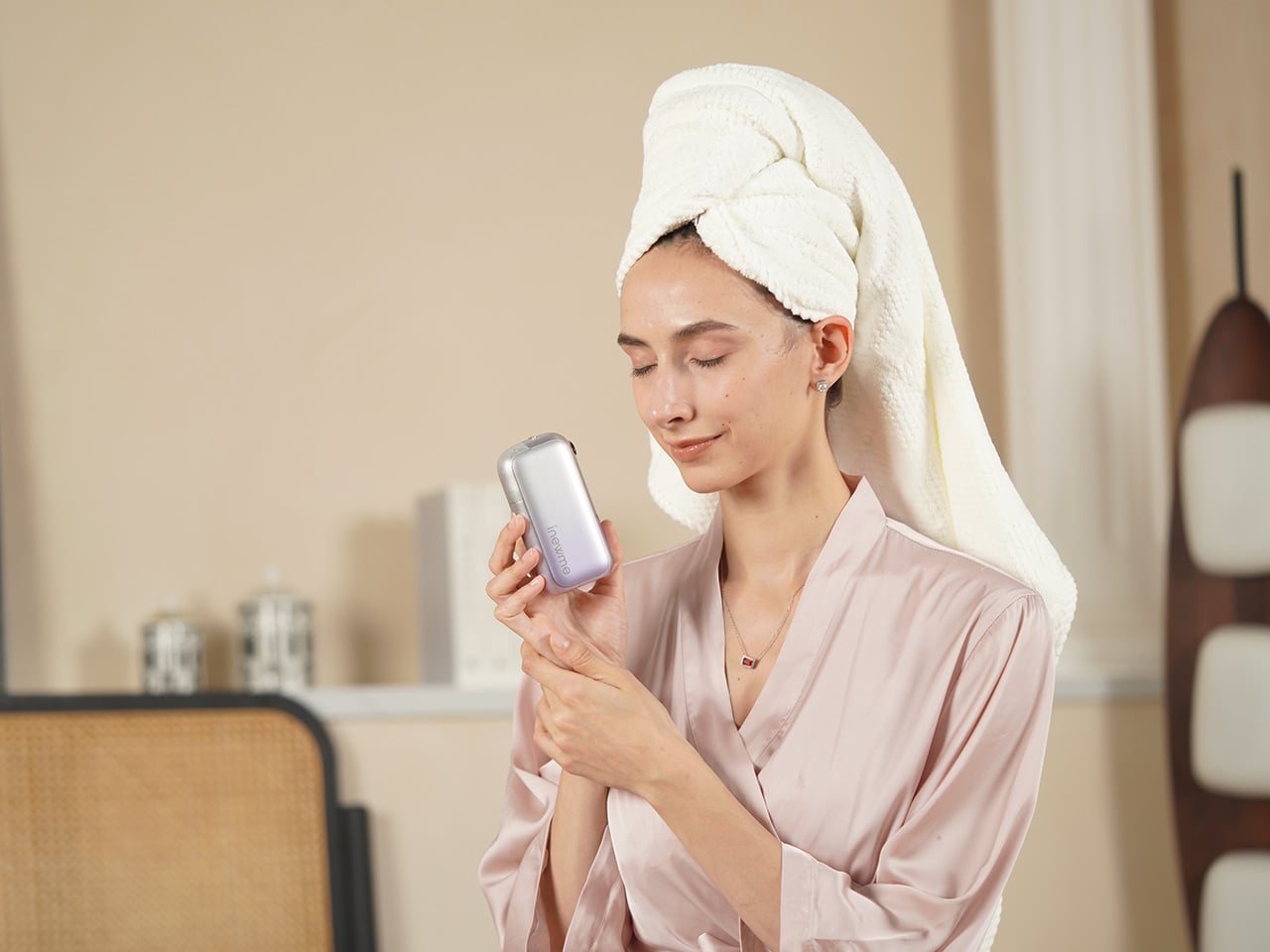
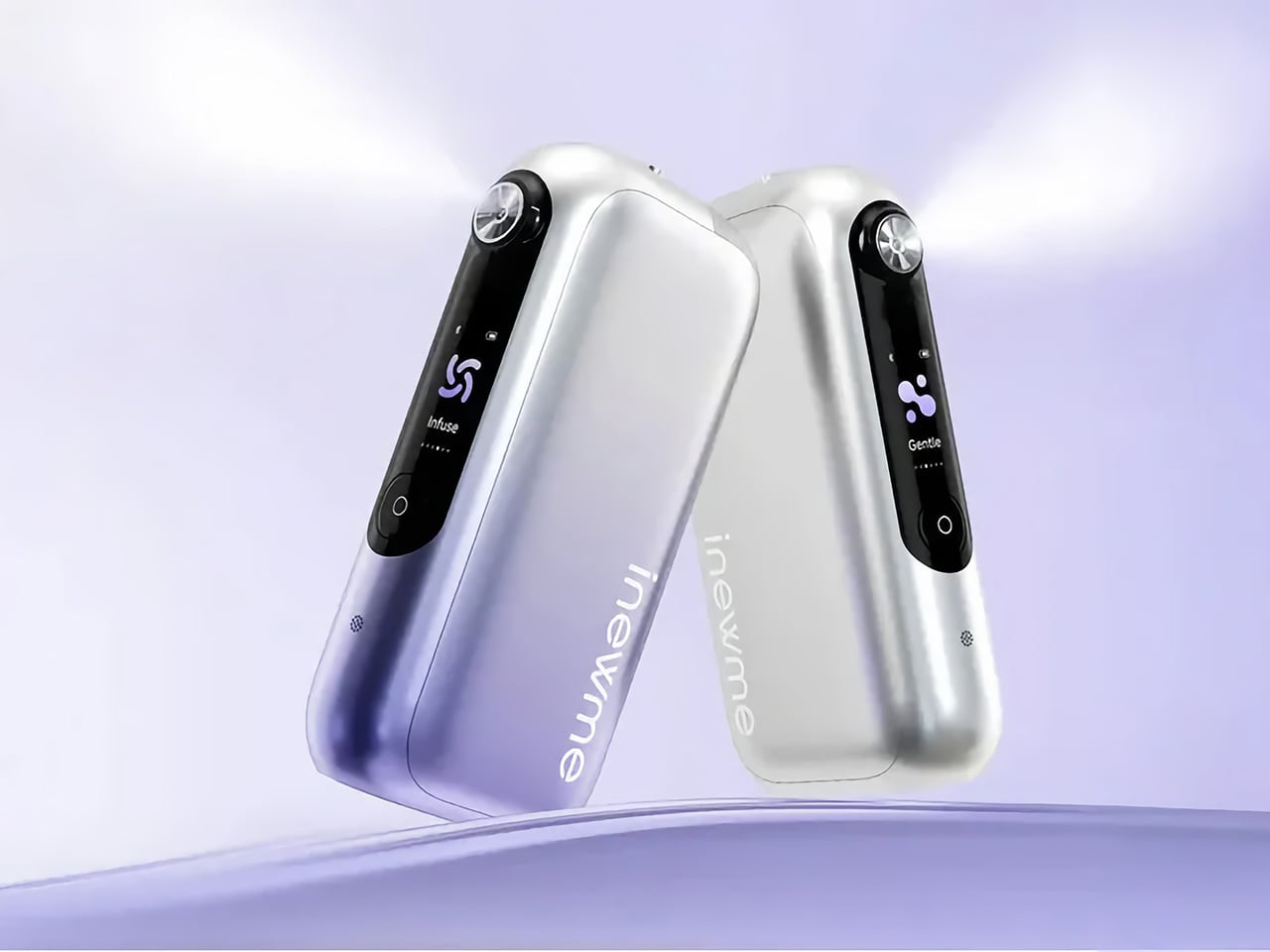
NanoHydra Pro tries to close that gap by shrinking a fairly advanced hydrator into something pocket-sized. It looks like a small metallic gadget with a gradient finish, the kind of thing that sits on a desk next to a phone or slips into a bag without announcing itself. A dual pump nano mist system atomizes toner or serum into a 10 micron droplet cloud, fine enough to sit on skin rather than drip off.

Designer: iNewMe

Click Here to Buy Now: $189 $269 (30% off). Hurry, only 121/200! Raised over $109,000.

The 10 micron mist feels different from a regular spray bottle. Most misters shoot larger droplets that either evaporate too fast or run down your cheeks, leaving streaks on your makeup or pooling near your jawline. NanoHydra Pro atomizes liquid into something closer to a soft fog, light enough to absorb quickly without leaving skin wet or sticky, and you can use the same toner you already have.

What makes it feel smarter is the ToF distance sensor built into the front. It reads how close the device is to your face and quietly adjusts mist output in real time. Hold it near, and the spray softens to avoid oversaturating small areas. Pull it back, and coverage expands for broader strokes. Step outside the detection range, and it shuts off automatically, saving product and avoiding accidental desk misting.

The design seems built for people who keep skincare at their desk rather than just in the bathroom. Five modes let you shift between everyday hydration, a gentler setting for sensitive days, a lifting mode when skin feels slack, an infuse mode for deeper serum sessions, and a manual option for one quick burst. Each mode adjusts mist intensity and duration to match the moment.

The battery lasts around a week with regular use, so it sits there ready without becoming another thing to plug in every night. You press a button, pick a mode on the small LCD screen, mist your face, and go back to work. It fits into the kind of routine where hydration happens between calls or emails rather than as a separate event you have to carve out time for at home.

Travel is where the leak-proof capsule starts to matter. The chamber locks toner or serum inside with enough seals that you can toss it into a bag, check it in luggage, or carry it through airport security without spills soaking into clothes or electronics. The compact body fits easily into a jacket pocket or backpack side slot. On a long flight or dry commute, pulling it out and misting your face takes less effort than digging through a toiletry kit.

A companion app adds a layer for people who like tracking routines. It lets you adjust mist intensity, log each session, and review hydration trends over time, turning a simple spritz into something more intentional. The app also offers guidance based on your skin type and habits, though the device still works perfectly well as a one-button hydrator if you would rather skip the data layer entirely.

NanoHydra Pro hints at a version of skincare tools that pay attention to context instead of just pushing liquid through a nozzle. It reads distance, tunes droplet size, and fits into spaces where traditional routines fall apart, like desks, cars, and airplane seats. As hydration stops being something that only happens at a mirror, a small object that adapts quietly in your hand starts to feel like the more useful kind of upgrade.

Click Here to Buy Now: $189 $269 (30% off). Hurry, only 121/200! Raised over $109,000.

The post This Pocket Hydrator Adjusts Mist Strength Based on Face Distance first appeared on Yanko Design.

Withings has received FDA clearance for medical ‘multiscope’ BeamO

Withings announced that its multi-function medical device BeamO has received clearance from the FDA. BeamO contains sensors to perform an electrocardiogram, a stethoscope and a thermometer. The company claims all three tests can be completed in less than a minute.  It is now available for purchase and will retail for $250. 

The company unveiled BeamO at CES 2024. It's being positioned as a tool for telehealth, with a companion app that can send results to medical professionals. Withings is also offering a Cardio Check-Up service as part of its health subscription, where results from BeamO can be reviewed remotely by cardiologists who will deliver a cardiac health assessment to the device owner within 24 hours.

Withings is the name behind several intriguing (and occasionally strange) home health and smart tech items, including a smartwatch, a highly futuristic bathroom scale and a toilet-mounted computer for urine analysis.

This article originally appeared on Engadget at https://www.engadget.com/home/smart-home/withings-has-received-fda-clearance-for-medical-multiscopebeamo-110000186.html?src=rss

Award-Winning Sculptural Device Makes Water From Air, Not Your Tap

Water quality and sustainability are growing concerns for modern households, but most purifiers still rely on tap water with inconsistent quality, bulky filter systems, and plastic jugs that clutter up the kitchen and generate waste. For anyone who wants pure hydration without the hassle, plastic waste, or aesthetic compromises, traditional systems can feel like choosing between wellness, the planet’s well-being, and the visual harmony of your carefully curated space.

Kara Pure 2 offers a new vision for home hydration that eliminates these trade-offs entirely. By pulling water straight from the air, mineralizing it with essential nutrients, and presenting it in a sculptural stainless steel form, it changes the simple act of pouring a glass of water into a daily wellness ritual that’s as beautiful as it is sustainable and convenient.

Designer: Cody Soodeen

Click Here to Buy Now: $3899 $5999 ($2100 off). Hurry, only 10/20 left! Raised over $260,000.

Kara Pure 2’s tall, brushed steel silhouette and oval pouring window bring a sculptural presence to any kitchen or office space. The sleek, minimalist design, with clean lines and premium materials, fits seamlessly into modern interiors without dominating valuable counter space. The 7-inch touchscreen is 40 percent larger than the original model, offering intuitive control over water temperature, filter status, and system settings with smooth, responsive interaction.

Inspired by the Stenocara beetle from the Namib Desert, which harvests water from air using specialized shell structures, Kara Pure 2 uses advanced desiccant technology to extract up to 10 liters of water from ambient air each day. Every drop is filtered through a new ultrafiltration system that removes 99.99 percent of impurities, microplastics, and bacteria before being enriched with essential minerals for optimal health.

The water is balanced to a 9.2 pH alkaline level and enriched with calcium, magnesium, potassium, zinc, sodium, and silica for smooth, great-tasting hydration that supports overall wellness and proper body function. The commercial-grade EPA air filter purifies intake air before it becomes water, offering dual benefits by improving both your drinking water quality and indoor air quality simultaneously.

Kara Water’s air-to-water innovation has earned recognition that few companies achieve: two TIME “Best Inventions” awards and two CES Innovation Awards, placing it alongside just 14 other companies in history like Apple, Tesla, and Samsung. The technology has already found homes in prestigious venues including House of Sound NYC, the luxury Gotham Hotel, and Hilton’s Conrad Hotel, proving that design-conscious hospitality and wellness spaces trust Kara Pure for both performance and presence.

There’s no plumbing installation, no refilling large tanks, and no waiting for delivery trucks to bring heavy bottled water to your door every week. Just plug in Kara Pure 2 and enjoy bottleless hydration on demand without lifting heavy jugs, storing bulky containers, or dealing with the environmental impact of single-use plastics piling up in recycling bins, or worse.

The 20 percent larger pouring area accommodates pitchers and bottles up to 64 ounces, making it easy to fill larger containers for family meals, workout sessions, or office meetings. Adjustable temperature settings provide instant hot water for morning coffee and tea or refreshing cold water down to 45 degrees Fahrenheit for afternoon hydration, all controlled through the intuitive touchscreen interface.

Kara Pure 2’s thermoelectric cooling technology is significantly more energy-efficient than traditional compressor systems and uses no harmful refrigerants, reducing both electricity bills and environmental impact for eco-conscious households. The upgraded recirculating system eliminates quarterly descaling maintenance, while the easier filter change design and single removable tank make upkeep straightforward and quick without requiring professional service.

The whisper-quiet 32 decibel operation means Kara Pure 2 can sit comfortably in bedrooms, home offices, or open-plan living spaces without disrupting conversations, sleep, or focused work throughout the day. Families with young children appreciate the instant access to clean, mineralized water for bottles and snacks, while busy professionals enjoy having both hot and cold hydration ready throughout long workdays.

Kara Pure 2 reimagines hydration as a centerpiece of modern living, combining air-to-water innovation, health-conscious mineralization, and sustainable design in a device that makes drinking water feel intentional, satisfying, and effortless. For homes that value both performance and presentation equally, it offers a refreshing alternative to the hidden appliances and plastic-dependent systems most people simply accept as unavoidable compromises in daily life.

Click Here to Buy Now: $3899 $5999 ($2100 off). Hurry, only 10/20 left! Raised over $260,000.

The post Award-Winning Sculptural Device Makes Water From Air, Not Your Tap first appeared on Yanko Design.

Withings’ $380 toilet-mounted urine analyzer is finally ready to buy

It’s been nearly three years since Withings first showed off U-Scan to a bemused world, and now it’s finally on sale. U-Scan is the company’s at-home urinalysis gizmo which sits in your toilet bowl and tests your first splash of the day. The device runs a tiny sample through a microfluidic to test, depending on what cartridge you use, either your nutritional or kidney health. These results are then sent to the Withings app, letting you track the quality of your urine over time. Your humble narrator holds the dubious honor of being the first reporter to test the U-Scan during its debut, and found the results pretty interesting.

There are two cartridges available at launch, the first dubbed Nutrio, which looks at your body’s response to nutrition. It will look at your urine’s pH, specific gravity, ketones and the presence of vitamin C over time. Those factors can help you understand if your diet is too acidic, how much fluid you’re drinking on a regular basis, if you’re burning fat, and your anti oxidant intake. The company says that Nutri will be of special interest to people taking GLP-1 medication for weight loss to help them monitor changes to their nutrition levels. Calci, meanwhile, will track your urine’s pH, specific gravity and calcium levels, to keep an eye on your risk of developing kidney stones.

Naturally, such a tool will not be the most affordable in the world, and you can expect to pay a hefty price to own one. Pay $379.95 and you’ll be able to get a U-Scan, a single cartridge that will last for three months, and access to Withings+. The options are then split across “Proactive” and “Intensive” Plans, with the former giving you 2-4 analyses per week, while the latter runs near-daily. If you want the closer monitoring, then $449.96 will get you two cartridges and Withings+ access, which will last you the same three month window. As for replacement cartridges, those on the Proactive tier will spend $99.95 every quarter, while those in team Intensive will pay $179.95. As part of signing up for Withings+, you’ll get a free coaching session with a registered dietician available in all 50 states.

This article originally appeared on Engadget at https://www.engadget.com/home/withings-380-toilet-mounted-urine-analyzer-is-finally-ready-to-buy-040146049.html?src=rss

Neuralink gets approval to start human trials in Canada

The first Neuralink clinical trials outside the US will take place in Canada. Neuralink has secured Health Canada's approval to launch human trials in the country, with the Toronto Western Hospital being the "first and exclusive surgical site" for the procedure. The company first opened its Canadian patient registry in March this year, but now it's actively looking for potential participants. "Recruitment is now open," it has announced on X. 

Under the CAN-PRIME study, Neuralink will embed its implant in the brain of the participant so that it can interpret their neural activity. The implant will allow them to control a computer or a smartphone with their brain without the need for wires or any kind of physical movement. Neuralink says the study aims to "evaluate the safety of [its] implant and surgical robot and assess the initial functionality of [its Brain Computer Interface] for enabling people with quadriplegia to control external devices with their thoughts." What it learns from the trials could help the company find safer ways to place the implant inside the brain, as well as to enhance the technology's capabilities. 

Neuralink's first human patient (pictured above) received his implant earlier this year. He experienced some issues, wherein the implant's threads retracted from his brain, though he seems to be doing well these days. On X, he said that he will soon challenge himself to use Neuralink for 72 hours to demonstrate what the technology can do. For its second patient, Neuralink employed mitigation measures to prevent thread retraction. That patient was already using computer-aided design (CAD) software mere weeks after his surgery in July. At the moment, Neuralink is specifically looking for patients who "have limited or no ability to use both hands due to cervical spinal cord injury or amyotrophic lateral sclerosis (ALS)" for its trials in Canada. 

This article originally appeared on Engadget at https://www.engadget.com/science/neuralink-gets-approval-to-start-human-trials-in-canada-143021769.html?src=rss

Tricorder-like device concept envisions a futuristic portable health scanner

Smartphones and smartwatches today have a variety of sensors and apps that give us a glimpse of our health. We can track heart rates, blood oxygen levels, and even temperatures, and combine that data to create a more holistic picture and actionable steps. Of course, nothing beats professional medical equipment, but we can’t carry those around with us.

Phones and wearables might be convenient, but they don’t always offer the best user experience for specific needs. This concept device, for example, tries to imagine a dedicated health scanner that is able to cram more features while still retaining its portable size. And it even looks and feels quite advanced to boot!

Designer: Vadim Trofimenko

When talking about handheld scanning devices, many sci-fi and pop culture buffs will probably think of Star Trek tricorders. These fictional devices can detect and analyze almost anything, from materials to creatures to people. Of course, we haven’t yet reached that level of technology, but we’re getting pretty close thanks to computer vision and AI.

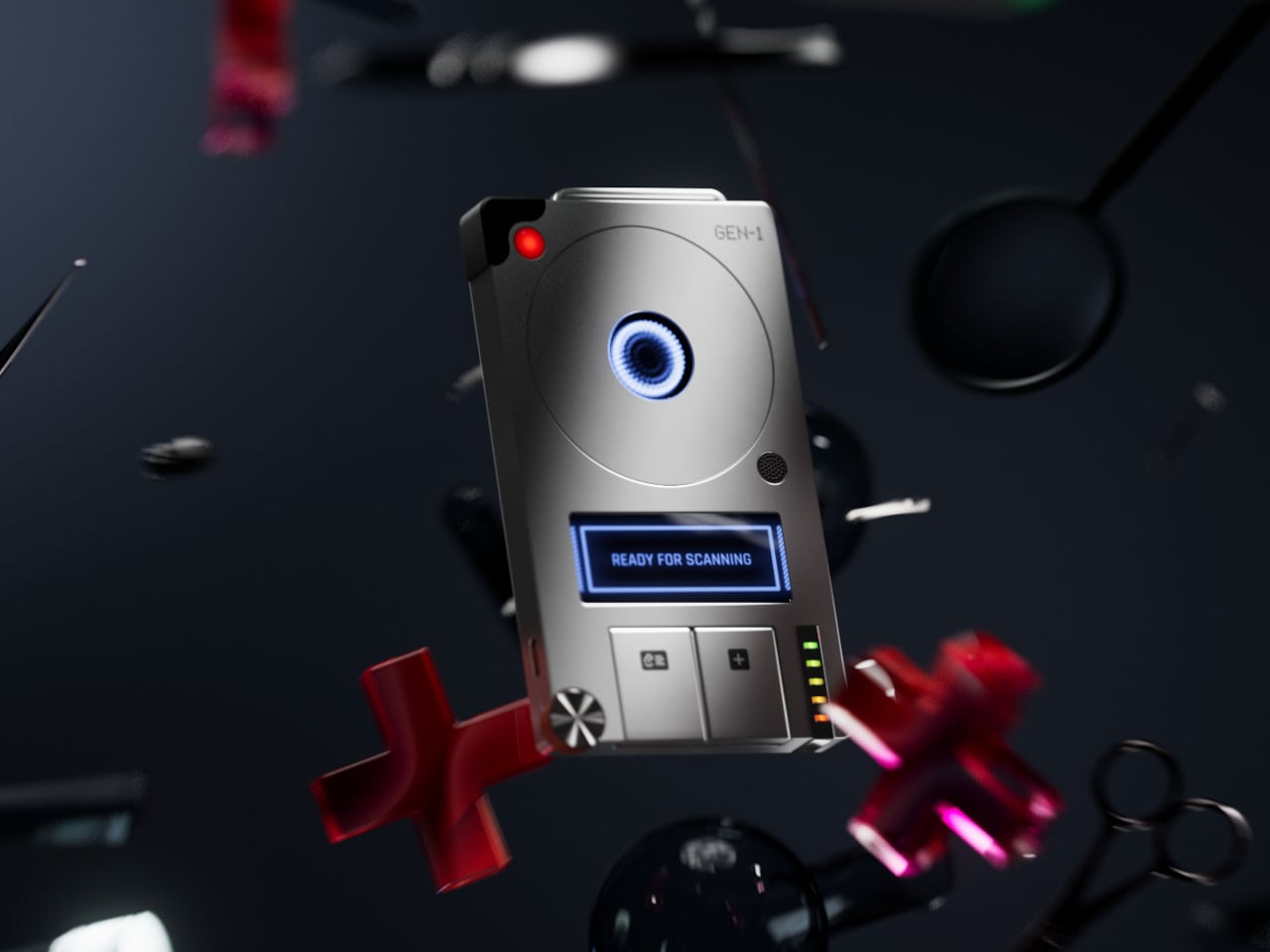
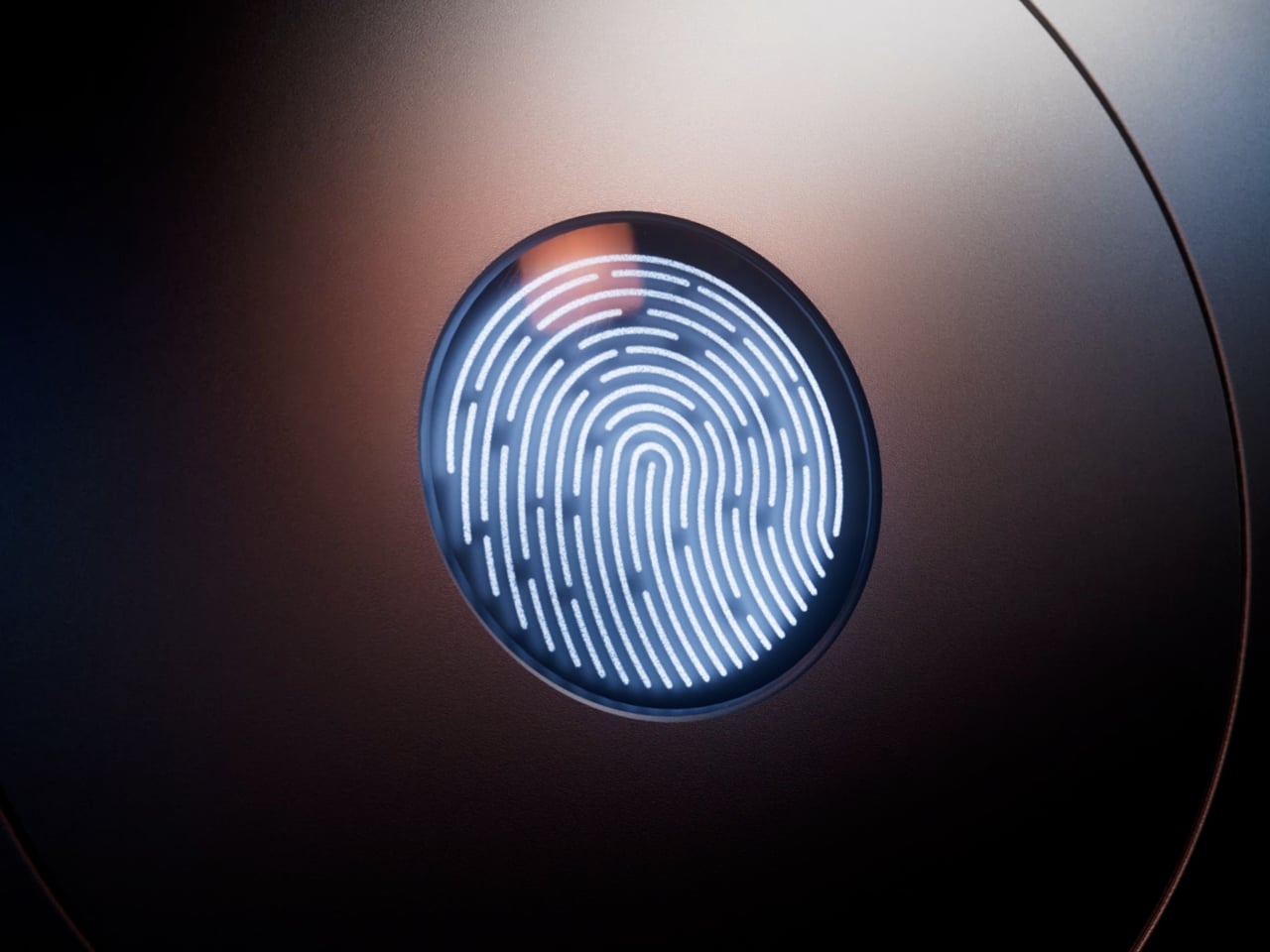
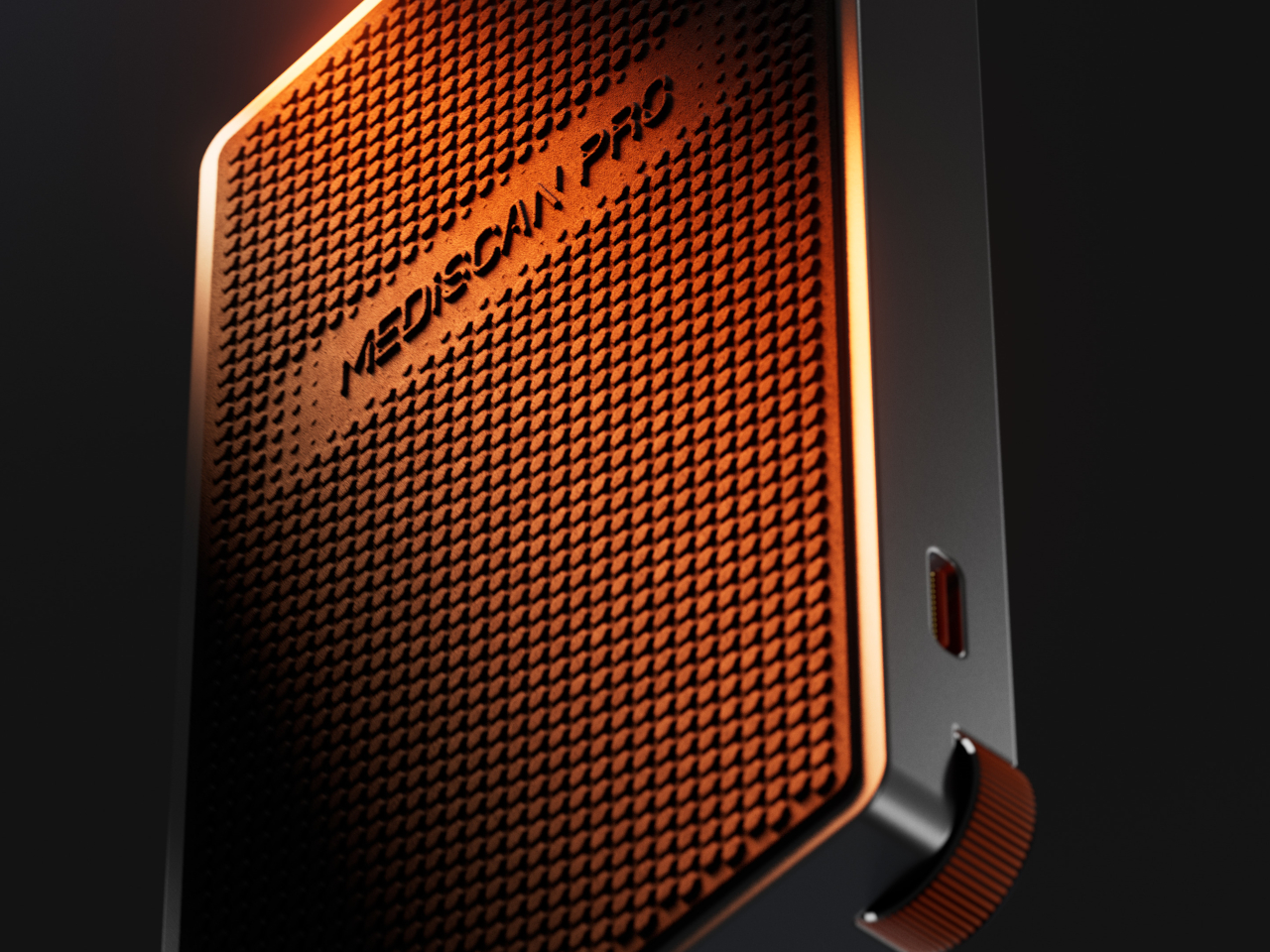
The MediScan Pro concept design tries to deliver some of that futuristic experience to the realm of personal health. It’s a pocket-sized metal box that offers more specialized functionality than generic smartphones and smartwatches, at least in theory. Based on the concept, it still scans your finger to get data, similar to how IR and laser scanners work today.

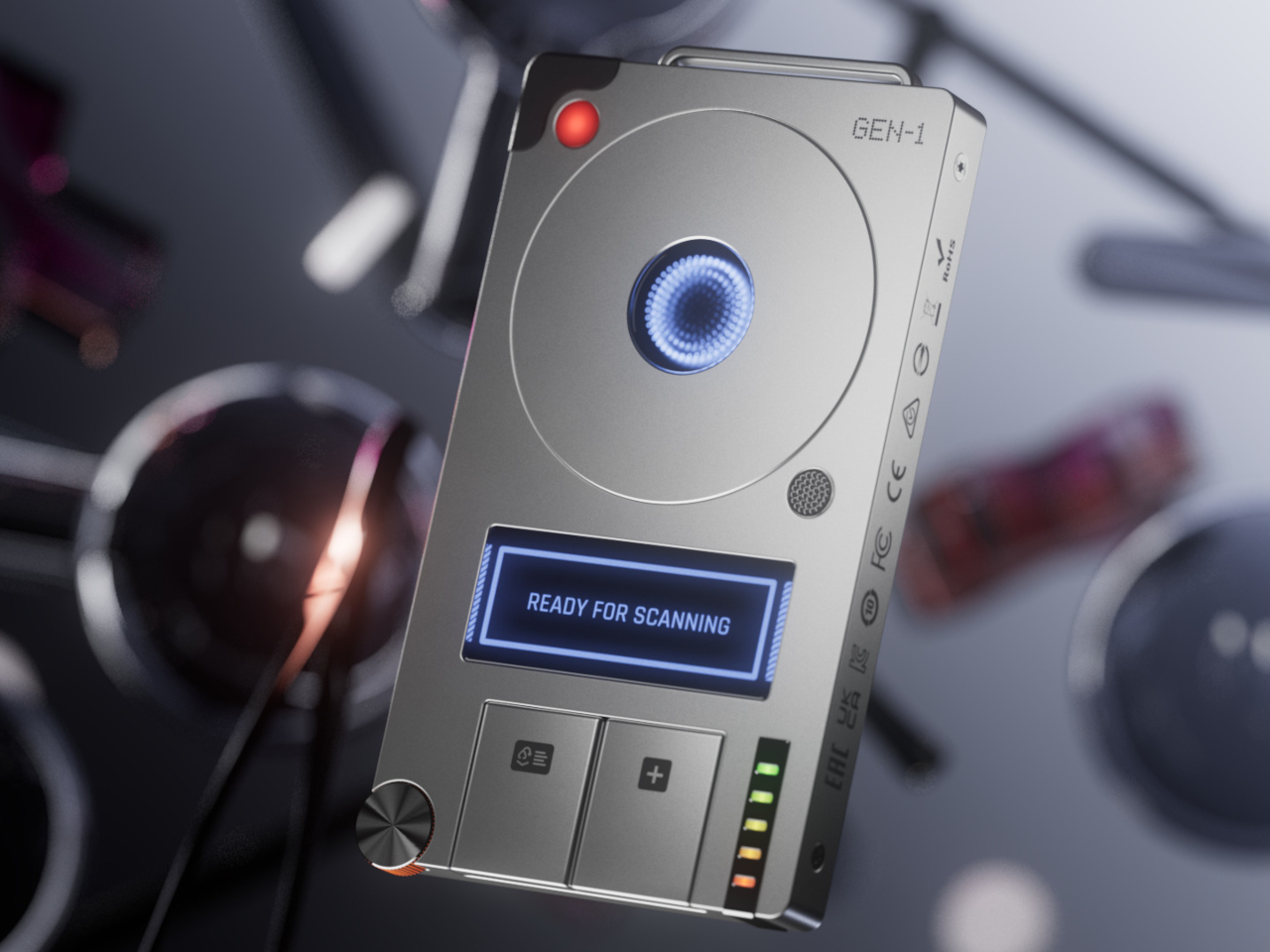
In terms of design, the MediScan Pro has a bit of a retro-futuristic aesthetic. It’s quite box and angular, not hiding the fact that it’s a technological product. There’s a sizeable fingerprint scanner near the top, a small display in the middle, and buttons and wheels at the bottom for controlling the devices. It has an aluminum body but, curiously, the textured surface on its back is supposed to be made from recycled plastic.

Much of the functionality it tries to offer is, to be honest, already available today, especially with the limited data you can glean from a fingerprint. It also uses AI to evaluate the data, give you recommendations, or contact your health provider. The difference from smartphones and smartwatches that already exist today is that MediScan Pro offers a distraction-free experience so you don’t suddenly forget what you’re doing because of the flood of notifications and alerts that greet you.

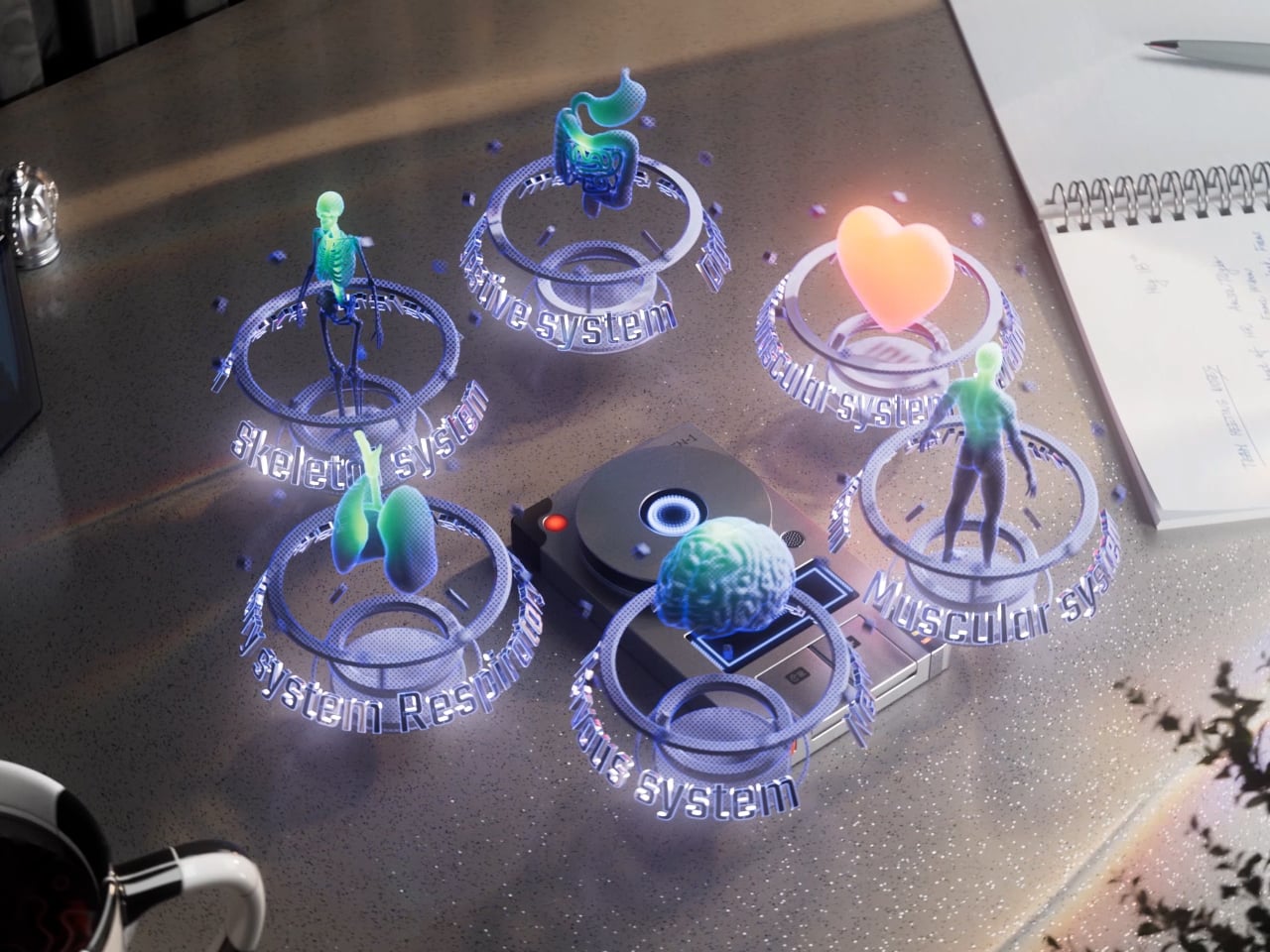
One unrealistic feature, however, is the use of holograms to display your health status. We’re not yet at that point where small devices can display detailed holograms, let alone ones that contain enough information at a glance. That’s not entirely outside the realm of possibility, but by then we might also have less bulky and more elegant designs by then.

The post Tricorder-like device concept envisions a futuristic portable health scanner first appeared on Yanko Design.

23andMe is laying off 40 percent of its staff

More than 200 employees of 23andMe are being laid off as part of the company’s ongoing cost-cutting measures. The layoffs will impact 40 percent of the genetic testing company’s workforce.

23andMe CEO and co-founder Anne Wojcicki said in a statement released on Monday that the staff reduction would save the beleaguered company more than $35 million. She called the layoffs “difficult but necessary actions as we restructure 23andMe and focus on the long-term success of our core consumer business and research partnerships.”

The company also announced it will start to shut down its therapeutics clinical programs that used its genetic database to research and develop new drugs. The therapeutics division housed two “immuno-oncology programs” that investigated therapeutic antibodies “designed to restore the ability of the body’s immune cells to kill cancer cells,” according to the division’s website.

The San Francisco-based company has not had an easy year. Hackers hit the genetics giant in April of last year and leaked information of 6.9 million customers. The data breach went unnoticed for a year and a half, leading to a $30 million settlement of a class action lawsuit and resignations from the company’s entire board.

This article originally appeared on Engadget at https://www.engadget.com/big-tech/23andme-is-laying-off-40-percent-of-its-staff-221207302.html?src=rss

How to use Apple’s AirPods Pro 2 as a hearing aid

Now that iOS 18.1 is available to the masses, Apple’s new hearing aid feature is ready for use. The tool is one of three hearing health items the company announced alongside the iPhone 16 in September. Another one of those, the “clinically-validated” hearing test, is an essential part of being able to use the AirPods Pro 2 as a hearing aid. With an up-to-date iPhone and those earbuds, you can employ hearing assistance tools without visiting a doctor or buying off-putting hearing aids. Simply take a five-minute test, and if the software determines you have mild to moderate hearing loss, you can immediately enable Apple’s FDA-approved hearing aid. Here’s a step-by-step guide on how to use it.

Despite the unchanged design, Apple has packed an assortment of updates into the new AirPods Pro. All of the conveniences from the 2019 model are here as well, alongside additions like Adaptive Transparency, Personalized Spatial Audio and a new touch gesture in tow. There’s room to further refine the familiar formula, but Apple has given iPhone owners several reasons to upgrade.
Billy Steele for Engadget

Before you can access Apple’s hearing aid, you’ll need to make sure your iPhone is updated to iOS 18.1 and your AirPods Pro 2 have the latest firmware (7B19). None of the new hearing health features will show up in the AirPods settings or in the Apple Health app if you don’t have both of those updates. What’s more, you won’t be able to run the hearing test or use the hearing aid feature on the first-gen AirPods Pro.

You can check your current iOS version from the iPhone Settings menu. Scroll down to General and tap Software Update. From here, you can see which version of iOS you’re running and if you’ve got a pending update that’s ready to download and install. Once again, you’re looking for iOS 18.1 here since this is the software version that delivers the suite of hearing health features.

To check the firmware on your AirPods Pro 2, connect the earbuds to your iPhone and navigate to the Settings menu. Here, your AirPods Pro 2 should appear near the top of the list and tapping that option will take you into the settings. You can also access AirPods Pro 2 details from the Bluetooth menu by tapping the “i” icon next to the device name.

Once you’re in the AirPods settings menu, scroll all the way down to the bottom of the main screen. One of the last things you’ll see is a bunch of firmware info, including the current version for the AirPods Pro 2. If you see 7B19, you’re good to go. If not, your earbuds haven’t updated yet, but you can try to force them to do so instead of waiting for the over-the-air process to take place on its own.

To do this, connect the AirPods Pro 2 to your iPhone for at least 30 seconds and play music to confirm the connection is stable. Then put the earbuds back on in the charging case and close the lid, keeping the AirPods Pro 2 in range of the iPhone. Now check Bluetooth settings, and if you see the AirPods Pro 2 stay connected for more than 10 seconds while in the charging case with the lid closed, then that should indicate that the update is in progress.

Apple's hearing test is a quick, easy-to-follow evaluation right in your pocket.
Billy Steele for Engadget

After you’ve confirmed that you have the necessary updates for your phone and earbuds, you’ll have to take Apple’s hearing test before the hearing aid features will show up. The only way around this is to upload an audiogram from your doctor in the Apple Health app. Either way, you’ll need to exhibit mild to moderate hearing loss (26-60 dBHL) for the Hearing Assistance section of the AirPods Pro 2 menu to be available to you.

Apple gives you two places to access its hearing test, and both of them are easy to find. The first is in the AirPods menu, which you can get to from the main Settings menu or from the Bluetooth menu. The Hearing Health section is prominently displayed on the main screen, just under the Noise Control options. In Hearing Health, Take a Hearing Test will be the third item after Hearing Protection and Hearing Assistance, and it will appear in blue.

In the Health app, the fastest way to get to the hearing test is to tap Browse on the menu on the main Summary screen. From there, select Hearing with the blue ear icon and scroll down to Get More From Health. Here, you’ll see the option to take the hearing test with the AirPods Pro 2.

There are two places to find Apple's hearing test on your iPhone.
Billy Steele for Engadget

After you take Apple’s hearing test, or upload your results from your doctor in the Health app, you’ll be able to access the Hearing Assistance section of the Hearing Health features in the AirPods settings. The hearing aid feature resides here, where you can turn it on or off as needed. It’s worth noting that Apple will ask if you want to set up Hearing Assistance immediately if your hearing test results meet the criteria for mild to moderate hearing loss.

On the main Hearing Assistance screen, you’ll see options for enabling/disabling the hearing aid and Media Assist. There are options for adjusting the hearing aid feature and choosing how the system applies Media Assist. The later tool uses your hearing profile to improve the sound for music, videos and calls. You can choose to have it only apply the personalization to either music and videos or calls and FaceTime. By default, it will re-tune the audio for all of them.

Under Adjustments beneath the hearing aid toggle, you’ll have the ability to tweak amplification, balance, tone and ambient noise reduction via individual sliders. You can also enable/disable the swipe gesture on AirPods Pro 2 that will adjust amplification when hearing aid mode is active (versus volume control for normal use). At the bottom of this menu, you can enable/disable Conversation Boost, the tool that specifically targets human voices that Apple debuted in 2021. When the hearing aid is enabled, you’ll see a second slider in the Control Center with an ear icon where you can adjust amplification and you can also tweak this setting on an Apple Watch.

Hearing aid will only be enabled when Noise Control is set to transparency, but Media Assist will still work in Adaptive, ANC and off modes. What’s more, the hearing aid and hearing protection features can be used simultaneously in transparency mode, with the later being active by default. And once again, you can turn the hearing aid tool off entirely at any time in the Hearing Assistance menu from the AirPods settings.

It could take a few days, or even a few weeks, for you to acclimate to the hearing aid feature. You can use the AirPods Pro 2 as hearing aids for up to six hours on a charge, and you’ll want to wear them as much as possible when you first start using them for this purpose. Once your hearing profile is enabled on the AirPods Pro 2, you shouldn’t share the earbuds with anyone else. This is due to the fact that adjustments have been made to compensate for the specific frequencies you have trouble hearing. That personalization would lead to weird tuning for someone else.

This article originally appeared on Engadget at https://www.engadget.com/audio/headphones/how-to-use-apples-airpods-pro-2-as-a-hearing-aid-173049967.html?src=rss

How to use Apple’s AirPods Pro 2 as a hearing aid

Now that iOS 18.1 is available to the masses, Apple’s new hearing aid feature is ready for use. The tool is one of three hearing health items the company announced alongside the iPhone 16 in September. Another one of those, the “clinically-validated” hearing test, is an essential part of being able to use the AirPods Pro 2 as a hearing aid. With an up-to-date iPhone and those earbuds, you can employ hearing assistance tools without visiting a doctor or buying off-putting hearing aids. Simply take a five-minute test, and if the software determines you have mild to moderate hearing loss, you can immediately enable Apple’s FDA-approved hearing aid. Here’s a step-by-step guide on how to use it.

Despite the unchanged design, Apple has packed an assortment of updates into the new AirPods Pro. All of the conveniences from the 2019 model are here as well, alongside additions like Adaptive Transparency, Personalized Spatial Audio and a new touch gesture in tow. There’s room to further refine the familiar formula, but Apple has given iPhone owners several reasons to upgrade.
Billy Steele for Engadget

Before you can access Apple’s hearing aid, you’ll need to make sure your iPhone is updated to iOS 18.1 and your AirPods Pro 2 have the latest firmware (7B19). None of the new hearing health features will show up in the AirPods settings or in the Apple Health app if you don’t have both of those updates. What’s more, you won’t be able to run the hearing test or use the hearing aid feature on the first-gen AirPods Pro.

You can check your current iOS version from the iPhone Settings menu. Scroll down to General and tap Software Update. From here, you can see which version of iOS you’re running and if you’ve got a pending update that’s ready to download and install. Once again, you’re looking for iOS 18.1 here since this is the software version that delivers the suite of hearing health features.

To check the firmware on your AirPods Pro 2, connect the earbuds to your iPhone and navigate to the Settings menu. Here, your AirPods Pro 2 should appear near the top of the list and tapping that option will take you into the settings. You can also access AirPods Pro 2 details from the Bluetooth menu by tapping the “i” icon next to the device name.

Once you’re in the AirPods settings menu, scroll all the way down to the bottom of the main screen. One of the last things you’ll see is a bunch of firmware info, including the current version for the AirPods Pro 2. If you see 7B19, you’re good to go. If not, your earbuds haven’t updated yet, but you can try to force them to do so instead of waiting for the over-the-air process to take place on its own.

To do this, connect the AirPods Pro 2 to your iPhone for at least 30 seconds and play music to confirm the connection is stable. Then put the earbuds back on in the charging case and close the lid, keeping the AirPods Pro 2 in range of the iPhone. Now check Bluetooth settings, and if you see the AirPods Pro 2 stay connected for more than 10 seconds while in the charging case with the lid closed, then that should indicate that the update is in progress.

Apple's hearing test is a quick, easy-to-follow evaluation right in your pocket.
Billy Steele for Engadget

After you’ve confirmed that you have the necessary updates for your phone and earbuds, you’ll have to take Apple’s hearing test before the hearing aid features will show up. The only way around this is to upload an audiogram from your doctor in the Apple Health app. Either way, you’ll need to exhibit mild to moderate hearing loss (26-60 dBHL) for the Hearing Assistance section of the AirPods Pro 2 menu to be available to you.

Apple gives you two places to access its hearing test, and both of them are easy to find. The first is in the AirPods menu, which you can get to from the main Settings menu or from the Bluetooth menu. The Hearing Health section is prominently displayed on the main screen, just under the Noise Control options. In Hearing Health, Take a Hearing Test will be the third item after Hearing Protection and Hearing Assistance, and it will appear in blue.

In the Health app, the fastest way to get to the hearing test is to tap Browse on the menu on the main Summary screen. From there, select Hearing with the blue ear icon and scroll down to Get More From Health. Here, you’ll see the option to take the hearing test with the AirPods Pro 2.

There are two places to find Apple's hearing test on your iPhone.
Billy Steele for Engadget

After you take Apple’s hearing test, or upload your results from your doctor in the Health app, you’ll be able to access the Hearing Assistance section of the Hearing Health features in the AirPods settings. The hearing aid feature resides here, where you can turn it on or off as needed. It’s worth noting that Apple will ask if you want to set up Hearing Assistance immediately if your hearing test results meet the criteria for mild to moderate hearing loss.

On the main Hearing Assistance screen, you’ll see options for enabling/disabling the hearing aid and Media Assist. There are options for adjusting the hearing aid feature and choosing how the system applies Media Assist. The later tool uses your hearing profile to improve the sound for music, videos and calls. You can choose to have it only apply the personalization to either music and videos or calls and FaceTime. By default, it will re-tune the audio for all of them.

Under Adjustments beneath the hearing aid toggle, you’ll have the ability to tweak amplification, balance, tone and ambient noise reduction via individual sliders. You can also enable/disable the swipe gesture on AirPods Pro 2 that will adjust amplification when hearing aid mode is active (versus volume control for normal use). At the bottom of this menu, you can enable/disable Conversation Boost, the tool that specifically targets human voices that Apple debuted in 2021. When the hearing aid is enabled, you’ll see a second slider in the Control Center with an ear icon where you can adjust amplification and you can also tweak this setting on an Apple Watch.

Hearing aid will only be enabled when Noise Control is set to transparency, but Media Assist will still work in Adaptive, ANC and off modes. What’s more, the hearing aid and hearing protection features can be used simultaneously in transparency mode, with the later being active by default. And once again, you can turn the hearing aid tool off entirely at any time in the Hearing Assistance menu from the AirPods settings.

It could take a few days, or even a few weeks, for you to acclimate to the hearing aid feature. You can use the AirPods Pro 2 as hearing aids for up to six hours on a charge, and you’ll want to wear them as much as possible when you first start using them for this purpose. Once your hearing profile is enabled on the AirPods Pro 2, you shouldn’t share the earbuds with anyone else. This is due to the fact that adjustments have been made to compensate for the specific frequencies you have trouble hearing. That personalization would lead to weird tuning for someone else.

This article originally appeared on Engadget at https://www.engadget.com/audio/headphones/how-to-use-apples-airpods-pro-2-as-a-hearing-aid-173049967.html?src=rss